
sell-- wordPOI
1. http://poi.apache.org/
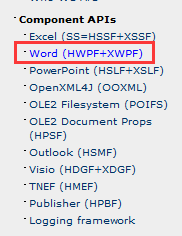
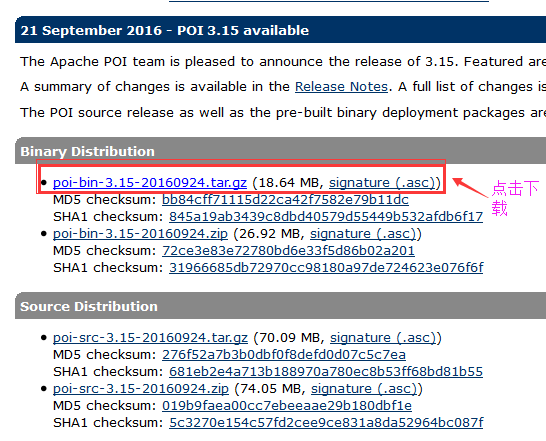
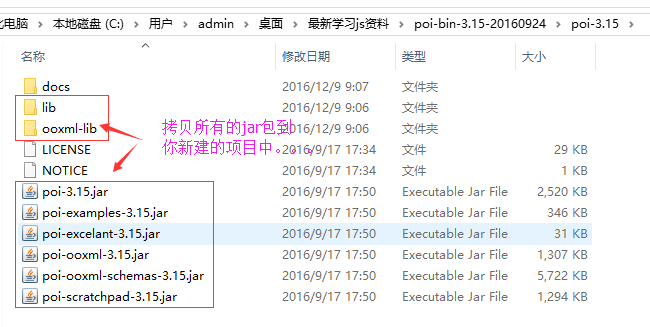
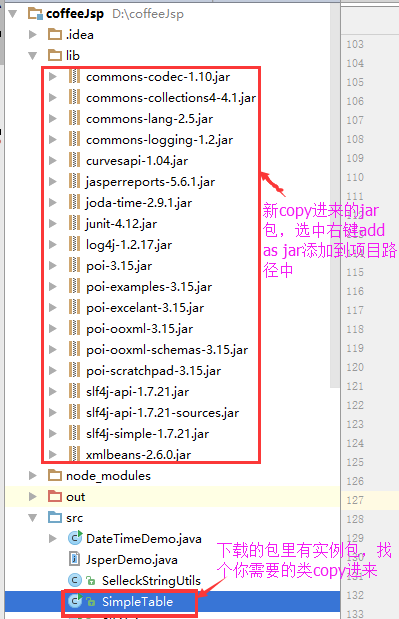
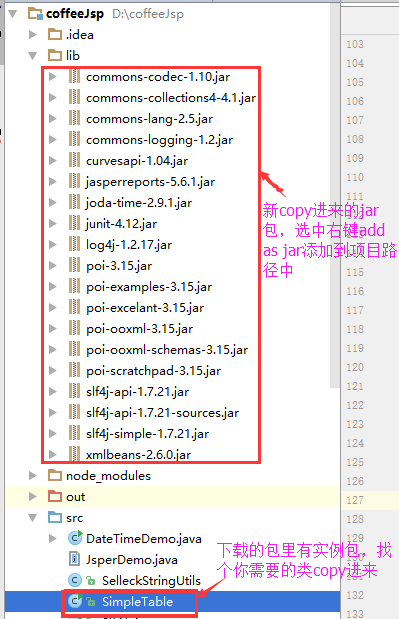
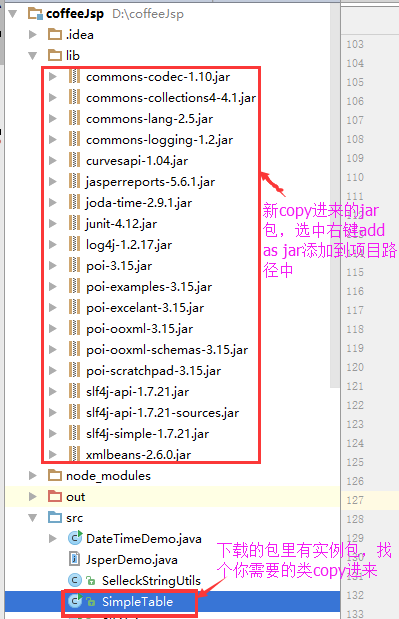
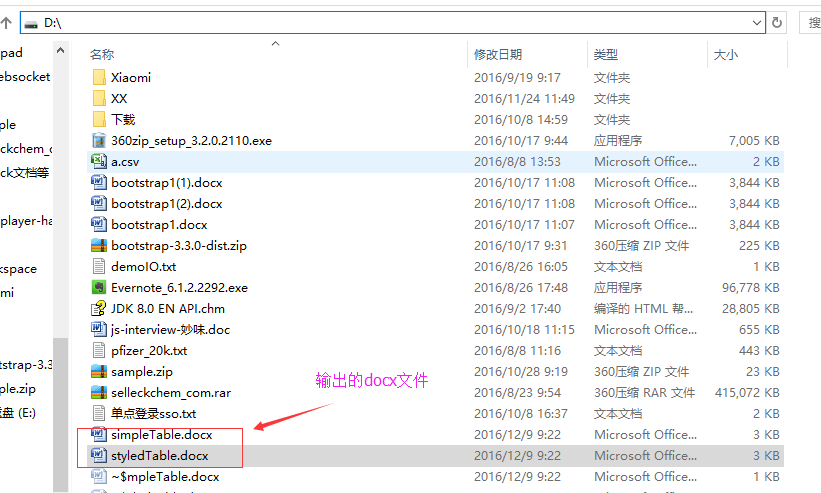
2.创建项目,结构如下
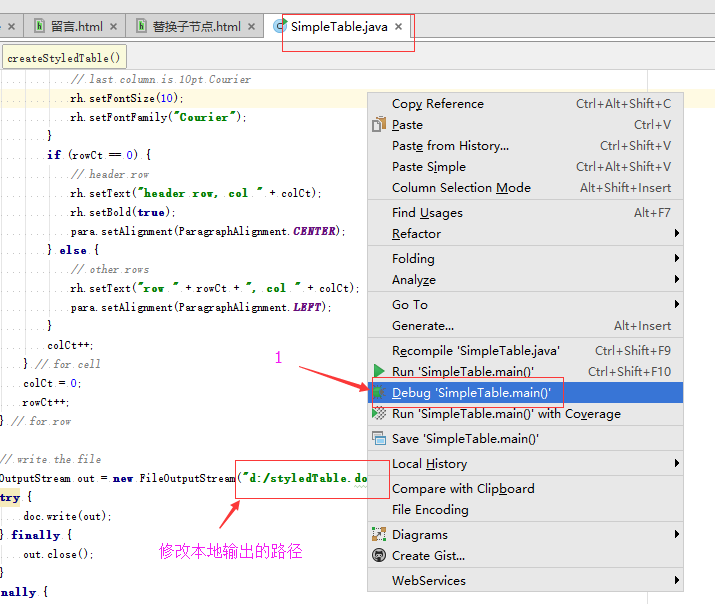
三: 查看效果
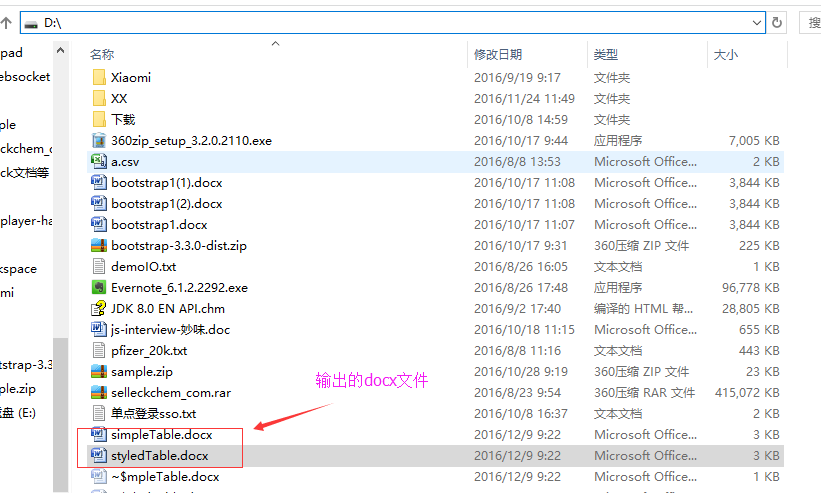
打开:
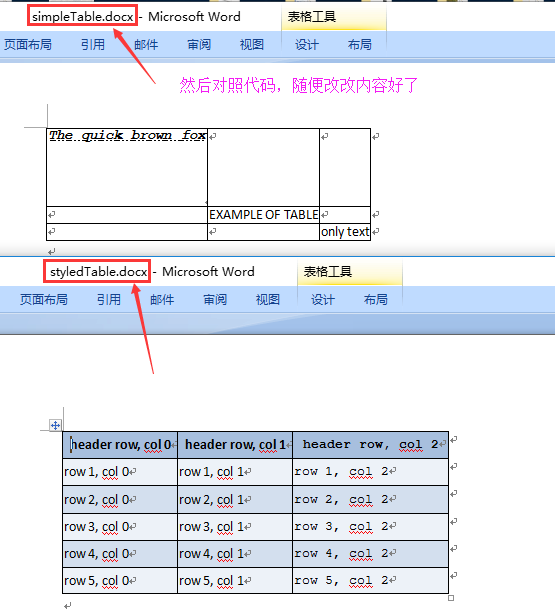
测试源码:
/* ====================================================================

   Licensed to the Apache Software Foundation (ASF) under one or more

   contributor license agreements.  See the NOTICE file distributed with

   this work for additional information regarding copyright ownership.

   The ASF licenses this file to You under the Apache License, Version 2.0

   (the "License"); you may not use this file except in compliance with

   the License.  You may obtain a copy of the License at

       http://www.apache.org/licenses/LICENSE-2.0

   Unless required by applicable law or agreed to in writing, software

   distributed under the License is distributed on an "AS IS" BASIS,

   WITHOUT WARRANTIES OR CONDITIONS OF ANY KIND, either express or implied.

   See the License for the specific language governing permissions and

   limitations under the License.

==================================================================== */

import org.apache.poi.xwpf.usermodel.*;

import org.openxmlformats.schemas.wordprocessingml.x2006.main.*;

import java.io.FileOutputStream;

import java.io.OutputStream;

import java.math.BigInteger;

import java.util.List;

public class SimpleTable {

    public static void main(String[] args) throws Exception {

    	try {

    		createSimpleTable();

            System.out.println("success");

        } catch(Exception e) {

    		System.out.println("Error trying to create simple table.");

    		throw(e);

    	}

    	try {

    		createStyledTable();

    	} catch(Exception e) {

    		System.out.println("Error trying to create styled table.");

    		throw(e);

    	}

    }

    public static void createSimpleTable() throws Exception {

        XWPFDocument doc = new XWPFDocument();

        try {

            XWPFTable table = doc.createTable(3, 3);

            table.getRow(1).getCell(1).setText("EXAMPLE OF TABLE");

            XWPFParagraph p1 = table.getRow(0).getCell(0).getParagraphs().get(0);

            XWPFRun r1 = p1.createRun();

            r1.setBold(true);

            r1.setText("The quick brown fox");

            r1.setItalic(true);

            r1.setFontFamily("Courier");

            r1.setUnderline(UnderlinePatterns.DOT_DOT_DASH);

            r1.setTextPosition(100);

            table.getRow(2).getCell(2).setText("only text");

            OutputStream out = new FileOutputStream("d:/simpleTable.docx");

            try {

                doc.write(out);

            } finally {

                out.close();

            }

        } finally {

            doc.close();

        }

    }

    public static void createStyledTable() throws Exception {

        XWPFDocument doc = new XWPFDocument();

        try {

            int nRows = 6;

            int nCols = 3;

            XWPFTable table = doc.createTable(nRows, nCols);

            CTTblPr tblPr = table.getCTTbl().getTblPr();

            CTString styleStr = tblPr.addNewTblStyle();

            styleStr.setVal("StyledTable");

            // Get a list of the rows in the table

            List<XWPFTableRow> rows = table.getRows();

            int rowCt = 0;

            int colCt = 0;

            for (XWPFTableRow row : rows) {

                // get table row properties (trPr)

                CTTrPr trPr = row.getCtRow().addNewTrPr();

                // set row height; units = twentieth of a point, 360 = 0.25"

                CTHeight ht = trPr.addNewTrHeight();

                ht.setVal(BigInteger.valueOf(360));

                // get the cells in this row

                List<XWPFTableCell> cells = row.getTableCells();

                // add content to each cell

                for (XWPFTableCell cell : cells) {

                    // get a table cell properties element (tcPr)

                    CTTcPr tcpr = cell.getCTTc().addNewTcPr();

                    // set vertical alignment to "center"

                    CTVerticalJc va = tcpr.addNewVAlign();

                    va.setVal(STVerticalJc.CENTER);

                    // create cell color element

                    CTShd ctshd = tcpr.addNewShd();

                    ctshd.setColor("auto");

                    ctshd.setVal(STShd.CLEAR);

                    if (rowCt == 0) {

                        // header row

                        ctshd.setFill("A7BFDE");

                    } else if (rowCt % 2 == 0) {

                        ctshd.setFill("D3DFEE");

                    } else {

                        ctshd.setFill("EDF2F8");

                    }

                    // get 1st paragraph in cell's paragraph list

                    XWPFParagraph para = cell.getParagraphs().get(0);

                    // create a run to contain the content

                    XWPFRun rh = para.createRun();

                    // style cell as desired

                    if (colCt == nCols - 1) {

                        // last column is 10pt Courier

                        rh.setFontSize(10);

                        rh.setFontFamily("Courier");

                    }

                    if (rowCt == 0) {

                        // header row

                        rh.setText("header row, col " + colCt);

                        rh.setBold(true);

                        para.setAlignment(ParagraphAlignment.CENTER);

                    } else {

                        // other rows

                        rh.setText("row " + rowCt + ", col " + colCt);

                        para.setAlignment(ParagraphAlignment.LEFT);

                    }

                    colCt++;

                } // for cell

                colCt = 0;

                rowCt++;

            } // for row

            // write the file

            OutputStream out = new FileOutputStream("d:/styledTable.docx");

            try {

                doc.write(out);

            } finally {

                out.close();

            }

        } finally {

            doc.close();

        }

    }

}
sell-- wordPOI的更多相关文章
- [LeetCode] Best Time to Buy and Sell Stock with Cooldown 买股票的最佳时间含冷冻期
Say you have an array for which the ith element is the price of a given stock on day i. Design an al ...
- [LeetCode] Best Time to Buy and Sell Stock IV 买卖股票的最佳时间之四
Say you have an array for which the ith element is the price of a given stock on day i. Design an al ...
- [LeetCode] Best Time to Buy and Sell Stock III 买股票的最佳时间之三
Say you have an array for which the ith element is the price of a given stock on day i. Design an al ...
- [LeetCode] Best Time to Buy and Sell Stock II 买股票的最佳时间之二
Say you have an array for which the ith element is the price of a given stock on day i. Design an al ...
- [LeetCode] Best Time to Buy and Sell Stock 买卖股票的最佳时间
Say you have an array for which the ith element is the price of a given stock on day i. If you were ...
- Best Time to Buy and Sell Stock1,2,3,4
找到最低值和最高值 int maxProfit(vector<int>& prices) { ); ; ]; ;i<prices.size();i++) { profit=m ...
- [LeetCode] Best Time to Buy and Sell Stock II
Say you have an array for which the ith element is the price of a given stock on day i. Design an al ...
- 4 Best Time to Buy and Sell Stock III_Leetcode
Say you have an array for which the ith element is the price of a given stock on day i. Design an al ...
- [LintCode] Best Time to Buy and Sell Stock II 买股票的最佳时间之二
Say you have an array for which the ith element is the price of a given stock on day i. Design an al ...
- [LintCode] Best Time to Buy and Sell Stock 买卖股票的最佳时间
Say you have an array for which the ith element is the price of a given stock on day i. If you were ...
随机推荐
- shell函数
1. 定义 : func() { } 或 function func() { } 2.参数 func 1 2 3 4 可在函数中直接调$1来使用,>=10的用${n}
- 低调的华丽,Windows Server 2003 ... 写给厌倦了XP,但又纠结于vista/win7花哨的童鞋(转)
发布于2001年10月25日的windows XP 距今已近8年 时间, 微软从没有一个操作系统能像XP那样 坚挺这么久,婚姻既有7年之痒,何况用了8年XP的广大 同学,但07年发布的vista似乎 ...
- SVN 中trunk、branches、tags
SVN 中trunk.branches.tags 我们在一些著名开源项目的版本库中,通常可以看到trunk, branches, tags等三个目录.由于SVN固有的特点,目录在SVN中并没有特别 ...
- java实现吸血鬼数字
public class Vempire { public static void main(String[] arg) { String[] ar_str1, ar_str2; ; int from ...
- 【液晶模块系列基础视频】2.虚拟U盘
[液晶模块系列基础视频]2.虚拟U盘 ============================== 技术论坛:http://www.eeschool.org 博客地址:http://xiaomagee ...
- [IT新应用]存储入门-文件级存储及块级别存储的选择
http://www.techrepublic.com/blog/the-enterprise-cloud/block-level-storage-vs-file-level-storage-a-co ...
- Memcached 笔记与总结(1)Linux(CentOS 6.6) 和 Windows(7)下安装与配置 Memcached (1.4.24)与 Memcached 基础命令
Memcached 官方网站:http://memcached.org/ 官网对其的描述是: What is Memcached? Free & open source, high-perfo ...
- PHP 开发 APP 接口 学习笔记与总结 - APP 接口实例 [3] 首页 APP 接口开发方案 ② 读取缓存方式
以静态缓存为例. 修改 file.php line:11 去掉 path 参数(方便),加上缓存时间参数: public function cacheData($k,$v = '',$cacheTim ...
- 【Fate/kaleid liner 魔法少女☆伊莉雅】系列中实践的、新世代的动画摄影工作流
通常的日本动画的摄影中,是以追加Cell(celluloid 赛璐珞)与背景的合成滤镜处理为主,而在[Fate/kaleid liner 魔法少女☆伊莉雅]系列的,加入了自己使用3DCG软 ...
- 关于0x000000c2问题解决方法
首先大家要用进入PE系统,按照我说的顺序做就可以解决了! 1,进入PE后找到系统盘,默认一般为C盘-->进入WINDOWS文件夹-->进入system32文件夹-->找到regedt ...