
环信SDK与Apple Watch的结合(3)
第3章主要介绍怎样在Watch App的页面上显示iPhone程序里的数据。主要操作的是“EMWatchOCDemo WatchKit Extension”这个文件夹,附源码EMWatchOCDemo。
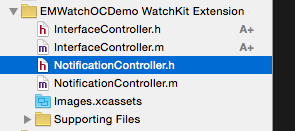
如果你已经看过我在第1章推荐的blog,应该明白这个target主要是负责逻辑的,从iPhone App中获取数据,调动Watch App显示数据。
默认是这个样子的
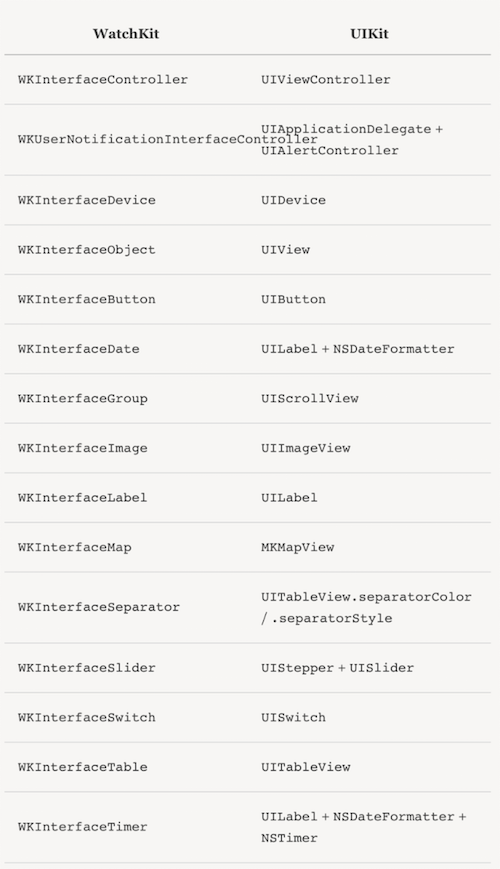
一、WathKit定义了一些专门用于Watch App的类,与UIKit的对比如下图
二、整合Watch App和iPhone App
1、新建Controller
根据Interface.storyboard,我需要新建5个Controller。右键---New File---Cocoa Touch Class
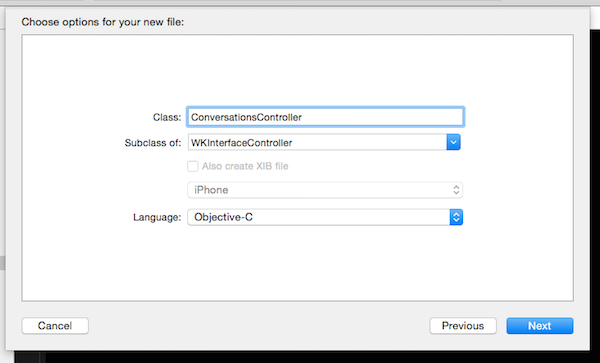
新建的类默认有三个方法,[-awakeWithContext:]相当于[-viewDidLoad],[-willActivate]相当于[-viewWillAppear],[-didDeactivate]相当于[-viewDidDisappear],“相当于”一下是不是就很容易理解每个方法中能进行什么操作了?
建好这5个Controller之后,再次打开Interface.storyboard,在每个storyboard Controller的Class属性中填写对应的类名,这种操作对于熟悉storyboard的开发者来说,应该都不陌生。
附图一张
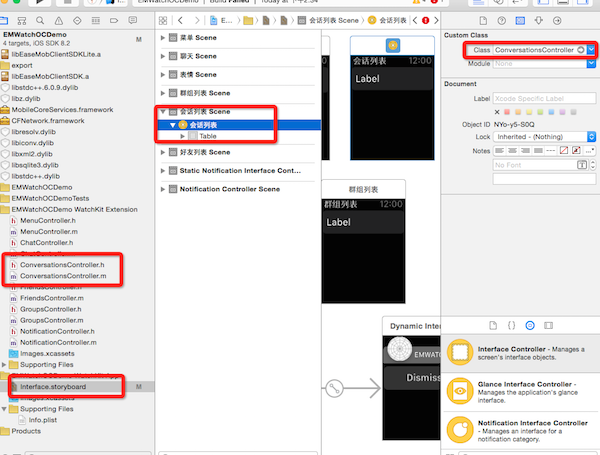
2、将自定义的类与storyboard关联起来之后,继续关联其他的控件。
声明插件变量Table,并在storyboard中进行关联。
@property (weak, nonatomic) IBOutlet WKInterfaceTable *table;
创建自定义的Table Row Controller,右键---New File---Cocoa Touch Class---Subclass of “NSObject”,声明插件变量Label,在storyboard中将Table Row Controller和Label进行关联。要记得填写Table Row Controller的Identifier,在加载数据时会用到这个属性。
3、接下来要进行每个页面的数据获取了,我是在[-awakeWithContext:]中进行的数据获取。
WKInterfaceController有个类方法[+ openParentApplication: reply:],用于向对应的iPhone App发起申请。
而对应的iPhone App要想检测到这个请求,需要在AppDelegate中监听 [- application: handleWatchKitExtensionRequest: reply:].
以菜单页面MenuController为例,当页面加载时要先向iPhone App发起获取是否登录的申请,iPhone App收到申请,将是否登录的值返给WatchKit Extension;如果没有登录,页面上显示“登录”选项,如果登录了,显示“会话”“好友”“群组”三个选项。
MenuController:
[WKInterfaceController openParentApplication:@{@"action":@"isLogined"} reply:^(NSDictionary *replyInfo, NSError *error) {

         BOOL isLogined = NO;

         if ([replyInfo count] > ) {

            isLogined = [[replyInfo objectForKey:@"isLogined"] boolValue];

         }

          if (isLogined) {

              NSDictionary *conversationInfo = [NSDictionary dictionaryWithObjectsAndKeys:@"会话", @"title", nil];

             NSDictionary *friendInfo = [NSDictionary dictionaryWithObjectsAndKeys:@"好友", @"title", nil];

             NSDictionary *groupInfo = [NSDictionary dictionaryWithObjectsAndKeys:@"群组", @"title", nil];

             [self.dataSoure addObject:conversationInfo];

             [self.dataSoure addObject:friendInfo];

             [self.dataSoure addObject:groupInfo];

             NSInteger count = [self.dataSoure count];

//@"RowType2Controller"就是上边提到的Table Row Controller 的Identifier属性

            [self.table setNumberOfRows:[self.dataSoure count] withRowType:@"RowType2Controller"];

             for (int i = ; i < count; i++) {

                 RowType2Controller *rowController = [self.table rowControllerAtIndex:i];

                 NSDictionary *dic = self.dataSoure[i];

                 NSString *title = dic[@"title"];

                 [rowController.titleLabel setText:title];

             }

        }

        else{

//@"RowType2Controller"就是上边提到的Table Row Controller 的Identifier属性

             [self.table setNumberOfRows: withRowType:@"RowType2Controller"];

             RowType2Controller *rowController = [self.table rowControllerAtIndex:];

             [rowController.titleLabel setText:@"登录"];

       }

  }];
AppDelegate
- (void)application:(UIApplication *)application handleWatchKitExtensionRequest:(NSDictionary *)userInfo reply:(void (^)(NSDictionary *))reply

{

    if ([userInfo count] > ) {

        NSString *actionString = [userInfo objectForKey:@"action"];

        EaseMob *easemob = [EaseMob sharedInstance];

        if ([actionString isEqualToString:@"isLogined"]) {

            reply(@{@"isLogined":[NSNumber numberWithBool:[easemob.chatManager isLoggedIn]]});

        }

}
4、获取到了数据,接下来要调用Watch App显示数据了。
显示数据主要用到了WKInterfaceTable。WKInterfaceTable相对于UITableView而言,能调用的接口少的可怜
WK_CLASS_AVAILABLE_IOS(8_2)

@interface WKInterfaceTable : WKInterfaceObject

- (void)setRowTypes:(NSArray *)rowTypes;                                         // row names. size of array is number of rows

- (void)setNumberOfRows:(NSInteger)numberOfRows withRowType:(NSString *)rowType; // repeating row name

@property(nonatomic,readonly) NSInteger numberOfRows;

- (id)rowControllerAtIndex:(NSInteger)index;

- (void)insertRowsAtIndexes:(NSIndexSet *)rows withRowType:(NSString *)rowType;

- (void)removeRowsAtIndexes:(NSIndexSet *)rows;

- (void)scrollToRowAtIndex:(NSInteger)index;

@end
WKInterfaceTable.h
- (void)table:(WKInterfaceTable *)table didSelectRowAtIndex:(NSInteger)rowIndex;  // row selection if controller has WKInterfaceTable property

- (id)contextForSegueWithIdentifier:(NSString *)segueIdentifier inTable:(WKInterfaceTable *)table rowIndex:(NSInteger)rowIndex;

- (NSArray *)contextsForSegueWithIdentifier:(NSString *)segueIdentifier inTable:(WKInterfaceTable *)table rowIndex:(NSInteger)rowIndex;
WKInterfaceController中
上一步中的代码示例已经给出了WKInterfaceTable使用方式,具体代码请看demo。
5、每个单独的页面都写好了,现在要让他们动起来。
WatchKit提供了三类页面导航方式。
第一种UINavigationController 控制的类似栈的导航方式,相应接口
- (void)pushControllerWithName:(NSString *)name context:(id)context;  // context passed to child controller via initWithContext:

- (void)popController;

- (void)popToRootController;
第二种 modal 形式,相应接口
- (void)presentControllerWithName:(NSString *)name context:(id)context; // modal presentation

- (void)dismissController;
第三种 类似 UIPageController 的分页式导航,相应接口
- (void)presentControllerWithNames:(NSArray *)names contexts:(NSArray *)contexts; // modal presentation of paged controllers. contexts matched to controllers

- (void)becomeCurrentPage;
其中的“WithName(s):”参数就是每个控件在storyboard中设置的Identifier属性。
好了,就先写这么多吧,后期有时间会继续补充。
环信SDK与Apple Watch的结合(3)的更多相关文章
- 环信SDK与Apple Watch的结合(2)
这一篇主要是介绍怎么拖apple watch上的相关页面,附源码EMWatchOCDemo. 需要在工程中的“EMWatchOCDemo WatchKit App”中进行操作,该文件夹的结构如图 Wa ...
- 环信SDK与Apple Watch的结合(1)
该系列是记录在apple watch上开发IM,用到了最近挺流行的环信IM SDK. 一.先来一段网上随处可查到的信息: 1.两种分辨率 1.65寸 312*390 1.5寸 272*340 2.开发 ...
- 集成IOS 环信SDK
集成IOS SDK 在您阅读此文档时,我们假定您已经具备了基础的 iOS 应用开发经验,并能够理解相关基础概念. 下载SDK 通过Cocoapods下载地址 不包含实时语音版本SDK(EaseMobC ...
- 环信SDK集成
利用环信SDK可以实现即时通讯,但在集成的过程中碰到了不少的坑. 注意 选择项目路径,这里以最新版环信demo为例 注意:环信的ChatDemoUI这个demo里边因为研发的同事为了照顾老版本的And ...
- 李洪强iOS开发本人集成环信的经验总结_01环信SDK的导入
李洪强iOS开发本人集成环信的经验总结_01环信SDK的导入 01 - 直接在项目中导入SDK和一些静态库 这个时候,没有错误的编译没有错误的话,就说明SDK已经配置成功 还有一种方法是用cocoap ...
- 李洪强iOS开发之-环信02.2_环信官网下载环信 SDK
李洪强iOS开发之-环信02.2_环信官网下载环信 SDK 移动客服即时通讯云 iOS SDK 当前版本:V3.1.4 2016-07-08 [ 版本历史 ] | 开发指南 | 知识库 | Demo源 ...
- 李洪强iOS开发之-环信02.1_环信 SDK 2.x到3.0升级文档
李洪强iOS开发之-环信02.1_环信 SDK 2.x到3.0升级文档 SDK 2.x 至 3.0 升级指南 环信 SDK 3.0 升级文档 3.0 中的核心类为 EMClient 类,通过 EMCl ...
- 环信SDK 头像、昵称、表情自定义和群聊设置的实现 一(附源码)
前言: 环信的SDK在公司的项目中有用到,现在用到的是群聊的部分,这里我们分析总结一下自己对环信给的DEMO大概的拆解一下,说说我们怎么样充分的利用这个demo来写我们所需要的业务.这个也由于篇幅的原 ...
- android-使用环信SDK开发即时通信功能及源代码下载
近期项目中集成即时聊天功能.挑来拣去,终于选择环信SDK来进行开发,选择环信的主要原因是接口方便.简洁.说明文档清楚易懂.文档有android.ios.和后台server端.还是非常全的. 环信官网: ...
随机推荐
- 【转】APP被苹果App Store拒绝的N个原因(持续补充)
作为iOS开发者,估计有很多都遇到过APP提交到App Store被拒,然后这些被拒的原因多种多样,今天dApps收集了常见的被拒的原因,以便更多开发者了解. 1.程序有重大bug,程序不能启动,或者 ...
- C#接口的使用场合,接口应用
当一个项目不断的扩大的时候,会面临的问题是不断的有以下情况: 1.以前编写程序的人离职了,新来的程序员看不懂以前的程序,或者觉得以前的程序部够好,但又不希望删除: 2.当实现第三方接口时,如:读写IC ...
- 分享一个漂亮的ASP.NET MVC黑色界面框架
插件应用架构概述 基于LCLFramework插件框架的应用由以下三个部分构成: (1)主程序:针对特定应用环境(Web.WinForm等应用环境),加载启动插件,获取插件入口,运行入口程序. (2) ...
- Apache+PHP+Mysql OS X 10.9 Mavericks WEB 服务器配置
在 OS X 10.9 上基本没有什么特别大的差异. 为了新系统用户方便小弟重新整理了一下,因为在 OSX 10.9 下的 Server 软件进行了不少升级,有些步骤不太一样了. 硬件方面就不在详细描 ...
- 水晶报表设置FiledObject支持HTML格式的数据
经常遇见把数据拼接成html格式后,然后在水晶报表中按照这种格式进行展现. 这就需要我们对次FiledObject设置成html文本: 设置方式: 格式编辑器->段落->文本解释,然后选择 ...
- Swift 关键字汇总
常见的关键字有以下4种 与声明有关的关键字:class.deinit.enum.extension.func.import.init.let.protocol.static.struct.subscr ...
- java对过反射调用方法
public class InvokeTester { public InvokeTester() { } String str; public InvokeTester(String str) ...
- JS - Object and Property的删除用法
在JS中,Object和Property的删除用法: var myObject = {name:'jimmy', age:12, height:123} delete myObject["j ...
- mongodb备份恢复
注意:在备份文件存放目录的选择上有这样一个条件,文件存放目录不管有多深,都只能有它一个文件:(即除了备份文件之外只能存在文件夹,这个条件约束其整个目录树) 数据备份 : /mongodump --ho ...
- 手把手教你搭建LyncServer2013之部署及配置监控功能(十八)
自弃用监控服务器角色以来,已对 Microsoft Lync Server 2013 监控基础结构进行了重大更改.不再采用不同的监控服务器角色(通常需要组织设置专用计算机来充当监控服务器),现在监控服 ...