
Paint的基本使用
前言
在讲述自定义控件的时候,我们讲到了自定义控件的基本步骤,那么在自定义控件中,我们第一个需要了解的就是Paint,即画笔。那么今天就来讲讲paint的基本使用。
自定义控件概述
今天要讲的内容包括:
- Paint画笔的基本使用
- Paint设置宽度时需要注意的地方
- 利用paint开发的一个简单示例
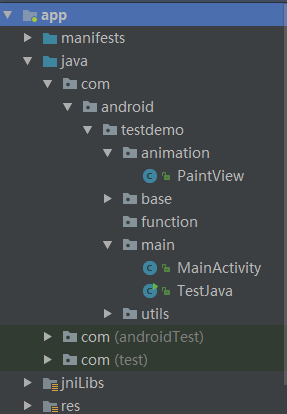
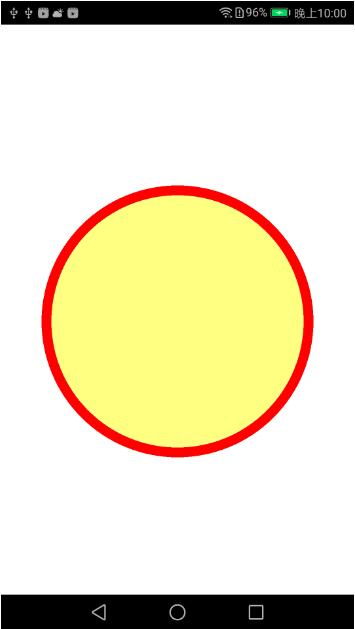
- 项目结构图和效果图
一.Paint画笔的基本使用
1.1 创建画笔,即Paint对象
        //初始化Paint

        Paint paint=new Paint();
1.2 设置Paint颜色
在设置Paint颜色之前,我们需要了解下颜色的一些基本知识
色值的定义有两种方式:
1.十进制方式
2.十六进制表示法
十进制的话颜色色值是从 0-255,数字越大,颜色越深,数字越小,颜色越浅;
十六进制表示法是:(00-ff)(00-ff)(00-ff)(00-ff)分别代表ARGB(例如表示白色,我们可以这样:#ffffffff),数值越小越淡,越大越深。
A表示透明度
R表示红色色值
G表示绿色色值
B表示蓝色色值
每种颜色都由ARGB组成,例如透明为:#00000000,红色为:#FFFF0000,绿色为:#FF00FF00,蓝色为:#FF0000FF
那么接下来就是给Paint设置颜色,代码如下:
        //设置画笔颜色

        paint.setColor(0xffff0000);
1.3 设置Paint填充样式
Paint的填充样式分三种:
        //Paint.Style.FILL:仅填充内部

        //Paint.Style.STROKE:仅描边

        //Paint.Style.FILL_AND_STROKE:描边且填充内部
如果想设置Paint的填充样式为仅描边,你可以这样:
        //设置画笔样式

        paint.setStyle(Paint.Style.STROKE);
1.4 设置Paint宽度
我们可以用以下方法来给Paint设置宽度(设置Piant宽度为30f):
        //设置画笔宽度

        paint.setStrokeWidth(30f);
1.5 Paint使用步骤基本代码
下面以创建一个MyView代码为例,贴出Paint使用步骤的基本代码
public class MyView extends View{

    public MyView(Context context) {

        super(context);

    }

    public MyView(Context context, @Nullable AttributeSet attrs) {

        super(context, attrs);

    }

    public MyView(Context context, @Nullable AttributeSet attrs, int defStyleAttr) {

        super(context, attrs, defStyleAttr);

    }

    @Override

    protected void onDraw(Canvas canvas) {

        super.onDraw(canvas);

        //初始化Paint

        Paint paint=new Paint();

        //设置画笔颜色

        paint.setColor(0xffff0000);

        //设置画笔样式

        paint.setStyle(Paint.Style.STROKE);

        //设置画笔宽度

        paint.setStrokeWidth(10f);

        //将paint设置到canvas中去

      canvas.drawCircle(200,200,100,paint);

    }

}
二.Paint设置宽度时需要注意的地方
paint.setStrokeWidth();方法仅对Paint的样式为Paint.Style.STROKE或Paint.Style.FILL_AND_STROKE起作用,当Paint的样式为Paint.Style.FILL时,设置Paint的宽度不起作用,因为Paint设置的宽度是描边宽度,而Paint.Style.FILL是仅填充内部,没有描边。
三.利用paint开发的一个简单示例
这里我们自定义一个PaintView,实现的是一个类似同心圆的效果,具体代码在demo中有,这里主要讲解其在MainActivity对应的activity_main.xml中的引用,xml中引用代码如下:
<android.support.constraint.ConstraintLayout xmlns:android="http://schemas.android.com/apk/res/android"

    xmlns:app="http://schemas.android.com/apk/res-auto"

    xmlns:tools="http://schemas.android.com/tools"

    android:layout_width="match_parent"

    android:layout_height="match_parent"

    android:background="@color/white"

    tools:context="com.android.testdemo.main.MainActivity">

    <com.android.testdemo.animation.PaintView

        android:layout_width="match_parent"

        android:layout_height="match_parent"/>

</android.support.constraint.ConstraintLayout>
四.项目结构图和效果图
项目结构图
效果图
Paint的基本使用
Paint的基本使用的更多相关文章
- 详解Paint的setXfermode(Xfermode xfermode)
一.setXfermode(Xfermode xfermode) Xfermode国外有大神称之为过渡模式,这种翻译比较贴切但恐怕不易理解,大家也可以直接称之为图像混合模式,因为所谓的“过渡”其实就是 ...
- android Canvas 和 Paint用法
自定义view里面的onDraw方法,在这里我们可以绘制各种图形,onDraw里面有两个API我们需要了解清楚他们的用法:Canvas 和 Paint. Canvas翻译成中文就是画布的意思,Canv ...
- [LeetCode] Paint Fence 粉刷篱笆
There is a fence with n posts, each post can be painted with one of the k colors. You have to paint ...
- [LeetCode] Paint House II 粉刷房子之二
There are a row of n houses, each house can be painted with one of the k colors. The cost of paintin ...
- [LeetCode] Paint House 粉刷房子
There are a row of n houses, each house can be painted with one of the three colors: red, blue or gr ...
- xp系统重绘边框线不显示(首次加载没有触发paint事件)
同样是,重绘边框事件,win7系统显示正常,而xp系统却不显示,这是什么原因造成的呢? 于是,小编开始百度,不停的查找原因,通过一番查找,小编也意外的收获了一些内容: 例如:窗口的拖动,放大,缩小,等 ...
- LeetCode Paint House II
原题链接在这里:https://leetcode.com/problems/paint-house-ii/ 题目: There are a row of n houses, each house ca ...
- LeetCode Paint House
原题链接在这里:https://leetcode.com/problems/paint-house/ 题目: There are a row of n houses, each house can b ...
- zjuoj 3773 Paint the Grid
http://acm.zju.edu.cn/onlinejudge/showProblem.do?problemCode=3773 Paint the Grid Time Limit: 2 Secon ...
- zjuoj 3780 Paint the Grid Again
http://acm.zju.edu.cn/onlinejudge/showProblem.do?problemCode=3780 Paint the Grid Again Time Limit: 2 ...
随机推荐
- [填坑]解决"Your MaintenanceTool appears to be older than 3.0.2. ."问题
之前我写过QT5.9版本在更新组件时出现“要继续此操作,至少需要一个有效且已启用的储存库”问题,得到了网友的热心转载,说明遇到此问题的人不在少数. 原文地址:https://blog.csdn.net ...
- [转]QT QDateTime类、QTimer类
QDateTime类,头文件#include <QDateTime> 可以使用QDateTime类来获得系统时间.通过QDateTime::currentDateTime()来获取本地系统 ...
- asp.net mvc源码分析-ModelValidatorProviders 客户端的验证
几年写过asp.net mvc源码分析-ModelValidatorProviders 当时主要是考虑mvc的流程对,客户端的验证也只是简单的提及了一下,现在我们来仔细看一下客户端的验证. 如图所示, ...
- Learning to rank相关的pointwise,pairwise,listwise
论文分享--- >Learning to Rank: From Pairwise Approach to Listwise Approach 学习排序 Learning to Rank 小结 [ ...
- sharding-jdbc之——分库分表实例
转载请注明出处:http://blog.csdn.net/l1028386804/article/details/79368021 一.概述 之前,我们介绍了利用Mycat进行分库分表操作,Mycat ...
- C#窗体读取EXCEL存入SQL数据库
windows窗体上放了一个Textbox1,2个按钮button1和button2~按button1选择excel文件~按button2进行相关处理 Code Snippet private vo ...
- ztree默认自动打开第一级
var treeObj = $.fn.zTree.getZTreeObj("tree"); var nodes = treeObj.getNodes(); if (nodes.le ...
- 我对android 软件栈了解
android 软件栈如图所示: Android平台的核心是Linux内核,它负责设备驱动程序.资源访问.电源管理和完成其他操作系统的职责.提供的设备驱动程序包括显示器.照相机,键盘.WiFi.闪存. ...
- laravel 开启sql调试
打开app\Providers\AppServiceProvider.PHP,在boot方法中添加如下内容 public function boot() { //sql调试 $sql_debug = ...
- 几种梯度下降方法对比(Batch gradient descent、Mini-batch gradient descent 和 stochastic gradient descent)
https://blog.csdn.net/u012328159/article/details/80252012 我们在训练神经网络模型时,最常用的就是梯度下降,这篇博客主要介绍下几种梯度下降的变种 ...