
Visual Studio 项目模板制作(四)
上一篇,介绍了VSIX安装模板的方法,那么,你是不是要问,为何有些项目模板却可以有向导,那是怎么做到的
今天这篇文章就是介绍如何为自己的模板添加向导,向导可以引导你完成项目中各种参数的设置,比如项目创建人,项目描述,公司等
下图创建Web项目时的向导

下面我们开始制作我们自己的项目向导
需要用到的两个类库: envdte , Microsoft.VisualStudio.TemplateWizardInterface
创建一个类库项目,引用上面两个类库
添加一个类,取名ProjectWizard继承IWizard接口实现 RunStarted 方法
using System;

using System.Collections.Generic;

using System.Linq;

using System.Text;

using System.Threading.Tasks;

using System.Windows.Forms;

using EnvDTE;

using Microsoft.VisualStudio.TemplateWizard;

namespace TemplateTestWizard

{

    public class ProjectWizard:IWizard

    {

        private bool shouldAdd = true;

        public string Creator = "";

        public void RunStarted(object automationObject, Dictionary<string, string> replacementsDictionary, WizardRunKind runKind, object[] customParams)

        {

            Creator = replacementsDictionary["$username$"];

            AssemblyWizard wizard=new AssemblyWizard(this);

            if (wizard.ShowDialog() == DialogResult.OK)

            {

                replacementsDictionary["$username$"]=Creator;

                shouldAdd = true;

            }

            else

            {

                shouldAdd = false;

            }

        }

        public void ProjectFinishedGenerating(Project project)

        {

        }

        public void ProjectItemFinishedGenerating(ProjectItem projectItem)

        {

        }

        public bool ShouldAddProjectItem(string filePath)

        {

            return shouldAdd;

        }

        public void BeforeOpeningFile(ProjectItem projectItem)

        {

        }

        public void RunFinished()

        {

        }

    }

}
下面为项目添加签名,由于制作的类库需要放到全局应用缓存中去,必须要添加签名
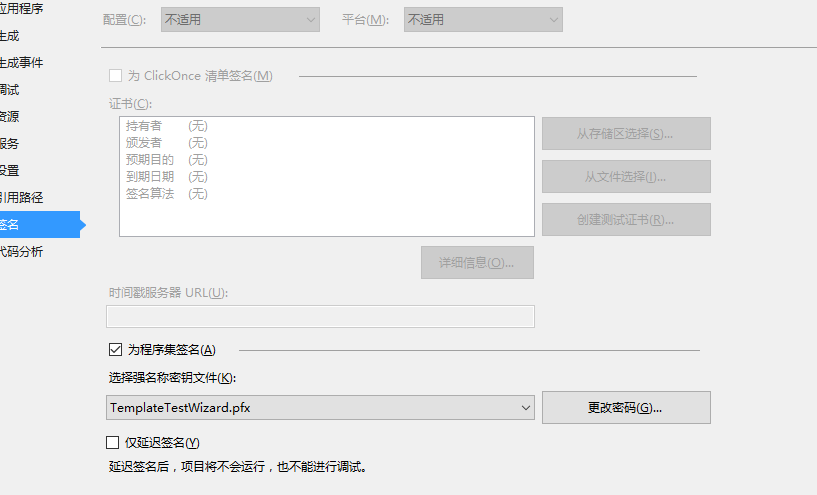
然后,打开Visual Studio命令提示符,以管理员运行,用 gacutil -i 注册生成的dll
gacutil -i path 注册程序集到全局应用程序缓存中

gacutil -l name  查看相应的程序集

gacutil -u name 卸载相应的程序集
下面,修改前面制作的Template,解压Template文件,打开 .vstemplate 文件,添加如下代码
<WizardExtension>

    <Assembly>

      TemplateTestWizard, Version=1.0.0.0, Culture=neutral, PublicKeyToken=2be8376f02202422, processorArchitecture=MSIL

    </Assembly>

    <FullClassName>TemplateTestWizard.ProjectWizard</FullClassName>

  </WizardExtension>
其中 Assembly 节点写的是内容可以用 gacutil -l name 查看,然后复制出来
FullClassName 是项目中ProjectWizard的完全限定名称
修改完模板后,在VS中打开新建项目

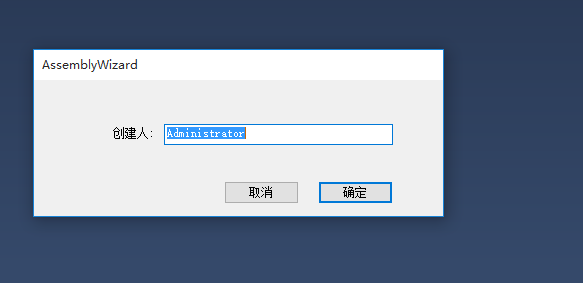
这个自定义向导就出来了,
如果模板里面有 $username$
using System;

using System.Diagnostics;

using System.Runtime.InteropServices;

using System.Threading;

namespace $safeprojectname$

{

    /// <summary>

    /// 创建人:$username$

    /// </summary>

    public static class CodeTimer

    {

        public static void Initialize()

        {

            Process.GetCurrentProcess().PriorityClass = ProcessPriorityClass.High;

            Thread.CurrentThread.Priority = ThreadPriority.Highest;

            Time("", , () => { });

        }

        public static void Time(string name, int iteration, Action action)

        {

            if (String.IsNullOrEmpty(name)) return;

            // 1.

            ConsoleColor currentForeColor = Console.ForegroundColor;

            Console.ForegroundColor = ConsoleColor.Yellow;

            Console.WriteLine(name);

            // 2.

            GC.Collect(GC.MaxGeneration, GCCollectionMode.Forced);

            int[] gcCounts = new int[GC.MaxGeneration + ];

            for (int i = ; i <= GC.MaxGeneration; i++)

            {

                gcCounts[i] = GC.CollectionCount(i);

            }

            // 3.

            Stopwatch watch = new Stopwatch();

            watch.Start();

            ulong cycleCount = GetCycleCount();

            for (int i = ; i < iteration; i++) action();

            ulong cpuCycles = GetCycleCount() - cycleCount;

            watch.Stop();

            // 4.

            Console.ForegroundColor = currentForeColor;

            Console.WriteLine("\tTime Elapsed:\t" + watch.ElapsedMilliseconds.ToString("N0") + "ms");

            Console.WriteLine("\tCPU Cycles:\t" + cpuCycles.ToString("N0"));

            // 5.

            for (int i = ; i <= GC.MaxGeneration; i++)

            {

                int count = GC.CollectionCount(i) - gcCounts[i];

                Console.WriteLine("\tGen " + i + ": \t\t" + count);

            }

            Console.WriteLine();

        }

        private static ulong GetCycleCount()

        {

            ulong cycleCount = ;

            QueryThreadCycleTime(GetCurrentThread(), ref cycleCount);

            return cycleCount;

        }

        [DllImport("kernel32.dll")]

        [return: MarshalAs(UnmanagedType.Bool)]

        static extern bool QueryThreadCycleTime(IntPtr threadHandle, ref ulong cycleTime);

        [DllImport("kernel32.dll")]

        static extern IntPtr GetCurrentThread();

    }

}
生成之后代码
using System;

using System.Diagnostics;

using System.Runtime.InteropServices;

using System.Threading;

namespace ConsoleApplication25

{

    /// <summary>

    /// 创建人:Administrator

    /// </summary>

    public static class CodeTimer

    {

        public static void Initialize()

        {

            Process.GetCurrentProcess().PriorityClass = ProcessPriorityClass.High;

            Thread.CurrentThread.Priority = ThreadPriority.Highest;

            Time("", , () => { });

        }

        public static void Time(string name, int iteration, Action action)

        {

            if (String.IsNullOrEmpty(name)) return;

            // 1.

            ConsoleColor currentForeColor = Console.ForegroundColor;

            Console.ForegroundColor = ConsoleColor.Yellow;

            Console.WriteLine(name);

            // 2.

            GC.Collect(GC.MaxGeneration, GCCollectionMode.Forced);

            int[] gcCounts = new int[GC.MaxGeneration + ];

            for (int i = ; i <= GC.MaxGeneration; i++)

            {

                gcCounts[i] = GC.CollectionCount(i);

            }

            // 3.

            Stopwatch watch = new Stopwatch();

            watch.Start();

            ulong cycleCount = GetCycleCount();

            for (int i = ; i < iteration; i++) action();

            ulong cpuCycles = GetCycleCount() - cycleCount;

            watch.Stop();

            // 4.

            Console.ForegroundColor = currentForeColor;

            Console.WriteLine("\tTime Elapsed:\t" + watch.ElapsedMilliseconds.ToString("N0") + "ms");

            Console.WriteLine("\tCPU Cycles:\t" + cpuCycles.ToString("N0"));

            // 5.

            for (int i = ; i <= GC.MaxGeneration; i++)

            {

                int count = GC.CollectionCount(i) - gcCounts[i];

                Console.WriteLine("\tGen " + i + ": \t\t" + count);

            }

            Console.WriteLine();

        }

        private static ulong GetCycleCount()

        {

            ulong cycleCount = ;

            QueryThreadCycleTime(GetCurrentThread(), ref cycleCount);

            return cycleCount;

        }

        [DllImport("kernel32.dll")]

        [return: MarshalAs(UnmanagedType.Bool)]

        static extern bool QueryThreadCycleTime(IntPtr threadHandle, ref ulong cycleTime);

        [DllImport("kernel32.dll")]

        static extern IntPtr GetCurrentThread();

    }

}
Visual Studio 项目模板制作(四)的更多相关文章
- Visual Studio 项目模板制作(一)
我们编写项目的时候,很多时候都是在写重复代码,比如一个比较完整的框架,然后下面有很多代码都是重复的Copy,其实我们可以利用Visual Studio的模板替我们干这些活,我们只要关注项目具体的业务就 ...
- Visual Studio 项目模板制作(三)
前面,我们已经制作好了模板,然后放到相应的Template目录就可以在Visual Studio中使用 本篇,我们采用安装VSIX扩展的方式来安装模板,这种方式需要安装Visual Studio SD ...
- Visual Studio 项目模板制作(二)
上一篇,我们制作了项目模板,本篇我制作项模板 首先,从我们需要导出模板的项目中,文件->导出模板,弹出 导出模板向导 对话框 选择项模板,点击下一步 选择要导出的项,点击下一步 选择要Refer ...
- 创建Visual studio项目模板 vstemplate关键点纪要
from:http://www.cnblogs.com/stickman/p/3454719.html 经过多次的实验,终于完美生成一个.VSIX的项目模板安装包,其中遇到不少问题与挫折,久经goog ...
- Visual Studio项目模板与向导开发
在[Xamarin+Prism开发详解系列]里面经常使用到[Prism unity app]的模板创建Prism.Forms项目: 备注:由于Unity社区已经不怎么活跃,下一个版本将会有Autofa ...
- asp.net core web 解决方案多项目模板制作打包总结
一.文件夹\项目结构 1.1.文件夹 net6.0:针对.net 6.0 项目模板 net6.0pack:针对net6.0打包 1.2.项目结构 Web\WebApi多项目.各层项目.单元测试项目 目 ...
- Visual Studio for Mac第四预
微软发布Visual Studio for Mac第四预览版 去年 11 月,微软发布了 Visual Studio for Mac 的首个预览版本,并且承诺后续数月会带来更多功能.而今天,随着 Vi ...
- [Cordova] 无法编译Visual Studio项目里Plugin副本的Native Code
[Cordova] 无法编译Visual Studio项目里Plugin副本的Native Code 问题情景 开发Cordova Plugin的时候,开发的流程应该是: 建立Cordova Plug ...
- 因GIT默认忽略.dll文件导致的Visual Studio项目通过Bamboo编译失败
背景 由GIT管理的Visual Studio项目,使用Stash管理远端代码库,通过与Stash集成的Bamboo生成项目并发布 现象 Visual Studio项目本地生成成功,用SourceTr ...
随机推荐
- 009-spring cloud gateway-过滤器GatewayFilter、GlobalFilter、GatewayFilterChain、作用、生命周期、GatewayFilterFactory内置过滤器
一.概述 在Spring-Cloud-Gateway之请求处理流程中最终网关是将请求交给过滤器链表进行处理. 核心接口:GatewayFilter,GlobalFilter,GatewayFilter ...
- PHP 常用命令行
1.PHP运行指定文件 php -f test.php (-f 可省略) 2.命令行直接运行PHP代码 php -r "phpinfo();" 如果结果太长,还可以 php -r ...
- 十天精通CSS3(2)
圆角效果 border-radius border-radius是向元素添加圆角边框. 使用方法: border-radius:10px; /* 所有角都使用半径为10px的圆角 */ border- ...
- [LeetCode] 443. String Compression_Easy tag:String
Given an array of characters, compress it in-place. The length after compression must always be smal ...
- python的三种字符串格式化方法
1.最方便的 print 'hello %s and %s' % ('df', 'another df') 但是,有时候,我们有很多的参数要进行格式化,这个时候,一个一个一一对应就有点麻烦了,于是就有 ...
- mysql5.7服务器The innodb_system data file 'ibdata1' must be writable导致无法启动服务器
现象如下:The innodb_system data file 'ibdata1' must be writable. 解决方案如下: 1.关闭mysqld进程: 2.删除配置文件中datadir所 ...
- 解读jquery.filtertable.min
jQuery.FilterTable是一款表格搜索过滤和单元格高亮插件. 该插件允许你对任意表格进行条件过滤,并且它会将搜索到的结果单元格高亮显示,非常实用和强大. 使用方法在页面中引入jquery和 ...
- codeforces D - Arthur and Walls
这题说的是给了一个矩阵,必须让.连接起来的图形变成矩形,2000*2000的矩形,那么我们就可以知道了,只要是存在一个有点的区域应该尽量将他削为矩形,那么将这个图形进行缩放,最后我们知道只要存在一个2 ...
- linux 安装软件的几种方法
一. 解析Linux应用软件安装包: 通常Linux应用软件的安装包有三种: 1) tar包,如software-1.2.3-1.tar.gz.它是使用UNIX系统的打包工具tar打包的. 2) rp ...
- sql的函数和存储过程的区别
本文部分内容转自http://www.cnblogs.com/lengbingshy/archive/2010/02/25/1673476.html 本质上没区别.只是函数有如:只能返回一个变量的限制 ...