
Python实现简单HTTP服务器(一)
一.返回固定内容
# coding:utf-8

import socket

from multiprocessing import Process


def handle_client(client_socket):

    """

    处理客户端请求

    """

    request_data = client_socket.recv(1024)

    print("request data:", request_data)

    # 构造响应数据

    response_start_line = "HTTP/1.1 200 OK\r\n"

    response_headers = "Server: My server\r\n"

    response_body = "<h1>Python HTTP Test</h1>"

    response = response_start_line + response_headers + "\r\n" + response_body

    # 向客户端返回响应数据

    client_socket.send(bytes(response, "utf-8"))

    # 关闭客户端连接

    client_socket.close()

if __name__ == "__main__":

    server_socket = socket.socket(socket.AF_INET, socket.SOCK_STREAM)

    server_socket.bind(("", 8000))

    server_socket.listen(128)

    while True:

        client_socket, client_address = server_socket.accept()

        print("[%s, %s]用户连接上了" % client_address)

        handle_client_process = Process(target=handle_client, args=(client_socket,))

        handle_client_process.start()

        client_socket.close()
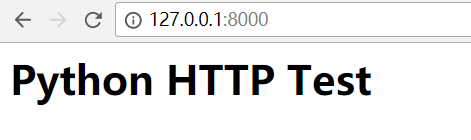
运行程序,打开浏览器输入:http://127.0.0.1:8000/,显示如下:
二.返回静态文件内容
# coding:utf-8

import socket

import re

from multiprocessing import Process

# 设置静态文件根目录

HTML_ROOT_DIR = "./html"

def handle_client(client_socket):

    """

    处理客户端请求

    """

    # 获取客户端请求数据

    request_data = client_socket.recv(1024)

    print("request data:", request_data)

    request_lines = request_data.splitlines()

    # 解析请求报文

    request_start_line = request_lines[0]

    # 提取用户请求的文件名

    file_name = re.match(r"\w+ +(/[^ ]*) ", request_start_line.decode("utf-8")).group(1)

    if "/" == file_name:

        file_name = "/index.html"

    # 打开文件,读取内容

    try:

        file = open(HTML_ROOT_DIR + file_name, "rb")

    except IOError:

        response_start_line = "HTTP/1.1 404 Not Found\r\n"

        response_headers = "Server: My server\r\n"

        response_body = "The file is not found!"

    else:

        file_data = file.read()

        file.close()

        # 构造响应数据

        response_start_line = "HTTP/1.1 200 OK\r\n"

        response_headers = "Server: My server\r\n"

        response_body = file_data.decode("utf-8")

    response = response_start_line + response_headers + "\r\n" + response_body

    print("response data:", response)

    # 向客户端返回响应数据

    client_socket.send(bytes(response, "utf-8"))

    # 关闭客户端连接

    client_socket.close()

if __name__ == "__main__":

    server_socket = socket.socket(socket.AF_INET, socket.SOCK_STREAM)

    server_socket.setsockopt(socket.SOL_SOCKET, socket.SO_REUSEADDR, 1)

    server_socket.bind(("", 8000))

    server_socket.listen(128)

    while True:

        client_socket, client_address = server_socket.accept()

        print("[%s, %s]用户连接上了" % client_address)

        handle_client_process = Process(target=handle_client, args=(client_socket,))

        handle_client_process.start()

        client_socket.close()
在程序所在目录下新建文件夹(html),里面放入HTML文件,运行程序,打开浏览器输入:http://127.0.0.1:8000/,显示如下:

改为面向对象的程序:
# coding:utf-8

import socket

import re

from multiprocessing import Process

# 设置静态文件根目录

HTML_ROOT_DIR = "./html"

class HTTPServer(object):

    def __init__(self):

        self.server_socket = socket.socket(socket.AF_INET, socket.SOCK_STREAM)

        self.server_socket.setsockopt(socket.SOL_SOCKET, socket.SO_REUSEADDR, 1)

    def start(self):

        self.server_socket.listen(128)

        while True:

            client_socket, client_address = self.server_socket.accept()

            print("[%s, %s]用户连接上了" % client_address)

            handle_client_process = Process(target=self.handle_client, args=(client_socket,))

            handle_client_process.start()

            client_socket.close()

    def handle_client(self, client_socket):

        """

        处理客户端请求

        """

        # 获取客户端请求数据

        request_data = client_socket.recv(1024)

        print("request data:", request_data)

        request_lines = request_data.splitlines()

        # 解析请求报文

        request_start_line = request_lines[0]

        # 提取用户请求的文件名

        file_name = re.match(r"\w+ +(/[^ ]*) ", request_start_line.decode("utf-8")).group(1)

        if "/" == file_name:

            file_name = "/index.html"

        # 打开文件,读取内容

        try:

            file = open(HTML_ROOT_DIR + file_name, "rb")

        except IOError:

            response_start_line = "HTTP/1.1 404 Not Found\r\n"

            response_headers = "Server: My server\r\n"

            response_body = "The file is not found!"

        else:

            file_data = file.read()

            file.close()

            # 构造响应数据

            response_start_line = "HTTP/1.1 200 OK\r\n"

            response_headers = "Server: My server\r\n"

            response_body = file_data.decode("utf-8")

        response = response_start_line + response_headers + "\r\n" + response_body

        print("response data:", response)

        # 向客户端返回响应数据

        client_socket.send(bytes(response, "utf-8"))

        # 关闭客户端连接

        client_socket.close()

    def bind(self, port):

        self.server_socket.bind(("", port))

def main():

    http_server = HTTPServer()

    http_server.bind(8000)

    http_server.start()

if __name__ == "__main__":

    main()
三.返回动态内容(运用wsgi)
# coding:utf-8

import socket

import re

import sys

from multiprocessing import Process

# 设置静态文件根目录

HTML_ROOT_DIR = "./html"

# 设置动态文件根目录

WSGI_PYTHON_DIR = "./wsgitest"

class HTTPServer(object):

    def __init__(self):

        self.server_socket = socket.socket(socket.AF_INET, socket.SOCK_STREAM)

        self.server_socket.setsockopt(socket.SOL_SOCKET, socket.SO_REUSEADDR, 1)

    def start(self):

        self.server_socket.listen(128)

        while True:

            client_socket, client_address = self.server_socket.accept()

            print("[%s, %s]用户连接上了" % client_address)

            handle_client_process = Process(target=self.handle_client, args=(client_socket,))

            handle_client_process.start()

            client_socket.close()

    def start_response(self, status, headers):

        response_headers = "HTTP/1.1 " + status + "\r\n"

        for header in headers:

            response_headers += "%s: %s\r\n" % header

        self.response_headers = response_headers

    def handle_client(self, client_socket):

        """

        处理客户端请求

        """

        # 获取客户端请求数据

        request_data = client_socket.recv(1024)

        print("request data:", request_data)

        request_lines = request_data.splitlines()

        for line in request_lines:

            print(line)

        # 解析请求报文

        request_start_line = request_lines[0]

        # 提取用户请求的文件名及请求方法

        file_name = re.match(r"\w+ +(/[^ ]*) ", request_start_line.decode("utf-8")).group(1)

        method = re.match(r"(\w+) +/[^ ]* ", request_start_line.decode("utf-8")).group(1)

        # 处理动态文件

        if file_name.endswith(".py"):

            try:

                m = __import__(file_name[1:-3])

            except Exception:

                self.response_headers = "HTTP/1.1 404 Not Found\r\n"

                response_body = "not found"

            else:

                env = {

                    "PATH_INFO": file_name,

                    "METHOD": method

                }

                response_body = m.application(env, self.start_response)

            response = self.response_headers + "\r\n" + response_body

        # 处理静态文件

        else:

            if "/" == file_name:

                file_name = "/index.html"

            # 打开文件,读取内容

            try:

                file = open(HTML_ROOT_DIR + file_name, "rb")

            except IOError:

                response_start_line = "HTTP/1.1 404 Not Found\r\n"

                response_headers = "Server: My server\r\n"

                response_body = "The file is not found!"

            else:

                file_data = file.read()

                file.close()

                # 构造响应数据

                response_start_line = "HTTP/1.1 200 OK\r\n"

                response_headers = "Server: My server\r\n"

                response_body = file_data.decode("utf-8")

            response = response_start_line + response_headers + "\r\n" + response_body

            print("response data:", response)

        # 向客户端返回响应数据

        client_socket.send(bytes(response, "utf-8"))

        # 关闭客户端连接

        client_socket.close()

    def bind(self, port):

        self.server_socket.bind(("", port))

def main():

    sys.path.insert(1, WSGI_PYTHON_DIR)

    http_server = HTTPServer()

    http_server.bind(8000)

    http_server.start()

if __name__ == "__main__":

    main()
在程序所在目录下新建文件夹(wsgitest),里面放入python文件(ctime.py)
# coding:utf-8

import time

def application(env, start_response):

    status = "200 OK"

    headers = [("Content-Type", "text/plain")]

    start_response(status, headers)

    return time.ctime()
运行程序,打开浏览器输入:http://127.0.0.1:8000/ctime.py,显示如下:
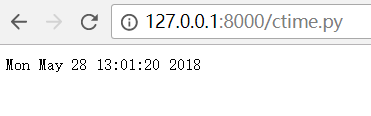
每刷新一次就执行相应python代码。
Python实现简单HTTP服务器(一)的更多相关文章
- Python实现简单HTTP服务器
Python实现简单HTTP服务器(一) 一.返回固定内容 复制代码 coding:utf-8 import socket from multiprocessing import Process de ...
- python 启动简单web服务器
有时我们在开发web静态页面时,需要一个web服务器来测试. 这时可以利用python提供的web服务器来实现. 1.在命令行下进入某个目录 2.在该目录下运行命令: python -m Simple ...
- Python实现简单HTTP服务器(二)
实现简单web框架 一.框架(MyWeb.py) # coding:utf-8 import time # 设置静态文件根目录 HTML_ROOT_DIR = "./html" c ...
- Python SimpleHTTPServer简单HTTP服务器
搭建FTP,或者是搭建网络文件系统,这些方法都能够实现Linux的目录共享.但是FTP和网络文件系统的功能都过于强大,因此它们都有一些不够方便的地方.比如你想快速共享Linux系统的某个目录给整个项目 ...
- 基于python实现简单web服务器
做web开发的你,真的熟悉web服务器处理机制吗? 分析请求数据 下面是一段原始的请求数据: b'GET / HTTP/1.1\r\nHost: 127.0.0.1:8000\r\nConnectio ...
- 用Python实现简单的服务器
socket接口是实际上是操作系统提供的系统调用.socket的使用并不局限于Python语言,你可以用C或者JAVA来写出同样的socket服务器,而所有语言使用socket的方式都类似(Apach ...
- 用Python实现简单的服务器【新手必学】
如何实现服务器... socket接口是实际上是操作系统提供的系统调用.socket的使用并不局限于Python语言,你可以用C或者JAVA来写出同样的socket服务器,而所有语言使用socket的 ...
- Python实现简单Web服务器
实验楼教程链接: https://www.shiyanlou.com/courses/552/labs/1867/document http原理详解(http下午茶): https://www.kan ...
- python最简单的http服务器
人生苦短,我用python 今天有个需求就是简单的把自己的图片通过web共享,自然就想起了使用服务器了,在python下使用一个简单的服务器是非常方便的,用到标准库里面的SimpleHTTPServe ...
随机推荐
- 基于github+hexo搭建个人博客(window)
0x01 环境搭建 1.Node.js环境 下载Node.js安装文件:https://nodejs.org/en/download/ 根据系统选择相应安装包下载,安装过程一路Next,默认设置即可. ...
- proxy chains 试用
我的机子是通过一台windows机器上的CCProxy代理上网.可是在设置了系统代理以后,发现在终端下若要进行ftp或者ssh等操作,并不能使用代理(但是wget是可以的). 期间试过一些方法,比如在 ...
- SaltStack 使用 Jinja2 模板
Jinja2 是基于 python 的一个模板引擎,如下,使用 Jinja2 实现根据不同的操作系统分发不同的文件: [root@localhost ~]$ cat /srv/salt/test.sl ...
- JavaScript表达式--掌握最全的表达式,一切尽在掌握中,让表达不再是难事
一.JavaScript表达式: 算术表达式: 字符串表达式: 关系(比较)表达式: 逻辑表达式 二.JavaScript运算符: ●什么是表达式--表达式是产生一个结果值的式子,常量,变量,运算符. ...
- SQL - 只获取小时
--时间小时加减 SELECT DATEADD(HOUR, -8, GETDATE()) FROM [Order] --使用convert转换时间格式获取小时,并转成int类型 SELECT CONV ...
- WP8.1开发:简单天气预报应用(转)
今天小梦给大家分享一个简单的天气预报应用源码:调用的是百度API.整个应用都没有什么难点.只是一个简单的网络请求和json数据处理.在WP8.1有小娜的情况下,天气预报应用还有意义吗?我认为还是有点意 ...
- namespace main
c++程序运行的入口是::main 如果把main放到某个命名空间中,则系统就无法找到入口. 所以就有了为了测试功能的tools和test,其中没有命名空间.
- 【ORACLE 】 ORA-00031 标记要删去的会话(解决)
在使用Oracle的过程中,会有使用了锁(for update)但又忘记释放锁的情况.这是就需要用到KILL语句了.(如果不知道KILL语句怎么用,可参考: http://www.cnblogs.co ...
- Firefox --- 火狐浏览器下载
http://www.firefox.com.cn/download/
- SpringBoot学习之Helloworld
1. 如果使用Spring开发一个"HelloWorld"的web应用 创建一个web项目并且导入相关jar包.SpringMVC Servlet 创建一个web.xml 编写一个 ...