
C#学习笔记(25)——用刻盘器批量从U盘删除添加文件
说明(2017-11-17 14:46:05):
1. 因为经常要从U盘里面删除版本,然后添加版本,每次都要几个人手动复制粘贴,费时费力,就花了一下午时间写了个程序,自动删除和添加版本。
2. DriverInfo类可以识别插到电脑的U盘,还能识别U盘容量。
3. 现在是先全部删除选中版本,再一个U盘一个U盘的往里拷贝,不知道用多线程是否能同时拷贝。
4. 如果遇到有一个U盘不能读取,软件会报错,提示未检测到路径,可以加个判断,判断一下U盘路径是否存在。不过我懒得改了,用之前先用刻盘软件检查一下有没有坏盘就好了。
5. 如果遇到里面已经存在这个版本了,目前是直接覆盖,不然会报错提示文件已存在,这里也可以判断一下是否存在这个文件,我也懒得改了。
6. 用c#在Windows系统操作文件还是很方便的,也不用找这个库那个库,我猜想如果用python做,估计找库就得找死,而且也没什么界面。
软件界面:
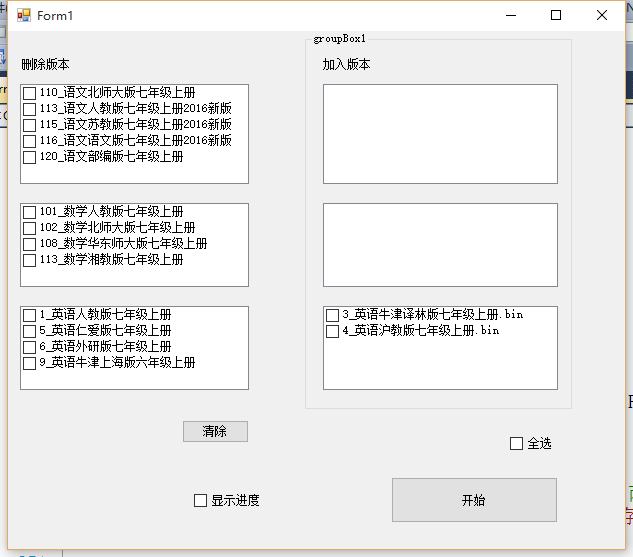
Form1.cs
 using System;

 using System.Collections.Generic;

 using System.ComponentModel;

 using System.Data;

 using System.Drawing;

 using System.Linq;

 using System.Text;

 using System.Windows.Forms;

 using System.IO;

 using System.Text.RegularExpressions;

 namespace ChangeBin

 {

     public partial class Form1 : Form

     {

         public Form1()

         {

             InitializeComponent();

         }

         //主程序

         private void Form1_Load(object sender, EventArgs e)

         {

             ShowSource();

             List<string> UdiskNames = GetUdiskNames();

             //foreach (string udiskName in UdiskNames)

             //{

             //    Console.WriteLine(udiskName);

             //}

         }

         private string[] GetInsertFileName()

         {

             List<string> fileNames = new List<string>();

             string[] chineseFile = Directory.GetFiles("../../res/1_语文");

             string[] mathFile = Directory.GetFiles("../../res/2_数学");

             string[] englishFile = Directory.GetFiles("../../res/3_英语");

             foreach (string name in chineseFile)

             {

                 fileNames.Add(name);

             }

             foreach (string name in mathFile)

             {

                 fileNames.Add(name);

             }

             foreach (string name in englishFile)

             {

                 fileNames.Add(name);

             }

             return fileNames.ToArray();

         }

         //全选右侧

         private void cb7_CheckedChanged(object sender, EventArgs e)

         {

             if (cb7.Checked)

             {

                 for (int i = ; i < clb4.Items.Count; i++)

                 {

                     clb4.SetItemChecked(i, true);

                 }

                 for (int i = ; i < clb5.Items.Count; i++)

                 {

                     clb5.SetItemChecked(i, true);

                 }

                 for (int i = ; i < clb6.Items.Count; i++)

                 {

                     clb6.SetItemChecked(i, true);

                 }

             }

             else

             {

                 for (int i = ; i < clb4.Items.Count; i++)

                 {

                     clb4.SetItemChecked(i, false);

                 }

                 for (int i = ; i < clb5.Items.Count; i++)

                 {

                     clb5.SetItemChecked(i, false);

                 }

                 for (int i = ; i < clb6.Items.Count; i++)

                 {

                     clb6.SetItemChecked(i, false);

                 }

             }

         }

         //清除左侧

         private void btnClear1_Click(object sender, EventArgs e)

         {

             for (int i = ; i < clb1.Items.Count; i++)

             {

                 clb1.SetItemChecked(i, false);

             }

             for (int i = ; i < clb2.Items.Count; i++)

             {

                 clb2.SetItemChecked(i, false);

             }

             for (int i = ; i < clb3.Items.Count; i++)

             {

                 clb3.SetItemChecked(i, false);

             }

         }

         //显示进度

         private void cbShowBack_CheckedChanged(object sender, EventArgs e)

         {

             BackGround bg = new BackGround();

             bg.Show();

         }

         //获取U盘里的需要删除的文件路径(怎么获取U盘容量??????名字 ??)

         private List<string> GetUdiskNames()

         {

             List<string> diskNames = new List<string>();

             DriveInfo[] driveInfo = DriveInfo.GetDrives();

             //15711846400byte

             foreach (DriveInfo d in driveInfo)

             {

                 if (d.DriveType == DriveType.Removable)

                 {

                     diskNames.Add(d.Name);

                 }

             }

             return diskNames;

         }

         //显示主页面

         private void ShowSource()

         {

             //获取需要拷贝的bin包名字和路径

             string[] chineseFile = Directory.GetFiles("../../res/1_语文");

             string[] mathFile = Directory.GetFiles("../../res/2_数学");

             string[] englishFile = Directory.GetFiles("../../res/3_英语");

             List<string> chineseFileName = new List<string>();

             List<string> mathFileName = new List<string>();

             List<string> englishFileName = new List<string>();

             foreach (string name in chineseFile)

             {

                 chineseFileName.Add(Regex.Split(name, @"1_语文\\")[]);

             }

             foreach (string name in mathFile)

             {

                 mathFileName.Add(Regex.Split(name, @"2_数学\\")[]);

             }

             foreach (string name in englishFile)

             {

                 englishFileName.Add(Regex.Split(name, @"3_英语\\")[]);

             }

             //把需要拷贝的文件名加入选择列表

             clb4.Items.AddRange(chineseFileName.ToArray());

             clb5.Items.AddRange(mathFileName.ToArray());

             clb6.Items.AddRange(englishFileName.ToArray());

         }

         //获取删除列表

         private List<string> GetDeleteList()

         {

             List<string> UdiskNames = GetUdiskNames();

             List<string> delNames = new List<string>();

             List<string> delPaths = new List<string>();

             foreach (var item in clb1.CheckedItems)

             {

                 delNames.Add(item.ToString());

             }

             foreach (var item in clb2.CheckedItems)

             {

                 delNames.Add(item.ToString());

             }

             foreach (var item in clb3.CheckedItems)

             {

                 delNames.Add(item.ToString());

             }

             foreach (string udiskName in UdiskNames)

             {

                 foreach (string delName in delNames)

                 {

                     if (delName.Contains("语文"))

                     {

                         delPaths.Add(udiskName + @"Root\Data\res\1_语文\" + delName + @".bin");

                     }

                     else if (delName.Contains("数学"))

                     {

                         delPaths.Add(udiskName + @"Root\Data\res\2_数学\" + delName + @".bin");

                     }

                     else if (delName.Contains("英语"))

                     {

                         delPaths.Add(udiskName + @"Root\Data\res\3_英语\" + delName + @".bin");

                     }

                 }

             }

             return delPaths;

         }

         //获取插入列表

         private List<string> GetInsertList()

         {

             List<string> InsertList = new List<string>();

             //获取需要拷贝的bin包名字和路径

             string[] chineseFile = Directory.GetFiles("../../res/1_语文");

             string[] mathFile = Directory.GetFiles("../../res/2_数学");

             string[] englishFile = Directory.GetFiles("../../res/3_英语");

             foreach (string file in chineseFile)

             {

                 InsertList.Add(file);

             }

             foreach (string file in mathFile)

             {

                 InsertList.Add(file);

             }

             foreach (string file in englishFile)

             {

                 InsertList.Add(file);

             }

             foreach (string item in InsertList)

             {

                 Console.WriteLine(item);

             }

             return InsertList;

         }

         //点击开始,开始删除,插入(要不要分开进行?????)

         private void btnStart_Click(object sender, EventArgs e)

         {

             //删除

             List<string> UdiskNames = GetUdiskNames();

             List<string> delPaths = GetDeleteList();

             if (delPaths.Count > )

             {

                 foreach (string delPath in delPaths)

                 {

                     //Console.WriteLine(delPath);

                     if (File.Exists(delPath))

                     {

                         File.Delete(delPath);

                         Console.WriteLine("已删除" + delPath);

                     }

                     else

                     {

                         //为啥删完还会显示不存在?循环了两次?还是delPath里面存了两遍?

                         Console.WriteLine(delPath + "不存在");

                     }

                 }

             }

             else

             {

                 MessageBox.Show("没有要删除的bin包");

             }

             //插入

             //获取需要拷贝的bin包名字和路径

             List<string> insertList = GetInsertList();

             List<string> chineseFileName = new List<string>();

             List<string> mathFileName = new List<string>();

             List<string> englishFileName = new List<string>();

             if (insertList.Count > )

             {

                 foreach (string uDiskName in UdiskNames)

                 {

                     foreach (string insertFile in insertList)

                     {

                         if (File.Exists(insertFile))

                         {

                             string desFileName = null;

                             string insertFileName = null;

                             if (insertFile.Contains("语文"))

                             {

                                 insertFileName = Regex.Split(insertFile, @"1_语文\\")[];

                                 desFileName = uDiskName + @"Root\Data\res\1_语文\" + insertFileName;

                             }

                             else if (insertFile.Contains("数学"))

                             {

                                 insertFileName = Regex.Split(insertFile, @"2_数学\\")[];

                                 desFileName = uDiskName + @"Root\Data\res\2_数学\" + insertFileName;

                             }

                             else if (insertFile.Contains("英语"))

                             {

                                 insertFileName = Regex.Split(insertFile, @"3_英语\\")[];

                                 desFileName = uDiskName + @"Root\Data\res\3_英语\" + insertFileName;

                             }

                             if (desFileName != null)

                             {

                                 //第三个参数是否允许覆盖???

                                 File.Copy(insertFile, desFileName,true);

                                 Console.WriteLine("已插入:" + desFileName);

                             }

                         }

                         else

                         {

                             Console.WriteLine("插入文件:" + insertFile + "不存在");

                         }

                     }

                 }

             }

             MessageBox.Show("拷贝完毕!");

         }

     }

 }
C#学习笔记(25)——用刻盘器批量从U盘删除添加文件的更多相关文章
- IOS学习笔记25—HTTP操作之ASIHTTPRequest
IOS学习笔记25—HTTP操作之ASIHTTPRequest 分类: iOS2012-08-12 10:04 7734人阅读 评论(3) 收藏 举报 iosios5网络wrapper框架新浪微博 A ...
- JVM学习笔记-第三章-垃圾收集器与内存分配策略
JVM学习笔记-第三章-垃圾收集器与内存分配策略 tips:对于3.4之前的章节可见博客:https://blog.csdn.net/sanhewuyang/article/details/95380 ...
- Linux学习笔记(4)磁盘分区(fdisk)、挂载与文件系统命令
Linux学习笔记(4)磁盘分区(fdisk).挂载与文件系统命令 1.磁盘分区是怎么表示的? 1.1 对于IDE接口,第一主盘为hda,第1从盘为hdb,第1从盘的第1个分区为hdb1 1.2 对于 ...
- linux命令学习笔记(25):linux文件属性详解
Linux 文件或目录的属性主要包括:文件或目录的节点.种类.权限模式.链接数量.所归属的用户和用户组. 最近访问或修改的时间等内容.具体情况如下: 命令: ls -lih 输出: [root@loc ...
- Cocos2d-x 学习笔记(25) 渲染 绘制 Render
[Cocos2d-x]学习笔记目录 本文链接:https://www.cnblogs.com/deepcho/p/cocos2dx-render.html 1. 从程序入口到渲染方法 一个Cocos2 ...
- Docker技术入门与实战 第二版-学习笔记-8-网络功能network-3-容器访问控制和自定义网桥
1)容器访问控制 容器的访问控制,主要通过 Linux 上的 iptables防火墙来进行管理和实现. iptables是 Linux 上默认的防火墙软件,在大部分发行版中都自带. 容器访问外部网络 ...
- [原创]java WEB学习笔记25:MVC案例完整实践(part 6)---新增操作的设计与实现
本博客为原创:综合 尚硅谷(http://www.atguigu.com)的系统教程(深表感谢)和 网络上的现有资源(博客,文档,图书等),资源的出处我会标明 本博客的目的:①总结自己的学习过程,相当 ...
- python学习笔记(5)--迭代器,生成器,装饰器,常用模块,序列化
生成器 在Python中,一边循环一边计算的机制,称为生成器:generator. 如: >>> g = (x * x for xin range(10)) >>> ...
- LearnOpenGL学习笔记(四)——着色器类编写
之前我们将着色器的代码用glsl写好之后,保存为字符串指针,然后用一个函数去编译它,这是一种手段,对于简单的着色器代码可以这样.但当我们针对复杂的着色器,我们发现编写.编译.管理着色器是一件麻烦事.我 ...
随机推荐
- java 发送post请求参数中含有+会转化为空格的问题
如题 原因分析:参数在传递过程中经历的几次编码和解码标准不同,导致加号.空格等字符的错误. 解决方案:将post请求的参数中 ,含有+号的,统统采用%2B 去替换,这是URL的协议问题.
- PWA 入门: 写个非常简单的 PWA 页面
Progressive Web Apps 是 Google 提出的用前沿的 Web 技术为网页提供 App 般使用体验的一系列方案. 这篇文章里我们来完成一个非常简单的 PWA 页面. 一个 PWA ...
- HTML CSS边框阴影的实现
一款用CSS控制背景图像平铺,从而实现区域边框阴影的效果,虽然用到了图片,但可贵之处是本代码不管你需要阴影的区域是多大,它都能自动适应,因些还是很值得收藏一下的,兼容所有的IE浏览器. <!DO ...
- Html中 <tr> 标签的隐藏与显示
TR标签的隐藏与显示:block(显示)和none(隐藏) <tr style="display:none"> <tr id="sample" ...
- 20本最好的Linux免费书籍
前些天Neo推荐了一个网站有<超过100本的linux免费书籍>,这里,我也向大家推荐20本最好的Linux免费书籍,当然,也是英文版的. 1. Ubuntu Pocket Guide a ...
- 还没被玩坏的robobrowser(7)——表单操作
背景 有一些站点是需要登录之后才能抓取内容的,另外做web测试的时候登录是家常便饭. 这一节里我们就以登陆testerhome为例,讲解一下robobrowser中form的操作. 预备知识 get_ ...
- 使用 Apache Commons CSV 读写 CSV 文件
有时候,我们需要读写 CSV 文件,在这里给大家分享Apache Commons CSV,读写 CSV 文件非常方便. 具体官方文档请访问Apache Commons CSV. 官方文档已经写得很详细 ...
- FreeSWITCH取消Digest校验流程
方法一.通过使用acl配置 <list name="domains" default="deny"> <!-- domain= is spec ...
- systemd的程序自启动脚本编写
以FreeSWITCH的自启动脚本为例. 一. 编写freeswitch.service文件 [Unit] Description=FreeSWITCH After=syslog.target net ...
- 【转载】Android 关于arm64-v8a、armeabi-v7a、armeabi、x86下的so文件兼容问题
转自:[欧阳鹏]http://blog.csdn.net/ouyang_peng Android 设备的CPU类型(通常称为”ABIs”) armeabiv-v7a: 第7代及以上的 ARM 处理器. ...