
Spring Boot 2.0 利用 Spring Security 实现简单的OAuth2.0认证方式1
0. 前言
之前帐号认证用过自己写的进行匹配,现在要学会使用标准了。准备了解和使用这个OAuth2.0协议。
1. 配置
1.1 配置pom.xml
有些可能会用不到,我把我项目中用到的所有包都贴出来。
         <dependency>

             <groupId>org.springframework.boot</groupId>

             <artifactId>spring-boot-starter-data-redis</artifactId>

         </dependency>

         <dependency>

             <groupId>org.springframework.boot</groupId>

             <artifactId>spring-boot-starter-security</artifactId>

         </dependency>

         <dependency>

             <groupId>org.springframework.security.oauth</groupId>

             <artifactId>spring-security-oauth2</artifactId>

             <version>2.3.3.RELEASE</version>

         </dependency>

         <dependency>

             <groupId>org.springframework.boot</groupId>

             <artifactId>spring-boot-starter-web</artifactId>

         </dependency>

         <dependency>

             <groupId>org.mybatis.spring.boot</groupId>

             <artifactId>mybatis-spring-boot-starter</artifactId>

             <version>1.3.2</version>

         </dependency>

         <!-- https://mvnrepository.com/artifact/com.github.pagehelper/pagehelper-spring-boot-starter -->

         <dependency>

             <groupId>com.github.pagehelper</groupId>

             <artifactId>pagehelper-spring-boot-starter</artifactId>

             <version>1.2.5</version>

         </dependency>

         <dependency>

             <groupId>org.springframework.cloud</groupId>

             <artifactId>spring-cloud-starter-oauth2</artifactId>

         </dependency>

         <dependency>

             <groupId>org.springframework.cloud</groupId>

             <artifactId>spring-cloud-starter-security</artifactId>

         </dependency>

         <dependency>

             <groupId>org.springframework.boot</groupId>

             <artifactId>spring-boot-devtools</artifactId>

             <scope>runtime</scope>

         </dependency>

         <dependency>

             <groupId>org.postgresql</groupId>

             <artifactId>postgresql</artifactId>

             <scope>runtime</scope>

         </dependency>

         <dependency>

             <groupId>org.springframework.boot</groupId>

             <artifactId>spring-boot-starter-test</artifactId>

             <scope>test</scope>

         </dependency>

         <dependency>

             <groupId>org.springframework.security</groupId>

             <artifactId>spring-security-test</artifactId>

             <scope>test</scope>

         </dependency>
1.2 配置application.properties
 #server

 server.port=8080

 server.servlet.session.timeout=2520000

 #redis

 spring.redis.database=0

 spring.redis.host=172.16.23.203

 spring.redis.port=6379

 spring.redis.password=

 spring.redis.jedis.pool.max-active=8

 spring.redis.jedis.pool.max-wait=60

 spring.redis.jedis.pool.max-idle=8

 spring.redis.jedis.pool.min-idle=0

 spring.redis.timeout=10000
1.3 资源服务器配置
 /**

  * OAuth 资源服务器配置

  * @author

  * @date 2018-05-29

  */

 @Configuration

 @EnableResourceServer

 public class ResourceServerConfiguration extends ResourceServerConfigurerAdapter {

     private static final String DEMO_RESOURCE_ID = "order";

     @Override

     public void configure(ResourceServerSecurityConfigurer resources) {

         resources.resourceId(DEMO_RESOURCE_ID).stateless(true);

     }

     @Override

     public void configure(HttpSecurity http) throws Exception {

         // Since we want the protected resources to be accessible in the UI as well we need

         // session creation to be allowed (it's disabled by default in 2.0.6)

         http.sessionManagement().sessionCreationPolicy(SessionCreationPolicy.IF_REQUIRED)

             .and()

             .requestMatchers().anyRequest()

             .and()

             .anonymous()

             .and()

             .authorizeRequests()

             .antMatchers("/order/**").authenticated();//配置order访问控制,必须认证过后才可以访问

     }

 }
1.4 授权服务器配置
 /**

  * OAuth 授权服务器配置

  * @author

  * @date 2018-05-29

  */

 @Configuration

 @EnableAuthorizationServer

 public class AuthorizationServerConfiguration extends AuthorizationServerConfigurerAdapter {

     private static final String DEMO_RESOURCE_ID = "order";

     @Autowired

     AuthenticationManager authenticationManager;

     @Autowired

     RedisConnectionFactory redisConnectionFactory;

     @Override

     public void configure(ClientDetailsServiceConfigurer clients) throws Exception {

         String finalSecret = "{bcrypt}"+new BCryptPasswordEncoder().encode("123456");

         //配置两个客户端,一个用于password认证一个用于client认证

         clients.inMemory()

             .withClient("client_1")

             .resourceIds(DEMO_RESOURCE_ID)

             .authorizedGrantTypes("client_credentials", "refresh_token")

             .scopes("select")

             .authorities("oauth2")

             .secret(finalSecret)

             .and()

             .withClient("client_2")

             .resourceIds(DEMO_RESOURCE_ID)

             .authorizedGrantTypes("password", "refresh_token")

             .scopes("select")

             .authorities("oauth2")

             .secret(finalSecret);

     }

     @Override

     public void configure(AuthorizationServerEndpointsConfigurer endpoints) throws Exception {

         endpoints

                 .tokenStore(new RedisTokenStore(redisConnectionFactory))

                 .authenticationManager(authenticationManager)

                 .allowedTokenEndpointRequestMethods(HttpMethod.GET, HttpMethod.POST);

     }

     @Override

     public void configure(AuthorizationServerSecurityConfigurer oauthServer) throws Exception {

         //允许表单认证

         oauthServer.allowFormAuthenticationForClients();

     }

 }
1.5 Spring Security配置
 /**

  * Spring-Security 配置<br>

  * 具体参考: https://github.com/lexburner/oauth2-demo

  * @author

  * @date 2018-05-28

  */

 @Configuration

 @EnableWebSecurity

 public class SecurityConfiguration extends WebSecurityConfigurerAdapter {

     @Bean

     @Override

     protected UserDetailsService userDetailsService(){

         InMemoryUserDetailsManager manager = new InMemoryUserDetailsManager();

         BCryptPasswordEncoder bCryptPasswordEncoder = new BCryptPasswordEncoder();

         String finalPassword = "{bcrypt}"+bCryptPasswordEncoder.encode("123456");

         manager.createUser(User.withUsername("user_1").password(finalPassword).authorities("USER").build());

         finalPassword = "{noop}123456";

         manager.createUser(User.withUsername("user_2").password(finalPassword).authorities("USER").build());

         return manager;

     }

     @Override

     protected void configure(HttpSecurity http) throws Exception {

         http

             .requestMatchers().anyRequest()

             .and()

                 .authorizeRequests()

                 .antMatchers("/oauth/*").permitAll();

     }

     /**

      * Spring Boot 2 配置,这里要bean 注入

      */

     @Bean

     @Override

     public AuthenticationManager authenticationManagerBean() throws Exception {

         AuthenticationManager manager = super.authenticationManagerBean();

         return manager;

     }

     @Bean

     PasswordEncoder passwordEncoder() {

         return PasswordEncoderFactories.createDelegatingPasswordEncoder();

     }
1.6 定义一个资源点
 @RestController

 @RequestMapping(value="/")

 public class TestController {

     @RequestMapping(value="order/demo")

     public YYModel getDemo() {

         Authentication auth = SecurityContextHolder.getContext().getAuthentication();

         System.out.println(auth);

         YYModel yy = new YYModel();

         yy.setYy("中文");

         yy.setZz(3);

         return yy;

     }

     @GetMapping("/test")

     public String getTest() {

         YYModel yy = new YYModel();

         yy.setYy("中文");

         yy.setZz(3);

         return yy.toJSONString();

     }

 }
2. 工具测试
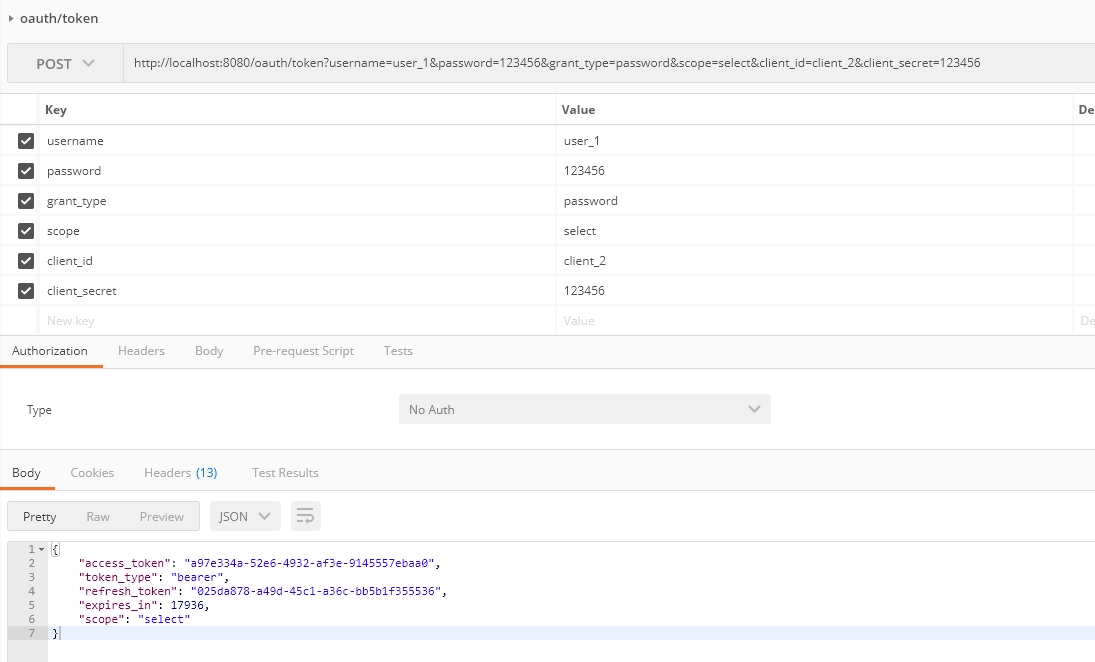
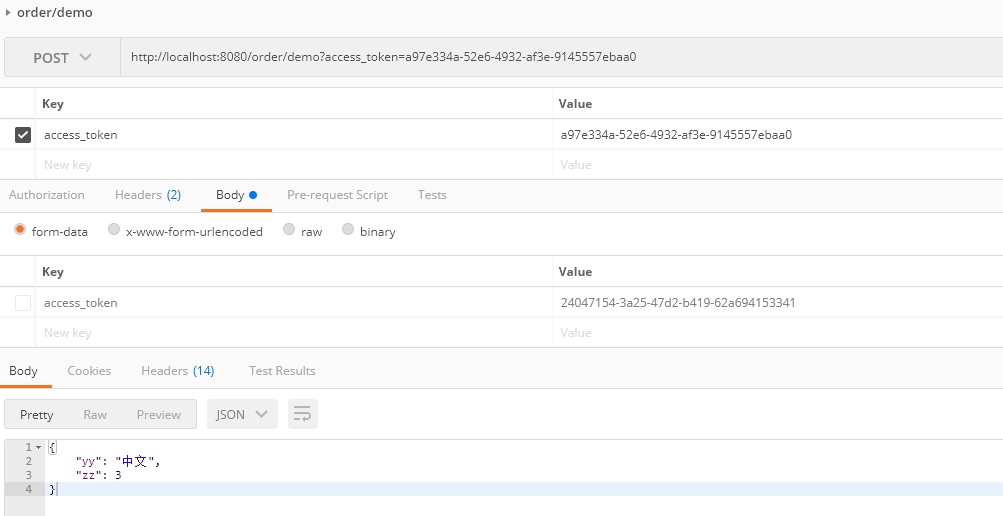
参考: http://blog.didispace.com/spring-security-oauth2-xjf-1/
Spring Boot 2.0 利用 Spring Security 实现简单的OAuth2.0认证方式1的更多相关文章
- Spring Boot 2.0 利用 Spring Security 实现简单的OAuth2.0认证方式2
0.前言 经过前面一小节已经基本配置好了基于SpringBoot+SpringSecurity+OAuth2.0的环境.这一小节主要对一些写固定InMemory的User和Client进行扩展.实现动 ...
- Spring Boot 2(一):Spring Boot 2.0新特性
Spring Boot 2(一):Spring Boot 2.0新特性 Spring Boot依赖于Spring,而Spring Cloud又依赖于Spring Boot,因此Spring Boot2 ...
- Spring Boot 多站点利用 Redis 实现 Session 共享
如何在不同站点(web服务进程)之间共享会话 Session 呢,原理很简单,就是把这个 Session 独立存储在一个地方,所有的站点都从这个地方读取 Session. 通常我们使用 Redis 来 ...
- spring boot 是如何利用jackson进行序列化的?
接上一篇:spring boot 是如何利用jackson进行反序列化的? @RestController public class HelloController { @RequestMapping ...
- spring boot rest 接口集成 spring security(2) - JWT配置
Spring Boot 集成教程 Spring Boot 介绍 Spring Boot 开发环境搭建(Eclipse) Spring Boot Hello World (restful接口)例子 sp ...
- spring boot rest 接口集成 spring security(1) - 最简配置
Spring Boot 集成教程 Spring Boot 介绍 Spring Boot 开发环境搭建(Eclipse) Spring Boot Hello World (restful接口)例子 sp ...
- Spring Boot配置篇(基于Spring Boot 2.0系列)
1:概述 SpringBoot支持外部化配置,配置文件格式如下所示: properties files yaml files environment variables command-line ar ...
- (转)Spring Boot 2 (八):Spring Boot 集成 Memcached
http://www.ityouknow.com/springboot/2018/09/01/spring-boot-memcached.html Memcached 介绍 Memcached 是一个 ...
- Spring Boot 2 (八):Spring Boot 集成 Memcached
Spring Boot 2 (八):Spring Boot 集成 Memcached 一.Memcached 介绍 Memcached 是一个高性能的分布式内存对象缓存系统,用于动态Web应用以减轻数 ...
随机推荐
- 理解 LDA 主题模型
前言 gamma函数 0 整体把握LDA 1 gamma函数 beta分布 1 beta分布 2 Beta-Binomial 共轭 3 共轭先验分布 4 从beta分布推广到Dirichlet 分布 ...
- 了解 node.js
原文为: 我们为什么要使用NodeJS 写的好,就收藏于此,供学习之用. 科普文一则,说说我对NodeJS(一种服务端JavaScript实现)的一些认识,以及我为什么会向后端工程师推荐NodeJS. ...
- 基于SpringSecurity和JWT的用户访问认证和授权
发布时间:2018-12-03 技术:springsecurity+jwt+java+jpa+mysql+mysql workBench 概述 基于SpringSecurity和JWT的用户访 ...
- git difftool 详解
一.如何比较两个版本之间的差异 1.显示版本得到版本的commit id 2.执行difftool命令 按Y进行比较,我用的是DiffMerge这个软件对代码进行比较的 二.比较当前所修改的内容 gi ...
- win32 socket之select
之前光看理论是不行滴,一定要实践,实践啊,不然永远都是门外汉!! 嗯嗯,把找到的一段源码贴上先,稍微修改了一下: #include <winsock.h> #include <std ...
- js跨域问题解释 使用jsonp或jQuery的解决方案
js跨域及解决方案 1.什么是跨域 我们经常会在页面上使用ajax请求访问其他服务器的数据,此时,客户端会出现跨域问题. 跨域问题是由于javascript语言安全限制中的同源策略造成的. 简单来说, ...
- HDU 4607 Park Visit (树的最长链)
Park Visit Time Limit: 6000/3000 MS (Java/Others) Memory Limit: 32768/32768 K (Java/Others)Total ...
- 【Linux】字符转换命令join
join 看字面上的意义 (加入/参加) 就可以知道,他是在处理两个文件之间的数据,而且,主要是在处理『两个文件当中,有 "相同数据" 的那一行,才将他加在一起』的意思.我们利用底 ...
- rsync的基本使用
1,本地同步文件: rsync -avz --delete /home/ /backups/ 注意:在指定复制源时,路径是否有最后的 “/” 有不同的含义,例如: /home: 表示将整个 /home ...
- 安装Eclipse Maven插件的方法
安装IDE Plugins的方法有很多.其一:在线安装,通过Help-->Install New Software的方式,输入HTTP地址来安装,简单易操作,但是也优缺点,就是下载速度慢,或者有 ...