
持续集成之三:Maven私服Nexus使用
环境
Red Hat Enterprise Linux Server release 7.3 (Maipo)
jdk1.7.0_80
apache-tomcat-7.0.90
mysql-5.7.23
apache-maven-3.5.4
nexus-2.11.1-01
1、Nexus的仓库类型分为以下四种:
group(仓库组):一组仓库的集合
hosted(宿主):配置第三方仓库 (包括公司内部私服 )
proxy(代理):私服会对中央仓库进行代理,用户连接私服,私服自动去中央仓库下载jar包或者插件
virtual(虚拟):兼容Maven1 版本的jar或者插件
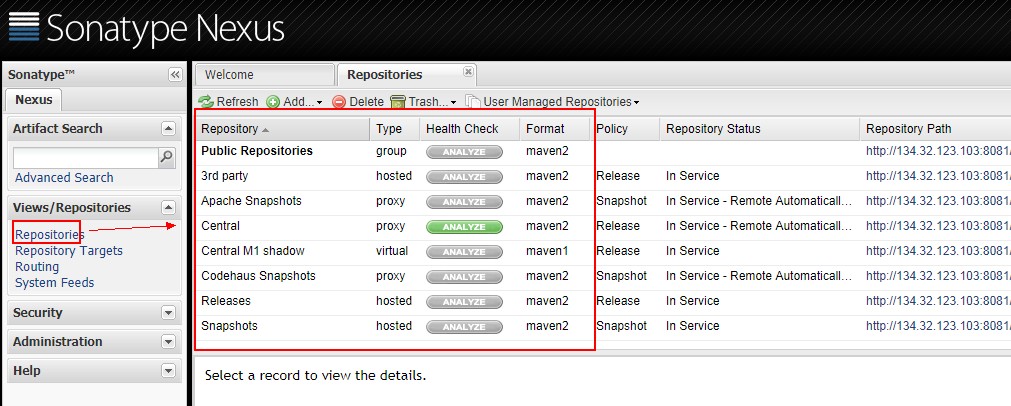
Public Repositories: 仓库组
3rd party: 无法从公共仓库获得的第三方发布版本的构件仓库
Apache Snapshots: 用了代理ApacheMaven仓库快照版本的构件仓库
Central: 用来代理maven中央仓库中发布版本构件的仓库
Central M1 shadow: 用于提供中央仓库中M1格式的发布版本的构件镜像仓库
Codehaus Snapshots: 用来代理CodehausMaven 仓库的快照版本构件的仓库
Releases: 用来部署管理内部的发布版本构件的宿主类型仓库
Snapshots:用来部署管理内部的快照版本构件的宿主类型仓库
2、常用设置
点击右上角的 Log In 按钮即可登陆了。默认登录账号/密码为: admin/admin123 ,登陆成功后的界面
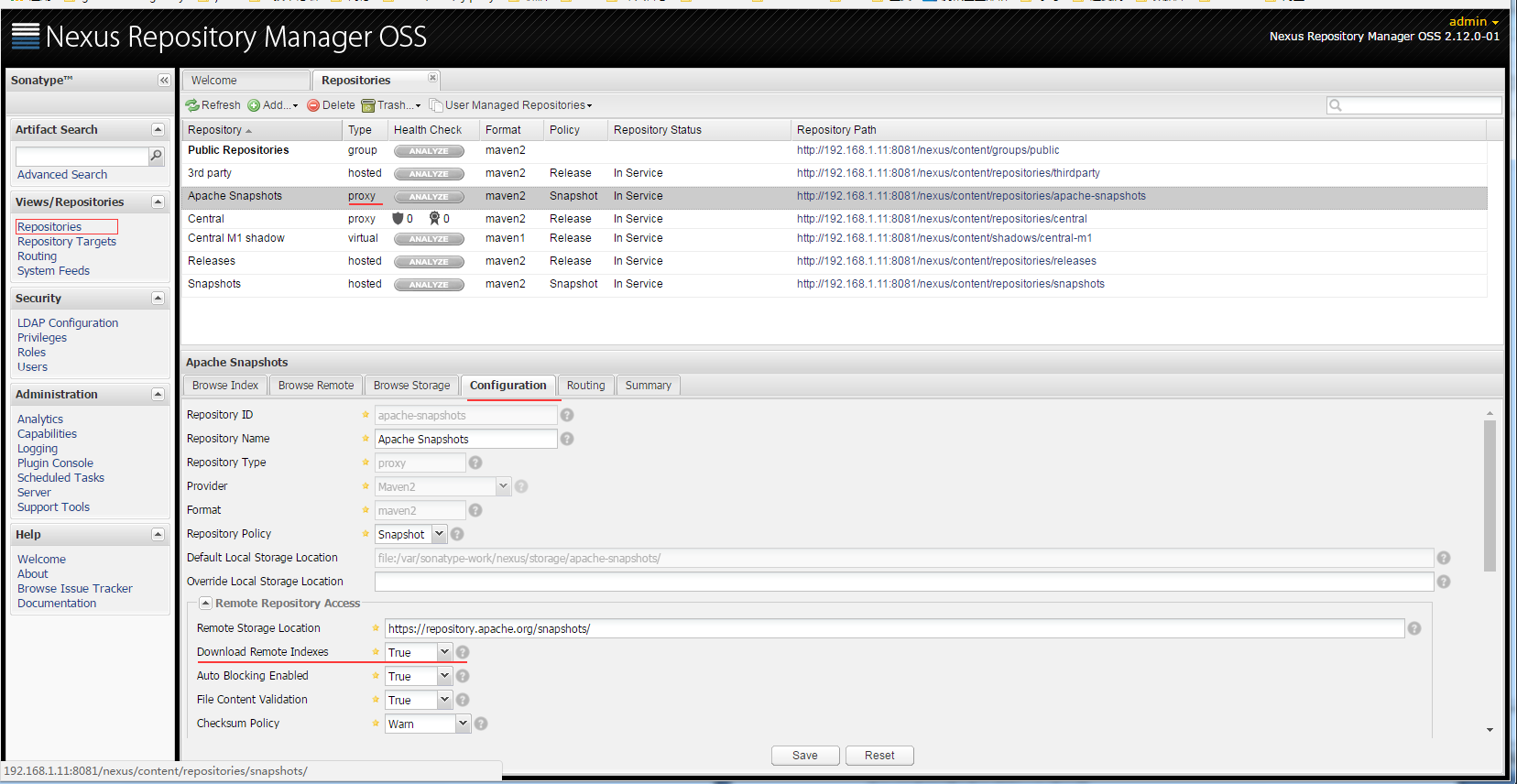
点击Repositories,将列表中所有Type为proxy 的项目的 Configuration 中的 Download Remote Indexes 设置为True
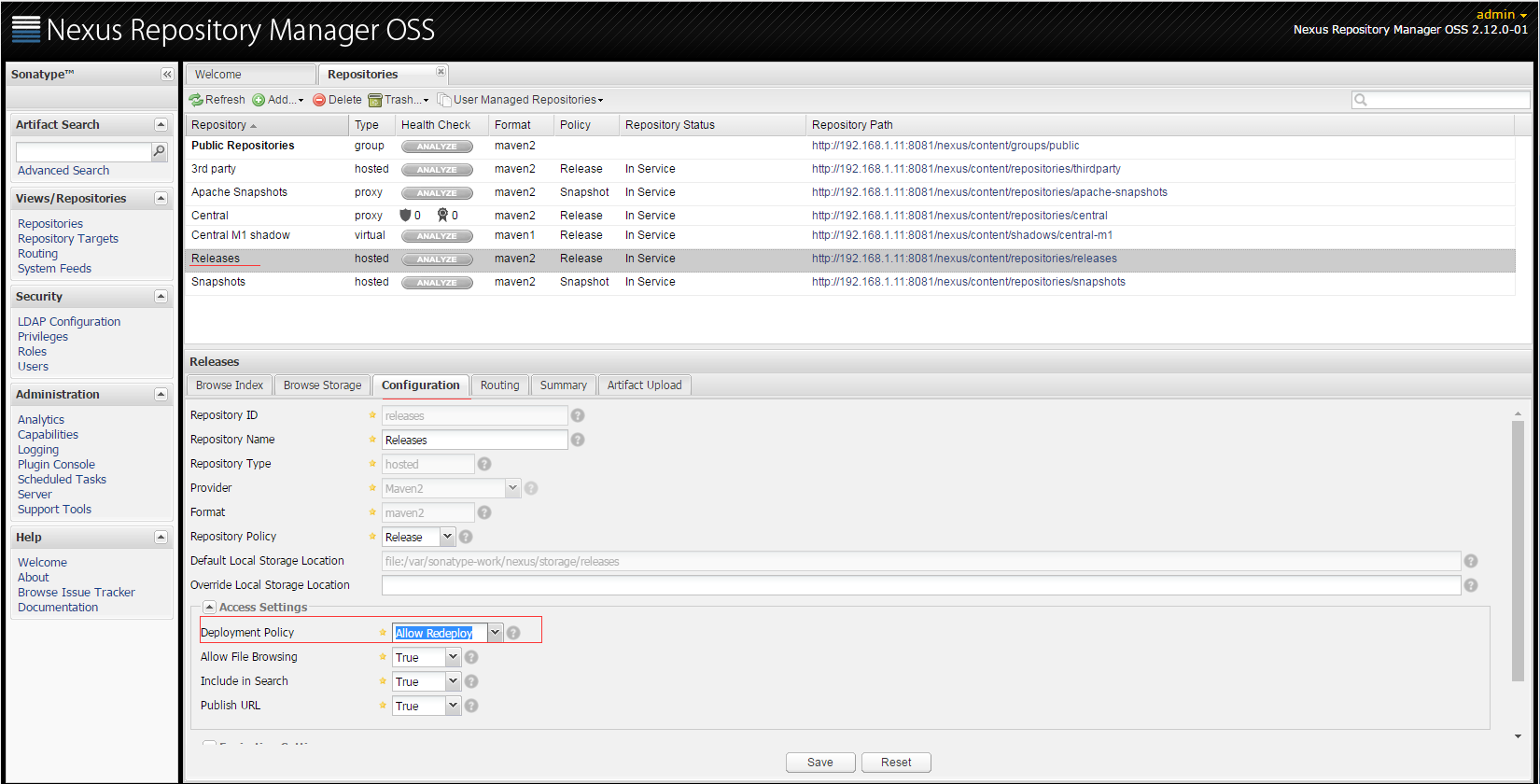
将Releases仓库的Deployment Policy设置为 Allow ReDeploy
当然我们也避免不了会使用到一些第三方的 jar ,而这些jar包也不存在于互联网上的maven中央仓库中,这时我们可以手工添加jar 到我们的私服中。
添加第三方 jar:

3、配置本地项目发布到Nexus
3.1在本地项目pom.xml中添加部署配置
<distributionManagement>
<repository>
<id>releases</id><!--这个ID需要与你的release仓库的Repository ID一致-->
<url>http://192.168.1.11:8081/nexus/content/repositories/releases</url>
</repository>
<snapshotRepository>
<id>snapshots</id><!--这个ID需要与你的snapshots仓库的Repository ID一致-->
<url>http://192.168.1.11:8081/nexus/content/repositories/snapshots</url>
</snapshotRepository>
</distributionManagement>
3.2在本地$MAVEN_HOME\conf目录下的settings.xml配置文件,添加认证配置
<servers>
<server>
<id>releases</id>
<username>admin</username>
<password>admin123</password>
</server>
<server>
<id>snapshots</id>
<username>admin</username>
<password>admin123</password>
</server>
</servers>
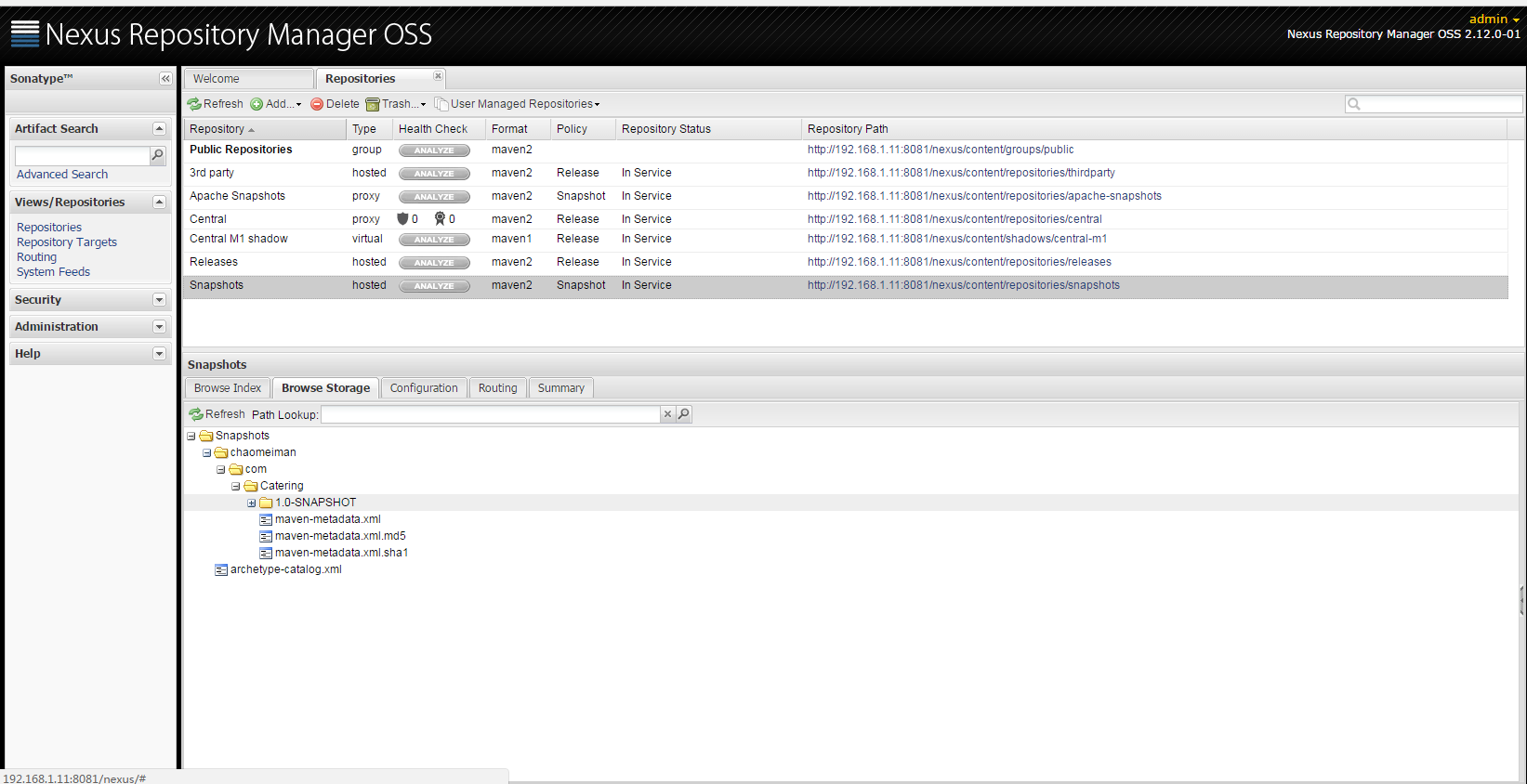
在本地工程目录下执行:mvn clean deploy
所部署的包就自动上传到了nexus安装目录下的
4、配置Maven从Nexus下载构件
4.1 配置maven 本地仓库路径
<localRepository>E:\repository</localRepository>
4.2 在项目POM中配置Nexus私服,这样的配置只对当前的Maven项目有效。
<!--指定Nexus的构件仓库-->

<repositories>

<repository>

<id>public</id>

<name>Team Maven Repository</name>

<url>http://134.32.123.103:8081/nexus/content/groups/public/</url>

<releases>

<enabled>true</enabled>

</releases>

<snapshots>

<enabled>true</enabled>

</snapshots>

</repository>

</repositories>

<!--指定Nexus的插件仓库-->

<pluginRepositories>

<pluginRepository>

<id>public</id>

<name>Team Maven Repository</name>

<url>http://134.32.123.103:8081/nexus/content/groups/public/</url>

<releases>

<enabled>true</enabled>

</releases>

<snapshots>

<enabled>true</enabled>

</snapshots>

</pluginRepository>

</pluginRepositories>
4.3在maven settings.xml中配置profile元素,这样就能让本机所有的Maven项目都使用自己的Maven私服。
(1) maven提供了profile来配置仓库信息
<profiles>

<profile>

<id>myprofile</id>

<repositories>

<repository>

<id>central</id>

<url>http://central</url>

<releases>

<enabled>true</enabled>

</releases>

<snapshots>

<enabled>true</enabled>

</snapshots>

</repository>

</repositories>

<pluginRepositories>

<pluginRepository>

<id>central</id>

<url>http://central</url>

<releases>

<enabled>true</enabled>

</releases>

<snapshots>

<enabled>false</enabled>

</snapshots>

</pluginRepository>

</pluginRepositories>

</profile>

</profiles>
(2)激活profile
<activeProfiles>

<activeProfile>myprofile</activeProfile>

</activeProfiles>
(3)配置镜像
<mirrors>

<mirror>

<id>nexus</id>

<url>http://127.0.0.1:7788/nexus/content/groups/public/</url>

<mirrorOf>*</mirrorOf>

</mirror>

</mirrors>
这里配置mirrorOf的值为*,代表maven的所有访问请求都会指向到Nexus仓库组。
参考:
maven全局配置文件settings.xml详解
Maven Nexus
Linux 使用nexus搭建maven私服
持续集成之三:Maven私服Nexus使用的更多相关文章
- 有手就行3——持续集成环境—maven、tomcat、安装和配置
有手就行3--持续集成环境-maven.tomcat.安装 持续集成环境(5)-Maven安装和配置 持续集成环境(6)-Tomcat安装和配置 持续集成环境(5)-Maven安装和配置 在Jenki ...
- Maven私服Nexus的搭建
# Maven私服Nexus的搭建 ## 私服存在的合理性 Maven中的依赖是从服务器仓库中下载的,Maven的仓库只有两大类: - 1) 本地仓库 - 2) 远程仓库,其中在远程仓库中又分成了3种 ...
- Centos 基础开发环境搭建之Maven私服nexus
hmaster 安装nexus及启动方式 /usr/local/nexus-2.6.3-01/bin ./nexus status Centos 基础开发环境搭建之Maven私服nexus . 软件 ...
- Ubuntu server下搭建Maven私服Nexus
Ubuntu server下搭建Maven私服Nexus Maven私服Nexus的作用,主要是为了节省资源,在内部作为maven开发资源共享服务器来使用. 1.下载 通过root用户进去Ubuntu ...
- maven私服nexus安装
maven私服nexus安装 1.nexus特性 1.1.nexus私服实际上是一个javaEE的web 系统 1.2.作用:用来管理一个公司所有的jar包,实现项目jar包的版本统一 1.3.jar ...
- 持续集成之三:搭建Maven私服Nexus
安装环境 Red Hat Enterprise Linux Server release 7.3 (Maipo) jdk1.7.0_80 apache-tomcat-7.0.90 mysql-5.7. ...
- 剑指架构师系列-持续集成之Maven+Nexus+Jenkins+git+Spring boot
1.Nexus与Maven 先说一下这个Maven是什么呢?大家都知道,Java社区发展的非常强大,封装各种功能的Jar包满天飞,那么如何才能方便的引入我们项目,为我所用呢?答案就是Maven,只需要 ...
- maven私服nexus搭建(windows)
1.下载nexus 地址:https://www.sonatype.com/download-oss-sonatype 下载相应版本的zip包. 2.安装nexus 下载完成后,解压到本地任意目录. ...
- maven私服nexus清理释放磁盘空间
应用背景: 自建的maven私服(或者叫私仓)nexus在使用过程中,因很多服务不断迭代更新上传jar包至nexus中,底层存放在一个叫Blob Stores的存储中,最近发现该存储已增大至好几百G, ...
随机推荐
- jQuery:find()方法与children()方法的区别
1:children及find方法都用是用来获得element的子elements的,两者都不会返回 text node,就像大多数的jQuery方法一样. 2:children方法获得的仅仅是元素一 ...
- android中SimpleCursorAdapter _id错误的问题
作为一个android新手,在绑定数据的时候是这样的 ListView listview=(ListView)this.findViewById(R.id.listView1); XJDal xj=n ...
- Unity3D 记第二次面试
2014-03-10 忍不住投递了几份简历大概有20个,总共收到面试电话2个,十分之一.一个是11号下午4点面试另一个是12号下午3点面试(后来没去至于原因下面有)12号没去,为什么?因为招聘要求“精 ...
- Shell脚本导入外部脚本内容
vim subscript.sh #!/bin/bash tool="ApacheSpark" vim main.sh #!/bin/bash source /home/wx/su ...
- Centos清除IP
要把配置好的ip清除掉,可以使用以下命令: ip addr flush dev eth0 如果系统中没有ip这个命令,可以使用更简单的: ifconfig eth0 0.0.0.0 可以用于PPTP拨 ...
- POJ1797 Heavy Transpotation
Background Hugo Heavy is happy. After the breakdown of the Cargolifter project he can now expand bu ...
- FW 每秒百万级别的 HTTP 请求 sung: 重型的(heavy-duty)、分布式的、多协议测试工具
本文是构建能够每秒处理 3 百万请求的高性能 Web 集群系列文章的第一篇.它记录了我使用负载生成器工具的一些经历,希望它能帮助每一个像我一样不得不使用这些工具的人节省时间. 负载生成器是一些生成用于 ...
- Guideline 2.1 - Information Needed
For information about testing your app and preparing it for review, please see Technical Note TN2431 ...
- HTML_body标签
常用符号:空格:  大于号:> 小于号: < 块级标签:H标签(加大加粗),P标签(段落间有间距),DIV(白板) 行内标签:SPAN标签(白板) <!- ...
- Wireless Network--poj2236(并查集)
Description An earthquake takes place in Southeast Asia. The ACM (Asia Cooperated Medical team) have ...