
201771010120 苏浪浪 《面向对象程序设计(java)》第11周学习总结
实验十一 集合
1、实验目的与要求
(1) 掌握Vetor、Stack、Hashtable三个类的用途及常用API;
(2) 了解java集合框架体系组成;
(3) 掌握ArrayList、LinkList两个类的用途及常用API。
(4) 了解HashSet类、TreeSet类的用途及常用API。
(5)了解HashMap、TreeMap两个类的用途及常用API;
(6) 结对编程(Pair programming)练习,体验程序开发中的两人合作。
2、实验内容和步骤
实验1: 导入第9章示例程序,测试程序并进行代码注释。
测试程序1:
l 使用JDK命令运行编辑、运行以下三个示例程序,结合运行结果理解程序;
l 掌握Vetor、Stack、Hashtable三个类的用途及常用API。
|
//示例程序1 import java.util.Vector; class Cat { private int catNumber; Cat(int i) { catNumber = i; } void print() { System.out.println("Cat #" + catNumber); } } class Dog { private int dogNumber; Dog(int i) { dogNumber = i; } void print() { System.out.println("Dog #" + dogNumber); } } public class CatsAndDogs { public static void main(String[] args) { Vector cats = new Vector(); for (int i = 0; i < 7; i++) cats.addElement(new Cat(i)); cats.addElement(new Dog(7)); for (int i = 0; i < cats.size(); i++) ((Cat) cats.elementAt(i)).print(); } } |
|
//示例程序2 import java.util.*; public class Stacks { static String[] months = { "1", "2", "3", "4" }; public static void main(String[] args) { Stack stk = new Stack(); for (int i = 0; i < months.length; i++) stk.push(months[i]); System.out.println(stk); System.out.println("element 2=" + stk.elementAt(2)); while (!stk.empty()) System.out.println(stk.pop()); } } |
|
//示例程序3 import java.util.*; class Counter { int i = 1; public String toString() { return Integer.toString(i); } } public class Statistics { public static void main(String[] args) { Hashtable ht = new Hashtable(); for (int i = 0; i < 10000; i++) { Integer r = new Integer((int) (Math.random() * 20)); if (ht.containsKey(r)) ((Counter) ht.get(r)).i++; else ht.put(r, new Counter()); } System.out.println(ht); } } |
1
package a;

    import java.util.Vector;

    class Cat {

        private int catNumber;

        Cat(int i) {

            catNumber = i;

        }

        void print() {

            System.out.println("Cat #" + catNumber);

        }

    }

    class Dog {

        private int dogNumber;

        Dog(int i) {

            dogNumber = i;

        }

        void print() {

            System.out.println("Dog #" + dogNumber);

        }

    }

    public class CatsAndDogs {

        public static void main(String[] args) {

            Vector cats = new Vector();

            Vector dogs = new Vector();

            for (int i = 0; i < 7; i++)

                cats.addElement(new Cat(i));

            cats.addElement(new Dog(7));

            for (int i = 0; i < cats.size(); i++)

                if(cats.elementAt(i)instanceof Cat)//做出判断能否被转换

                {

                ((Cat) cats.elementAt(i)).print();

        }

                else

                    ((Dog) cats.elementAt(i)).print();

    }

    }
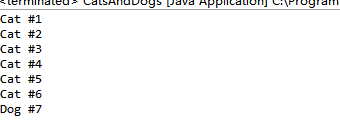
2
package b;

import java.util.*;

public class Stacks {//stack是java里的一个集合类,用于模拟一个堆栈,存放的信息是后进的元素先出

    static String[] months = { "1", "2", "3", "4" };

    public static void main(String[] args) {

        Stack stk = new Stack();

        for (int i = 0; i < months.length; i++)

            stk.push(months[i]);

        System.out.println(stk);

        System.out.println("element 2=" + stk.elementAt(2));

        while (!stk.empty())

            System.out.println(stk.pop());

    }

}

3
package c;

import java.util.*;

class Counter {

    int i = 1;

    public String toString() {

        return Integer.toString(i);

    }

}

public class Statistics {

    public static void main(String[] args) {

        Hashtable ht = new Hashtable();//相当于array,里面可以存放大多数类型数据,在不知array的情况下用hashtable 比较方便;(键值类)

        for (int i = 0; i < 10000; i++) {

            Integer r = new Integer((int) (Math.random() * 20));//生成20以内的随机数

            if (ht.containsKey(r))//Hashtable常用方法,判断r是不是键值的一个方法

                ((Counter) ht.get(r)).i++;

            else

                ht.put(r, new Counter());

        }

        System.out.println(ht);

    }

}

测试程序2:
l 使用JDK命令编辑运行ArrayListDemo和LinkedListDemo两个程序,结合程序运行结果理解程序;
|
import java.util.*; public class ArrayListDemo { public static void main(String[] argv) { ArrayList al = new ArrayList(); // Add lots of elements to the ArrayList... al.add(new Integer(11)); al.add(new Integer(12)); al.add(new Integer(13)); al.add(new String("hello")); // First print them out using a for loop. System.out.println("Retrieving by index:"); for (int i = 0; i < al.size(); i++) { System.out.println("Element " + i + " = " + al.get(i)); } } } |
|
import java.util.*; public class LinkedListDemo { public static void main(String[] argv) { LinkedList l = new LinkedList(); l.add(new Object()); l.add("Hello"); l.add("zhangsan"); ListIterator li = l.listIterator(0); while (li.hasNext()) System.out.println(li.next()); if (l.indexOf("Hello") < 0) System.err.println("Lookup does not work"); else System.err.println("Lookup works"); } } |
package b;

import java.util.*;

public class ArrayListDemo {

    public static void main(String[] argv) {

        ArrayList al = new ArrayList();//ArrayList是实现了基于动态数组的数据结构;ArrayList要移动数据.

        // Add lots of elements to the ArrayList...

        al.add(new Integer(11));

        al.add(new Integer(12));

        al.add(new Integer(13));

        al.add(new String("hello"));

        // First print them out using a for loop.

        System.out.println("Retrieving by index:");

        for (int i = 0; i < al.size(); i++) {

            System.out.println("Element " + i + " = " + al.get(i));

        }

    }

}
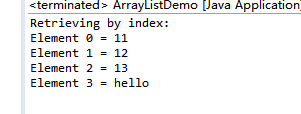
2
package cc;

import java.util.*;

public class LinkedListDemo {

    public static void main(String[] argv) {

        LinkedList l = new LinkedList();//LinkedList基于链表的数据结构;LinkedList要移动指针

        l.add(new Object());

        l.add("Hello");

        l.add("zhangsan");

        ListIterator li = l.listIterator(0);

        while (li.hasNext())

            System.out.println(li.next());

        if (l.indexOf("Hello") < 0)

            System.err.println("Lookup does not work");

        else

            System.err.println("Lookup works");

   }

}
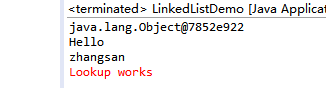
l 在Elipse环境下编辑运行调试教材360页程序9-1,结合程序运行结果理解程序;
l 掌握ArrayList、LinkList两个类的用途及常用API。
package linkedList;

import java.util.*;

/**

 * This program demonstrates operations on linked lists.

 * @version 1.11 2012-01-26

 * @author Cay Horstmann

 */

public class LinkedListTest//LinkedList基于链表的数据结构;LinkedList要移动指针

{

   public static void main(String[] args)

   {

      List<String> a = new LinkedList<>();

      a.add("Amy");

      a.add("Carl");

      a.add("Erica");

      List<String> b = new LinkedList<>();

      b.add("Bob");

      b.add("Doug");

      b.add("Frances");

      b.add("Gloria");

      // merge the words from b into a

      ListIterator<String> aIter = a.listIterator();

      Iterator<String> bIter = b.iterator();

      while (bIter.hasNext())

      {

         if (aIter.hasNext()) aIter.next();

         aIter.add(bIter.next());

      }

      System.out.println(a);

      // remove every second word from b

      bIter = b.iterator();

      while (bIter.hasNext())

      {

         bIter.next(); // skip one element

         if (bIter.hasNext())

         {

            bIter.next(); // skip next element

            bIter.remove(); // remove that element

         }

      }

      System.out.println(b);

      // bulk operation: remove all words in b from a

      a.removeAll(b);

      System.out.println(a);

   }

}

测试程序3:
l 运行SetDemo程序,结合运行结果理解程序;
|
import java.util.*; public class SetDemo { public static void main(String[] argv) { HashSet h = new HashSet(); //也可以 Set h=new HashSet() h.add("One"); h.add("Two"); h.add("One"); // DUPLICATE h.add("Three"); Iterator it = h.iterator(); while (it.hasNext()) { System.out.println(it.next()); } } } |
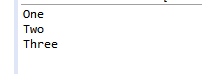
l 在Elipse环境下调试教材365页程序9-2,结合运行结果理解程序;了解HashSet类的用途及常用API。
package set;

import java.util.*;

/**

 * This program uses a set to print all unique words in System.in.

 * @version 1.12 2015-06-21

 * @author Cay Horstmann

 */

public class SetTest

{

   public static void main(String[] args)

   {

      Set<String> words = new HashSet<>(); // HashSet是实现Set接口的一个类,

      long totalTime = 0;

      try (Scanner in = new Scanner(System.in))

      {

         while (in.hasNext())

         {

            String word = in.next();

            long callTime = System.currentTimeMillis();

            words.add(word);

            callTime = System.currentTimeMillis() - callTime;

            totalTime += callTime;

         }

      }

      Iterator<String> iter = words.iterator();

      for (int i = 1; i <= 20 && iter.hasNext(); i++)

         System.out.println(iter.next());

      System.out.println(". . .");

      System.out.println(words.size() + " distinct words. " + totalTime + " milliseconds.");

   }

}
l 在Elipse环境下调试教材367页-368程序9-3、9-4,结合程序运行结果理解程序;了解TreeSet类的用途及常用API。
package treeSet;

import java.util.*;

/**

 * This program sorts a set of item by comparing their descriptions.

 * @version 1.12 2015-06-21

 * @author Cay Horstmann

 */

public class TreeSetTest//TreeSet的存储原理:底层是通过二叉树的数据结构实现的,存储规则:左小右大,当添加元素的时候依靠的是元素的comparable方法来添加元素

{

   public static void main(String[] args)

   {

      SortedSet<Item> parts = new TreeSet<>();

      parts.add(new Item("Toaster", 1234));

      parts.add(new Item("Widget", 4562));

      parts.add(new Item("Modem", 9912));

      System.out.println(parts);

      NavigableSet<Item> sortByDescription = new TreeSet<>(

            Comparator.comparing(Item::getDescription));

      sortByDescription.addAll(parts);

      System.out.println(sortByDescription);

   }

}

测试程序4:
l 使用JDK命令运行HashMapDemo程序,结合程序运行结果理解程序;
|
import java.util.*; public class HashMapDemo { public static void main(String[] argv) { HashMap h = new HashMap(); // The hash maps from company name to address. h.put("Adobe", "Mountain View, CA"); h.put("IBM", "White Plains, NY"); h.put("Sun", "Mountain View, CA"); String queryString = "Adobe"; String resultString = (String)h.get(queryString); System.out.println("They are located in: " + resultString); } } |
package treeSet;

import java.util.*;

public class HashMapDemo {

   public static void main(String[] argv) {

      HashMap h = new HashMap();//HashMap通过hashcode对其内容进行快速查找

      // The hash maps from company name to address.

      h.put("Adobe", "Mountain View, CA");

      h.put("IBM", "White Plains, NY");

      h.put("Sun", "Mountain View, CA");

      String queryString = "Adobe";

      String resultString = (String)h.get(queryString);

      System.out.println("They are located in: " +  resultString);

  }

}

l 在Elipse环境下调试教材373页程序9-6,结合程序运行结果理解程序;
package map;

import java.util.*;

/**

 * This program demonstrates the use of a map with key type String and value type Employee.

 * @version 1.12 2015-06-21

 * @author Cay Horstmann

 */

public class MapTest

{

   public static void main(String[] args)

   {

      Map<String, Employee> staff = new HashMap<>();//HashMap通过hashcode对其内容进行快速查找

      staff.put("144-25-5464", new Employee("Amy Lee"));

      staff.put("567-24-2546", new Employee("Harry Hacker"));

      staff.put("157-62-7935", new Employee("Gary Cooper"));

      staff.put("456-62-5527", new Employee("Francesca Cruz"));

      // print all entries

      System.out.println(staff);

      // remove an entry

      staff.remove("567-24-2546");

      // replace an entry

      staff.put("456-62-5527", new Employee("Francesca Miller"));

      // look up a value

      System.out.println(staff.get("157-62-7935"));

      // iterate through all entries

      staff.forEach((k, v) ->

         System.out.println("key=" + k + ", value=" + v));

   }

}

l 了解HashMap、TreeMap两个类的用途及常用API。
:HashMap通过hashcode对其内容进行快速查找,而 TreeMap中所有的元素都保持着某种固定的顺序,如果你需要得到一个有序的结果你就应该使用TreeMap(HashMap中元素的排列顺序是不固定的)。
实验2:结对编程练习:
l 关于结对编程:以下图片是一个结对编程场景:两位学习伙伴坐在一起,面对着同一台显示器,使用着同一键盘,同一个鼠标,他们一起思考问题,一起分析问题,一起编写程序。
l 关于结对编程的阐述可参见以下链接:
http://www.cnblogs.com/xinz/archive/2011/08/07/2130332.html
http://en.wikipedia.org/wiki/Pair_programming
l 对于结对编程中代码设计规范的要求参考:
http://www.cnblogs.com/xinz/archive/2011/11/20/2255971.html
以下实验,就让我们来体验一下结对编程的魅力。
l 确定本次实验结对编程合作伙伴;
合作伙伴:马兴德(201771010117);
l 各自运行合作伙伴实验九编程练习1,结合使用体验对所运行程序提出完善建议;
建议:
//修改后: File file = new File("身份证号.txt");(将文件放入该包中更好如前代码—);
package Test;

import java.io.BufferedReader;

import java.io.File;

import java.io.FileInputStream;

import java.io.FileNotFoundException;

import java.io.IOException;

import java.io.InputStreamReader;

import java.util.ArrayList;

import java.util.Arrays;

import java.util.Collections;

import java.util.Scanner;

public class Main{

    private static ArrayList<Student> studentlist;

    public static void main(String[] args) {

        studentlist = new ArrayList<>();

        Scanner scanner = new Scanner(System.in);

        File file = new File("D:\\身份证号.txt");

       //修改后: File file = new File("身份证号.txt");(将文件放入该包中更好如前代码—)

        try {

            FileInputStream fis = new FileInputStream(file);

            BufferedReader in = new BufferedReader(new InputStreamReader(fis));

            String temp = null;

            while ((temp = in.readLine()) != null) {

                Scanner linescanner = new Scanner(temp);

                linescanner.useDelimiter(" ");

                String name = linescanner.next();

                String number = linescanner.next();

                String sex = linescanner.next();

                String age = linescanner.next();

                String province =linescanner.nextLine();

                Student student = new Student();

                student.setName(name);

                student.setnumber(number);

                student.setsex(sex);

                int a = Integer.parseInt(age);

                student.setage(a);

                student.setprovince(province);

                studentlist.add(student);

            }

        } catch (FileNotFoundException e) {

            System.out.println("学生信息文件找不到");

            e.printStackTrace();

        } catch (IOException e) {

            System.out.println("学生信息文件读取错误");

            e.printStackTrace();

        }

        boolean isTrue = true;

        while (isTrue) {

            System.out.println("选择你的操作,输入正确格式的选项");

            System.out.println("a.字典排序");

            System.out.println("b.输出年龄最大和年龄最小的人");

            System.out.println("c.寻找老乡");

            System.out.println("d.寻找年龄相近的人");

            System.out.println("e.退出");

            String m = scanner.next();

            switch (m) {

            case "a":

                Collections.sort(studentlist);

                System.out.println(studentlist.toString());

                break;

            case "b":

                 int max=0,min=100;

                 int j,k1 = 0,k2=0;

                 for(int i=1;i<studentlist.size();i++)

                 {

                     j=studentlist.get(i).getage();

                 if(j>max)

                 {

                     max=j;

                     k1=i;

                 }

                 if(j<min)

                 {

                   min=j;

                   k2=i;

                 }

                 }

                 System.out.println("年龄最大:"+studentlist.get(k1));

                 System.out.println("年龄最小:"+studentlist.get(k2));

                break;

            case "c":

                 System.out.println("老家?");

                 String find = scanner.next();

                 String place=find.substring(0,3);

                 for (int i = 0; i <studentlist.size(); i++)

                 {

                     if(studentlist.get(i).getprovince().substring(1,4).equals(place))

                         System.out.println("老乡"+studentlist.get(i));

                 }

                 break;

            case "d":

                System.out.println("年龄:");

                int yourage = scanner.nextInt();

                int near=agenear(yourage);

                int value=yourage-studentlist.get(near).getage();

                System.out.println(""+studentlist.get(near));

                break;

            case "e":

                isTrue = false;

                System.out.println("退出程序!");

                break;

                default:

                System.out.println("输入有误");

            }

        }

    }

        public static int agenear(int age) {

        int j=0,min=53,value=0,k=0;

         for (int i = 0; i < studentlist.size(); i++)

         {

             value=studentlist.get(i).getage()-age;

             if(value<0) value=-value;

             if (value<min)

             {

                min=value;

                k=i;

             }

          }

         return k;

      }

}
package Test;

public class Student implements Comparable<Student> {

    private String name;

    private String number ;

    private String sex ;

    private int age;

    private String province;

    public String getName() {

        return name;

    }

    public void setName(String name) {

        this.name = name;

    }

    public String getnumber() {

        return number;

    }

    public void setnumber(String number) {

        this.number = number;

    }

    public String getsex() {

        return sex ;

    }

    public void setsex(String sex ) {

        this.sex =sex ;

    }

    public int getage() {

        return age;

        }

        public void setage(int age) {

            // int a = Integer.parseInt(age);

        this.age= age;

        }

    public String getprovince() {

        return province;

    }

    public void setprovince(String province) {

        this.province=province ;

    }

    public int compareTo(Student o) {

       return this.name.compareTo(o.getName());

    }

    public String toString() {

        return  name+"\t"+sex+"\t"+age+"\t"+number+"\t"+province+"\n";

    }

}
l 各自运行合作伙伴实验十编程练习2,结合使用体验对所运行程序提出完善建议;
建议:
1)、

(2)、
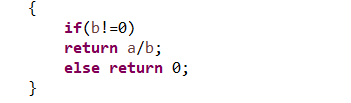
前边用了该程序以后后边子类不需要定义(b!=0)如上边1)和2)中:(2)明显多余;

l 采用结对编程方式,与学习伙伴合作完成实验九编程练习1;
package Test;

import java.io.BufferedReader;

import java.io.File;

import java.io.FileInputStream;

import java.io.FileNotFoundException;

import java.io.IOException;

import java.io.InputStreamReader;

import java.util.ArrayList;

import java.util.Arrays;

import java.util.Collections;

import java.util.Scanner;

public class Main{

    private static ArrayList<Student> studentlist;

    public static void main(String[] args) {

        studentlist = new ArrayList<>();

        Scanner scanner = new Scanner(System.in);

        File file = new File("身份证号.txt");

              try {

            FileInputStream fis = new FileInputStream(file);

            BufferedReader in = new BufferedReader(new InputStreamReader(fis));

            String temp = null;

            while ((temp = in.readLine()) != null) {

                Scanner linescanner = new Scanner(temp);

                linescanner.useDelimiter(" ");

                String name = linescanner.next();

                String number = linescanner.next();

                String sex = linescanner.next();

                String age = linescanner.next();

                String province =linescanner.nextLine();

                Student student = new Student();

                student.setName(name);

                student.setnumber(number);

                student.setsex(sex);

                int a = Integer.parseInt(age);

                student.setage(a);

                student.setprovince(province);

                studentlist.add(student);

            }

        } catch (FileNotFoundException e) {

            System.out.println("学生信息文件找不到");

            e.printStackTrace();

        } catch (IOException e) {

            System.out.println("学生信息文件读取错误");

            e.printStackTrace();

        }

        boolean isTrue = true;

        while (isTrue) {

            System.out.println("选择你的操作,输入正确格式的选项");

            System.out.println("a.字典排序");

            System.out.println("b.输出年龄最大和年龄最小的人");

            System.out.println("c.寻找老乡");

            System.out.println("d.寻找年龄相近的人");

            System.out.println("e.退出");

            String m = scanner.next();

            switch (m) {

            case "a":

                Collections.sort(studentlist);

                System.out.println(studentlist.toString());

                break;

            case "b":

                 int max=0,min=100;

                 int j,k1 = 0,k2=0;

                 for(int i=1;i<studentlist.size();i++)

                 {

                     j=studentlist.get(i).getage();

                 if(j>max)

                 {

                     max=j;

                     k1=i;

                 }

                 if(j<min)

                 {

                   min=j;

                   k2=i;

                 }

                 }

                 System.out.println("年龄最大:"+studentlist.get(k1));

                 System.out.println("年龄最小:"+studentlist.get(k2));

                break;

            case "c":

                 System.out.println("老家?");

                 String find = scanner.next();

                 String place=find.substring(0,3);

                 for (int i = 0; i <studentlist.size(); i++)

                 {

                     if(studentlist.get(i).getprovince().substring(1,4).equals(place))

                         System.out.println("老乡"+studentlist.get(i));

                 }

                 break;

            case "d":

                System.out.println("年龄:");

                int yourage = scanner.nextInt();

                int near=agenear(yourage);

                int value=yourage-studentlist.get(near).getage();

                System.out.println(""+studentlist.get(near));

                break;

            case "e":

                isTrue = false;

                System.out.println("退出程序!");

                break;

                default:

                System.out.println("输入有误");

            }

        }

    }

        public static int agenear(int age) {

        int j=0,min=53,value=0,k=0;

         for (int i = 0; i < studentlist.size(); i++)

         {

             value=studentlist.get(i).getage()-age;

             if(value<0) value=-value;

             if (value<min)

             {

                min=value;

                k=i;

             }

          }

         return k;

      }

}
package Test;

public class Student implements Comparable<Student> {

    private String name;

    private String number ;

    private String sex ;

    private int age;

    private String province;

    public String getName() {

        return name;

    }

    public void setName(String name) {

        this.name = name;

    }

    public String getnumber() {

        return number;

    }

    public void setnumber(String number) {

        this.number = number;

    }

    public String getsex() {

        return sex ;

    }

    public void setsex(String sex ) {

        this.sex =sex ;

    }

    public int getage() {

        return age;

        }

        public void setage(int age) {

            // int a = Integer.parseInt(age);

        this.age= age;

        }

    public String getprovince() {

        return province;

    }

    public void setprovince(String province) {

        this.province=province ;

    }

    public int compareTo(Student o) {

       return this.name.compareTo(o.getName());

    }

    public String toString() {

        return  name+"\t"+sex+"\t"+age+"\t"+number+"\t"+province+"\n";

    }

}
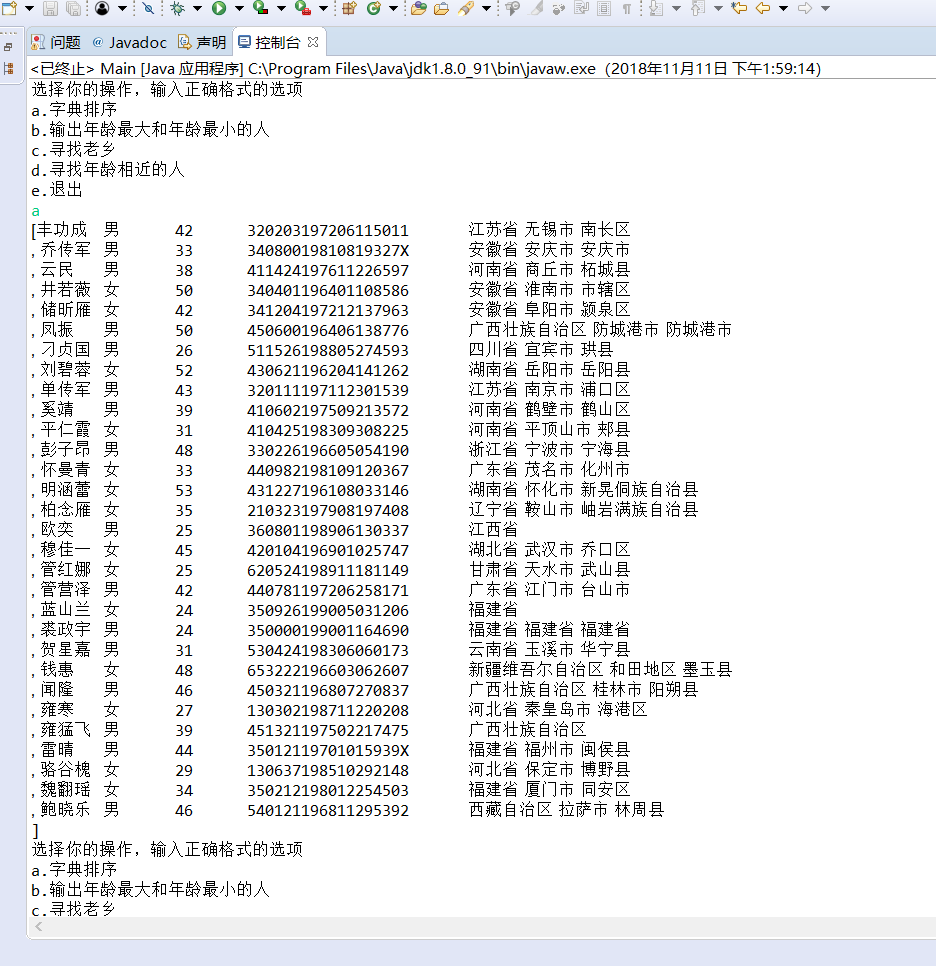
l 采用结对编程方式,与学习伙伴合作完成实验十编程练习2。
package d;

import java.io.FileNotFoundException;

import java.io.PrintWriter;

import java.util.Scanner;

public class Demo {

    public static void main(String[] args) {

        Scanner in = new Scanner(System.in);

        Suanfa counter=new Suanfa();

        PrintWriter out = null;

        try {

            out = new PrintWriter("text.txt");

        } catch (FileNotFoundException e) {

            // TODO Auto-generated catch block

            e.printStackTrace();

        }

        int sum = 0;

        for (int i = 0; i <10; i++) {

            int a = (int) Math.round(Math.random() * 100);

            int b = (int) Math.round(Math.random() * 100);

            int m= (int) Math.round(Math.random() * 3);

           switch(m)

           {

           case 0:

               System.out.println(a + "+" + b + "=");

               int d0 = in.nextInt();

               out.println(a + "+" + b + "=" + d0);

               if (d0 == counter.suanfa1(a, b)) {

                   sum += 10;

                   System.out.println("恭喜答案正确");

               } else {

                   System.out.println("抱歉,答案错误");

               }

               break;

           case 1:

               while (a < b) {

                   int x = a;

                   a = b;

                   b = x;

               }

               System.out.println(a + "-" + b + "=");

               int d1 = in.nextInt();

               out.println(a + "-" + b + "=" + d1);

               if (d1 == counter.suanfa2(a, b)) {

                   sum += 10;

                   System.out.println("恭喜答案正确");

               } else {

                   System.out.println("抱歉,答案错误");

               }

               break;

           case 2:

               System.out.println(a + "*" + b + "=");

               int d2 = in.nextInt();

               out.println(a + "*" + b + "=" + d2);

               if (d2 ==counter.suanfa3(a, b)) {

                   sum += 10;

                   System.out.println("恭喜答案正确");

               } else {

                   System.out.println("抱歉,答案错误");

               }

               break;

           case 3:

               while (b == 0 || a % b != 0) {

                   a = (int) Math.round(Math.random() * 100);

                   b = (int) Math.round(Math.random() * 100);

               }

               System.out.println(a + "/" + b + "=");

               int d3 = in.nextInt();

               out.println(a + "/" + b + "=" + d3);

               if (d3 == counter.suanfa4(a, b)) {

                   sum += 10;

                   System.out.println("恭喜答案正确");

               } else {

                   System.out.println("抱歉,答案错误");

               }

               break;

           }

}

        System.out.println("成绩"+sum);

        out.println("成绩:"+sum);

         out.close();

    }

    }
package d;

public class Suanfa<T> {

   private T a;

   private T b;

   public Suanfa() {

       a = null;

       b = null;

   }

   public Suanfa(T a, T b) {

       this.a = a;

       this.b = b;

   }

    public int   suanfa1(int a,int b)

    {

        return a+b;

    }

    public int   suanfa2(int a,int b)

    {

        return a-b;

    }

    public int   suanfa3(int a,int b)

    {

        return a*b;

    }

    public int   suanfa4(int a,int b)

    {

        if(b!=0)

        return a/b;

        else return 0;

    }

}
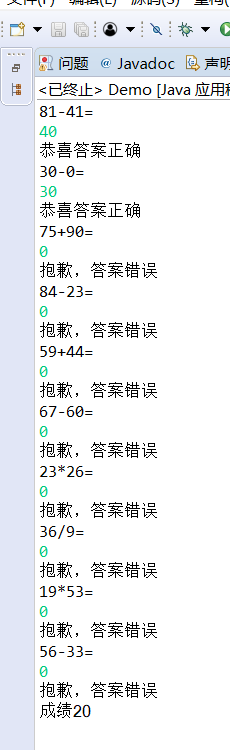
实验总结:通过本周学习以及老师和助教的帮助下:了解了HashMap、TreeMap两个类的用途;学习到了Vetor、Stack、Hashtable三个类的用途; 了解了java集合框架体系组成; 了解了HashSet类、TreeSet类的用途;在结对编程练习的过程中,我前边程序的不足得到一些完善;也了解到结对练习的好处。
201771010120 苏浪浪 《面向对象程序设计(java)》第11周学习总结的更多相关文章
- 201771010134杨其菊《面向对象程序设计java》第九周学习总结
第九周学习总结 第一部分:理论知识 异常.断言和调试.日志 1.捕获 ...
- 201871010132-张潇潇《面向对象程序设计(java)》第一周学习总结
面向对象程序设计(Java) 博文正文开头 项目 内容 这个作业属于哪个课程 https://www.cnblogs.com/nwnu-daizh/ 这个作业的要求在哪里 https://www.cn ...
- 扎西平措 201571030332《面向对象程序设计 Java 》第一周学习总结
<面向对象程序设计(java)>第一周学习总结 正文开头: 项目 内容 这个作业属于哪个课程 https://www.cnblogs.com/nwnu-daizh/ 这个作业的要求在哪里 ...
- 杨其菊201771010134《面向对象程序设计Java》第二周学习总结
第三章 Java基本程序设计结构 第一部分:(理论知识部分) 本章主要学习:基本内容:数据类型:变量:运算符:类型转换,字符串,输入输出,控制流程,大数值以及数组. 1.基本概念: 1)标识符:由字母 ...
- 201871010124 王生涛《面向对象程序设计JAVA》第一周学习总结
项目 内容 这个作业属于哪个课程 https://www.cnblogs.com/nwnu-daizh/ 这个作业的要求在哪里 https://edu.cnblogs.com/campus/xbsf/ ...
- 201871010115——马北《面向对象程序设计JAVA》第二周学习总结
项目 内容 这个作业属于哪个课程 https://www.cnblogs.com/nwnu-daizh/ 这个作业的要求在哪里 https://www.cnblogs.com/nwnu-daizh/p ...
- 201771010123汪慧和《面向对象程序设计Java》第二周学习总结
一.理论知识部分 1.标识符由字母.下划线.美元符号和数字组成, 且第一个符号不能为数字.标识符可用作: 类名.变量名.方法名.数组名.文件名等.第二部分:理论知识学习部分 2.关键字就是Java语言 ...
- 201777010217-金云馨《面向对象程序设计(Java)》第二周学习总结
项目 内容 这个作业属于哪个课程 https://www.cnblogs.com/nwnu-daizh/ 这个作业的要求在哪里 https://www.cnblogs.com/nwnu-daizh/p ...
- 201871010132——张潇潇《面向对象程序设计JAVA》第二周学习总结
项目 内容 这个作业属于哪个课程 https://www.cnblogs.com/nwnu-daizh/ 这个作业的要求在哪里 https://www.cnblogs.com/nwnu-daizh/p ...
- 201521123082 《Java程序设计》第11周学习总结
201521123082 <Java程序设计>第11周学习总结 标签(空格分隔):java 1. 本周学习总结 1.1 以你喜欢的方式(思维导图或其他)归纳总结多线程相关内容. Answe ...
随机推荐
- Spring5参考指南:Bean的创建
文章目录 Spring容器中的Bean Bean的命名 Bean的实例化 Spring容器中的Bean Bean在Spring中就是一个业务组件,我们通过创建各种Bean来完成最终的业务逻辑功能. 在 ...
- Android自绘制控件
开发过程中,我们免不了需要用到一些自定义的 View,自定义 View 一般可分为三类: ① 继承类 View —— 一般继承系统以后的基本 View,新增/重置一些自定义属性 ,例如两端对齐的Tex ...
- 初篇:我与Linux
据悉,红帽认证将于本年的8月份更换Rhel7为Rhel8.所以我想趁这次机会搏一搏. 我个人是初中就神仰Linux已久,只不过那个时候的我只知道Linux系统,不知道有什么区分.奈何那 ...
- 计算3的n次幂htm代码
<!DOCTYPE html> <html lang="en"> <head> <meta charset="UTF-8&quo ...
- SaaS 公司如何切入大客户
编者按:本文作者是氪空间第四期项目 Kuick 创始人崔超,其现在的产品KuickDeal是一款销售活动管理工具.本文来自作者投稿,36 氪经授权转载. 首先,今天我们不讨论 SaaS 公司应该做中小 ...
- log4j MDC NDC详解
NDC ( Nested Diagnostic Context )和 MDC ( Mapped Diagnostic Context )是 log4j 种非常有用的两个类,它们用于存储应用程序的上下文 ...
- winform练习-通过遍历Control容器中的对象统一委托事件-楼盘选择器
1.窗体布局如下,一个label标签内容如下,一个btnSave按钮,用于保存,其他九个按钮用于选择楼盘. 2. 按钮存于Control容器中,编写方法遍历容器中的button,通过条件过滤掉不是bu ...
- nodejs操作MySQL,mysql连接池及事务的使用
https://blog.csdn.net/jasnet_u/article/details/88605168
- 程序员最喜欢用的在线IDE代码编译器,什么?你竟然不知道!
1.网址https://tech.io/snippet 支持 20+ 种编程语言,页面上没有杂七杂八的东西,非常简约,非常干净,另外,它上面的代码段还可以嵌入到网页之中. 2.网址 https://w ...
- CF思维联系–CodeForces - 225C. Barcode(二路动态规划)
ACM思维题训练集合 Desciption You've got an n × m pixel picture. Each pixel can be white or black. Your task ...