
zwx_helper 只用小括号()和中括号[ ] 轻松开发wxWidgets
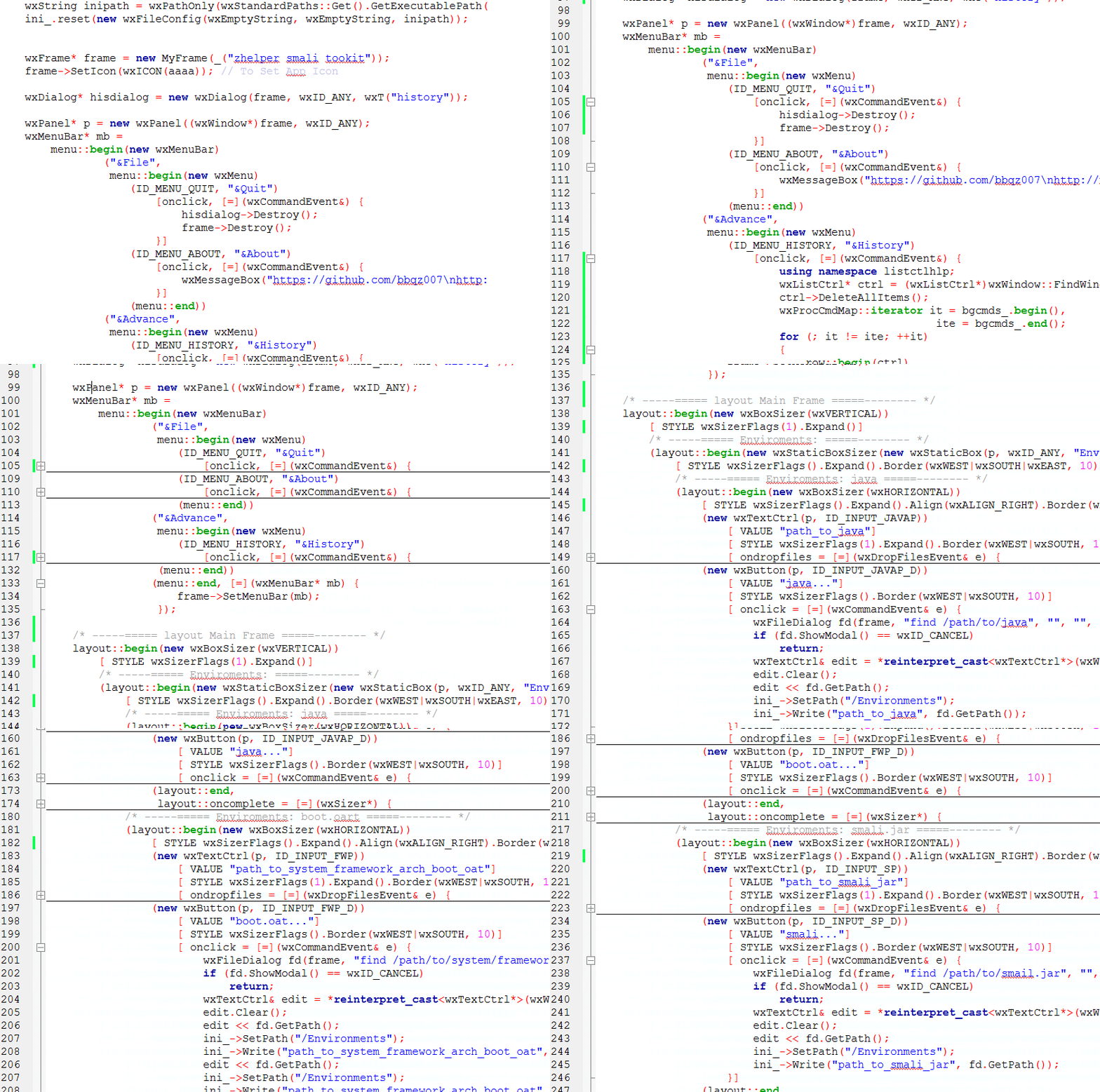
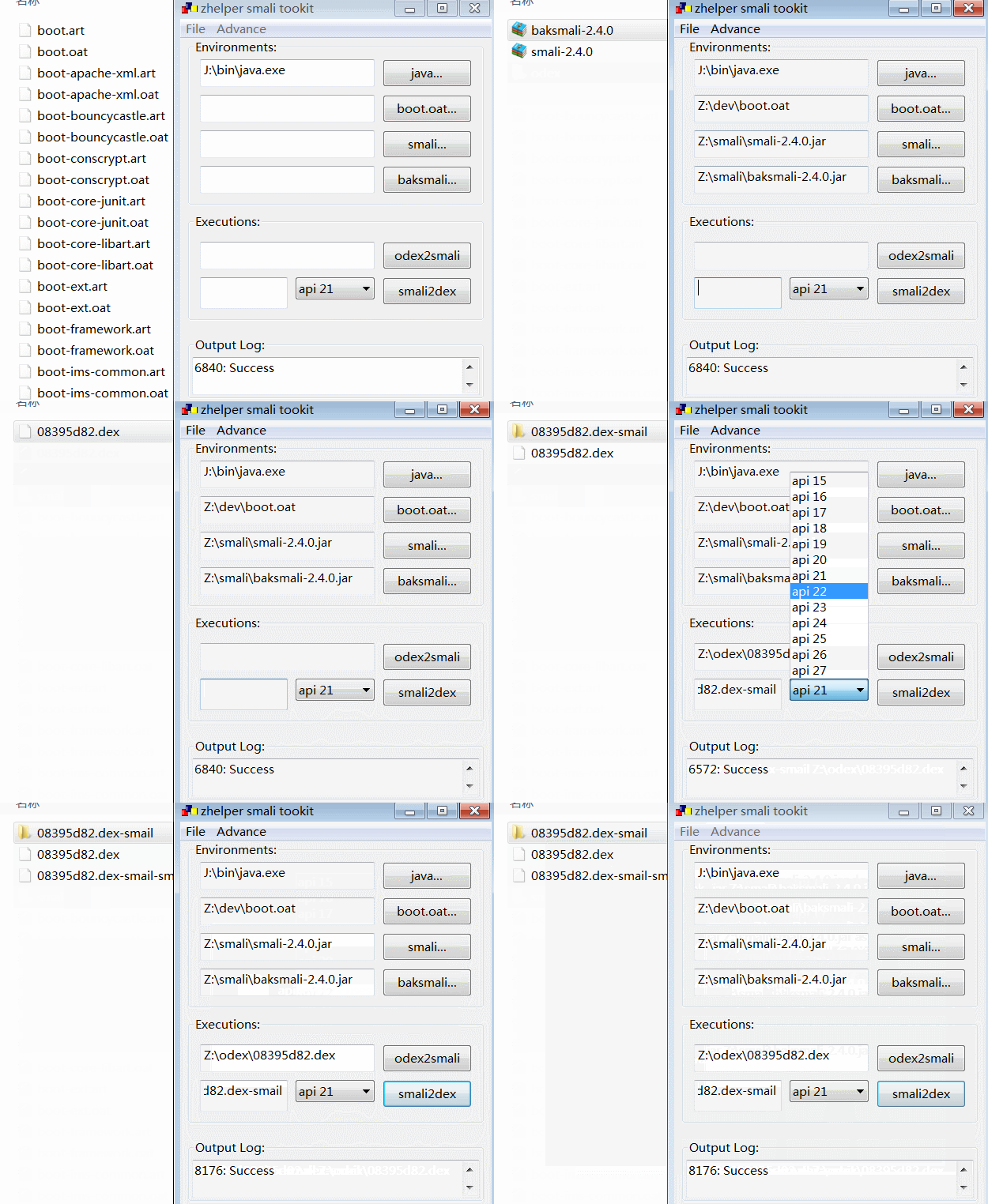
https://github.com/bbqz007/zhelper-wxWidgets
https://github.com/bbqz007/zhelper-wxWidgets/tree/master/demo/smali-toolkit
zhelper-wxWidgets
a helper header help you easy to program gui app on wxWidgets 3.x
you can easily write menus like this
Frame* frame = new Frame;

Delegate* delegate = new Delegate(frame);

menu::begin(new MenuBar)

    ("File",

         menu::begin(new Menu)

            (ID_OPEN, "open")

                [onclick = [=] (event& e) {

                    delegate->handle(e);

                }]

            (ID_NEW,  "new")

                [onclick, [=] (event& e) {

                    delegate->handle(e);

                }]

            (menu::end))

     ("About",

          menu::begin(new Menu)

            (ID_HELP,   "help")

                [onclick, [=] (event&)  {   }]

            (menu::end))

     (menu::end,

        [=] (MenuBar* mb) {

            frame->SetMenuBar(mb);

        });
you can easily write windows like this as well:
Frame* frame = new Frame;

layout::begin(new layout)

    (layout::begin(new layout)

        [layout_flags]

        (new textctrl)

            [layout_flags]

            [ ondropfiles = [] (event&) {} ]

            [ onchar = [] (event&) {} ]

        (new button)

            [layout_flags]

            [ onclick = [] (event&) {} ]

        (layout::end))

    (layout::begin(new layout)

        [layout_flags]

        (new textctrl)

            [layout_flags]

        (new button)

            [layout_flags]

            [ onclick = [] (event&) {} ]

        (layout::end))

    (layout::begin(new layout)

        (new button)

            [ onclick = [] (event&) {} ]

        (layout::end))

    (layout::begin(new layout)

        (new button)

            [ onclick = [] (event&) {} ]

        (layout::end))

    (layout::end,

     layout::oncomplete = [=] (layout& layout) {

         frame->SetLayout(layout);

     });
just easy like writing a html
<div id='0'>

    <div id='1'>

        <input type="button" onclick="handler()">

    </div>

    <div id='2'>

        <input type="button" onclick="handler()">

    </div>

    <div id='3'>

        <input type="button" onclick="handler()">

    </div>

    <div id='4'>

        <input type="button" onclick="handler()">

    </div>

</div>
how to use?
just include the header and use c++11.
how to write layouts?
1.begin with calling layout::begin(somelayout)
2.add elements(layout or widget) to layout, by calling operator () (widget)
3.configure your latest added elements, by calling operator [] (prop)
4.end with calling operator () (layout::end)
just like
layout::begin(somelayout)   // begin to write a layout

    [prop]              // configure layout properties of somelayout

    (new element)           // add a element to somelayout

        [prop]              // configure layout properties of new element

        [onclick = ...]     // configure onclick function associated with new element

        [onchar = ...]      // configure onchar function associated with new element

    (layout::end)           // end up writing a layout
new features for programming with wxListCtrl
you do not need to fill things into item then insert and lots of code,
you do not need to know about the interfaces of wxListCtrl.
you just need to write () and [ ].
- easy way to write wxListCtrl headers (columns)
wxListCtrl* p = new wxListCtrl;

using namespace zhelper::wxWidgets::listctrlhlp;

column::begin(p)

  ("col 1") [ font ] [ color ]

  ("col 2") [ font ] [ color ]

  (column::end)
- easy way to append rows into wxListCtrl
row::begin(p)

  ("row 1_col 1") [ font ] [ color ]

  ("row 1_col 2") [ font ] [ color ]

  (row::another)

  ("row 2_col 1") [ font ] [ color ]

  ("row 2_col 2") [ font ] [ color ]

  (row::end)
- easy way to modify cell of wxListCtrl
cell::begin(p)

  (1, 1)    // row 2 , col 2

    [ "change value" ] [ change_font ] [ change_color ]

  (0, 1)    // row 1 , col 2

    [ "change value" ] [ change_font ] [ change_color ]

   (cell:end)
zwx_helper 只用小括号()和中括号[ ] 轻松开发wxWidgets的更多相关文章
- javascript小括号、中括号、大括号学习总结
作为一名编程人员,和括号打交道是必不可少的.你可知道在不同的上下文中,括号的作用是不一样的,今天就让我们简单总结下javascript小括号.中括号.大括号的用法. 总的来说,JavaScript中小 ...
- Python的小括号( )、中括号[ ]和大括号{}分别代表什么?
python语言最常见的括号有三种,分别是:小括号( ).中括号[ ]和大括号也叫做花括号{ },分别用来代表不同的python基本内置数据类型. 1.python中的小括号( ):代表tuple元组 ...
- JS使用正则表达式获取小括号、中括号及花括号内容的方法示例
本文实例讲述了JS使用正则表达式获取小括号.中括号及花括号内容的方法.分享给大家供大家参考,具体如下: JS 正则表达式 获取小括号 中括号 花括号内的内容 <!DOCTYPE html> ...
- JavaScript小括号、中括号、大括号的多义性
语义1,函数声明时参数表 func(arg1,arg2){ // ... } 语义2,和一些语句联合使用以达到某些限定作用 // 和for in一起使用 for(var a in obj){ // . ...
- bash 括号(小括号,双小括号,中括号,双中括号,大括号)
小括号()和大括号{} 主要包括一下几种 ${var} $(cmd) ()和{} $((exp)) ${var:-string},${var:+string},${var:=string},${var ...
- shell中的括号(小括号,中括号,大括号)及单引号、 双引号,反引号(``)
一.小括号,园括号() 1.单小括号 () ①命令组.括号中的命令将会新开一个子shell顺序执行,所以括号中的变量不能够被脚本余下的部分使用.括号中多个命令之间用分号隔开,最后一个命令可以没有分号, ...
- shell之小括号、中括号、大括号
1.Shell中变量的原形:${var} 一串命令的执行 #等价于 $ var=test $ echo $var test #例如,用在这个位置 $ echo ${var}AA testAA 2.命 ...
- php使用正则表达式提取字符串中尖括号、小括号、中括号、大括号中的字符串
$str="你好<我>(爱)[北京]{天安门}"; echo f1($str); //返回你好 echo f2($str); //返回我 echo f3($str); ...
- php正则:匹配(),{},[]小括号,大括号,中括号里面的内容
php正则:匹配(),{},[]小括号,大括号,中括号里面的内容 比如有一段字符: $s='60c8 {"code":"200","message&q ...
随机推荐
- atom 之 前端必备插件
一. 语法支持 1. Language-label Ø ES2016.ESNext.JXS语法扩展 2. Language-postcss Ø Postcss语法高亮 二. 自动补全 1. Autoc ...
- Python下redis包安装
找到Python的第三方包安装路径,在dos命令行中切换到该目录,输入: pip install redis 最后在Python解释器中即可.
- WebRTC 及点对点网络通信机制
原文请查阅这里,略有删减,本文采用知识共享署名 4.0 国际许可协议共享,BY Troland. 这是 JavaScript 工作原理第十八章. 概述 何为 WebRTC ?首先,字面上已经给出了关于 ...
- 与IBM的Lin Sun关于Istio 1.0和微服务的问答
北京时间 7 月 31 日,Istio 正式发布了 1.0 版本,并表示已经可用于生产环境.该版本的主要新特性包括跨集群 mesh 支持.细粒度流量控制以及在一个 mesh 中增量推出 mutual ...
- 澳大利亚公共服务部门神速完成Win10部署:4个月完成44000台设备升级
不到一年时间,澳大利亚公共服务部门已经完成Win10系统部署升级,涉及到全部的35000名员工.在2015年,澳大利亚公共服务部门IT员工告知微软,需要更创新的方式远程为居民提供服务,并且效率要更快. ...
- JavaScript实现插入排序
一.插入排序简介: 想象我们斗地主,摸排阶段,手里的牌都按照从小到大排序.如果每摸一张牌,我们就把他插入合适的位置,使得它比后面位置的牌小,比前面位置的牌大或者相等. 类似这样的一种排序方法就是插入排 ...
- 数学--数论--Hdu 1452 Happy 2004(积性函数性质+和函数公式+快速模幂+乘法逆元)
Consider a positive integer X,and let S be the sum of all positive integer divisors of 2004^X. Your ...
- 涉及secureCRT中文显示的一些设置
1.secureCRT中文显示乱码: 如果你的linux本身是显示着中文的,可进行如下设置: 选项->会话选项 外观->字符编码改为UTF-8,确定即可 2.secureCRT中文横向显示 ...
- Java采用反射技术创建对象后对目标类的成员变量和成员方法进行访问
实现: package com.ljy; import java.lang.reflect.Field; import java.lang.reflect.Method; /** * * @Class ...
- P1640 连续攻击游戏
题目传送门 Ⅰ.二分图匹配 其实这题应该不难看出是二分图匹配(尽管我没看出来) 每个物品只能用一次,实际上就是1~n的数字对物品的最大匹配 把物品的两个属性向物品编号连边,之后就从数字1一直匹配过去 ...