
组合模式(c++实现)
组合模式
定义
将对象组合成树形结构以表示“部分-整体”的层次结构。组合模式是的用户对单个对象和组合对象的使用具有一致性。
动机
当你发现需求中是体现部分与整体层次的结构时,以及你希望用户可以忽略组合对象与单个对象的不同,统一的使用组合对象结构中的所有对象时,就应该考虑用组合模式了。
UML类图
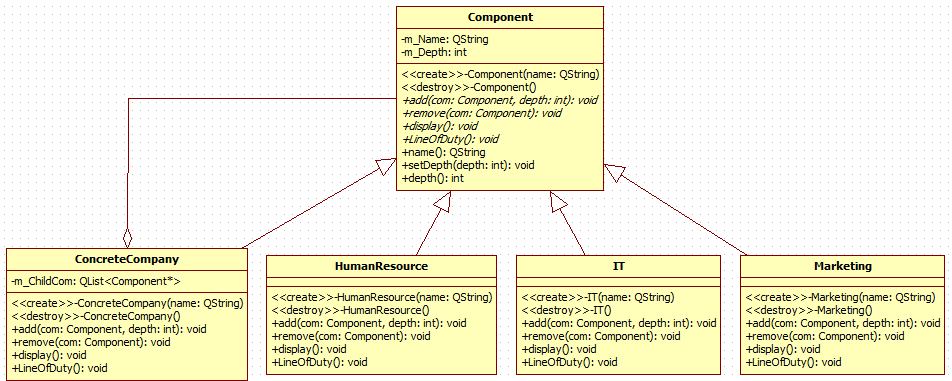
场景拆解
以一个大型公司为需求背景,组织我们的代码。一个北京总公司,下面有郑州和西安两个分公司。然后每个公司不管是总公司还是分公司都有自己的人力资源部,IT部和市场部。
源码实现
- component.h
#ifndef COMPONENT_H

#define COMPONENT_H

#include <QList>

class Component

{

public:

    Component(QString name);

    virtual ~Component();

    virtual void add(Component* com, int depth = 0) = 0;

    virtual void remove(Component* com) = 0;

    virtual void display() = 0;

    virtual void LineOfDuty() = 0;

    QString name();

    void setDepth(int depth);

    int depth();

private:

    QString         m_Name;

    int                 m_Depth;

};

class ConcreteCompany : public Component

{

public:

    ConcreteCompany(QString name);

    virtual ~ConcreteCompany();

    virtual void add(Component* com, int depth = 0);

    virtual void remove(Component* com);

    virtual void display();

    virtual void LineOfDuty();

private:

    QList<Component*> m_ChildCom;

};

class HumanResource : public Component

{

public:

    HumanResource(QString name);

    virtual ~HumanResource();

    virtual void add(Component* com, int depth = 0);

    virtual void remove(Component* com);

     virtual void display();

    virtual void LineOfDuty();

};

class IT : public Component

{

public:

    IT(QString name);

    virtual ~IT();

    virtual void add(Component* com, int depth = 0);

    virtual void remove(Component* com);

     virtual void display();

    virtual void LineOfDuty();

};

class Marketing : public Component

{

public:

    Marketing(QString name);

    virtual ~Marketing();

    virtual void add(Component* com, int depth = 0);

    virtual void remove(Component* com);

     virtual void display();

    virtual void LineOfDuty();

};

#endif // COMPONENT_H
- component.cpp
/************************************

    * @brief	: 安排一下故事背景:有一个王者农药全国总公司在深圳,现在想要在全国开办事处

    * 1.北京办事处- 招聘部,研发部,市场部

    * 2.郑州办事处- 招聘部,研发部,市场部

    * 3.西安办事处- 招聘部,研发部,市场部

    * and so on...

    * @author	:   wzx

    * @date	:   2020-05-11

    * @project	:  Composite

*************************************/

#include <QDebug>

#include "component.h"

#define DELETEOBJECT(x) if(x) { delete x; x = nullptr; }

Component::Component(QString name):m_Name(name) {}

Component::~Component(){}

QString Component::name()

{

    return m_Name;

}

void Component::setDepth(int depth)

{

    m_Depth = depth;

}

int Component::depth()

{

    return m_Depth;

}

ConcreteCompany::ConcreteCompany(QString name)

    : Component(name)

{

}

ConcreteCompany::~ConcreteCompany()

{

    for(auto com : m_ChildCom)

    {

        DELETEOBJECT(com);

    }

    m_ChildCom.clear();

}

void ConcreteCompany::add(Component* com, int depth)

{

    com->setDepth(depth);

    m_ChildCom.append(com);

}

void ConcreteCompany:: remove(Component* com)

{

    m_ChildCom.removeOne(com);

}

void ConcreteCompany::display()

{

    QString str;

    for(int n = 0; n < depth(); ++n)

        str += "--";

    qDebug() << qPrintable(str)  <<  (name());

    for(auto com : m_ChildCom)

    {

        com->display();

    }

}

void ConcreteCompany::LineOfDuty()

{

}

HumanResource::HumanResource(QString name)

    : Component(name)

{

}

HumanResource::~HumanResource()

{

}

void HumanResource::add(Component* com, int depth)

{

    com->setDepth(depth);

}

void HumanResource::remove(Component* com)

{

}

void HumanResource::display()

{

    QString str;

    for(int n = 0; n < depth(); ++n)

        str += "--";

    qDebug() << qPrintable(str)  <<  (name());

}

void HumanResource::LineOfDuty()

{

    qDebug() << "人力资源部,负责招聘";

}

IT::IT(QString name)

    : Component(name)

{

}

IT::~IT()

{

}

void IT::add(Component* com, int depth)

{

    com->setDepth(depth);

}

void IT::remove(Component* com)

{

}

void IT::display()

{

    QString str;

    for(int n = 0; n < depth(); ++n)

        str += "--";

    qDebug() << qPrintable(str)  <<  (name());

}

void IT::LineOfDuty()

{

    qDebug() << "IT部门,负责写代码";

}

Marketing::Marketing(QString name)

    : Component(name)

{

}

Marketing::~Marketing()

{

}

void Marketing::add(Component* com, int depth)

{

    com->setDepth(depth);

}

void Marketing::remove(Component* com)

{

}

void Marketing::display()

{

    QString str;

    for(int n = 0; n < depth(); ++n)

        str += "--";

    qDebug() << qPrintable(str)  <<  name();

}

void Marketing::LineOfDuty()

{

    qDebug() << "市场部门,负责市场推广";

}
- main.cpp
#include <QCoreApplication>

#include <QDebug>

#include "component.h"

int main(int argc, char *argv[])

{

    QCoreApplication a(argc, argv);

    Component* root = new ConcreteCompany("北京总部");

    root->setDepth(0);

    root->add(new HumanResource("人力资源部门"), 1);

    root->add(new IT("IT部门"), 1);

    root->add(new Marketing("市场部门"), 1);

    Component* zz = new ConcreteCompany("郑州办事处");

    zz->add(new HumanResource("人力资源部门"), 2);

    zz->add(new IT("IT部门"), 2);

    zz->add(new Marketing("市场部门"), 2);

    root->add(zz, 1);

    Component* xa = new ConcreteCompany("西安办事处");

    xa->add(new HumanResource("人力资源部门"), 2);

    xa->add(new IT("IT部门"), 2);

    xa->add(new Marketing("市场部门"), 2);

    root->add(xa, 1);

    root->display();

    return a.exec();

}
- 运行结果
"北京总部"
-- "人力资源部门"
-- "IT部门"
-- "市场部门"
-- "郑州办事处"
---- "人力资源部门"
---- "IT部门"
---- "市场部门"
-- "西安办事处"
---- "人力资源部门"
---- "IT部门"
---- "市场部门"
优点
组合模式定义了包含基本对象和组合对象的类层次结构。基本对象可以组合成更复杂的组合对象,而这个组合对象又可以被组合,这样不断的递归下去,客户代码中,任何用到基本对象的地方都可以使用组合对象了。
缺点
参考《大化设计模式》
组合模式(c++实现)的更多相关文章
- ComponentPattern (组合模式)
import java.util.LinkedList; /** * 组合模式 * * @author TMAC-J 主要用于树状结构,用于部分和整体区别无区别的场景 想象一下,假设有一批连锁的理发店 ...
- 设计模式(十一):从文Finder中认识"组合模式"(Composite Pattern)
上一篇博客中我们从从电影院中认识了"迭代器模式"(Iterator Pattern),今天我们就从文件系统中来认识一下“组合模式”(Composite Pattern).说到组合模 ...
- 设计模式(十)组合模式(Composite Pattern)
一.引言 在软件开发过程中,我们经常会遇到处理简单对象和复合对象的情况,例如对操作系统中目录的处理就是这样的一个例子,因为目录可以包括单独的文件,也可以包括文件夹,文件夹又是由文件组成的,由于简单对象 ...
- 设计模式--组合模式Composite(结构型)
一.概念 组合模式允许你将对象组合成树形结构来表现"整体/部分"层次结构.组合能让客户以一致的方式处理个别对象以及对象组合. 二.UML图 1.Component(对象接口),定义 ...
- 组合模式/composite模式/对象结构型模式
组合模式/composite模式/对象结构型 意图 将对象组合成树形结构以表示"整体--部分"的层次结构.Composite使得用户对单个对象和组合对象的使用具有一致性. 动机 C ...
- c#设计模式-组合模式
在软件开发过程中,我们经常会遇到处理简单对象和复合对象的情况,例如对操作系统中目录的处理就是这样的一个例子,因为目录可以包括单独的文件,也可以包括文件夹,文件夹又是由文件组成的,由于简单对象和复合对象 ...
- C#设计模式系列:组合模式(Composite)
1.组合模式简介 1.1>.定义 组合模式主要用来处理一类具有“容器特征”的对象——即它们在充当对象的同时,又可以作为容器包含其他多个对象. 1.2>.使用频率 中高 2.组合模式结构图 ...
- php实现设计模式之 组合模式
<?php /** * 组合模式 * * 将对象组合成树形结构以表示"部分-整体"的层次结构,使得客户对单个对象和复合对象的使用具有一致性 * * * 1) 抽象构件角色Co ...
- 轻松掌握:JavaScript组合模式
组合模式 组合模式:将一组对象组合成树形结构,并统一对待组合对象和叶对象,忽略它们之间的不同(因为叶对象也可以也可以包含叶对象而成为组合对象),组合模式中的对象只能是一对多的关系,不能出现多对一. 基 ...
- java设计模式之组合模式
组合模式 组合模式,将对象组合成树形结构以表示“部分-整体”的层次结构,组合模式使得用户对单个对象和组合对象的使用具有一致性.掌握组合模式的重点是要理解清楚 “部分/整体” 还有 ”单个对象“ 与 & ...
随机推荐
- SpringBoot系列(八)分分钟学会Springboot多种解决跨域方式
SpringBoot系列(八) 分分钟学会SpringBoot多种跨域解决方式 往期推荐 SpringBoot系列(一)idea新建Springboot项目 SpringBoot系列(二)入门知识 s ...
- MySQL系列操作
Linux环境下安装使用MySQL Portal 数据备份&恢复 Portal
- 机器学习新手项目之N-gram分词
概述 对机器学习感兴趣的小伙伴,可以借助python,实现一个N-gram分词中的Unigram和Bigram分词器,来进行入门, github地址 此项目并将前向最大切词FMM和后向最大切词的结果作 ...
- Missing artifact net.sf.json-lib:json-lib:jar:2.2.3
<!-- https://mvnrepository.com/artifact/net.sf.json-lib/json-lib --><dependency> <gro ...
- windows批处理protoc生成C++代码
1 首先需要生成protoc的可执行文件,具体可以参考 https://www.cnblogs.com/cnxkey/articles/10152646.html 2 将单个protoc文件生成.h ...
- Windows线程+进程通信
一 Windows线程进程 1)定义 按照MS的定义, Windows中的进程简单地说就是一个内存中的可执行程序, 提供程序运行的各种资源. 进程拥有虚拟的地址空间, 可执行代码, 数据, 对象句柄集 ...
- Spring Data REST不完全指南(三)
上一篇我们介绍了使用Spring Data REST时的一些高级特性,以及使用代码演示了如何使用这些高级的特性.本文将继续讲解前面我们列出来的七个高级特性中的后四个.至此,这些特性能满足我们大部分的接 ...
- java 方法的重载、重写与重构
首先我们要知道重载.重写.重构的区别 重载:指的是在同一个类中,方法名相同,但是参数数量.参数类型或者返回类型不同的方法就叫做重载. 重写: 重写分两种.第一种的是在子类继承父类的情况下,通过@Ove ...
- 《工程热力学沈维道童钧耕第四版-带书签》高清pdf下载链接
<工程热力学沈维道童钧耕第四版-带书签>高清pdf下载链接 百度网盘链接:https://pan.baidu.com/s/1dWksA8O3y2JSfIQy5lrU5g 提取码:7x9w ...
- 每天都在用,但你知道 Tomcat 的线程池有多努力吗?
这是why的第 45 篇原创文章.说点不一样的线程池执行策略和线程拒绝策略,探讨怎么让线程池先用完最大线程池再把任务放到队列中. 荒腔走板 大家好,我是 why,一个四川程序猿,成都好男人. 先是本号 ...