
Spark教程——(5)PySpark入门
启动PySpark:
[root@node1 ~]# pyspark
Python 2.7.5 (default, Nov  6 2016, 00:28:07)
[GCC 4.8.5 20150623 (Red Hat 4.8.5-11)] on linux2
Type "help", "copyright", "credits" or "license" for more information.
Setting default log level to "WARN".
To adjust logging level use sc.setLogLevel(newLevel).
Welcome to
      ____              __
     / __/__  ___ _____/ /__
    _\ \/ _ \/ _ `/ __/  '_/
   /__ / .__/\_,_/_/ /_/\_\   version 1.6.0
      /_/

Using Python version 2.7.5 (default, Nov  6 2016 00:28:07)
SparkContext available as sc, HiveContext available as sqlContext.
上下文已经包含 sc 和 sqlContext:
SparkContext available as sc, HiveContext available as sqlContext.
执行脚本:
>>> from __future__ import print_function
>>> import os
>>> import sys
>>> from pyspark import SparkContext
>>> from pyspark.sql import SQLContext
>>> from pyspark.sql.types import Row, StructField, StructType, StringType, IntegerType# RDD is created from a list of rows
>>> some_rdd = sc.parallelize([Row(name="John", age=19),Row(name="Smith", age=23),Row(name="Sarah", age=18)])# Infer schema from the first row, create a DataFrame and print the schema
>>> some_df = sqlContext.createDataFrame(some_rdd)
>>> some_df.printSchema()
root
 |-- age: long (nullable = true)
 |-- name: string (nullable = true)
# Another RDD is created from a list of tuples
>>> another_rdd = sc.parallelize([("John", 19), ("Smith", 23), ("Sarah", 18)])# Schema with two fields - person_name and person_age
>>> schema = StructType([StructField("person_name", StringType(), False),StructField("person_age", IntegerType(), False)])# Create a DataFrame by applying the schema to the RDD and print the schema
>>> another_df = sqlContext.createDataFrame(another_rdd, schema)
>>> another_df.printSchema()
root
 |-- person_name: string (nullable = false)
 |-- person_age: integer (nullable = false)
进入Github下载people.json文件:
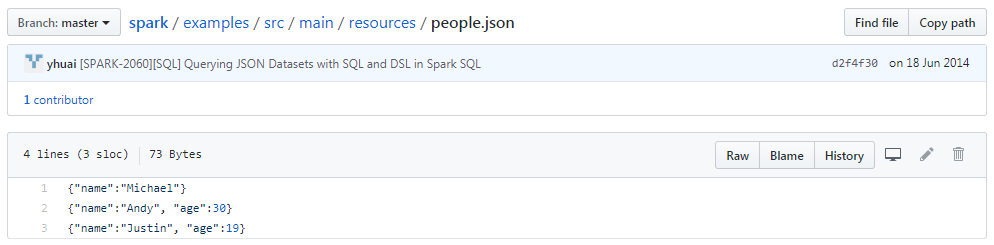
并上传到HDFS上:
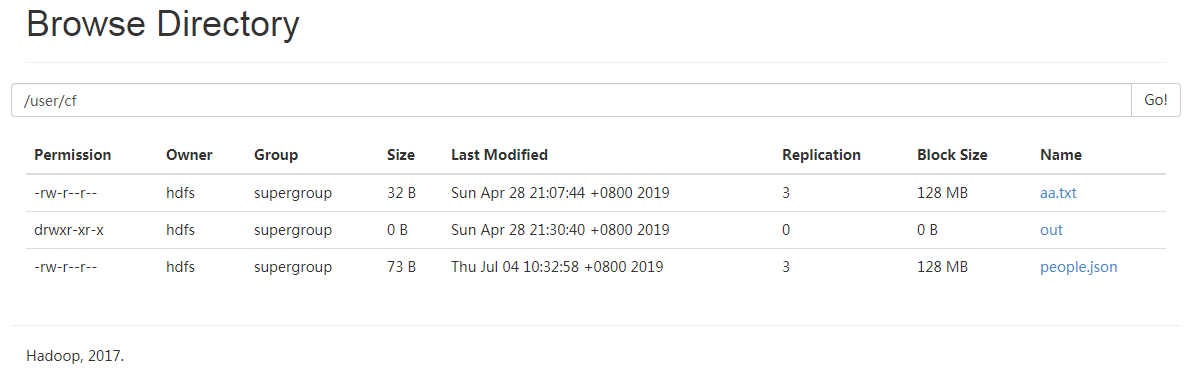
继续执行脚本:
# A JSON dataset is pointed to by path.
# The path can be either a single text file or a directory storing text files.
>>> if len(sys.argv) < 2:
...     path = "/user/cf/people.json"
... else:
...     path = sys.argv[1]
...
# Create a DataFrame from the file(s) pointed to by path
>>> people = sqlContext.jsonFile(path)
[Stage 5:>                                                          (0 + 1) / 2]19/07/04 10:34:33 WARN spark.ExecutorAllocationManager: No stages are running, but numRunningTasks != 0
# The inferred schema can be visualized using the printSchema() method.
>>> people.printSchema()
root
 |-- age: long (nullable = true)
 |-- name: string (nullable = true)

# Register this DataFrame as a table.
>>> people.registerAsTable("people")
/opt/cloudera/parcels/CDH-5.14.2-1.cdh5.14.2.p0.3/lib/spark/python/pyspark/sql/dataframe.py:142: UserWarning: Use registerTempTable instead of registerAsTable.
  warnings.warn("Use registerTempTable instead of registerAsTable.")
# SQL statements can be run by using the sql methods provided by sqlContext
>>> teenagers = sqlContext.sql("SELECT name FROM people WHERE age >= 13 AND age <= 19")
>>> for each in teenagers.collect():
...     print(each[0])
...
Justin
执行结束:
>>> sc.stop()
>>>
参考程序:
#
# Licensed to the Apache Software Foundation (ASF) under one or more
# contributor license agreements.  See the NOTICE file distributed with
# this work for additional information regarding copyright ownership.
# The ASF licenses this file to You under the Apache License, Version 2.0
# (the "License"); you may not use this file except in compliance with
# the License.  You may obtain a copy of the License at
#
#    http://www.apache.org/licenses/LICENSE-2.0
#
# Unless required by applicable law or agreed to in writing, software
# distributed under the License is distributed on an "AS IS" BASIS,
# WITHOUT WARRANTIES OR CONDITIONS OF ANY KIND, either express or implied.
# See the License for the specific language governing permissions and
# limitations under the License.
#

from __future__ import print_function

import os
import sys

from pyspark import SparkContext
from pyspark.sql import SQLContext
from pyspark.sql.types import Row, StructField, StructType, StringType, IntegerType

if __name__ == "__main__":
    sc = SparkContext(appName="PythonSQL")
    sqlContext = SQLContext(sc)

    # RDD is created from a list of rows
    some_rdd = sc.parallelize([Row(name="John", age=19),
                              Row(name="Smith", age=23),
                              Row(name="Sarah", age=18)])
    # Infer schema from the first row, create a DataFrame and print the schema
    some_df = sqlContext.createDataFrame(some_rdd)
    some_df.printSchema()

    # Another RDD is created from a list of tuples
    another_rdd = sc.parallelize([("John", 19), ("Smith", 23), ("Sarah", 18)])
    # Schema with two fields - person_name and person_age
    schema = StructType([StructField("person_name", StringType(), False),
                        StructField("person_age", IntegerType(), False)])
    # Create a DataFrame by applying the schema to the RDD and print the schema
    another_df = sqlContext.createDataFrame(another_rdd, schema)
    another_df.printSchema()
    # root
    #  |-- age: integer (nullable = true)
    #  |-- name: string (nullable = true)

    # A JSON dataset is pointed to by path.
    # The path can be either a single text file or a directory storing text files.
    if len(sys.argv) < 2:
        path = "file://" + \
            os.path.join(os.environ['SPARK_HOME'], "examples/src/main/resources/people.json")
    else:
        path = sys.argv[1]
    # Create a DataFrame from the file(s) pointed to by path
    people = sqlContext.jsonFile(path)
    # root
    #  |-- person_name: string (nullable = false)
    #  |-- person_age: integer (nullable = false)

    # The inferred schema can be visualized using the printSchema() method.
    people.printSchema()
    # root
    #  |-- age: IntegerType
    #  |-- name: StringType

    # Register this DataFrame as a table.
    people.registerAsTable("people")

    # SQL statements can be run by using the sql methods provided by sqlContext
    teenagers = sqlContext.sql("SELECT name FROM people WHERE age >= 13 AND age <= 19")

    for each in teenagers.collect():
        print(each[0])

    sc.stop()
Spark教程——(5)PySpark入门的更多相关文章
- Spark教程——(11)Spark程序local模式执行、cluster模式执行以及Oozie/Hue执行的设置方式
本地执行Spark SQL程序: package com.fc //import common.util.{phoenixConnectMode, timeUtil} import org.apach ...
- Spring_MVC_教程_快速入门_深入分析
Spring MVC 教程,快速入门,深入分析 博客分类: SPRING Spring MVC 教程快速入门 资源下载: Spring_MVC_教程_快速入门_深入分析V1.1.pdf Spring ...
- AFNnetworking快速教程,官方入门教程译
AFNnetworking快速教程,官方入门教程译 分类: IOS2013-12-15 20:29 12489人阅读 评论(5) 收藏 举报 afnetworkingjsonios入门教程快速教程 A ...
- 【译】ASP.NET MVC 5 教程 - 1:入门
原文:[译]ASP.NET MVC 5 教程 - 1:入门 本教程将教你使用Visual Studio 2013 预览版构建 ASP.NET MVC 5 Web 应用程序 的基础知识.本主题还附带了一 ...
- Nginx教程(一) Nginx入门教程
Nginx教程(一) Nginx入门教程 1 Nginx入门教程 Nginx是一款轻量级的Web服务器/反向代理服务器及电子邮件(IMAP/POP3)代理服务器,并在一个BSD-like协议下发行.由 ...
- spark教程
某大神总结的spark教程, 地址 http://litaotao.github.io/introduction-to-spark?s=inner
- Android基础-系统架构分析,环境搭建,下载Android Studio,AndroidDevTools,Git使用教程,Github入门,界面设计介绍
系统架构分析 Android体系结构 安卓结构有四大层,五个部分,Android分四层为: 应用层(Applications),应用框架层(Application Framework),系统运行层(L ...
- Spark SQL 编程API入门系列之SparkSQL的依赖
不多说,直接上干货! 不带Hive支持 <dependency> <groupId>org.apache.spark</groupId> <artifactI ...
- spark教程(七)-文件读取案例
sparkSession 读取 csv 1. 利用 sparkSession 作为 spark 切入点 2. 读取 单个 csv 和 多个 csv from pyspark.sql import Sp ...
- spark教程(六)-Python 编程与 spark-submit 命令
hadoop 是 java 开发的,原生支持 java:spark 是 scala 开发的,原生支持 scala: spark 还支持 java.python.R,本文只介绍 python spark ...
随机推荐
- 微服务、分库分表、分布式事务管理、APM链路跟踪性能分析演示项目
好多年没发博,最近有时间整理些东西,分享给大家. 所有内容都在github项目liuzhibin-cn/my-demo中,基于SpringBoot,演示Dubbo微服务 + Mycat, Shardi ...
- LNMP环境搭建(PHP7.4.0)
目录 准备工作 安装wget 安装net-tools 安装vim 配置显示行号 关闭防火墙 安装Nginx 安装依赖 编译安装Nginx 配置环境变量 Systemd管理 安装MySQL 安装依赖 下 ...
- 兵贵神速!掌握这10个Python技巧,让你代码工作如鱼得水
主题 Python 1000个读者心中有1000个哈姆雷特,要问1000个程序员“什么才是最好的语言”,Java.Python.PHP.C++ 也都有自己的位置.但要问编程语言流行指数之王非,那真的非 ...
- Stream:java1.8新特性
原 Stream:java1.8新特性 2017年08月01日 18:15:43 kekeair-zhang 阅读数:392 标签: streamjava1-8新特性 更多 个人分类: 日记 版权声明 ...
- RS232与RS485
1.RS232实物图与引脚图? 2.RS485实物图与引脚图?
- 【代码学习】PYTHON字典(Dictionary)
一.什么是字典 字典是另一种可变容器模型,且可存储任意类型对象. 字典的每个键值(key->value)对用(:)分割,每个对之间用逗号(,)分割,整个字典包括在花括号({})中,格式如下 d ...
- Beego Learning Notes
Beego框架学习 1.1软件框架 一个公司是由公司中的各部部门来组成的,每一个部门拥有特定的职能,部门与部门之间通过相互的配合来完成让公司运转起来. 一个软件框架是由其中各个软件模块组成的,每一个模 ...
- ASA防火墙忘记密码之后的恢复步骤
ASA的密码恢复方法与路由器相似,修改配置寄存器的值,启动时绕过startup-config配置文件,重新配置密码. 密码恢复的步骤如下: (1)重新插拔电源线,重启ASA (2)按ESC键或Ctrl ...
- 洛谷P1164小A点菜(01背包)
题目背景 uim神犇拿到了uoi的ra(镭牌)后,立刻拉着基友小A到了一家……餐馆,很低端的那种. uim指着墙上的价目表(太低级了没有菜单),说:“随便点”. 题目描述 不过uim由于买了一些辅(e ...
- IIS 配置迁移
使用管理员身份运行cmd 应用程序池: # 导出所有应用程序池 %windir%\system32\inetsrv\appcmd list apppool /config /xml > c:\a ...