
SilverLight-DataControls:四、The PagedCollectionView(分页的集合视图) 对象
| ylbtech-SilverLight-DataControls-PagedCollectionView:The PagedCollectionView(分页的集合视图) 对象 |
- 1.A, Building a Data Object(创建一个数据对象)
- 1.B, Sorting(排序)
- 1.C, Filtering(过滤)
- 1.D, Grouping(分组)
- 1.E, Paging(分页)
| 1.A, Building a Data Object(创建一个数据对象)返回顶部 |
/Access/Product.cs
using System;

using System.Collections.Generic;

using System.Linq;

using System.ComponentModel.DataAnnotations;

namespace SLYlbtechApp.Access

{

    /// <summary>

    /// 产品类

    /// </summary>

    public class Product

    {

        int productId;

        /// <summary>

        /// 编号【PK】

        /// </summary>

        public int ProductId

        {

            get { return productId; }

            set { productId = value; }

        }

        string productName;

        /// <summary>

        /// 产品名称

        /// </summary>

        public string ProductName

        {

            get

            {

                return productName;

            }

            set

            {

                if (value=="") throw new ArgumentException("不能为空");

                productName = value;

            }

        }

        string quantityPerUnit;

        /// <summary>

        /// 产品规格

        /// </summary>

        public string QuantityPerUnit

        {

            get { return quantityPerUnit; }

            set { quantityPerUnit = value; }

        }

        /// <summary>

        /// 单位价格

        /// 注意 不要使用 decimal 类型,在 UserControl.Resounrce 资源绑定是引发类型转换异常

        /// </summary>

        double unitPrice;

        [Display(Name="价格",Description="价格不能小于0")]

        public double UnitPrice

        {

            get { return unitPrice; }

            set

            {

                if (value < ) throw new ArgumentException("不能小于0");

                unitPrice = value;

            }

        }

        string description;

        /// <summary>

        /// 描述

        /// </summary>

        public string Description

        {

            get { return description; }

            set { description = value; }

        }

        string productImagePath;

        /// <summary>

        /// 产品图片地址

        /// </summary>

        public string ProductImagePath

        {

            get { return productImagePath; }

            set { productImagePath = value; }

        }

        string categoryName;

        /// <summary>

        /// 类别名称

        /// </summary>

        public string CategoryName

        {

            get { return categoryName; }

            set { categoryName = value; }

        }

        DateTime addedDate;

        /// <summary>

        /// 添加日期

        /// </summary>

        public DateTime AddedDate

        {

            get { return addedDate; }

            set { addedDate = value; }

        }

        /// <summary>

        /// 空参构造

        /// </summary>

        public Product()

        {

            AddedDate = new DateTime(, , ); //设置默认日期

        }

        /// <summary>

        /// 全参构造

        /// </summary>

        /// <param name="productId"></param>

        /// <param name="productName"></param>

        /// <param name="quantityPerUnit"></param>

        /// <param name="unitPrice"></param>

        /// <param name="description"></param>

        /// <param name="productImagePath"></param>

        /// <param name="categoryName"></param>

        public Product(int productId, string productName, string quantityPerUnit, double unitPrice, string description

            , string productImagePath, string categoryName)

        {

            ProductId = productId;

            ProductName=productName;

            QuantityPerUnit=quantityPerUnit;

            UnitPrice=unitPrice;

            Description=description;

            ProductImagePath=productImagePath;

            CategoryName=categoryName;

        }

        /// <summary>

        /// 获取全部产品

        /// </summary>

        /// <returns></returns>

        public static IList<Product> GetAll()

        {

            IList<Product> dals = new List<Product>();

            string categoryName = string.Empty;

            string productImagePath = string.Empty;

            string description = "嗟夫!草木无情,有时飘零。人为动物,惟物之灵。百忧感其心,万事劳其形,有动于中,必摇其精。而况思其力之所不及,忧其智之所不能,宜其渥然丹者为槁木,黟然黑者为星星。奈何以非金石之质,欲与草木而争荣?念谁为之戕贼,亦何恨乎秋声!";

            #region Add Product

            #region 饮料

            categoryName = "饮料";

            productImagePath = "../Images/pencil.jpg";

            dals.Add(new Product()

            {

                ProductId = ,

                ProductName = "啤酒",

                QuantityPerUnit = "1箱*6听",

                UnitPrice = 10d,

                CategoryName = categoryName

                ,

                ProductImagePath = productImagePath,

                Description = description

            });

            dals.Add(new Product()

            {

                ProductId = ,

                ProductName = "绿茶",

                QuantityPerUnit = "500ml",

                UnitPrice = 3d,

                CategoryName = categoryName

                ,

                ProductImagePath = productImagePath,

                Description = description

            });

            dals.Add(new Product()

            {

                ProductId = ,

                ProductName = "红茶",

                QuantityPerUnit = "500ml",

                UnitPrice = 3d,

                CategoryName = categoryName

                ,

                ProductImagePath = productImagePath,

                Description = description

            });

            dals.Add(new Product()

            {

                ProductId = ,

                ProductName = "纯净水",

                QuantityPerUnit = "500ml",

                UnitPrice = 1.5d,

                CategoryName = categoryName

                ,

                ProductImagePath = productImagePath,

                Description = description

            });

            #endregion

            #region 零食

            categoryName = "零食";

            productImagePath = "../Images/pencil2.jpg";

            dals.Add(new Product()

            {

                ProductId = ,

                ProductName = "奥利奥巧克力饼干",

                QuantityPerUnit = "10 boxes x 20 bags",

                UnitPrice = 30d,

                CategoryName = categoryName

                ,

                ProductImagePath = productImagePath,

                Description = description

            });

            dals.Add(new Product()

            {

                ProductId = ,

                ProductName = "玻璃 海苔",

                QuantityPerUnit = "20g",

                UnitPrice = 13d,

                CategoryName = categoryName

                ,

                ProductImagePath = productImagePath,

                Description = description

            });

             dals.Add(new Product()

             {

                 ProductId = ,

                 ProductName = "好丽友 薯片",

                 QuantityPerUnit = "100g",

                 UnitPrice = 3d,

                 CategoryName = categoryName

                 ,

                 ProductImagePath = productImagePath,

                 Description = description

             });

             dals.Add(new Product()

             {

                 ProductId = ,

                 ProductName = "统一 老坛酸菜面",

                 QuantityPerUnit = "1 盒",

                 UnitPrice = 8.5d,

                 CategoryName = categoryName

                 ,

                 ProductImagePath = productImagePath,

                 Description = description

             });

            #endregion

            #endregion

             return dals;

        }

        /// <summary>

        /// GetModel

        /// </summary>

        /// <returns></returns>

        public static Product GetModel()

        {

            Product dal = null;

            string categoryName = string.Empty;

            string productImagePath = string.Empty;

            string description = "嗟夫!草木无情,有时飘零。人为动物,惟物之灵。百忧感其心,万事劳其形,有动于中,必摇其精。而况思其力之所不及,忧其智之所不能,宜其渥然丹者为槁木,黟然黑者为星星。奈何以非金石之质,欲与草木而争荣?念谁为之戕贼,亦何恨乎秋声!";

            categoryName = "饮料";

            productImagePath = "Images/pencil.jpg";

            dal = new Product()

            {

                ProductId = ,

                ProductName = "啤酒",

                QuantityPerUnit = "1箱*6听",

                UnitPrice=3.5,

                CategoryName = categoryName

                ,

                ProductImagePath = productImagePath,

                Description = description

            };

            //dal._unitPrice = 10d;

            return dal;

        }

        /// <summary>

        /// GetModel

        /// </summary>

        /// <param name="id">产品编号</param>

        /// <returns></returns>

        public static Product GetModel(int id)

        {

            Product dal = null;

            IList<Product> dals = GetAll();

            try

            {

                dal = dals.Single(p => p.ProductId == id);

            }

            catch { }

            finally

            {

                dals = null;

            }

            return dal;

        }

    }

}
4,
| 1.B, Sorting(排序)返回顶部 |
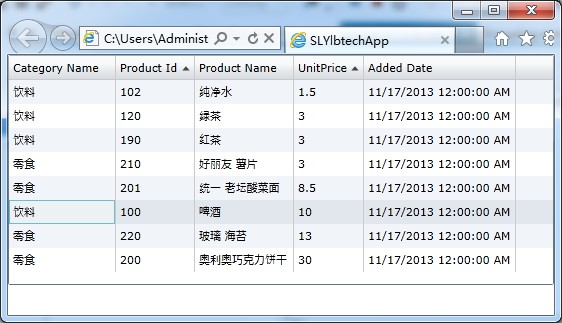
xmlns:data="clr-namespace:System.Windows.Controls;assembly=System.Windows.Controls.Data"
2.2/3,
<Grid x:Name="LayoutRoot" Background="White">

    <Grid.RowDefinitions>

        <RowDefinition Height="*"></RowDefinition>

        <RowDefinition Height="30"></RowDefinition>

    </Grid.RowDefinitions>

    <data:DataGrid Grid.Row="0" x:Name="gridList" AutoGenerateColumns="False">

        <data:DataGrid.Columns>

            <data:DataGridTextColumn Header="Category Name" Binding="{Binding CategoryName}"></data:DataGridTextColumn>

            <data:DataGridTextColumn Header="Product Id" Binding="{Binding ProductId}"></data:DataGridTextColumn>

            <data:DataGridTextColumn Header="Product Name" Binding="{Binding ProductName}"></data:DataGridTextColumn>

            <data:DataGridTextColumn Header="UnitPrice" Binding="{Binding UnitPrice}" CanUserReorder="True"></data:DataGridTextColumn>

            <data:DataGridTextColumn Header="Added Date" Binding="{Binding AddedDate}"></data:DataGridTextColumn>

        </data:DataGrid.Columns>

    </data:DataGrid>

</Grid>
2.3/3,
using System.Windows.Controls;

using SLYlbtechApp.Access;

using System.Windows.Data;

namespace SLYlbtechApp.ThePagedCollectionView

{

    public partial class Sorting : UserControl

    {

        public Sorting()

        {

            InitializeComponent();

            PagedCollectionView view = new PagedCollectionView(Product.GetAll());

            //排序

            view.SortDescriptions.Add(new System.ComponentModel.SortDescription("UnitPrice"

                , System.ComponentModel.ListSortDirection.Ascending));

            view.SortDescriptions.Add(new System.ComponentModel.SortDescription("ProductId"

                , System.ComponentModel.ListSortDirection.Ascending)); //二次排序

            this.gridList.ItemsSource = view;

        }

    }

}
3,
| 1.C, Filtering(过滤)返回顶部 |
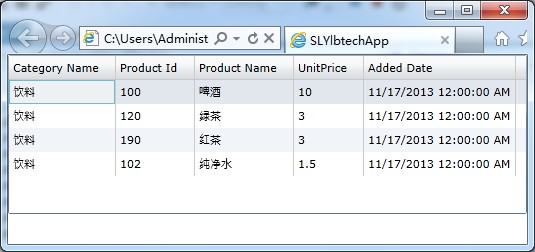
using System.Windows.Controls;

using SLYlbtechApp.Access;

using System.Windows.Data;

namespace SLYlbtechApp.ThePagedCollectionView

{

    public partial class Filtering : UserControl

    {

        public Filtering()

        {

            InitializeComponent();

            PagedCollectionView view = new PagedCollectionView(Product.GetAll());

            //过滤集合

            view.Filter = delegate(object filterObject)

            {

                Product product = (Product)filterObject;

                return (product.CategoryName == "饮料"); //只显示 类别名称等于“饮料”的商品

            };

            this.gridList.ItemsSource = view;

        }

    }

}
3,
| 1.D Grouping(分组)返回顶部 |
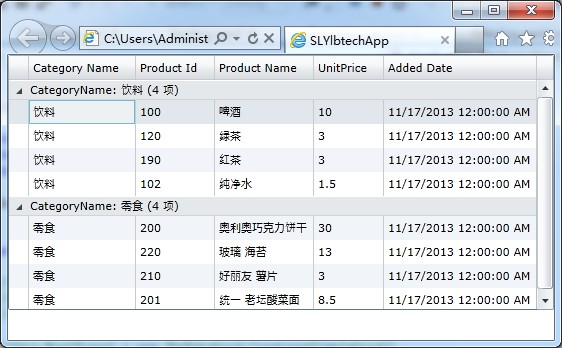
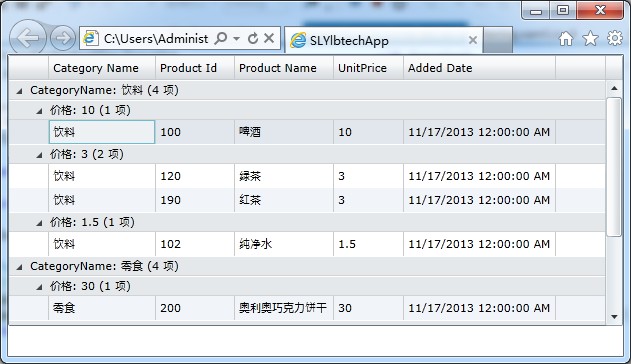
using System.Windows.Controls;

using SLYlbtechApp.Access;

using System.Windows.Data;

namespace SLYlbtechApp.ThePagedCollectionView

{

    public partial class Grouping : UserControl

    {

        public Grouping()

        {

            InitializeComponent();

            PagedCollectionView paged = new PagedCollectionView(Product.GetAll());

            //分组

            paged.GroupDescriptions.Add(new PropertyGroupDescription("CategoryName"));

            //paged.GroupDescriptions.Add(new System.Windows.Data.PropertyGroupDescription("UnitPrice")); //二次分组

            this.gridList.ItemsSource = paged;

        }

    }

}
3,
| 1.E, Paging(分页)返回顶部 |
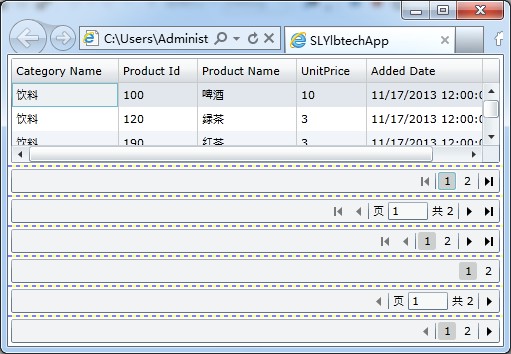
<Grid x:Name="LayoutRoot" ShowGridLines="True" Background="White">

    <Grid.RowDefinitions>

        <RowDefinition/>

        <RowDefinition Height="30"/>

        <RowDefinition Height="30"/>

        <RowDefinition Height="30"/>

        <RowDefinition Height="30"/>

        <RowDefinition Height="30"/>

        <RowDefinition Height="30"/>

    </Grid.RowDefinitions>

    <data:DataGrid x:Name="gridList" AutoGenerateColumns="False" Margin="3">

        <data:DataGrid.Columns>

            <data:DataGridTextColumn Header="Category Name" Binding="{Binding CategoryName}"></data:DataGridTextColumn>

            <data:DataGridTextColumn Header="Product Id" Binding="{Binding ProductId}"></data:DataGridTextColumn>

            <data:DataGridTextColumn Header="Product Name" Binding="{Binding ProductName}"></data:DataGridTextColumn>

            <data:DataGridTextColumn Header="UnitPrice" Binding="{Binding UnitPrice}" CanUserReorder="True"></data:DataGridTextColumn>

            <data:DataGridTextColumn Header="Added Date" Binding="{Binding AddedDate}"></data:DataGridTextColumn>

        </data:DataGrid.Columns>

    </data:DataGrid>

    <data:DataPager x:Name="pager" Grid.Row="1" Margin="3" IsTotalItemCountFixed="True"

                    PageSize="5" DisplayMode="FirstLastNumeric" Source="{Binding ItemsSource, ElementName=gridList}"/>

    <data:DataPager x:Name="pager2" Grid.Row="2" Margin="3" IsTotalItemCountFixed="True"

                    PageSize="5" Source="{Binding ItemsSource, ElementName=gridList}"/>

    <data:DataPager x:Name="pager3" Grid.Row="3" Margin="3" IsTotalItemCountFixed="True"

                    PageSize="5" DisplayMode="FirstLastPreviousNextNumeric" Source="{Binding ItemsSource, ElementName=gridList}"/>

    <data:DataPager x:Name="pager4" Grid.Row="4" Margin="3" IsTotalItemCountFixed="True"

                    PageSize="5" DisplayMode="Numeric" Source="{Binding ItemsSource, ElementName=gridList}"/>

    <data:DataPager x:Name="pager5" Grid.Row="5" Margin="3" IsTotalItemCountFixed="True"

                    PageSize="5" DisplayMode="PreviousNext" Source="{Binding ItemsSource, ElementName=gridList}"/>

    <data:DataPager x:Name="pager6" Grid.Row="6" Margin="3" IsTotalItemCountFixed="True"

                    PageSize="5" DisplayMode="PreviousNextNumeric" Source="{Binding ItemsSource, ElementName=gridList}"/>

</Grid>
2.3/3,
using System.Windows.Controls;

using SLYlbtechApp.Access;

using System.Windows.Data;

namespace SLYlbtechApp.ThePagedCollectionView

{

    public partial class Paging : UserControl

    {

        public Paging()

        {

            InitializeComponent();

            //分页

            PagedCollectionView view = new PagedCollectionView(Product.GetAll());

            this.gridList.ItemsSource = view;

        }

    }

}
3,
| 1.F,返回顶部 |
 |
作者:ylbtech 出处:http://ylbtech.cnblogs.com/ 本文版权归作者和博客园共有,欢迎转载,但未经作者同意必须保留此段声明,且在文章页面明显位置给出原文连接,否则保留追究法律责任的权利。 |
SilverLight-DataControls:四、The PagedCollectionView(分页的集合视图) 对象的更多相关文章
- 集合视图控制器(CollectionViewController) 、 标签控制器(TabBarController) 、 高级控件介绍
1 创建集合视图,设置相关属性以满足要求 1.1 问题 集合视图控制器UIConllectionViewController是一个展示大量数据的控制器,系统默认管理着一个集合视图UICollectio ...
- UICollectionView 集合视图 的使用
直接上代码: // // RootViewController.m // // #import "RootViewController.h" #import "Colle ...
- SQL Server -- 回忆笔记(四):case函数,索引,子查询,分页查询,视图,存储过程
SQL Server知识点回忆篇(四):case函数,索引,子查询,分页查询,视图,存储过程 1. CASE函数(相当于C#中的Switch) then '未成年人' else '成年人' end f ...
- 【转载】MDX Step by Step 读书笔记(四) - Working with Sets (使用集合)
1. Set - 元组的集合,在 Set 中的元组用逗号分开,Set 以花括号括起来,例如: { ([Product].[Category].[Accessories]), ([Product].[ ...
- C# List 集合 交集、并集、差集、去重, 对象集合、 对象、引用类型、交并差补、List<T>
关键词:C# List 集合 交集.并集.差集.去重, 对象集合. 对象.引用类型.交并差.List<T> 有时候看官网文档是最高效的学习方式! 一.简单集合 Intersect 交集, ...
- day 68 django 之api操作 | jQueryset集合与对象
我们的orm里面分为: jQueryset集合, 还有对象, 我们的jqueryset集合里面可以有多个对象,这句话的意思就是我们的对象是最小的单位,不可以再拆分了,我们的jQueryset集合就相当 ...
- 对象转型、迭代器Iterator、Set集合、装箱与拆箱、基本数据类型与字符串的转换、TreeSet集合与对象
包的声明与定义 需要注意的是,包的声明只能位于Java源文件的第一行. 在实际程序开发过程中,定义的类都是含有包名的: 如果没有显式地声明package语句,创建的类则处于默认包下: 在实际开发中 ...
- Java基础 - Map接口的实现类 : HashedMap / LinkedHashMap /TreeMap 的构造/修改/遍历/ 集合视图方法/双向迭代输出
Map笔记: import java.util.*; /**一:Collection接口的 * Map接口: HashMap(主要实现类) : HashedMap / LinkedHashMap /T ...
- UICollectionView(集合视图)以及自定义集合视图
一.UICollectionView集合视图 其继承自UIScrollView. UICollectionView类是iOS6新引进的API,用于展示集合视图,布局 ...
随机推荐
- jubeeeeeat(网络流)
jubeeeeeat 总时间限制: 1000ms 内存限制: 256000kB 描述 众所周知,LZF很喜欢打一个叫Jubeat的游戏.这是个音乐游戏,游戏界面是4×4的方阵,会根据音乐节奏要求玩 ...
- 国内外移动端web适配屏幕方案总结
基础知识点 设备像素:设备像素又称物理像素(physical pixel),设备能控制显示的最小单位,我们可以把这些像素看作成显示器上一个个的点. iPhone5的物理像素是640X1136. PS: ...
- 2.新手必须掌握的Linux命令
第2章 新手必须掌握的Linux命令 章节简述: 本章首先介绍系统内核和Shell终端的关系与作用,然后介绍Bash解释器的4大优势并学习Linux命令的执行方法.经验丰富的运维人员可以通过合理地组合 ...
- 【LeetCode】Reverse Integer(整数反转)
这道题是LeetCode里的第7道题. 题目描述: 给出一个 32 位的有符号整数,你需要将这个整数中每位上的数字进行反转. 示例 1: 输入: 123 输出: 321 示例 2: 输入: -123 ...
- Django中间件、Auth认证
中间件 一:什么是中间件 是介于request与response处理之间的一道处理过程 二:中间件的作用 如果你想修改请求,例如被传送到view中的HttpRequest对象. 或者你想修改view返 ...
- hdu2094 stl之set的应用
产生冠军 Time Limit: 1000/1000 MS (Java/Others) Memory Limit: 32768/32768 K (Java/Others)Total Submis ...
- hibernate缓存机制【转】
一.why(为什么要用Hibernate缓存?) Hibernate是一个持久层框架,经常访问物理数据库. 为了降低应用程序对物理数据源访问的频次,从而提高应用程序的运行性能. 缓存内的数据是对物理数 ...
- 正则表达式与python中re模块
一个网站,正则表达式入门的,很好 http://www.jb51.net/tools/zhengze.html 下面这个包含对python中re的介绍,也是很不错的http://www.w3cscho ...
- kb-07线段树--10--dfs序建树
/* hdu3974 dfs序建树,然后区间修改查询: */ #include<iostream> #include<cstdio> #include<cstring&g ...
- ACM程序设计选修课——1043: Radical loves integer sequences(YY)
1043: Radical loves integer sequences Time Limit: 1 Sec Memory Limit: 128 MB Submit: 36 Solved: 4 ...