
matplotlib绘图(四)
控制文字属性的方法:
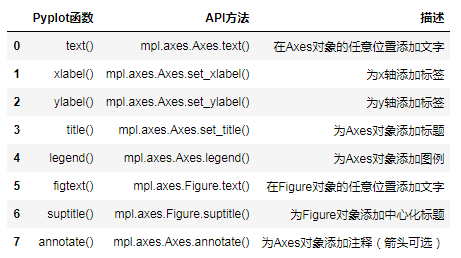
所有的方法都会返回一个matplotlib.text.Text对象
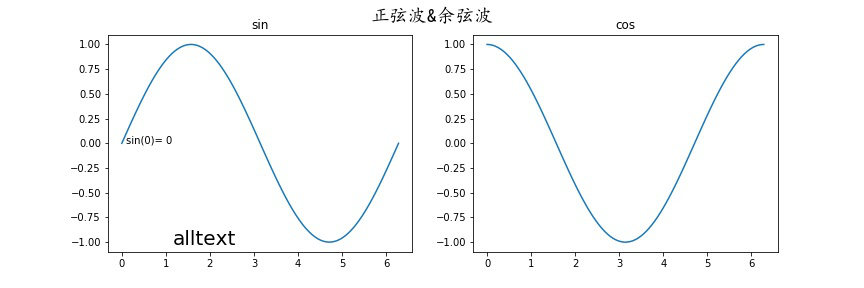
文本注释:
annnotate()
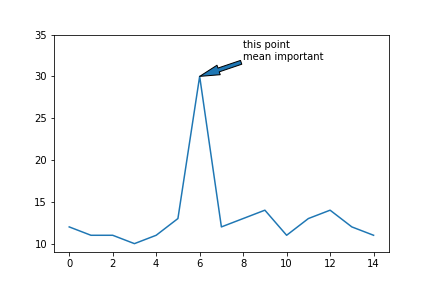
xy参数设置箭头指示的位置,xytext参数设置注释文字的位置
arrowprops参数以字典的形式设置箭头的样式
width参数设置箭头长发行部分的宽度,headlength参数设置箭头尖端的长度,
headwidth参数设置箭头尖端底部的宽度,
facecolor设置箭头颜色
shrink参数设置箭头顶点,尾部与指示点,注释文字的距离(比例值)
系统定义的箭头样式:
    ``'-'``        None

    ``'->'``       head_length=0.4,head_width=0.2

    ``'-['``       widthB=1.0,lengthB=0.2,angleB=None

    ``'|-|'``      widthA=1.0,widthB=1.0

    ``'-|>'``      head_length=0.4,head_width=0.2

    ``'<-'``       head_length=0.4,head_width=0.2

    ``'<->'``      head_length=0.4,head_width=0.2

    ``'<|-'``      head_length=0.4,head_width=0.2

    ``'<|-|>'``    head_length=0.4,head_width=0.2

    ``'fancy'``    head_length=0.4,head_width=0.4,tail_width=0.4

    ``'simple'``   head_length=0.5,head_width=0.5,tail_width=0.2

    ``'wedge'``    tail_width=0.3,shrink_factor=0.5
x = np.arange(15)
y = np.random.randint(10,15,size = 15)
plt.annotate(s = "this point \nmean important",xy = (6,30),xytext = (8,32),arrowprops= {"arrowstyle":"wedge"} )

自定义箭头样式:
plt.annotate(s = "this point \nmean important",
xy = (6,30),xytext = (8,32),
arrowprops= {"width":4,"headwidth":10,"headlength":20,"shrink":1} )
matplotlib绘图(四)的更多相关文章
- matplotlib绘图的基本操作
转自:Laumians博客园 更简明易懂看Matplotlib Python 画图教程 (莫烦Python)_演讲•公开课_科技_bilibili_哔哩哔哩 https://www.bilibili. ...
- matplotlib绘图基本用法-转自(http://blog.csdn.net/mao19931004/article/details/51915016)
本文转载自http://blog.csdn.net/mao19931004/article/details/51915016 <!DOCTYPE html PUBLIC "-//W3C ...
- Matplotlib绘图及动画总结
目录 Matplotlib绘图总结 绘图原理 block模式(python默认) interactive模式(ipython模式默认) 深入子图 子图表示 子图绘图 绘制动画 参考链接 Matplot ...
- 数据分析07 /matplotlib绘图
数据分析07 /matplotlib绘图 目录 数据分析07 /matplotlib绘图 1. 绘制线性图:plt.plot() 2. 绘制柱状图:plt.bar() 3. 绘制直方图:plt.his ...
- python数据分析使用matplotlib绘图
matplotlib绘图 关注公众号"轻松学编程"了解更多. Series和DataFrame都有一个用于生成各类图表的plot方法.默认情况下,它们所生成的是线形图 %matpl ...
- Matplotlib 绘图秘籍·翻译完成
原文:Matplotlib Plotting Cookbook 协议:CC BY-NC-SA 4.0 欢迎任何人参与和完善:一个人可以走的很快,但是一群人却可以走的更远. 在线阅读 ApacheCN ...
- matplotlib 绘图
http://blog.csdn.net/jkhere/article/details/9324823 都打一遍 5 matplotlib-绘制精美的图表 matplotlib 是python最著名的 ...
- python实战学习之matplotlib绘图续
学习完matplotlib绘图可以设置的属性,还需要学习一下除了折线图以外其他类型的图如直方图,条形图,散点图等,matplotlib还支持更多的图,具体细节可以参考官方文档:https://matp ...
- python中利用matplotlib绘图可视化知识归纳
python中利用matplotlib绘图可视化知识归纳: (1)matplotlib图标正常显示中文 import matplotlib.pyplot as plt plt.rcParams['fo ...
随机推荐
- GYM 101933D(最短路、二分、dp)
要点 非要先来后到暗示多源最短路,求最小的最大值暗示二分 二分内部的check是关键,dp处理一下,\(dp[i]\)表示第\(i\)笔订单最早何时送达,如果在ddl之前到不了则\(return\ 0 ...
- (转)nginx利用geo模块做限速白名单以及geo实现全局负载均衡的操作记录
nginx利用geo模块做限速白名单以及geo实现全局负载均衡的操作记录 原文:http://www.cnblogs.com/kevingrace/p/6165572.html Nginx的geo模块 ...
- js得到当前页面的url信息
所有的代码都是可用,而且附了图片的,不过是直接用我自己的文章地址,所以有些显示的有点奇怪. 大家可以找个网址试试代码是否可行. 1,设置或获取对象指定的文件名或路径. console.log(wind ...
- yum指令之修复
折腾着搞 openvpn 网站服务器 yum指令 出了点问题 ------------------------------------------------------------ [root@cl ...
- PHP正则表达式 - 元字符
下表包含了元字符的完整列表以及它们在正则表达式上下文中的行为: 字符 描述 \ 将下一个字符标记为一个特殊字符.或一个原义字符.或一个 向后引用.或一个八进制转义符.例如,'n' 匹配字符 " ...
- MVC的viewPage 通用属性运用。
试想下在MVC的前端页面JS或者html中需要使用多语言,而后端的多语言是维护在资源文件中的,前端如果使用的话需要使用AJAX频繁的获取,一个页面中可能会存在大量的需要语言转换的地方,频繁使用AJAX ...
- Jquery4
w3s例子http://www.w3school.com.cn/jquery/event_keyup.asp Jquery插件 http://www.cnblogs.com/afuge/archive ...
- 介绍我最近做的网站 Asp.Net MVC4 + BootStrap
一.前言 最近一直在做一个多站SEO数据分析的站点(www.easyyh.com),用了一些新技术,如Asp.Net MVC4,BootStrap,EasyUI,这些都是以前没有搞过的,最近搞得差不多 ...
- jsp使用中$的符号使用失效
解决方法 添加一段话 <%@ page isELIgnored="false"%> 原因:因为jsp servlet版本问题,2.3及2.3之前的版本isELIgno ...
- Servlet--HttpServlet
一.Servlet 接口(javax.servlet) 定义: public interface Servlet Implemented by: FacesServlet, Gene ...