
ssm异步上传图片
1.首先引入jersey jar包
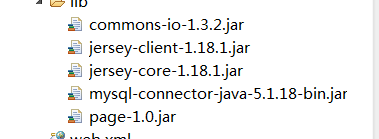
2.在配置文件中,配置允许上传图片

3.修改增加商品页面
<%@ page language="java" import="java.util.*" pageEncoding="UTF-8"%>
<%@ include file="/back_page/head.jsp" %>
<!DOCTYPE html PUBLIC "-//W3C//DTD XHTML 1.0 Transitional//EN" "http://www.w3.org/TR/xhtml1/DTD/xhtml1-transitional.dtd">
<html xmlns="http://www.w3.org/1999/xhtml">
<head>
<title>babasport-add</title>
<script type="text/javascript">
function uploadPic() {
var options={
url:"/cn/upload/uploadPic.do", 访问保存图片的controller层的方法
dataType:"json",
type:"post",
success:function(data){
//回调2个路径
//url 绝对路径,用于在页面上显示图片
//path 相对路径,保存在数据库中
$("#allImgUrl").attr("src",data.url); 显示图片
$("#path").val(data.path)
}
}
$("#jvForm").ajaxSubmit(options);
}
</script>
</head>
<body>
<div class="box-positon">
<div class="rpos">当前位置: 品牌管理 - 添加</div>
<form class="ropt">
<input type="submit" onclick="this.form.action='v_list.shtml';" value="返回列表" class="return-button"/>
</form>
<div class="clear"></div>
</div>
<div class="body-box" style="float:right">
<form id="jvForm" action="/cn/brand/add.do" method="post" enctype="multipart/form-data">
<table cellspacing="1" cellpadding="2" width="100%" border="0" class="pn-ftable">
<tbody>
<tr>
<td width="20%" class="pn-flabel pn-flabel-h">
<span class="pn-frequired">*</span>
品牌名称:</td><td width="80%" class="pn-fcontent">
<input type="text" class="required" name="name" maxlength="100"/>
</td>
</tr>
<tr>
<td width="20%" class="pn-flabel pn-flabel-h">
<span class="pn-frequired">*</span>
上传商品图片(90x150尺寸):</td>
<td width="80%" class="pn-fcontent">
注:该尺寸图片必须为90x150。
</td>
</tr>
<tr>
<td width="20%" class="pn-flabel pn-flabel-h"></td>
<td width="80%" class="pn-fcontent">
<img width="100" height="100" id="allImgUrl"/>
<input type="hidden" name="imgUrl" id="path"/> 保存到数据库中,贮存在对象里
<input type="file" onchange="uploadPic()" name="pic"/> 鼠标点击选中发生的事件,就是已经保存图片了
</td>
</tr>
<tr>
<td width="20%" class="pn-flabel pn-flabel-h">
品牌描述:</td><td width="80%" class="pn-fcontent">
<input type="text" class="required" name="description" maxlength="80" size="60"/>
</td>
</tr>
<tr>
<td width="20%" class="pn-flabel pn-flabel-h">
排序:</td><td width="80%" class="pn-fcontent">
<input type="text" class="required" name="sort" maxlength="80"/>
</td>
</tr>
<tr>
<td width="20%" class="pn-flabel pn-flabel-h">
是否可用:</td><td width="80%" class="pn-fcontent">
<input type="radio" name="isDisplay" value="1" checked="checked"/>可用
<input type="radio" name="isDisplay" value="0"/>不可用
</td>
</tr>
</tbody>
<tbody>
<tr>
<td class="pn-fbutton" colspan="2">
<input type="submit" class="submit" value="提交"/> <input type="reset" class="reset" value="重置"/>
</td>
</tr>
</tbody>
</table>
</form>
</div>
</body>
</html>
4.controller层方法
package cn.itcast.core.controller.admin;

import java.io.IOException;

import java.text.DateFormat;

import java.text.SimpleDateFormat;

import java.util.Date;

import java.util.Random;

import javax.servlet.http.HttpServletResponse;

import org.apache.commons.io.FilenameUtils;

import org.springframework.stereotype.Controller;

import org.springframework.web.bind.annotation.RequestMapping;

import org.springframework.web.bind.annotation.RequestParam;

import org.springframework.web.multipart.MultipartFile;

import cn.itcast.common.web.ResponseUtils;

import cn.itcast.core.web.Constants;

import com.alibaba.fastjson.JSONObject;

import com.sun.jersey.api.client.Client;

import com.sun.jersey.api.client.WebResource;

/**

 * 上传图片

 * 商品

 * 品牌

 * 商品介绍Fck

 * @author lx

 *

 */

@Controller

public class UploadController {

	//上传图片

	@RequestMapping(value = "/upload/uploadPic.do")

	//异步,所以不需要返回值

	public void uploadPic(@RequestParam(required = false) MultipartFile pic,HttpServletResponse response){  false:不插图片也不会报错

		//扩展名

		String ext = FilenameUtils.getExtension(pic.getOriginalFilename()); 通过引入apache公司的jar包,来调用方法

		//图片名称生成策略

		DateFormat df = new SimpleDateFormat("yyyyMMddHHmmssSSS"); 避免重名覆盖

		//图片名称一部分

		String format = df.format(new Date());

		//随机三位数

		Random r = new Random();

		// n 1000   0-999   99

		for(int i=0 ; i<3 ;i++){

			format += r.nextInt(10);

		}

		//实例化一个Jersey

		Client client = new Client(); 相当于一个客户端向服务器发送图片

		//保存数据库

		String path = "upload/" + format + "." + ext;

		//另一台服务器的请求路径是?

		String url = Constants.IMAGE_URL  + path; 定义一个常量,后期修改方便

		//设置请求路径

		WebResource resource = client.resource(url);

		//发送开始  POST  GET   PUT

		try {

			resource.put(String.class, pic.getBytes());

		} catch (IOException e) {

			// TODO Auto-generated catch block

			e.printStackTrace();

		}

		//返回二个路径

		JSONObject jo = new JSONObject();

		jo.put("url", url);

		jo.put("path",path);

		ResponseUtils.renderJson(response, jo.toString()); 封装成一个工具类

	}

}
5.返回其他类型的工具类
package cn.itcast.common.web;

import java.io.IOException;

import javax.servlet.http.HttpServletResponse;

/**

 * 异步返回各种格式

 * json

 * xml

 * text

 * @author lx

 *

 */

public class ResponseUtils {

    //发送内容

    public static void render(HttpServletResponse response,String contentType,String text){

        response.setContentType(contentType);

        try {

            response.getWriter().write(text);

        } catch (IOException e) {

            // TODO Auto-generated catch block

            e.printStackTrace();

        }

    }

    //发送的是JSON

    public static void renderJson(HttpServletResponse response,String text){

        render(response, "application/json;charset=UTF-8", text);

    }

    //发送xml

    public static void renderXml(HttpServletResponse response,String text){

        render(response, "text/xml;charset=UTF-8", text);

    }

    //发送text

    public static void renderText(HttpServletResponse response,String text){

        render(response, "text/plain;charset=UTF-8", text);

    }

}
6.图片服务器常量
package cn.itcast.core.web;

/**

 * 业务常量

 * @author lx

 *

 */

public interface Constants {

	/**

	 * 图片服务器

	 */

	public static final String IMAGE_URL = "http://localhost:8080/cn/";

}
7.显示列表页面图片,在实体类中定义一个方法
package cn.itcast.core.bean.product;

import cn.itcast.core.web.Constants;

/**

 * 品牌

 * @author lx

 *

 */

public class Brand {

	private Integer id;

	private String name;

	private String description;

	private String imgUrl;

	private Integer sort;

	private Integer isDisplay;

	//获取全路径

	public String getAllUrl(){

		return Constants.IMAGE_URL + imgUrl;

	}

	//页号

	private Integer pageNo = 1;

	//开始行

	private Integer startRow;

	//每页数

	private Integer pageSize = 10;

	public Integer getStartRow() {

		return startRow;

	}

	public void setStartRow(Integer startRow) {

		this.startRow = startRow;

	}

	public Integer getPageSize() {

		return pageSize;

	}

	public void setPageSize(Integer pageSize) {

		//计算一次开始行

		this.startRow = (pageNo - 1)*pageSize;

		this.pageSize = pageSize;

	}

	public Integer getPageNo() {

		return pageNo;

	}

	public void setPageNo(Integer pageNo) {

		//计算一次开始行

		this.startRow = (pageNo - 1)*pageSize;

		this.pageNo = pageNo;

	}

	public Integer getId() {

		return id;

	}

	public void setId(Integer id) {

		this.id = id;

	}

	public String getName() {

		return name;

	}

	public void setName(String name) {

		this.name = name;

	}

	public String getDescription() {

		return description;

	}

	public void setDescription(String description) {

		this.description = description;

	}

	public String getImgUrl() {

		return imgUrl;

	}

	public void setImgUrl(String imgUrl) {

		this.imgUrl = imgUrl;

	}

	public Integer getSort() {

		return sort;

	}

	public void setSort(Integer sort) {

		this.sort = sort;

	}

	public Integer getIsDisplay() {

		return isDisplay;

	}

	public void setIsDisplay(Integer isDisplay) {

		this.isDisplay = isDisplay;

	}

	@Override

	public String toString() {

		return "Brand [id=" + id + ", name=" + name + ", description="

				+ description + ", imgUrl=" + imgUrl + ", sort=" + sort

				+ ", isDisplay=" + isDisplay + "]";

	}

}
8 在list页面显示

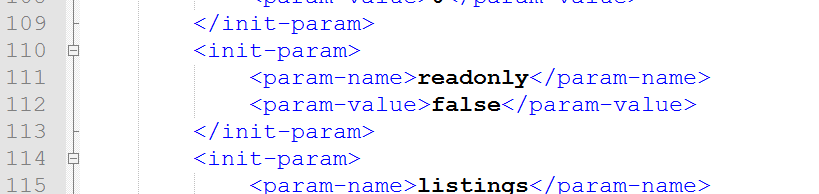
9.最后要在要接收的服务器(可以是本地,或者另一台tomcat)修改配置文件
ssm异步上传图片的更多相关文章
- Jquery实现异步上传图片
利用jQuery的ajax函数就可以实现异步上传图片了.一开始我是想在处理程序中,直接用context.Request.Files来获取页面中的input file,但是不知道为什么一次获取不了.网上 ...
- 异步上传图片,光用jquery不行,得用jquery.form.js插件
异步上传图片,光用jquery不行,得用jquery.form.js插件,百度一下下载这个插件,加jquery,引入就可以了 <form id="postbackground" ...
- [Ajax] 使用Ajax异步上传图片文件(非Form表单提交)
通过表单Form提交来上传文件的方式这里就不说了: 下面介绍,通过js中使用ajax异步上传图片文件: 新建一个html页面和一个一般处理程序即可: 涉及思路: //发送2次Ajax请求完成js异步上 ...
- 利用KindEditor的uploadbutton实现异步上传图片
利用KindEditor的uploadbutton实现异步上传图片 异步上传图片最经常使用的方法就是图片在iframe中上传.这样仅仅须要刷新iframe.而不用刷新整个页面. KindEdi ...
- php结合jquery异步上传图片(ajaxSubmit)
php结合jquery异步上传图片(ajaxSubmit),以下为提交页面代码: <!DOCTYPE html PUBLIC "-//W3C//DTD XHTML 1.0 Transi ...
- C# 异步上传图片案例
好久没写博客了,都感觉自己快堕落了!今天随性写一篇关于异步上传图片的程序及插件! 说是程序及插件,其实程序占大头,所谓的插件只是两个JS.分别为:jquery.html5upload.js 和 jqu ...
- 使用Ajax异步上传图片的方法(html,javascript,php)
前两天项目中需要用到异步上传图片和显示上传进度的功能,于是找了很多外国的文章,翻山越岭地去遇上各种坑,这里写篇文章记录一下. HTML <form id="fileupload-for ...
- Ajax实现异步上传图片
要求:点击页面浏览按钮后,选择需要上传的图片,页面无刷新,将上传的图片展示出来 开发流程 一:在页面编写表单代码和js代码 <!DOCTYPE html PUBLIC "-//W3C/ ...
- MVC异步上传图片到本地/服务器
这两天朋友问我,有没有异步上传图片到本地/服务器这种demo,他有用, 我就想,好吧, 那刚好周末了,整理一套出来. 主要用到的是jquery uploadify 这个juqery的插件 ,可以无刷新 ...
随机推荐
- FFMPEG,将字幕“烧进”MP4视频中
原文地址:http://blog.csdn.net/ufocode/article/details/75475539 由于mp4容器,不像MKV等容器有自己的字幕流. MKV这种容器的视频格式中,会带 ...
- AFLW如何获取你想要的21点人脸关键点数据
目前人脸检测和人脸的关键点的数据库根据关键点个数:5,20,21,29,68等.https://blog.csdn.net/XZZPPP/article/details/74939823该网页详细列出 ...
- mosquitto $SYS下topic
$SYS/broker/clients/connected
- 搜狐畅游CEO王滔辞职
凤凰科技讯 11月3日消息,搜狐公布公告确认搜狐畅游CEO离职.公告称王滔因个人原因辞去畅游首席运行官职务.将继续担任畅游公司董事和首席产品官. 据搜狐公告,董事会任命搜狐总裁余楚媛与畅游总裁陈德文为 ...
- OpenSAML2.X 在SSO系统中的应用
背景 年底的时候有机会开发一个SPA(单页面应用)的项目,那时候须要用到票据的方式能够用Cookie的方式来登录.当是想到了OpenID或者是CAS的方式来做统一认证中心.后来一个安全界的大牛推荐让我 ...
- powershell 卸载KB hotfix补丁
- unity,List元素第一个成员最好是string类型
例如 List<CmyObj> m_list=new List<CmyObj>(); class CmyObj{ string m_name; int m_value; } c ...
- Java类的实例化的初始化过程
A a = new A(); new 创建对象过程: 1.类加载 代码验证 2.给对象在内存(堆)中分配空间(给属性赋值): 3.属性赋默认值: byte,short.int,long -&g ...
- cloudera-manager-installer.bin不生成repo文件
[转] 运行cloudera-manager-installer.bin,并在后边增加参数使其不再在/etc/yum.repo.d/下生成cloudera-manager.repo文件 ./cloud ...
- 区别:Use MFC In A Shared DLL 和 Use MFC In A Static Library
摘自:Programming Windows with MFC, 2nd Edition Choosing Use MFC In A Shared DLL minimizes your applica ...