
Neuroph studio 入门教程
PERCEPTRON
Perceptron is a simple two layer neural network with several neurons in input layer, and one or more neurons in output layer. All neurons use step transfer function and network can use LMS based learning algorithm such as Perceptron Learning or Delta Rule. This network can be used as a linear classifier, and it can only be applied to linear separable problems.

To create and train Perceptron neural network using Neuroph Studio do the following:
- Create Neuroph Project.
- Create Perceptron network.
- Create training set (in main menu choose Training >New Training Set).
- Train network
- Test trained network
Step 1. Create Neuroph project.
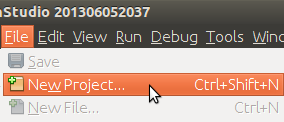
Click File > New Project.
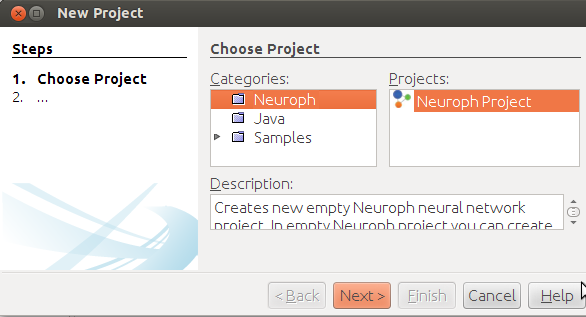
Select Neuroph Project, click Next.
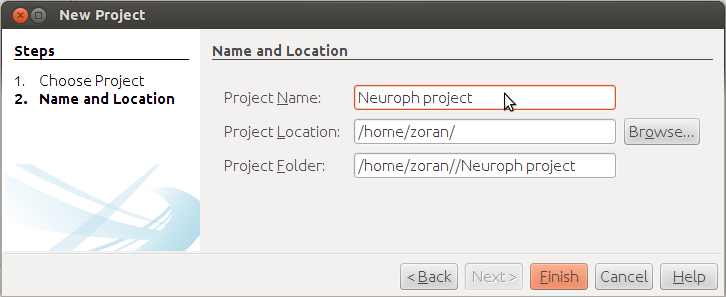
Enter project name and location, click Finish.
Project is created, now create neural network.
Step 2. Create Perceptron network.
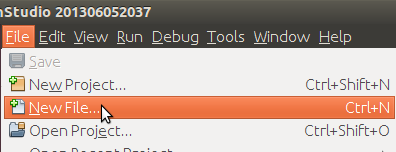
Click File > New File
Select project from Project drop-down menu, select Neural Network file type, click next.
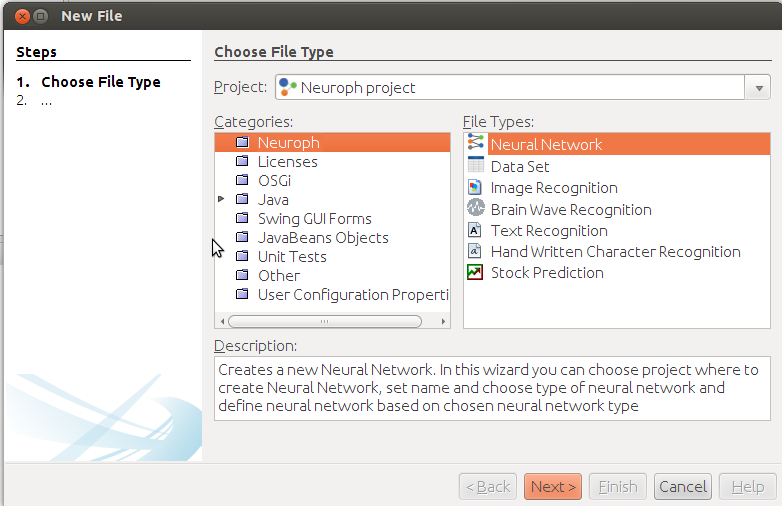
Enter network name, select Perceptron network type, click next.

In new perceptron dialog enter number ofneurons in input (2) and output layer (1) , choose Perceptron Learningand click Create button.

This will create the Perceptron neural network with two neurons in input, and one in output layer. By default, all neurons with Steptransfer functions.

Now we shall train this simple network to learn logical AND function. First we have to create the training setaccording to AND truth table.
Step 3. To create training set, click File>New File to open Data Set wizard.
Select DataSet file type, then click next.
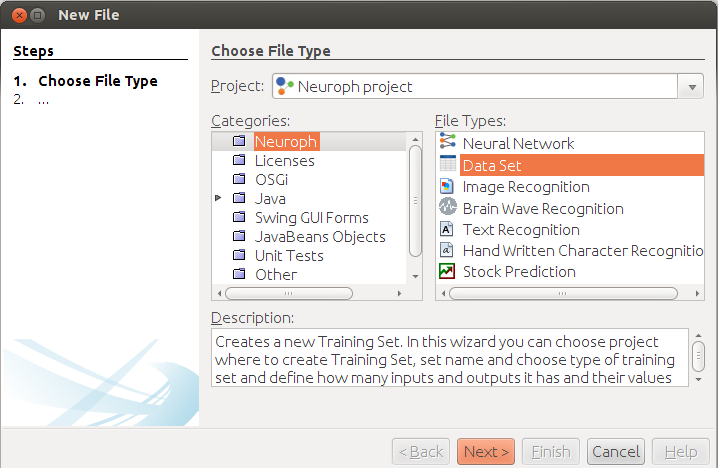
Enter training set name, number of inputs andoutputs as shown on picture below and click Finish button.

Then create training set by entering training elements as input and desired output values of neurons in input and outputlayer. Use Add row button to add new elements, and click OK button when finished.

Step 4. Training network. To start network training procedure, drag n' drop training set to corresponding field in the network window, and 'Train' button will become enabled in toolbar. Click the 'Train' button to open Set Learning Parameters dialog.

In Set Learning parameters dialoguse default learning parameters, and just click the Train button.

When the Total Net Error is zero, thetraining is complete.

Step 5. After the training is complete, you can test the network for the whole training set by selecting training set to test, and clicking Test button..

This will show test results in the new tab.

To test single input, use Set Input button. This will open Set Network Input dialog in which you can enter input values for network delimited withspace.

The result of network test is shown on picture below. Network learned logical AND function. As we can see the outputneuron has value 1. Test the network to see how it behaves for other input values.

PERCEPTRON IN JAVA CODE
package org.neuroph.samples;
import java.util.Arrays;
import org.neuroph.core.NeuralNetwork;
import org.neuroph.nnet.Perceptron;
import org.neuroph.core.data.DataSet;
import org.neuroph.core.data.DataSetRow;
/**
* This sample shows how to create, train, save and load simple Perceptron neural network
*/
public class PerceptronSample {
public static void main(String args[]) {
// create training set (logical AND function)
DataSet trainingSet = new DataSet(2, 1);
trainingSet.addRow(new DataSetRow(new double[]{0, 0}, new double[]{0}));
trainingSet.addRow(new DataSetRow(new double[]{0, 1}, new double[]{0}));
trainingSet.addRow(new DataSetRow(new double[]{1, 0}, new double[]{0}));
trainingSet.addRow(new DataSetRow(new double[]{1, 1}, new double[]{1}));// create perceptron neural network
NeuralNetwork myPerceptron = new Perceptron(2, 1);// learn the training set
myPerceptron.learn(trainingSet);// test perceptron
System.out.println("Testing trained perceptron");
testNeuralNetwork(myPerceptron, trainingSet);// save trained perceptron
myPerceptron.save("mySamplePerceptron.nnet");// load saved neural network
NeuralNetwork loadedPerceptron = NeuralNetwork.createFromFile("mySamplePerceptron.nnet");// test loaded neural network
System.out.println("Testing loaded perceptron");
testNeuralNetwork(loadedPerceptron, trainingSet);}
public static void testNeuralNetwork(NeuralNetwork nnet, DataSet tset) {
for(DataSetRow dataRow : tset.getRows()) {
nnet.setInput(dataRow.getInput());
nnet.calculate();
double[ ] networkOutput = nnet.getOutput();
System.out.print("Input: " + Arrays.toString(dataRow.getInput()) );
System.out.println(" Output: " + Arrays.toString(networkOutput) );}
}
}
EXTERNAL LINKS
To learn more about the Perceptrons see:
Neuroph studio 入门教程的更多相关文章
- 自动化测试工具 Test Studio入门教程
Test Studio安装 可以到下载试用版 官网 http://www.telerik.com/teststudio , 装完以后需要装silverlight 安装好了,主界面是介个样子的 Test ...
- Android Studio JNI开发入门教程
Android Studio JNI开发入门教程 2016-08-29 14:38 3269人阅读 评论(0) 收藏 举报 分类: JNI(3) 目录(?)[+] 概述 在Andorid ...
- 《Visual C++ 2010入门教程》系列一:关于Visual Studio、VC和C++的那些事
原文:http://www.cnblogs.com/Mrt-02/archive/2011/07/24/2115606.html 作者:董波 日期:2010.6.15 写在前面 在我还在上学的时候,我 ...
- 官方入门教程和文档 | Visual Studio
Visual Studio 2017 概述 | Microsoft Docs(直接教你用vs) https://docs.microsoft.com/zh-cn/visualstudio/ide/vi ...
- 1,[VS入门教程] 使用Visual Studio写c语言 入门与技巧精品文~~~~下载安装篇
Microsoft Visual Studio是微软(俗称巨硬)公司出品的强大IDE(Integrated Development Environment 集成开发环境),功能强大齐全,界面舒服之类的 ...
- eclipse再见,android studio 新手入门教程(一)基本设置
写在前面: 作为一个刚半只脚踏入android开发的新手,在使用eclipse开发了两个自我感觉不甚成熟的商城类app之后,遇到了一些问题,总结为如下: 代码复用性.findviewById,oncl ...
- SharePoint 2013 入门教程
以下文章是自己在学习SharePoint的过程中,不断积累和总结的博文,现在总结一个目录,分享给大家.这个博客也是自己从SharePoint入门,到一个SharePoint开发的成长记录,里面记录的都 ...
- .NET轻量级MVC框架:Nancy入门教程(二)——Nancy和MVC的简单对比
在上一篇的.NET轻量级MVC框架:Nancy入门教程(一)——初识Nancy中,简单介绍了Nancy,并写了一个Hello,world.看到大家的评论,都在问Nancy的优势在哪里?和微软的MVC比 ...
- UWP 入门教程2——如何实现自适应用户界面
系列文章 UWP入门教程1——UWP的前世今生 如上文所说的,布局面板根据可用的屏幕空间,指定界面元素的大小和位置.例如StackPanel 会水平或垂直排列界面元素.Grid 布局与CSS 中的表格 ...
随机推荐
- Struts2拦截器配置和使用
拦截器是Struts2最强大的特性之一,它是一种可以让用户在Action执行之前和Result执行之后进行一些功能处理的机制. 说到拦截器interceptor,就会想到过滤器filter: 过滤器f ...
- windows查看端口占用指令
1.Windows平台 在windows命令行窗口下执行: 1.查看所有的端口占用情况 C:\>netstat -ano 协议 本地地址 外部地址 ...
- vue ui components
vue ui components h_ui https://www.npmjs.com/~hs_ui https://www.npmjs.com/package/h_ui_beta https:// ...
- ZOJ3513_Human or Pig
这个题太坑爹了,题意也好纠结. 是这样的,给你一个n*m的矩形,中间有n*m个1*1的格子,有不同的跳跃方法.如果当前为human(人类)那么他可以有意识的选择自己下一步跳往何方:如果当前为pig(猪 ...
- collection 多态 会自动转型为子类 继承多态需要显示转型
- [AT2363] [agc012_c] Tautonym Puzzle
题目链接 AtCoder:https://agc012.contest.atcoder.jp/tasks/agc012_c 洛谷:https://www.luogu.org/problemnew/sh ...
- HBase多租户机制分析
在HBase1.1.0发布之前,HBase同一集群上的用户.表都是平等的,没有优劣之分.这种’大同’社会看起来完美,实际上有很多问题.最棘手的主要有这么两个,其一是某些业务较其他业务重要,需要在资源有 ...
- 【基础】一个简单的MVC实例及故障排除
Controller: public ActionResult Index() { string setting = "ApplicationServices"; var conn ...
- Red Hat下升级python的问题
分为两部分: 一,升级Python 安装的包的渠道(传送门),安装过程的渠道(传送门). 二.涉及的问题 1.yum不能使用 解决办法(传送门),其中的部分就行.
- 深入详解windows安全认证机制ntlm&Kerberos
0x01 为什么要理解windows 安全认证机制: 加深对后续各种漏洞利用的理解深度,还是那句话,要知其然,更要知其所以然,不废话,咱们直接开始 0x02 windows认证协议主要有以下两种: 基 ...