
ELK之elasticsearch5.6的安装和head插件的安装
这里选择的elasticsearch为5.6的新版本,根据官方文档有几种暗装方式:
https://www.elastic.co/guide/en/elasticsearch/reference/current/install-elasticsearch.html
这里选择rpm包安装https://www.elastic.co/guide/en/elasticsearch/reference/current/rpm.html
1、wget https://artifacts.elastic.co/downloads/elasticsearch/elasticsearch-5.6.1.rpm
2、查看有哪些配置文件
[root@node1 ~]# cd /etc/elasticsearch/

[root@node1 elasticsearch]# ll

总用量 20

-rw-rw----. 1 root elasticsearch 3024 9月  19 14:00 elasticsearch.yml

-rw-rw----. 1 root elasticsearch 3123 9月  18 10:38 jvm.options

-rw-rw----. 1 root elasticsearch 4456 9月   7 11:12 log4j2.properties

drwxr-x---. 2 root elasticsearch 4096 9月   7 11:12 scripts
elasticsearch常用配置在elasticsearch.yml文件中,关于jvm的一些配置在jvm.options文件中,日志的配置在log4j2.properties文件中
[root@node1 elasticsearch]# grep -v "^#" /etc/elasticsearch/elasticsearch.yml

cluster.name: my-elastic

node.name: node1

network.host: 0.0.0.0

http.port: 9200
简单配置之后然后启动服务:/etc/init.d/elasticsearch start
默认日志文件为/var/log/elasticsearch/目录下,启动有报错都可以根据报错解决
这里将一些遇到的报错及解决方法列一些出来:
[root@node1 elasticsearch]# cat /etc/security/limits.d/90-nproc.conf

# Default limit for number of user's processes to prevent

# accidental fork bombs.

# See rhbz #432903 for reasoning.

*          soft    nproc     2048

root       soft    nproc     unlimited
[root@node1 elasticsearch]# grep -v "^#" /etc/elasticsearch/elasticsearch.yml

cluster.name: my-elastic

node.name: node1

bootstrap.system_call_filter: false

network.host: 0.0.0.0

http.port: 9200
重新启动elasticsearch服务,查看日志是否报错,如没有报错,浏览器进行访问是否有效:
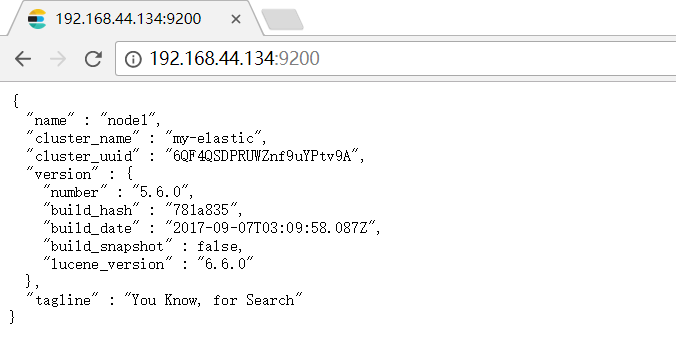
现在为elasticsearch安装上插件head,利用github找到head插件:

https://github.com/mobz/elasticsearch-head,根据文中说明:
There are multiple ways of running elasticsearch-head.
Running with built in server
git clone git://github.com/mobz/elasticsearch-head.gitcd elasticsearch-headnpm installnpm run start
This will start a local webserver running on port 9100 serving elasticsearch-head
Running as a plugin of Elasticsearch (deprecated)
- for Elasticsearch 5.x: site plugins are not supported. Run as a standalone server
elasticsearch5.x以上需要安装head插件需要作为一个单独的服务,步骤如上,于是开始安装:
如果没有npm命令需要首先安装上:
git clone git://github.com/mobz/elasticsearch-head.git

cd elasticsearch-head

npm install

npm run start
默认监听在0.0.0.0,不需要修改监听地址
这里有两种启动方式:
1、npm run start(仓库拉取下来的elasticsearch-head目录下执行)
2、[root@node1 elasticsearch-head]# ./node_modules/grunt/bin/grunt server
启动后都是如下效果:
[root@node1 elasticsearch-head]# ./node_modules/grunt/bin/grunt server

Loading "watch.js" tasks...ERROR

>> Error: Cannot find module 'http-parser-js'

Running "connect:server" (connect) task

Waiting forever...

Started connect web server on http://localhost:9100
查看日志:
[2017-09-19T13:50:36,288][INFO ][o.e.p.PluginsService ] [node1] no plugins loaded
[2017-09-19T13:50:38,401][INFO ][o.e.d.DiscoveryModule ] [node1] using discovery type [zen]
[2017-09-19T13:50:39,079][INFO ][o.e.n.Node ] [node1] initialized
[2017-09-19T13:50:39,079][INFO ][o.e.n.Node ] [node1] starting ...
[2017-09-19T13:50:39,239][INFO ][o.e.t.TransportService ] [node1] publish_address {192.168.44.134:9300}, bound_addresses {[::]:9300}
9100端口已经监听了,访问浏览器http://192.168.44.134:9100却依然连接不到集群,然后谷歌到需要进行设置:
check http.cors.enabled and http.cors.allow-origin are set in config/elasticsearch.yml in order to enable cors.
Reference : https://www.elastic.co/guide/en/elasticsearch/reference/current/modules-http.html
然后配置elastic,具体配置如下:
[root@node1 elasticsearch]# grep -v "^#" /etc/elasticsearch/elasticsearch.yml

cluster.name: my-elastic

node.name: node1

bootstrap.system_call_filter: false

http.cors.enabled: true

http.cors.allow-origin: "*"

network.host: 0.0.0.0

http.port: 9200
重启服务之后,浏览器访问
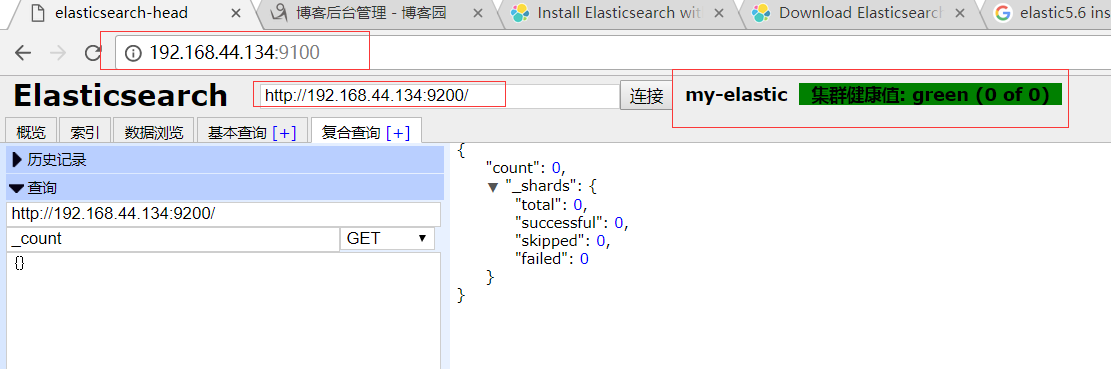
至此elasticsearch5.6版本安装head插件成功!!!
插件head的一些配置,如果node1不是监听在0.0.0.0而是ip:
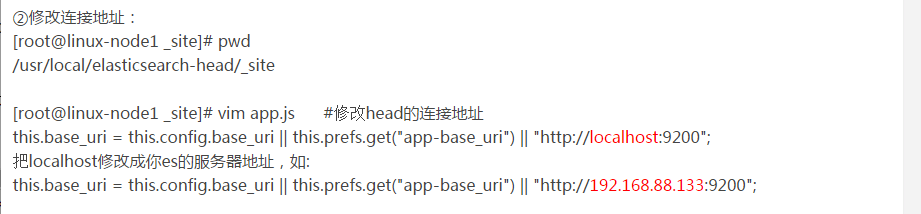
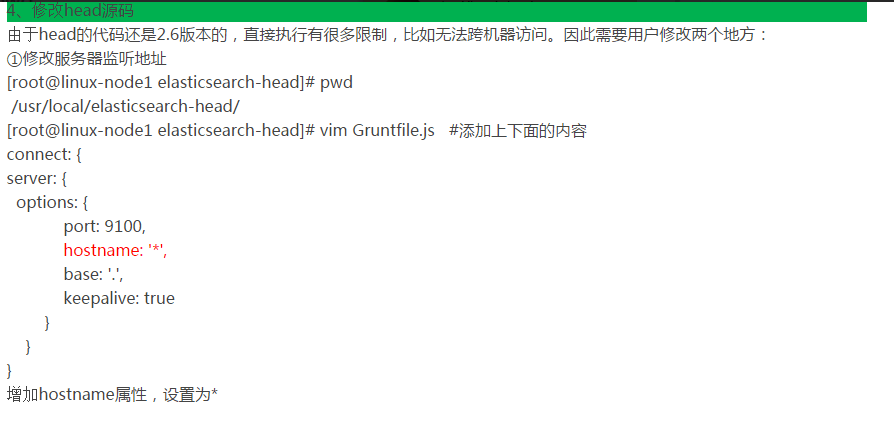
还有一个配置文件:(我这里没有hostname这个选项)
ELK之elasticsearch5.6的安装和head插件的安装的更多相关文章
- elasticsearch5.0以上版本及head插件的安装
本文转载至:https://www.cnblogs.com/hts-technology/p/8477258.html(针对5.0以上版本) 对于es5.0以下的版本可以参考:https://www. ...
- 批量搞机(二):分布式ELK平台、Elasticsearch介绍、Elasticsearch集群安装、ES 插件的安装与使用
一.分布式ELK平台 ELK的介绍: ELK 是什么? Sina.饿了么.携程.华为.美团.freewheel.畅捷通 .新浪微博.大讲台.魅族.IBM...... 这些公司都在使用 ELK!ELK! ...
- 转:ElasticSearch的安装和相关插件的安装
原文来自于:http://blog.csdn.net/whxaing2011/article/details/18237733 本文主要介绍如下内容: 1.ElasticSearch ...
- ElasticSearch 5.2.2 安装及 head 插件的安装
ElasticSearch 是一个基于 Lucene 的高度可扩展的开源全文搜索和分析引擎.它能够做到可以快速.实时地存储.搜索和分析大量数据.它通常作为底层引擎/技术,为具有复杂搜索功能和要求的应用 ...
- Ubuntu16.04下安装googlechrome flash 插件和安装网易云音乐
一.ubuntu 16.04 下安装完后发现 flash无法播放没有安装flash插件因为 Adobe Flash 不再支持 linux Google 便开发了PepperFlashPlayer来替代 ...
- eclipse安装反编译插件
1. 进入http://jadclipse.sourceforge.net/wiki/index.php/Main_Page#Download 下载 net.sf.jadclipse ...
- 解决WordPress无法上传媒体文件以及无法下载和安装主题与插件的问题
前言: 我的个人博客网站荒原之梦在安装成功WordPress之后本来是可以上传媒体文件,安装主题和插件的,但是后来不知道怎么回事就出了问题:不能上传媒体文件也不能安装主题和插件了.出现这个问题后我尝试 ...
- 04 sublime text 3在线安装package control插件,之后安装主题插件和ConvertToUTF8 插件
前提:需要@@科学@@上网 在线安装包通常都需要@@科学@@上网 安装package control插件 在线安装package control插件 按ctrl+shift+p 输入install,选 ...
- elasticsearch5.0集群+kibana5.0+head插件插件的安装
elasticsearch5.0集群+kibana5.0+head插件插件的安装 es集群的规划: 两台16核64G内存的服务器: yunva_etl_es1 ip:1.1.1.1 u04es01. ...
随机推荐
- Django学习笔记第四篇--数据处理URL和数据库
一.URL: 1.基础的URL与视图函数的映射 from django.conf.urls import url from django.contrib import admin from appna ...
- MySql指令大全(转载)
1.连接Mysql 格式: mysql -h主机地址 -u用户名 -p用户密码 1.连接到本机上的MYSQL.首先打开DOS窗口,然后进入目录mysql\bin,再键入命令mysql -u root ...
- Web测试系列之测试工具
一Web功能测试工具MAXQ MAXQ是开源的Web功能测试工具. MAXQ是开源的Web功能测试工具.他的特点:1)简单易学;2)是一个轻量级的Web功能测试工具;3)可以自动录制WebBrowse ...
- JavaWeb配置错误页面
我们在实际开发过程中经常会遇到程序出错的各种情况,比如最常见的404错误,500错误等等相关错误,服务器默认会将错误的信息直接显示在浏览器的页面上,如下图所示: 不管是谁如果看到这种情况的话,顿时就会 ...
- 读取properties文件------servletcontext及dao层读取
用servletcontext读取properties文件-------1) 重点在于:InputStream in=this.getServletContext().getResourceAsStr ...
- MongoDB 聚合结果大小限制
The aggregate command can return either a cursor or store the results in a collection. When returnin ...
- php+nginx上传文件配置
- 软件project--作图
软工学习进行了一个多月,但是真正静下心来学习也只是一周左右吧,这段时间里给自己印象最深刻的就是作图了, 机房收费系统我们是先进行的编码,后学习软件project对它来了一次回想性的文档编写. 刚開始当 ...
- JDK 注解详解
注解用途 我们在使用spring MVC框架时用到了很多的注解,如:@Controller.@RequestMapping等等,spring框架通过反射获取到标签进行不同的逻辑处理.注解是代码的附属信 ...
- python 学习笔记(十四)有依赖关系的接口开发
接口开发中存在很多有依赖关系的接口,例如:BBS中发帖的时候就需要进行校验用户是否登录,那么此时发帖的接口就与用户登录接口有依赖关系.在发帖时就需要先获取用户的session,与当前登录用户进行校验对 ...