
spring boot2 kafka
一.软件版本
1.linux:centos6
2.zookeeper:zookeeper-3.4.1
3.kafka:kafka_2.12-2.2.0
4.jdk:1.8
5.instelliJ Idea
二.环境准备
1.关闭防火墙:service iptables stop
2.zookeeper:复制conf目录下的zoo_sample.cfg配置文件并改名为zoo.cfg
3.kafka:修改配置文件conf/server.properties中
①broker.id=123(broker.id每个kafka的都不一样,必须唯一)
②advertised.listeners=PLAINTEXT://192.168.56.101:9092(对应自己的linux的ip地址)
③zookeeper.connect=127.0.0.1:2181(本机默认端口是2181,有需要到zookeeper的zoo.cfg文件中修改)
三.软件setup&start
1.zookeeper:zookeeper-3.4.14/bin目录下执行
①./zkServer.sh start ../conf/zoo.cfg
2.kafka:kafka_2.12-2.2.0/bin目录下执行
①./kafka-server-start.sh ../config/server.properties
四.创建topic&发送消息&消费消息
1.创建topic “test”,kafka_2.12-2.2.0/bin目录下执行
①./kafka-topics.sh --create --bootstrap-server localhost:9092 --replication-factor 1 --partitions 1 --topic test
②验证是否创建成功:./kafka-topics.sh --list --bootstrap-server localhost:9092
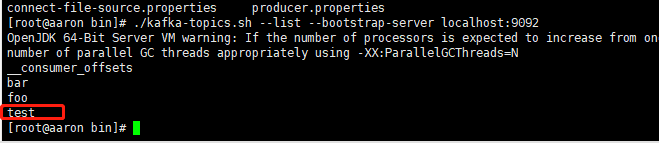
③开启消息生产者的console,kafka_2.12-2.2.0/bin目录下执行,并发送几条信息
./kafka-console-producer.sh --broker-list localhost:9092 --topic test

④开启消息消费者的console,kafka_2.12-2.2.0/bin目录下执行
./kafka-console-consumer.sh --bootstrap-server localhost:9092 --topic test

以上步骤没出现问题表示kafka服务器端以及搭建完毕。
五.Spring boot2 kafka通信
1.创建topic:TopicConfiguration
package com.aaron.kafka.springboot.configuration;

import org.apache.kafka.clients.admin.AdminClientConfig;

import org.apache.kafka.clients.admin.NewTopic;

import org.springframework.context.annotation.Bean;

import org.springframework.context.annotation.Configuration;

import org.springframework.kafka.core.KafkaAdmin;

import org.springframework.util.StringUtils;

import java.util.HashMap;

import java.util.Map;

@Configuration

public class TopicConfiguration {

    @Bean

    public KafkaAdmin admin() {

        Map<String, Object> configs = new HashMap<>();

        configs.put(AdminClientConfig.BOOTSTRAP_SERVERS_CONFIG,

                StringUtils.arrayToCommaDelimitedString(new String[]{"192.168.56.101:9092"}));

        return new KafkaAdmin(configs);

    }

    @Bean

    public NewTopic topic1() {

        return new NewTopic("test", 1, (short) 2);

    }

}
2.spring boot2中建立kafka的消息生产者:KafkaProducerConfiguration
package com.aaron.kafka.springboot.configuration;

import com.aaron.kafka.springboot.listener.MessageListenerImpl;

import org.springframework.context.annotation.Bean;

import org.springframework.context.annotation.Configuration;

import org.springframework.kafka.core.DefaultKafkaConsumerFactory;

import org.springframework.kafka.listener.ContainerProperties;

import org.springframework.kafka.listener.KafkaMessageListenerContainer;

import java.util.HashMap;

import java.util.Map;

@Configuration

public class kafkaConsumerConfiguration {

    @Bean

    public MessageListenerImpl messageListener(){

        return new MessageListenerImpl();

    }

    @Bean

    public KafkaMessageListenerContainer kafkaMessageListenerContainer(){

        ContainerProperties containerProps = new ContainerProperties("test");

        containerProps.setMessageListener(messageListener());

        DefaultKafkaConsumerFactory<Integer, String> cf =

                new DefaultKafkaConsumerFactory<Integer, String>(consumerProps());

        KafkaMessageListenerContainer<Integer, String> container =

                new KafkaMessageListenerContainer<>(cf, containerProps);

        return container;

    }

    /**

     * 设置consumer的properties

     * @return

     */

    private Map<String,Object> consumerProps(){

        Map<String, Object> consumerProps = new HashMap<>();

        consumerProps.put("bootstrap.servers","192.168.56.101:9092");

        consumerProps.put("group.id","123");

        consumerProps.put("enable.auto.commit","true");

        consumerProps.put("auto.commit.interval.ms","1000");

        consumerProps.put("key.deserializer","org.apache.kafka.common.serialization.StringDeserializer");

        consumerProps.put("value.deserializer","org.apache.kafka.common.serialization.StringDeserializer");

        return consumerProps;

    }

}
3.建立测试代码:KafkaTest
package com.aaron.kafka.springboot;

import org.junit.Test;

import org.junit.runner.RunWith;

import org.springframework.boot.test.context.SpringBootTest;

import org.springframework.kafka.core.KafkaTemplate;

import org.springframework.test.context.junit4.SpringRunner;

import javax.annotation.Resource;

@RunWith(SpringRunner.class)

@SpringBootTest

public class KafkaTest {

    @Resource

    private KafkaTemplate kafkaTemplate;

    @Test

    public void sendMsg(){

        kafkaTemplate.send("test","hello","world");

    }

}
运行测试结果如下:

4.Spring boot2中建立消费者和消息监听器:kafkaConsumerConfiguration和MessageListenerImpl
package com.aaron.kafka.springboot.configuration;

import com.aaron.kafka.springboot.listener.MessageListenerImpl;

import org.springframework.context.annotation.Bean;

import org.springframework.context.annotation.Configuration;

import org.springframework.kafka.core.DefaultKafkaConsumerFactory;

import org.springframework.kafka.listener.ContainerProperties;

import org.springframework.kafka.listener.KafkaMessageListenerContainer;

import java.util.HashMap;

import java.util.Map;

@Configuration

public class kafkaConsumerConfiguration {

    @Bean

    public MessageListenerImpl messageListener(){

        return new MessageListenerImpl();

    }

    @Bean

    public KafkaMessageListenerContainer kafkaMessageListenerContainer(){

        ContainerProperties containerProps = new ContainerProperties("test");

        containerProps.setMessageListener(messageListener());

        DefaultKafkaConsumerFactory<Integer, String> cf =

                new DefaultKafkaConsumerFactory<Integer, String>(consumerProps());

        KafkaMessageListenerContainer<Integer, String> container =

                new KafkaMessageListenerContainer<>(cf, containerProps);

        return container;

    }

    /**

     * 设置consumer的properties

     * @return

     */

    private Map<String,Object> consumerProps(){

        Map<String, Object> consumerProps = new HashMap<>();

        consumerProps.put("bootstrap.servers","192.168.56.101:9092");

        consumerProps.put("group.id","123");

        consumerProps.put("enable.auto.commit","true");

        consumerProps.put("auto.commit.interval.ms","1000");

        consumerProps.put("key.deserializer","org.apache.kafka.common.serialization.StringDeserializer");

        consumerProps.put("value.deserializer","org.apache.kafka.common.serialization.StringDeserializer");

        return consumerProps;

    }

}
package com.aaron.kafka.springboot.listener;

import org.springframework.kafka.listener.MessageListener;

public class MessageListenerImpl implements MessageListener {

    @Override

    public void onMessage(Object o) {

        System.out.println(o.toString());

    }

}
关闭服务器上的消费者然后启动springBoot
在服务器上的producer中输入文本 Hello World
Idea 中的console显示如下:

六.kafka的集群配置
1.复制配置文件server.properties改名为server-1.properties、server-2.properties
修改配置文件中
broker.id=121
log.dirs=/tmp/kafka-logs-1
advertised.listeners=PLAINTEXT://192.168.56.101:9093
(server-2.properties中的则为:
broker.id=122
log.dirs=/tmp/kafka-logs-2
advertised.listeners=PLAINTEXT://192.168.56.101:9094)
2.运行方式启动kafka,kafka_2.12-2.2.0/bin下执行
./kafka-server-start.sh ../config/server-1.properties
./kafka-server-start.sh ../config/server-2.properties
后台方式运行命令如下:
nohup ./kafka-server-start.sh ../config/server-1.properties &
nohup ./kafka-server-start.sh ../config/server-2.properties &
注意:如果出现

则配置文件(server-1.properties和server-2.properties)中打开注释并修改为:listeners=PLAINTEXT://192.168.56.101:9093(server-2.properties的为:listeners=PLAINTEXT://192.168.56.101:9094)
spring boot2 kafka的更多相关文章
- Spring Boot2.0 整合 Kafka
Kafka 概述 Apache Kafka 是一个分布式流处理平台,用于构建实时的数据管道和流式的应用.它可以让你发布和订阅流式的记录,可以储存流式的记录,并且有较好的容错性,可以在流式记录产生时就进 ...
- Spring Boot2.0 设置拦截器
所有功能完成 配置登录认证 配置拦截器 在spring boot2.0 之后 通过继承这个WebMvcConfigurer类 就可以完成拦截 新建包com.example.interceptor; 创 ...
- Spring Boot2.0 静态资源被拦截问题
在Spring Boot2.0+的版本中,只要用户自定义了拦截器,则静态资源会被拦截.但是在spring1.0+的版本中,是不会拦截静态资源的. 因此,在使用Spring Boot2.0+时,配置拦截 ...
- Spring Boot2.0使用Spring Security
一.Spring Secutity简介 Spring 是一个非常流行和成功的 Java 应用开发框架.Spring Security 基于 Spring 框架,提供了一套 Web 应用安全性 ...
- spring boot2.0(一 ) 基础环境搭建
1.基础配置 开发环境:window jdk版本:1.8(spring boot2.0最低要求1.8) 开发工具:eclipse 构建方式:maven3 2.POM配置文件 <project x ...
- Spring Boot2.0自定义配置文件使用
声明: spring boot 1.5 以后,ConfigurationProperties取消locations属性,因此采用PropertySource注解配合使用 根据Spring Boot2. ...
- Spring boot2.0 设置文件上传大小限制
今天把Spring boot版本升级到了2.0后,发现原来的文件上传大小限制设置不起作用了,原来的application.properties设置如下: spring.http.multipart.m ...
- spring boot 2.0(一)权威发布spring boot2.0
Spring Boot2.0.0.RELEASE正式发布,在发布Spring Boot2.0的时候还出现一个小插曲,将Spring Boot2.0同步到Maven仓库的时候出现了错误,然后Spring ...
- 【spring cloud】spring cloud2.X spring boot2.0.4调用feign配置Hystrix Dashboard 和 集成Turbine 【解决:Hystrix仪表盘Unable to connect to Command Metric Stream】【解决:Hystrix仪表盘Loading...】
环境: <java.version>1.8</java.version><spring-boot.version>2.0.4.RELEASE</spring- ...
随机推荐
- 使用 acme.sh 签发续签 Let‘s Encrypt 证书 泛域名证书
1. 安装 acme.sh 安装很简单, 一个命令: curl https://get.acme.sh | sh 并创建 一个 bash 的 alias, 方便你的使用 alias acme.sh=~ ...
- PPTP支持IPv6
pptp支持ipv6,谷歌资料不多,这里整理下 主要用来给ipv4访问ipv6资源的场景使用,客户端连接上pptp后会分配得到一个ipv6地址,通过此地址访问ipv6的资源 客户端网段在pptp. ...
- CentOS7中GreVPN的配置
目前只实现了三层的GRE隧道,但其实二层也可以实现的,但是没有找到很好的方法,待研究 环境如下: host A : 121.207.22.123 host B: 111.2.33.28 1. 在ho ...
- [算法] 举一反三之n重复数组中找唯一m重复异类数
n重复数组,是指数组中的数字都出现n次: 唯一m重复异类数,是指存在唯一一个没出现n次,只出现了m次的数: 这里我简记它为nX+my问题,求解y,其中m < n,数组中都是整数: 3X+y问题 ...
- IP通信第四周作业
一.选择交换机的主要技能指标是什么? a.背板带宽.二/三层交换吞吐率. b.VLAN类型和数量. c.交换机端口数量及类型. d.支持网络管理的协议和方法.需要交换机提供更加方便和集中式的管理. e ...
- 《CSS世界》读书笔记(十一)
激进的margin属性 margin与元素尺寸以及相关布局 元素尺寸 border box尺寸,对应jQuery中的$().outerWidth()和$().outerHeight()方法,在原生DO ...
- mySQL简单操作(二)
1.like子句 [where clause like '%com'] '%' '_' 2.正则 3.union操作符 用于连接多个select语句,[distinct]删除重复数据 select c ...
- 51nod 1009 数字1的数量(数位dp模板)
给定一个十进制正整数N,写下从1开始,到N的所有正数,计算出其中出现所有1的个数. 例如:n = 12,包含了5个1.1,10,12共包含3个1,11包含2个1,总共5个1. 数位dp的模板题 ...
- STA 141A, Homework
STA 141A, Homework 2Due April 30th 2019 (by 8 am) Name:Student ID:Section:Names of your study mates: ...
- [c/c++] programming之路(27)、union共用体
共用体时刻只有一个变量,结构体变量同时并存 一.创建共用体的三种形式 #include<stdio.h> #include<stdlib.h> #include<stri ...