
PyTorch in Action: A Step by Step Tutorial
PyTorch in Action: A Step by Step Tutorial
PyTorch in Action: A Step by Step Tutorial
Installation Guide
Step 1, donwload the Miniconda and installing it on your computer.
The reason why explain installing conda is that some of classmates don`t have a conda environment on their computer.
https://mirrors.tuna.tsinghua.edu.cn/anaconda/miniconda/
Step 2, create a conda virtual envriomment
In this ariticle, we assume that there is a CPU version of PyTorch is going to be installed. To specifically distinguish CPU version and GPU version, we`re going to create a virtual environment named "PyTorch-CPU".
In the Conda Prompt run the following commands:
conda create -n PyTorch-CPU pipStep 3, install PyTorch
On the website of PyTorch(https://pytorch.org/), there is a guidance on the page. To chose the most appropriate options(e.g. as the follow figure).
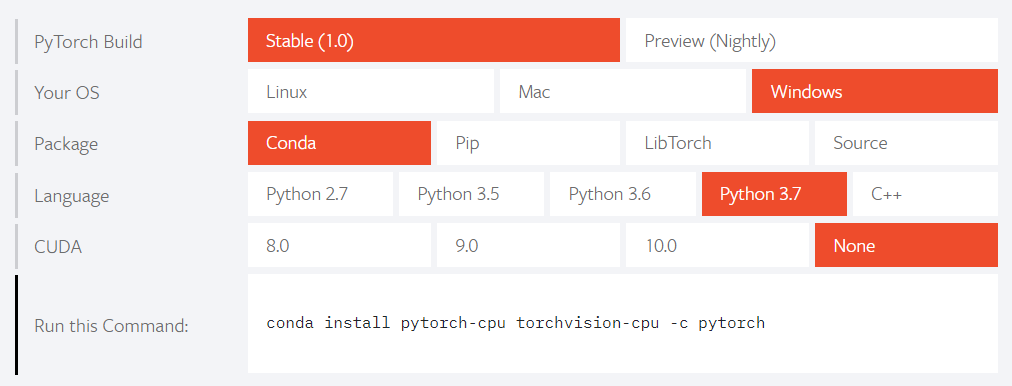
In the Conda Prompt run the following commands:
activate PyTorh-CPU

conda install pytorch-cpu torchvision-cpu -c pytorch
Congratulations, installation of PyTorch is complete!
pypi 源
国内源的地址
| 名称 | 地址 |
|---|---|
| 阿里云 | http://mirrors.aliyun.com/pypi/simple/ |
| 中国科技大学 | https://pypi.mirrors.ustc.edu.cn/simple/ |
| 豆瓣 | http://pypi.douban.com/simple/ |
| 清华大学 | https://pypi.tuna.tsinghua.edu.cn/simple/ |
使用方法
$ pip3 install {package name} -i http://mirrors.aliyun.com/pypi/simple/比如,安装 scikit-learn 的命令用例如下
$ pip3 install scikit-learn -i http://mirrors.aliyun.com/pypi/simple/PyTorch in Action: A Step by Step Tutorial的更多相关文章
- Action(8):Error -27728:Step download timeout(120 seconds)has expired when downloading
Action(8):Error -27728:Step download timeout(120 seconds)has expired when downloading 出现如下图所示对话框上的 ...
- Tomcat Clustering - A Step By Step Guide --转载
Tomcat Clustering - A Step By Step Guide Apache Tomcat is a great performer on its own, but if you'r ...
- WPF Step By Step 系列-Prism框架在项目中使用
WPF Step By Step 系列-Prism框架在项目中使用 回顾 上一篇,我们介绍了关于控件模板的用法,本节我们将继续说明WPF更加实用的内容,在大型的项目中如何使用Prism框架,并给予Pr ...
- Struts2+Spring+Hibernate step by step 11 ssh拦截验证用户登录到集成
注意:该系列文章从教师王健写了一部分ssh集成开发指南 引言: 之前没有引入拦截器之前,我们使用Filter过滤器验证用户是否登录,在使用struts2之后,全然能够使用拦截器,验证用户是否已经登录, ...
- WPF MVVM 架构 Step By Step(6)(把actions从view model解耦)
到现在为止,我们创建了一个简单的MVVM的例子,包含了实现了的属性和命令.我们现在有这样一个包含了例如textbox类似的输入元素的视图,textbox用绑定来和view model联系,像点击but ...
- 精通initramfs构建step by step
(一)hello world 一.initramfs是什么 在2.6版本的linux内核中,都包含一个压缩过的cpio格式 的打包文件.当内核启动时,会从这个打包文件中导出文件到内核的rootfs ...
- Metrics.NET step by step使用Metrics监控应用程序的性能
使用Metrics监控应用程序的性能 在编写应用程序的时候,通常会记录日志以便事后分析,在很多情况下是产生了问题之后,再去查看日志,是一种事后的静态分析.在很多时候,我们可能需要了解整个系统在当前,或 ...
- Step by Step Process of Migrating non-CDBs and PDBs Using ASM for File Storage (Doc ID 1576755.1)
Step by Step Process of Migrating non-CDBs and PDBs Using ASM for File Storage (Doc ID 1576755.1) AP ...
- Asp.Net Core 5 REST API - Step by Step
翻译自 Mohamad Lawand 2021年1月19日的文章 <Asp.Net Core 5 Rest API Step by Step> [1] 在本文中,我们将创建一个简单的 As ...
随机推荐
- 转载:[Java面经]干货整理, Java面试题(覆盖Java基础,Java高级,JavaEE,数据库,设计模式等)
原文:http://www.cnblogs.com/wang-meng/p/5898837.html 一:继承.抽象类与接口区别.访问控制(private, public, protected,默认) ...
- linux命令技巧
printf "%-5s %-10s %-4s\n" No Name Mark printf "%-5s %-10s %-4.2f\n" 1 Sarath 80 ...
- HTTP学习总结
首先是一张总结的图: 对各个不同的通信进行解分: 1.http通信详解 2.cookie通信图: 3.cookie管理的session信息 4.token通信
- 如何设置记事本( .txt文件)的默认编码为UTF-8?
1.在桌面新建一个文本文档,不要写入任何内容,然后手动另存为,将此文档编码改为UTF-8,然后将文件名字改为template.txt: 2.再将template.txt移动到C:\Windows\Sh ...
- iOS UIView 选择性倒角
有些APP中会有卡券,卡券做成了选择性倒角,例如左上,右上倒角.非常美观.看一下iOS的实现: #import "Masonry.h" @interface WJWDaojiaoV ...
- Mysqlutil.JDBCutil.Dtabaseutil数据库操作工具类[批量操作]
一个用来操作数据库的常用工具类. 提供批量操作,生成建表,插入语句等 操作示例: // 1.获取连接 DataBaseUtil jdbc = new DataBaseUtil(); jdbc.getC ...
- 关于php得到参数数据
通过GET得到参数数据 $_SERVER['QUERY_STRING'] 获取?后面的值 $_SERVER['SCRIPT_NAME'] 获取当前脚本的路径 具体参数通过_GET['参数']获得 fi ...
- Objects First with Java 读书笔记 (1)
umm...这学期被发了助教Java的任务,为了避免误人子弟从零开始现学.课是英语教学,就不逐字翻译了,方便记. 参考书目:Objects First with Java - A Practical ...
- mac环境使用ATS验证
https://blog.csdn.net/skylin19840101/article/details/53760146 参考的这篇文章,用 /usr/bin/nscurl --ats-diagno ...
- vghyj
2017*****1012:我是康迪:我的爱好是计算机:我的码云个人主页是:https://gitee.com/kdkdkdkd我的第一个项目地址是:https://gitee.com/kdkdkdk ...