
kubernetes 开发 code-generator
主要参考项目 https://github.com/kubernetes/code-generator
1. git clone https://github.com/kubernetes/code-generator
2. 创建自己的项目例如 k8s-controller-example
3. 复制 code-generator 项目的vendor, hack 目录到自己的项目下
4. 创建doc.go types.go 文件
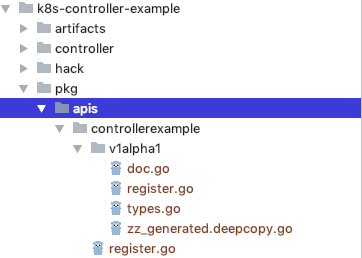
保持这个目录结构
其中 pkg/apis是固定的
controllerexample是groupname
v1alpha1 是 version
doc.go types.go register.go 都是自己写的
doc.go
// +k8s:deepcopy-gen=package

// +groupName=controllerexample.github.com

package v1alpha1
types.go
package v1alpha1

import (

	metav1 "k8s.io/apimachinery/pkg/apis/meta/v1"

)

// +genclient

// +k8s:deepcopy-gen:interfaces=k8s.io/apimachinery/pkg/runtime.Object

// Foo is a specification for a Foo resource

type App struct {

	metav1.TypeMeta   `json:",inline"`

	metav1.ObjectMeta `json:"metadata,omitempty"`

	Spec   AppSpec   `json:"spec"`

	Status AppStatus `json:"status"`

}

// FooSpec is the spec for a Foo resource

type AppSpec struct {

	DeploymentName string `json:"deploymentName"`

	Replicas       *int32 `json:"replicas"`

}

// FooStatus is the status for a Foo resource

type AppStatus struct {

	AvailableReplicas int32 `json:"availableReplicas"`

}

// +k8s:deepcopy-gen:interfaces=k8s.io/apimachinery/pkg/runtime.Object

// FooList is a list of Foo resources

type AppList struct {

	metav1.TypeMeta `json:",inline"`

	metav1.ListMeta `json:"metadata"`

	Items []App `json:"items"`

}
code-generator 通过一些特殊注释来生成代码
// +k8s:deepcopy-gen=package

// +groupName=controllerexample.github.com

doc.go的注释放在了package上 这是全局注释,针对这个package , 注意把这些注释的前后都加上空行
+k8s:deepcopy-gen=package 为这个package下的所有type生成deepcopy方法
+groupName=controllerexample.github.com 针对自己的groupname来修改 要对应到实际创建的目录名称
5. 修改 hack/update-codegen.sh 文件
#!/usr/bin/env bash

# Copyright 2017 The Kubernetes Authors.

#

# Licensed under the Apache License, Version 2.0 (the "License");

# you may not use this file except in compliance with the License.

# You may obtain a copy of the License at

#

#     http://www.apache.org/licenses/LICENSE-2.0

#

# Unless required by applicable law or agreed to in writing, software

# distributed under the License is distributed on an "AS IS" BASIS,

# WITHOUT WARRANTIES OR CONDITIONS OF ANY KIND, either express or implied.

# See the License for the specific language governing permissions and

# limitations under the License.

set -o errexit

set -o nounset

set -o pipefail

SCRIPT_ROOT=$(dirname ${BASH_SOURCE})/..

CODEGEN_PKG=${CODEGEN_PKG:-$(cd ${SCRIPT_ROOT}; ls -d -1 ./vendor/k8s.io/code-generator 2>/dev/null || echo ../code-generator)}

# generate the code with:

# --output-base    because this script should also be able to run inside the vendor dir of

#                  k8s.io/kubernetes. The output-base is needed for the generators to output into the vendor dir

#                  instead of the $GOPATH directly. For normal projects this can be dropped.

${CODEGEN_PKG}/generate-groups.sh "deepcopy,client,informer,lister" \

  github.com/xuchenCN/k8s-controller-example/pkg/client github.com/xuchenCN/k8s-controller-example/pkg/apis \

  controllerexample:v1alpha1 \

  --output-base "$GOPATH/src" \

  --go-header-file ${SCRIPT_ROOT}/hack/boilerplate.go.txt

# To use your own boilerplate text use:

#   --go-header-file ${SCRIPT_ROOT}/hack/custom-boilerplate.go.txt
v1alpha1.register.go
/*

Copyright 2017 The Kubernetes Authors.

Licensed under the Apache License, Version 2.0 (the "License");

you may not use this file except in compliance with the License.

You may obtain a copy of the License at

    http://www.apache.org/licenses/LICENSE-2.0

Unless required by applicable law or agreed to in writing, software

distributed under the License is distributed on an "AS IS" BASIS,

WITHOUT WARRANTIES OR CONDITIONS OF ANY KIND, either express or implied.

See the License for the specific language governing permissions and

limitations under the License.

*/

package v1alpha1

import (

	metav1 "k8s.io/apimachinery/pkg/apis/meta/v1"

	"k8s.io/apimachinery/pkg/runtime"

	"k8s.io/apimachinery/pkg/runtime/schema"

	samplecontroller "github.com/xuchenCN/k8s-controller-example/pkg/apis/controllerexample"

)

// SchemeGroupVersion is group version used to register these objects

var SchemeGroupVersion = schema.GroupVersion{Group: samplecontroller.GroupName, Version: "v1alpha1"}

// Kind takes an unqualified kind and returns back a Group qualified GroupKind

func Kind(kind string) schema.GroupKind {

	return SchemeGroupVersion.WithKind(kind).GroupKind()

}

// Resource takes an unqualified resource and returns a Group qualified GroupResource

func Resource(resource string) schema.GroupResource {

	return SchemeGroupVersion.WithResource(resource).GroupResource()

}

var (

	SchemeBuilder = runtime.NewSchemeBuilder(addKnownTypes)

	AddToScheme   = SchemeBuilder.AddToScheme

)

// Adds the list of known types to Scheme.

func addKnownTypes(scheme *runtime.Scheme) error {

	scheme.AddKnownTypes(SchemeGroupVersion,

		&App{},

		&AppList{},

	)

	metav1.AddToGroupVersion(scheme, SchemeGroupVersion)

	return nil

}
controllerexample.register.go
/*

Copyright 2017 The Kubernetes Authors.

Licensed under the Apache License, Version 2.0 (the "License");

you may not use this file except in compliance with the License.

You may obtain a copy of the License at

    http://www.apache.org/licenses/LICENSE-2.0

Unless required by applicable law or agreed to in writing, software

distributed under the License is distributed on an "AS IS" BASIS,

WITHOUT WARRANTIES OR CONDITIONS OF ANY KIND, either express or implied.

See the License for the specific language governing permissions and

limitations under the License.

*/

package controllerexample

const (

	GroupName = "controllerexample.github.com"

)
6. 执行./hack/update-codegen.sh
kubernetes 开发 code-generator的更多相关文章
- ABP配套代码生成器(ABP Code Generator)帮助文档,实现快速开发
ABP代码生成器介绍 针对abp这个框架做了一个代码生成器,功能强大.分为两大功能点,一个是数据层,一个是视图层. 数据服务层:通过它,可以实现表设计.领域层初始化.多语言.automapper自动注 ...
- Android开发的插件Code Generator与LayoutCreator的安装与使用,提升你的开发效率
前言 大家好,给大家带来Android开发的插件Code Generator与LayoutCreator的安装与使用,提升你的开发效率的概述,希望你们喜欢 学习目标 掌握两个插件的安装和使用,能够实现 ...
- 【2017年9月10日更新】ABP配套代码生成器(ABP Code Generator)帮助文档,实现快速开发
ABP代码生成器介绍 ABP Code Generator 针对abp这个框架做了一个代码生成器,功能强大.分为两大功能点,一个是数据层,一个是视图层. 数据服务层:通过它,可以实现表设计.领域层初始 ...
- 安卓自动生成代码插件-Android code Generator(转)
编辑推荐:稀土掘金,这是一个针对技术开发者的一个应用,你可以在掘金上获取最新最优质的技术干货,不仅仅是Android知识.前端.后端以至于产品和设计都有涉猎,想成为全栈工程师的朋友不要错过! 介绍 A ...
- [转]OData的初步认识 OData v4 Client Code Generator
本文转自:http://www.cnblogs.com/1zhk/p/5356053.html What – OData是什么? OData - Open Data Protocol,是一个设计和使用 ...
- OData Client Code Generator
转发. [Tutorial & Sample] How to use OData Client Code Generator to generate client-side proxy cla ...
- Android项目实战(十九):Android Studio 优秀插件: Parcelable Code Generator
Android Studio 优秀插件系列: Android Studio 优秀插件(一):GsonFormat Android Studio 优秀插件(二): Parcelable Code Gen ...
- JAVA 调用Axis2 code generator 生成的webservice
以下代码为调用 JAVA 调用Axis2 code generator 生成的webservice的代码. package test; import java.rmi.RemoteException; ...
- DNN - Modules - QR Code Generator
Dotnetnuke 平台上的二维码模块.支持DNN 7.x平台的安装 QR码(快速响应码)是二维条形码.随着移动设备市场正以快速的步伐,QR码正在成为非常重要的营销工具.与移动电话或平板电脑的扫描, ...
- there was an error running the selected code generator unable to retrieve metadata for
there was an error running the selected code generator unable to retrieve metadata for PROBLEM: I ha ...
随机推荐
- 06_ for 练习 _ 年利率
<!DOCTYPE html> <html> <head> <meta charset="utf-8" /> <title&g ...
- swust oj 984
利用二叉树中序及先序遍历确定该二叉树的后序序列 1000(ms) 10000(kb) 2754 / 5599 已知二叉树的中序和先序遍历可以唯一确定后序遍历.已知中序和后序遍历可以唯一确定先序遍历,但 ...
- js高级1
1.每一个元素身上的事件都是天生自带的,不需要我们去定义,只需要我们给这个事件绑定的方法,当事件触发的时候就会执行这个方法. 2.事件绑定的方法 1,div.onclick=function(){} ...
- 关于在IE浏览器中使用控件问题
<!DOCTYPE HTML PUBLIC "-//W3C//DTD HTML 4.0 Transitional//EN"><html><head&g ...
- | 线段树-地平线horizon
[题目描述]:在地平线上有n个建筑物.每个建筑物在地平线上可以看成一个下边界和地平线重合的矩形.每个建筑物有三个描述(Li ,Ri,Hi),分别表示该建筑物的左边界,右边界,高度.输出输出这些建筑物在 ...
- ASP.NET Core 问题排查:Request.EnableRewind 后第一次读取不到 Request.Body
实际应用场景是将用户上传的文件依次保存到阿里云 OSS 与腾讯云 COS ,实现方式是在启用 Request.EnableRewind() 的情况下通过 Request.Body 读取流,并依次通过 ...
- html中不常用但必须知道的标签
1.<b>加粗</b> 为天地立心,为生民立命,为往圣继绝学,为万世开太平 2.<s>删除线</s> 为天地立心,为生民立命,为往圣继绝学,为万世开太平 ...
- Vue.js最简单的代码
<!DOCTYPE html><html lang="en"><head> <meta charset="UTF-8" ...
- python摸爬滚打之----tcp协议的三次握手四次挥手
TCP协议的三次握手, 四次挥手 三次握手过程 1, 服务器时刻准备接受客户端进程的连接请求, 此时服务器就进入了LISTEN(监听)状态; 2, 客户端进程然后向服务器发出连接请求报文, 之后客户端 ...
- SpringCloud第六步:搭建分布式配置中心
什么是配置中心 在分布式系统中,由于服务数量巨多,为了方便服务配置文件统一管理,实时更新,所以需要分布式配置中心组件.在Spring Cloud中,有分布式配置中心组件spring cloud con ...