
Adaptive Placeholders
https://wisdmlabs.com/blog/create-adaptive-placeholders-using-css/
https://circleci.com/blog/adaptive-placeholders/
https://stackoverflow.com/questions/47983822/css-operator-adaptive-placeholder-contact-form-7-wordpress
<!DOCTYPE html>

<html lang="zh-cn">

<head>

    <meta http-equiv="Content-type" content="text/html; charset=utf-8" />

    <title>Adaptive Placeholder – 自适应的占位符效果</title>

    <style type="text/css">

    body {

    background-color: #FAFAFA;

}

.top-banner {

  background: #555;

}

input[type=text] {

  -webkit-box-sizing: border-box;

  -moz-box-sizing: border-box;

  box-sizing: border-box;

  width: 100%;

  height: -webkit-calc(3em + 2px);

  height: calc(3em + 2px);

  margin: 0 0 1em;

  padding: 1em;

  border: 1px solid #cccccc;

  border-radius: 1.5em;

  background: #fff;

  resize: none;

  outline: none;

}

input[type=text][required]:focus {

  border-color: #00bafa;

}

input[type=text][required]:focus + label[placeholder]:before {

  color: #00bafa;

}

input[type=text][required]:focus + label[placeholder]:before, input[type=text][required]:valid + label[placeholder]:before {

  -webkit-transition-duration: .2s;

  transition-duration: .2s;

  -webkit-transform: translate(0, -1.5em) scale(0.9, 0.9);

  -ms-transform: translate(0, -1.5em) scale(0.9, 0.9);

  transform: translate(0, -1.5em) scale(0.9, 0.9);

}

input[type=text][required]:invalid + label[placeholder][alt]:before {

  content: attr(alt);

}

input[type=text][required] + label[placeholder] {

  display: block;

  pointer-events: none;

  line-height: 2.3em;

  margin-top: -webkit-calc(-3em - 2px);

  margin-top: calc(-3em - 2px);

  margin-bottom: -webkit-calc((3em - 1em) + 2px);

  margin-bottom: calc((3em - 1em) + 2px);

}

input[type=text][required] + label[placeholder]:before {

  content: attr(placeholder);

  display: inline-block;

  margin: 0 -webkit-calc(1em + 2px);

  margin: 0 calc(1em + 2px);

  padding: 0 2px;

  color: #898989;

  white-space: nowrap;

  -webkit-transition: 0.3s ease-in-out;

  transition: 0.3s ease-in-out;

  background-image: -webkit-gradient(linear, left top, left bottom, from(#ffffff), to(#ffffff));

  background-image: -webkit-linear-gradient(top, #ffffff, #ffffff);

  background-image: linear-gradient(to bottom, #ffffff, #ffffff);

  -webkit-background-size: 100% 5px;

  background-size: 100% 5px;

  background-repeat: no-repeat;

  background-position: center;

}

    *, *:after, *:before { -webkit-box-sizing: border-box; -moz-box-sizing: border-box; box-sizing: border-box; }

.clearfix:after{visibility:hidden;display:block;font-size:0;content:" ";clear:both;height:0}

.clearfix{*zoom:1}

.fl{float:left}

.fr{float:right}

.fl,.fr{_display:inline}

.top-banner {

	position:absolute;

	z-index: 999;

	left:0;

	top:0;

	height:40px;

	line-height:40px;

	padding:0 30px;

	width:100%;

	font-size: 13px;

	background-color: rgba(255, 255, 255, 0.15);

	color: #fff;

	font-family: "宋体","Microsoft Yahei","Helvetica Neue",Helvetica,Arial,sans-serif;

	font-size: 15px;

	/*text-shadow: 1px 1px 3px #333;*/

	/*box-shadow: 0 1px 0 #999;*/

}

.top-banner a {

	color: #fff;

	text-decoration: none;

}

    </style>

   <script type="text/javascript">

$(function() {

    $("input[id$=address]").qtip({

        content: '涂聚文告诉你,好样的'

    });

});

</script>

</head>

<body>

    <div style="width:400px;height:100px;margin:300px auto">

        <form>

            <input required='必须填写' type='text' class="name" id="name">

            <label alt='请输入姓名' placeholder='姓名'></label>

            <input required='必须填写' type='text' class="address" id="address">

            <label alt='请输入地址' placeholder='地址'></label>

        </form>

    </div>

<div class="footer-banner" style="width:728px; margin:200px auto 0"></div>

<script src="js/jquery.min.js"></script>

</body>

</html>
Adaptive Placeholders的更多相关文章
- 移动端web自适应解决方案: adaptive.js
代码有更新,最好直接查看github github:https://github.com/finance-sh/adaptive adaptivejs利用rem解决移动端页面开发的自适应问题 页面模板 ...
- 【Win 10应用开发】Adaptive磁贴模板的XML文档结构
在若干天之前,老周给大家讲了Adaptive Toast通知的XML模板,所以相应地,今天老周给大家介绍一下Adaptive磁贴的新XML模板. 同样道理,你依旧可以使用8.1时候的磁贴模板,在win ...
- [MySQL] Buffer Pool Adaptive Flush
Buffer Pool Adaptive Flush 在MySQL的帮助文档中Tuning InnoDB Buffer Pool Flushing提到, innodb_adaptive_flushin ...
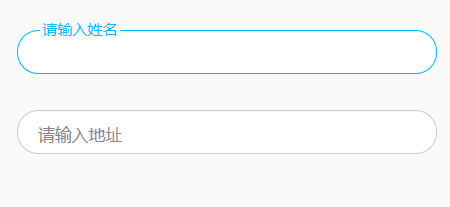
- Adaptive Placeholder – 自适应的占位符效果
在早期,我们都是通过使用 JavaScript 来实现占位符功能.而现在,HTML5 原生提供的 placeholder 属性让我们在现代浏览器轻松就能实现这样的功能.这里向大家分享一个自适应的占位符 ...
- Adaptive Backgrounds – jQuery 自适应背景插件
Adaptive Backgrounds 是一款很特别的 jQuery 插件,可以从图像中提取主导颜色并将它应用到它的父元素.这个插件利用 Canvas 元素和 ImageData 对象.需要注意的是 ...
- Adaptive Code Via C#读书笔记
原书链接: http://www.amazon.com/Adaptive-Code-via-principles-Developer-ebook/dp/B00OCLLYTY/ref=dp_kinw_s ...
- Win 10 开发中Adaptive磁贴模板的XML文档结构,Win10 应用开发中自适应Toast通知的XML文档结构
分享两篇Win 10应用开发的XML文档结构:Win 10 开发中Adaptive磁贴模板的XML文档结构,Win10 应用开发中自适应Toast通知的XML文档结构. Win 10 开发中Adapt ...
- Correlation Filter in Visual Tracking系列一:Visual Object Tracking using Adaptive Correlation Filters 论文笔记
Visual Object Tracking using Adaptive Correlation Filters 一文发表于2010的CVPR上,是笔者所知的第一篇将correlation filt ...
- [Notes] Reading Notes on [Adaptive Robot Control – mxautomation J. Braumann 2015]
Reading sources: 1.Johannes Braumann, Sigrid Brell-Cokcan, Adaptive Robot Control (ARC ) Note: buil ...
随机推荐
- linux下SS 网络命令详解
ss命令用来显示处于活动状态的套接字信息. ss命令可以用来获取socket统计信息,它可以显示和netstat类似的内容. 但ss的优势在于它能够显示更多更详细的有关TCP和连接状态的信息,而且比n ...
- aspnet core2中使用csp内容安全策略
aspnet core2中使用csp内容安全策略 问题:aspnet core2如何使用csp防止xss的攻击 方法: public void ConfigureServices( IServiceC ...
- java中级或者高级面试题分享
一. 基础知识: 1)集合类:List和Set比较,各自的子类比较(ArrayList,Vector,LinkedList:HashSet,TreeSet): 2)HashMap的底层实现,之后会问C ...
- #Java学习之路——基础阶段(第五篇)
我的学习阶段是跟着CZBK黑马的双源课程,学习目标以及博客是为了审查自己的学习情况,毕竟看一遍,敲一遍,和自己归纳总结一遍有着很大的区别,在此期间我会参杂Java疯狂讲义(第四版)里面的内容. 前言: ...
- 如何将多个数据的- 转为:来匹配josn格式
var str = `北京 2 河北 3 河北-邯郸 301 河北-保定 302 河北-邢台 303 山东 4 山东-青岛 401 山东-烟台 402`; var arrStr = str.split ...
- [Swift]LeetCode989. 数组形式的整数加法 | Add to Array-Form of Integer
For a non-negative integer X, the array-form of X is an array of its digits in left to right order. ...
- 使用Task
http://www.cnblogs.com/Charltsing/p/taskpoolthread.html task默认对线程的调度是逐步增加的,连续多次运行并发线程,会提高占用的线程数,而等若干 ...
- Kubernetes 笔记 04 架构是个好东西
本文首发于我的公众号 Linux云计算网络(id: cloud_dev),专注于干货分享,号内有 10T 书籍和视频资源,后台回复「1024」即可领取,欢迎大家关注,二维码文末可以扫. Hi,大家好, ...
- mogodb分片配置
下图展示了在MongoDB中使用分片集群结构分布: 上图中主要有如下所述三个主要组件: Shard: 用于存储实际的数据块,实际生产环境中一个shard server角色可由几台机器组个一个repli ...
- Python内置函数(41)——max
英文文档: max(iterable, *[, key, default]) max(arg1, arg2, *args[, key]) Return the largest item in an i ...