
ROS笔记2 构建一个package
构建package
catkin_make 可以理解为一个集成了CMake和make的命令行工具
通常的cmake构建如下
# In a CMake project

$ mkdir build

$ cd build

$ cmake ..

$ make

$ make install  # (optionally)
catkin_make使用如下
# In a catkin workspace

$ catkin_make --source my_src

$ catkin_make install --source my_src  # (optionally)

> The build folder is the default location of the build space and is where cmake and make are called to configure and build your packages. The devel folder is the default location of the devel space, which is where your executables and libraries go before you install your packages.

build编译目录,devel是可执行程序和库文件目录.

# In a catkin workspace

$ catkin_make

$ catkin_make install  # (optionally)
这个命令将编译src目录下所有的包.
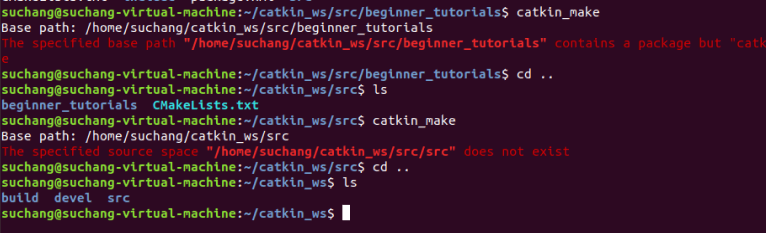
catkin_make要运行在workspace的根目录下.
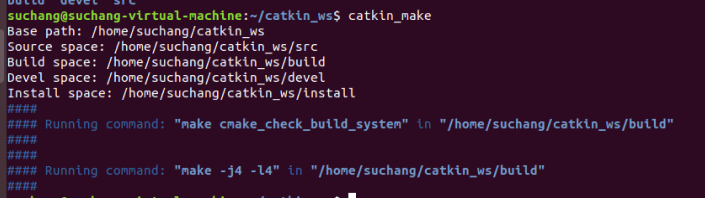
正常输出应该是这样,可能因为之前编译过了.这些输出其实就是cmake和make的输出.
Base path: /home/user/catkin_ws

Source space: /home/user/catkin_ws/src

Build space: /home/user/catkin_ws/build

Devel space: /home/user/catkin_ws/devel

Install space: /home/user/catkin_ws/install

####

#### Running command: "cmake /home/user/catkin_ws/src

-DCATKIN_DEVEL_PREFIX=/home/user/catkin_ws/devel

-DCMAKE_INSTALL_PREFIX=/home/user/catkin_ws/install" in "/home/user/catkin_ws/build"

####

-- The C compiler identification is GNU 4.2.1

-- The CXX compiler identification is Clang 4.0.0

-- Checking whether C compiler has -isysroot

-- Checking whether C compiler has -isysroot - yes

-- Checking whether C compiler supports OSX deployment target flag

-- Checking whether C compiler supports OSX deployment target flag - yes

-- Check for working C compiler: /usr/bin/gcc

-- Check for working C compiler: /usr/bin/gcc -- works

-- Detecting C compiler ABI info

-- Detecting C compiler ABI info - done

-- Check for working CXX compiler: /usr/bin/c++

-- Check for working CXX compiler: /usr/bin/c++ -- works

-- Detecting CXX compiler ABI info

-- Detecting CXX compiler ABI info - done

-- Using CATKIN_DEVEL_PREFIX: /tmp/catkin_ws/devel

-- Using CMAKE_PREFIX_PATH: /opt/ros/kinetic

-- This workspace overlays: /opt/ros/kinetic

-- Found PythonInterp: /usr/bin/python (found version "2.7.1")

-- Found PY_em: /usr/lib/python2.7/dist-packages/em.pyc

-- Found gtest: gtests will be built

-- catkin 0.5.51

-- BUILD_SHARED_LIBS is on

-- ~~~~~~~~~~~~~~~~~~~~~~~~~~~~~~~~~~~~~~~~~~~~~

-- ~~  traversing packages in topological order:

-- ~~  - beginner_tutorials

-- ~~~~~~~~~~~~~~~~~~~~~~~~~~~~~~~~~~~~~~~~~~~~~

-- +++ add_subdirectory(beginner_tutorials)

-- Configuring done

-- Generating done

-- Build files have been written to: /home/user/catkin_ws/build

####

#### Running command: "make -j4" in "/home/user/catkin_ws/build"

####
ROS笔记2 构建一个package的更多相关文章
- ROS笔记1 安装及创建一个ROS Package
安装 跟着官方的安装指引来就行了.安装前要先确定自己的ros版本和ubuntu版本.这二者是一一对应的. http://wiki.ros.org/ROS/Installation 主要是package ...
- ROS学习记录(四)————怎样建立一个package包?
功能包是什么? 英文表述package,我可没有在炫英文啊,我的英文很烂的,只是在提醒大家,在ROS系统中,这个词使用的频率非常之高,你必须记住它,要不就没法正确的看懂信息.言归正传,package是 ...
- Android学习笔记-构建一个可复用的自定义BaseAdapter
转载自http://www.runoob.com/w3cnote/android-tutorial-customer-baseadapter.html 作者:coder-pig 本节引言: 如题, ...
- Nodejs课堂笔记-第三课 构建一个nodejs的Docker镜像
本文由Vikings(http://www.cnblogs.com/vikings-blog/) 原创,转载请标明.谢谢! 因为一直做Linux有关的开发工作,所以不习惯在Windows平台编译和测试 ...
- gRPC初探——概念介绍以及如何构建一个简单的gRPC服务
目录 引言 1. gRPC简介 2. 使用Protocol Buffers进行服务定义 2.1 定义消息 2.2 定义服务接口 3.构建简单的gRPC服务 3.1 编写proto文件,定义消息和接口 ...
- 构建一个简单的基于MVC模式的JavaWeb
零晨三点半了,刚刚几个兄弟一起出去吼歌,才回来,这应该是我大学第二次去K歌,第一次是大一吧,之后每次兄弟喊我,我都不想去,因为我还是很害怕去KTV,或许是因为那里是我伤心的地方,也或许是因为我在那里失 ...
- 构建一个基本的前端自动化开发环境 —— 基于 Gulp 的前端集成解决方案(四)
通过前面几节的准备工作,对于 npm / node / gulp 应该已经有了基本的认识,本节主要介绍如何构建一个基本的前端自动化开发环境. 下面将逐步构建一个可以自动编译 sass 文件.压缩 ja ...
- 使用gulp来构建一个前端项目
什么是gulp? gulp是一个前端项目构建工具,是自动化项目的构建利器,它不仅能对网站资源进行优化,而且在开发过程中很多重复的任务能够使用正确的工具自动完成.你可以使用gulp及其插件对你的项目代码 ...
- Eclipse的maven构建一个web项目,以构建SpringMVC项目为例
http://www.cnblogs.com/javaTest/archive/2012/04/28/2589574.html springmvc demo实例教程源代码下载:http://zuida ...
随机推荐
- spring-cloud-Zuul学习(一)【基础篇】--入门案例【重新定义spring cloud实践】
-- 2 ...
- linux学习历程-不熟悉的linux命令
一:man(执行查看帮助命令) 二:常用的系统工作命令 1:echo echo命令用于显示在终端输出字符串或变量提取后的值,格式“echo [字符串]|[$变量]” 2:date 用于显示系统的时间和 ...
- 连接Redis_五种数据格式
前面我们已经准备成功开启Redis服务,其端口号为6379,接下来我们就看看如何使用C#语言来操作Redis.就如MongoDB一样,要操作Redis服务,自然就需要下载C#的客户端,这里通过Nuge ...
- LoadRunner(一)——性能测试基础及性能指标概述
参考学习感谢:<精通软件性能测试与LoadRunner实战> 一.典型的性能测试场景 某个产品要发布了,需要对全市的用户做集中培训.通常在进行培训的时候,老师讲解完成一个业务以后,被培训用 ...
- 连接池c3p0 ,Proxool ,Druid ,Tomcat Jdbc Pool对比测试
这次所要做的测试是比较几种我们常用的数据库连接池的性能,他们分别是:c3p0 ,Proxool ,Druid ,Tomcat Jdbc Pool这四种,测试将采用统一的参数配置力求比较“公平”的体现统 ...
- i春秋官网4.0上线啦 文末有福利
爱瑞宝地(Everybody)期待了很久的 i春秋官网4.0上线啦 除了产品的功能更加完善 性能和体验也将大幅度提高 清新.舒适的视觉感受 搭配更加便捷的操作流程 只需一秒,扫码立即登录 即刻进入网络 ...
- Ubuntu 16.04安装Nginx
在Ubuntu下安装Nginx有以下方法,但是如果想要安装最新版本的就必须下载源码包编译安装. 一.基于APT源安装 sudo apt-get install nginx 安装好的文件位置: /usr ...
- [Swift]LeetCode144. 二叉树的前序遍历 | Binary Tree Preorder Traversal
Given a binary tree, return the preorder traversal of its nodes' values. Example: Input: [1,null,2,3 ...
- 通用网页调用本地应用程序方案(windows平台)
一.更新注册表 Windows Registry Editor Version 5.00 [HKEY_CLASSES_ROOT\receiveOutOfArg] "URL Protocol& ...
- solr之环境配置三
配置安装Solr到Tomcat 1. 解压 solr4.7.2.zip 2. 将 solr-4.7.2\dist\solr-4.7.2.war拷贝到 apache-tomcat-7.0.55\weba ...