
cache2go源码最后一讲 - examples
先看一下我们讲到哪里了:
cache2go的源码前面我们已经讲完了cacheitem和cachetable的实现,今天cahce和examples会一起讲完~
1、cache.go源码
前面的代码看完之后现在看cache.go就太简单了,上代码吧~
 1var (
 2    cache = make(map[string]*CacheTable)
 3    mutex sync.RWMutex
 4)
 5
 6// Cache returns the existing cache table with given name or creates a new one
 7// if the table does not exist yet.
 8//【表存在则返回表,表不存在的时候创建一个不包含items的空表,然后返回之】
 9func Cache(table string) *CacheTable {
10    mutex.RLock()
11    //【注意cache的类型,这是一个用于存CacheTable的map】
12    t, ok := cache[table]
13    mutex.RUnlock()
14
15    if !ok {
16        mutex.Lock()
17        //【表不存在的时候需要创建一个空表,这时候做了一个二次检查,为的是并发安全】
18        t, ok = cache[table]
19        // Double check whether the table exists or not.
20        if !ok {
21            t = &CacheTable{
22                name:  table,
23                items: make(map[interface{}]*CacheItem),
24            }
25            cache[table] = t
26        }
27        mutex.Unlock()
28    }
29
30    return t
31}
2、example
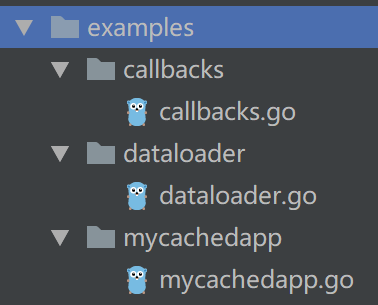
如上图,项目中还有一个examples目录,大家肯定已经猜到了里面的内容了,没错,就是上面介绍的一堆代码组成的缓存库,怎么玩?
下面我们一个一个来看这3个示例吧~
1、callbacks.go
 1func main() {
 2    //【创建一个名为myCache的缓存表】
 3    cache := cache2go.Cache("myCache")
 4
 5    // This callback will be triggered every time a new item
 6    // gets added to the cache.
 7    //【每次有新item被加入到这个缓存表的时候会被触发的回调函数】
 8    //【这个函数只做了一个输出的动作】
 9    cache.SetAddedItemCallback(func(entry *cache2go.CacheItem) {
10        fmt.Println("Added:", entry.Key(), entry.Data(), entry.CreatedOn())
11    })
12    // This callback will be triggered every time an item
13    // is about to be removed from the cache.
14    //【当一个item被删除时被触发执行的回调函数,同样只有一个打印功能】
15    cache.SetAboutToDeleteItemCallback(func(entry *cache2go.CacheItem) {
16        fmt.Println("Deleting:", entry.Key(), entry.Data(), entry.CreatedOn())
17    })
18
19    // Caching a new item will execute the AddedItem callback.
20    //【缓存中添加一条记录】
21    cache.Add("someKey", 0, "This is a test!")
22
23    // Let's retrieve the item from the cache
24    //【读取刚才存入的数据】
25    res, err := cache.Value("someKey")
26    if err == nil {
27        fmt.Println("Found value in cache:", res.Data())
28    } else {
29        fmt.Println("Error retrieving value from cache:", err)
30    }
31
32    // Deleting the item will execute the AboutToDeleteItem callback.
33    //【删除someKey对应的记录】
34    cache.Delete("someKey")
35
36    // Caching a new item that expires in 3 seconds
37    //【添加设置了3s存活时间的记录】
38    res = cache.Add("anotherKey", 3*time.Second, "This is another test")
39
40    // This callback will be triggered when the item is about to expire
41    //【一旦触发了删除操作就会调用到下面这个回调函数,在这里也就是3s到期时被执行
42    res.SetAboutToExpireCallback(func(key interface{}) {
43        fmt.Println("About to expire:", key.(string))
44    })
45
46    //【为了等上面的3s时间到】
47    time.Sleep(5 * time.Second)
48}
2、dataloader.go
 1func main() {
 2    cache := cache2go.Cache("myCache")
 3
 4    // The data loader gets called automatically whenever something
 5    // tries to retrieve a non-existing key from the cache.
 6    //【当从cache中访问一个不存在的key时会触发这个回调函数】
 7    cache.SetDataLoader(func(key interface{}, args ...interface{}) *cache2go.CacheItem {
 8        // Apply some clever loading logic here, e.g. read values for
 9        // this key from database, network or file.
10        //【这里可以做一些机智的处理,比如说从数据库,网络或者文件中读取数据,这当然也是缓存的意义】
11        //key.(string)是类型断言,将interface{}类型的数据转回到string类型
12        val := "This is a test with key " + key.(string)
13
14        // This helper method creates the cached item for us. Yay!
15        //【很棒,这样就构造了一个value,然后构造出item】
16        item := cache2go.NewCacheItem(key, 0, val)
17        return item
18    })
19
20    // Let's retrieve a few auto-generated items from the cache.
21    //【试着检索一些自动生成的items】
22    for i := 0; i < 10; i++ {
23        //【将i转换为字符串,拼接成someKey_1的形式】
24        res, err := cache.Value("someKey_" + strconv.Itoa(i))
25        if err == nil {
26            fmt.Println("Found value in cache:", res.Data())
27        } else {
28            fmt.Println("Error retrieving value from cache:", err)
29        }
30    }
31}
3、mycachedapp.go
 1// Keys & values in cache2go can be of arbitrary types, e.g. a struct.
 2//【这个例子中要存储的数据是如下结构体类型】
 3type myStruct struct {
 4    text     string
 5    moreData []byte
 6}
 7
 8func main() {
 9    // Accessing a new cache table for the first time will create it.
10    //【创建缓存表myCache】
11    cache := cache2go.Cache("myCache")
12
13    // We will put a new item in the cache. It will expire after
14    // not being accessed via Value(key) for more than 5 seconds.
15    //【构造一个数据】
16    val := myStruct{"This is a test!", []byte{}}
17    //【存入数据,设置存活时间为5s】
18    cache.Add("someKey", 5*time.Second, &val)
19
20    // Let's retrieve the item from the cache.
21    //【试着读取】
22    res, err := cache.Value("someKey")
23    if err == nil {
24        fmt.Println("Found value in cache:", res.Data().(*myStruct).text)
25    } else {
26        fmt.Println("Error retrieving value from cache:", err)
27    }
28
29    // Wait for the item to expire in cache.
30    //【等待6s之后,明显是该过期了】
31    time.Sleep(6 * time.Second)
32    res, err = cache.Value("someKey")
33    if err != nil {
34        fmt.Println("Item is not cached (anymore).")
35    }
36
37    // Add another item that never expires.
38    //【再存入一个永不过期的数据】
39    cache.Add("someKey", 0, &val)
40
41    // cache2go supports a few handy callbacks and loading mechanisms.
42    //【设置回调函数,删除数据的时候被调用】
43    cache.SetAboutToDeleteItemCallback(func(e *cache2go.CacheItem) {
44        fmt.Println("Deleting:", e.Key(), e.Data().(*myStruct).text, e.CreatedOn())
45    })
46
47    // Remove the item from the cache.
48    //【手动执行删除操作,当然,上面设置的函数将被调用】
49    cache.Delete("someKey")
50
51    // And wipe the entire cache table.
52    //【抹去整个cache中的数据】
53    cache.Flush()
54}
终于全部讲完了~
如上,整个项目除了测试代码外,实现逻辑部分全部分析完了,cache2go算是非常简短的go开源项目了,很适合作为第一个读源码项目,下面要分析的groupcache也是和cache相关,但是相比cache2go要复杂很多,groupcache是大名鼎鼎的memcache的go语言版,我们下周开始分析!

cache2go源码最后一讲 - examples的更多相关文章
- Pytorch学习之源码理解:pytorch/examples/mnists
Pytorch学习之源码理解:pytorch/examples/mnists from __future__ import print_function import argparse import ...
- 启航 - cache2go源码分析
一.概述 我们今天开始第一部分“golang技能提升”.这一块我计划分析3个项目,一个是很流行的golang源码阅读入门项目cache2go,接着是非常流行的memcache的go语言版groupca ...
- Kettle 4.2源码分析第二讲--Kettle插件结构体系简介
1. 插件体系结构 1.1. 插件技术原理 1.1.1. 插件概念说明 插件是一种遵循统一的预定义接口规范编写出来的程序,应用程序在运行时通过接口规范对插件进行调用,以扩展应用程序的功能.在英 ...
- 建议收藏!利用Spring解决循环依赖,深入源码给你讲明白!
前置知识 只有单例模式下的bean会通过三级缓存提前暴露来解决循环依赖的问题.而非单例的bean每次获取都会重新创建,并不会放入三级缓存,所以多实例的bean循环依赖问题不能解决. 首先需要明白处于各 ...
- Kettle 4.2源码分析第一讲--Kettle 简介
Pentaho Data Integration(PDI)简介 1. PDI结构简介 图 1‑1 PDI核心组件 Spoon是构建ETL Jobs和Transformations的工具.Spoon可以 ...
- anki_vector SDK源码解析(教程)
一:最近anki vector robot开放了Python SDK,我听到的第一时间就赶快上网查了查,先抛几个官网重要链接吧: Python编程API手册及环境搭建等: https://sdk-re ...
- Redux异步解决方案之Redux-Thunk原理及源码解析
前段时间,我们写了一篇Redux源码分析的文章,也分析了跟React连接的库React-Redux的源码实现.但是在Redux的生态中还有一个很重要的部分没有涉及到,那就是Redux的异步解决方案.本 ...
- 手写@koa/router源码
上一篇文章我们讲了Koa的基本架构,可以看到Koa的基本架构只有中间件内核,并没有其他功能,路由功能也没有.要实现路由功能我们必须引入第三方中间件,本文要讲的路由中间件是@koa/router,这个中 ...
- 可视化工具gephi源码探秘(二)---导入netbeans
在上篇<可视化工具gephi源码探秘(一)>中主要介绍了如何将gephi的源码导入myeclipse中遇到的一些问题,此篇接着上篇而来,主要讲解当下通过myeclipse导入gephi源码 ...
随机推荐
- php |= 什么意思
- ios 上下滑动粘滞问题
ios 移动端,当你触及到可以左右滑动部分,进行上下滑动操作时,会导致上下滑动粘滞卡顿的问题 mdn:https://developer.mozilla.org/zh-CN/docs/Web/CSS/ ...
- [CF1138B]Circus
Description: 给你2个长度为n的01串 从中选出\(n/2\)个,使得选出的数中第一排1的个数等于未选出数中第二排1的个数 输出一种方案即可,没有输出-1 Hint: \(n \le 50 ...
- 机器学习(九)隐马尔可夫模型HMM
1.隐马尔可夫HMM模型 一个隐马尔可夫模型可以表示为\[\lambda=\{A,B,\pi\}\]具体就不说了,比较基本. 2.HMM模型的三个基本问题 1.概率计算问题:给定\(\lambda\) ...
- 4.28Linux(6)
2019-4-28 21:27:41 明天回家.回家继续学Linux还好有个服务器!!!感觉有个属于自己的服务器感觉好爽啊!! 越努力越幸运!永远不要高估自己!!! Nginx安装 服务器的请求原理 ...
- 11、js 数组详细操作方法及解析合集
js 数组详细操作方法及解析合集 前言 在开发中,数组的使用场景非常多,平日中也涉及到很多数组的api/相关操作,一直也没有对这块内容进行一块整理总结,很多时候就算用过几次这个api,在开发中也很容易 ...
- 微信小程序发送短信验证码完整实例
微信小程序注册完整实例,发送短信验证码,带60秒倒计时功能,无需服务器端.效果图: 代码: index.wxml <!--index.wxml--> <view class=&quo ...
- MongoDB 分片键的选择与案例
MongoDB版本:3.6 一.分片键类别 1.升序片键 升序片键例如:日期时间字段.自增字段. 2.随机分发片键 随机分发片键例如:用户名.邮件名.UUID.MD5值或者是其它的一些没有规律的值的列 ...
- Go变量逃逸分析
目录 什么是逃逸分析 为什么要逃逸分析 逃逸分析是怎么完成的 逃逸分析实例 总结 写过C/C++的同学都知道,调用著名的malloc和new函数可以在堆上分配一块内存,这块内存的使用和销毁的责任都在程 ...
- [Swift]LeetCode907. 子数组的最小值之和 | Sum of Subarray Minimums
Given an array of integers A, find the sum of min(B), where B ranges over every (contiguous) subarra ...