
Asp.Net Boilerplate Project 使用swagger调试api
文件有点大,去掉了packages文件夹,(Swashbuckle.Core.5.6.0)
链接:https://pan.baidu.com/s/1DzMLhFyRav0dufS4dTeMzg
提取码:lab0
在https://aspnetboilerplate.com/Templates下载模板
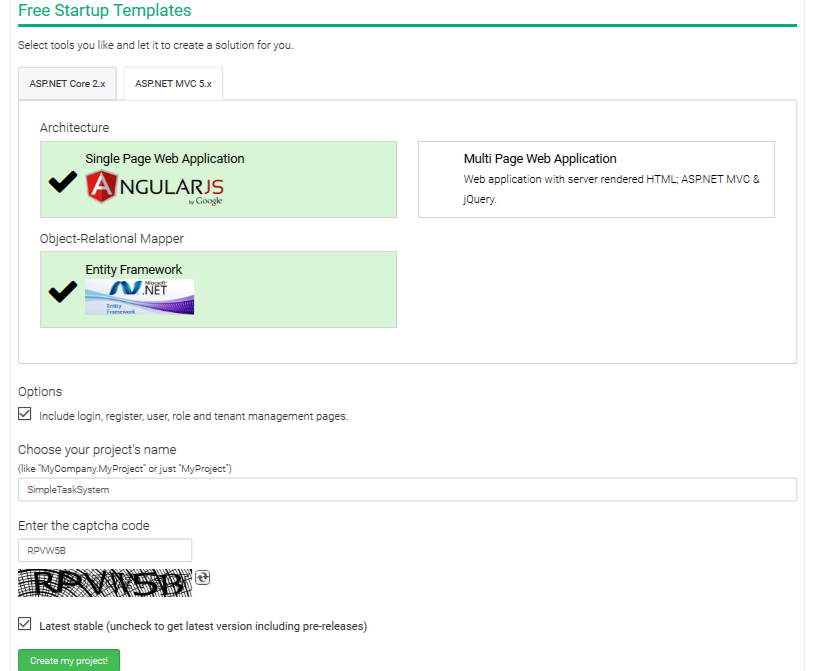
在项目SimpleTaskSystem.WebApi里安装Swashbuckle.core 5.6.0
安装成功后再文件SimpleTaskSystemWebApiModule.cs的方法Initialize里调用ConfigureSwaggerUi();
 private void ConfigureSwaggerUi()

 {

     Configuration.Modules.AbpWebApi().HttpConfiguration

         .EnableSwagger(c =>

         {

             c.SingleApiVersion("v1", "SimpleTaskSystem.WebApi");

             c.ResolveConflictingActions(apiDescriptions => apiDescriptions.First());

         })

         .EnableSwaggerUi(c =>

         {

             //路径规则,项目命名空间.文件夹名称.js文件名称

             c.InjectJavaScript(Assembly.GetAssembly(typeof(SimpleTaskSystemWebApiModule)), "SimpleTaskSystem.Api.Scripts.Swagger.js");

             //汉化

             //c.InjectJavaScript(Assembly.GetExecutingAssembly(), "SimpleTaskSystem.Api.Scripts.Translator.js");

             c.InjectJavaScript(Assembly.GetAssembly(typeof(SimpleTaskSystemWebApiModule)), "SimpleTaskSystem.Api.Scripts.Translator.js");

         });

 }
然后再api文件夹下创建新的文件夹Scripts,再Scripts里创建js文件Swagger.js。
 var getCookieValue = function(key) {

     var equalities = document.cookie.split('; ');

     for (var i = 0; i < equalities.length; i++) {

         if (!equalities[i]) {

             continue;

         }

         var splitted = equalities[i].split('=');

         if (splitted.length !== 2) {

             continue;

         }

         if (decodeURIComponent(splitted[0]) === key) {

             return decodeURIComponent(splitted[1] || '');

         }

     }

     return null;

 };

 var csrfCookie = getCookieValue("XSRF-TOKEN");

 var csrfCookieAuth = new SwaggerClient.ApiKeyAuthorization("X-XSRF-TOKEN", csrfCookie, "header");

 swaggerUi.api.clientAuthorizations.add("X-XSRF-TOKEN", csrfCookieAuth);
汉化的js:
 'use strict';

 /**

  * Translator for documentation pages.

  *

  * To enable translation you should include one of language-files in your index.html

  * after <script src='lang/translator.js' type='text/javascript'></script>.

  * For example - <script src='lang/ru.js' type='text/javascript'></script>

  *

  * If you wish to translate some new texsts you should do two things:

  * 1. Add a new phrase pair ("New Phrase": "New Translation") into your language file (for example lang/ru.js). It will be great if you add it in other language files too.

  * 2. Mark that text it templates this way <anyHtmlTag data-sw-translate>New Phrase</anyHtmlTag> or <anyHtmlTag data-sw-translate value='New Phrase'/>.

  * The main thing here is attribute data-sw-translate. Only inner html, title-attribute and value-attribute are going to translate.

  *

  */

 window.SwaggerTranslator = {

     _words: [],

     translate: function () {

         var $this = this;

         $('[data-sw-translate]').each(function () {

             $(this).html($this._tryTranslate($(this).html()));

             $(this).val($this._tryTranslate($(this).val()));

             $(this).attr('title', $this._tryTranslate($(this).attr('title')));

         });

     },

     _tryTranslate: function (word) {

         return this._words[$.trim(word)] !== undefined ? this._words[$.trim(word)] : word;

     },

     learn: function (wordsMap) {

         this._words = wordsMap;

     }

 };

 /* jshint quotmark: double */

 window.SwaggerTranslator.learn({

     "Warning: Deprecated": "警告:已过时",

     "Implementation Notes": "实现备注",

     "Response Class": "响应类",

     "Status": "状态",

     "Parameters": "参数",

     "Parameter": "参数",

     "Value": "值",

     "Description": "描述",

     "Parameter Type": "参数类型",

     "Data Type": "数据类型",

     "Response Messages": "响应消息",

     "HTTP Status Code": "HTTP状态码",

     "Reason": "原因",

     "Response Model": "响应模型",

     "Request URL": "请求URL",

     "Response Body": "响应体",

     "Response Code": "响应码",

     "Response Headers": "响应头",

     "Hide Response": "隐藏响应",

     "Headers": "头",

     "Try it out!": "试一下!",

     "Show/Hide": "显示/隐藏",

     "List Operations": "显示操作",

     "Expand Operations": "展开操作",

     "Raw": "原始",

     "can't parse JSON.  Raw result": "无法解析JSON. 原始结果",

     "Model Schema": "模型架构",

     "Model": "模型",

     "apply": "应用",

     "Username": "用户名",

     "Password": "密码",

     "Terms of service": "服务条款",

     "Created by": "创建者",

     "See more at": "查看更多:",

     "Contact the developer": "联系开发者",

     "api version": "api版本",

     "Response Content Type": "响应Content Type",

     "fetching resource": "正在获取资源",

     "fetching resource list": "正在获取资源列表",

     "Explore": "浏览",

     "Show Swagger Petstore Example Apis": "显示 Swagger Petstore 示例 Apis",

     "Can't read from server.  It may not have the appropriate access-control-origin settings.": "无法从服务器读取。可能没有正确设置access-control-origin。",

     "Please specify the protocol for": "请指定协议:",

     "Can't read swagger JSON from": "无法读取swagger JSON于",

     "Finished Loading Resource Information. Rendering Swagger UI": "已加载资源信息。正在渲染Swagger UI",

     "Unable to read api": "无法读取api",

     "from path": "从路径",

     "server returned": "服务器返回"

 });

 $(function () {

     window.SwaggerTranslator.translate();

 });
需要注意的是:着两个文件的“生成操作”必须的“嵌入的资源”,否则在访问http://localhost:6234/swagger/ui/index时,会报这两个js文件加载失败。

编译解决方案后我们就可以运行看看是否有误了:
http://localhost:6234/swagger/ui/index
打开F12,我们看到已经正确加载了

接下来,我们测试一下
打开http://localhost:6234/swagger,我们可以看到下图的api列表:
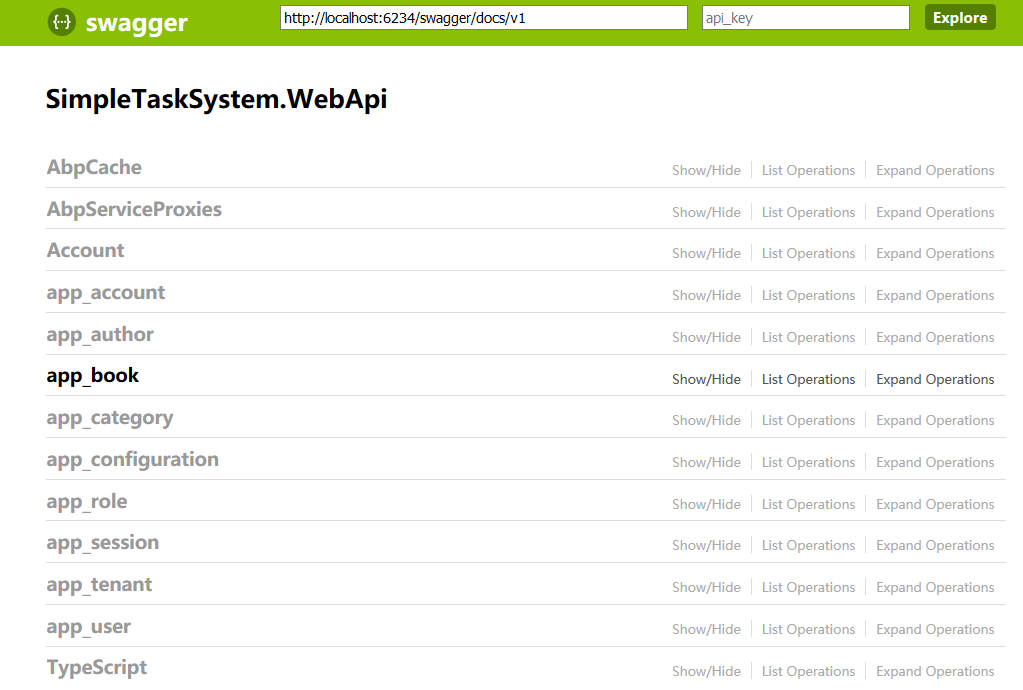
其中 app_author、app_book、app_category是我们创建的
下面我们测试下app_author的api,首先插入一条数据: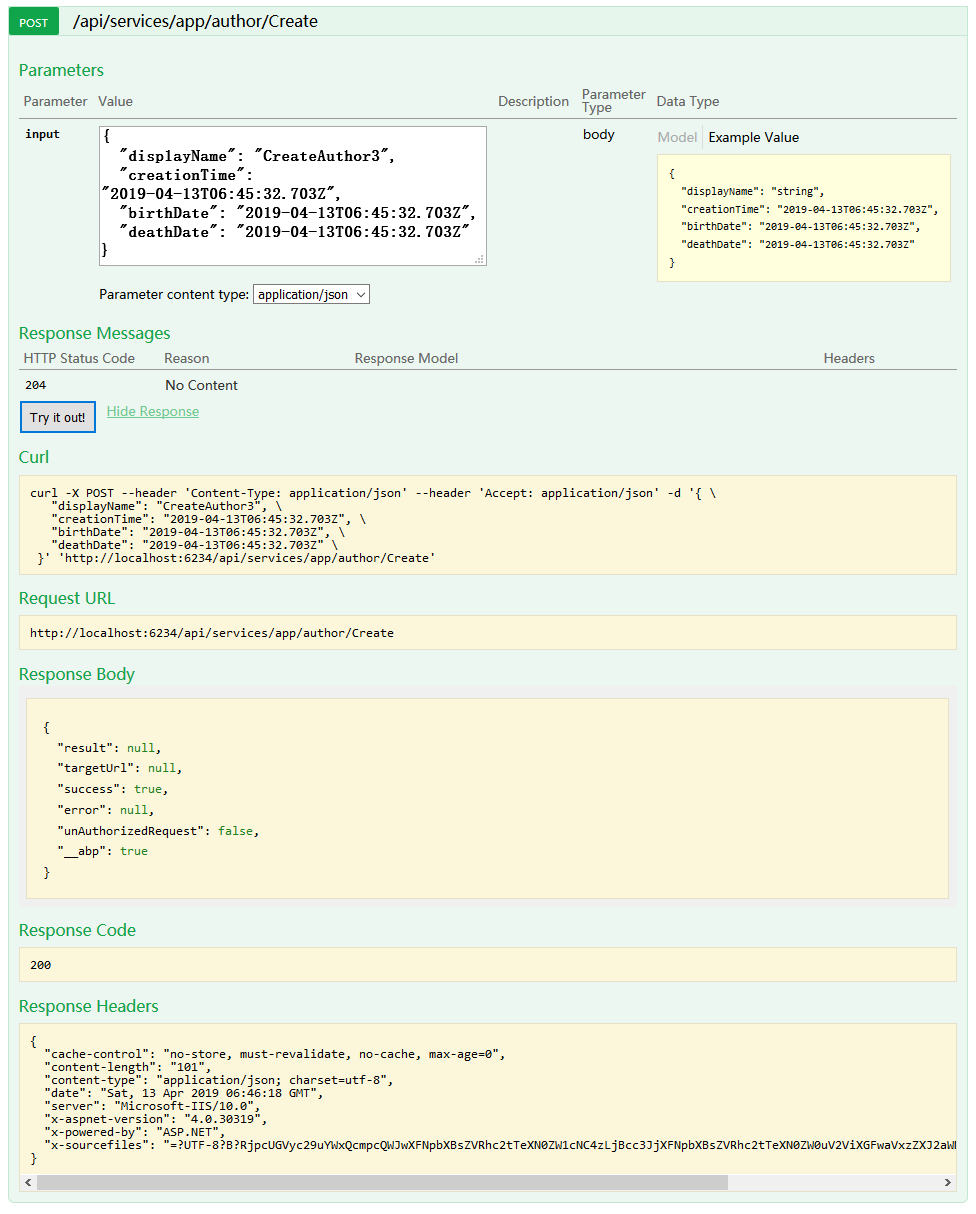
可以看到已经成功,然后我们看下所有数据:
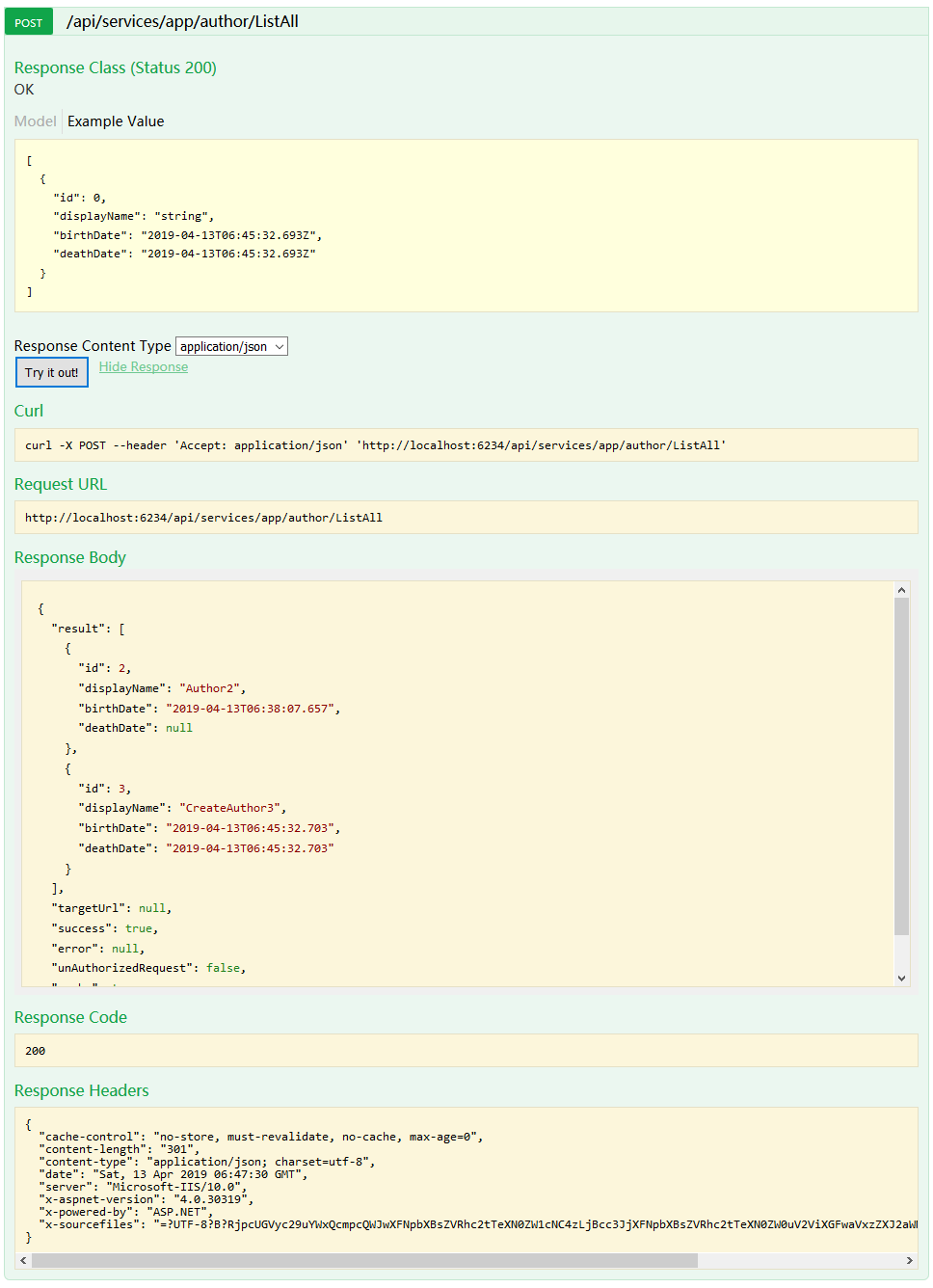
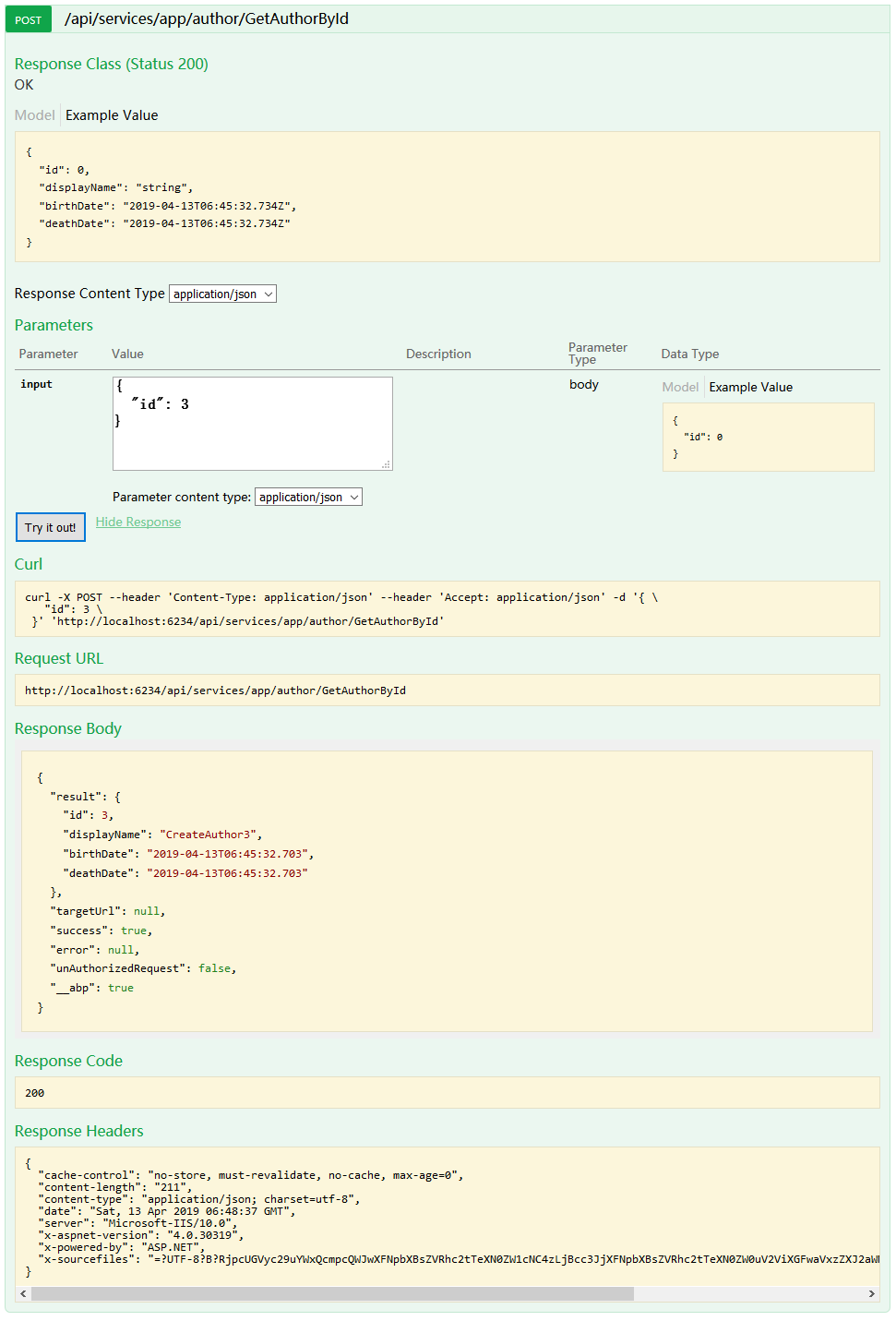
我们再看下根据id获取数据
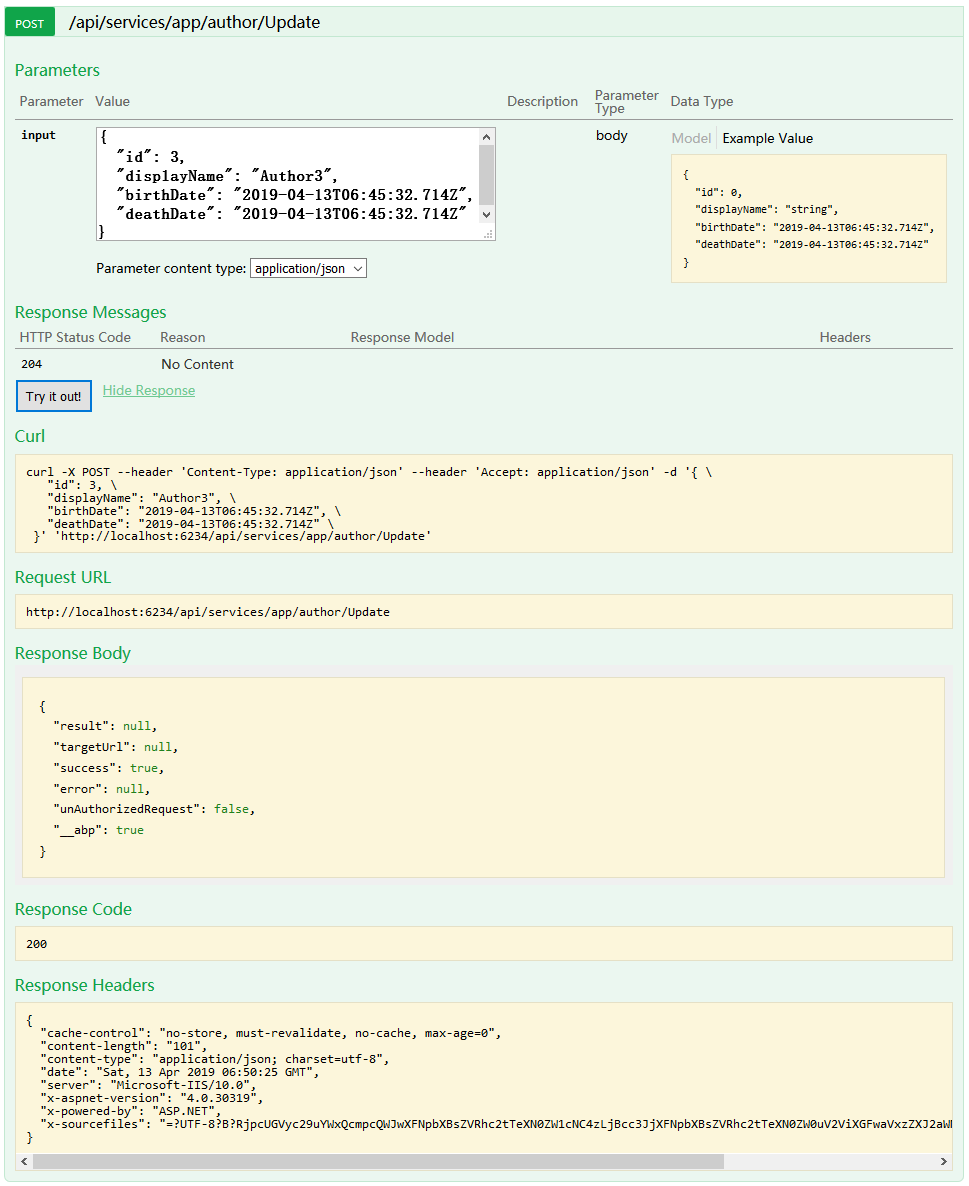
我们更新一个数据试试:
删除一条呢:

我们可以看到Author的这几个api都是可以的。
提示:在新增book时,由于表的关联关系,只有在正确输入Category和Author的id后才能创建成功。
Asp.Net Boilerplate Project 使用swagger调试api的更多相关文章
- ASP.NET Core WebApi使用Swagger生成api说明文档看这篇就够了
引言 在使用asp.net core 进行api开发完成后,书写api说明文档对于程序员来说想必是件很痛苦的事情吧,但文档又必须写,而且文档的格式如果没有具体要求的话,最终完成的文档则完全取决于开发者 ...
- ASP.NET Core WebApi使用Swagger生成api
引言 在使用asp.net core 进行api开发完成后,书写api说明文档对于程序员来说想必是件很痛苦的事情吧,但文档又必须写,而且文档的格式如果没有具体要求的话,最终完成的文档则完全取决于开发者 ...
- ASP.NET Core WebApi使用Swagger生成api说明文档
1. Swagger是什么? Swagger 是一个规范和完整的框架,用于生成.描述.调用和可视化 RESTful 风格的 Web 服务.总体目标是使客户端和文件系统作为服务器以同样的速度来更新.文件 ...
- 【转】ASP.NET Core WebApi使用Swagger生成api说明文档看这篇就够了
原文链接:https://www.cnblogs.com/yilezhu/p/9241261.html 引言 在使用asp.net core 进行api开发完成后,书写api说明文档对于程序员来说想必 ...
- ABP(ASP.NET Boilerplate Project)学习总结
ABP(ASP.NET Boilerplate Project),现下比较流行的一种web框架,因为公司新项目准备使用这种框架,所以写下这篇文章记录下自己一步一步搭建的过程,就当做是对学习的一个总结与 ...
- ASP.NET Core WebApi使用Swagger生成API说明文档【xml注释版】
⒈新建ASP.NET Core WebAPi项目 ⒉添加 NuGet 包 Install-Package Swashbuckle.AspNetCore ⒊Startup中配置 using System ...
- Asp.Net Core下使用swagger生成api文档
目录 一.前期准备 二.配置Swagger 三.参考 .Net Core中有两个集成NSwag的包,分别为Swashbuckle和NSwag.两者的配置大同小异.这里以NSwag为例. 一.前期准备 ...
- ASP.NET Core WebApi使用Swagger生成API说明文档【特性版】
⒈新建ASP.NET Core WebAPi项目 ⒉添加 NuGet 包 Install-Package Swashbuckle.AspNetCore ⒊Startup中配置 using System ...
- Asp.Net Core WebAPI使用Swagger时API隐藏与分组
1.前言 为什么我们要隐藏部分接口? 因为我们在用swagger代替接口的时候,难免有些接口会直观的暴露出来,比如我们结合Consul一起使用的时候,会将健康检查接口以及报警通知接口暴露出来,这些接口 ...
随机推荐
- eclipse配置tomcat添加外部项目
在eclipse中配置tomcat,添加外部项目. 添加外部项目 然后直接启动服务器,服务器里面不能添加项目.
- 接口自动化测试持续集成--Soapui接口测试
接口测试目前笔者掌握的工具有三种: 一.python+requests+jenkins,优点:代码实现接口测试,对测试代码书写比较自由等:缺点:需要测试者需要有一定的代码基础: 二.jmeter+an ...
- [macOS] Mojave10.14 夜神安卓模拟器启动问题
废话不多说,其它的都有在这里讨论: https://bbs.yeshen.com/forum.php?mod=viewthread&tid=8566 我的最终解决办法是,virtualbox安 ...
- 棋盘游戏,dfs搜索
问题描述 在一个给定形状的棋盘(形状可能是不规则的)上面摆放棋子,棋子没有区别.要求摆放时任意的两个棋子不能放在棋盘中的同一行或者同一列,请编程求解对于给定形状和大小的棋盘,摆放k个棋子的所有可行的摆 ...
- SV-assertion
断言(assert)是一种描述性语言,通过描述的期望结果来进行仿真验证. 断言有一个更加基础的信息,我们称为属性(property),属性可以作为断言结果,功能覆盖点,形式检查和约束随机激励生成. 断 ...
- eclipse中使用workset整理项目
eclipse项目过多怎么方便管理呢? 可以使用workset来进行管理.这里的workset跟.net 也就是visual studio中的项目解决方法类似,可以将项目.类库进行分开管理. 可以点击 ...
- 关于Win10安装vs2013简体中文语言包无法安装的问题
Win10下安装VS2013后无法安装VS2013中文简体语言包,提示Windows程序兼容模式已打开. 解决方案: 1,随便找个文件夹将简体中文语言包放入其中,发送快捷方式到桌面,右击快捷方式 选择 ...
- docker运行镜像报错:"write init-p: broken pipe"
docker: Error response from daemon: OCI runtime create failed: container_linux.go:344: starting cont ...
- 软件测试实验四----mujava变异测试
1.整个路径结构 2.具体内容 2.1mujava的安装 2.1.1更改CLASSPATH环境变量,使命令行可以找到mujava的路径,方便之后mujava的使用. 2.1.2在系统某一路径下按照格式 ...
- 服务器怎么安装mysql数据库
有些小伙伴们想自己玩玩服务器.可以买了服务以后,发现服务器就是一个大框子,没有数据存储.啥都没有,这时候就需要各种软件操作来逐步安装这些东西, 一.使用的工具:xshell(从官网上下载),目的是得使 ...