
iOS ---进阶之摇一摇
1、摇一摇的原理分析
1)在摇动手机时会产生一个动画,界面的图片会在中间分开分别进行向上、向下的位置移动。
分析:此过程就是在主屏幕上设置两个imageView,在开始摇动的方法中对这两个imageView进行位置移动,界面的层次结构如下图: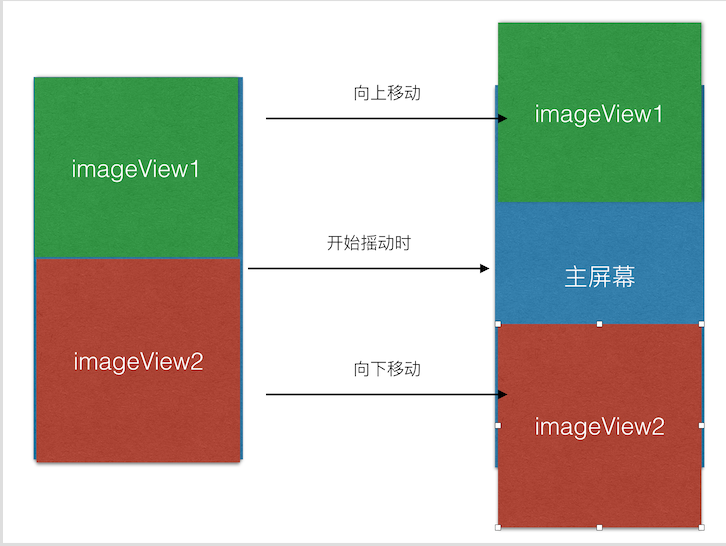
2)在界面进行动画操作的同时播放音频
分析:在执行动画的方法中添加播放音频的代码
3)在结束晃动时做出相应的操作:发送随机数据请求、页面的跳转等等
2、VC.m文件的代码如下:
#import "ViewController.h"

#import "NextViewController.h"

#import <AudioToolbox/AudioToolbox.h>

#define SCREEN_WIDTH  self.view.bounds.size.width

#define SCREEN_HEIGHT self.view.bounds.size.height

@interface ViewController ()

@property (strong,nonatomic)UIImageView * topImage;

@property (strong,nonatomic)UIImageView * bottomImage;

@end

@implementation ViewController

- (void)viewDidLoad {

    [super viewDidLoad];

    [UIApplication sharedApplication].applicationSupportsShakeToEdit = YES;

    [self setupImageView];

}

/**

 *  播放MP3

 */

- (void)playMp3

{

    NSString * mp3Path = [[NSBundle mainBundle]pathForResource:@"glass.wav" ofType:nil];

    NSURL * soundUrl = [NSURL fileURLWithPath:mp3Path];

    SystemSoundID soundId;

    AudioServicesCreateSystemSoundID((__bridge CFURLRef)(soundUrl), &soundId);

    AudioServicesPlaySystemSound(soundId);

}

- (void)setupImageView

{

    self.topImage = [[UIImageView alloc]initWithFrame:CGRectMake(, , SCREEN_WIDTH, SCREEN_HEIGHT/)];

    self.topImage.image = [UIImage imageNamed:@"Shake_01"];

    [self.view addSubview:self.topImage];

    self.bottomImage = [[UIImageView alloc]initWithFrame:CGRectMake(, SCREEN_HEIGHT/, SCREEN_WIDTH, SCREEN_HEIGHT/)];

    self.bottomImage.image = [UIImage imageNamed:@"Shake_02"];

    [self.view addSubview:self.bottomImage];

}

/**

 *  开始摇动

 */

-(void)motionBegan:(UIEventSubtype)motion withEvent:(UIEvent *)event

{

    [UIView animateWithDuration:1.0 animations:^{

        [self playMp3];

        self.topImage.transform = CGAffineTransformMakeTranslation(, -);

        self.bottomImage.transform = CGAffineTransformMakeTranslation(, );

    }];

}

/**

 *  结束取消

 */

-(void)motionCancelled:(UIEventSubtype)motion withEvent:(UIEvent *)event

{

    [UIView animateWithDuration:1.0 animations:^{

        self.topImage.transform = CGAffineTransformIdentity;

        self.bottomImage.transform = CGAffineTransformIdentity;

    } completion:^(BOOL finished) {

        [self.navigationController pushViewController:[[NextViewController alloc]init] animated:YES];

    }];

}

/**

 *  结束摇动

 */

-(void)motionEnded:(UIEventSubtype)motion withEvent:(UIEvent *)event

{

   [UIView animateWithDuration:1.0 animations:^{

       self.topImage.transform = CGAffineTransformIdentity;

       self.bottomImage.transform = CGAffineTransformIdentity;

   } completion:^(BOOL finished) {

       [self.navigationController pushViewController:[[NextViewController alloc]init] animated:YES];

   }];

}

@end
3、测试的时候最好在真机上测试。
demo下载地址:https://github.com/fengzhihao123/FZHShake
iOS ---进阶之摇一摇的更多相关文章
- iOS开发 传感器(加速计、摇一摇、计步器)
一.传感器 1.什么是传感器传感器是一种感应\检测周围环境的一种装置, 目前已经广泛应用于智能手机上 传感器的作用用于感应\检测设备周边的信息不同类型的传感器, 检测的信息也不一样 iPhone中的下 ...
- iOS开发——高级篇——传感器(加速计、摇一摇、计步器)
一.传感器 1.什么是传感器传感器是一种感应\检测周围环境的一种装置, 目前已经广泛应用于智能手机上 传感器的作用用于感应\检测设备周边的信息不同类型的传感器, 检测的信息也不一样 iPhone中的下 ...
- ios UIWindow 错误使用导致无法接收motionEnded(摇一摇)函数
今天遇到一个问题,第一次运行程序时,- (void)motionEnded:(UIEventSubtype)motion withEvent:(UIEvent *)event函数无法调用,第二次就好了 ...
- iOS开发——高级技术&摇一摇功能的实现
摇一摇功能的实现 在AppStore中多样化功能越来越多的被使用了,所以今天就开始介绍一些iOS开发的比较实用,但是我们接触的比较少的功能,我们先从摇一摇功能开始 在 UIResponder中存在这么 ...
- IOS端的摇一摇功能
//微信的摇一摇是怎么实现的~发现原来 ios本身就支持 //在 UIResponder中存在这么一套方法 - (void)motionBegan:(UIEventSubtype)motion wit ...
- IOS中微信摇一摇声音无法播放解决办法
在IOS中第一次调用play方法播放音频会被阻止,必须得等用户有交互动作,比如touchstart,click后才能正常调用,所以可以在摇一摇之前提醒用户点击一下开始游戏的按钮或者给用户一个弹窗,用户 ...
- IOS 摇一摇的方法
● 监控摇一摇的方法 ● 方法1:通过分析加速计数据来判断是否进行了摇一摇操作(比较复杂) ● 方法2:iOS自带的Shake监控API(非常简单) ● 判断摇一摇的步骤:实现3个摇一摇监听方法 ● ...
- swift 实现 iOS摇一摇
本博客包含了如何实现iOS摇一摇全步骤,包括了完整的代码. 先附上demo地址https://github.com/Liuyubao/LYBShake ,支持swift3.0+. 一.导包 项目主要使 ...
- 不会吧,这也行?iOS后台锁屏监听摇一摇
目录 背景介绍 探索过程 其他 APP 有没有类似功能 系统提供的摇一摇回调能否满足 其他方法能否实现 利用 CoreMotion 框架,监听加速计原始数据 通过加速计监听摇一摇 控制器相关逻辑和代码 ...
随机推荐
- python操作vmware
import pysphere from pysphere import VIServer host_ip = "200.200.173.45" username = " ...
- Red Hat 系列如何快速定制二进制内核 RPM 包?
随着Linux服务器越来越多了,底层系统内核想要保持版本统一就需要定制专门的二进制安装包来便捷的升级和管理. RedHat系那当然就是使用rpmbuild来做定制化管理了. 今天我们分俩个部分(roo ...
- cmake条件编译
CMake的条件编译基于if elseif endif.3.0版本具体语法如下 if(expression) # then section. COMMAND1(ARGS ...) COMMAND2(A ...
- VGGNet
VGGNet 是牛津大学计算机视觉组(Visual Geometry Group)和 GoogleDeepMind 公司的研究员一起研发的的深度卷积神经网络. 在ImageNet大型视觉识别挑战 IL ...
- Chrome 扩展 Vue Devtools
Vue.js devtools是基于google chrome浏览器的一款调试vue.js应用的开发者浏览器扩展,可以在浏览器开发者工具下调试代码. 1)首先在github下载devtools源码,地 ...
- Chrome 强制刷新缓存的方法
https://jingyan.baidu.com/article/11c17a2c2a9e27f446e39d98.html
- Debian 如何使用测试版更新软件包到最新的版本
#vim /etc/apt/sources.list 将版本代号替换成 testing 然后更新,应可以安装最新的软件包了.
- Basic4android v3.20 发布
这次主要是可视化设计器的增强. 具体新功能如下: This version includes many important improvements: Visual designer Anchors ...
- 8.3 mysql 表操作
库操作 一 系统数据库 information_schema: 虚拟库,不占用磁盘空间,存储的是数据库启动后的一些参数,如用户表信息.列信息.权限信息.字符信息等 performance_sch ...
- 如何使用Office Word 2007以上在写51CTO博客
目前大部分的博客作者在用Word写博客这件事情上都会遇到以下3个痛点: 1.所有博客平台关闭了文档发布接口,用户无法使用Word,Windows Live Writer等工具来发布博客.使用Word写 ...