
Day20-单表中获取表单数据的3种方式
1. 搭建环境请参考:http://www.cnblogs.com/momo8238/p/7508677.html
2. 创建表结构
models.py
from django.db import models

# Create your models here.

class Business(models.Model):

    #id列,是自动创建的

    caption=models.CharField(max_length=32)

class Host(models.Model):

    nid=models.AutoField(primary_key=True)

    hostname=models.CharField(max_length=32,db_index=True) #加上索引,可以提高查询速度

    ip=models.GenericIPAddressField(protocol="ipv4",db_index=True)

    port=models.IntegerField()

    b=models.ForeignKey("Business",to_field='id')
在Terminal端执行:
python manage.py makemigrations

python manage.py migrate
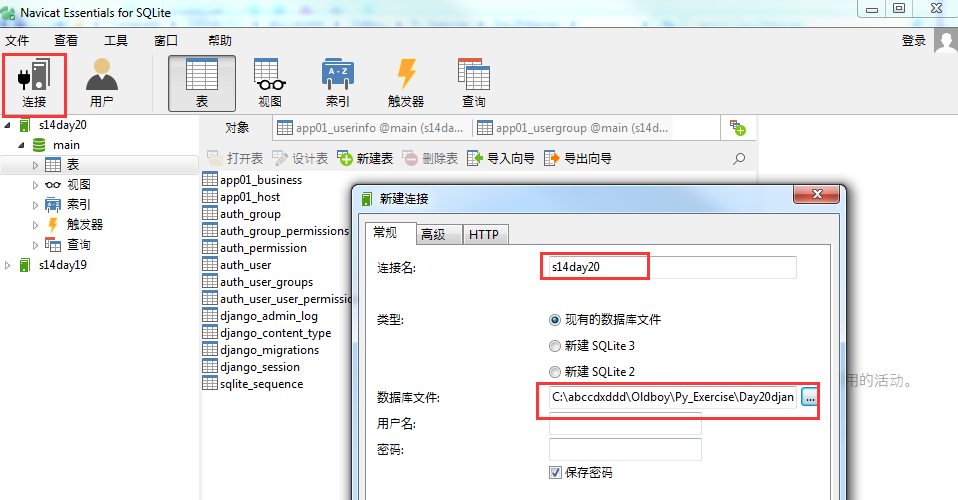
3. 在SQLite中打开.
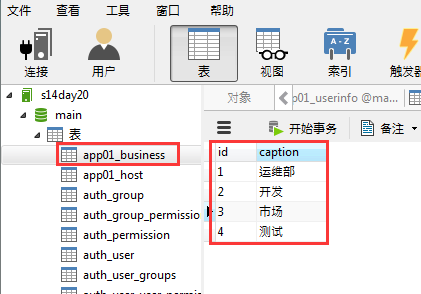
4. 在business业务线数据表中,手动增加几条数据
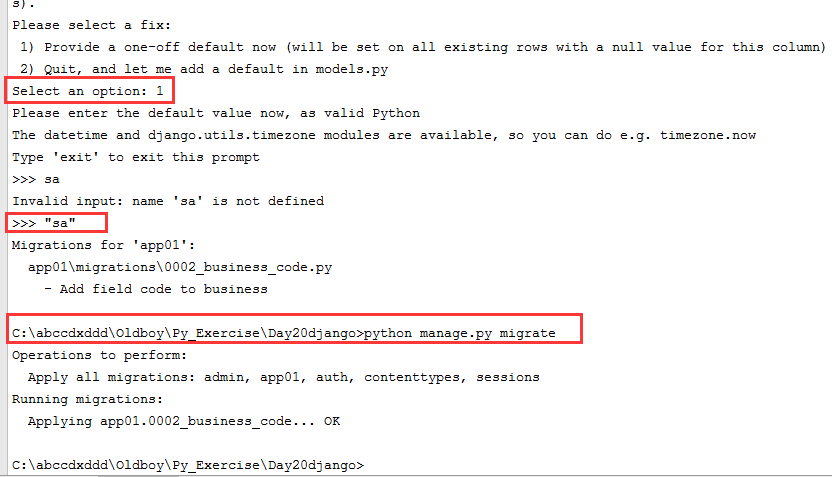
5. 如果此时想再往 business表中增加一列的话,会报错。因为程序不知道该怎么给已经存在的数据赋这列值。code=models.CharField(max_length=32)
或者可以在新建的时候写上null=True; code=models.CharField(max_length=32,null=True)
或者可以在新建的时候写上default="sa"; code=models.CharField(max_length=32,default="sa")

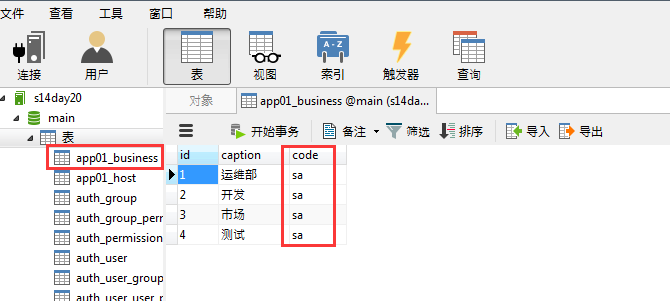
选1,增加默认值"sa", 重新打开一下表,就可以看到更新了。
导入相应的模块,from app01 import models (这里的意思是导入models.py这个模块)
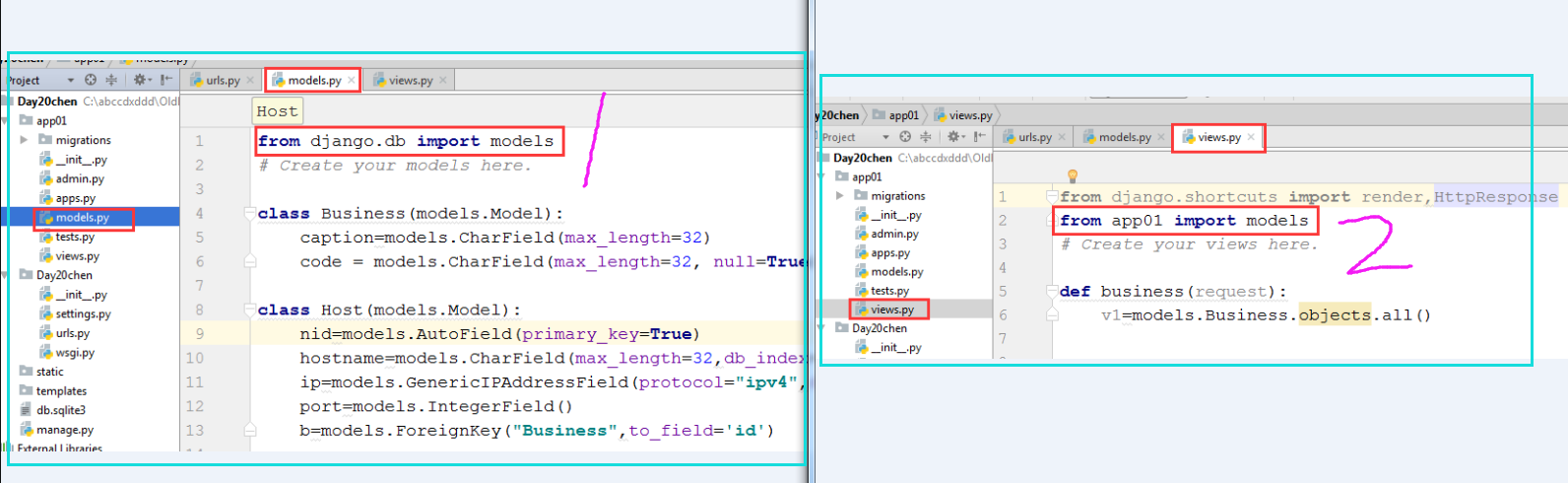
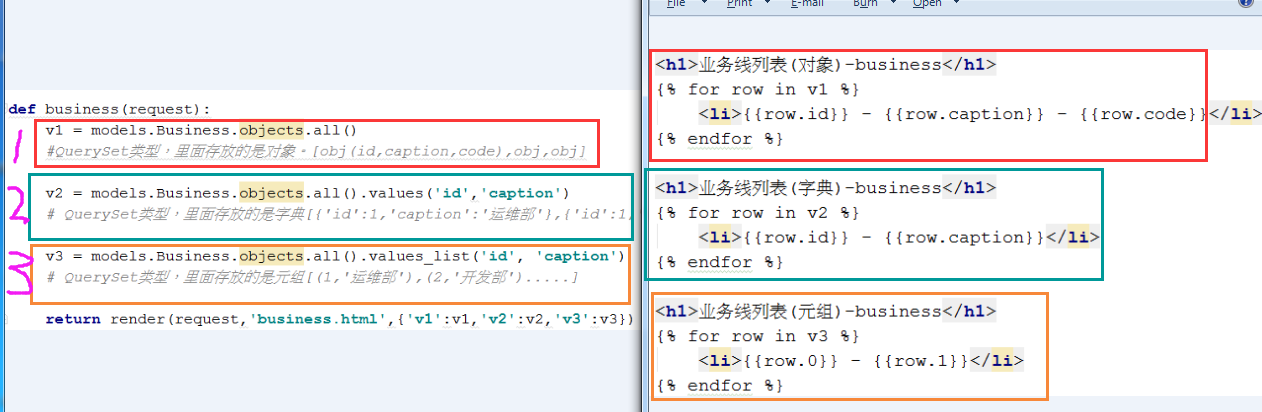
6.在business表中,测试在单表中获取数据的三种方式。QuerySet就像一个列表,只不过里面存放的是很多对象。
记忆:只要出现values,那么里面存放的就是字典;
只要出现values_list,那么里面存放的就是列表;
除此之外,其它的都是对象。
下面获取到的都是QuerySet对象。
v1 = models.Business.objects.all()
#QuerySet类型,里面存放的是对象。[obj(id,caption,code),obj,obj]

v2 = models.Business.objects.all().values('id','caption')
# QuerySet类型,里面存放的是字典[{'id':1,'caption':'运维部'},{'id':1,'caption':'开发部'}..]

v3 = models.Business.objects.all().values_list('id', 'caption')
# QuerySet类型,里面存放的是元组[(1,'运维部'),(2,'开发部').....]
如果想获取一个对象,可以用以下的方法。
models.Business.objects.get(id=1) #如果不存在的花,则会报错。
models.Business.objects.filter(id=1) #获取到的是一个对象列表,如果没有匹配的值,返回的列表就为空。但不会报错。
models.Business.objects.filter(id=1).first() #获取对象列表中的第一个值。
粘贴部分程序
urls.py
from django.conf.urls import url

from django.contrib import admin

from app01 import views

urlpatterns = [

    url(r'^admin/', admin.site.urls),

    url(r'^business/', views.business),

]
views.py
from django.shortcuts import render,HttpResponse

from app01 import models

# Create your views here.

def business(request):

    v1 = models.Business.objects.all()

    #QuerySet类型,里面存放的是对象。[obj(id,caption,code),obj,obj]

    v2 = models.Business.objects.all().values('id','caption')

    # QuerySet类型,里面存放的是字典[{'id':1,'caption':'运维部'},{'id':1,'caption':'开发部'}..]

    v3 = models.Business.objects.all().values_list('id', 'caption')

    # QuerySet类型,里面存放的是元组[(1,'运维部'),(2,'开发部').....]

    return render(request,'business.html',{'v1':v1,'v2':v2,'v3':v3})
business.html
<!DOCTYPE html>

<html lang="en">

<head>

    <meta charset="UTF-8">

    <title>Title</title>

</head>

<body>

    <h1>业务线列表(对象)-business</h1>

    {% for row in v1 %}

        <li>{{row.id}} - {{row.caption}} - {{row.code}}</li>

    {% endfor %}

    <h1>业务线列表(字典)-business</h1>

    {% for row in v2 %}

        <li>{{row.id}} - {{row.caption}}</li>

    {% endfor %}

    <h1>业务线列表(元组)-business</h1>

    {% for row in v3 %}

        <li>{{row.0}} - {{row.1}}</li>

    {% endfor %}

</body>

</html>
models.py
from django.db import models

# Create your models here.

class Business(models.Model):

    #id列,是自动创建的

    caption=models.CharField(max_length=32)

    code=models.CharField(max_length=32)

class Host(models.Model):

    nid=models.AutoField(primary_key=True)

    hostname=models.CharField(max_length=32,db_index=True) #加上索引,可以提高查询速度

    ip=models.GenericIPAddressField(protocol="ipv4",db_index=True)

    port=models.IntegerField()

    b=models.ForeignKey("Business",to_field='id')
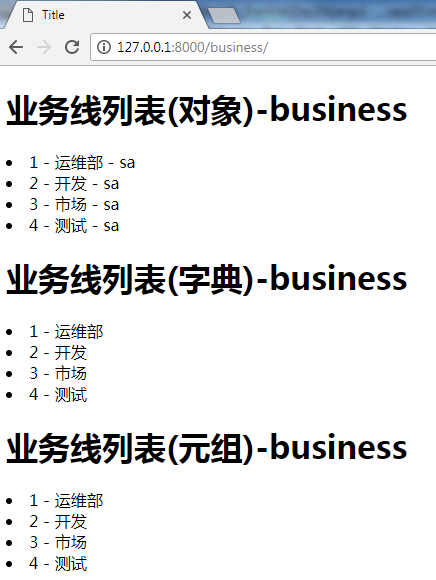
网页中的效果:
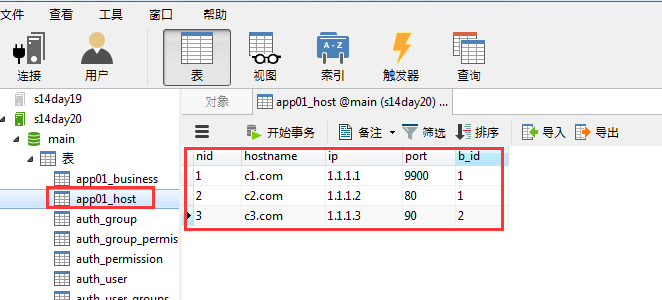
7. 手动在app01_host表中增加数据备用
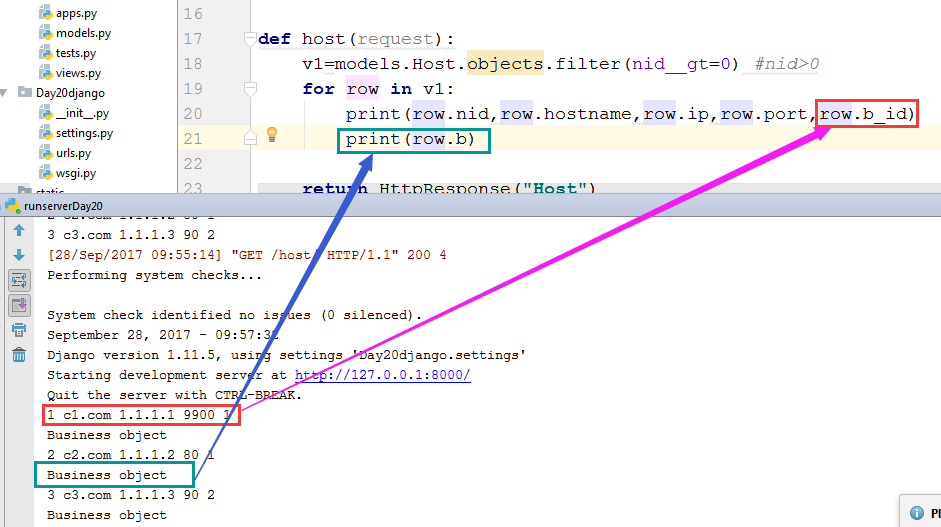
8. 稍做测试,看下row.b_id, row_b 分别输出的是什么
row.b_id:是数字
row_b:是business object 对象
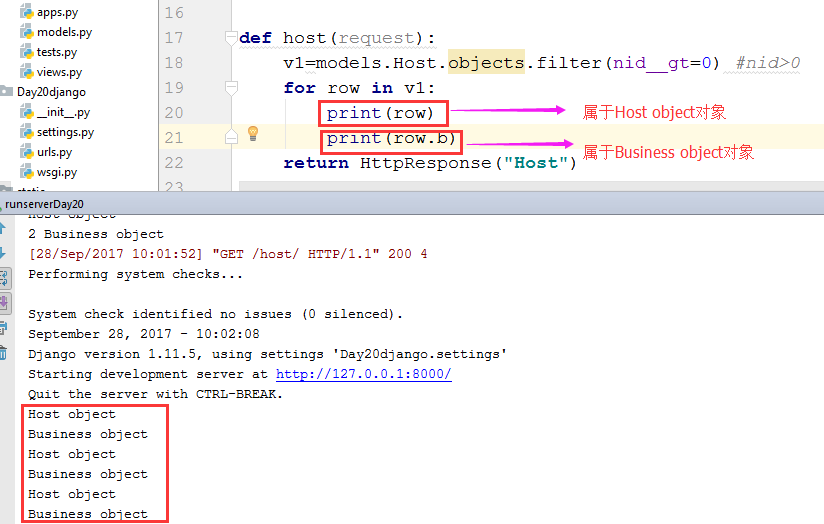
row:属于Host object对象
row.b:属于Business object 对象
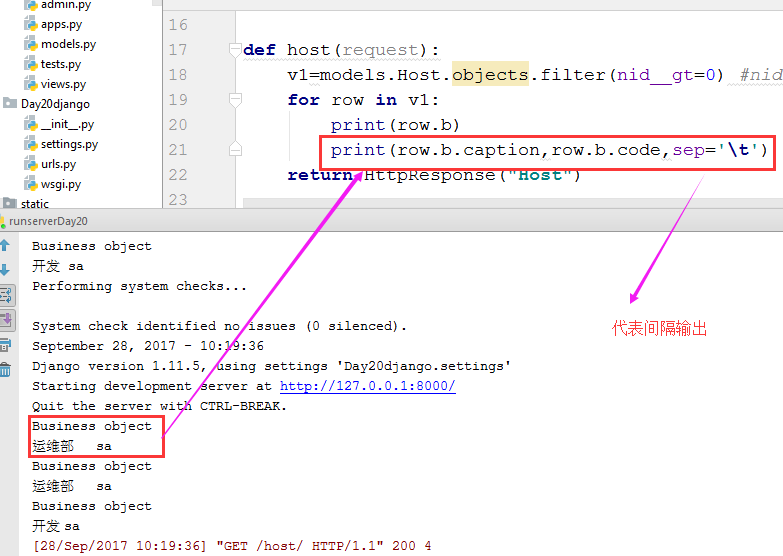
既然row.b属于Business object 对象,那么它后面就可以再通过. 去获取它下面的属性和方法
插播一句:
所有的变量都是对象。 对象在python里,其实是一个指针,指向一个数据结构,数据结构里有属性,有方法。
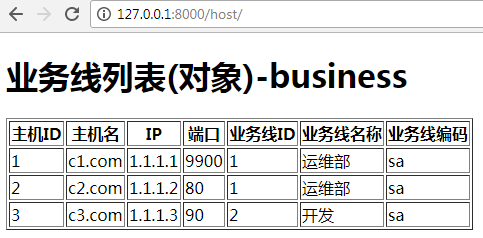
9. 在前端输出所有信息
host.html中
<!DOCTYPE html>

<html lang="en">

<head>

    <meta charset="UTF-8">

    <title>Title</title>

</head>

<body>

    <h1>业务线列表(对象)-business</h1>

    <table border="1">

        <thead>

            <tr>

                <th>主机ID</th>

                <th>主机名</th>

                <th>IP</th>

                <th>端口</th>

                <th>业务线ID</th>

                <th>业务线名称</th>

                <th>业务线编码</th>

            </tr>

        </thead>

        <tbody>

            {% for row in v1%}

            <tr>

                <td>{{row.nid}}</td>

                <td>{{row.hostname}}</td>

                <td>{{row.ip}}</td>

                <td>{{row.port}}</td>

                <td>{{row.b_id}}</td>

                <td>{{row.b.caption}}</td>

                <td>{{row.b.code}}</td>

            </tr>

            {% endfor %}

        </tbody>

    </table>

</body>

</html>
效果图:
优化输出,隐藏了主机ID和业务线ID
<!DOCTYPE html>

<html lang="en">

<head>

    <meta charset="UTF-8">

    <title>Title</title>

</head>

<body>

    <h1>业务线列表(对象)-business</h1>

    <table border="1">

        <thead>

            <tr>

                <th>主机名</th>

                <th>IP</th>

                <th>端口</th>

                <th>业务线名称</th>

            </tr>

        </thead>

        <tbody>

            {% for row in v1%}

            <tr hid="{{row.nid}}" bid="{{row.b_id}}">

                <td>{{row.hostname}}</td>

                <td>{{row.ip}}</td>

                <td>{{row.port}}</td>

                <td>{{row.b.caption}}</td>

            </tr>

            {% endfor %}

        </tbody>

    </table>

</body>

</html>
效果图:
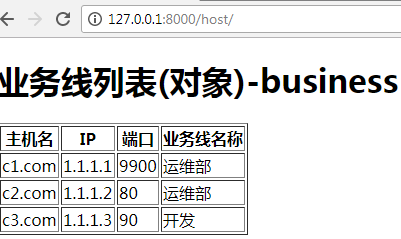
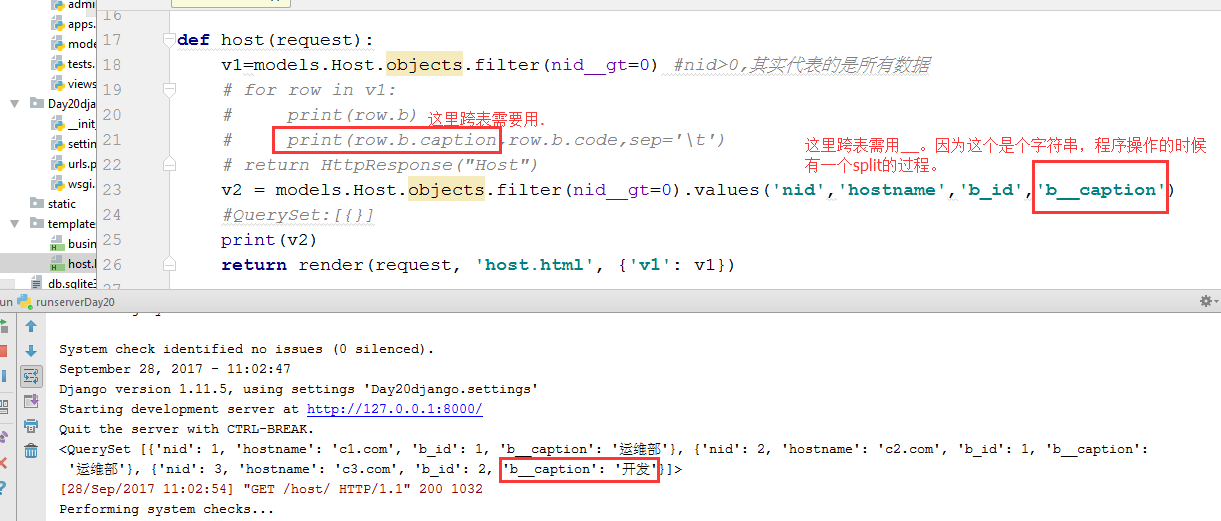
10. 一对多表操作,也就是跨表操作。通过.可以实现跨表,通过__也可以实现跨表操作,不过两者的使用场景不同。
from django.shortcuts import render,HttpResponse

from app01 import models

# Create your views here.

def business(request):

    v1 = models.Business.objects.all()

    #QuerySet类型,里面存放的是对象。[obj(id,caption,code),obj,obj]

    v2 = models.Business.objects.all().values('id','caption')

    # QuerySet类型,里面存放的是字典[{'id':1,'caption':'运维部'},{'id':1,'caption':'开发部'}..]

    v3 = models.Business.objects.all().values_list('id', 'caption')

    # QuerySet类型,里面存放的是元组[(1,'运维部'),(2,'开发部').....]

    return render(request,'business.html',{'v1':v1,'v2':v2,'v3':v3})

def host(request):

    v1=models.Host.objects.filter(nid__gt=0) #nid>0,其实代表的是所有数据

    # for row in v1:

    #     print(row.b)

    #     print(row.b.caption,row.b.code,sep='\t')

    # return HttpResponse("Host")

    v2 = models.Host.objects.filter(nid__gt=0).values('nid','hostname','b_id','b__caption')

    #QuerySet:[{}]

    print(v2)

    return render(request, 'host.html', {'v1': v1})
10.2
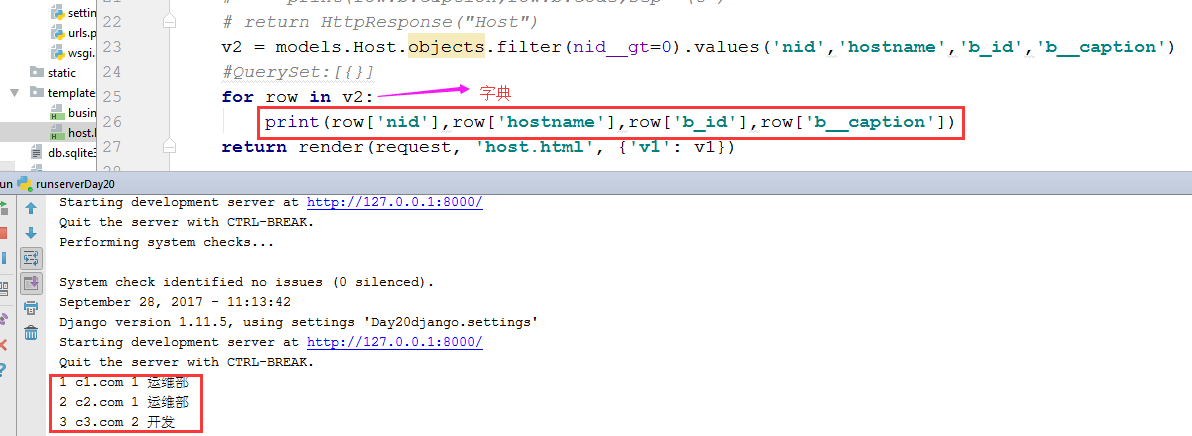
用字典的方法,让前端获取到数据
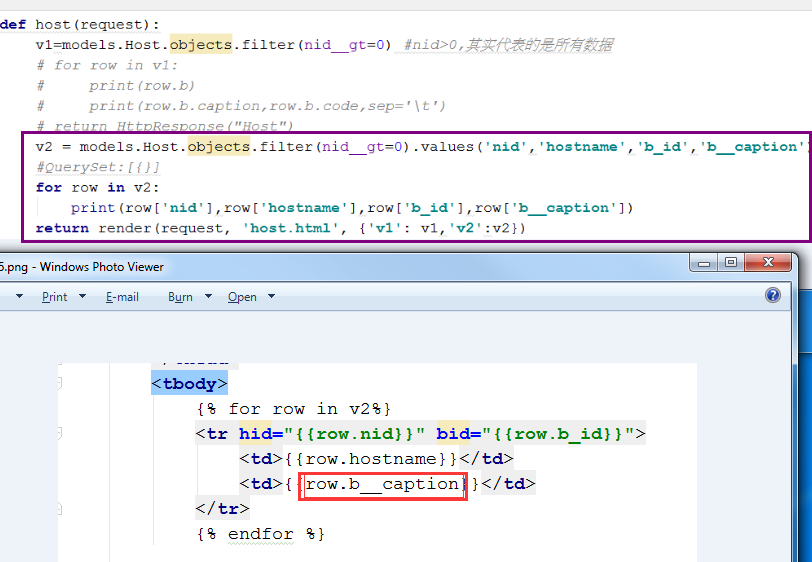
总结3种跨表方式
views.py
from django.shortcuts import render,HttpResponse

from app01 import models

# Create your views here.

def business(request):

    v1 = models.Business.objects.all()

    #QuerySet类型,里面存放的是对象。[obj(id,caption,code),obj,obj]

    v2 = models.Business.objects.all().values('id','caption')

    # QuerySet类型,里面存放的是字典[{'id':1,'caption':'运维部'},{'id':1,'caption':'开发部'}..]

    v3 = models.Business.objects.all().values_list('id', 'caption')

    # QuerySet类型,里面存放的是元组[(1,'运维部'),(2,'开发部').....]

    return render(request,'business.html',{'v1':v1,'v2':v2,'v3':v3})

def host(request):

    v1=models.Host.objects.filter(nid__gt=0) #nid>0,其实代表的是所有数据

    # for row in v1:

    #     print(row.b)

    #     print(row.b.caption,row.b.code,sep='\t')

    # return HttpResponse("Host")

    v2 = models.Host.objects.filter(nid__gt=0).values('nid','hostname','b_id','b__caption')

    #QuerySet:[{}]

    for row in v2:

        print(row['nid'],row['hostname'],row['b_id'],row['b__caption'])

    v3 = models.Host.objects.filter(nid__gt=0).values_list('nid', 'hostname', 'b_id', 'b__caption')

    return render(request, 'host.html', {'v1': v1,'v2':v2,'v3':v3})
host.html
<!DOCTYPE html>

<html lang="en">

<head>

    <meta charset="UTF-8">

    <title>Title</title>

</head>

<body>

    <h1>业务线列表(对象)-business</h1>

    <table border="1">

        <thead>

            <tr>

                <th>主机名</th>

                <th>IP</th>

                <th>端口</th>

                <th>业务线名称</th>

            </tr>

        </thead>

        <tbody>

            {% for row in v1%}

            <tr hid="{{row.nid}}" bid="{{row.b_id}}">

                <td>{{row.hostname}}</td>

                <td>{{row.ip}}</td>

                <td>{{row.port}}</td>

                <td>{{row.b.caption}}</td>

            </tr>

            {% endfor %}

        </tbody>

    </table>

    <h1>业务线列表(字典)-business</h1>

    <table border="1">

        <thead>

            <tr>

                <th>主机名</th>

                <th>业务线名称</th>

            </tr>

        </thead>

        <tbody>

            {% for row in v2%}

            <tr hid="{{row.nid}}" bid="{{row.b_id}}">

                <td>{{row.hostname}}</td>

                <td>{{row.b__caption}}</td>

            </tr>

            {% endfor %}

        </tbody>

    </table>

    <h1>业务线列表(元组)-business</h1>

    <table border="1">

        <thead>

            <tr>

                <th>主机名</th>

                <th>业务线名称</th>

            </tr>

        </thead>

        <tbody>

            {% for row in v3%}

            <tr hid="{{row.0}}" bid="{{row.2}}">

                <td>{{row.1}}</td>

                <td>{{row.3}}</td>

            </tr>

            {% endfor %}

        </tbody>

    </table>

</body>

</html>
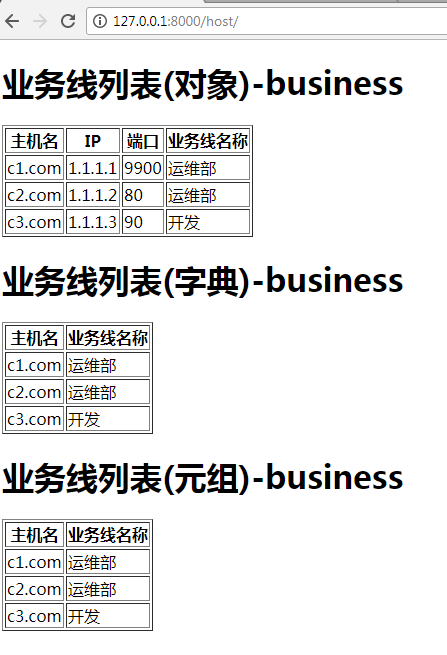
页面效果:
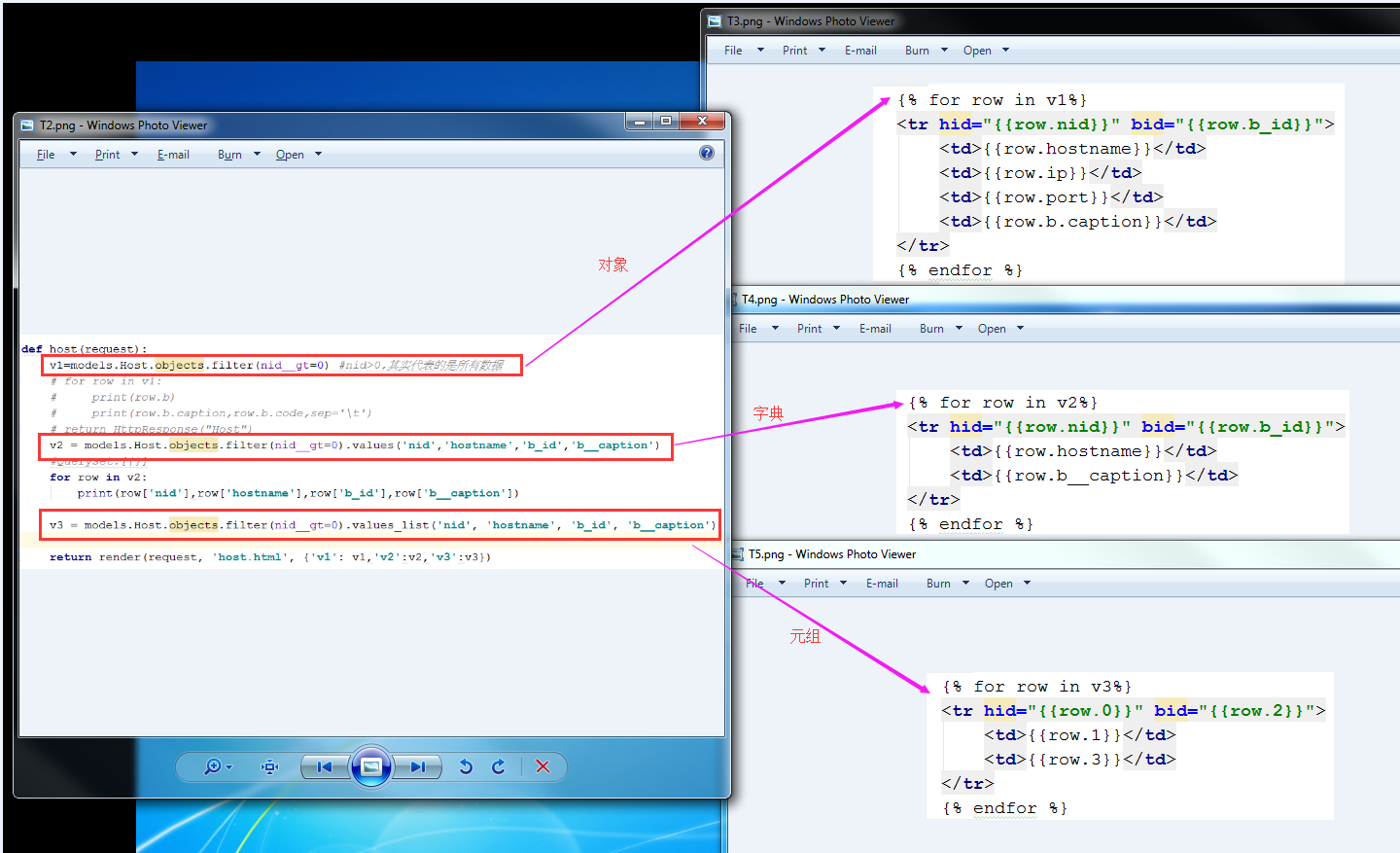
11.一对多表操作的3种方式总结

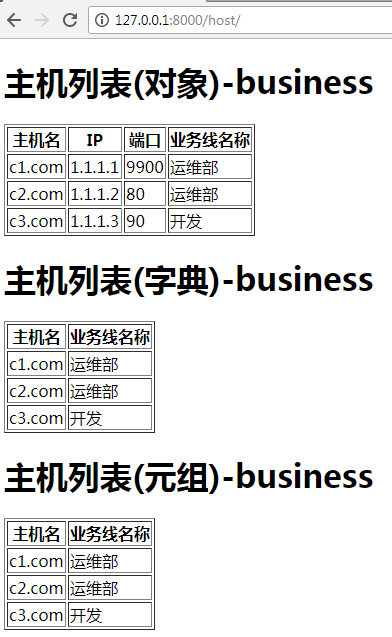
把host页的名称都改为主机列表
12. 增加一对多的数据
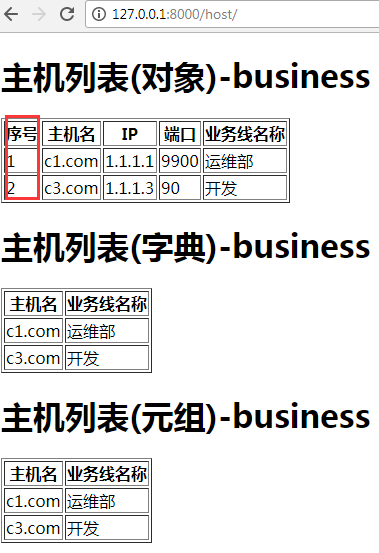
为了使输出的数据更好看,我们增加一列命名为序号。在for循环下有个计数器
<td>{{forloop.counter}}</td>,循环几次,则值就相应地显示为几,可以跟着数据库中的数据进行动态调整。
<td>{{forloop.counter0}}</td>,从0开始计数(0.1.2.3.)
<td>{{forloop.revcounter}}</td>,倒着计数计数直到1(3.2.1)
<td>{{forloop.revcounter0}}</td>,倒着计数计数直到0(3.2.1.0)
<td>{{forloop.first}}</td>,是否是第一次循环,是的话返回True,否则返回False
<td>{{forloop.last}}</td>,是否是最后一次循环,是的话返回True,否则返回False
<td>{{forloop.parentloop}}</td>,当有多层循环的时候,拿到父亲是属于第几次循环。
host.html中程序修改如下:
<!DOCTYPE html>

<html lang="en">

<head>

    <meta charset="UTF-8">

    <title>Title</title>

</head>

<body>

    <h1>主机列表(对象)-business</h1>

    <table border="1">

        <thead>

            <tr>

                <th>序号</th>

                <th>主机名</th>

                <th>IP</th>

                <th>端口</th>

                <th>业务线名称</th>

            </tr>

        </thead>

        <tbody>

            {% for row in v1%}

            <tr hid="{{row.nid}}" bid="{{row.b_id}}">

                <td>{{forloop.counter}}</td>

                <td>{{row.hostname}}</td>

                <td>{{row.ip}}</td>

                <td>{{row.port}}</td>

                <td>{{row.b.caption}}</td>

            </tr>

            {% endfor %}

        </tbody>

    </table>

    <h1>主机列表(字典)-business</h1>

    <table border="1">

        <thead>

            <tr>

                <th>主机名</th>

                <th>业务线名称</th>

            </tr>

        </thead>

        <tbody>

            {% for row in v2%}

            <tr hid="{{row.nid}}" bid="{{row.b_id}}">

                <td>{{row.hostname}}</td>

                <td>{{row.b__caption}}</td>

            </tr>

            {% endfor %}

        </tbody>

    </table>

    <h1>主机列表(元组)-business</h1>

    <table border="1">

        <thead>

            <tr>

                <th>主机名</th>

                <th>业务线名称</th>

            </tr>

        </thead>

        <tbody>

            {% for row in v3%}

            <tr hid="{{row.0}}" bid="{{row.2}}">

                <td>{{row.1}}</td>

                <td>{{row.3}}</td>

            </tr>

            {% endfor %}

        </tbody>

    </table>

</body>

</html>
显示效果:
13. 用模态对话框实现增加一条数据。
urls.py
from django.conf.urls import url

from django.contrib import admin

from app01 import views

urlpatterns = [

    url(r'^admin/', admin.site.urls),

    url(r'^business/', views.business),

    url(r'^host/', views.host),

]
business.html
<!DOCTYPE html>

<html lang="en">

<head>

    <meta charset="UTF-8">

    <title>Title</title>

</head>

<body>

    <h1>业务线列表(对象)-business</h1>

    {% for row in v1 %}

        <li>{{row.id}} - {{row.caption}} - {{row.code}}</li>

    {% endfor %}

    <h1>业务线列表(字典)-business</h1>

    {% for row in v2 %}

        <li>{{row.id}} - {{row.caption}}</li>

    {% endfor %}

    <h1>业务线列表(元组)-business</h1>

    {% for row in v3 %}

        <li>{{row.0}} - {{row.1}}</li>

    {% endfor %}

</body>

</html>
host.html
<!DOCTYPE html>

<html lang="en">

<head>

    <meta charset="UTF-8">

    <title>Title</title>

    <style>

        .hide{

            display:none;

        }

        .shade{

            position:fixed;

            top:0;

            bottom:0;

            right:0;

            left:0;

            background:black;

            opacity:0.6;

            z-index:100;

        }

        .add-modal{

            position:fixed;

            height:300px;

            width:400px;

            top:100px;

            left:50%;

            z-index:101;

            border:1px solid red;

            background:white;

            margin-left:-200px;

        }

    </style>

</head>

<body>

    <h1>主机列表(对象)-business</h1>

    <div>

        <input id="add_host" type="button" value="添加"/>

    </div>

    <table border="1">

        <thead>

            <tr>

                <th>序号</th>

                <th>主机名</th>

                <th>IP</th>

                <th>端口</th>

                <th>业务线名称</th>

            </tr>

        </thead>

        <tbody>

            {% for row in v1%}

            <tr hid="{{row.nid}}" bid="{{row.b_id}}">

                <td>{{forloop.counter}}</td>

                <td>{{row.hostname}}</td>

                <td>{{row.ip}}</td>

                <td>{{row.port}}</td>

                <td>{{row.b.caption}}</td>

            </tr>

            {% endfor %}

        </tbody>

    </table>

    <h1>主机列表(字典)-business</h1>

    <table border="1">

        <thead>

            <tr>

                <th>主机名</th>

                <th>业务线名称</th>

            </tr>

        </thead>

        <tbody>

            {% for row in v2%}

            <tr hid="{{row.nid}}" bid="{{row.b_id}}">

                <td>{{row.hostname}}</td>

                <td>{{row.b__caption}}</td>

            </tr>

            {% endfor %}

        </tbody>

    </table>

    <h1>主机列表(元组)-business</h1>

    <table border="1">

        <thead>

            <tr>

                <th>主机名</th>

                <th>业务线名称</th>

            </tr>

        </thead>

        <tbody>

            {% for row in v3%}

            <tr hid="{{row.0}}" bid="{{row.2}}">

                <td>{{row.1}}</td>

                <td>{{row.3}}</td>

            </tr>

            {% endfor %}

        </tbody>

    </table>

    <div class="shade hide"></div>

    <div class="add-modal hide">

        <form method="POST" action="/host/">

            <div class="group">

                <input type="text" placeholder="主机名" name="hostname"/>

            </div>

            <div class="group">

                <input type="text" placeholder="IP" name="ip"/>

            </div>

            <div class="group">

                <input type="text" placeholder="端口" name="port"/>

            </div>

            <div class="group">

                <select name="b_id">

                    {% for op in b_list %}

                    <option value="{{op.id}}">{{op.caption}}</option>

                    {% endfor %}

                </select>

            </div>

            <input type="submit" value="提交"/>

            <input id="cancel" type="button" value="取消"/>

        </form>

    </div>

    <script src="/static/jquery-1.12.4.js"></script>

    <script>

        $(function(){

            $('#add_host').click(function(){

                $('.shade,.add-modal').removeClass('hide');

            });

        $('#cancel').click(function(){

            $('.shade,.add-modal').addClass('hide');

            });

        })

    </script>

</body>

</html>
views.py
from django.shortcuts import render,HttpResponse,redirect

from app01 import models

# Create your views here.

def business(request):

    v1 = models.Business.objects.all()

    #QuerySet类型,里面存放的是对象。[obj(id,caption,code),obj,obj]

    v2 = models.Business.objects.all().values('id','caption')

    # QuerySet类型,里面存放的是字典[{'id':1,'caption':'运维部'},{'id':1,'caption':'开发部'}..]

    v3 = models.Business.objects.all().values_list('id', 'caption')

    # QuerySet类型,里面存放的是元组[(1,'运维部'),(2,'开发部').....]

    return render(request,'business.html',{'v1':v1,'v2':v2,'v3':v3})

# def host(request):

#     v1=models.Host.objects.filter(nid__gt=0) #nid>0,其实代表的是所有数据

#     # for row in v1:

#     #     print(row.b)

#     #     print(row.b.caption,row.b.code,sep='\t')

#     # return HttpResponse("Host")

#     v2 = models.Host.objects.filter(nid__gt=0).values('nid','hostname','b_id','b__caption')

#     #QuerySet:[{}]

#     for row in v2:

#         print(row['nid'],row['hostname'],row['b_id'],row['b__caption'])

#

#     v3 = models.Host.objects.filter(nid__gt=0).values_list('nid', 'hostname', 'b_id', 'b__caption')

#

#     return render(request, 'host.html', {'v1': v1,'v2':v2,'v3':v3})

def host(request):

    if request.method=='GET':

        v1=models.Host.objects.filter(nid__gt=0) #nid>0,其实代表的是所有数据

        v2 = models.Host.objects.filter(nid__gt=0).values('nid','hostname','b_id','b__caption')

        v3 = models.Host.objects.filter(nid__gt=0).values_list('nid', 'hostname', 'b_id', 'b__caption')

        b_list=models.Business.objects.all()

        return render(request, 'host.html', {'v1': v1,'v2':v2,'v3':v3,'b_list':b_list})

    elif request.method=='POST':

        h=request.POST.get('hostname')

        i = request.POST.get('ip')

        p = request.POST.get('port')

        b = request.POST.get('b_id')

        models.Host.objects.create(hostname=h,ip=i,port=p,b_id=b)

        return redirect('/host/')
models.py
from django.db import models

# Create your models here.

class Business(models.Model):

    #id列,是自动创建的

    caption=models.CharField(max_length=32)

    code=models.CharField(max_length=32)

class Host(models.Model):

    nid=models.AutoField(primary_key=True)

    hostname=models.CharField(max_length=32,db_index=True) #加上索引,可以提高查询速度

    ip=models.GenericIPAddressField(protocol="ipv4",db_index=True)

    port=models.IntegerField()

    b=models.ForeignKey("Business",to_field='id')
最终效果

Day20-单表中获取表单数据的3种方式的更多相关文章
- Struts2中获取HttpServletRequest,HttpSession等的几种方式
转自:http://www.kaifajie.cn/struts/8944.html package com.log; import java.io.IOException; import java. ...
- Activity启动过程中获取组件宽高的五种方式
第一种:(重写Activity的onWindowFocusChanged方法) /** * 重写Acitivty的onWindowFocusChanged方法 */ @Override public ...
- js中获取页面元素节点的几种方式
<!DOCTYPE html><html lang="en"><head> <meta charset="UTF-8" ...
- Spring框架中获取连接池常用的四种方式
1:DBCP数据源 DBCP类包位于 /lib/jakarta-commons/commons-dbcp.jar,DBCP是一个依赖Jakarta commons-pool对象池机制的数据库连接池,所 ...
- SharePoint中获取当前登录的用户名几种方式
第一种方法: System.Web.HttpContext.Current.User.Identity.Name.ToString();或者: SPContext.Current.Site.OpenW ...
- 在Action中获取表单提交数据
-----------------siwuxie095 在 Action 中获取表单提交数据 1.之前的 Web 阶段是提交表单到 Servlet,在其中使用 Request 对象 的方法获取数据 2 ...
- koa 基础(十)原生node.js 在 koa 中获取表单提交的数据
1.app.js // 引入模块 const Koa = require('koa'); const router = require('koa-router')(); /*引入是实例化路由 推荐*/ ...
- 在Express 中获取表单请求体数据
在Express 中获取表单请求体数据 获取 GET 请求参数 获取 POST 请求体数据 安装 配置 获取 GET 请求参数 Express 内置了一个 API , 可以直接通过 req.query ...
- 在SQL SERVER中获取表中的第二条数据
在SQL SERVER中获取表中的第二条数据, 思路:先根据时间逆排序取出前2条数据作为一个临时表,再按顺时排序在临时表中取出第一条数据 sql语句如下: select top 1 * from(se ...
随机推荐
- day3 前奏
1.第1个c语言 编辑---编译----运行 python@ubuntu:~/Desktop/pythons06$ vim -第1个c语言.c #include<stdio.h> int ...
- Luogu2183【国家集训队】礼物
题面 题解 易得答案为 $$ \sum_{i=1}^m\binom{n-\sum_{j=1}^{i-1}w_j}{\sum_{j=1}^iw_j} $$ 扩展$\text{Lucas}$即可 代码 # ...
- sklearn半监督学习
标签: 半监督学习 作者:炼己者 欢迎大家访问 我的简书 以及 我的博客 本博客所有内容以学习.研究和分享为主,如需转载,请联系本人,标明作者和出处,并且是非商业用途,谢谢! --- 摘要:半监督学习 ...
- c++中的stack实现
通用.类型安全.模板 简直就是巧夺天工的例子
- JS基础,课堂作业,三个数字排序
三个数字大小排序 <script> var a = parseInt(prompt("请输入第一个整数:")); var b = parseInt(prompt(&qu ...
- Maven学习(三)-----Maven本地资源库
Maven本地资源库 Maven的本地资源库是用来存储所有项目的依赖关系(插件jar和其他文件,这些文件被Maven下载)到本地文件夹.很简单,当你建立一个Maven项目,所有相关文件将被存储在你的M ...
- linux源码学习-for_each_cpu
刚开始读linux源码,第一眼就看到了这个很有意思的函数族,周末好好研究一下 3.13 这个组都是宏定义for循环,分析的时候注意到cpumask_next(),它在一个文件中定义了两次,还不是重载, ...
- Scrum立会报告+燃尽图(06)选题
此作业要求参见:[https://edu.cnblogs.com/campus/nenu/2018fall/homework/2195] 一.小组介绍 组长:王一可 组员:范靖旋,王硕,赵佳璐,范洪达 ...
- c# apache服务器请求得到数据(初级)
1.代码: string data = new WebClient().DownloadString("http://localhost:81/123.txt");
- U盘安装OSX
1.插入U盘,磁盘工具,格式化U盘为Mac OS X拓展 (日志式): 2.去网站搜索recovery disk assistant,此文件大约1.1M,直接打开使用它制作启动盘,进度条完毕就完成了. ...