
C#单元测试:NUnit详细使用方法
1. TDD的简介
2.NUnit的介绍
2.1 NUnit的介绍
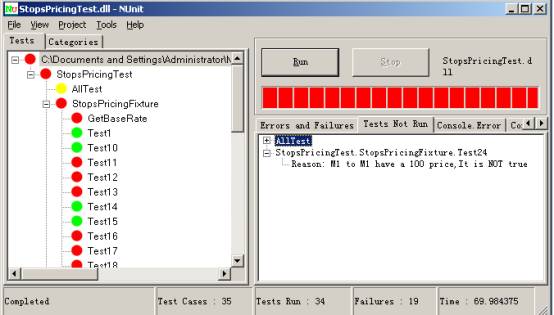
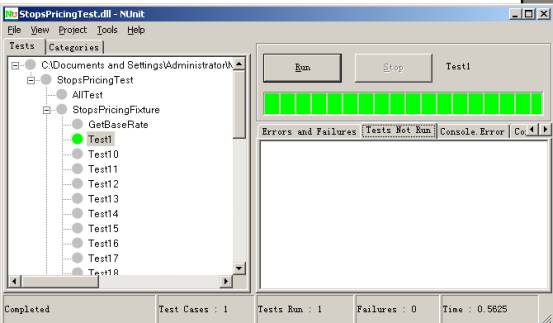
图2 NUnit运行的另外一个效果
- 绿色 描述目前所执行的测试都通过
- 黄色 意味某些测试忽略,但是这里没有失败
- 红色 表示有失败
- 状态.说明了现在运行测试的状态。当所有测试完成时,状态变为Completed.运行测试中,状态是Running: <test-name> (<test-name>是正在运行的测试名称)。
- Test Cases说明加载的程序集中测试案例的总个数。这也是测试树里叶子节点的个数。
- Tests Run 已经完成的测试个数。
- Failures 到目前为止,所有测试中失败的个数.
- Time 显示运行测试时间(以秒计)
- New Project允许你创建一个新工程。工程是一个测试程序集的集合。这种机制让你组织多个测试程序集,并把他们作为一个组对待。
- Open 加载一个新的测试程序集,或一个以前保存的NUnit工程文件。
- Close关闭现在加载的测试程序集或现在加载的NUnit工程。
- Save 保存现在的Nunit工程到一个文件。如果正工作单个程序集,本菜单项允许你创建一个新的NUnit工程,并把它保存在文件里。
- Save As允许你将现有NUnit工程作为一个文件保存。
- Reload 强制重载现有测试程序集或NUnit工程。NUnit-Gui自动监测现加载的测试程序集的变化。
- Recent Files 说明5个最近在NUnit中加载的测试程序集或NUnit工程(这个列表在Windows注册表,由每个用户维护,因此如果你共享你的PC,你仅看到你的测试)。最近程序集的数量可以使用Options菜单项修改,可以访问Tool主菜单。
- Exit退出。
- View菜单有以下内容:
- Expand一层层扩展现在树中所选节点
- Collapse 折叠现在树中选择的节点
- Expand All递归扩展树中所选节点后的所有节点
- Collapse All递归折叠树中所选节点后的所有节点
- Expand Fixtures扩展树中所有代表测试fixture的节点。
- Collapse Fixtures 折叠树中所有代表测试fixture的节点。
- Properties 显示树中现所选节点的属性。
- Tools 菜单由这些项:
- Save Results as XML作为一XML文件保存运行测试的结果。
- Options让你定制NUnit的行为。
- Errors and Failures 窗口显示失败的测试。在我们的例子里,这个窗口是空。
- Tests Not Run 窗口显示没有得到执行的测试。
- Console.Error 窗口显示运行测试产生的错误消息。这些此消息是应用程序代码使用Console.Error输出流可以输出的。
- Console.Out窗口显示运行测试打印到Console.Error输出流的文本消息。
2.2 一些常用属性
- Test Fixture
- Test
TestFixtureAttribute
- 必须是Public,否则NUnit看不到它的存在.
- 它必须有一个缺省的构造函数,否则是NUnit不会构造它.
- 构造函数应该没有任何副作用,因为NUnit在运行时经常会构造这个类多次,如果要是构造函数要什么副作用的话,那不是乱了.
 using System;
2
using NUnit.Framework;3
namespace MyTest.Tests4
 {
{5

6
[TestFixture]7
public class PriceFixture8
 {
{9
// 
10
 }
}11
 }
}12
TestAttribute
public void MethodName()using System;2
using NUnit.Framework;3
4
namespace MyTest.Tests5
{6
[TestFixture]7
public class SuccessTests8
{9
[Test] public void Test1()10
{ /* */ }11
}12
}13
14
一般来说,有了上面两个属性,你可以做基本的事情了.

另外,我们再对如何进行比较做一个描述。

在NUnit中,用Assert(断言)进行比较,Assert是一个类,它包括以下方法:AreEqual,AreSame,Equals, Fail,Ignore,IsFalse,IsNotNull,具体请参看NUnit的文档。
3.如何在.NET中应用NUnit
第1步.为测试代码创建一个Visual Studio工程。
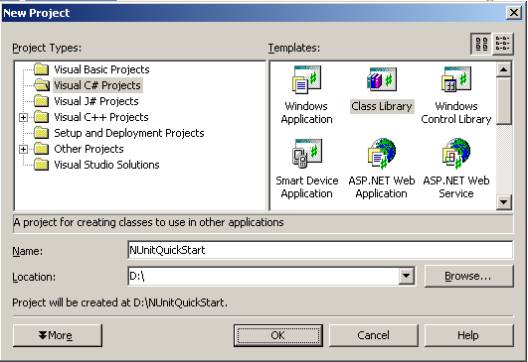
图 4-1: 创建第一个NUnit工程
第2步.增加一个NUnit框架引用
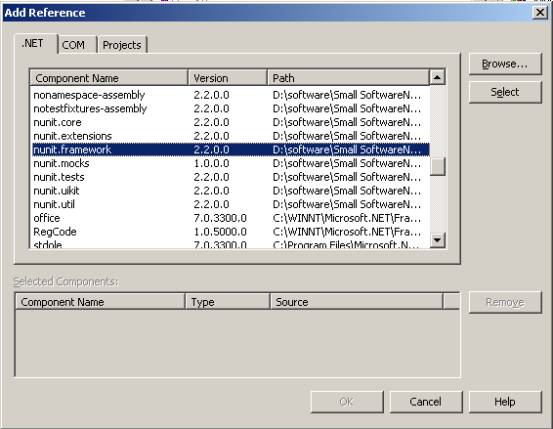
第3步.为工程加一个类.
using System; 2
using NUnit.Framework; 3
4
namespace NUnitQuickStart 5
{ 6
[TestFixture] 7
public class NumersFixture 8
{ 9
[Test] 10
public void AddTwoNumbers() 11
{ 12
int a=1; 13
int b=2; 14
int sum=a+b; 15
Assert.AreEqual(sum,3); 16
} 17
} 18
}19
第4步.建立你的Visual Studio 工程,使用NUnit-Gui测试
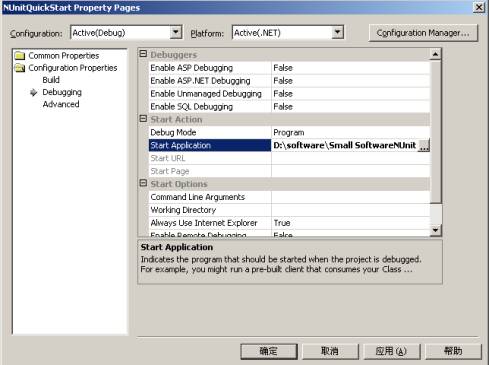


第5步.编译运行测试.
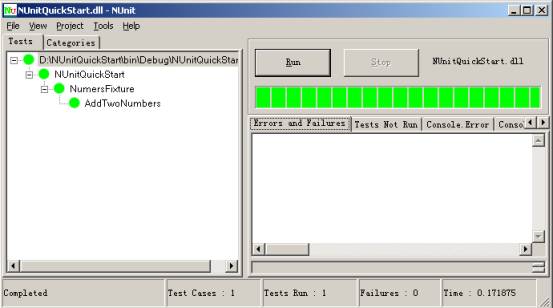
4.其他的一些核心概念
SetUp/TearDown 属性
using System; 2
using NUnit.Framework; 3
4
namespace NUnitQuickStart 5
{ 6
[TestFixture] 7
public class NumersFixture 8
{ 9
[Test] 10
public void AddTwoNumbers() 11
{ 12
int a=1; 13
int b=2; 14
int sum=a+b; 15
Assert.AreEqual(sum,3); 16
} 17
[Test] 18
public void MultiplyTwoNumbers() 19
{ 20
int a = 1; 21
int b = 2; 22
int product = a * b; 23
Assert.AreEqual(2, product); 24
} 25
26
} 27
} 28
我们仔细一看,不对,有重复的代码,如何去除重复的代码呢?我们可以提取这些代码到一个独立的方法,然后标志这个方法为SetUp 属性,这样2个测试方法可以共享对操作数的初始化了,这里是改动后的代码:
using System; 2
using NUnit.Framework; 3
4
namespace NUnitQuickStart 5
{ 6
[TestFixture] 7
public class NumersFixture 8
{ 9
private int a; 10
private int b; 11
[SetUp] 12
public void InitializeOperands() 13
{ 14
a = 1; 15
b = 2; 16
} 17
18
[Test] 19
public void AddTwoNumbers() 20
{ 21
int sum=a+b; 22
Assert.AreEqual(sum,3); 23
} 24
[Test] 25
public void MultiplyTwoNumbers() 26
{ 27
int product = a * b; 28
Assert.AreEqual(2, product); 29
} 30
31
} 32
} 33
这样NUnit将在执行每个测试前执行标记SetUp属性的方法.在本例中就是执行InitializeOperands()方法.记住,这里这个方法必须为public,不然就会有以下错误:Invalid Setup or TearDown method signature
ExpectedException
[Test]2
[ExpectedException(typeof(DivideByZeroException))]3
public void DivideByZero()4
{5
int zero = 0;6
int infinity = a/zero;7
Assert.Fail("Should have gotten an exception");8
}9
Ignore 属性
[Test]2
[Ignore("Multiplication is ignored")]3
public void MultiplyTwoNumbers()4
{5
int product = a * b;6
Assert.AreEqual(2, product);7
}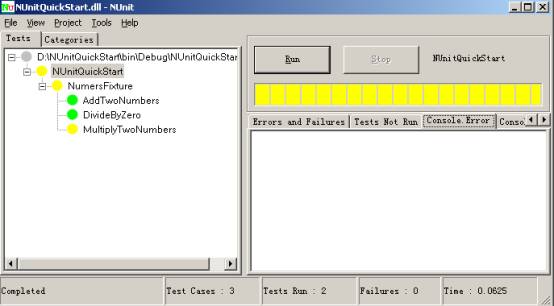
图 5-1: 在一个程序员测试中使用 Ignore属性
TestFixtureSetUp/TestFixtureTearDown
using NUnit.Framework;2
3
[TestFixture]4
public class DatabaseFixture5
{6
[TestFixtureSetUp]7
public void OpenConnection()8
{9
//open the connection to the database10
}11
12
[TestFixtureTearDown]13
public void CloseConnection()14
{15
//close the connection to the database16
}17
18
[SetUp]19
public void CreateDatabaseObjects()20
{21
//insert the records into the database table22
}23
24
[TearDown]25
public void DeleteDatabaseObjects()26
{27
//remove the inserted records from the database table28
}29
30
[Test]31
public void ReadOneObject()32
{33
//load one record using the open database connection34
}35
36
[Test]37
public void ReadManyObjects()38
{39
//load many records using the open database connection40
}41
}42
43
Test Suite
namespace NUnit.Tests2
{3
using System;4
using NUnit.Framework;5
6
7
8
public class AllTests9
{10
[Suite]11
public static TestSuite Suite12
{13
get14
{15
TestSuite suite = new TestSuite("All Tests");16
suite.Add(new OneTestCase());17
suite.Add(new Assemblies.AssemblyTests());18
suite.Add(new AssertionTest());19
return suite;20
}21
}22
}23
} 24
Category属性
using System; 2
using NUnit.Framework; 3
4
namespace NUnitQuickStart 5
{ 6
[TestFixture] 7
public class NumersFixture 8
{ 9
private int a; 10
private int b; 11
[SetUp] 12
public void InitializeOperands() 13
{ 14
a = 1; 15
b = 2; 16
} 17
18
[Test] 19
[Category("Numbers")] 20
public void AddTwoNumbers() 21
{ 22
int sum=a+b; 23
Assert.AreEqual(sum,3); 24
} 25
26
[Test] 27
[Category("Exception")] 28
[ExpectedException(typeof(DivideByZeroException))] 29
public void DivideByZero() 30
{ 31
int zero = 0; 32
int infinity = a/zero; 33
Assert.Fail("Should have gotten an exception"); 34
} 35
[Test] 36
[Ignore("Multiplication is ignored")] 37
[Category("Numbers")] 38
public void MultiplyTwoNumbers() 39
{ 40
int product = a * b; 41
Assert.AreEqual(2, product); 42
} 43
44
} 45
NUnit-GUI界面如图5-2:
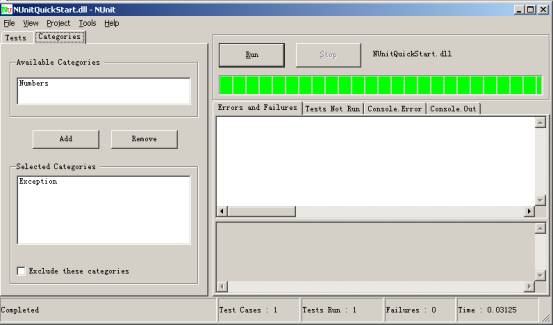
图5-2:使用Catagories属性的界面
Explicit属性
2
[Test,Explicit] 3
[Category("Exception")] 4
[ExpectedException(typeof(DivideByZeroException))] 5
public void DivideByZero() 6
{ 7
int zero = 0; 8
int infinity = a/zero; 9
Assert.Fail("Should have gotten an exception"); 10
}11
为什么会设计成这样呢?原因是Ingore属性忽略了某个test或test fixture,那么他们你再想调用执行是不可能的。那么万一有一天我想调用被忽略的test或test fixture怎么办,就用Explicit属性了。我想这就是其中的原因吧。
Expected Exception属性
[Test] 2
[ExpectedException(typeofInvalidOperationException))] 3
public void ExpectAnException() 4
{ 5
int zero = 0; 6
int infinity = a/zero; 7
Assert.Fail("Should have gotten an exception"); 8
9
} 10
在本测试中,应该抛出DivideByZeroException,但是期望的是InvalidOperationException,所以不能通过。如果我们将[ExpectedException(typeof(InvalidOperationException))]改为[ExpectedException(typeof(DivideByZeroException))],本测试通过。
5 . 测试生命周期合约
using System;2
using NUnit.Framework;3
[TestFixture]4
public class LifeCycleContractFixture5
{6
[TestFixtureSetUp]7
public void FixtureSetUp()8
{9
Console.Out.WriteLine("FixtureSetUp");10
}11
12
[TestFixtureTearDown]13
public void FixtureTearDown()14
{15
Console.Out.WriteLine("FixtureTearDown");16
}17
18
[SetUp]19
public void SetUp()20
{21
Console.Out.WriteLine("SetUp");22
}23
24
[TearDown]25
public void TearDown()26
{27
Console.Out.WriteLine("TearDown");28
}29
30
[Test]31
public void Test1()32
{33
Console.Out.WriteLine("Test 1");34
}35
36
[Test]37
public void Test2()38
{39
Console.Out.WriteLine("Test 2");40
}41
42
}43
44
FixtureSetUpSetUpTest 1TearDownSetUpTest 2TearDownFixtureTearDown6) NUnit中文文档:http://www.36sign.com/nunit
C#单元测试:NUnit详细使用方法的更多相关文章
- NUnit详细使用方法
http://www.ltesting.net/ceshi/open/kydycsgj/nunit/ http://nunit.org/index.php?p=download NUnit详细使用方法 ...
- Python单元测试框架unittest使用方法讲解
这篇文章主要介绍了Python单元测试框架unittest使用方法讲解,本文讲解了unittest概述.命令行接口.测试案例自动搜索.创建测试代码.构建测试套件方法等内容,需要的朋友可以参考下 概 ...
- PL/SQL Developer 连接Oracle数据库详细配置方法
PL/SQL Developer 连接Oracle数据库详细配置方法 近段时间很多网友提出监听配置相关问题,客户终端(Client)无法连接服务器端(Server).本文现对监听配置作一简单介绍,给出 ...
- Html Mailto标签详细使用方法
http://www.360doc.com/content/09/0805/14/16915_4684377.shtml Html Mailto标签详细使用方法 Html中mailto标签是一个非常实 ...
- 使用phpExcelReader操作excel提示The filename *.xls is not readable的详细解决方法
使用phpExcelReader操作excel提示The filename *.xls is not readable的详细解决方法 是xls文件有问题,另存为新的xls文件,然后导入就不会有这个问题
- Spring框架 JdbcTemplate类 @Junit单元测试,可以让方法独立执行 如:@Test
package cn.zmh.PingCe; import org.junit.Test; import org.springframework.jdbc.core.BeanPropertyRowMa ...
- python简介及详细安装方法
1.Python简介 1.1 Python是什么 相信混迹IT界的很多朋友都知道,Python是近年来最火的一个热点,没有之一.从性质上来讲它和我们熟知的C.java.php等没有什么本质的区别,也是 ...
- vlc 详细使用方法:libvlc_media_add_option 函数中的参数设置
vlc 详细使用方法:libvlc_media_add_option 函数中的参数设置 [转载自]tinyle的专栏 [原文链接地址]http://blog.csdn.net/myaccella/ar ...
- 【yumex图形安装双击】【转载】CentOS yum的详细使用方法
CentOS yum的详细使用方法 yum是什么yum = Yellow dog Updater, Modified主要功能是更方便的添加/删除/更新RPM包.它能自动解决包的倚赖性问题.它能便于管理 ...
随机推荐
- C语言—第二次作业
1.本章学习内容 1.1思维导图 1.2本章学习体会即代码量学习体会 1.2.1学习体会 在本章中对循环的内容进行了加深训练,学习了一种解决问题的方法循环嵌套,也学到了伪代码的运用,在描述算法是运用伪 ...
- PRINT语句详解
首先摘自联机丛书中的PRINT语法如下: PRINT msg_str | @local_variable | string_exp 以上可看出PRINT语句的输出参数均为字符或字符串的常量或变量 - ...
- 洛谷P1742 最小圆覆盖(计算几何)
题面 传送门 题解 之前只是在抄题解--这篇才算是真正自己想的吧-- 首先我们把输入序列给\(random\)一下防止出题人好心送你一个毒瘤序列 我们设\(r\)为当前最大半径,\(o\)为此时对应圆 ...
- k_means算法的C++实现
首先画出k_means算法的流程图:
- 查看python中已安装的包
pip list 现在我又知道了个:rpm -qa | grep XXXX(moudle name)
- eclipse安装SonarLint插件,sonarLint客户端的使用
一.在线安装sonarLint 打开eclipse里的help->Eclipse Marketplace,搜索“sonar”关键字,目前sonar的插件是sonarlint,如下图: 点击“In ...
- Centos7.4下安装Redis5.0
一.下载Redis Redis下载地址:https://redis.io/download 二.安装依赖包 安装Redis之前需要安装c++命令 yum install gcc-c++ 三.上传并解压 ...
- sqlplus登录远程数据库与数据导出
一.登录 1.cmd中输入sqlplus /nolog 2.链接数据库,root是用户名,root123是密码,ORCL是数据库名.conn root/root123@192.168.1.27:152 ...
- FCN详解
转载自:https://www.cnblogs.com/gujianhan/p/6030639.html 论文地址:https://arxiv.org/pdf/1411.4038v1.pdf 背景 C ...
- android samsung note3 device not found
descriptiong : android samsung note3 device not found solution: usb link by PTP, DONE! (be curiosly ...