
python打造漏洞补丁缺少检测
前言:
当我们进行后渗透的时候,进行提权的时候
要识别被未打补丁的漏洞。来进行提权,从而
拿到管理员权限。
思路:
1.让使用者在cmd中打systeminfo命令。将补丁号
放入一个txt。
2.与list.txt进行对比。没有的则打出来
对漏洞进行区分
代码:
import os

import optparse

import re

def main():

    parser=optparse.OptionParser()

    parser.add_option('-j',dest='jiance',help='-j[file] Check all')

    parser.add_option('-7',dest='windows7',help='-7[file] inspect windows7')

    parser.add_option('-8',dest='windowsserver2008',help='-8 [file] inspect windows server 2008')

    parser.add_option('-2',dest='windowserver2012',help='-2 [file] inspect windows server 2012')

    parser.add_option('-3',dest='windowsserver2003',help='-3 [file] inspect windows server 2003')

    parser.add_option('-x',dest='windowsXP',help='-x [file] inspect windows XP')

    parser.add_option('-0',dest='windows10',help='0 [file] inspect windows 10')

    (options,args)=parser.parse_args()

    if options.jiance:

        file=options.jiance

        jiance(file)

    elif options.windows7:

        file2=options.windows7

        windows7(file2)

    elif options.windowsserver2008:

        file3=options.windowsserver2008

        windowsserver2008(file3)

    elif options.windowserver2012:

        file4=options.windowserver2012

        windowsserver2012(file4)

    elif options.windowsserver2003:

        file5=options.windowsserver2003

        windowsserver2003(file5)

    elif options.windowsXP:

        file6=options.windowsXP

        windowsxp(file6)

    elif options.windows10:

        file7=options.windows10

        windows10(file7)

    else:

        parser.print_help()

        exit()

def jiance(file):

    pd=os.path.exists(file)

    if pd == True:

        print('[*]{}existence'.format(file))

    else:

        print('[-]Sorry{}not existence'.format(file))

        exit()

    pd2=os.path.exists('list.txt')

    if pd2==True:

        print('[*]list.txt existence')

    else:

        print('[-]not existence list.txt')

        exit()

    lists=open('list.txt','r').read()

    fg=open('{}'.format(file),'r').read()

    pow="{}".format(fg)

    lgw=re.findall('KB\d+',lists)

    print('[*]There are no patched patches')

    for v in lgw:

        if v in str(pow):

            pass

        else:

            print("[*]",v)

def windows7(file2):

    pd = os.path.exists(file2)

    if pd == True:

        print('[*]{}existence'.format(file2))

    else:

        print('[-]Sorry{}not existence'.format(file2))

        exit()

    pd2 = os.path.exists('windows7.txt')

    if pd2 == True:

        print('[*]windows 7.txt existence')

    else:

        print('[-]not existence windows 7.txt')

        exit()

    lists = open('windows7.txt', 'r').read()

    fg = open('{}'.format(file2), 'r').read()

    pow = "{}".format(fg)

    lgw = re.findall('KB\d+', lists)

    print('[*]There are no patched patches')

    for v in lgw:

        if v in str(pow):

            pass

        else:

            print("[*]", v)

def windowsserver2008(file3):

    pd = os.path.exists(file3)

    if pd == True:

        print('[*]{}existence'.format(file3))

    else:

        print('[-]Sorry{}not existence'.format(file3))

        exit()

    pd2 = os.path.exists('windows server 2008.txt')

    if pd2 == True:

        print('[*]windows server 2008.txt existence')

    else:

        print('[-]not existence windows server 2008.txt')

        exit()

    lists = open('windows server 2008.txt', 'r').read()

    fg = open('{}'.format(file3), 'r').read()

    pow = "{}".format(fg)

    lgw = re.findall('KB\d+', lists)

    print('[*]There are no patched patches')

    for v in lgw:

        if v in str(pow):

            pass

        else:

            print("[*]", v)

def windowsserver2012(file4):

    pd = os.path.exists(file4)

    if pd == True:

        print('[*]{}existence'.format(file4))

    else:

        print('[-]Sorry{}not existence'.format(file4))

        exit()

    pd2 = os.path.exists('windows server 2012.txt')

    if pd2 == True:

        print('[*]windows server 2012.txt existence')

    else:

        print('[-]not existence windows server 2012.txt')

        exit()

    lists = open('windows server 2012.txt', 'r').read()

    fg = open('{}'.format(file4), 'r').read()

    pow = "{}".format(fg)

    lgw = re.findall('KB\d+', lists)

    print('[*]There are no patched patches')

    for v in lgw:

        if v in str(pow):

            pass

        else:

            print("[*]", v)

def windowsserver2003(file5):

    pd = os.path.exists(file5)

    if pd == True:

        print('[*]{}existence'.format(file5))

    else:

        print('[-]Sorry{}not existence'.format(file5))

        exit()

    pd2 = os.path.exists('windows server 2003.txt')

    if pd2 == True:

        print('[*]windows server 2003.txt existence')

    else:

        print('[-]not existence windows server 2003.txt')

        exit()

    lists = open('windows server 2003.txt', 'r').read()

    fg = open('{}'.format(file5), 'r').read()

    pow = "{}".format(fg)

    lgw = re.findall('KB\d+', lists)

    print('[*]There are no patched patches')

    for v in lgw:

        if v in str(pow):

            pass

        else:

            print("[*]", v)

def windowsxp(file6):

    pd = os.path.exists(file6)

    if pd == True:

        print('[*]{}existence'.format(file6))

    else:

        print('[-]Sorry{}not existence'.format(file6))

        exit()

    pd2 = os.path.exists('windows XP.txt')

    if pd2 == True:

        print('[*]windows XP.txt existence')

    else:

        print('[-]not existence windows XP.txt')

        exit()

    lists = open('windows XP.txt', 'r').read()

    fg = open('{}'.format(file6), 'r').read()

    pow = "{}".format(fg)

    lgw = re.findall('KB\d+', lists)

    print('[*]There are no patched patches')

    for v in lgw:

        if v in str(pow):

            pass

        else:

            print("[*]", v)

def windows10(file7):

    pd = os.path.exists(file7)

    if pd == True:

        print('[*]{}existence'.format(file7))

    else:

        print('[-]Sorry{}not existence'.format(file7))

        exit()

    pd2 = os.path.exists('windows 10.txt')

    if pd2 == True:

        print('[*]windows 10.txt existence')

    else:

        print('[-]not existence windows 10.txt')

        exit()

    lists = open('windows 10.txt', 'r').read()

    fg = open('{}'.format(file7), 'r').read()

    pow = "{}".format(fg)

    lgw = re.findall('KB\d+', lists)

    print('[*]There are no patched patches')

    for v in lgw:

        if v in str(pow):

            pass

        else:

            print("[*]", v)

if __name__ == '__main__':

    main()
效果:
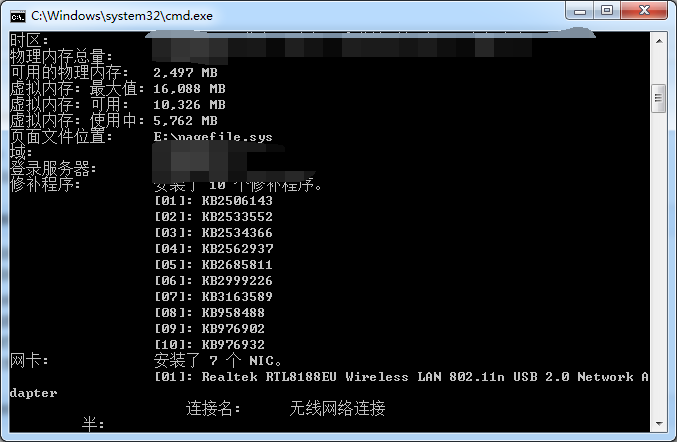
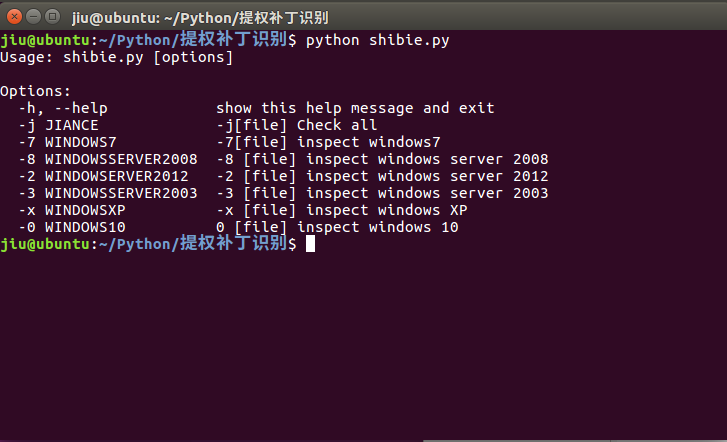
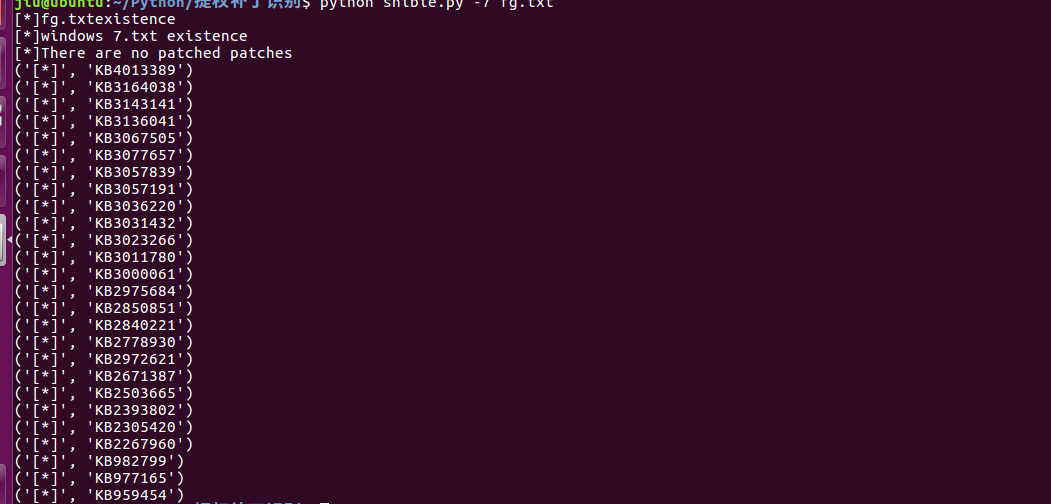
Github下载地址:https://github.com/422926799/python
python打造漏洞补丁缺少检测的更多相关文章
- python打造漏洞数据导出工具
功能 [x] 支持导出的数据:IP地址.漏洞名称.风险等级.整改建议.漏洞描述.漏洞CVE编号.漏洞对应端口.漏洞对应协议.漏洞对应服务等. [x] 导出不同端口的同一个漏洞,也就是一个端口对应一个漏 ...
- phantomjs + python 打造一个微信机器人
phantomjs + python 打造一个微信机器人 1.前奏 媳妇公司不能上网,但经常需要在公众号上找一些文章做一些参考,需要的时候就把文章链接分享给我,然后我在浏览器打开网页,一点点复制过 ...
- python常见漏洞总结
总结一下python里面常见安全问题,文章大部分内容来自MisakiKata师傅的python_code_audit项目,对原文进行了一些修改,后续会使用编写了规则对代码里面是否用到这些危险函数进行相 ...
- Weblogic反序列化漏洞补丁更新解决方案
Weblogic反序列化漏洞的解决方案基于网上给的方案有两种: 第一种方案如下 使用SerialKiller替换进行序列化操作的ObjectInputStream类; 在不影响业务的情况下,临时删除掉 ...
- python脚本实现集群检测和管理
python脚本实现集群检测和管理 场景是这样的:一个生产机房,会有很多的测试机器和生产机器(也就是30台左右吧),由于管理较为混乱导致了哪台机器有人用.哪台机器没人用都不清楚,从而产生了一个想法-- ...
- 教你用python打造WiFiddos
本文来源于i春秋学院,未经允许严禁转载. 0x00 前言因为在百度上很难找到有关于用python打造WiFidos的工具的,而且不希望大家成为一名脚本小子,所以我打算写一篇,需要的工具有scapy,i ...
- 【python】10分钟教你用python打造贪吃蛇超详细教程
10分钟教你用python打造贪吃蛇超详细教程 在家闲着没妹子约, 刚好最近又学了一下python,听说pygame挺好玩的.今天就在家研究一下, 弄了个贪吃蛇出来.希望大家喜欢. 先看程序效果: 0 ...
- 10分钟教你用Python打造微信天气预报机器人
01 前言 最近武汉的天气越来越恶劣了.动不动就下雨,所以,拥有一款好的天气预报工具,对于我们大学生来说,还真是挺重要的了.好了,自己动手,丰衣足食,我们来用Python打造一个天气预报的微信机器人吧 ...
- 第11章:使用Python打造MySQL专家系统
1.Python语言高级特性 1).深入浅出Python生成器 1).生成器函数:与普通函数定义类似,使用yield语句而不是return语句返回结果.yield语句一次返回一个结果,在每个结果中间挂 ...
随机推荐
- zookeeper和Eureka对CAP理论的支持
著名的CAP理论指出,一个分布式系统不可能同时满足C(一致性).A(可用性)和P(分区容错性).由于分区容错性在是分布式系统中必须要保证的,因此我们只能在A和C之间进行权衡.在此Zookeeper保证 ...
- OpenGL超级宝典笔记——遮挡查询 [转]
目录[-] 遮挡查询之前 包围体 遮挡查询 在一个场景中,如果有有些物体被其他物体遮住了不可见.那么我们就不需要绘制它.在复杂的场景中,这可以减少大量的顶点和像素的处理,大幅度的提高帧率.遮挡查询就是 ...
- Input Size VS Time Complexity
2018-05-01 11:10:54 本文介绍了输入数据规模和时间复杂度上限的关系,可以通过数据规模推算使用算法的类型. < 10: O(n!) permutation < 15: O( ...
- MVVM特点、源(数据)与目标(如:控件等)的映射
数据(源,viewMode表示)与控件(目标)的完全映射, 在绑定之后,通过操作数据,改变控件显示效果.显示内容.状态等.
- 安装GraphicsMagick
环境 CentOS7/CentOS7.1 x64 1.检查yum 2.检查是否安装zlib,下载地址:http://www.zlib.net/ 3.安装libpng,下载地址:http://www. ...
- 使用PMD进行代码审查(转)
原文地址:使用PMD进行代码审查 很久没写博客了,自从上次写的设计模式的博客被不知名的鹳狸猿下架了一次之后兴趣大减,那时候就没什么兴致写博客了,但是这段时间还没有停下来,最近也在研究一些其他的东西,目 ...
- MySQL根据表字段生成C#Model语句
USE INFORMATION_SCHEMA;SELECT CONCAT('/// <summary>\r\n/// ',COLUMN_COMMENT,'\r\n/// </summ ...
- windows下搭建nginx+php+虚拟主机配置过程
需要软件信息: nginx php RunHiddenConsole 首先安装之前要规划一下把他们放到那里,比如我将他们统一放在e :/web下 那么将这些都拷贝过来,开始吧,window要执行php ...
- xml生成javabean(zhuan)
package com.dom4j; import java.io.File;import java.io.FileWriter;import java.io.IOException;import j ...
- 360插件化Replugin爬坑之路
前言 继上次爬完了热修复的坑位,中途爬了各种各样的坑.今天我们来说说插件化Replugin的坑位.Replugin刚出的时候我就看过了.第一次看的时候可能心态不好.没看懂= =第二次重头在看,发现蛮简 ...