
python打造漏洞补丁缺少检测
前言:
当我们进行后渗透的时候,进行提权的时候
要识别被未打补丁的漏洞。来进行提权,从而
拿到管理员权限。
思路:
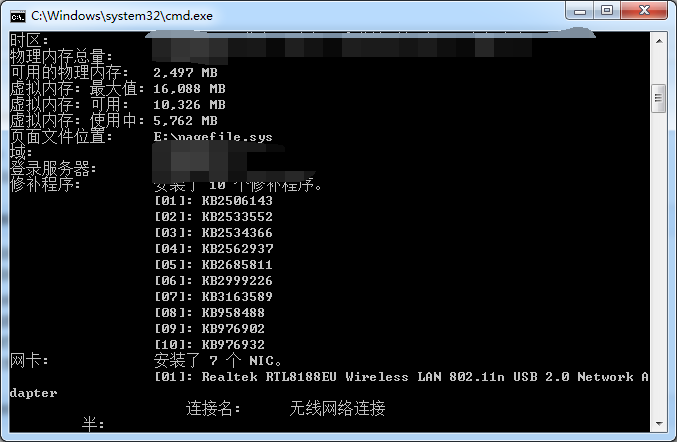
1.让使用者在cmd中打systeminfo命令。将补丁号
放入一个txt。
2.与list.txt进行对比。没有的则打出来
对漏洞进行区分
代码:
import os

import optparse

import re

def main():

    parser=optparse.OptionParser()

    parser.add_option('-j',dest='jiance',help='-j[file] Check all')

    parser.add_option('-7',dest='windows7',help='-7[file] inspect windows7')

    parser.add_option('-8',dest='windowsserver2008',help='-8 [file] inspect windows server 2008')

    parser.add_option('-2',dest='windowserver2012',help='-2 [file] inspect windows server 2012')

    parser.add_option('-3',dest='windowsserver2003',help='-3 [file] inspect windows server 2003')

    parser.add_option('-x',dest='windowsXP',help='-x [file] inspect windows XP')

    parser.add_option('-0',dest='windows10',help='0 [file] inspect windows 10')

    (options,args)=parser.parse_args()

    if options.jiance:

        file=options.jiance

        jiance(file)

    elif options.windows7:

        file2=options.windows7

        windows7(file2)

    elif options.windowsserver2008:

        file3=options.windowsserver2008

        windowsserver2008(file3)

    elif options.windowserver2012:

        file4=options.windowserver2012

        windowsserver2012(file4)

    elif options.windowsserver2003:

        file5=options.windowsserver2003

        windowsserver2003(file5)

    elif options.windowsXP:

        file6=options.windowsXP

        windowsxp(file6)

    elif options.windows10:

        file7=options.windows10

        windows10(file7)

    else:

        parser.print_help()

        exit()

def jiance(file):

    pd=os.path.exists(file)

    if pd == True:

        print('[*]{}existence'.format(file))

    else:

        print('[-]Sorry{}not existence'.format(file))

        exit()

    pd2=os.path.exists('list.txt')

    if pd2==True:

        print('[*]list.txt existence')

    else:

        print('[-]not existence list.txt')

        exit()

    lists=open('list.txt','r').read()

    fg=open('{}'.format(file),'r').read()

    pow="{}".format(fg)

    lgw=re.findall('KB\d+',lists)

    print('[*]There are no patched patches')

    for v in lgw:

        if v in str(pow):

            pass

        else:

            print("[*]",v)

def windows7(file2):

    pd = os.path.exists(file2)

    if pd == True:

        print('[*]{}existence'.format(file2))

    else:

        print('[-]Sorry{}not existence'.format(file2))

        exit()

    pd2 = os.path.exists('windows7.txt')

    if pd2 == True:

        print('[*]windows 7.txt existence')

    else:

        print('[-]not existence windows 7.txt')

        exit()

    lists = open('windows7.txt', 'r').read()

    fg = open('{}'.format(file2), 'r').read()

    pow = "{}".format(fg)

    lgw = re.findall('KB\d+', lists)

    print('[*]There are no patched patches')

    for v in lgw:

        if v in str(pow):

            pass

        else:

            print("[*]", v)

def windowsserver2008(file3):

    pd = os.path.exists(file3)

    if pd == True:

        print('[*]{}existence'.format(file3))

    else:

        print('[-]Sorry{}not existence'.format(file3))

        exit()

    pd2 = os.path.exists('windows server 2008.txt')

    if pd2 == True:

        print('[*]windows server 2008.txt existence')

    else:

        print('[-]not existence windows server 2008.txt')

        exit()

    lists = open('windows server 2008.txt', 'r').read()

    fg = open('{}'.format(file3), 'r').read()

    pow = "{}".format(fg)

    lgw = re.findall('KB\d+', lists)

    print('[*]There are no patched patches')

    for v in lgw:

        if v in str(pow):

            pass

        else:

            print("[*]", v)

def windowsserver2012(file4):

    pd = os.path.exists(file4)

    if pd == True:

        print('[*]{}existence'.format(file4))

    else:

        print('[-]Sorry{}not existence'.format(file4))

        exit()

    pd2 = os.path.exists('windows server 2012.txt')

    if pd2 == True:

        print('[*]windows server 2012.txt existence')

    else:

        print('[-]not existence windows server 2012.txt')

        exit()

    lists = open('windows server 2012.txt', 'r').read()

    fg = open('{}'.format(file4), 'r').read()

    pow = "{}".format(fg)

    lgw = re.findall('KB\d+', lists)

    print('[*]There are no patched patches')

    for v in lgw:

        if v in str(pow):

            pass

        else:

            print("[*]", v)

def windowsserver2003(file5):

    pd = os.path.exists(file5)

    if pd == True:

        print('[*]{}existence'.format(file5))

    else:

        print('[-]Sorry{}not existence'.format(file5))

        exit()

    pd2 = os.path.exists('windows server 2003.txt')

    if pd2 == True:

        print('[*]windows server 2003.txt existence')

    else:

        print('[-]not existence windows server 2003.txt')

        exit()

    lists = open('windows server 2003.txt', 'r').read()

    fg = open('{}'.format(file5), 'r').read()

    pow = "{}".format(fg)

    lgw = re.findall('KB\d+', lists)

    print('[*]There are no patched patches')

    for v in lgw:

        if v in str(pow):

            pass

        else:

            print("[*]", v)

def windowsxp(file6):

    pd = os.path.exists(file6)

    if pd == True:

        print('[*]{}existence'.format(file6))

    else:

        print('[-]Sorry{}not existence'.format(file6))

        exit()

    pd2 = os.path.exists('windows XP.txt')

    if pd2 == True:

        print('[*]windows XP.txt existence')

    else:

        print('[-]not existence windows XP.txt')

        exit()

    lists = open('windows XP.txt', 'r').read()

    fg = open('{}'.format(file6), 'r').read()

    pow = "{}".format(fg)

    lgw = re.findall('KB\d+', lists)

    print('[*]There are no patched patches')

    for v in lgw:

        if v in str(pow):

            pass

        else:

            print("[*]", v)

def windows10(file7):

    pd = os.path.exists(file7)

    if pd == True:

        print('[*]{}existence'.format(file7))

    else:

        print('[-]Sorry{}not existence'.format(file7))

        exit()

    pd2 = os.path.exists('windows 10.txt')

    if pd2 == True:

        print('[*]windows 10.txt existence')

    else:

        print('[-]not existence windows 10.txt')

        exit()

    lists = open('windows 10.txt', 'r').read()

    fg = open('{}'.format(file7), 'r').read()

    pow = "{}".format(fg)

    lgw = re.findall('KB\d+', lists)

    print('[*]There are no patched patches')

    for v in lgw:

        if v in str(pow):

            pass

        else:

            print("[*]", v)

if __name__ == '__main__':

    main()
效果:
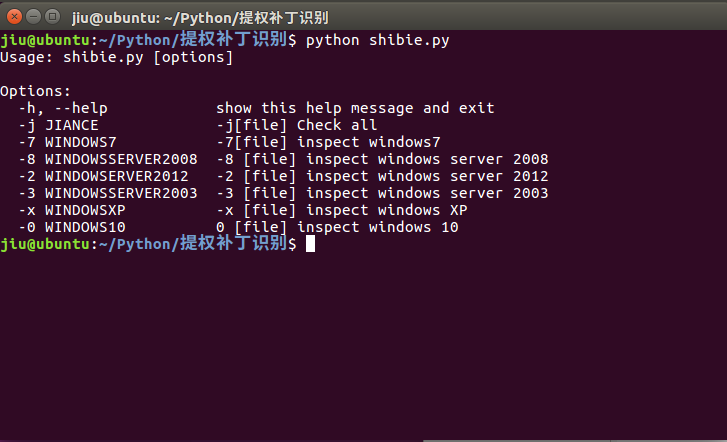
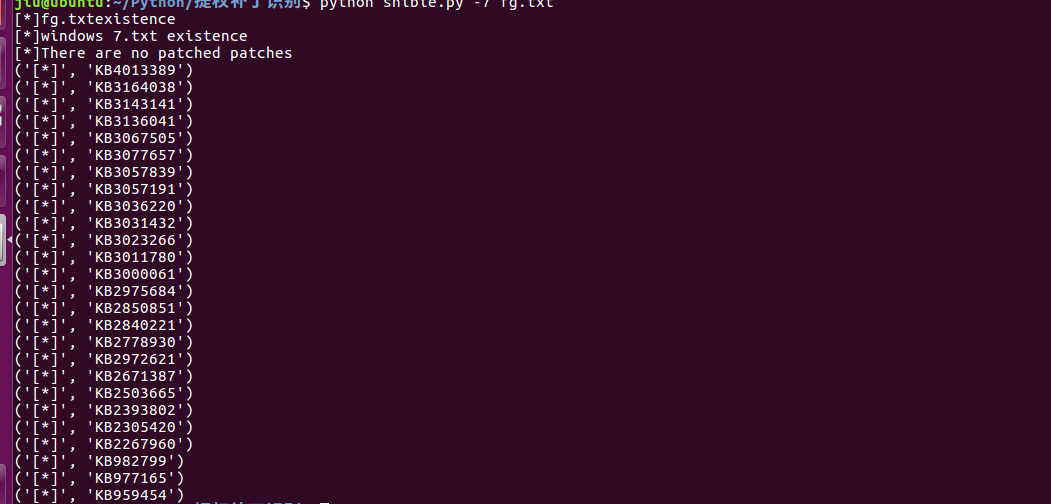
Github下载地址:https://github.com/422926799/python
python打造漏洞补丁缺少检测的更多相关文章
- python打造漏洞数据导出工具
功能 [x] 支持导出的数据:IP地址.漏洞名称.风险等级.整改建议.漏洞描述.漏洞CVE编号.漏洞对应端口.漏洞对应协议.漏洞对应服务等. [x] 导出不同端口的同一个漏洞,也就是一个端口对应一个漏 ...
- phantomjs + python 打造一个微信机器人
phantomjs + python 打造一个微信机器人 1.前奏 媳妇公司不能上网,但经常需要在公众号上找一些文章做一些参考,需要的时候就把文章链接分享给我,然后我在浏览器打开网页,一点点复制过 ...
- python常见漏洞总结
总结一下python里面常见安全问题,文章大部分内容来自MisakiKata师傅的python_code_audit项目,对原文进行了一些修改,后续会使用编写了规则对代码里面是否用到这些危险函数进行相 ...
- Weblogic反序列化漏洞补丁更新解决方案
Weblogic反序列化漏洞的解决方案基于网上给的方案有两种: 第一种方案如下 使用SerialKiller替换进行序列化操作的ObjectInputStream类; 在不影响业务的情况下,临时删除掉 ...
- python脚本实现集群检测和管理
python脚本实现集群检测和管理 场景是这样的:一个生产机房,会有很多的测试机器和生产机器(也就是30台左右吧),由于管理较为混乱导致了哪台机器有人用.哪台机器没人用都不清楚,从而产生了一个想法-- ...
- 教你用python打造WiFiddos
本文来源于i春秋学院,未经允许严禁转载. 0x00 前言因为在百度上很难找到有关于用python打造WiFidos的工具的,而且不希望大家成为一名脚本小子,所以我打算写一篇,需要的工具有scapy,i ...
- 【python】10分钟教你用python打造贪吃蛇超详细教程
10分钟教你用python打造贪吃蛇超详细教程 在家闲着没妹子约, 刚好最近又学了一下python,听说pygame挺好玩的.今天就在家研究一下, 弄了个贪吃蛇出来.希望大家喜欢. 先看程序效果: 0 ...
- 10分钟教你用Python打造微信天气预报机器人
01 前言 最近武汉的天气越来越恶劣了.动不动就下雨,所以,拥有一款好的天气预报工具,对于我们大学生来说,还真是挺重要的了.好了,自己动手,丰衣足食,我们来用Python打造一个天气预报的微信机器人吧 ...
- 第11章:使用Python打造MySQL专家系统
1.Python语言高级特性 1).深入浅出Python生成器 1).生成器函数:与普通函数定义类似,使用yield语句而不是return语句返回结果.yield语句一次返回一个结果,在每个结果中间挂 ...
随机推荐
- Android:你好,androidX!再见,android.support
1.AndroidX简介 点击查看Android文档中对androidx的简介 按照官方文档说明 androidx 是对 android.support.xxx 包的整理后产物.由于之前的suppor ...
- jquery chosen 插件 动态设置+更新选项值
我要在表单里使用一个select下拉菜单(是不是multiple无所谓),所以选择了jquery chosen这个插件.现在有一个需求,需要根据表单的另一个域来动态加载该select元素的选项. 1 ...
- 如何修改SQL Server 2008数据库服务器名称
在做数据库发布订阅的时候我们经常要碰到要使用服务器名称来进行. 那么我们经常会碰到的问题是,现在开始大量的使用云服,我们只需要一台服务器搭建好环境,做一个备份镜像,还原到其他的服务器上就可以了,但是问 ...
- python学习笔记(HTMLTestRunner在Py3的兼容)
博主最近开始重构自动化框架并且向Py3上兼容 第一个问题就是生成测试报告的HTMLTestRunner,由于此模块是基于Py2开发的,这里需要修改源码 # 94行 # import StringIO ...
- 一. Spring框架防XXS跨站攻击
使用 Spring 框架进行 Java Web 开发,可以在 web.xml 文件中设置 HTML encode,在 JSP 文件页面元素 form 中确定实施. web.xml 加上: <co ...
- Android学习必备--java工具15个
Weka .Weka集成了数据挖掘工作的机器学习算法.这些算法可以直接应用于一个数据集上或者你可以自己编写代码来调用.Weka包括一系列的工具,如数据预处理.分类.回归.聚类.关联规则以及可视化. M ...
- 数据库使用B+树原理
转载:http://zhuanlan.51cto.com/art/201808/582078.htm https://www.cnblogs.com/vincently/p/4526560.html( ...
- zz VS2010配色方案
http://studiostyles.info 这个网站专门为vs 2005, vs 2008, vs2010提供配色方案下载. 网站首页罗列出大量的配色方案,都附有缩略图以及rated(评估),d ...
- STL标准库-容器-forward_list
技术在于交流.沟通,本文为博主原创文章转载请注明出处并保持作品的完整性. forward_list即单向list,功能少额外开销就小.而且只能在前段插入元素 结构如下 一 定义 #include &l ...
- 2018.12.25 SOW
1. Understanding Customer Requirements 11.1. Project Overview 21.2. System Requirements 21.3. Indust ...