
Python学习---django重点之视图函数
django重点之视图函数
http请求中产生两个核心对象:
http请求:HttpRequest对象,由Django自己创建
http响应:HttpResponse对象,由开发自己创建,必须返回一个response对象
所在位置:django.http
之前我们用到的参数request就是HttpRequest 检测方法:isinstance(request,HttpRequest)
HttpRequest对象的属性和方法:
print(request.GET)     # 包含所有HTTP GET参数的类字典对象

print(request.path)    # 获取请求页面的全路径,不包括域名

print(request.COOKIES) # 包含所有cookies的标准Python字典对象;keys和values都是字符串。

print(request.FILES)   # 包含所有上传文件的类字典对象;

                       # FILES中的每一个Key都是<input type="file" name="" />标签中name属性的值,

                       # FILES中的每一个value同时也是一个标准的python字典对象,

                       # 包含下面三个Keys:filename,content_type, content

print(request.user)    # 代表当前登陆的用户

                       # 可以通过user的is_authenticated()方法来辨别用户是否登陆:

print(request.session) # session:    唯一可读写的属性,代表当前会话的字典对象;

if request.method == "POST":  # 注意是大写

注意一个常用方法:request.POST.getlist('')
HttpResponse对象:
locals()
redirect()
在HttpResponse对象上扩展的常用方法:
1 页面渲染: render()(推荐)render_to_response(), 需要导入render_to_response模块
2 页面跳转: redirect("路径")
3 locals(): 可以直接将函数中所有的变量传给模板
Locals()实例讲解
settigs.py:
'DIRS': [os.path.join(BASE_DIR, 'templates')],  # 设置templates的路径为Django以前版本

# 'DIRS': [],      # 注释掉该行,此为Django 2.0.1最新版本

# 'django.middleware.csrf.CsrfViewMiddleware',

         ...省略默认配置

STATIC_URL = '/static/'

TEMPLATE_DIRS = (os.path.join(BASE_DIR,  'templates'),)  # 原配置

# 静态资源文件

STATICFILES_DIRS = (os.path.join(BASE_DIR, "statics"),)   # 现添加的配置,这里是元组,注意逗号
templates/locals.html
<!DOCTYPE html>

<html lang="en">

<head> <meta charset="UTF-8"></head>

<body>

     {#传统写法#}

{#    <h2> hello {{ world }}</h2>   {#注意,2个大括号内只能放置一个变量#}

{#    <h2> hello {{ year }} </h2>   {#注意,2个大括号内只能放置一个变量#}

    {#高级写法#}

    <h2>world</h2>

    <h2>year</h2>

</body>

</html>
mysite2/urls.py
from django.contrib import admin

from django.urls import path

from blog import views

from django.conf.urls import url

urlpatterns = [

       # locals写法

   url(r'locals/', views.locals_def),  # 将路径名跟函数进行映射

]
views.py
from django.shortcuts import render, HttpResponse,render_to_response

import datetime

# locals操作

def locals_def(request):

    year="2020"

    world="world"

    # return render(request, 'locals.html', {"world":world,"yeae":year}) # 传统写法

    # locals仅仅需要返回函数名即可,表示使用本地变量

    return render_to_response('locals.html', locals())  # 少了一个参数

# 注意:render()和render_to_response()的区别是需要添加参数request
页面显示:

Redirect()实例讲解
settigs.py
'DIRS': [os.path.join(BASE_DIR, 'templates')],  # 设置templates的路径为Django以前版本

# 'DIRS': [],      # 注释掉该行,此为Django 2.0.1最新版本

# 'django.middleware.csrf.CsrfViewMiddleware',

         ...省略默认配置

STATIC_URL = '/static/'

TEMPLATE_DIRS = (os.path.join(BASE_DIR,  'templates'),)  # 原配置

# 静态资源文件

STATICFILES_DIRS = (os.path.join(BASE_DIR, "statics"),)   # 现添加的配置,这里是元组,注意逗号
templates/X.html
无
mysite2/urls.py
from django.contrib import admin

from django.urls import path

from blog import views

from django.conf.urls import url

urlpatterns = [

          # redirect写法

    url(r'redirect/', views.redirect_def)

]
views.py
from django.shortcuts import render, HttpResponse,redirect

import datetime

# redirect 操作

def redirect_def(request):

    return redirect("https://www.baidu.com")
页面显示:

自定义Redirect()跳转
settigs.py
'DIRS': [os.path.join(BASE_DIR, 'templates')],  # 设置templates的路径为Django以前版本

# 'DIRS': [],      # 注释掉该行,此为Django 2.0.1最新版本

# 'django.middleware.csrf.CsrfViewMiddleware',

         ...省略默认配置

STATIC_URL = '/static/'

TEMPLATE_DIRS = (os.path.join(BASE_DIR,  'templates'),)  # 原配置

# 静态资源文件

STATICFILES_DIRS = (os.path.join(BASE_DIR, "statics"),)   # 现添加的配置,这里是元组,注意逗号
templates/ logging.html
<!DOCTYPE html>

<html lang="en">

<head> <meta charset="UTF-8"></head>

<body>

<form action="/logging" method="post">  {# 注意,action外部没有引号,大括号里面url 引号XXX #}

    <input type="text" name="user">      {#    注意,这里只能用name,不能用id哈  #}

    <input type="password" name="pass">  {#    注意,这里只能用name,不能用id哈  #}

    <input type="submit" value="submit">

</form>

</body>

</html>
templates/ home.html
<!DOCTYPE html>

<html lang="en">

<head>    <meta charset="UTF-8">   </head>

<body>

    <h2 align="center">欢迎{{ name_logging }}登陆</h2>

</body>

</html>
mysite2/urls.py
from django.contrib import admin

from django.urls import path

from blog import views

from django.conf.urls import url

urlpatterns = [

# logging

# url(r'logging/', views.logging),   # 错误的,如果后面还有匹配的内容,这里不用添加斜杠[系统匹配自动添加]

url(r'logging', views.logging), # 如果后面还有匹配的内容,这里不用添加斜杠

# home

url(r'home/', views.home),

]
views.py
from django.shortcuts import render, HttpResponse

import datetime

def logging(request):

    if request.method == "POST":

        if 1:  # 提交的数据跟数据库进行匹配

            return redirect("/home/")  # 登陆成功后去home界面,但是无法看到登陆的用户

            # name_logging = 'FTL   # 不添加此变量和locals(),return的时候不传递任何值给home

            # return render(request, 'home.html', locals())

    return render(request, 'logging.html')

def home(request):

name_logging = 'FTL'# logging()传递变量后,此处可以不用写变量,但是home代码报错,页面显示OK

    return render(request, 'home.html', {"name_logging": name_logging})
页面显示:
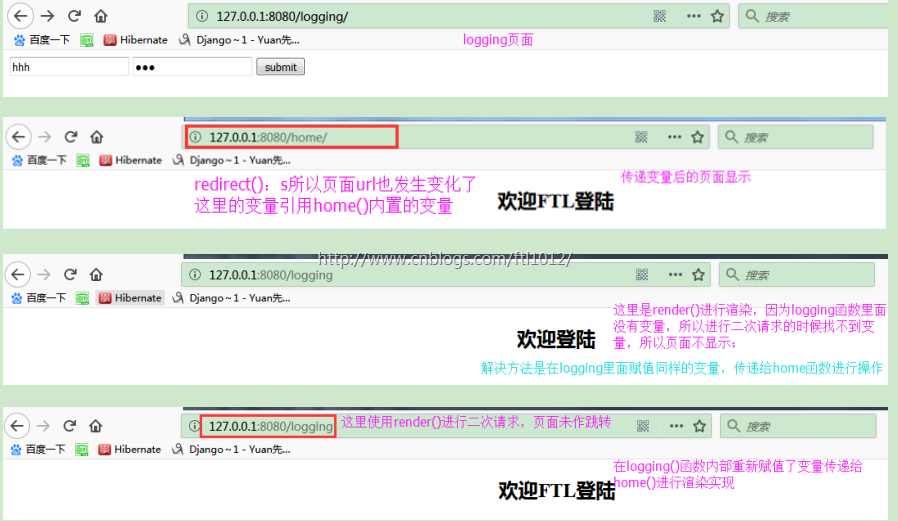
遇到的问题:
1.进行url匹配的时候,一定要注意,因为logging前面系统自动补位一个斜杠[/logging]进行匹配,当调跳转到home的时候,系统也会自动部位一个url[/home],所以进行跳转的时候,logging的匹配是[r'logging']
2. 使用redirect() 时,URL会进行跳转,变量使用函数内部的变量
使用render()时,URL需要传递变量给home函数,否则页面无法显示变量内容
Python学习---django重点之视图函数的更多相关文章
- Python学习---Django重点之静态资源配置
[官网静态文件介绍] https://docs.djangoproject.com/en/1.10/howto/static-files/ # settings.py 配置静态资源文件 # STATI ...
- Python学习---django模板语法180122
django模板语法[Template] 模版的组成: HTML代码+逻辑控制代码 <h1> {{ user_name }} </h1> 逻辑控制代码的组成: 1.变量: ...
- Django Views(视图函数)
http请求中产生两个核心对象: http请求:HttpRequest对象 http响应:HttpResponse对象 所在位置:django.http 之前我们用到的参数request就是HttpR ...
- Django之views视图函数
views视图函数属于MTV中逻辑处理的部分视图函数包含着两个对象,HttpRequest对象和HttpResponse对象 一.HttpRequest对象 HttpRequest对象在Django中 ...
- Python学习---Django拾遗180328
Django之生命周期 前台发送URL请求到Django的中间件进行内容校验,完成校验后到达路由映射文件url.py,然后调用视图函数views.py里面的函数进行内容处理[ 1.操作数据库进行数据读 ...
- Python学习---Django路由系统【all】
Django URL (路由系统) Django URL (路由系统): URL配置(URLconf)就像Django 所支撑网站的目录.它的本质是URL模式以及要为该URL模式调用的视图函数之间的映 ...
- Python学习【第九篇】函数
函数 函数是什么? 函数是组织好的,可重复使用的,用来实现单一,或相关联功能的代码段. 在学习函数之前,一直遵循:面向过程编程,即:根据业务逻辑从上而下实现功能,其往往用一段代码来实现指定功能,开发过 ...
- Django创建通用视图函数
想在我们有两个视图: def thinkingview(request): user = request.user if request.method == 'GET': return render( ...
- Python学习笔记014——迭代工具函数 内置函数enumerate()
1 描述 enumerate() 函数用于将一个可遍历的数据对象(如列表.元组或字符串)组合为一个索引序列,同时列出数据和数据下标,一般用在 for 循环当中. 2 语法 enumerate(sequ ...
随机推荐
- git 检出项目部分目录(稀疏检出)
git clone 会把整个项目都clone下来,对于大项目git status比较慢,每次pull时候也拉取一些无关的代码或者文件:git可以实现像svn一样检出部分目录 步骤: git clone ...
- maven子模块转化成project
把maven多模块中的子模块单独形成一个eclipse的project,需要使用导入 选中子模块,右键选择Import... 在选择弹出框中选择Maven--Existing Maven Projec ...
- Linq lambda 匿名方法
课程6 委托.匿名方法.Lambda表达式.Linq查询表达式 上课日志1 一.委托的基本认识 提问:能不能把方法作为参数传递??? 也即是能不能声明一个能存放方法的变量呢——委托. 委托是一种数据类 ...
- C#可选参数、命名参数、参数数组
学习了C#4.0的新特性:可选参数.命名参数.参数数组. 1.可选参数,是指给方法的特定参数指定默认值,在调用方法时可以省略掉这些参数. 但要注意: (1)可选参数不能为参数列表的第1个参数,必须位于 ...
- 数据结构(三)--- B树(B-Tree)
文章图片代码来自邓俊辉老师的课件 概述 上图就是 B-Tree 的结构,可以看到这棵树和二叉树有点不同---"又矮又肥".同时子节点可以有若干个小的子节点构成.那么这样一棵树 ...
- Dapper的简单使用(初学者归纳)
Dapper的简单使用(初学者归纳) //引用:using System;using System.Collections.Generic;using System.Linq;using System ...
- [PHP] 从PHP 5.6.x 移植到 PHP 7.0.x新特性
从PHP 5.6.x 移植到 PHP 7.0.x 新特性: 1.标量类型声明 字符串(string), 整数 (int), 浮点数 (float), 布尔值 (bool),callable,array ...
- 04-Tomcat体系结构与插件配置
一.发布程序详解 Context docBase:web应用的文件路径 path:URL入口 reloadable:字节码变化服务器是否重新加载web应用 二.tomcat服务器体系结构 1.Serv ...
- JMX 远程监控 Linux tomcat 功能实现
作者远程服务器操作系统 CentOS 7.0, tomcat 版本 7.0 1. Linux tomcat 配置 1.1 catalina_opt 配置 可以在 catalina.sh 文件中添加如下 ...
- Redis-跳跃表
相当于Redis 中的 sorted set 跳跃表节点结构: typedef struct zskiplistNode { struct zskiplistNode *backward; //后退 ...