
ios 开发UI篇— UIToolbar
前言
    NS_CLASS_AVAILABLE_IOS(2_0) __TVOS_PROHIBITED @interface UIToolbar : UIView <UIBarPositioning>

@available(iOS 2.0, *) public class UIToolbar : UIView, UIBarPositioning- 工具条控件 UIToolbar 用做工具条按钮项(UIBarButtonItem)的容器,可以盛放一个或者多个工具条按钮项,一般放置在界面顶部或者底部。如果要针对工具条按钮项自定义视图,可以使用 UIToolbarDelegate 设置。
    // 创建 UIToolbar 工具条,工具条上面可以放一些导航专用按钮项

    UIToolbar *toolbar = [[UIToolbar alloc] initWithFrame:CGRectMake(0, 20, self.view.bounds.size.width, 44)];

    [self.view addSubview:toolbar];

    // 创建工具条 UIBarButtonItem 按钮项

    // 创建编辑按钮

    UIBarButtonItem *editButton = [[UIBarButtonItem alloc]

                                   initWithBarButtonSystemItem:UIBarButtonSystemItemEdit

                                                        target:self

                                                        action:@selector(editClick)];

    // 创建刷新按钮

    UIBarButtonItem *refreshButton = [[UIBarButtonItem alloc]

                                       initWithBarButtonSystemItem:UIBarButtonSystemItemRefresh

                                                            target:self

                                                            action:@selector(refreshClick)];

    // 创建弹簧按钮

    UIBarButtonItem *flexibleButton = [[UIBarButtonItem alloc]

                                        initWithBarButtonSystemItem:UIBarButtonSystemItemFlexibleSpace

                                                             target:nil

                                                             action:nil];

    // 将按钮项添加到工具条,通过数组给工具条设置一些导航按钮

    toolbar.items = @[editButton, flexibleButton, refreshButton];
2、UIBarButtonItem 的创建
系统类按钮
    /*

        UIBarButtonSystemItemDone,           Done

        UIBarButtonSystemItemCancel,         Cancel

        UIBarButtonSystemItemEdit,           Edit

        UIBarButtonSystemItemSave,           Save

        UIBarButtonSystemItemUndo,           Undo

        UIBarButtonSystemItemRedo,           Redo

        UIBarButtonSystemItemAdd,            加号 图标按钮

        UIBarButtonSystemItemFlexibleSpace,  弹簧 按钮,将 button 推向两边

        UIBarButtonSystemItemFixedSpace,     弹簧 按钮,将 button 推向两边,

                                             可设间距 fixedSpaceButton.width = 50;

        UIBarButtonSystemItemCompose,        撰写 图标按钮

        UIBarButtonSystemItemReply,          答复 图标按钮

        UIBarButtonSystemItemAction,         详情 图标按钮

        UIBarButtonSystemItemOrganize,       文件夹 图标按钮

        UIBarButtonSystemItemBookmarks,      书籍 图标按钮

        UIBarButtonSystemItemSearch,         搜索 图标按钮

        UIBarButtonSystemItemRefresh,        刷新 图标按钮

        UIBarButtonSystemItemStop,           X 号 图标按钮

        UIBarButtonSystemItemCamera,         相机 图标按钮

        UIBarButtonSystemItemTrash,          删除 图标按钮

        UIBarButtonSystemItemPlay,           播放 图标按钮

        UIBarButtonSystemItemPause,          暂停 图标按钮

        UIBarButtonSystemItemRewind,         快退 图标按钮

        UIBarButtonSystemItemFastForward,    快进 图标按钮

    */

    UIBarButtonItem *done = [[UIBarButtonItem alloc] initWithBarButtonSystemItem:UIBarButtonSystemItemDone

                                                                          target:self

                                                                          action:@selector(buttonClick)];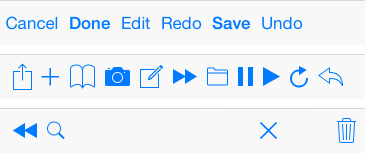

文本类按钮
    /*

        UIBarButtonItemStylePlain        默认按钮风格;按下时会闪动

        UIBarButtonItemStyleBordered     与 UIBarButtonItemStylePlain 相同,但显示的按钮有边框, NS_ENUM_DEPRECATED_IOS

        UIBarButtonItemStyleDone         显示一个蓝色按钮,提醒用户编辑完毕时应该点触(tap)该按钮。

    */

    UIBarButtonItem *titleBtn = [[UIBarButtonItem alloc] initWithTitle:@"按钮"

                                                                 style:UIBarButtonItemStylePlain

                                                                target:self

                                                                action:@selector(buttonClick)];
图片类按钮
    // 对图片进行处理,以原图的样式显示,否则显示为蓝色块

    UIImage *image1 = [[UIImage imageNamed:@"001"] imageWithRenderingMode:UIImageRenderingModeAlwaysOriginal];

    UIBarButtonItem *imageBtn1 = [[UIBarButtonItem alloc] initWithImage:image1

                                                                   style:UIBarButtonItemStylePlain

                                                                  target:self

                                                                  action:@selector(buttonClick)];

    UIImage *image2 = [[UIImage imageNamed:@"002"] imageWithRenderingMode:UIImageRenderingModeAlwaysOriginal];

    UIImage *image3 = [[UIImage imageNamed:@"004"] imageWithRenderingMode:UIImageRenderingModeAlwaysOriginal];

    UIBarButtonItem *imageBtn2 = [[UIBarButtonItem alloc] initWithImage:image2

                                                   landscapeImagePhone:image3

                                                                  style:UIBarButtonItemStyleDone

                                                                 target:self

                                                                 action:@selector(buttonClick)];
自定义视图类按钮
    UIProgressView *progress = [[UIProgressView alloc] initWithProgressViewStyle:UIProgressViewStyleBar];

    progress.frame = CGRectMake(0, 0, 80, 20);

    progress.progress = 0.5;

    progress.progressTintColor = [UIColor greenColor];

    progress.trackTintColor = [UIColor redColor];

    UIBarButtonItem *viewBtn = [[UIBarButtonItem alloc] initWithCustomView:progress];
3、navigation 中的 toolBar
navigationController 自带的 toolbar 属性是所有添加在 navigationController 上的视图所共用的,是属于 navigationController 的,不是属于每个 ViewController 的,但 toolbar 上显示的内容的是每个 ViewController 的,需要在每个 ViewController 上单独设置。
toolbar 的显示状态会被带到已经显示过的 ViewController 上,跳转到未显示过的 ViewController 时,toolbar 再次被隐藏。
Objective-C
    // 显示 toolBar,toolBar 默认是隐藏的,首先需要让它显示出来,默认在屏幕的最下方

    self.navigationController.toolbarHidden = NO;

    // 向 toolBar 添加按钮,最多只能显示 8 个,往 self.navigationController.toolbarItems 上添加时无用

    self.toolbarItems = buttonArray;
ios 开发UI篇— UIToolbar的更多相关文章
- iOS开发UI篇—Date Picker和UITool Bar控件简单介绍
iOS开发UI篇—Date Picker和UITool Bar控件简单介绍 一.Date Picker控件 1.简单介绍: Date Picker显示时间的控件 有默认宽高,不用设置数据源和代理 如何 ...
- iOS开发UI篇—CAlayer(自定义layer)
iOS开发UI篇—CAlayer(自定义layer) 一.第一种方式 1.简单说明 以前想要在view中画东西,需要自定义view,创建一个类与之关联,让这个类继承自UIView,然后重写它的Draw ...
- iOS开发UI篇—UITabBarController简单介绍
iOS开发UI篇—UITabBarController简单介绍 一.简单介绍 UITabBarController和UINavigationController类似,UITabBarControlle ...
- iOS开发UI篇—懒加载
iOS开发UI篇—懒加载 1.懒加载基本 懒加载——也称为延迟加载,即在需要的时候才加载(效率低,占用内存小).所谓懒加载,写的是其get方法. 注意:如果是懒加载的话则一定要注意先判断是否已经有了, ...
- iOS开发UI篇—CAlayer层的属性
iOS开发UI篇—CAlayer层的属性 一.position和anchorPoint 1.简单介绍 CALayer有2个非常重要的属性:position和anchorPoint @property ...
- iOS开发UI篇—CAlayer(创建图层)
iOS开发UI篇—CAlayer(创建图层) 一.添加一个图层 添加图层的步骤: 1.创建layer 2.设置layer的属性(设置了颜色,bounds才能显示出来) 3.将layer添加到界面上(控 ...
- iOS开发UI篇—CALayer简介
iOS开发UI篇—CALayer简介 一.简单介绍 在iOS中,你能看得见摸得着的东西基本上都是UIView,比如一个按钮.一个文本标签.一个文本输入框.一个图标等等,这些都是UIView. 其实 ...
- iOS开发UI篇—核心动画(UIView封装动画)
iOS开发UI篇—核心动画(UIView封装动画) 一.UIView动画(首尾) 1.简单说明 UIKit直接将动画集成到UIView类中,当内部的一些属性发生改变时,UIView将为这些改变提供动画 ...
- iOS开发UI篇—核心动画(转场动画和组动画)
转自:http://www.cnblogs.com/wendingding/p/3801454.html iOS开发UI篇—核心动画(转场动画和组动画) 一.转场动画简单介绍 CAAnimation的 ...
随机推荐
- css权威指南读书笔记-第10章浮动和定位
这一章看了之后真是豁然开朗,之前虽然写了圣杯布局和双飞翼布局,有些地方也是模糊的,现在打算总结之后再写一遍. 以下都是从<css权威指南>中摘抄的我认为很有用的说明. 浮动元素 一个元素浮 ...
- C语言——二叉排序树
二叉排序树是一种实现动态查找的树表,又称二叉查找树. 二叉排序树的性质: 1. 若它的左子树不为空,则左子树上所有节点的键值均小于它的根节点键值 2. 若它的右子树不为空,则右子树上所有节点的键值均大 ...
- 样式 bootstrap purecss Amaze UI 推荐
Bootstrap 简洁.直观.强悍的前端开发框架,让web开发更迅速.简单. Bootstrap,来自 Twitter,是目前很受欢迎的前端框架.Bootstrap 是基于 HTML.CSS.JAV ...
- 获取所有后缀DDE打开命令
概述: 由于需要使用DDE方式打开文件,所以把支持DDE方式打开文件的参数都导出来到文件,方便查找. 并且提供运行DDE命令的工具,可以用于测试DDE功能. 1.运行脚步GetDDE.vbs可以获取系 ...
- 结对编程项目总结(core2组)
结对编程项目总结(core2组) 作业---四则运算(Core 第二组) ----by 吴雪晴 PB16061514 齐天杨 PB16060706 一.项目简介 项目的任务为制作一个给(貌似是?) ...
- 自动化测试基础篇--Selenium unittest简介
一.什么是unittest unittest是Python单元测试框架,类似于JUnit框架. unittest中有4个重要的概念:test fixture, test case, test suit ...
- 文件复制(shutil)
import shutil #拷贝整个目录树 shutil.copytree('d:\\aaa','e:\\aaa') #目标文件夹(e:\aaa)必须不存在 shutil.rmtree('e:\\a ...
- 10分钟开始.Net Core
.Net Core 2.0发布了,API也越来越多.此时不用.Net Core,更待何时? 安装.Net Core SDK 首先,我们当然要先装.Net Core SDK,在这里下载( ...
- Ubuntu apt-get 更换源
Ubuntu apt-get 更换源 我们使用清华的镜像源进行更换 Ubuntu 的软件源配置文件是 /etc/apt/sources.list.将系统自带的该文件做个备份,将该文件替换为下面内容,即 ...
- Centos7中yum安装MySQL
安装mysql [root@localhost ~]# yum update [root@localhost ~]# cat /etc/redhat-release CentOS Linux rele ...