
Linux 性能搜集【top/vmstat/iostat】
为方便问题发生后,问题原因的分析排查,我们可以在服务器中事先部署如下脚本,方便故障发生后,问题原因的分析排查
脚本部署方法:
1.将脚本【top_monitor.sh】上传到服务器
2.登陆虚拟机,并切换到root用户
3.执行命令: chmod +x <path>/top_monitor.sh 【<path>替换成实际脚本上传的目录】
4.执行命令:crontab -e
5.添加定时任务:* * * * * <the path of the script>/top_monitor.sh <the path of ouputs saved> <keeps>
备注:
范例:* * * * * /root/top_monitor.sh /var/tmp/ 72 &
a.这里的keeps以小时为单位,如果保留三天的话,就输入72
b.该脚本每五秒钟收集一次top/vmstat/iostat命令的输出,每分钟会生成一个性能数据文件
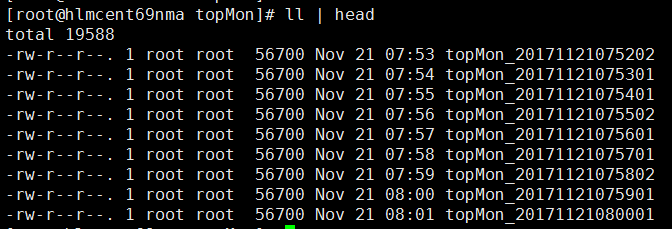
c.不要把用户数据放到该目录下,否则会被清理掉
6.搜集到的性能日志格式如下:
-- ::

top - :: up  day,  min,   users,  load average: 0.00, 0.00, 0.00

Tasks:  total,    running,  sleeping,    stopped,    zombie

Cpu(s):  1.0%us,  0.5%sy,  0.0%ni, 98.2%id,  0.3%wa,  0.0%hi,  0.0%si,  0.0%st

Mem:   3530640k total,   778368k used,  2752272k free,   127976k buffers

Swap:        0k total,        0k used,        0k free,   352288k cached

  PID USER      PR  NI  VIRT  RES  SHR S %CPU %MEM    TIME+  COMMAND

    root                       S  1.9  0.0   :07.04 events/

     root             S  0.0  0.0   :07.80 init

     root                       S  0.0  0.0   :00.01 kthreadd

     root      RT                 S  0.0  0.0   :02.09 migration/

     root                       S  0.0  0.0   :00.79 ksoftirqd/

     root      RT                 S  0.0  0.0   :00.00 stopper/

     root      RT                 S  0.0  0.0   :00.13 watchdog/

     root      RT                 S  0.0  0.0   :02.19 migration/

     root      RT                 S  0.0  0.0   :00.00 stopper/

     root                       S  0.0  0.0   :00.80 ksoftirqd/

    root      RT                 S  0.0  0.0   :00.13 watchdog/

    root                       S  0.0  0.0   :04.85 events/

    root                       S  0.0  0.0   :00.00 events/

    root                       S  0.0  0.0   :00.00 events/

    root                       S  0.0  0.0   :00.00 events_long/

    root                       S  0.0  0.0   :00.00 events_long/

    root                       S  0.0  0.0   :00.00 events_power_ef

    root                       S  0.0  0.0   :00.00 events_power_ef

    root                       S  0.0  0.0   :00.00 cgroup

    root                       S  0.0  0.0   :00.00 khelper

    root                       S  0.0  0.0   :00.00 netns

    root                       S  0.0  0.0   :00.00 async/mgr

    root                       S  0.0  0.0   :00.00 pm

    root                       S  0.0  0.0   :00.39 sync_supers

    root                       S  0.0  0.0   :00.06 bdi-default

    root                       S  0.0  0.0   :00.00 kintegrityd/

procs -----------memory---------- ---swap-- -----io---- --system-- -----cpu-----

 r  b   swpd   free   buff  cache   si   so    bi    bo   in   cs us sy id wa st

Linux 2.6.-696.3..el6.x86_64 (hlmcent69nma)  //      _x86_64_        ( CPU)

avg-cpu:  %user   %nice %system %iowait  %steal   %idle

           1.00    0.00    0.52    0.27    0.00   98.20

Device:         rrqm/s   wrqm/s     r/s     w/s   rsec/s   wsec/s avgrq-sz avgqu-sz   await r_await w_await  svctm  %util

sdc               0.00     0.00    0.00    0.00     0.03     0.00     8.02     0.00    1.88    1.88    0.00   1.88   0.00

sdb               0.00     6.55    0.01    0.08     0.09  3249.50 37296.35     0.00   13.02    0.60   14.82   0.50   0.00

sda               0.04    15.12    0.12    2.52     6.35   141.07    55.83     0.01    4.93    6.92    4.83   3.29   0.87
脚本详情如下:
#! /bin/bash

if [ $# != 2 ]; then

        echo "Invalid option, try top_monitor.sh <path> <hours>"

        exit

fi

export dir=$1

export keeps=$2

## Create topMon folder

if [ ! -d "$dir" ]; then

	mkdir $dir

fi

mkdir $dir/topMon

file=$dir/topMon/"topMon_"`date +%Y%m%d`

file=$dir/topMon/"topMon_"`date +%Y%m%d%H%M%S`

## Cleanup expired outputs

for i in `find $dir/topMon/ -type f -atime +$keeps -print`

#for i in `find $dir/topMon/ -type f -amin +$keeps -print`

do

rm -rf $i

done

## Record top ouputs

for i in {0..10}

do

date +"%Y-%m-%d %H:%M:%S" >> $file

top -b -n 1 | head -33 >> $file

vmstat >> $file

iostat -x 1 1 >> $file

sleep 5

done
Linux 性能搜集【top/vmstat/iostat】的更多相关文章
- 【Linux】系统之vmstat&iostat
Linux系统出现了性能问题,一般我们可以通过top.iostat.free.vmstat等命令来查看初步定位问题. iostat常见用法: $iostat -d -k 1 10 #查看TPS和吞吐量 ...
- linux性能调试之vmstat
linux性能监控调优工具vmstat: vmstat:用于监控.显示系统运行过程中的虚拟内存/CPU/磁盘状态. 简单示例(时间间隔2s,监控2次): 重要字段解释: r 表示运行队列(等待运行的进 ...
- Linux性能分析Top
前言 在实际开发中,有时候会收到一些服务的监控报警,比如CPU飙高,内存飙高等,这个时候,我们会登录到服务器上进行排查.本篇博客将涵盖这方面的知识:Linux性能工具. 一次线上问题排查模拟 背景:服 ...
- Linux性能分析top iostat vmstat free
最近看到一大牛的分析报告,才知道笔者认识这4个命令是多么肤浅,其实要读懂内存的信息,是要一些功力的.1.top VIRT 虚拟内存总量,VIRT=SWAP+RESSWAP ...
- Linux性能监控top及vmstat命令
监控的工具---top 第一行: 03:07:27 当前系统时间 3 days, 18:58 系统已经运行了3天18小时58分钟(在这期间没有重启过) 4 users load average: 0. ...
- Linux 性能搜集【linux_reports-cpu/memory/disks/network】
为方便问题发生后,问题原因的分析排查,我们可以在服务器中事先部署如下脚本,方便故障发生后,问题原因的分析排查 脚本部署方法: 1.将脚本[linux_reports.sh]上传到服务器 2.登陆虚拟机 ...
- Linux进程管理工具vmstat,iostat,pmap
一查看内存的工具——vmstat (一)vmstat的介绍 vmstat vmstat是Virtual Memory Statistics(虚拟内存统计)的缩写 利用vmstat命令可以对操作系统的报 ...
- Linux性能检测命令 - vmstat
一.vmstat命令描述 最常见的Linux/Unix监控工具想必是vmstat了,vmstat是Virtual Meomory Statistics(虚拟内存统计)的缩写,可以展现给定时间间隔的服务 ...
- linux性能测试命令-----top
Top命令显示了实际CPU使用情况,默认情况下,它显示了服务器上占用CPU的任务信息,并且每5秒钟刷新一次.它会显示CPU使用量.内存使用量.交换内存.缓存大小.缓冲区大小.流程PID.用户.命令等. ...
随机推荐
- Python爬虫知识点一
一.入门知识: 1.1.HTTP简介HTTP = HyperText Transfer ProtocolURI = Uniform Resource IdentifierURL = Uniform R ...
- QCanvasItem介绍-QT3
QCanvasItem类提供一个在QCanvas上的抽象图形对象. 各种QCanvasItem子类提供立即可用的行为.这个类是一个纯粹的抽象超类,它提供了在所有具体的canvas项目类中共享的行为.Q ...
- linux下一键安装redis并设置为后台进程及开机启动
1.下载适合你的版本的redis(下载页面https://redis.io/download),我下载的是4.0.6版本 wget http://download.redis.io/releases/ ...
- 【转】npm使用过程中的一些错误解决办法及npm常用命令
原文 node,npm在前端开发流程中提供了非常完善的自动化工具链,但是同样由于其复杂性导致有很多奇奇怪怪的问题.本文将记录使用过程中出现的一些问题及其解决方法备案. 国内由于gfw问题,导致很多国外 ...
- Error:C:\Users\issuser\AndroidStudioProjects\SQLiteDemo1\.gradle\buildOutputCleanup\cache.properties (系统找不到指定的文件。)
android studio报下图中的这个错误的解决办法: 解决办法: 1.删除掉下图中标记的2个文件夹 2.将下图标记的文件的文件名重命名,把最后的后缀.lock去掉,因为加上了这个后缀,所以提示找 ...
- flask动态url规则
动态URL规则 URL规则可以添加变量部分,也就是件更符合同规则的URL抽象成一个URL模式. @app.route('/item/<id>') def item(id): return ...
- python 版本管理工具 pyenv 使用备忘
安装步骤 安装 xcode-select 以及 homebrew(前者在安装 git 的时候装过,后者 mac 开发必备无需解释) 安装 pyenv brew install pyenv,用 pyen ...
- 分析uboot中 make xxx_config过程
make xxx_config实质上就是调用了 首先看MKCONFIG: [注意]SRCTREE=源文件下的目录 之后的语句: @$(MKCONFIG) $(@:_config=) arm arm92 ...
- Vijos-P1057题解
题目如下: https://www.vijos.org/p/1057 思路分析: 输入文件第一行为两个整数n,m(1<=n,m<=1000),接下来n行,每行m个数字,用空格隔开.0表示该 ...
- jdbc+servlet+jsp实现登录验证
基础知识准备:sql的增删改查. 新增:insert into 表名称(字段名.....)values(字段名....). 修改:update 表名称 set 字段名="新值" ...