
VS2013和VS2015中MVC 区域路由匹配顺序相反
创建测试工程
分别在vs2013和vs2015中创建mvc项目,并创建First、Second、Three三个Area,每个Area下面创建一个HomeController和Index视图。修改RouteConfig.cs中的路由注册方法,添加命名空间
       public static void RegisterRoutes(RouteCollection routes)

        {

            routes.IgnoreRoute("{resource}.axd/{*pathInfo}");

            routes.MapRoute(

                name: "Default",

                url: "{controller}/{action}/{id}",

                defaults: new { controller = "Home", action = "Index", id = UrlParameter.Optional },

                namespaces: new[] { "RouteDebuggerMvc5Demo.Controllers" }

            );

        }
修改三个Area的路由注册方法,添加命名空间:
  public class FirstAreaRegistration : AreaRegistration

    {

        public override string AreaName

        {

            get

            {

                return "First";

            }

        }

        public override void RegisterArea(AreaRegistrationContext context)

        {

            context.MapRoute(

                "First_default",

                "First/{controller}/{action}/{id}",

                new { action = "Index", id = UrlParameter.Optional },

                namespaces: new[] { "RouteDebuggerMvc5Demo.Areas.First.Controllers" }

            );

        }

    }
使用nuget添加RouteDebugger引用,在Web.config中配置启用 <add key="RouteDebugger:Enabled" value="true" />,运行起来:
VS2013中升序
| Matches Current Request | Url | Defaults | Constraints | DataTokens |
|---|---|---|---|---|
| False | First/{controller}/{action}/{id} | action = Index, id = UrlParameter.Optional | (empty) | Namespaces = RouteDebuggerMvc5Demo.Areas.First.Controllers, area = First, UseNamespaceFallback = False |
| False | Second/{controller}/{action}/{id} | action = Index, id = UrlParameter.Optional | (empty) | Namespaces = RouteDebuggerMvc5Demo.Areas.Second.Controllers, area = Second, UseNamespaceFallback = False |
| False | Three/{controller}/{action}/{id} | action = Index, id = UrlParameter.Optional | (empty) | Namespaces = RouteDebuggerMvc5Demo.Areas.Three.Controllers, area = Three, UseNamespaceFallback = False |
| False | {resource}.axd/{*pathInfo} | (null) | (empty) | (null) |
| True | {controller}/{action}/{id} | controller = Home, action = Index, id = UrlParameter.Optional | (empty) | Namespaces = RouteDebuggerMvc5Demo.Controllers |
| True | {*catchall} | (null) | (null) | (null) |
VS2015中降序
| Matches Current Request | Url | Defaults | Constraints | DataTokens |
|---|---|---|---|---|
| False | Three/{controller}/{action}/{id} | action = Index, id = UrlParameter.Optional | (empty) | Namespaces = RouteDebuggerDemo.Areas.Three.Controllers, RouteDebuggerDemo, area = Three, UseNamespaceFallback = False |
| False | Second/{controller}/{action}/{id} | action = Index, id = UrlParameter.Optional | (empty) | Namespaces = RouteDebuggerDemo.Areas.Second.Controllers, RouteDebuggerDemo, area = Second, UseNamespaceFallback = False |
| False | First/{controller}/{action}/{id} | action = Index, id = UrlParameter.Optional | (empty) | Namespaces = RouteDebuggerDemo.Areas.First.Controllers, RouteDebuggerDemo, area = First, UseNamespaceFallback = False |
| False | {resource}.axd/{*pathInfo} | (null) | (empty) | (null) |
| True | {controller}/{action}/{id} | controller = Home, action = Index, id = UrlParameter.Optional | (empty) | Namespaces = RouteDebuggerDemo.Controllers, RouteDebuggerDemo |
| True | {*catchall} | (null) | (null) | (null) |
如果在VS2013中的某个路由注册有问题,一直没有显现出来,升级到VS2015后出现了404就有可能是路由匹配顺序导致的。问题参考:Why did the order of Areas in RegisterAllAreas change with Visual Studio 2015?
手动修改路由顺序
默认在 *.csproj文件中的路由顺序是
<Compile Include="Areas\First\Controllers\HomeController.cs" />
<Compile Include="Areas\First\FirstAreaRegistration.cs" />
<Compile Include="Areas\Second\Controllers\HomeController.cs" />
<Compile Include="Areas\Second\SecondAreaRegistration.cs" />
<Compile Include="Areas\Three\Controllers\HomeController.cs" />
<Compile Include="Areas\Three\ThreeAreaRegistration.cs" />
修改成
<Compile Include="Areas\First\Controllers\HomeController.cs" />
<Compile Include="Areas\First\FirstAreaRegistration.cs" />
<Compile Include="Areas\Three\Controllers\HomeController.cs" />
<Compile Include="Areas\Three\ThreeAreaRegistration.cs" />
<Compile Include="Areas\Second\Controllers\HomeController.cs" />
<Compile Include="Areas\Second\SecondAreaRegistration.cs" />
重新访问页面查看路由,顺序已经改变了(对比上面VS2015里的顺序),可以通过这种方法把最常用的路由调到最前面,提高匹配速度。经测试添加新的Area后,调整的路由顺序不会变回去,可以放心使用。

参考链接:.Net MVC Area Registration Sequence
RouteDebugger 简介
作者地址:ASP.NET Routing Debugger,代码结构图如下:
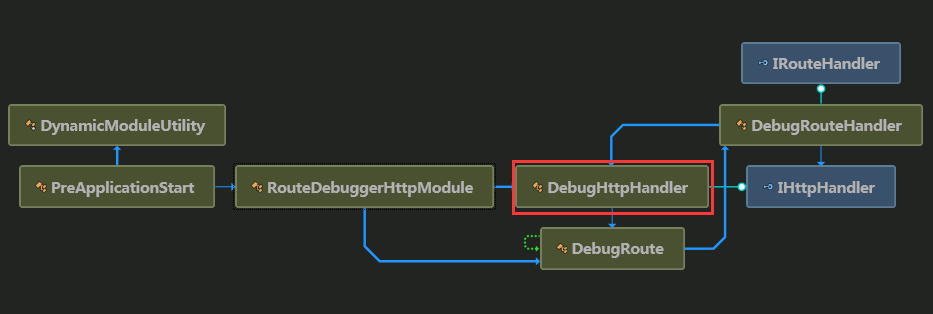
程序集属性[assembly: PreApplicationStartMethod(typeof(PreApplicationStart), "Start")] 使PreApplicationStart的Start方法在Application_Start方法之前执行,
public static void Start()

        {

            bool flag = Convert.ToBoolean(ConfigurationManager.AppSettings["RouteDebugger:Enabled"]);

            if (flag)

            {

                DynamicModuleUtility.RegisterModule(typeof(RouteDebuggerHttpModule));

            }

        }
最后处理请求的是DebugHttpHandler里的ProcessRequest方法把匹配的路由信息获取出来,代码如下:
//处理请求
public void ProcessRequest(HttpContext context)
{
HttpRequest request = context.Request;
if (!this.IsRoutedRequest(request) || context.Response.ContentType == null || !context.Response.ContentType.Equals("text/html", StringComparison.OrdinalIgnoreCase))
{
return;
}
string text = string.Empty;
RequestContext requestContext = request.RequestContext;
if (request.QueryString.Count > )
{
RouteValueDictionary routeValueDictionary = new RouteValueDictionary();
foreach (string text2 in request.QueryString.Keys)
{
if (text2 != null)
{
routeValueDictionary.Add(text2, request.QueryString[text2]);
}
}
VirtualPathData virtualPath = RouteTable.Routes.GetVirtualPath(requestContext, routeValueDictionary);
if (virtualPath != null)
{
text = "<p><label style=\"font-weight: bold; font-size: 1.1em;\">Generated URL</label>: ";
text = text + "<strong style=\"color: #00a;\">" + virtualPath.VirtualPath + "</strong>";
Route route = virtualPath.Route as Route;
if (route != null)
{
text = text + " using the route \"" + route.Url + "\"</p>";
}
}
}
string text3 = string.Empty;
RouteData routeData = requestContext.RouteData;
RouteValueDictionary values = routeData.Values;
RouteBase route2 = routeData.Route;
string text4 = string.Empty;
using (RouteTable.Routes.GetReadLock())
{
foreach (RouteBase current in RouteTable.Routes)
{
//查询请求与路由是否匹配
bool flag = current.GetRouteData(requestContext.HttpContext) != null; string isMatchRequest = string.Format("<span{0}>{1}</span>", DebugHttpHandler.BoolStyle(flag), flag);
string url = "n/a";
string defaults = "n/a";
string constraints = "n/a";
string dataTokens = "n/a";
Route route3 = this.CastRoute(current);
if (route3 != null)
{
url = route3.Url;
defaults = DebugHttpHandler.FormatDictionary(route3.Defaults);
constraints = DebugHttpHandler.FormatDictionary(route3.Constraints);
dataTokens = DebugHttpHandler.FormatDictionary(route3.DataTokens);
} text4 += string.Format("<tr><td>{0}</td><td>{1}</td><td>{2}</td><td>{3}</td><td>{4}</td></tr>", new object[]
{
isMatchRequest,
url,
defaults,
constraints,
dataTokens
});
}
}
string text10 = "n/a";
string text11 = "";
if (!(route2 is DebugRoute))
{
foreach (string current2 in values.Keys)
{
text3 += string.Format("\t<tr><td>{0}</td><td>{1} </td></tr>", current2, values[current2]);
}
foreach (string current3 in routeData.DataTokens.Keys)
{
text11 += string.Format("\t<tr><td>{0}</td><td>{1} </td></tr>", current3, routeData.DataTokens[current3]);
}
Route route4 = route2 as Route;
if (route4 != null)
{
text10 = route4.Url;
}
}
else
{
text10 = string.Format("<strong{0}>NO MATCH!</strong>", DebugHttpHandler.BoolStyle(false));
}
text3 = "text3";
text10 = "text10";
text4 = "text4";
text11 = "text11";
text = "text"; context.Response.Write(string.Format("<html>\r\n<div id=\"haackroutedebugger\" style=\"background-color: #fff; padding-bottom: 10px;\">\r\n <style>\r\n #haackroutedebugger, #haackroutedebugger td, #haackroutedebugger th {{background-color: #fff; font-family: verdana, helvetica, san-serif; font-size: small;}}\r\n #haackroutedebugger tr.header td, #haackroutedebugger tr.header th {{background-color: #ffc;}}\r\n </style>\r\n <hr style=\"width: 100%; border: solid 1px #000; margin:0; padding:0;\" />\r\n <h1 style=\"margin: 0; padding: 4px; border-bottom: solid 1px #bbb; padding-left: 10px; font-size: 1.2em; background-color: #ffc;\">Route Debugger</h1>\r\n <div id=\"main\" style=\"margin-top:0; padding: 0 10px;\">\r\n <p style=\"font-size: .9em; padding-top:0\">\r\n Type in a url in the address bar to see which defined routes match it. \r\n A {{*catchall}} route is added to the list of routes automatically in \r\n case none of your routes match.\r\n </p>\r\n <p style=\"font-size: .9em;\">\r\n To generate URLs using routing, supply route values via the query string. example: <code>http://localhost:14230/?id=123</code>\r\n </p>\r\n <p><label style=\"font-weight: bold; font-size: 1.1em;\">Matched Route</label>: {1}</p>\r\n {5}\r\n <div style=\"float: left;\">\r\n <table border=\"1\" cellpadding=\"3\" cellspacing=\"0\" width=\"300\">\r\n <caption style=\"font-weight: bold;\">Route Data</caption>\r\n <tr class=\"header\"><th>Key</th><th>Value</th></tr>\r\n {0}\r\n </table>\r\n </div>\r\n <div style=\"float: left; margin-left: 10px;\">\r\n <table border=\"1\" cellpadding=\"3\" cellspacing=\"0\" width=\"300\">\r\n <caption style=\"font-weight: bold;\">Data Tokens</caption>\r\n <tr class=\"header\"><th>Key</th><th>Value</th></tr>\r\n {4}\r\n </table>\r\n </div>\r\n <hr style=\"clear: both;\" />\r\n <table border=\"1\" cellpadding=\"3\" cellspacing=\"0\">\r\n <caption style=\"font-weight: bold;\">All Routes</caption>\r\n <tr class=\"header\">\r\n <th>Matches Current Request</th>\r\n <th>Url</th>\r\n <th>Defaults</th>\r\n <th>Constraints</th>\r\n <th>DataTokens</th>\r\n </tr>\r\n {2}\r\n </table>\r\n <hr />\r\n <h3>Current Request Info</h3>\r\n <p>\r\n AppRelativeCurrentExecutionFilePath is the portion of the request that Routing acts on.\r\n </p>\r\n <p><strong>AppRelativeCurrentExecutionFilePath</strong>: {3}</p>\r\n </div>\r\n</div>", new object[]
{
text3,
text10,
text4,
request.AppRelativeCurrentExecutionFilePath,
text11,
text
}));
}
注:RouteDebugger的源码是通过ILSpy反编译的。
结束语
抽出时间去验证路由顺序是因为两个错误引起的:
1.升级vs2013的mvc4解决方案到vs2015后所有的Area路由失效,返回404错误。以为是vs2015对mvc4的支持不够(刚出来是对mvc4是有点问题),就撤销升级返回vs2013了。
2.在vs2013中添加了一个新的Area,排在了以前的所有路由之后,出现404错误。通过RouteDebugger发现是路由的顺序问题,所以想到上面那个问题应该也是顺序问题,不应该是vs2015的缺陷。
希望这篇文章可以帮助你避免遇到同样的问题,觉着有用就推荐一下吧
VS2013和VS2015中MVC 区域路由匹配顺序相反的更多相关文章
- MVC教程:MVC区域路由
一.区域路由 为了管理网站中大量的文件,在ASP.NET MVC 2.0版本中引入了一个新概念:区域(Area). 有了区域以后,可以让我们的项目不至于太复杂而导致管理混乱.每个模块的页面都放入相应的 ...
- .net core mvc 区域路由设置(配置)
写博客原因:添加了区域(用作后台)后,报错: An unhandled exception occurred while processing the request.AmbiguousActionE ...
- nginx中server块的匹配顺序
客户端发出一个http请求时,nginx收到后会取出header头中的host,与nginx.conf中每个server的server_name进行匹配,以此决定到底由哪一个server块来处理这个请 ...
- 怎样在vs2013和vs2015中实现自动编译sass
Visual Studio不论是2013版本还是2015版本要自动编译都需要添加扩展. 添加扩展的方法,路径“工具”->“扩展和更新”,在打开的窗口“搜索”你需要的扩展根据提示“下载”和“安装” ...
- VS2013、VS2015中,新建项目没有看到解决方案的问题(已解决)
问题描述:装好VS2013 专业版 for Update5不知怎么弄的,突然新建项目没有了解决方案,于是各种折腾,最后终于解决了! ================================== ...
- MVC区域路由配置
- asp.net MVC 的路由匹配
- MVC 区域路
VS2013和VS2015中MVC 区域路由匹配顺序相反 创建测试工程 分别在vs2013和vs2015中创建mvc项目,并创建First.Second.Three三个Area,每个Area下面创 ...
- mvc路由,mvc区域
1.路由在进行匹配时,会默认匹配第一个路由信息 2.路由规则的{control}和{action}时不能改变的 3.路由规则可以中间字符可以随便定义,但是{control}和{action}必须使用一 ...
随机推荐
- cygwin 运行窗口程序
首先, 默认安装的cygwin是不能运行窗口程序的 比如,一段python窗口程序: import * from tkinter Tk() mainloop() 如果使用命令行: python3 py ...
- 11g默认审计选项
[注:参考了maclean的网文]11g默认审计选项AUDIT_TRAIL参数的缺省值为DB,审计数据记录在数据库中的AUD$审计字典基表上.在11g中CREATE SESSION将被作为受审计的权限 ...
- Java线程中yield()的用法
Thread.yield()方法的作用:暂停当前正在执行的线程,并执行其他线程.(可能没有效果) yield()让当前正在运行的线程回到可运行状态,以允许具有相同优先级的其他线程获得运行的机会.因此, ...
- 分享jquery.cookie.js
代码如下: /*! * jQuery Cookie Plugin v1.4.1 * https://github.com/carhartl/jquery-cookie * * Copyright 20 ...
- 关于BOM的理解
BOM提供了很多对象,用于访问浏览器的功能,这些功能与网页内容无关 BOM的核心对象时window,她表示浏览器的一个实例 window的双重角色 1.JS访问浏览器窗口的一个接口 2.ECMA ...
- ASP.NET MVC 项目直接预览PDF文件
背景及需求 项目使用的是MVC4框架,其中有一个功能是根据设置生成PDF文件,并在点击时直接预览. 实现过程 1.第一版实现代码: HTML内容 @{ Layout = null; } <!DO ...
- 初探ASP.NET Web API
什么是ASP.NET Web API? 官方的解释是 ASP.NET Web API is a framework that makes it easy to build HTTP services ...
- 多源最短路径---Floyd-Warshall算法
摘自啊哈算法-知识分享,代码自己有改动,使得输出更直观. 小哼准备去一些城市旅游.有些城市之间有公路,有些城市之间没有,如下图.为了节省经费以及方便计划旅程,小哼希望出发之前知道任意两个城市之间的最短 ...
- 从C#到TypeScript - Reflect
总目录 从C#到TypeScript - 类型 从C#到TypeScript - 高级类型 从C#到TypeScript - 变量 从C#到TypeScript - 接口 从C#到TypeScript ...
- FineUIMvc随笔 - 动态创建表格列
声明:FineUIMvc(基础版)是免费软件,本系列文章适用于基础版. 用户需求 用户希望实现动态创建表格列,在 WebForms 中,我们通过在 Page_Init 中创建列来实现: 但是在 MVC ...