
delphi用webservice
delphi的webservice开发。
一、在已有的项目中,调用外部的webservice
1、根据向导建webservice,在项目中引入“WSDL Importer"。假设引入后生成的类的名字为”service"
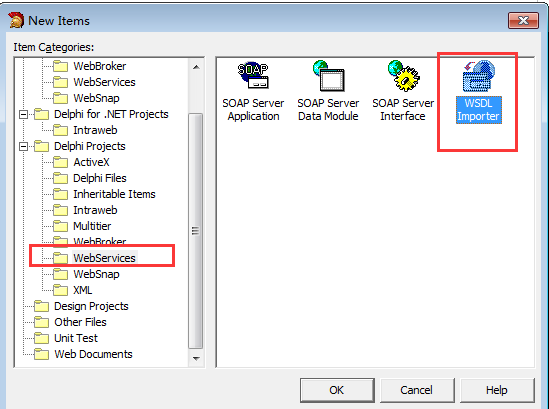
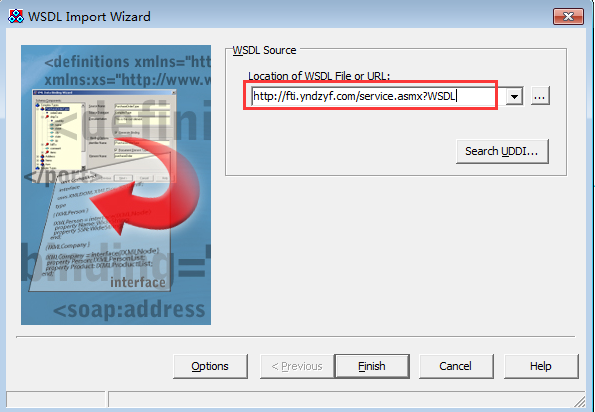
2、对生成的service类做相应的修改。
2.1、如果webservice方法里的某些参数即是接收传入参数又是接收返回参数,在delphi里要对参数名字重新命名
如在用c#写的webservice的服务端方法是sr.Get_Delivery_Data_Over(sn, sjlx, ref err);

//默认生成的代码为

 procedure Get_Delivery_Data(const err: WideString; const data_str: TByteDynArray; const sn: Integer; const sjlx: WideString; out Get_Delivery_DataResult: Boolean; out err: WideString; out data_str: TByteDynArray; out sn: Integer); stdcall;

///要改成如下:

 procedure Get_Delivery_Data(const err1: WideString; const data_str1: TByteDynArray; const sn1: Integer; const sjlx: WideString; out Get_Delivery_DataResult: Boolean; out err: WideString; out data_str: TByteDynArray; out sn: Integer); stdcall;
2.2、 如果delphi调用c#写的webservice时,服务器端方法接收到delphi传过来的参数总是为空时,在delphi的service类的initialization下面加这名话
InvRegistry.RegisterInvokeOptions(TypeInfo(ServiceSoap),ioDocument); ///必需要加,不然传到c#写的webservice里的方法的参数值是空的
如下是service类的源代码
// ************************************************************************ //

// The types declared in this file were generated from data read from the

// WSDL File described below:

// WSDL     : http://fti.yndzyf.com/Service.asmx?wsdl

// Encoding : utf-

// Version  : 1.0

// (-- :: - 1.33.2.5)

// ************************************************************************ //

unit Service;

interface

uses InvokeRegistry, SOAPHTTPClient, Types, XSBuiltIns;

type

  // ************************************************************************ //

  // The following types, referred to in the WSDL document are not being represented

  // in this file. They are either aliases[@] of other types represented or were referred

  // to but never[!] declared in the document. The types from the latter category

  // typically map to predefined/known XML or Borland types; however, they could also

  // indicate incorrect WSDL documents that failed to declare or import a schema type.

  // ************************************************************************ //

  // !:string          - "http://www.w3.org//XMLSchema"

  // !:base64Binary    - "http://www.w3.org//XMLSchema"

  // !:int             - "http://www.w3.org//XMLSchema"

  // !:boolean         - "http://www.w3.org//XMLSchema"

  Websoap              = class;                 { "http://aitf.yndzyf.com/"[H] }

  // ************************************************************************ //

  // Namespace : http://aitf.yndzyf.com/

  // ************************************************************************ //

  Websoap = class(TSOAPHeader)

  private

    FUserName: WideString;

    FPassWord: WideString;

  published

    property UserName: WideString read FUserName write FUserName;

    property PassWord: WideString read FPassWord write FPassWord;

  end;

  // ************************************************************************ //

  // Namespace : http://aitf.yndzyf.com/

  // soapAction: http://aitf.yndzyf.com/%operationName%

  // transport : http://schemas.xmlsoap.org/soap/http

  // binding   : ServiceSoap

  // service   : Service

  // port      : ServiceSoap

  // URL       : http://fti.yndzyf.com/Service.asmx

  // ************************************************************************ //

  ServiceSoap = interface(IInvokable)

  ['{E00EB65B-7136-E473-42EF-D3135F25019F}']

    procedure Get_Delivery_Data(const err1: WideString; const data_str1: TByteDynArray; const sn1: Integer; const sjlx: WideString; out Get_Delivery_DataResult: Boolean; out err: WideString; out data_str: TByteDynArray; out sn: Integer); stdcall;

    procedure Get_Delivery_Data_Over(const sn: Integer; const sjlx: WideString; const err1: WideString; out Get_Delivery_Data_OverResult: Boolean; out err: WideString); stdcall;

    procedure Receive_data(const error1: WideString; const str: TByteDynArray; const sn: Integer; const sjlx: WideString; out Receive_dataResult: Boolean; out error: WideString); stdcall;

  end;

function GetServiceSoap(UseWSDL: Boolean=System.False; Addr: string=''; HTTPRIO: THTTPRIO = nil;user:string='';password:string=''): ServiceSoap;

implementation

function GetServiceSoap(UseWSDL: Boolean; Addr: string; HTTPRIO: THTTPRIO;user:string;password:string): ServiceSoap;

const

  defWSDL = 'http://fti.yndzyf.com/Service.asmx?wsdl';

  defURL  = 'http://fti.yndzyf.com/Service.asmx';

  defSvc  = 'Service';

  defPrt  = 'ServiceSoap';

var

  RIO: THTTPRIO;

begin

  Result := nil;

  if (Addr = '') then

  begin

    if UseWSDL then

      Addr := defWSDL

    else

      Addr := defURL;

  end;

  if HTTPRIO = nil then

    RIO := THTTPRIO.Create(nil)

  else

    RIO := HTTPRIO;

  try

    Result := (RIO as ServiceSoap);

    if UseWSDL then

    begin

      RIO.WSDLLocation := Addr;

      RIO.Service := defSvc;

      RIO.Port := defPrt;

    end else

      RIO.URL := Addr;

  finally

    if (Result = nil) and (HTTPRIO = nil) then

      RIO.Free;

  end;

end;

initialization

  InvRegistry.RegisterInterface(TypeInfo(ServiceSoap), 'http://aitf.yndzyf.com/', 'utf-8');

  InvRegistry.RegisterDefaultSOAPAction(TypeInfo(ServiceSoap), 'http://aitf.yndzyf.com/%operationName%');

  InvRegistry.RegisterHeaderClass(TypeInfo(ServiceSoap), Websoap, 'Websoap', '');

  RemClassRegistry.RegisterXSClass(Websoap, 'http://aitf.yndzyf.com/', 'Websoap');

  InvRegistry.RegisterInvokeOptions(TypeInfo(ServiceSoap),ioDocument);   ///必要要加,不然传到c#写的webservice里的值是空的

end.
3、调用
procedure Tform_smrk.bgetydClick(Sender: TObject);

var sql:string;

var err_fp,err1_fp,err_yjm,err1_yjm:Widestring;

data_fp,data_fp1,data_yjm,data_yjm1:TByteDynArray;

sn_fp,sn_fp1,sn_yjm,sn_yjm1:Integer;

flag_fp,flag_fp1,flag_yjm,flag_yjm1:boolean;

ws:webSoap;

svc:serviceSoap;

begin

       svc := HTTPRIO1 as ServiceSoap;

       ws:=websoap.Create;

       ws.UserName:=serviceName;///webservice的用户名和密码

       ws.PassWord:=servicePassword;

      (svc as ISOAPHeaders).Send(ws);

       svc.Get_Delivery_Data('',data_fp1,,'运单',flag_fp,err_fp,data_fp,sn_fp);

       (svc as ISOAPHeaders).Send(ws);///每次调用时都要重新设置用户和密码

       svc.Get_Delivery_Data('',data_yjm1,,'电子监管',flag_yjm,err_yjm,data_yjm,sn_yjm);

       if length(data_fp)> then///如果有运单

       begin

          ADOStoredProc1.ProcedureName:= 'p_insert_data';

          ADOStoredProc1.Parameters.Clear;

          ADOStoredProc1.Parameters.Refresh;

          ADOStoredProc1.Parameters.ParamByName('@data_str').Value:=data_fp;

          if length(data_yjm)>  then  ADOStoredProc1.Parameters.ParamByName('@data_str_yjm').Value:=data_yjm;

          ADOStoredProc1.Prepared;

          ADOStoredProc1.ExecProc;

end
要注意的是:1、每次调用webservice时要重新写一次(svc as ISOAPHeaders).Send(ws);,将webSoap和serviceSoap关联
2、上面的代码是从webservice取xml的二进制文件,然后将取出的二进制数据传入到存储过程p_insert_data里。用ADOStoreProc可以对存储过程传参数
时可以不考虑参数的类型,直接用ADOStoredProc1.Parameters.ParamByName('@data_str').Value:=data_fp赋值,在赋值前要ADOStoredProc1.Parameters.Refresh;不然不能对参数 赋值成功。
3、HTTPRIO1 是控件THTTPRIO。控件要设置好URL=http://fti.yndzyf.com/Service.asmx?wsdl
delphi用webservice的更多相关文章
- Delphi调用webservice总结
Delphi调用webservice总结 Delphi调用C#写的webservice 用delphi的THTTPRIO控件调用了c#写的webservice. 下面是我调试时遇到的一些问题: ...
- delphi 调用Webservice 引入wsdl 报错 document empty
delphi 调用Webservice 引入wsdl 报错 document empty 直接引入wsdl 地址报错 document empty 解决办法:在浏览器里保存为xml文件,然后在开发环境 ...
- Delphi编写WebService体会
源:Delphi编写WebService体会 Dispatch: 派遣,分派 Invoke: 调用 Invokable: 可调用接口 TReomtable: WebService中自定义类都是继承自该 ...
- DELPHI新版本WEBSERVICE的变化
DELPHI新版本WEBSERVICE,不仅可以编译成ISAPI DLL,依靠IIS部署, 并且还可以编译成单独的EXE,不再依赖IIS就可以独立运行,这一点未尝不可以说是非常方便的改进.
- Delphi调用WebService(通过SoapHeader认证)经验总结
项目(Delphi开发)需要调用另一个系统的WebService.走了不少弯路,现记录总结一下经验.以下是WebService要求: 1.WebService概述 营销Webservice接口采用Ap ...
- 【转】Delphi调用webservice总结
原文:http://www.cnblogs.com/zhangzhifeng/archive/2013/08/15/3259084.html Delphi调用C#写的webservice 用delph ...
- Delphi实现WebService带身份认证的数据传输
WebService使得不同开发工具开发出来的程序可以在网络连通的环境下相互通信,它最大的特点就是标准化(基于XML的一系列标准)带来的跨平台.跨开发工具的通用性,基于HTTP带来的畅通无阻的能力(跨 ...
- Delphi 调试WEBService程序(ISAPI或CGI) 把Web App Debugger executable转换成 ISAPI/NSAPI
1.新建一个web工程,请选中最下面一项:Web App Debugger executable,Coclass name我们设为demo1: 2.在弹出的WebModule2中右击,在弹出的Ac ...
- delphi调用webservice 转
如今 Web Service 已越来越火了,在DotNet已开发的Web Service中,Delphi 7如何方便的调用DotNet写的Web Service呢?方法有两种,一种是在Delphi ...
随机推荐
- Javascript 进阶 面向对象编程 继承的一个样例
Javascript的难点就是面向对象编程,上一篇介绍了Javascript的两种继承方式:Javascript 进阶 继承.这篇使用一个样例来展示js怎样面向对象编程.以及怎样基于类实现继承. 1. ...
- 刚在在win8.1下装了ubuntu12.04
这是一个開始. 開始我想在win7下,由于我本来是7和win8.1双系统,想直接把win7覆盖了. 可是不知道怎么回事,比較复杂.于是在win8.1下装了. 先把win7的系统盘格式化了. 把下的is ...
- Xss过滤,只json型数据过滤,图片文件不过滤,采用jsoup
package com.huaji.fes.filter; import javax.servlet.http.HttpServletRequest;import javax.servlet.http ...
- CoreJava逻辑思维-顺时针打印自定义矩阵
CoreJava逻辑思维-顺时针打印自定义矩阵 这两天回顾了一下刚入Java时的一些比较有意思的逻辑题,曾经也费劲脑汁的思考过的一些问题,比如百钱百鸡最简单的算法啦之类的,而今天博主想说的是一个循环打 ...
- Mybatis中模糊查询的各种写法(转)
. sql中字符串拼接 SELECT * FROM tableName WHERE name LIKE CONCAT(CONCAT('%', #{text}), '%');或者 <if test ...
- 使用soap实现简单webservice
在网上看到一些关于用soap实现简单webservice的一些知识,简单整理一下希望对大家有所帮助. 可以给大家看一下我的简单实现的列子,Soap,大家可以到Github上自行下载. 首先说一下web ...
- mybatis防止sql注入
SQL注入是一种代码注入技术,用于攻击数据驱动的应用,恶意的SQL语句被插入到执行的实体字段中(例如,为了转储数据库内容给攻击者).[摘自] SQL injection - Wikipedi ...
- 小白的Python之路 PEP8 代码风格
转载自http://www.douban.com/note/134971609/ Python 的代码风格由 PEP 8 描述.这个文档描述了 Python 编程风格的方方面面.在遵守这个文档的条件下 ...
- 【python】函数闭包
列表时可以改
- Vue2 后台管理系统解决方案
基于Vue.js 2.x系列 + Element UI 的后台管理系统解决方案. github地址:https://github.com/lin-xin/manage-system demo地址:ht ...