
接口测试——Java + TestNG 国家气象局接口(json解析)实例
后端测试,主要以测试接口为主。需要代码支撑,近期便找了个天气接口捣鼓了。
使用到的工具是:Eclipse + TestNG + Maven + ReportNG,全国城市编码:http://www.cnblogs.com/oucbl/p/6138963.html,接口地址:http://www.weather.com.cn/data/cityinfo/城市编码.html
先看一下代码架构,如下所示:
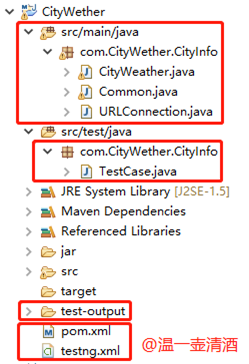
建的是maven工程,个人觉得这样下载依赖包较方便。工程科分为四部分:功能代码,测试case,报表文件和配置文件。网络上也有很多这样的实例,我只是列举些我在做的过程中所遇到的问题吧,也当一个记录。maven不会配置,可参见我之前写的随笔。
功能代码
Common
 package com.CityWether.CityInfo;

 import net.sf.json.JSONException;

 import net.sf.json.JSONObject;

 public class Common {

     public static String getJsonValue(String JsonString, String JsonId) {

         String JsonValue = "";

         //trim()去掉字符串首尾的空格

         if (JsonString == null || JsonString.trim().length() < 1) {

             return null;

         }

         try {

             JSONObject obj1 = new JSONObject(JsonString);

             JsonValue = obj1.getString(JsonId);

         } catch (JSONException e) {

             e.printStackTrace();

         }

         return JsonValue;

     }

 }
URLConnection
 package com.CityWether.CityInfo;

 import java.net.HttpURLConnection;

 import java.net.URL;

 public class URLConnection {

     public static HttpURLConnection getConnection(String url){

         HttpURLConnection connection = null;

         try {

             // 打开和URL之间的连接

             URL postUrl = new URL(url);

             connection = (HttpURLConnection) postUrl.openConnection();

              // 设置通用的请求属性

             connection.setDoOutput(true);

             connection.setDoInput(true);

             connection.setRequestMethod("GET");

             connection.setUseCaches(false);

             connection.setInstanceFollowRedirects(true);

             connection.setRequestProperty("Content-Type", "application/json");

             connection.setRequestProperty("Charset", "utf-8");

             connection.setRequestProperty("Accept-Charset", "utf-8");

         } catch (Exception e) {

             e.printStackTrace();

         }

         return connection;

     }

 }
CityWeather
 package com.CityWether.CityInfo;

 import java.io.BufferedReader;

 import java.io.DataOutputStream;

 import java.io.IOException;

 import java.io.InputStreamReader;

 import java.net.HttpURLConnection;

 public class CityWeather {

     private String url="";

     public String geturl() {

         return url;

     }

     public static String formatString(String s) {

         if (s != null) {

               s = s.replaceAll("\ufeff", "");

         }

         return s;

     }

     public String getHttpRespone(String cityCode) throws IOException {

         String line = "";

         String httpResults = "";

         url=("http://www.weather.com.cn/data/cityinfo/" + cityCode + ".html");

         try {

             HttpURLConnection connection = URLConnection.getConnection(url);

             // 建立实际的连接

             connection.connect();

             BufferedReader reader = new BufferedReader(new InputStreamReader(connection.getInputStream()));

             while ((line = reader.readLine()) != null) {

                 httpResults = httpResults + line.toString();

             }

             reader.close();

             // 断开连接

             connection.disconnect();

         } catch (Exception e) {

             e.printStackTrace();

         }

         return httpResults;

     }

 }
测试case
 package com.CityWether.CityInfo;

 import java.io.IOException;

 import org.testng.Assert;

 import org.testng.Reporter;

 import org.testng.annotations.Test;

 import com.CityWether.CityInfo.CityWeather;

 import com.CityWether.CityInfo.Common;

 public class TestCase {

     public String httpResult= null, weatherinfo= null, city=null,expect_city = null;

     public static String cityCode="";

     CityWeather weather=new CityWeather();

     @Test(priority=0)

     public void getHuaihua() throws IOException{

         expect_city="怀化";

         cityCode="101251201";

         resultCheck(cityCode, expect_city);

     }

     @Test(priority=1)

     public void getHuitong() throws IOException{

         expect_city="会同";

         cityCode="101251206";

         resultCheck(cityCode, expect_city);

     }

     @Test(priority=2)

     public void getChangsha() throws IOException{

         expect_city="长沙";

         cityCode="101250101";

         resultCheck(cityCode, expect_city);

     }

     @Test(priority=3)

     public void getBaoshan() throws IOException{

         expect_city="宝山";

         cityCode="101020300";

         resultCheck(cityCode, expect_city);

     }

     @Test(priority=4)

     public void getShanghai() throws IOException{

         expect_city="上海";

         cityCode="101020100";

         resultCheck(cityCode, expect_city);

     }

     @Test(priority=5)

     public void Minhang() throws IOException{

         expect_city="闵行";

         cityCode="101020200";

         resultCheck(cityCode, expect_city);

     }

     public void resultCheck(String cityCode, String expect_city) throws IOException{

         System.setProperty("org.uncommons.reportng.escape-output", "false");

         Reporter.log("【正常用例】:获取"+expect_city+"天气成功!");

         httpResult=weather.getHttpRespone(cityCode);

         Reporter.log("<p><span style=\"color:#FF0000\">请求地址: "+weather.geturl()+"</span></p>");

         Reporter.log("【返回结果】: "+httpResult);

         weatherinfo=Common.getJsonValue(httpResult, "weatherinfo");

         city=Common.getJsonValue(weatherinfo, "city");

         Reporter.log("<p>【用例结果】: resultCode=>expected: " + expect_city + " ,actual: "+ city+"</p>");

         Assert.assertEquals(city,expect_city);

         Reporter.log("<p></p>");

         Reporter.log("<p>"+"------------------------------------------------------------------------------"+"</p>");

     }

 }
报表文件示例
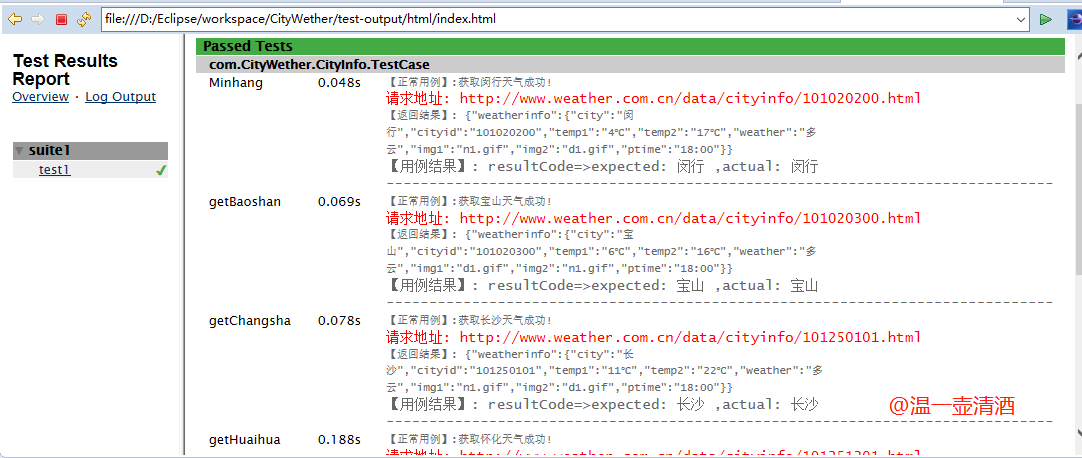
报表html文件位置在如下所示:

代码实现如上就完成,需要配置pom.xml文件和testng.xml文件,可参照如下:
pom.xml
pom.xml文件是下载依赖包的,特别方便
 <project xmlns="http://maven.apache.org/POM/4.0.0" xmlns:xsi="http://www.w3.org/2001/XMLSchema-instance"

   xsi:schemaLocation="http://maven.apache.org/POM/4.0.0 http://maven.apache.org/xsd/maven-4.0.0.xsd">

   <modelVersion>4.0.0</modelVersion>

   <groupId>com</groupId>

   <artifactId>CityWether</artifactId>

   <version>0.0.1-SNAPSHOT</version>

   <packaging>jar</packaging>

   <name>CityWether</name>

   <url>http://maven.apache.org</url>

   <properties>

     <project.build.sourceEncoding>UTF-8</project.build.sourceEncoding>

   </properties>

   <dependencies>

     <dependency>

       <groupId>junit</groupId>

       <artifactId>junit</artifactId>

       <version>3.8.1</version>

       <scope>test</scope>

     </dependency>

     <dependency>

         <groupId>org.json</groupId>

         <artifactId>json</artifactId>

         <version>20171018</version>

     </dependency>

     <dependency>

         <groupId>org.testng</groupId>

            <artifactId>testng</artifactId>

         <version>6.9.10</version>

   </dependency>

   <dependency>

     <groupId>org.uncommons</groupId>

     <artifactId>reportng</artifactId>

     <version>1.1.4</version>

  </dependency>

  <dependency>

     <groupId>com.google.inject</groupId>

     <artifactId>guice</artifactId>

     <version>4.0</version>

  </dependency>

  <dependency>

     <groupId>velocity</groupId>

     <artifactId>velocity-dep</artifactId>

     <version>1.4</version>

  </dependency>

   </dependencies>

 </project>
这里需要注意的是,由于接口返回的是json数据,所以必须导入json依赖包:
 <dependency>

    <groupId>org.json</groupId>

    <artifactId>json</artifactId>

    <version>20171018</version>

 </dependency>
testng.xml
testng.xml文件是用于运行的,运行程序直接运行该文件即可:
 <?xml version="1.0" encoding="UTF-8"?>

 <!DOCTYPE suite SYSTEM "http://beust.com/testng/testng-1.0.dtd" >

 <suite name="suite1">

     <test name="test1">

         <classes>

             <class name="com.CityWether.CityInfo.TestCase" />

         </classes>

     </test>

     <listeners>

       <listener class-name="org.uncommons.reportng.HTMLReporter" />

       <listener class-name="org.uncommons.reportng.JUnitXMLReporter" />

     </listeners>

 </suite>
问题总结
自己在完成过程中,过程中遇到如下问题:
1、接口返回的数据是乱码
如下所示:

经百度科普,是因为BOM报头报错,可参见该博文:http://blog.csdn.net/u012519664/article/details/41596857?%3E,里面有详细介绍。
解决办法:
在CityWeather类中代码下加上如下代码即可:
  public static String formatString(String s) {

        if (s != null) {

              s = s.replaceAll("\ufeff", "");

        }

        return s;

    }
2、Common类中导包错误
Common类中代码导入如下包,运行程序报错
import org.json.JSONException;

import org.json.JSONObject;
报错为:
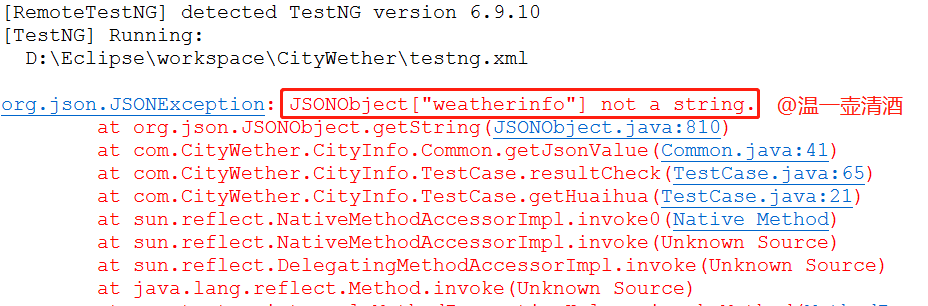
解决办法为:
重新导入JSON包即可,如下:
import net.sf.json.JSONException;

import net.sf.json.JSONObject;
3、注意:测试报告美化是依赖ReportNG包的,切莫忘记
接口测试——Java + TestNG 国家气象局接口(json解析)实例的更多相关文章
- json-lib-2.4-jdk15.jar所需全部JAR包.rar java jsoup解析开彩网api接口json数据实例
json-lib-2.4-jdk15.jar所需全部JAR包.rar java jsoup解析开彩网api接口json数据实例 json-lib-2.4-jdk15.jar所需全部JAR包.rar ...
- JSON解析实例——使用Json-lib
JSON解析实例——使用Json-lib Json-lib下载及使用 本文介绍用一个类库进行JSON解析. 工具下载地址:http://sourceforge.net/projects/json-li ...
- Java进阶学习:JSON解析利器JackSon
Java:JSON解析利器JackSon JackSon基础 1.Maven项目引入 <!-- https://mvnrepository.com/artifact/org.codehaus.j ...
- 接口测试02 - 无法绕过的json解析
概述: 先瞧一下什么是json.JSON(JavaScript Object Notation,JS对象标记)是一种轻量级的数据交换格式. 它基于ECMAScript(w3c定制的js规范)的一个子集 ...
- java中常见的json解析方法、库以及性能对比
常见的json解析有原生的JSONObject和JSONArray方法,谷歌的GSON库,阿里的fastjson,还有jackson,json-lib. Gson(项目地址:https://githu ...
- Java 自定义注解与注解解析实例
在学习Java之后会遇到很多的注解,有加载JavaBean的注解:@Component,@Service,@Controller:有获取配置文件中数值的注解@Value:有获取Http请求的数据的注解 ...
- 接口测试-Java代码实现接口请求并封装
前言:在接口测试和Java开发中对接口请求方法进行封装都非常有必要,无论是在我们接口测试的时候还是在开发自测,以及调用某些第三方接口时,都能为我们调用和调试接口提供便捷: Java实现对http请求的 ...
- http后台json解析实例
localhost:8080/hbinterface/orderInterface/sIReverseAccept.do?bizType=4&&bnetAccount=ESBTEST2 ...
- Java面向对象之接口interface 入门实例
一.基础概念 (一)接口可以简单的理解为,是一个特殊的抽象类,该抽象类中的方法都是抽象的. 接口中的成员有两种:1.全局常量 2.抽象方法 定义接口用关键字interface,接口中的成员都用固定的修 ...
随机推荐
- 3. python文件操作
5 打开文件的模式有: r,只读模式(默认). w,只写模式.[不可读:不存在则创建:存在则删除内容:] a,追加模式.[可读: 不存在则创建:存在则只追加内容:] ...
- 【java】多线程同步死锁
package 多线程; class A{ public synchronized void say(B b){ System.out.println("A说:你把你的本给我,我把我的笔给你 ...
- OC学习6——面相对象的三大特性
我们在学习Java的时候都知道,类有三大特性:继承,封装,多态,这也是面向对象的三大特征.OC学习篇之---类的三大特性(封装,继承,多态) 1.封装(Encapsulation)是指将对象的状态信息 ...
- BZOJ 4819 新生舞会
第一句话:算出3.363636的孩子啊,你跑错流种了. 貌似上一篇我讲SDOI出原题?嘿还真是! 半个月前有一个叫WG的男人给我们搞过一场考试... ... 里面有一道题叫做保密... ...SDOI ...
- bzoj 3597: [Scoi2014]方伯伯运椰子
Description Input 第一行包含二个整数N,M 接下来M行代表M条边,表示这个交通网络 每行六个整数,表示Ui,Vi,Ai,Bi,Ci,Di 接下来一行包含一条边,表示连接起点的边 Ou ...
- F和弦大横按
用食指手掌关节顶住. 靠近品柱往上压 右手压住琴尾,这样就很轻松试下C跟F不停转换就快找到感觉 等熟练了,食指自然不会按太上 练得差不多了,手指向琴头倾压,有两个好处 1.手指后面的肉不会碰到弦 2. ...
- springCloud系列教程01:Eureka 注册中心集群搭建
springCloud系列教程包含如下内容: springCloud系列教程01:Eureka 注册中心集群搭建 springCloud系列教程02:ConfigServer 配置中心server搭建 ...
- Python个人项目--豆瓣图书个性化推荐
项目名称: 豆瓣图书个性化推荐 需求简述:从给定的豆瓣用户名中,获取该用户所有豆瓣好友列表,从豆瓣好友中找出他们读过的且评分5星的图书,如果同一本书被不同的好友评5星,评分人数越多推荐度越高. 输入: ...
- 解决 react-router / react-router-dom v4 history不能访问的问题
今天我把react-router 升级了一下, 在使用react-router-dom 是,子组件使用this.props.history 找不到了,看看官方文档,找了半天也没找到,因为我是在异步执行 ...
- jenkins的搭建
根据官方网站的步骤进行安装 网址:https://wiki.jenkins.io/display/JENKINS/Installing+Jenkins+on+Red+Hat+distributions ...