
SpringBoot+Redis环境搭建
写在正文前的絮叨:
其实这个环境的搭建是很简单的,照着官网给的说明很快就可以搭建测试出来。为什么又要写出来呢?只是为了记录、保留、分享这其中遇到的坑。
这个环境之前在架构一个简单系统时,也曾经搭建过,是springsession+redis。这里先落下伏笔(是坑的来源之一)。
正文:
首先要快速搭建一个maven项目,并使用springboot ,可以去spring官网中的 https://start.spring.io/ 快速构建,添加web、redis pom即可。这里注意选择的版本(也是坑的来源之一)
如图:目录结构。其中标红框中是要我们添加内容的。
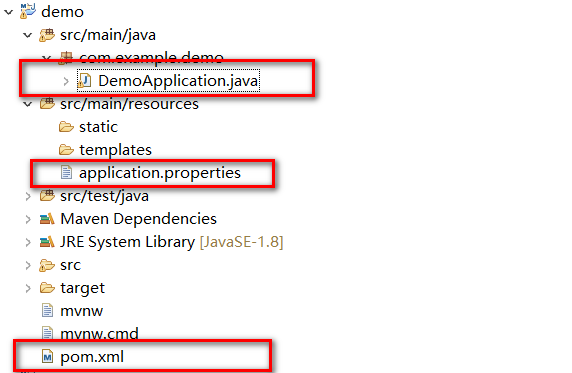
其中:1.DemoApplication.java内容
package com.example.demo;
import java.util.List;
import org.springframework.beans.factory.annotation.Autowired;
import org.springframework.boot.SpringApplication;
import org.springframework.boot.autoconfigure.SpringBootApplication;
import org.springframework.data.redis.connection.RedisConnection;
import org.springframework.data.redis.core.StringRedisTemplate;
import org.springframework.data.redis.core.ValueOperations;
import org.springframework.web.bind.annotation.PathVariable;
import org.springframework.web.bind.annotation.RequestMapping;
import org.springframework.web.bind.annotation.RestController;
@SpringBootApplication
@RestController
public class DemoApplication {
public static void main(String[] args) {
SpringApplication.run(DemoApplication.class, args);
}
@Autowired
private StringRedisTemplate stringRedisTemplate;
@RequestMapping("/age/{age}")
public String testRedis(@PathVariable String age){
ValueOperations<String, String> ops =stringRedisTemplate.opsForValue();
ops.set("bbb", age);
RedisConnection connection = stringRedisTemplate.getConnectionFactory().getConnection();
List<String> config = connection.getConfig("hostname");
return age;
}
}
2.application.properties内容
# REDIS (RedisProperties)
# Redis数据库索引(默认为0)
spring.redis.database=0
# Redis服务器地址
spring.redis.host=192.168.
# Redis服务器连接端口
spring.redis.port=6379
# Redis服务器连接密码(默认为空)
spring.redis.password=
# 连接池最大连接数(使用负值表示没有限制)
spring.redis.pool.max-active=8
# 连接池最大阻塞等待时间(使用负值表示没有限制)
spring.redis.pool.max-wait=-1
# 连接池中的最大空闲连接
spring.redis.pool.max-idle=8
# 连接池中的最小空闲连接
spring.redis.pool.min-idle=0
# 连接超时时间(毫秒)
spring.redis.timeout=0
server.port = 9999
3.pom.xml内容
<?xml version="1.0" encoding="UTF-8"?>
<project xmlns="http://maven.apache.org/POM/4.0.0" xmlns:xsi="http://www.w3.org/2001/XMLSchema-instance"
xsi:schemaLocation="http://maven.apache.org/POM/4.0.0 http://maven.apache.org/xsd/maven-4.0.0.xsd">
<modelVersion>4.0.0</modelVersion>
<groupId>com.example</groupId>
<artifactId>demo</artifactId>
<version>0.0.1-SNAPSHOT</version>
<packaging>jar</packaging>
<name>demo</name>
<description>Demo project for Spring Boot</description>
<parent>
<groupId>org.springframework.boot</groupId>
<artifactId>spring-boot-starter-parent</artifactId>
<version>1.4.7.RELEASE</version>
<relativePath/> <!-- lookup parent from repository 2.0.0.BUILD-SNAPSHOT -->
</parent>
<properties>
<project.build.sourceEncoding>UTF-8</project.build.sourceEncoding>
<project.reporting.outputEncoding>UTF-8</project.reporting.outputEncoding>
<java.version>1.8</java.version>
</properties>
<dependencies>
<dependency>
<groupId>org.springframework.boot</groupId>
<artifactId>spring-boot-starter-data-redis</artifactId>
</dependency>
<dependency>
<groupId>org.springframework.boot</groupId>
<artifactId>spring-boot-starter-web</artifactId>
</dependency>
<dependency>
<groupId>org.springframework.boot</groupId>
<artifactId>spring-boot-starter-test</artifactId>
<scope>test</scope>
</dependency>
</dependencies>
<build>
<plugins>
<plugin>
<groupId>org.springframework.boot</groupId>
<artifactId>spring-boot-maven-plugin</artifactId>
</plugin>
</plugins>
</build>
<repositories>
<repository>
<id>spring-snapshots</id>
<name>Spring Snapshots</name>
<url>https://repo.spring.io/snapshot</url>
<snapshots>
<enabled>true</enabled>
</snapshots>
</repository>
<repository>
<id>spring-milestones</id>
<name>Spring Milestones</name>
<url>https://repo.spring.io/milestone</url>
<snapshots>
<enabled>false</enabled>
</snapshots>
</repository>
</repositories>
<pluginRepositories>
<pluginRepository>
<id>spring-snapshots</id>
<name>Spring Snapshots</name>
<url>https://repo.spring.io/snapshot</url>
<snapshots>
<enabled>true</enabled>
</snapshots>
</pluginRepository>
<pluginRepository>
<id>spring-milestones</id>
<name>Spring Milestones</name>
<url>https://repo.spring.io/milestone</url>
<snapshots>
<enabled>false</enabled>
</snapshots>
</pluginRepository>
</pluginRepositories>
</project>
最后,启动你的redis服务端,并在application.properties中正确写host的值。
启动项目,这个时候就可以发现能够写数据到redis中了。
写在正文结尾的絮叨:
上面有两处提到坑:
1.是之前有搭建过这样的环境,所以不可避免的会遗留一些配置。我的就是在本机的系统环境变量里添加了redis的连接属性配置,指向的是别的redis地址。这就覆盖了application.properties中的配置,导致我在我以为的目标redis库中永远看不到写的数据。
2.是提到的构建系统时注意版本。。我本着用新的原则,使用的是2.0.0.BUILD-SNAPSHOT版本构建的,同样的配置。启动会报找不到RedisConnectionFactory 这个Bean的错误。这个一般不会想到是版本的问题,但是我之前有搭建过,所以进行比较下,
我将原先的版本1.5.2.RELEASE进行替换,结果是成功的,然后是1.4.7.RELEASE也是可以的,但是1.3.1.RELEASE也会报错。
====总结:1.历史遗留 2.版本比较
祝好
SpringBoot+Redis环境搭建的更多相关文章
- Redis环境搭建和代码测试及与GIS结合的GEO数据类型预研
文章版权由作者李晓晖和博客园共有,若转载请于明显处标明出处:http://www.cnblogs.com/naaoveGIS/ 1.背景 1.1传统MySQL+ Memcached架构遇到的问题 My ...
- redis环境搭建及一主二从三哨兵模式配置
一.单机redis环境搭建 1.安装: OS:linux redhat6.5 下载redis 官网下载链接:https://redis.io/download 把安装包上传到服务器,进行解压 [roo ...
- nginx + lua +redis环境搭建
环境搭建,其实主要是lua的环境,这个环境够麻烦的,在网上找了很多前辈的文章,终于完成了 ,安装redis wget http://download.redis.io/releases/redis-3 ...
- django+celery+redis环境搭建
初次尝试搭建django+celery+redis环境,记录下来,慢慢学习~ 1.安装apache 下载httpd-2.0.63.tar.gz,解压tar zxvf httpd-2.0.63.tar. ...
- Redis环境搭建(Linux)
1.简介 redis是一个开源的key-value数据库.它又经常被认为是一个数据结构服务器.因为它的value不仅包括基本的string类型还有 list,set ,sorted set ...
- 一.redis 环境搭建
1.简介 redis是一个开源的key-value数据库.它又经常被认为是一个数据结构服务器.因为它的value不仅包括基本的string类型还有 list,set ,sorted set ...
- Redis环境搭建(MacOS)
Redis是一个开源的key-value类型的存储系统,大部分数据存在于内存中,所有读写速度十分快.其支持的存储value数据类型有多种,如:strings.hashes.lists.sets.sor ...
- Redis环境搭建
一.准备的安装包 windows虚拟机软件:VMware Workstation Pro 12 linux安装文件:CentOS-7-x86_64-Minimal-1511.iso 远程登录软件:pu ...
- 浅谈基于Linux的Redis环境搭建
本篇文章主要讲解基于Linux环境的Redis服务搭建,Redis服务配置.客户端访问和防火强配置等技术,适合具有一定Linux基础和Redis基础的读者阅读. 一 Redis服务搭建 1.在根路径 ...
随机推荐
- Unity Shader - 消融效果原理与变体
基本原理与实现 主要使用噪声和透明度测试,从噪声图中读取某个通道的值,然后使用该值进行透明度测试. 主要代码如下: fixed cutout = tex2D(_NoiseTex, i.uvNoiseT ...
- USACO2004 Open提交作业(区间DP)
Description 贝西在哞哞大学选修了C门课,她要把这些课的作业交给老师,然后去车站和同学们一 起回家.老师们在办公室里,办公室要等他们下课后才开,第i门课的办公室在Ti时刻后开放. 所有的办公 ...
- LINUX 笔记-ls命令
常用参数: -l :列出长数据串,包含文件的属性与权限数据等 -a :列出全部的文件,连同隐藏文件(开头为.的文件)一起列出来(常用) -d :仅列出目录本身,而不是列出目录的文件数据 -h :将文件 ...
- For循环的实质
For循环的实质 1.调用可迭代对象的iter方法返回一个迭代器对象 2.不断调用迭代器对象的next方法 3.处理StopIteration
- Java基础-数组(06)
数组是存储多个变量(元素)的东西(容器),这多个变量的数据类型要一致 数组概念 数组是存储同一种数据类型多个元素的容器.数组既可以存储基本数据类型,也可以存储引用数据类型. 数组的定义格式 格式1:数 ...
- 进程,线程,GIL,Python多线程,生产者消费者模型都是什么鬼
1. 操作系统基本知识,进程,线程 CPU是计算机的核心,承担了所有的计算任务: 操作系统是计算机的管理者,它负责任务的调度.资源的分配和管理,统领整个计算机硬件:那么操作系统是如何进行任务调度的呢? ...
- iOS之 NSTimer(一)
以前没怎么了解过这个NSTimer,其实还是有挺多坑的,今天来总结一下: 首先我们一起来看这个: 我在A -> (push) -> B控制器,然后再B控制器中开启了一个NSTimer.然 ...
- 项目swift的一些问题
在用swift做项目的时候,总会把之前oc的思想转过来. 1. 对Alamofire的再次封装,之前使用AFNetwork进行了在次封装,这样做的好处就是可以用一个全局的类来管理全部的网络请求,这样就 ...
- Unity3D手机斗地主游戏开发实战(02)_叫地主功能实现(不定期更新中~~~)
目录 Unity3D手机斗地主游戏开发实战(01)_发牌功能实现 Unity3D手机斗地主游戏开发实战(02)_叫地主功能实现 一.大体思路 前面我们实现了点击开始游戏按钮,系统依次给玩家发牌的逻辑和 ...
- 【前端】跨浏览器事件处理程序EventUtil.js个人注释及详解
<javascript高级程序设计>跨浏览器事件处理程序EventUtil.js个人注释 EventUtil.js // 跨浏览器事件处理程序封装 var EventUtil = { // ...