
Android AIDL使用特定的解释
1.什么是aidl:aidl这是 Android Interface definition language缩写,认清,这是android进程间通信接口的叙事语言描述。通过它我们可以定义进程间通信接口
icp:interprocess communication :内部进程通信
2.既然aidl能够定义并实现进程通信,那么我们怎么使用它呢?文档/android-sdk/docs/guide/developing/tools/aidl.html中对步骤作了具体描写叙述:
--1.Create your .aidl file - This file defines an interface (YourInterface.aidl) that defines the methods and fields available to a client.
创建你的aidl文件,我在后面给出了一个样例,它的aidl文件定义例如以下:写法跟java代码类似,可是这里有一点值得注意的就是它可以引用其他aidl文件里定义的接口,可是不可以引用你的java类文件里定义的接口
- package com.cao.android.demos.binder.aidl;
- import com.cao.android.demos.binder.aidl.AIDLActivity;
- interface AIDLService {
- void registerTestCall(AIDLActivity cb);
- void invokCallBack();
- }
--2.Add the .aidl file to your makefile - (the ADT Plugin for Eclipse manages this for you). Android includes the compiler, called AIDL, in the tools/ directory.
编译你的aidl文件,这个仅仅要是在eclipse中开发,你的adt插件会像资源文件一样把aidl文件编译成java代码生成在gen目录下。不用手动去编译:编译生成AIDLService.java如我样例中代码
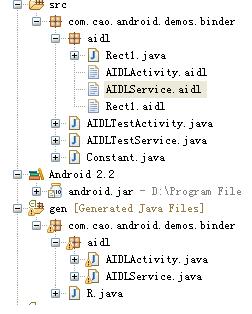
--3.Implement your interface methods - The AIDL compiler creates an interface in the Java programming language from your AIDL interface. This interface has an inner abstract class named Stub that inherits the interface (and implements a few additional methods
necessary for the IPC call). You must create a class that extends YourInterface.Stub and implements the methods you declared in your .aidl file.
实现你定义aidl接口中的内部抽象类Stub,public static abstract class Stub extends android.os.Binder implements com.cao.android.demos.binder.aidl.AIDLService
Stub类继承了Binder,并继承我们在aidl文件里定义的接口。我们须要实现接口方法,以下是我在样例中实现的Stub类:
- private final AIDLService.Stub mBinder = new AIDLService.Stub() {
- @Override
- public void invokCallBack() throws RemoteException {
- Log("AIDLService.invokCallBack");
- Rect1 rect = new Rect1();
- rect.bottom=-1;
- rect.left=-1;
- rect.right=1;
- rect.top=1;
- callback.performAction(rect);
- }
- @Override
- public void registerTestCall(AIDLActivity cb) throws RemoteException {
- Log("AIDLService.registerTestCall");
- callback = cb;
- }
- };
Stub翻译成中文是存根的意思,注意Stub对象是在被调用端进程,也就是服务端进程,至此,服务端aidl服务端得编码完毕了。
--4.Expose your interface to clients - If you're writing a service, you should extend Service and override Service.onBind(Intent) to return an instance of your class that implements your interface.
第四步告诉你怎么在client怎样调用服务端得aidl描写叙述的接口对象。doc仅仅告诉我们须要实现Service.onBind(Intent)方法,该方法会返回一个IBinder对象到client。绑定服务时不是须要一个ServiceConnection对象么。在没有了解aidl使用方法前一直不知道它是什么作用,事实上他就是用来在client绑定service时接收service返回的IBinder对象的:
- AIDLService mService;
- private ServiceConnection mConnection = new ServiceConnection() {
- public void onServiceConnected(ComponentName className, IBinder service) {
- Log("connect service");
- mService = AIDLService.Stub.asInterface(service);
- try {
- mService.registerTestCall(mCallback);
- } catch (RemoteException e) {
- }
- }
- public void onServiceDisconnected(ComponentName className) {
- Log("disconnect service");
- mService = null;
- }
- };
mService就是AIDLService对象,详细能够看我后面提供的演示样例代码,须要注意在client须要存一个服务端实现了的aidl接口描写叙述文件,可是client仅仅是使用该aidl接口,不须要实现它的Stub类,获取服务端得aidl对象后mService = AIDLService.Stub.asInterface(service);,就能够在client使用它了。对mService对象方法的调用不是在client运行。而是在服务端运行。
4.aidl中使用java类,须要实现Parcelable接口,而且在定义类同样包以下对类进行声明:
上面我定义了Rect1类
之后你就能够在aidl接口中对该类进行使用了
package com.cao.android.demos.binder.aidl;
import com.cao.android.demos.binder.aidl.Rect1;
interface AIDLActivity {
void performAction(in Rect1 rect);
}
注意in/out的说明,我这里使用了in表示输入參数。out没有试过。为什么使用in/out临时没有做深入研究。
5.aidl使用完整演示样例,为了清除说明aidl使用,这里有一个样例,样例參考了博客:
http://blog.csdn.net/saintswordsman/archive/2010/01/04/5130947.aspx
作出说明
样例实现了一个AIDLTestActivity。AIDLTestActivity通过bindservice绑定一个服务AIDLTestService,通过并获取AIDLTestActivity的一个aidl对象AIDLService。该对象提供两个方法,一个是registerTestCall注冊一个aidl对象。通过该方法,AIDLTestActivity把本身实现的一个aidl对象AIDLActivity传到AIDLTestService,在AIDLTestService通过操作AIDLActivity这个aidl远端对象代理,使AIDLTestActivity弹出一个toast。完整样例见上传的资源:http://download.csdn.net/source/3284820
版权声明:本文博客原创文章,博客,未经同意,不得转载。
Android AIDL使用特定的解释的更多相关文章
- Android aidl Binder框架浅析
转载请标明出处:http://blog.csdn.net/lmj623565791/article/details/38461079 ,本文出自[张鸿洋的博客] 1.概述 Binder能干什么?B ...
- Android AIDL自动生成Java文件测试
/******************************************************************************** * Android AIDL自动生成 ...
- Using self-defined Parcelable objects during an Android AIDL RPC / IPC call
Using self-defined Parcelable objects during an Android AIDL RPC / IPC call In my previous post “Usi ...
- Android中的动画具体解释系列【4】——Activity之间切换动画
前面介绍了Android中的逐帧动画和补间动画,并实现了简单的自己定义动画.这一篇我们来看看怎样将Android中的动画运用到实际开发中的一个场景--Activity之间跳转动画. 一.定义动画资源 ...
- Android Google Map v2具体解释:开发环境配置
Android Google Map v2具体解释:开发环境配置 --转载请注明出处:coder-pig 说在前面: 说到地 ...
- log4net使用特定的解释
说明:该程序演示如何使用log4net记录日志信息. log4net它是-known开源组件的日志记录功能.使用log4net可以很容易地将信息记录到文件.控制台.Windows事件日志和数据库(含有 ...
- Android系统APN配置具体解释
Android 系统APN配置具体解释 这些天一直在调系统原生的Settings.apk里面APN配置的问题.在设置里面手动添加了APN配置选项.可是在界面上还是看不到.所以跟了下代码.原以为就是简 ...
- ANDROID L——Material Design详细解释(UI控制)
转载请注明本文出自大苞米的博客(http://blog.csdn.net/a396901990),谢谢支持! Android L: Google已经确认Android L就是Android Lolli ...
- Android开发之异步具体解释(二)之AsyncTask
请尊重他人的劳动成果,转载请注明出处:Android开发之异步具体解释(二)之AsyncTask http://blog.csdn.net/fengyuzhengfan/article/details ...
随机推荐
- linux sed命令详解(转)
简介 sed 是一种在线编辑器,它一次处理一行内容.处理时,把当前处理的行存储在临时缓冲区中,称为“模式空间”(pattern space),接着用sed命令处理缓冲区中的内容,处理完成后,把缓冲区的 ...
- 发现C++Builder 2010一组类BUG
今天C++Builder 2010写小码,我们用一个集合类.您可以设置操作结果是不正确的,排除其他原因引起的,最后,它应该被设置以确定问题类的源,以下是一个集合类测试代码: enum TTes ...
- Java 8 时间日期库的20个使用示例
java 8是如何处理时间及日期的 有人问我学习一个新库的最佳途径是什么?我的回答是,就是在实际项目中那样去使用它.在一个真实的项目中会有各种各样的需求,这会促使开发人员去探索和研究这个新库.简言之, ...
- Android Studio怎样安装插件
Android Studio安装插件的方式事实上和Eclipse大同小异.废话不多说,直接上图: 区域1:你当前已经安装了的插件 区域2:在线安装 区域3:从硬盘安装,即针对你已经下载好了的插件,可通 ...
- 采用SharePoint Designer将JavaScript而他们的网站页面集成的定义
采用SharePoint Designer将JavaScript而他们的网站页面集成的定义 像JavaScript这种动态脚本语言可以给你的页面震撼效果.为了加盟JavaScript要定义自己的网站页 ...
- mysql table is marked as crashed and last (automatic?) repair failed
1.同事的服务器在mysqldump备份的时候报错了 这个原因是myisam的表数据太多,在某个时刻, 存放数据的这个MyISAM表数据急速长大. 比如一些log表, 当硬盘写满了.这个时候还在继续写 ...
- linux 手动安装 oracle(转)
Linux下安装Oracle 11 此为参照CU论坛上的高人写的文章并结合自身环境增加了点细节性的东西 操作系统 CentOS 4.2 2.6.11.8内核 安装准备 下载Oracle11安装包 内存 ...
- Gradle构建多模块项目(转)
废话不多说,直接进入主题. 1. 创建项目 首先创建项目,名称为 test: mkdir test && cd test gradle init 这时候的项目结构如下: ➜ test ...
- HDU 4311 Meeting point-1 && HDU 4312 Meeting point-2
这俩个题 题意::给出N(<1e5)个点求找到一个点作为聚会的地方,使每个点到达这里的距离最小.4311是 曼哈顿距离 4312是 切比雪夫距离: 曼哈顿距离 :大家都知道 对于二维坐标系a( ...
- 移动web:Tips消息弹出框
在web开发中经常会用到像alert这样的弹出消息,每个浏览器自带的消息弹出框都不相同.为了统一外观,实现自定义的功能,动手写一个弹出框插件. 对弹出框的实现要求如下: 1. 仿照IOS系统弹出外观 ...