
jquery validate remote验证唯一性
jquery.validate.js 的 remote 后台验证
之前已经有一篇关于jquery.validate.js验证的文章,还不太理解的可以先看看:jQuery Validate 表单验证(这篇文章只是介绍了一下如何实现前台验证,并没有涉及后台验证remote方法)。
有时候我们不仅仅对表单所录入的信息进行验证还需要将录入的值与数据库进行比较,这时我们就需要借助remote方法来实现。这篇文章就是介绍 jquery.validate.js的后台验证的remote方法,准备工作,前台页面:
|
1
2
3
4
5
6
7
8
9
10
11
12
13
14
15
16
17
18
19
20
21
22
23
24
25
26
27
28
29
30
31
32
33
34
35
36
37
38
39
40
41
42
43
44
45
46
47
48
49
50
51
52
53
54
55
56
57
58
59
60
61
62
63
64
65
66
67
68
69
70
71
|
<!DOCTYPE html PUBLIC "-//W3C//DTD HTML 4.01 Transitional//EN" "http://www.w3.org/TR/html4/loose.dtd"><html><head><meta http-equiv="Content-Type" content="text/html; charset=UTF-8"><title>Insert title here</title><style type="text/css">form{max-width:800px; margin:0 auto;}form label{display:inline-block;width:150px; text-align:right;}fieldset{margin-bottom:25px;}legend { border: 1px solid #77848D; font-family: "Arial"; font-size: 14px; margin-left: 15px; padding: 5px;}em.error{font-weight:normal; color:red;}</style><script src="test/jquery.js" type="text/javascript"></script><script src="test/jquery.validate.js" type="text/javascript"></script><script src="test/jquery.validate.message_cn.js" type="text/javascript"></script></head><body><form name="test" id="testform" method="get" action="get.php"> <fieldset> <legend title="用户注册(User Register)">用户注册(User Login)</legend> <p> <label for="name">用户名:</label> <input id="name" name="name" type="text" /> </p> <p> <label for="mail">邮箱:</label> <input id="mail" name="mail" type="password" /> </p> <p> <label for="password">密码:</label> <input id="password" name="password" type="password" /> </p> <p> <label for="repassword">重复密码:</label> <input id="repassword" name="repassword" type="password" /> </p> <p> <label for="hash">邀请码:</label> <input id="hash" name="hash" type="text" /> </p> <p> <label for="sel">选择:</label> <select id="sel" name="sel"> <option value="">请选择</option> <option value="1">选择1</option> <option value="2">选择2</option> <option value="3">选择3</option> <option value="4">选择4</option> </select> </p> <p> <label for="type">用户类型:</label> <span><input name="type" type="radio" value="1" />类型1</span> <span><input name="type" type="radio" value="2" />类型2</span> <span><input name="type" type="radio" value="3" />类型3</span> </p> <p> <label for="submit"> </label> <input class="submit" type="submit" value="注册"/> </p> </fieldset></form></body></html> |
要实现的效果:
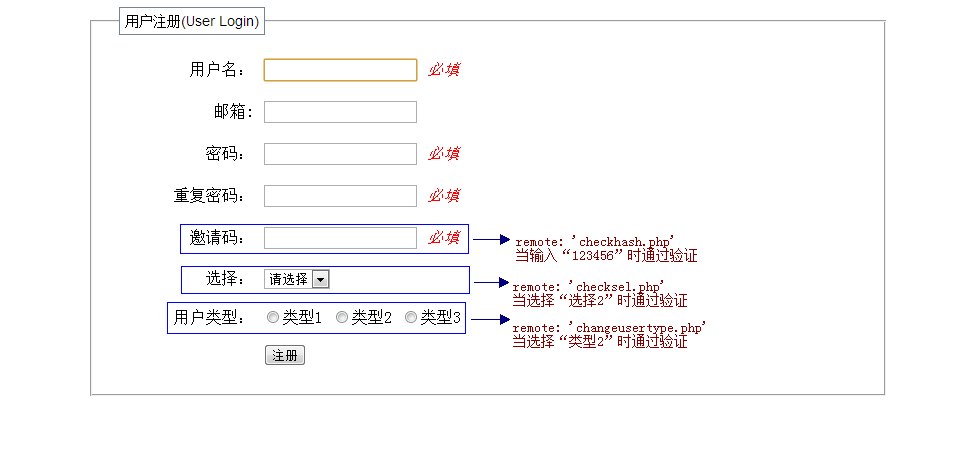
由图可知我们要准备三个远程验证的文件(这里只是做到这种效果,就不连接数据库查找数据了,如果要和数据库的数据进行匹配原理是一样的,在这里就不赘述查找数据的方法了,相信程序员们都该掌握数据库的操作才行。在这里我们直接定义一个变量来进行匹配):
1.checkhash.php
|
1
2
3
4
5
6
7
8
9
10
11
12
|
<?phpif($_GET){ $hash = $_GET['hash']; if($hash == '123456') { echo 'true'; }else{ echo 'false'; } exit();} |
2.checksel.php
|
1
2
3
4
5
6
7
8
9
10
11
12
|
<?phpif($_GET){ $sel = $_GET['sel']; if($sel == 2) { echo 'true'; }else{ echo 'false'; } exit();} |
3.changeusertype.php
|
1
2
3
4
5
6
7
8
9
10
11
12
|
<?phpif($_GET){ $type = $_GET['type']; if($type == 2) { echo 'true'; }else{ echo 'false'; } exit();} |
验证代码:
|
1
2
3
4
5
6
7
8
9
10
11
12
13
14
15
16
17
18
19
20
21
22
23
24
25
26
27
28
29
30
31
32
33
34
35
36
37
38
39
40
41
42
43
44
45
46
47
48
49
50
51
52
53
54
55
56
57
58
59
60
61
62
63
64
65
66
67
68
69
70
|
<script type="text/javascript">$(function(){ $("#testform").validate({ rules : { name : { required : true }, password: { required: true, minlength: 5 }, repassword: { required: true, minlength: 5, equalTo: "#password" }, hash: { required: true, remote: 'checkhash.php' }, sel: { remote: 'checksel.php' }, type: { remote:{ url: "changeusertype.php", type: "get", dataType: 'json', data: { 'type': function(){return $('input[name="type"]:checked').val();} } } <span></span>} }, messages : { name : { required : '必填' }, password: { required: '必填', minlength: '最少5个字符' }, repassword: { required: '必填', minlength: '最少5个字符', <span></span>equalTo: '两次输入的密码不一样' }, hash: { required: '必填', remote: '邀请码不正确' }, sel: { remote: '选择不正确' }, type: { remote: '类型不可更改' } }, focusInvalid: true, /*指定错误信息位置*/ errorPlacement: function (error, element) { error.appendTo(element.closest("p")); }, //设置错误信息存放标签 errorElement: "em", submitHandler: function(form) { } });})</script> |
预览效果是这样的:

这样似乎已经达到了要求,但是有一个小问题当我们输入正确的值里点击提交出现了这样的问题(邀请码和选择的验证没有问题,但是单选按钮的出现了问题):

这是为什么?查阅了一些资料,在验证时会判断之前有没有验证过,当有验证过并有previousValue值时它就会忽略再次提交的值而是取上一次验证结果显示,有很多解决方法都是说更改源码,其它可以不用,我们在提交表单之前先清空之前一次验证绑定的previousValue值,这样就解决问题了。我们在验证方法之前加一个清空previousValue值的函数:
|
1
2
3
4
5
6
|
function emptyValue(){ if($('input[name="type"]').data("previousValue")) $('input[name="type"]').data("previousValue").old = null; return true;} |
在提交表单之前调用这个方法:
|
1
|
<input class="submit" onclick="emptyValue()" type="submit" value="注册"/> |
现在应该是这样的效果了(选择正确的用户类型点击提交应该可以通过验证):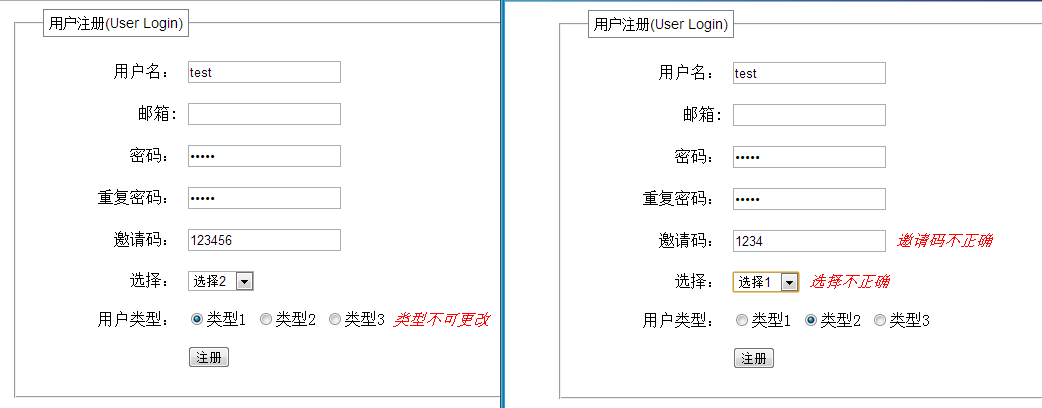
这个问题是在工作时碰到的,纠结了好久是改源码呢还是不改呢,最后找到了解决方法,在闲暇的时间整理了一下,现在贴出来以作参考,如果你有更好的方法也可以告诉我哦!
jquery validate remote验证唯一性的更多相关文章
- jQuery Validate 插件验证,,返回不同信息(json remote)自定义
问题 申请账号需要确认该账号是存在 jquery.validate.js中的remote Jquery Ajax获取后台返回的Json数据后,添加自定义校验 解题思路:输入的登陆信息远程验证是否该账号 ...
- 1)jquery validate 远程验证remote,自定义验证 , 手机号验证 2)bootstrap validate 远程remote验证的方法.
1)jquery validate 远程验证remote,自定义验证 1-1: js <script src="YYFramework/Public/js/jquery-3.1.1. ...
- jquery.validate remote 和 自定义验证方法
jquery.validate remote 和 自定义验证方法 $(function(){ var validator = $("#enterRegForm").validate ...
- 封装jQuery Validate扩展验证方法
一.封装自定义验证方法-validate-methods.js /***************************************************************** j ...
- jquery validate扩展验证方法
/***************************************************************** jQuery Validate扩展验证方法 (linjq) *** ...
- 扩展jquery.validate自定义验证,自定义提示,本地化
<!DOCTYPE html> <html> <head> <meta name="viewport" content="wid ...
- jquery.validate.js 验证表单时,在IE当中未验证就直接提交的原因
jquery.validate.js 验证表单时,在IE当中未验证就直接提交的原因 今天利用了jquery.validate.js来验证表单,发现在火狐.谷歌浏览器当中都可以进行验证,但是在IE系列浏 ...
- 使用tooltip显示jquery.validate.unobtrusive验证信息
通过重写CSS实现使用tooltip显示jquery.validate.unobtrusive验证信息,效果如图: 1. 在ViewModel中定义验证规则 [Display(Name = " ...
- jQuery Validate Ajax 验证
jQuery Validate Ajax 验证 <script type="text/javascript"> $(function() { $('#formCityL ...
随机推荐
- WPF学习(9)样式和行为
在asp.net世界中,我们的美工人员会为我们准备好静态页面,它注意包括三个部分:html.css和js.而在WPF世界里,也同样有着类似这三个部分的静态页面:Xaml.Style和Behaviors ...
- mousewheel 与 DOMMouseScroll
FF使用DOMMouseScroll,其他浏览器使用mousewheel FF在一个特殊的属性event.detail.表示滚动的值 event.detail 正数:向下滚动,负数:向上滚动 滚动一次 ...
- hadoop工作平台梳理
文章 http://blog.csdn.net/lili72/article/details/41130743 lili72 数据平台: 一. hadoop平台:Hbase.hive,storm,s ...
- JAVA —— 数组
import java.util.Arrays; public class Array { public static void main(String[] args){ Array test= ...
- poj 2482 Stars in Your Window(扫描线)
id=2482" target="_blank" style="">题目链接:poj 2482 Stars in Your Window 题目大 ...
- 使用批处理给IIS添加MIME类型
原文 使用批处理给IIS添加MIME类型 @echo off set /p warn="警告:本脚本会清空全部站点原有MIME类型,输入y按回车继续,直接回车退出:" if & ...
- Codeforces Round #277.5 (Div. 2)A——SwapSort
A. SwapSort time limit per test 1 second memory limit per test 256 megabytes input standard input ou ...
- Spring3.0学习笔记文档的官方网站(六)--3.4.1
3.4 依靠 3.4.1 依赖注入 依赖注入两种方式:基于构造函数DI.基于setter方法DI. 3.4.1.1 基于构造函数DI 参数是引进一个对象的.和缺乏父母之前-子类关系: ...
- 开展project
正常的生活之路
相对刚走出学校的学生在其他行业工作,竞争力的薪酬,同时.并不断地不仅学习更新专业知识让你感到生活的充实,更满足了你那不让外人知的虚荣心.在刚出校门的几年中,你常常回头看看被你落在后面的同学们,在内心怜 ...
- DevExpress XtraReports 入门一 创建 Hello World 报表
原文:DevExpress XtraReports 入门一 创建 Hello World 报表 本文只是为了帮助初次接触或是需要DevExpress XtraReports报表的人群使用的,为了帮助更 ...