
Windows Phone开发(44):推送通知第二集——磁贴通知
原文:Windows Phone开发(44):推送通知第二集——磁贴通知
前面我们说了第一个类型——Toast通知,这玩意儿不知大家是不是觉得很新鲜,以前玩.NET编程应该没接触过吧?
其实这东西绝对不复杂,只是刚接触的时候会有点莫名罢了,Toast通知和今天要说的磁贴通知,都有一个共同点,那就是格式都规定死了D。
本质就是向特定的URI地址POST一个XML文档罢了,相信很多人都会,如果你还不会,真的,要补一补基础课了。
多说无益,还是快点切入主题,开门见水吧。
首先,我们要知道我们在服务器端要POST什么样的XML文档,来,一起来看看。
<?xml version="1.0" encoding="utf-8" ?>

<wp:Notification xmlns:wp="WPNotification">

  <wp:Tile ID="导航URI">

    <wp:BackgroundImage>正面背景图片</wp:BackgroundImage>

    <wp:Count>计数器</wp:Count>

    <wp:Title>正面标题</wp:Title>

    <wp:BackBackgroundImage>背面背景图片</wp:BackBackgroundImage>

    <wp:BackTitle>背面标题</wp:BackTitle>

    <wp:BackContent>背面内容</wp:BackContent>

  </wp:Tile>

</wp:Notification>
前面关于磁贴的内容,大家有印象吧?
磁帖者,有正面的标题、背景图、计数器;背面有标题、背景图和正文。有印象就好,不用我打水口枪。
来吧,我们通过一个现场演练来体会体会吧。
先做服务器端,这回我选择用ASP.NET,不要告诉我你不会。
启动VS,建一个ASP.NET网站,然后,把default.aspx改造一下,如果你嫌生成的代码不好看,可以把文件删除,然后新建一个页面。
好了,页面布局嘛,我贴一下HTML就行了。
<%@ Page Language="C#" AutoEventWireup="true" CodeFile="Default.aspx.cs" Inherits="_Default" %>

<!DOCTYPE html PUBLIC "-//W3C//DTD XHTML 1.0 Transitional//EN" "http://www.w3.org/TR/xhtml1/DTD/xhtml1-transitional.dtd">

<html xmlns="http://www.w3.org/1999/xhtml">

<head runat="server">

    <title></title>

</head>

<body>

    <form id="form1" runat="server">

    <div>

        <div>

            目标URI:

            <asp:TextBox ID="txtURI" runat="server" Width="911px"></asp:TextBox>

        </div>

        <div>

            <table border="0">

                <tr>

                    <td>正面背景:</td>

                    <td>

                        <asp:TextBox ID="txtBackImg" runat="server" Width="316px"></asp:TextBox></td>

                </tr>

                <tr>

                    <td>正面标题:</td>

                    <td>

                        <asp:TextBox ID="txtTitle" runat="server" Width="316px"></asp:TextBox>

                    </td>

                </tr>

                <tr>

                    <td>计数:</td>

                    <td>

                        <asp:TextBox ID="txtCount" runat="server" Width="313px"></asp:TextBox>

                    </td>

                </tr>

                <tr>

                    <td>背面背景:</td>

                    <td>

                        <asp:TextBox ID="txtBackBackImg" runat="server" Width="316px"></asp:TextBox>

                    </td>

                </tr>

                <tr>

                    <td>背面标题:</td>

                    <td>

                        <asp:TextBox ID="txtBackTitle" runat="server" Width="321px"></asp:TextBox>

                    </td>

                </tr>

                <tr>

                    <td>背面正文:</td>

                    <td>

                        <asp:TextBox ID="txtBackContent" runat="server" Width="309px"></asp:TextBox>

                    </td>

                </tr>

            </table>

            <div style="margin-left:20px; margin-top:10px;">

                <asp:Button ID="btnSend" runat="server" Text="发送" onclick="btnSend_Click" /></div>

        </div>

        <div style=" margin-top:20px;">

            <asp:TextBox ID="txtRes" runat="server" Height="155px" TextMode="MultiLine"

                Width="729px"></asp:TextBox>

        </div>

    </div>

    </form>

</body>

</html>
还是别少了后台代码。
/*

 <?xml version="1.0" encoding="utf-8" ?>

<wp:Notification xmlns:wp="WPNotification">

  <wp:Tile ID="导航URI">

    <wp:BackgroundImage>正面背景图片</wp:BackgroundImage>

    <wp:Count>计数器</wp:Count>

    <wp:Title>正面标题</wp:Title>

    <wp:BackBackgroundImage>背面背景图片</wp:BackBackgroundImage>

    <wp:BackTitle>背面标题</wp:BackTitle>

    <wp:BackContent>背面内容</wp:BackContent>

  </wp:Tile>

</wp:Notification>

 * 清除磁贴的属性值

 <?xml version="1.0" encoding="utf-8" ?>

<wp:Notification xmlns:wp="WPNotification">

  <wp:Tile ID="导航URI">

    <wp:BackgroundImage></wp:BackgroundImage>

    <wp:Count Action="Clear"></wp:Count>

    <wp:Title Action="Clear"></wp:Title>

    <wp:BackBackgroundImage Action="Clear"></wp:BackBackgroundImage>

    <wp:BackTitle Action="Clear"></wp:BackTitle>

    <wp:BackContent Action="Clear"></wp:BackContent>

  </wp:Tile>

</wp:Notification>

 * HTTP标头

 X-WindowsPhone-Target: token

X-NotificationClass:1

1 立即发送

11 450秒发送

21  900秒发送

 */

using System;

using System.Collections.Generic;

using System.Linq;

using System.Web;

using System.Web.UI;

using System.Web.UI.WebControls;

using System.Net;

using System.Net.Mime;

using System.IO;

using System.Text;

public partial class _Default : System.Web.UI.Page

{

    protected void Page_Load(object sender, EventArgs e)

    {

    }

    protected void btnSend_Click(object sender, EventArgs e)

    {

        HttpWebRequest request = (HttpWebRequest)WebRequest.Create(txtURI.Text);

        request.Method = WebRequestMethods.Http.Post;

        // 加上HTTP标头

        request.Headers.Add("X-WindowsPhone-Target", "token");

        request.Headers.Add("X-NotificationClass", "1");

        // 拼接内容,XML文档

        string Msg = "<?xml version=\"1.0\" encoding=\"utf-8\" ?>" +

                     "<wp:Notification xmlns:wp=\"WPNotification\">" +

                        "<wp:Tile>" +

                            "<wp:BackgroundImage>" + txtBackImg.Text + "</wp:BackgroundImage>" +

                            "<wp:Count>" + txtCount.Text + "</wp:Count>" +

                            "<wp:Title>" + txtTitle.Text + "</wp:Title>" +

                            "<wp:BackBackgroundImage>" + txtBackBackImg.Text + "</wp:BackBackgroundImage>" +

                            "<wp:BackTitle>" + txtBackTitle.Text + "</wp:BackTitle>" +

                            "<wp:BackContent>" + txtBackContent.Text + "</wp:BackContent>" +

                        "</wp:Tile>" +

                      "</wp:Notification>";

        byte[] buffer = Encoding.UTF8.GetBytes(Msg);

        request.ContentType = MediaTypeNames.Text.Xml;

        // POST数据要记得设置内容长度

        request.ContentLength = buffer.Length;

        // 写入流

        using (Stream stream = request.GetRequestStream())

        {

            stream.Write(buffer, 0, buffer.Length);

        }

        // 接收回应

        HttpWebResponse response = (HttpWebResponse)request.GetResponse();

        // 读出响应的HTTP头

        string headers = "";

        foreach (string key in response.Headers.AllKeys)

        {

            headers += key + " : " + response.Headers.Get(key) + "\r\n";

        }

        txtRes.Text = headers;

    }

}
补充一下,上面代码中,前面的注释我已经写上了,其实MSDN上都有,我想很多人不看,我说一下,如果你打算清除磁贴某些属性的值,如标题等,这可以用以下的XML文档。
<?xml version="1.0" encoding="utf-8" ?>

<wp:Notification xmlns:wp="WPNotification">

  <wp:Tile ID="导航URI">

    <wp:BackgroundImage></wp:BackgroundImage>

    <wp:Count Action="Clear"></wp:Count>

    <wp:Title Action="Clear"></wp:Title>

    <wp:BackBackgroundImage Action="Clear"></wp:BackBackgroundImage>

    <wp:BackTitle Action="Clear"></wp:BackTitle>

    <wp:BackContent Action="Clear"></wp:BackContent>

  </wp:Tile>

</wp:Notification>
重点就是,Action="Clear",但要注意,磁贴正面的背景图不能清除。
好,再来新建一个WP应用,这回要做客户端。
直接新建即可,XAML文档不用改,因为我们不需要界面设计了,直打开后台代码吧。
using System;

using System.Collections.Generic;

using System.Linq;

using System.Net;

using System.Windows;

using System.Windows.Controls;

using System.Windows.Documents;

using System.Windows.Input;

using System.Windows.Media;

using System.Windows.Media.Animation;

using System.Windows.Shapes;

using Microsoft.Phone.Controls;

using Microsoft.Phone.Notification;

namespace WPClient

{

    public partial class MainPage : PhoneApplicationPage

    {

        // 构造函数

        public MainPage()

        {

            InitializeComponent();

            HttpNotificationChannel Channel = null;

            // 通道名,随便弄一个,不要与其它应用程序重复

            string Channel_Name = "TileNoftification";

            // 在现有的通道里面找找,看能不能找着?

            Channel = HttpNotificationChannel.Find(Channel_Name);

            if (Channel == null)

            {

                // 找不到,那就新建一个呗

                Channel = new HttpNotificationChannel(Channel_Name);

                // 打开通道前要先注册事件处理,为什么?自己想一下吧

                // 就是因为ChannelUriUpdated事件,如不这样,

                // 当第一次获取URI时你就得不到更新通知

                Channel.ChannelUriUpdated += new EventHandler<NotificationChannelUriEventArgs>(Channel_ChannelUriUpdated);

                // 出事了,总得向上级汇报一下吧?

                Channel.ErrorOccurred += new EventHandler<NotificationChannelErrorEventArgs>(Channel_ErrorOccurred);

                // 登记注册完毕,着手办喜事

                Channel.Open();

                // 办喜事别忘记了发请帖啊,调用BindToShellTile

                Channel.BindToShellTile();

            }

            else

            {

                // 如果找到了通道,还是要注册一下事件

                // 老夫妻也可以再拍一回婚纱照吧?

                Channel.ChannelUriUpdated+=new EventHandler<NotificationChannelUriEventArgs>(Channel_ChannelUriUpdated);

                Channel.ErrorOccurred+=new EventHandler<NotificationChannelErrorEventArgs>(Channel_ErrorOccurred);

                // 把住址告诉人家,相册做好之后,数码冲印店送货上门

                System.Diagnostics.Debug.WriteLine("URI: {0}", Channel.ChannelUri.ToString());

            }

        }

        void Channel_ErrorOccurred(object sender, NotificationChannelErrorEventArgs e)

        {

            // 向上级汇报一下错误

            Dispatcher.BeginInvoke(() =>

                {

                    MessageBox.Show(e.Message);

                });

        }

        void Channel_ChannelUriUpdated(object sender, NotificationChannelUriEventArgs e)

        {

            // 搬家了记得通知一下大家新住址

            Dispatcher.BeginInvoke(() =>

                {

                    System.Diagnostics.Debug.WriteLine("URI: {0}", e.ChannelUri.ToString());

                });

        }

    }

}
先动行WP端,当然,同时运行两个都可以了。
在“输出”窗口中,把这个URI复制到服务器端的网页上。

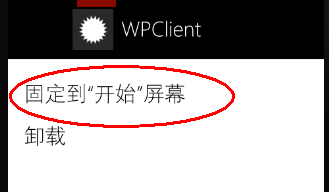
接着,按模拟器的“开始”按钮,来到“开始”屏幕,向右滑动,看到应用程序列表,在本应用程序上长按,从弹出的菜单中选“固定到开始屏幕”.
然后,回到服务器端页面,填好所有参数,点击“发送”。看结果。

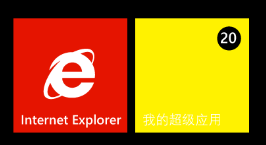
都看到效果了?
图片可以自己准备,png格式,173*173,随便用画图工具搞两下就行了,只是为了测试,把图片加到项目后,设置以下属性就行了。

OK,大家照着上面的多练几次,一定有感觉的,我不想讲理论的东西,因为没什么用。
Windows Phone开发(44):推送通知第二集——磁贴通知的更多相关文章
- 背水一战 Windows 10 (121) - 后台任务: 推送通知
[源码下载] 背水一战 Windows 10 (121) - 后台任务: 推送通知 作者:webabcd 介绍背水一战 Windows 10 之 后台任务 推送通知 示例演示如何接收推送通知/WebA ...
- iOS开发 iOS10推送必看
iOS10更新之后,推送也是做了一些小小的修改,下面我就给大家仔细说说.希望看完我的这篇文章,对大家有所帮助. 一.简单入门篇---看完就可以简单适配完了 相对简单的推送证书以及环境的问题,我就不在这 ...
- 【FAQ】HMS Core推送服务与本地创建通知消息如何相互覆盖?
我们知道,单独使用HMS Core推送服务或本地创建通知消息,都可以实现通知消息的覆盖,方式分别为: 1.本地创建通知消息(简称本地通知消息) 通过notificationManager.notify ...
- fir.im Weekly - 关于 iOS10 适配、开发、推送的一切
"小程序"来了,微信变成名副其实的 Web OS,新一轮的Web App 与Native App争论四起.程序员对新技术永远保持灵敏的嗅觉和旺盛的好奇心,@李锦发整理了微信小程序资 ...
- atitit.极光消息推送服务器端开发实现推送 jpush v3. 总结o7p
atitit.极光消息推送服务器端开发实现推送 jpush v3. 总结o7p 1. 推送所设计到底功能1 1.1. 内容压缩1 1.2. 多引擎1 2. reg ,设置appkey and pw ...
- dwr消息推送和tomcat集群
网友的提问: 项目中用到了dwr消息推送.而服务端是通过一个http请求后 触发dwr中的推送方法.而单个tomcat中.服务器发送的http请求和用户都在一个tomcat服务器中.这样就能精准推送到 ...
- 【WP 8.1开发】推送通知测试服务端程序
所谓推送通知,用老爷爷都能听懂的话说,就是: 1.我的服务器将通知内容发送到微软的通知服务器,再由通知服务器帮我转发消息. 2.那么,微软的推送服务器是如何知道我的服务器要发消息给哪台手机呢?手机客户 ...
- Xcode8开发iOS10推送通知过程
iOS10发布后,简书优先开发增加了iOS10的新通知.本文分享整个feature的开发过程遇到的问题. 1.工程配置 Xcode8发生了很大的变化,直接打开原来的工程编译运行,这个时候是获取不到Pu ...
- iOS开发——消息推送跳转
项目开发用集成是极光推送JPush 这里主要是消息推送过来处理对应界面跳转 同时看到两篇写的不错的相关博客分享一下: http://www.jianshu.com/ ...
随机推荐
- Webbrowser加载Flash后方向键失效问题(用到了OLE接口,没有被处理就转发,够复杂的)
原文:http://blog.csdn.net/dropme/article/details/6253528 窗体上放一个ApplicationEvent控件,OnMessage事件中这么写 uses ...
- Ogre嵌入MFC傻瓜全然教程(三)
经过前两两篇博文的解说.我们已经完毕了渲染工作,但仅仅是渲染而没有交互性,本篇博文我们就来加上事件的处理方法. 首先我们须要为项目加入一个帧监听类:CMyFrameListener,为了直观,在这直接 ...
- 应用程序初始化正常(0xc015002)失败解决方法
VS2005 sidebyside manifest error Microsoft.VC80.MFC Microsoft.VC80.CRT Microsoft.VC80.MFCLOC msvcr80 ...
- 显示形状回归算法(ESR)代码介绍
源地址:http://www.thinkface.cn/thread-3704-1-6.html 人脸对齐包括两个部分,分别为训练部分和测试部分.所有的代码基于opencv2.0.(一)训练阶段Ste ...
- QT5.6,5.7,5.8的新特征以及展望
https://wiki.qt.io/New_Features_in_Qt_5.6 (跨平台High-DPI,改进WebEngine到45,支持WIN 10,Canvas3D,3D) https:// ...
- 14.5.2 Changing the Number or Size of InnoDB Redo Log Files 改变InnoDB Redo Log Files的数量
14.5.2 Changing the Number or Size of InnoDB Redo Log Files 改变InnoDB Redo Log Files的数量 改变InnoDB redo ...
- [计算机基础]HTTP协议学习笔记
HTTP:Hypertext transfer protocol超文本传输协议是一种详细规定了浏览器和Internet之间互相通信的规则 HTTP允许传输任意类型的数据对象,由Content-Type ...
- 菜鸟玩云计算之十一:Hadoop 手动安装指南
Hadoop 手动安装指南 cheungmine 2013-4 本文用于指导在Windows7,VMWare上安装Ubuntu, Java, Hadoop, HBase实验环境. 本指南用于实验的软件 ...
- 深入应用看本质之-ICMP(1)
在网络层的学习时我们easy忽略IP的一个字段--存活时间 以下是百度上的解释 (8)生存时间 占8位,生存时间字段经常使用的的英文缩写是TTL(Time To Live),表明是数据报在网络中的寿命 ...
- POJ1505&&UVa714 Copying Books(DP)
Copying Books Time Limit: 3000MS Memory Limit: 10000K Total Submissions: 7109 Accepted: 2221 Descrip ...