
JAVA NIO FileChannel 内存映射文件
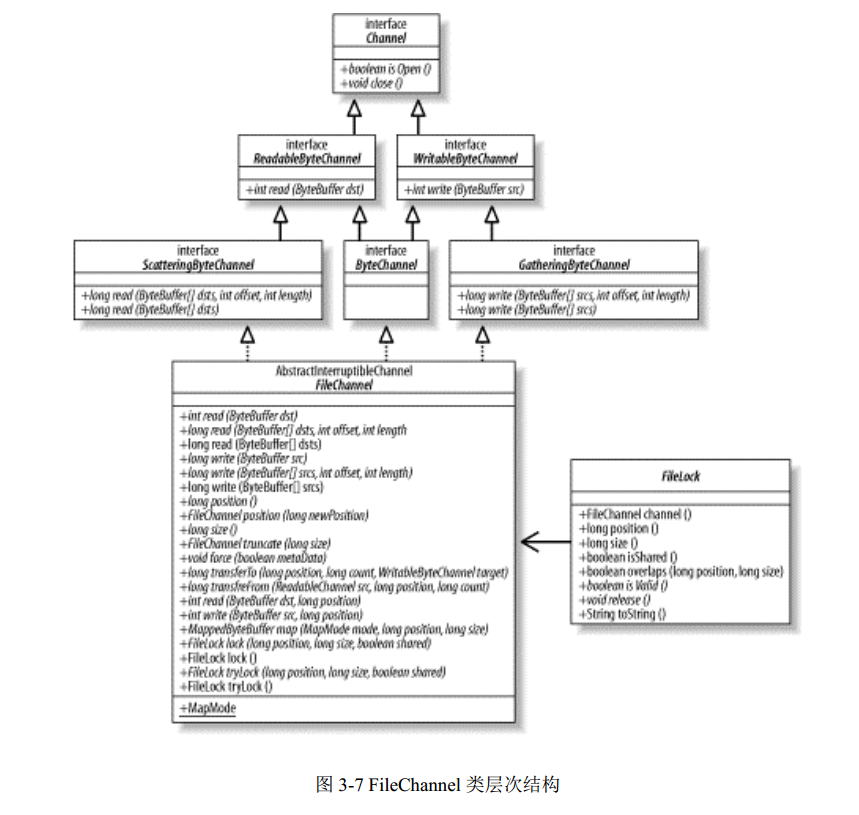
文件通道总是阻塞式的。
文件通道不能创建,只能通过(RandomAccessFile、FileInputStream、FileOutputStream)getChannel()获得,具有与File形同的访问权限。
线程安全。
文件锁:锁的对象是文件。
package org.windwant.nio;

import java.io.File;

import java.io.FileNotFoundException;

import java.io.IOException;

import java.io.RandomAccessFile;

import java.nio.ByteBuffer;

import java.nio.MappedByteBuffer;

import java.nio.channels.Channel;

import java.nio.channels.FileChannel;

import java.nio.channels.FileLock;

import java.nio.channels.Selector;

import java.util.concurrent.locks.ReadWriteLock;

import java.util.concurrent.locks.ReentrantReadWriteLock;

/**

 * Created by windwant on 2016/5/13.

 */

public class NIOOpt {

    public static void main(String[] args) {

        try {

            MappedPrivateChannel();

        } catch (Exception e) {

            e.printStackTrace();

        }

    }

    /**

     * MapMode.PRIVATE 写时拷贝(copy-on-write)映射:通过put()修改的任何修改,会导致产生一个私有的数据

     * 拷贝,宝贝中的数据只有MappedByteBuffer实例可以看到。不会对底层文件做任何修改。若缓冲区被回收,修改丢

     * 失,read/write方式建立通道。

     * 做修改,拷贝副本前,其它方式的映射区的修改,会反映到当前区域。映射相互的修改不可见

     * 允许父子进程共享内存页

     * 处理一个文件多个映射场景。

     * 关闭通道,映射会保持。除非丢弃缓冲区本身。

     * MappedByteBuffer 对象是直接的,占用的内存位于jvm堆栈之外。

     */

    public static void MappedPrivateChannel() throws Exception {

        // Create a temp file and get a channel connected to it

        File tempFile = File.createTempFile ("mmaptest", null);

        RandomAccessFile file = new RandomAccessFile (tempFile, "rw");

        FileChannel channel = file.getChannel( );

        ByteBuffer temp = ByteBuffer.allocate (100);

        // Put something in the file, starting at location 0

        temp.put ("This is the file content".getBytes( ));

        temp.flip( );

        channel.write (temp, 0);

        // Put something else in the file, starting at location 8192.

        // 8192 is 8 KB, almost certainly a different memory/FS page.

        // This may cause a file hole, depending on the

        // filesystem page size.

        temp.clear( );

        temp.put ("This is more file content".getBytes( ));

        temp.flip( );

        channel.write (temp, 8192);

        // Create three types of mappings to the same file

        MappedByteBuffer ro = channel.map (

                FileChannel.MapMode.READ_ONLY, 0, channel.size( ));

        MappedByteBuffer rw = channel.map (

                FileChannel.MapMode.READ_WRITE, 0, channel.size( ));

        MappedByteBuffer cow = channel.map (

                FileChannel.MapMode.PRIVATE, 0, channel.size( ));

        // the buffer states before any modifications

        System.out.println ("Begin");

        showBuffers (ro, rw, cow);

        // Modify the copy-on-write buffer

        cow.position (8);

        cow.put ("COW".getBytes( ));

        System.out.println ("Change to COW buffer");

        showBuffers (ro, rw, cow);

        // Modify the read/write buffer92

        rw.position (9);

        rw.put (" R/W ".getBytes( ));

        rw.position (8194);

        rw.put (" R/W ".getBytes( ));

        rw.force( );

        System.out.println ("Change to R/W buffer");

        showBuffers (ro, rw, cow);

        // Write to the file through the channel; hit both pages

        temp.clear( );

        temp.put ("Channel write ".getBytes( ));

        temp.flip( );

        channel.write (temp, 0);

        temp.rewind( );

        channel.write (temp, 8202);

        System.out.println ("Write on channel");

        showBuffers (ro, rw, cow);

        // Modify the copy-on-write buffer again

        cow.position (8207);

        cow.put (" COW2 ".getBytes( ));

        System.out.println ("Second change to COW buffer");

        showBuffers (ro, rw, cow);

        // Modify the read/write buffer

        rw.position (0);

        rw.put (" R/W2 ".getBytes( ));

        rw.position (8210);

        rw.put (" R/W2 ".getBytes( ));

        rw.force( );

        System.out.println ("Second change to R/W buffer");

        showBuffers (ro, rw, cow);

        // cleanup

        channel.close( );

        file.close( );

        tempFile.delete( );

    }

    // Show the current content of the three buffers

    public static void showBuffers (ByteBuffer ro, ByteBuffer rw, ByteBuffer cow) throws Exception{

        dumpBuffer ("R/O", ro);

        dumpBuffer ("R/W", rw);

        dumpBuffer ("COW", cow);

        System.out.println ("");

    }

    // Dump buffer content, counting and skipping nulls

    public static void dumpBuffer (String prefix, ByteBuffer buffer) throws Exception {

        System.out.print (prefix + ": '");

        int nulls = 0;

        int limit = buffer.limit( );

        for (int i = 0; i < limit; i++) {

            char c = (char) buffer.get (i);

            if (c == '\u0000') {

                nulls++;

                continue;

            }

            if (nulls != 0) {

                System.out.print ("|[" + nulls

                        + " nulls]|");

                nulls = 0;

            }

            System.out.print (c);

        }

        System.out.println ("'");

    }

    /**

     * channel Gather/Scatter 矢量IO

     */

    public static void channelGatherScatter(){

        ByteBuffer head = ByteBuffer.allocate(4);

        ByteBuffer body = ByteBuffer.allocate(100);

        RandomAccessFile afile = null;

        RandomAccessFile bfile = null;

        ReadWriteLock readWriteLock = new ReentrantReadWriteLock();

        try {

            afile = new RandomAccessFile("hello.txt", "r");

            bfile = new RandomAccessFile("hehe.txt", "rw");

            readWriteLock.readLock().lock();

            FileChannel fileChannel = afile.getChannel();

            ByteBuffer[] buffers = {head, body};

            while (fileChannel.read(buffers) != -1){

            }

            head.flip();

            body.flip();

            System.out.println(new String(head.array()));

            System.out.println(new String(body.array()));

            readWriteLock.readLock().unlock();

            fileChannel.close();

            afile.close();

            readWriteLock.writeLock().lock();

            FileChannel bfileChannel = bfile.getChannel();

            while (bfileChannel.write(buffers) > 0){

            }

            bfileChannel.position(bfileChannel.position() + 10);

            bfileChannel.write(ByteBuffer.wrap("THIS IS THE TEST TEXT!".getBytes()));

            bfileChannel.truncate(3); //改变文件大小

            bfileChannel.force(true); //写入磁盘文件 参数 是否更新文件元数据(所有者、访问权限等)

            readWriteLock.writeLock().unlock();

            bfileChannel.close();

            bfile.close();

        }catch (Exception e){

            e.printStackTrace();

        }

    }

    /**

     * 基于MappedFileChannle的文件复制

     * 文件锁

     */

    public static void mappedFileChannelLock(){

        RandomAccessFile afile = null;

        RandomAccessFile bfile = null;

        FileChannel fc = null;

        FileChannel fcb = null;

        try {

            afile = new RandomAccessFile("hello.txt", "rw");

            fc = afile.getChannel();

            long length = fc.size();

            FileLock fileLock = fc.tryLock(0, length, true);//true共享锁 false 独占锁 从开始 锁定全部内容 如果获取不到锁会返回null

            if(null != fileLock) {

                MappedByteBuffer mbb = fc.map(FileChannel.MapMode.READ_WRITE, 0, length);

                byte[] fbo = new byte[(int) length];

                mbb.get(fbo);

                System.out.println(new String(fbo, "UTF-8"));

                fileLock.release();

                bfile = new RandomAccessFile("hehe.txt", "rw");

                fcb = bfile.getChannel();

                fileLock = fcb.tryLock(0, length, false);

                MappedByteBuffer mbbb = fcb.map(FileChannel.MapMode.READ_WRITE, 0, length);

                for (int i = 0; i < length; i++) {

                    mbbb.put(i, fbo[i]);

                }

                mbbb.flip();

                mbbb.force();

                fileLock.release();

            }

        } catch (FileNotFoundException e) {

            e.printStackTrace();

        } catch (IOException e) {

            e.printStackTrace();

        }finally {

            try {

                fc.close();

                fcb.close();

                afile.close();

                bfile.close();

            } catch (IOException e) {

                e.printStackTrace();

            }

        }

    }

    /**

     * MappedByteBuffer map(MapMode mode, long position, long size)

     * size大于文件大小,文件会做扩充

     * MappedByteBuffer 内存映射缓冲池

     * 基于MappedFileChannle的文件复制

     * 读写锁

     * 直接读取,修改磁盘上的文件。

     * 自动缓存内存页,比较高效。

     */

    public static void mappedFileChannel(){

        RandomAccessFile afile = null;

        RandomAccessFile bfile = null;

        FileChannel fc = null;

        FileChannel fcb = null;

        ReadWriteLock readWriteLock = new ReentrantReadWriteLock();

        try {

            afile = new RandomAccessFile("hello.txt", "rw");

            readWriteLock.readLock().lock();

            fc = afile.getChannel();

            long length = fc.size();

            MappedByteBuffer mbb = fc.map(FileChannel.MapMode.READ_WRITE, 0, length);

            byte[] fbo = new byte[(int) length];

            mbb.get(fbo);

            System.out.println(new String(fbo));

            readWriteLock.readLock().unlock();

            bfile = new RandomAccessFile("hehe.txt", "rw");

            readWriteLock.writeLock().lock();

            fcb = bfile.getChannel();

            MappedByteBuffer mbbb = fcb.map(FileChannel.MapMode.READ_WRITE, 0, length);

            for (int i = 0; i < length; i++) {

                mbbb.put(i, fbo[i]);

            }

            mbbb.flip();

            mbbb.force();

            readWriteLock.writeLock().unlock();

        } catch (FileNotFoundException e) {

            e.printStackTrace();

        } catch (IOException e) {

            e.printStackTrace();

        }finally {

            try {

                fc.close();

                fcb.close();

                afile.close();

                bfile.close();

            } catch (IOException e) {

                e.printStackTrace();

            }

        }

    }

    /**

     * FileChannel文件读取

     */

    public static void fileChannel(){

        try {

            RandomAccessFile afile = new RandomAccessFile("hello.txt", "rw");

            FileChannel fc = afile.getChannel();

            ByteBuffer bb = ByteBuffer.allocate(48);

            int byteRead;

            while ((byteRead = fc.read(bb)) != -1){//确保读完

                System.out.println("read:" + byteRead);

                bb.flip();//翻转为读状态

                while (bb.hasRemaining()){//直到没有可读的字节

                    System.out.println(String.valueOf(bb.get()));

                }

                bb.clear();

            }

            fc.close();

            afile.close();

        } catch (FileNotFoundException e) {

            e.printStackTrace();

        } catch (IOException e) {

            e.printStackTrace();

        }

    }

    /**

     * 基于FileChannel transferTo transferFrom 方法文件复制

     */

    public static void fileTransfer(){

        try {

            RandomAccessFile afile = new RandomAccessFile("hello.txt", "rw");

            RandomAccessFile bfile = new RandomAccessFile("hehe.txt", "rw");

            FileChannel ac = afile.getChannel();

            FileChannel bc = bfile.getChannel();

            long position = 0;

            long count = ac.size();

//            bc.transferFrom(ac, position, count);

            ac.transferTo(position, count, bc);

            ac.close();

            afile.close();

            bc.close();

            bfile.close();

        } catch (FileNotFoundException e) {

            e.printStackTrace();

        } catch (IOException e) {

            e.printStackTrace();

        }

    }

    public static void fileSelector(){

        try {

            RandomAccessFile afile = new RandomAccessFile("hello.txt", "rw");

            Channel c = afile.getChannel();

            Selector s = Selector.open();

        } catch (FileNotFoundException e) {

            e.printStackTrace();

        } catch (IOException e) {

            e.printStackTrace();

        }

    }

    /**

     * 基于基本channel buffer的文件复制操作

     */

    public static void fileTransferByNormal() {

        try {

            RandomAccessFile afile = new RandomAccessFile("hello.txt", "rw");

            RandomAccessFile bfile = new RandomAccessFile("hehe.txt", "rw");

            FileChannel ac = afile.getChannel();

            FileChannel bc = bfile.getChannel();

            ByteBuffer bf = ByteBuffer.allocateDirect(16 * 1024);

            while (ac.read(bf) != -1) {

                bf.flip();

                while (bf.hasRemaining()) {//确保写完

                    bc.write(bf);

                }

                bf.clear();

            }

            ac.close();

            afile.close();

            bc.close();

            bfile.close();

        } catch (FileNotFoundException e) {

            e.printStackTrace();

        } catch (IOException e) {

            e.printStackTrace();

        }

    }

}
JAVA NIO FileChannel 内存映射文件的更多相关文章
- Java NIO之内存映射文件——MappedByteBuffer
大多数操作系统都可以利用虚拟内存实现将一个文件或者文件的一部分"映射"到内存中.然后,这个文件就可以当作是内存数组来访问,这比传统的文件要快得多. 内存映射文件的一个关键优势是操作 ...
- JAVA NIO之浅谈内存映射文件原理与DirectMemory
JAVA类库中的NIO包相对于IO 包来说有一个新功能是内存映射文件,日常编程中并不是经常用到,但是在处理大文件时是比较理想的提高效率的手段.本文我主要想结合操作系统中(OS)相关方面的知识介绍一下原 ...
- 内存映射文件(Memory-Mapped File)
Java Memory-Mapped File所使用的内存分配在物理内存而不是JVM堆内存,且分配在OS内核. 1: 内存映射文件及其应用 - 实现一个简单的消息队列 / 计算机程序的思维逻辑 在一般 ...
- Java NIO 内存映射文件
Java NIO 内存映射文件 @author ixenos 文件操作的四大方法 前提:内存的访问速度比磁盘高几个数量级,但是基本的IO操作是直接调用native方法获得驱动和磁盘交互的,IO速度限制 ...
- 【JavaNIO的深入研究4】内存映射文件I/O,大文件读写操作,Java nio之MappedByteBuffer,高效文件/内存映射
内存映射文件能让你创建和修改那些因为太大而无法放入内存的文件.有了内存映射文件,你就可以认为文件已经全部读进了内存,然后把它当成一个非常大的数组来访问.这种解决办法能大大简化修改文件的代码.fileC ...
- Java编程的逻辑 (61) - 内存映射文件及其应用 - 实现一个简单的消息队列
本系列文章经补充和完善,已修订整理成书<Java编程的逻辑>,由机械工业出版社华章分社出版,于2018年1月上市热销,读者好评如潮!各大网店和书店有售,欢迎购买,京东自营链接:http:/ ...
- JAVA I/O(三)内存映射文件
<Java编程思想>中对内存映射文件有详细的介绍,此处仅做简单记录和总结.内存映射文件允许创建和修改因为太大而不能放入内存的文件. 1. 内存映射文件简单实例 import java.io ...
- NIO之通道(Channel)的原理与获取以及数据传输与内存映射文件
通道(Channel) 由java.nio.channels包定义的,Channel表示IO源与目标打开的连接,Channel类似于传统的“流”,只不过Channel本身不能直接访问数据,Channe ...
- Java 内存映射文件
import java.io.*; import java.nio.MappedByteBuffer; import java.nio.channels.FileChannel; import jav ...
随机推荐
- C#设计模式-访问者模式
一. 访问者(Vistor)模式 访问者模式是封装一些施加于某种数据结构之上的操作.一旦这些操作需要修改的话,接受这个操作的数据结构则可以保存不变.访问者模式适用于数据结构相对稳定的系统, 它把数据结 ...
- 本地存储之cookie
cookie概述: Cookie 在计算机中是个存储在浏览器目录中的文本文件,当浏览器运行时,存储在 RAM 中发挥作用 (此种 Cookies 称作 Session Cookies), 一旦用户从该 ...
- C#-正则,常用几种数据解析-端午快乐
在等待几个小时就是端午节了,这里预祝各位节日快乐. 这里分享的是几个在C#中常用的正则解析数据写法,其实就是Regex类,至于正则的匹配格式,请仔细阅读正则的api文档,此处不具体说明,谢谢. 开始吧 ...
- Microsoft Build 2016 Day 1 记录
去年今日:Microsoft Build 2015 汇总 今年的 Bulid 时间是 3.30-4.1,第一天的主角主要是 Windows 10.人工智能.HoloLens.小娜等,详细介绍:3 分钟 ...
- 数据结构:二叉查找树(C语言实现)
数据结构:二叉查找树(C语言实现) ►写在前面 关于二叉树的基础知识,请看我的一篇博客:二叉树的链式存储 说明: 二叉排序树或者是一棵空树,或者是具有下列性质的二叉树: 1.若其左子树不空,则左子树上 ...
- 一个前端所需具备的PS能力
前端网页设计+静态实现案例 放一个2天半内给某公司完成的(设计 + 静态实现)的案例吧,静态阴影用CSS3实现的http://www.cnblogs.com/MuYunyun/p/5693615.ht ...
- markdown常用语法总结
转自markdown示例[模板] 1.1.段落标题 根据原文中的文档标题可以对应设置标题. # 一级标题## 二级标题### 三级标题 效果 => 一级标题 二级标题 三级标题 1.2.斜体.加 ...
- SQL Server 执行计划利用统计信息对数据行的预估原理二(为什么复合索引列顺序会影响到执行计划对数据行的预估)
本文出处:http://www.cnblogs.com/wy123/p/6008477.html 关于统计信息对数据行数做预估,之前写过对非相关列(单独或者单独的索引列)进行预估时候的算法,参考这里. ...
- Python爬虫小白入门(一)写在前面
一.前言 你是不是在为想收集数据而不知道如何收集而着急? 你是不是在为想学习爬虫而找不到一个专门为小白写的教程而烦恼? Bingo! 你没有看错,这就是专门面向小白学习爬虫而写的!我会采用实例的方式, ...
- 线上bug的解决方案--带来的全新架构设计
缘由 本人从事游戏开发很多年一直都是游戏服务器端开发. 因为个人原因吧,一直在小型公司,或者叫创业型团队工作吧.这样的环境下不得不逼迫我需要什么都会,什么做. 但是自我感觉好像什么都不精通..... ...