
双目测距+点云——使用MiddleBurry数据集的图片
效果
输入:
|
|
|
 左图
左图
 右图
右图
输出:
 视差图
视差图
 深度图
深度图
实现了鼠标点击图片中的位置,显示其深度。
 点云
点云
其他例子点云:
|
|
|
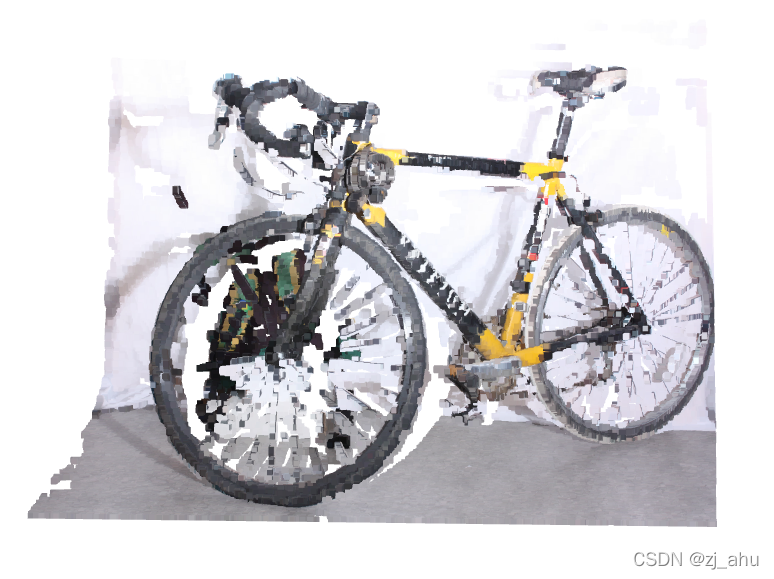 bicycle
 motorcycle
使用自己的双目摄像头拍摄的图片:
|
|
|
 bottle
 laptop
由于摄像头不是很好,所以最后效果没有数据集的好,但大致能分辨出物体。
代码
stereoConfig.py
# -*- coding: utf-8 -*-

# @Time : 2022/3/25 16:06

# @Author : Zhang Jun

# @File : stereoConfig.py

# @Software: PyCharm

import numpy as np

####################仅仅是一个示例###################################

# 双目相机参数

class stereoCamera(object):

    def __init__(self):

        # 左相机内参

        self.cam_matrix_left = np.array([[1499.641, 0, 1097.616],

                                         [0., 1497.989, 772.371],

                                         [0., 0., 1.]])

        # 右相机内参

        self.cam_matrix_right = np.array([[1494.855, 0, 1067.321],

                                          [0., 1491.890, 777.983],

                                          [0., 0., 1.]])

        # 左右相机畸变系数:[k1, k2, p1, p2, k3]

        self.distortion_l = np.array([[-0.1103, 0.0789, -0.0004, 0.0017, -0.0095]])

        self.distortion_r = np.array([[-0.1065, 0.0793, -0.0002, -8.9263e-06, -0.0161]])

        # 旋转矩阵

        self.R = np.array([[0.9939, 0.0165, 0.1081],

                           [-0.0157, 0.9998, -0.0084],

                           [-0.1082, 0.0067, 0.9940]])

        # 平移矩阵

        self.T = np.array([[-423.716], [2.561], [21.973]])

        # 主点列坐标的差

        self.doffs = 0.0

        # 指示上述内外参是否为经过立体校正后的结果

        self.isRectified = False

    # def setMiddleBurryParams(self):

    #     self.cam_matrix_left = np.array([[3997.684, 0, 225.0],

    #                                      [0., 3997.684, 187.5],

    #                                      [0., 0., 1.]])

    #     self.cam_matrix_right = np.array([[3997.684, 0, 225.0],

    #                                       [0., 3997.684, 187.5],

    #                                       [0., 0., 1.]])

    #     self.distortion_l = np.zeros(shape=(5, 1), dtype=np.float64)

    #     self.distortion_r = np.zeros(shape=(5, 1), dtype=np.float64)

    #     self.R = np.identity(3, dtype=np.float64)

    #     self.T = np.array([[-193.001], [0.0], [0.0]])

    #     self.doffs = 131.111

    #     self.isRectified = True

    def setMiddleBurryParams(self):

        self.cam_matrix_left = np.array([[7190.247, 0, 1035.513],

                                         [0., 7190.247, 945.196],

                                         [0., 0., 1.]])

        self.cam_matrix_right = np.array([[7190.247, 0, 1378.036],

                                          [0., 7190.247, 945.196],

                                          [0., 0., 1.]])

        self.distortion_l = np.zeros(shape=(5, 1), dtype=np.float64)

        self.distortion_r = np.zeros(shape=(5, 1), dtype=np.float64)

        self.R = np.identity(3, dtype=np.float64)

        self.T = np.array([[-174.945], [0.0], [0.0]])

        self.doffs = 342.523

        self.isRectified = True
stereo.py
# -*- coding: utf-8 -*-

# @Time : 2022/3/25 16:05

# @Author : Zhang Jun

# @File : stereo.py

# @Software: PyCharm

# -*- coding: utf-8 -*-

import sys

import cv2

import numpy as np

import stereoConfig

import open3d as o3d

# 预处理

def preprocess(img1, img2):

    # 彩色图->灰度图

    if (img1.ndim == 3):

        img1 = cv2.cvtColor(img1, cv2.COLOR_BGR2GRAY)  # 通过OpenCV加载的图像通道顺序是BGR

    if (img2.ndim == 3):

        img2 = cv2.cvtColor(img2, cv2.COLOR_BGR2GRAY)

    # 直方图均衡

    img1 = cv2.equalizeHist(img1)

    img2 = cv2.equalizeHist(img2)

    return img1, img2

# 消除畸变

def undistortion(image, camera_matrix, dist_coeff):

    undistortion_image = cv2.undistort(image, camera_matrix, dist_coeff)

    return undistortion_image

# 获取畸变校正和立体校正的映射变换矩阵、重投影矩阵

# @param:config是一个类,存储着双目标定的参数:config = stereoconfig.stereoCamera()

def getRectifyTransform(height, width, config):

    # 读取内参和外参

    left_K = config.cam_matrix_left

    right_K = config.cam_matrix_right

    left_distortion = config.distortion_l

    right_distortion = config.distortion_r

    R = config.R

    T = config.T

    # 计算校正变换

    R1, R2, P1, P2, Q, roi1, roi2 = cv2.stereoRectify(left_K, left_distortion, right_K, right_distortion,

                                                      (width, height), R, T, alpha=0)

    map1x, map1y = cv2.initUndistortRectifyMap(left_K, left_distortion, R1, P1, (width, height), cv2.CV_32FC1)

    map2x, map2y = cv2.initUndistortRectifyMap(right_K, right_distortion, R2, P2, (width, height), cv2.CV_32FC1)

    return map1x, map1y, map2x, map2y, Q

# 畸变校正和立体校正

def rectifyImage(image1, image2, map1x, map1y, map2x, map2y):

    rectifyed_img1 = cv2.remap(image1, map1x, map1y, cv2.INTER_AREA)

    rectifyed_img2 = cv2.remap(image2, map2x, map2y, cv2.INTER_AREA)

    return rectifyed_img1, rectifyed_img2

# 立体校正检验----画线

def draw_line(image1, image2):

    # 建立输出图像

    height = max(image1.shape[0], image2.shape[0])

    width = image1.shape[1] + image2.shape[1]

    output = np.zeros((height, width, 3), dtype=np.uint8)

    output[0:image1.shape[0], 0:image1.shape[1]] = image1

    output[0:image2.shape[0], image1.shape[1]:] = image2

    # 绘制等间距平行线

    line_interval = 50  # 直线间隔:50

    for k in range(height // line_interval):

        cv2.line(output, (0, line_interval * (k + 1)), (2 * width, line_interval * (k + 1)), (0, 255, 0), thickness=2,

                 lineType=cv2.LINE_AA)

    return output

# 视差计算

def stereoMatchSGBM(left_image, right_image, down_scale=False):

    # SGBM匹配参数设置

    if left_image.ndim == 2:

        img_channels = 1

    else:

        img_channels = 3

    blockSize = 3

    paraml = {'minDisparity': 0,

              'numDisparities': 128,

              'blockSize': blockSize,

              'P1': 8 * img_channels * blockSize ** 2,

              'P2': 32 * img_channels * blockSize ** 2,

              'disp12MaxDiff': 1,

              'preFilterCap': 63,

              'uniquenessRatio': 15,

              'speckleWindowSize': 100,

              'speckleRange': 1,

              'mode': cv2.STEREO_SGBM_MODE_SGBM_3WAY

              }

    # 构建SGBM对象

    left_matcher = cv2.StereoSGBM_create(**paraml)

    paramr = paraml

    paramr['minDisparity'] = -paraml['numDisparities']

    right_matcher = cv2.StereoSGBM_create(**paramr)

    # 计算视差图

    size = (left_image.shape[1], left_image.shape[0])

    if down_scale == False:

        disparity_left = left_matcher.compute(left_image, right_image)

        disparity_right = right_matcher.compute(right_image, left_image)

    else:

        left_image_down = cv2.pyrDown(left_image)

        right_image_down = cv2.pyrDown(right_image)

        factor = left_image.shape[1] / left_image_down.shape[1]

        disparity_left_half = left_matcher.compute(left_image_down, right_image_down)

        disparity_right_half = right_matcher.compute(right_image_down, left_image_down)

        disparity_left = cv2.resize(disparity_left_half, size, interpolation=cv2.INTER_AREA)

        disparity_right = cv2.resize(disparity_right_half, size, interpolation=cv2.INTER_AREA)

        disparity_left = factor * disparity_left

        disparity_right = factor * disparity_right

    # 真实视差(因为SGBM算法得到的视差是×16的)

    trueDisp_left = disparity_left.astype(np.float32) / 16.

    trueDisp_right = disparity_right.astype(np.float32) / 16.

    return trueDisp_left, trueDisp_right

def getDepthMapWithQ(disparityMap: np.ndarray, Q: np.ndarray) -> np.ndarray:

    points_3d = cv2.reprojectImageTo3D(disparityMap, Q)

    depthMap = points_3d[:, :, 2]

    reset_index = np.where(np.logical_or(depthMap < 0.0, depthMap > 65535.0))

    depthMap[reset_index] = 0

    return depthMap.astype(np.float32)

def getDepthMapWithConfig(disparityMap: np.ndarray, config: stereoConfig.stereoCamera) -> np.ndarray:

    fb = config.cam_matrix_left[0, 0] * (-config.T[0])

    doffs = config.doffs

    depthMap = np.divide(fb, disparityMap + doffs)

    reset_index = np.where(np.logical_or(depthMap < 0.0, depthMap > 65535.0))

    depthMap[reset_index] = 0

    reset_index2 = np.where(disparityMap < 0.0)

    depthMap[reset_index2] = 0

    return depthMap.astype(np.float32)

if __name__ == '__main__':

    # 读取MiddleBurry数据集的图片

    iml = cv2.imread('perfect001/Backpack-perfect/im0.png', 1)  # 左图

    imr = cv2.imread('perfect001/Backpack-perfect/im1.png', 1)  # 右图

    if (iml is None) or (imr is None):

        print("Error: Images are empty, please check your image's path!")

        sys.exit(0)

    height, width = iml.shape[0:2]

    # 读取相机内参和外参

    # 使用之前先将标定得到的内外参数填写到stereoconfig.py中的StereoCamera类中

    config = stereoConfig.stereoCamera()

    config.setMiddleBurryParams()

    print(config.cam_matrix_left)

    # 立体校正

    map1x, map1y, map2x, map2y, Q = getRectifyTransform(height, width, config)  # 获取用于畸变校正和立体校正的映射矩阵以及用于计算像素空间坐标的重投影矩阵

    iml_rectified, imr_rectified = rectifyImage(iml, imr, map1x, map1y, map2x, map2y)

    print(Q)

    # 绘制等间距平行线,检查立体校正的效果

    line = draw_line(iml_rectified, imr_rectified)

    cv2.imwrite('check_rectification.png', line)

    # 立体匹配

    iml_, imr_ = preprocess(iml, imr)  # 预处理,一般可以削弱光照不均的影响,不做也可以

    disp, _ = stereoMatchSGBM(iml, imr, True)  # 这里传入的是未经立体校正的图像,因为我们使用的middleburry图片已经是校正过的了

    cv2.imwrite('disaprity.png', disp)

    # 计算深度图

    #depthMap = getDepthMapWithQ(disp, Q)

    depthMap = getDepthMapWithConfig(disp, config)

    minDepth = np.min(depthMap)

    maxDepth = np.max(depthMap)

    print(minDepth, maxDepth)

    depthMapVis = (255.0 * (depthMap - minDepth)) / (maxDepth - minDepth)

    depthMapVis = depthMapVis.astype(np.uint8)

    def callbackFunc(e, x, y, f, p):

        if e == cv2.EVENT_LBUTTONDOWN:

            print('目标的深度距离为 %2f mm' % depthMap[y][x])

    cv2.namedWindow('DepthMap', 0)

    cv2.setMouseCallback("DepthMap", callbackFunc, None)

    cv2.imshow("DepthMap", depthMapVis)

    cv2.waitKey(0)

    # 使用open3d库绘制点云

    iml = cv2.cvtColor(iml, cv2.COLOR_BGR2RGB)

    colorImage = o3d.geometry.Image(iml)

    depthImage = o3d.geometry.Image(depthMap)

    rgbdImage = o3d.geometry.RGBDImage.create_from_color_and_depth(colorImage, depthImage, depth_scale=1000.0,

                                                                     depth_trunc=np.inf,convert_rgb_to_intensity=False)

    intrinsics = o3d.camera.PinholeCameraIntrinsic()

    fx = config.cam_matrix_left[0, 0]

    fy = fx

    cx = config.cam_matrix_left[0, 2]

    cy = config.cam_matrix_left[1, 2]

    print(fx, fy, cx, cy)

    intrinsics.set_intrinsics(width, height, fx=fx, fy=fy, cx=cx, cy=cy)

    extrinsics = np.array([[1., 0., 0., 0.],

                           [0., 1., 0., 0.],

                           [0., 0., 1., 0.],

                           [0., 0., 0., 1.]])

    pointcloud = o3d.geometry.PointCloud().create_from_rgbd_image(rgbdImage, intrinsic=intrinsics, extrinsic=extrinsics)

    # 计算像素点的3D坐标(左相机坐标系下)

    points_3d = cv2.reprojectImageTo3D(disp, Q)  # 参数中的Q就是由getRectifyTransform()函数得到的重投影矩阵

    # 构建点云--Point_XYZRGBA格式

    o3d.io.write_point_cloud("0/PointCloud.pcd", pointcloud=pointcloud)

    o3d.visualization.draw_geometries([pointcloud], width=720, height=480)
参考资料
双目测距理论及其python实现
MiddleBurry数据集官网
双目测距+点云——使用MiddleBurry数据集的图片的更多相关文章
- 学习笔记:使用opencv做双目测距(相机标定+立体匹配+测距).
最近在做双目测距,觉得有必要记录点东西,所以我的第一篇博客就这么诞生啦~ 双目测距属于立体视觉这一块,我觉得应该有很多人踩过这个坑了,但网上的资料依旧是云里雾里的,要么是理论讲一大堆,最后发现还不知道 ...
- 学习OpenCV双目测距原理及常见问题解答
学习OpenCV双目测距原理及常见问题解答 转自博客:https://blog.csdn.net/angle_cal/article/details/50800775 一. 整体思路和问题转化. 图 ...
- 使用OpenCV/python进行双目测距
在做SLAM时,希望用到深度图来辅助生成场景,所以要构建立体视觉,在这里使用OpenCV的Stereo库和python来进行双目立体视觉的图像处理. 立体标定 应用标定数据 转换成深度图 标定 在开始 ...
- 【计算机视觉】双目测距(六)--三维重建及UI显示
原文: http://blog.csdn.NET/chenyusiyuan/article/details/5970799 在获取到视差数据后,利用 OpenCV 的 reProjectImageTo ...
- 采用线性回归方法降低双目测距到平面的误差(sklearn)
继上篇,为了改善标定板的深度信息: remove_idx1 = np.where(Z <= 0) remove_idx2 = np.where(Z > 500)#将Z轴坐标限定在0-500 ...
- 图片流量节省大杀器:基于腾讯云CDN的sharpP自适应图片技术实践
目前移动端运营素材大部分依赖图片,基于对图片流量更少,渲染速度更快的诉求,我们推动CDN,X5内核,即通产品部共同推出了一套业务透明,无痛接入的CDN图片优化方案:基于CDN的sharpP自适应图片无 ...
- 【caffe-windows】 caffe-master 之 训练自己数据集(图片转换成lmdb or leveldb)
前期准备: 文件夹train:此文件夹中按类别分好子文件夹,各子文件夹里存放相应图片 文件夹test:同train,有多少类就有多少个子文件夹 trainlabels.txt : 存的是训练集的标签 ...
- 微信小程序里如何用阿里云上传视频,图片。。
纯手写,踩了半天多的坑干出来了... 网上也有对于阿里云如何在微信小程序里使用,但是很不全,包括阿里云文档的最佳实践里. 话不多说上代码了. upvideo(){ var aliOssParams = ...
- 使用OpenCV把二进制mnist数据集转换为图片
mnist数据集是以二进制形式保存的,这里借助OpenCV把mnist数据集转换成图片格式.转换程序如下: #include <iostream> #include <fstream ...
- 阿里云使用js 实现OSS图片上传、获取OSS图片列表、获取图片外网访问地址(读写权限私有、读写权限公共);
详情请参考:https://help.aliyun.com/document_detail/32069.html?spm=a2c4g.11186623.6.763.ZgC59a 或者https://h ...
随机推荐
- 齐博x1工单碎片模板制作教程
可以把工单插入到任何频道的内容里边,如下图所示 碎片模板制作标准如下 <form action="{:urls('order/add')}" class="wn_f ...
- PX01关于手机屏IIC触摸调试学习笔记
相关文件下载: 上位机工具:http://www.xk-image.com/download/blog/0002_TP调试/LcdTools20210605.rar 调试案例:http://www.x ...
- ubuntu 安装anaconda3
ubuntu 安装anaconda3 官网:https://www.anaconda.com/ 下载:https://www.anaconda.com/products/individual#Down ...
- 原生Ajax处理文件流
在通过Ajax处理请求时,可能会遇到需要下载文件的情况,这里简要的说明下处理方法. let downloadFile = document.getElementById("downloadI ...
- 我的Spark学习笔记
一.架构设计 Driver根据用户代码构建计算流图,拆解出分布式任务并分发到 Executors 中去:每个Executors收到任务,然后处理这个 RDD 的一个数据分片子集 DAGSchedule ...
- python 的time、datetime模块
python 时间模块 import datetime res = datetime.datetime.now() print(res) # 2022-08-07 16:47:07.120459 ...
- Codeforces Round #781(C. Tree Infection)
Codeforces Round #781 C. Tree Infection time limit per test 1 second memory limit per test 256 megab ...
- Java继承Frame画一个窗口显示图片
将图片显示到窗口上. 在工程目录下准备好图片5.png 运行代码: import javax.imageio.ImageIO; import java.awt.*; import java.awt.e ...
- 嵌入式-C语言基础:指针是存放变量的地址,那为什么要区分类型?
指针是存放变量的地址,那为什么要区分类型?不能所有类型的变量都用一个类型吗?下面用一个例子来说明这个问题. #include<stdio.h> int main() { int a=0x1 ...
- Linux Framebuffer 实验
一.准备 linux虚拟机或ARM开发板 Ubuntu18.04 二.Framebuffer介绍 次笔记主要的目的是实验,所以我不介绍了,有需要的小伙伴可以去看下面博客 Linux LCD Framb ...