
SpringCloud微服务之Ribbon负载均衡(一)
什么是微服务?什么是SpringCloud?
微服务是一种架构的模式,它提倡将一个应用程序划分成很多个微小的服务,服务与服务之间相互协调、相互配合。每个服务运行都是一个独立的进程,服务与服务之间采用轻量级的通讯机制相互沟通。简单的来说就是将一个庞大的复杂的单体应用进行划分成n多个微小的服务(一个服务负责一个业务),各个微服务都被独立的部署。
微服务与集群的区别是,微服务的每一个部署的服务都是不相同的,而集群部署的每一个服务都是相同的。
Spring Cloud是一个微服务框架,相比Dubbo等RPC框架,Spring Cloud提供的全套的分布式系统解决方案。它是在SpringBoot的基础上构建的。SpringCloud的五大神兽分别是Eureka、Ribbon、Feign、Hystrix、Zuul。
环境搭建
版本说明
springboot:2.0.3
springcloud:Finchley
创建一个父工程(maven项目)
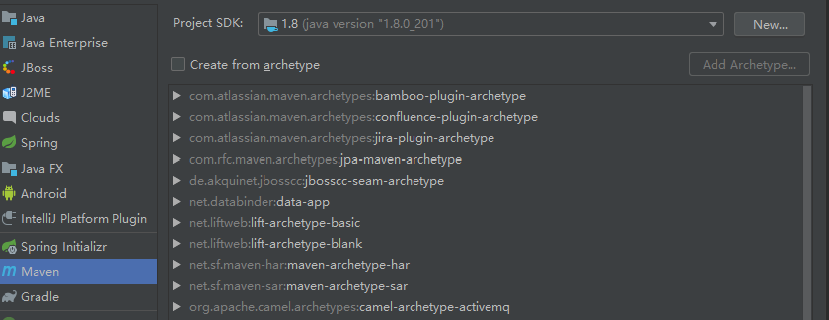
选择maven,点击next

然后点击完成
修改父工程pom.xml
<?xml version="1.0" encoding="UTF-8"?>

<project xmlns="http://maven.apache.org/POM/4.0.0"

         xmlns:xsi="http://www.w3.org/2001/XMLSchema-instance"

         xsi:schemaLocation="http://maven.apache.org/POM/4.0.0 http://maven.apache.org/xsd/maven-4.0.0.xsd">

    <modelVersion>4.0.0</modelVersion>

    <groupId>com.lzh</groupId>

    <artifactId>my-springcloud-01</artifactId>

    <packaging>pom</packaging>

    <version>1.0-SNAPSHOT</version>

    <properties>

        <project.build.sourceEncoding>UTF-8</project.build.sourceEncoding>

        <maven.compiler.source>1.8</maven.compiler.source>

        <maven.compiler.target>1.8</maven.compiler.target>

        <junit.version>4.12</junit.version>

        <log4j.version>1.2.17</log4j.version>

        <lombok.version>1.16.18</lombok.version>

    </properties>

    <dependencyManagement>

        <dependencies>

            <dependency>

                <groupId>org.springframework.cloud</groupId>

                <artifactId>spring-cloud-dependencies</artifactId>

                <version>Finchley.RELEASE</version>

                <!--<version>Dalston.SR1</version>-->

                <type>pom</type>

                <scope>import</scope>

            </dependency>

            <dependency>

                <groupId>org.springframework.boot</groupId>

                <artifactId>spring-boot-dependencies</artifactId>

                <version>2.0.3.RELEASE</version>

                <type>pom</type>

                <scope>import</scope>

            </dependency>

            <dependency>

                <groupId>mysql</groupId>

                <artifactId>mysql-connector-java</artifactId>

                <version>5.0.4</version>

            </dependency>

            <dependency>

                <groupId>com.alibaba</groupId>

                <artifactId>druid</artifactId>

                <version>1.0.31</version>

            </dependency>

            <dependency>

                <groupId>org.mybatis.spring.boot</groupId>

                <artifactId>mybatis-spring-boot-starter</artifactId>

                <version>1.3.0</version>

            </dependency>

            <dependency>

                <groupId>ch.qos.logback</groupId>

                <artifactId>logback-core</artifactId>

                <version>1.2.3</version>

            </dependency>

            <dependency>

                <groupId>junit</groupId>

                <artifactId>junit</artifactId>

                <version>${junit.version}</version>

                <scope>test</scope>

            </dependency>

            <dependency>

                <groupId>log4j</groupId>

                <artifactId>log4j</artifactId>

                <version>${log4j.version}</version>

            </dependency>

        </dependencies>

    </dependencyManagement>

    <build>

        <finalName>microservicecloud</finalName>

        <resources>

            <resource>

                <directory>src/main/resources</directory>

                <filtering>true</filtering>

            </resource>

        </resources>

        <plugins>

            <plugin>

                <groupId>org.apache.maven.plugins</groupId>

                <artifactId>maven-resources-plugin</artifactId>

                <configuration>

                    <delimiters>

                        <delimit>$</delimit>

                    </delimiters>

                </configuration>

            </plugin>

        </plugins>

    </build>

</project>
创建子工程(maven项目)
工程名称:microservice-consumer-80
pom.xml文件
<?xml version="1.0" encoding="UTF-8"?>

<project xmlns="http://maven.apache.org/POM/4.0.0"

         xmlns:xsi="http://www.w3.org/2001/XMLSchema-instance"

         xsi:schemaLocation="http://maven.apache.org/POM/4.0.0 http://maven.apache.org/xsd/maven-4.0.0.xsd">

    <parent>

        <artifactId>my-springcloud-01</artifactId>

        <groupId>com.lzh</groupId>

        <version>1.0-SNAPSHOT</version>

    </parent>

    <modelVersion>4.0.0</modelVersion>

    <artifactId>microservice-consumer-80</artifactId>

    <dependencies>

        <dependency>

            <groupId>com.lzh</groupId>

            <artifactId>microservice-api</artifactId>

            <version>1.0-SNAPSHOT</version>

        </dependency>

        <dependency>

            <groupId>org.springframework.cloud</groupId>

            <artifactId>spring-cloud-starter-netflix-eureka-client</artifactId>

        </dependency>

        <!-- 整合ribbon -->

        <dependency>

            <groupId>org.springframework.cloud</groupId>

            <artifactId>spring-cloud-starter-netflix-ribbon</artifactId>

        </dependency>

        <dependency>

            <groupId>org.springframework.boot</groupId>

            <artifactId>spring-boot-starter-web</artifactId>

        </dependency>

        <dependency>

            <groupId>org.springframework.boot</groupId>

            <artifactId>spring-boot-starter-actuator</artifactId>

        </dependency>

    </dependencies>

</project>
编码实现
在主启动类上加上@EnableDiscoveryClient注解
创建一个配置文件ConfigBean.java,new一个RestTemplate远程调用模板,加入@LoadBalanced注解,开启负载均衡
import org.springframework.cloud.client.loadbalancer.LoadBalanced;

import org.springframework.context.annotation.Bean;

import org.springframework.context.annotation.Configuration;

import org.springframework.web.client.RestTemplate;

/**

 * @author lzh

 * create 2019-11-05-9:58

 */

@Configuration

public class ConfigBean {

    @Bean

    //加入负载均衡

    //Spring Cloud Ribbon是基于Netflix Ribbon实现的一套客户端    负载均衡的工具

    @LoadBalanced

    public RestTemplate getRestTemplate(){

        return new RestTemplate();

    }

}
在服务层DeptServiceImpl.java类中用RestTemplate模板工具调用,这里使用服务名称调用,如果服务名称相同,则会进行顺序轮询调用
import com.lzh.cloud.model.Dept;

import com.lzh.cloud.service.DeptService;

import org.springframework.beans.factory.annotation.Autowired;

import org.springframework.stereotype.Service;

import org.springframework.web.client.RestTemplate;

import java.util.List;

/**

 * @author lzh

 * create 2019-11-05-10:27

 */

@Service

public class DeptServiceImpl implements DeptService {

    /**

     * 使用restTemplate访问restful接口非常的简单粗暴无脑。

     * (url, requestMap, ResponseBean.class)这三个参数分别代表

     * REST请求地址、请求参数、HTTP响应转换被转换成的对象类型。

     */

    @Autowired

    private RestTemplate restTemplate;

    //private static final String REST_URL_PREFIX = "http://localhost:8001";

    private static final String REST_URL_PREFIX = "http://MICROSERVICECLOUD-DEPT";

    @Override

    public boolean add(Dept dept) {

        return restTemplate.postForObject(REST_URL_PREFIX + "/dept/add", dept, Boolean.class);

    }

    @Override

    public Dept get(Long id) {

        return restTemplate.getForObject(REST_URL_PREFIX + "/dept/get/" + id, Dept.class);

    }

    @Override

    public List<Dept> list() {

        return restTemplate.getForObject(REST_URL_PREFIX + "/dept/list/", List.class);

    }

    @Override

    public Object discovery() {

        return restTemplate.getForObject(REST_URL_PREFIX + "/dept/discovery", Object.class);

    }

}
自定义轮询规则
在主启动类的前一个包创建一个配置MySelRule类,注意不要跟主启动类同包或者在主启动类的子包中创建
import com.netflix.loadbalancer.IRule;

import org.springframework.context.annotation.Bean;

import org.springframework.context.annotation.Configuration;

/**

 * @author lzh

 * create 2019-05-19-17:10

 */

@Configuration

public class MySelfRule {

    @Bean

    public IRule myRule(){

        //return new RandomRule(); //Ribbon默认是轮询,我自定义为随机

        //return new RoundRobinRule(); //Ribbon默认是轮询,我自定义为随机

        return new RandomRule_LZH(); // 我自定义为每台机器5次

    }

}
参照源码,自定义轮询算法RandomRule_LZH.java
import com.netflix.client.config.IClientConfig;

import com.netflix.loadbalancer.AbstractLoadBalancerRule;

import com.netflix.loadbalancer.ILoadBalancer;

import com.netflix.loadbalancer.Server;

import java.util.List;

public class RandomRule_LZH extends AbstractLoadBalancerRule {

    // total = 0 // 当total==5以后,我们指针才能往下走,

    // index = 0 // 当前对外提供服务的服务器地址,

    // total需要重新置为零,但是已经达到过一个5次,我们的index = 1

    // 分析:我们5次,但是微服务只有8001 8002 8003 三台,OK?

    //

    private int total = 0;            // 总共被调用的次数,目前要求每台被调用5次

    private int currentIndex = 0;    // 当前提供服务的机器号

    public Server choose(ILoadBalancer lb, Object key) {

        if (lb == null) {

            return null;

        }

        Server server = null;

        while (server == null) {

            if (Thread.interrupted()) {

                return null;

            }

            List<Server> upList = lb.getReachableServers();

            List<Server> allList = lb.getAllServers();

            int serverCount = allList.size();

            if (serverCount == 0) {

                /*

                 * No servers. End regardless of pass, because subsequent passes only get more

                 * restrictive.

                 */

                return null;

            }

//            int index = rand.nextInt(serverCount);// java.util.Random().nextInt(3);

//            server = upList.get(index);

//            private int total = 0;             // 总共被调用的次数,目前要求每台被调用5次

//            private int currentIndex = 0;    // 当前提供服务的机器号

            if (total < 5) {

                server = upList.get(currentIndex);

                total++;

            } else {

                total = 0;

                currentIndex++;

                if (currentIndex >= upList.size()) {

                    currentIndex = 0;

                }

            }

            if (server == null) {

                /*

                 * The only time this should happen is if the server list were somehow trimmed.

                 * This is a transient condition. Retry after yielding.

                 */

                Thread.yield();

                continue;

            }

            if (server.isAlive()) {

                return (server);

            }

            // Shouldn't actually happen.. but must be transient or a bug.

            server = null;

            Thread.yield();

        }

        return server;

    }

    @Override

    public Server choose(Object key) {

        return choose(getLoadBalancer(), key);

    }

    @Override

    public void initWithNiwsConfig(IClientConfig clientConfig) {

        // TODO Auto-generated method stub

    }

}
最后不要忘了在主启动类加上注解,使用自定义轮询算法configuration = MySelfRule.class
import org.springframework.boot.SpringApplication;

import org.springframework.boot.autoconfigure.SpringBootApplication;

import org.springframework.cloud.client.discovery.EnableDiscoveryClient;

import org.springframework.cloud.netflix.eureka.EnableEurekaClient;

/**

 * @author lzh

 * create 2019-11-04-22:26

 */

@SpringBootApplication

@EnableEurekaClient

//自定义负载均衡规则

//在启动该为服务的时候就能去加载我们的自定义Ribbon配置类,从而使配置生效

//configuration = MySelfRule.class  把MySelfRule配置类加载进容器

@RibbonClient(name = "MICROSERVICECLOUD-DEPT",configuration = MySelfRule.class)

@EnableDiscoveryClient

public class MyConsumerApplication_80 {

    public static void main(String[] args) {

        SpringApplication.run(MyConsumerApplication_80.class);

    }

}
代码
github:https://github.com/LZHDonald/my-springcloud-01/tree/master/microservice-consumer-80
SpringCloud微服务之Ribbon负载均衡(一)的更多相关文章
- spring-cloud: eureka之:ribbon负载均衡自定义配置(二)
spring-cloud: eureka之:ribbon负载均衡自定义配置(二) 有默认配置的话基本上就是轮询接口,现在我们改用自定义配置,同时支持:轮询,随机接口读取 准备工作: 1.eureka服 ...
- spring-cloud: eureka之:ribbon负载均衡配置(一)
spring-cloud: eureka之:ribbon负载均衡配置(一) 比如我有: 一个eureka服务:8761 两个user用户服务: 7900/7901端口 一个movie服务:8010 1 ...
- SpringCloud系列五:Ribbon 负载均衡(Ribbon 基本使用、Ribbon 负载均衡、自定义 Ribbon 配置、禁用 Eureka 实现 Ribbon 调用)
1.概念:Ribbon 负载均衡 2.具体内容 现在所有的服务已经通过了 Eureka 进行了注册,那么使用 Eureka 注册的目的是希望所有的服务都统一归属到 Eureka 之中进 行处理,但是现 ...
- 微服务SpringCloud之服务调用与负载均衡
上一篇我们学习了服务的注册与发现,本篇博客是在上一篇的基础上学习服务的调用.上一博客主要创建了Eureka的服务端和一个Client,该Client包含了一个Controller用来提供对外服务供外部 ...
- 学习一下 SpringCloud (三)-- 服务调用、负载均衡 Ribbon、OpenFeign
(1) 相关博文地址: 学习一下 SpringCloud (一)-- 从单体架构到微服务架构.代码拆分(maven 聚合): https://www.cnblogs.com/l-y-h/p/14105 ...
- 【微服务】之四:轻松搞定SpringCloud微服务-负载均衡Ribbon
对于任何一个高可用高负载的系统来说,负载均衡是一个必不可少的名称.在大型分布式计算体系中,某个服务在单例的情况下,很难应对各种突发情况.因此,负载均衡是为了让系统在性能出现瓶颈或者其中一些出现状态下可 ...
- SpringCloud微服务(02):Ribbon和Feign组件,实现服务调用的负载均衡
本文源码:GitHub·点这里 || GitEE·点这里 一.Ribbon简介 1.基本概念 Ribbon是一个客户端的负载均衡(Load Balancer,简称LB)器,它提供对大量的HTTP和TC ...
- 小D课堂 - 新版本微服务springcloud+Docker教程_4-03 高级篇幅之Ribbon负载均衡源码分析实战
笔记 3.高级篇幅之Ribbon负载均衡源码分析实战 简介: 讲解ribbon服务间调用负载均衡源码分析 1.完善下单接口 2.分析@LoadBalanced ...
- SpringCloud微服务负载均衡与网关
1.使用ribbon实现负载均衡ribbon是一个负载均衡客户端 类似nginx反向代理,可以很好的控制htt和tcp的一些行为.Feign默认集成了ribbon. 启动两个会员服务工程,端口号分别为 ...
随机推荐
- Python属性描述符
实现了__get__.set.__delete__中任意一个方法的类,称之为属性描述符. 属性描述符可以控制属性操作时的一些行为. 只要具有__get__方法的类就是描述符类. 如果一个类中具有__g ...
- Struts2中的过滤器
过滤器: 过滤器可以处理用户的请求和程序响应的内容,可用于权限控制.编码转换的场合.过滤器是servlet规范中的一部分,不是只有Struts2有. 使用过滤器之前你得定义一个过 ...
- 系统操作命令实践 下(系统指令+增删改查+vim编辑器)
目录 1.考试 2.今日问题 3.今日内容 4.复制文件 4.移动文件 Linux文件查看补充 cat , nl 5.删除文件 6.系统别名 7.vi/vim编辑器 系统操作命令实践 下(系统指令+增 ...
- 《PHP程序员面试笔试宝典》——如何回答非技术性问题?
如何巧妙地回答面试官的问题? 本文摘自<PHP程序员面试笔试宝典> 评价一个人的能力,除了专业能力,还有一些非专业能力,如智力.沟通能力和反应能力等,所以在IT企业招聘过程的笔试.面试环节 ...
- Solution -「CF 1237E」Balanced Binary Search Trees
\(\mathcal{Description}\) Link. 定义棵点权为 \(1\sim n\) 的二叉搜索树 \(T\) 是 好树,当且仅当: 除去最深的所有叶子后,\(T\) 是满的: ...
- pytest(10)-常用执行参数说明
pytest单元测试框架中可以使用命令行及代码pytest.main()两种方式执行测试,且可以加入各种参数来组织执行测试.接下来我们来了解常用的执行参数的含义及其用法. pytest中的执行参数根据 ...
- C# 字符串计算MD5
public static string ComputeMD5 (string text) // 计算字符串的 MD5 { System.Security.Cryptography.MD5Crypto ...
- JMM之Java中锁概念的分类总结
在Java的并发编程中不可避免的涉及到锁.从不同维护可以将锁进行不同的分类,如下: 1.乐观锁和悲观锁(根据读写操作的比例划分) 乐观锁是一种乐观思想,即认为读多写少,遇到并发写的可能性低,每次去拿数 ...
- JAVA8学习——Stream底层的实现四(学习过程)
Stream的深入(四) 从更高角度去看一下:类与类之间的设计关系 (借助IDEA的图形处理工具 Ctrl+Alt+U). ReferencePipeline的三个实现的子类: Head Statel ...
- 树莓派使用docker安装青龙面板和改面板端口号
配置环境 系统:Raspbian 11(64位) 设备:树莓派4B 系统默认没有防火墙,所以就不用在防火墙中开放端口. 一.安装docker(已安装省略) 1.安装 curl -fsSL https: ...