
unity 加载网络图片
摘要:利用Http加载网络图片。
解决思路:
1、直接用unity 自带的www加载,在高版本www已经过时了。
2、本文直接使用万能的文件流加载。
(1)使用System.Net.HttpWebRequest 请求网络流。
(2)利用System.Drawing这个dll把网络流装载到内存。可以获取远程网络图片的基本信息,图片宽高,格式等。如果已经知道远程图片数据,可以先把网络流拷贝到内存,直接对流进行操作。
(3)Texture2D.LoadImage显示图片
废话不多说,直接上代码
获取网络图片二进制数据:
 1 public struct RemoteImageMessage

 2 {

 3     public int Width;

 4

 5     public int Height;

 6

 7     public byte[] DataSource;

 8 }

 9

10 public static class ImageDownloadHelper

11 {

12     /// <summary>

13     /// 获取远程图片

14     /// </summary>

15     /// <param name="imgPath"></param>

16     /// <param name="complete"></param>

17     public static void GetImage(string imgPath, Action<RemoteImageMessage> complete)

18     {

19         System.Threading.Tasks.Task.Run(() =>

20         {

21             RemoteImageMessage remoteImageMessage = new RemoteImageMessage();

22             try

23             {

24                 System.Net.HttpWebRequest webRequest = System.Net.WebRequest.CreateHttp(imgPath);

25                 using (var response = webRequest.GetResponse())

26                 {

27                     if (response.ContentLength != 0)

28                     {

29                         System.IO.Stream stream = response.GetResponseStream();

30                         System.Drawing.Image image = System.Drawing.Image.FromStream(stream);

31                         remoteImageMessage.Width = image.Width;

32                         remoteImageMessage.Height = image.Height;

33                         var bytes = ImageToBytes(image);

34                         remoteImageMessage.DataSource = bytes;

35                         stream.Close();

36                         stream.Dispose();

37                     }

38                 }

39             }

40             catch (Exception ex)

41             {

42                 Debug.LogError("加载图片出错!" + ex);

43             }

44             finally

45             {

46                 complete?.Invoke(remoteImageMessage);

47             }

48         });

49     }

50

51     /// <summary>

52     /// Image 转bytes

53     /// </summary>

54     /// <param name="image"></param>

55     /// <returns></returns>

56     private static byte[] ImageToBytes(System.Drawing.Image image)

57     {

58         System.Drawing.Imaging.ImageFormat format = image.RawFormat;

59         using (System.IO.MemoryStream ms = new System.IO.MemoryStream())

60         {

61             if (format.Equals(System.Drawing.Imaging.ImageFormat.Jpeg))

62             {

63                 image.Save(ms, System.Drawing.Imaging.ImageFormat.Jpeg);

64             }

65             else if (format.Equals(System.Drawing.Imaging.ImageFormat.Png))

66             {

67                 image.Save(ms, System.Drawing.Imaging.ImageFormat.Png);

68             }

69             else if (format.Equals(System.Drawing.Imaging.ImageFormat.Bmp))

70             {

71                 image.Save(ms, System.Drawing.Imaging.ImageFormat.Bmp);

72             }

73             else if (format.Equals(System.Drawing.Imaging.ImageFormat.Gif))

74             {

75                 image.Save(ms, System.Drawing.Imaging.ImageFormat.Gif);

76             }

77             else if (format.Equals(System.Drawing.Imaging.ImageFormat.Icon))

78             {

79                 image.Save(ms, System.Drawing.Imaging.ImageFormat.Icon);

80             }

81             byte[] buffer = new byte[ms.Length];

82             //Image.Save()会改变MemoryStream的Position,需要重新Seek到Begin

83             ms.Seek(0, System.IO.SeekOrigin.Begin);

84             ms.Read(buffer, 0, buffer.Length);

85             return buffer;

86         }

87     }

88

89 }
在unity中显示
 1 public class ImageLoaderHeler : MonoBehaviour

 2 {

 3     private RawImage rawImage = null;

 4

 5     private string[] imageUrl = new string[]

 6     {   "http://t8.baidu.com/it/u=2247852322,986532796&fm=79&app=86&f=JPEG?w=1280&h=853",

 7         "http://t9.baidu.com/it/u=3363001160,1163944807&fm=79&app=86&f=JPEG?w=1280&h=830",

 8         "http://t9.baidu.com/it/u=583874135,70653437&fm=79&app=86&f=JPEG?w=3607&h=2408",

 9         "http://t9.baidu.com/it/u=2268908537,2815455140&fm=79&app=86&f=JPEG?w=1280&h=719",

10         "http://t7.baidu.com/it/u=1179872664,290201490&fm=79&app=86&f=JPEG?w=1280&h=854",

11         "http://t9.baidu.com/it/u=3923875871,1613462878&fm=79&app=86&f=JPEG?w=1280&h=854",

12         "http://t9.baidu.com/it/u=3949188917,63856583&fm=79&app=86&f=JPEG?w=1280&h=875",

13         "http://t7.baidu.com/it/u=1355385882,1155324943&fm=79&app=86&f=JPEG?w=1280&h=854",

14         "http://t8.baidu.com/it/u=2857883419,1187496708&fm=79&app=86&f=JPEG?w=1280&h=763",

15         "http://t7.baidu.com/it/u=830740827,3648735644&fm=79&app=86&f=JPEG?w=1280&h=853",

16         "http://t8.baidu.com/it/u=198337120,441348595&fm=79&app=86&f=JPEG?w=1280&h=732",

17         "http://t9.baidu.com/it/u=1577456063,1344044640&fm=79&app=86&f=JPEG?w=1280&h=853",

18         "http://t8.baidu.com/it/u=2678662753,1297312162&fm=79&app=86&f=JPEG?w=1181&h=787",

19         "http://t8.baidu.com/it/u=2148738019,2920001333&fm=79&app=86&f=JPEG?w=1181&h=788",

20         "http://t9.baidu.com/it/u=1373840141,993565751&fm=79&app=86&f=JPEG?w=1181&h=788"

21     };

22

23     // Start is called before the first frame update

24     void Start()

25     {

26         rawImage = GetComponent<RawImage>();

27         //InvokeRepeating("Test", 3, 0.5f);

28     }

29

30

31     private int index = 0;

32

33     private void Test()

34     {

35         if (index >= imageUrl.Length)

36         {

37             index = 0;

38         }

39         LoadImage(imageUrl[index++]);

40     }

41

42     private void LoadImage(string imagePath)

43     {

44         var start = DateTime.Now;

45         Debug.LogError("图片数据开始加载!");

46         ImageDownloadHelper.GetImage(imagePath, (image) =>

47          {

48              ThreadCrossor.GetInstance()?.AddTaskToMainThread(() =>

49              {

50                  var ori = rawImage.texture;

51                  if (ori != null)

52                  {

53                      DestroyImmediate(ori);

54                      rawImage.texture = null;

55                  }

56                  Debug.LogError($"图片尺寸{image.Width},{image.Height}");

57                  Texture2D texture2D = new Texture2D(image.Width, image.Height);

58                  texture2D.LoadImage(image.DataSource);

59                  rawImage.texture = texture2D;

60              });

61              Debug.LogError($"完成图片加载!加载时间:{(DateTime.Now - start).TotalSeconds}s");

62          });

63     }

64

65

66     // Update is called once per frame

67     void Update()

68     {

69

70     }

71 }
写了一个简单的跨线程交互的类
public class ThreadCrossor : MonoBehaviour

{

    private static ThreadCrossor threadCrossor = null;

    List<Action> actions = new List<Action>();

    public static ThreadCrossor GetInstance()

    {

        return threadCrossor;

    }

    /// <summary>

    /// 往主进程添加任务

    /// </summary>

    /// <param name="action"></param>

    public void AddTaskToMainThread(Action action)

    {

        lock (actions)

        {

            actions.Add(action);

        }

    }

    // Start is called before the first frame update

    void Start()

    {

        threadCrossor = this;

    }

    // Update is called once per frame

    void Update()

    {

        lock (actions)

        {

            if (actions.Count > 0)

            {

                foreach(var action in actions)

                {

                    action?.Invoke();

                }

                actions.Clear();

            }

        }

    }

}
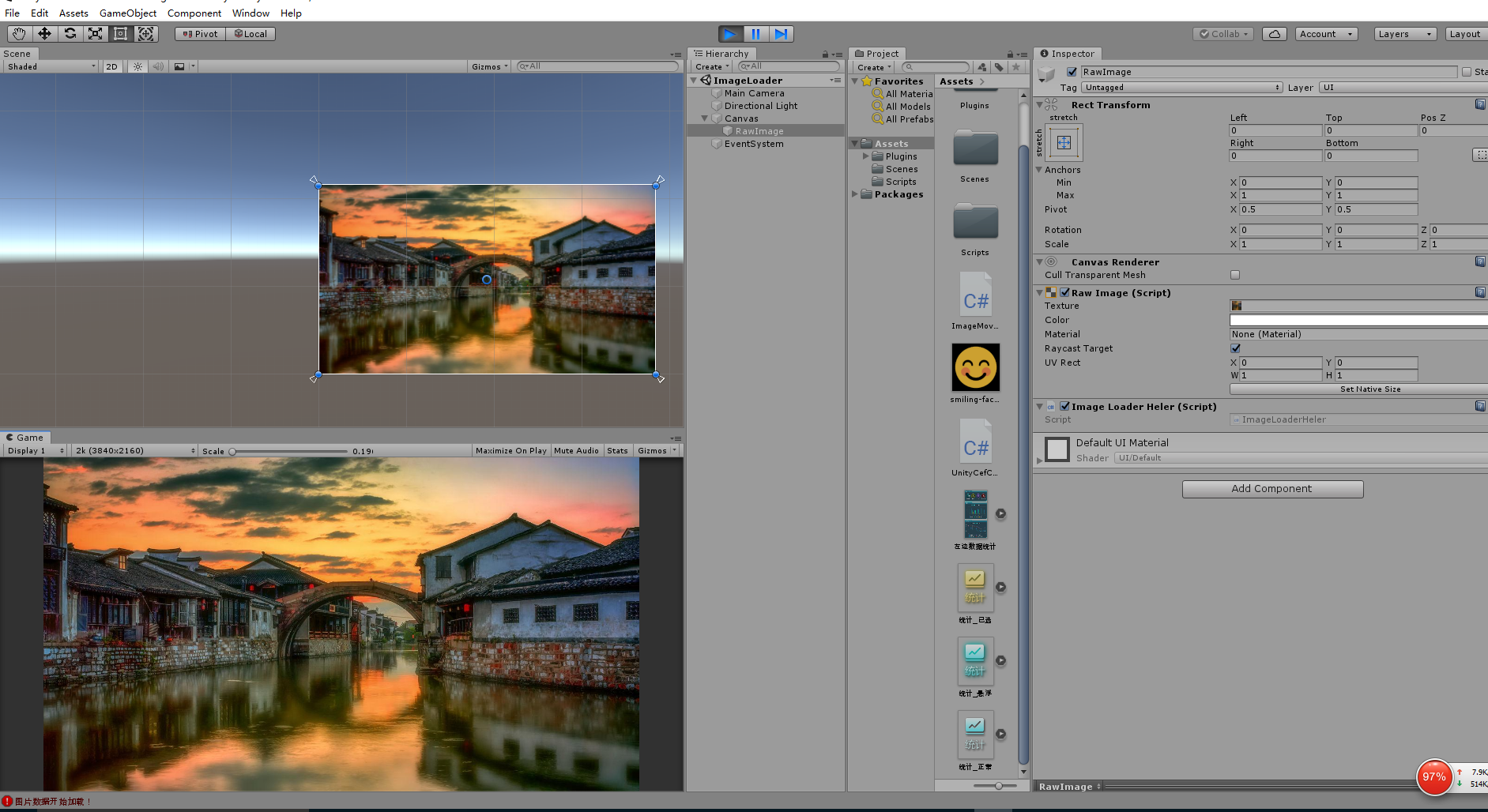
效果如下:
unity 加载网络图片的更多相关文章
- 【WPF】wpf image控件加载网络图片不显示问题,
1.加载网络图片到内存system.drawing.image对象中2.内存中的image 转Bitmap 再转适合system.windows.controls.image 的BitmapImage ...
- 有关DTCoreText无法加载网络图片及应用问题
至于DTCoreText是干嘛的,不清楚的同学自行网上脑补,这就不啰嗦了,只说一下其用法. 里面有三种控件供大家使用,DTAttributedTextView, DTAttributedLabel 和 ...
- [转]全面理解Unity加载和内存管理
[转]全面理解Unity加载和内存管理 最近一直在和这些内容纠缠,把心得和大家共享一下: Unity里有两种动态加载机制:一是Resources.Load,一是通过AssetBundle,其实两者本质 ...
- [原创]cocos2dx加载网络图片&异步加载图片
[动机] 之前看到一款卡牌游戏,当你要看全屏高清卡牌的时候,游戏会单独从网络上下载,本地只存了非高清的,这样可以省点包大小,所以我萌生了实现一个读取网络图片的类. [联想] 之前浏览网页的时候经常看到 ...
- SDWebImage 加载网络图片失败,重新运行,就能加载成功。
现象: 使用SDWebImage 加载网络图片,偶尔会有一两张图片就是显示不出来.重新运行有时又可以了. 这个问题的原因是: 当SDWebImage 在加载图片的时候 我用的是- (void)sd_s ...
- Android Volley入门到精通:使用Volley加载网络图片
在上一篇文章中,我们了解了Volley到底是什么,以及它的基本用法.本篇文章中我们即将学习关于Volley更加高级的用法,如何你还没有看过我的上一篇文章的话,建议先去阅读Android Volley完 ...
- Android三种基本的加载网络图片方式(转)
Android三种基本的加载网络图片方式,包括普通加载网络方式.用ImageLoader加载图片.用Volley加载图片. 1. [代码]普通加载网络方式 ? 1 2 3 4 5 6 7 8 9 10 ...
- 仿微信朋友圈图片查看-glide加载网络图片,photoview 实现缩放
http://www.cnblogs.com/csonezp/p/5083286.html 这里实现的效果就和微信朋友圈点击图片后查看大图一样,如果你不清楚是什么效果,可以拿出手机,打开朋友圈,找到一 ...
- android官方开源的高性能异步加载网络图片的Gridview例子
这个是我在安卓安卓巴士上看到的资料,放到这儿共享下.这个例子android官方提供的,其中讲解了如何异步加载网络图片,以及在gridview中高效率的显示图片此代码很好的解决了加载大量图片时,报OOM ...
随机推荐
- 冒泡法排序_c++实现
看完了郝斌老师的c语言视频,冒泡法排序,就试着写了.我觉得学习算法最重要的不是代码,而是它的原理. 代码: /** 2 * Copyright (c) 1991 - 2016 Arvin Tang. ...
- Java中的equals和==的区别以及几个常用的object中的方法简单的调试方法
一.equals 1.equals:是Object类中的方法,只能判断引用类型 2.默认判断的是地址是否相等(判断两个参数是否是同一个对象),子类中往往重写该方法,用于判断内容(值)是否相等 二.== ...
- Vue2.0源码学习(4) - 合并配置
合并配置 通过之前的源码学习,我们已经了解到了new Vue主要有两种场景,第一种就是在外部主动调用new Vue创建一个实例,第二个就是代码内部创建子组件的时候自行创建一个new Vue实例.但是无 ...
- nginx域名转发
场景1:因服务器限制,所以只对外开放了一个端口,但是需要请求不同的外网环境,所以在中转服务器上用nginx做了一次转发 实现: server { listen 8051; server_name lo ...
- ajax读本地文件
前置条件: 1. 编辑器,我用的是HbuilderX,解压即食,非常美味,点击传送门. 2. jQuery.min.js,点击传送门. 简单的项目目录: a. test.html内容 <!DOC ...
- ASPack壳脱壳实验
实验目的 1.学会使用相关软件工具,手动脱ASPack壳. 2.不要用PEiD查入口,单步跟踪,提高手动找入口能力. 实验内容 手动对文件"ASPack 2.12 - Alexey Solo ...
- [iptables] 基于iptables实现的跨网络通信
描述 在很多业务场景下,会遇上很多诡异的需求,不仅限于文章提及的需求,还有各种五花八门的需求,大部份的这些需求的产生都是来源于以前设计.规划上导致的问题.所以我们都会想尽办法为客户解决问题,维护好客户 ...
- Oracle的发展历程
我们学习的是ORACLE(甲骨文)公司(就是收购Sun公司的甲骨文公司)的Oracle数据库(Oracle Database).Oracle数据库是关系型数据库中的大型数据库,存储量大,而且也非常安全 ...
- 【C#版本】微信公众号模板消息对接(一)(图文详解)
特此说明:本篇文章为个人原创文章,创作不易,未经作者本人同意.许可等条件,不得以任何形式搬运.转载.抄袭(等包括但不限于此手段)本文章,否则保留追究有关侵权人责任的权利 一.认识微信公众号模板消息 什 ...
- Bagging与随机森林
Bagging Bagging是并行式集成学习算法最著名的代表,基于自助采样法(bootstrap sampling). 给定m个样本的数据集,选取m次,每次选1个样本,构成一个新的样本集,其中有的样 ...