
AdsStream的使用
本例子是测试ads通信的。
1.首先添加TwinCAT.Ads引用
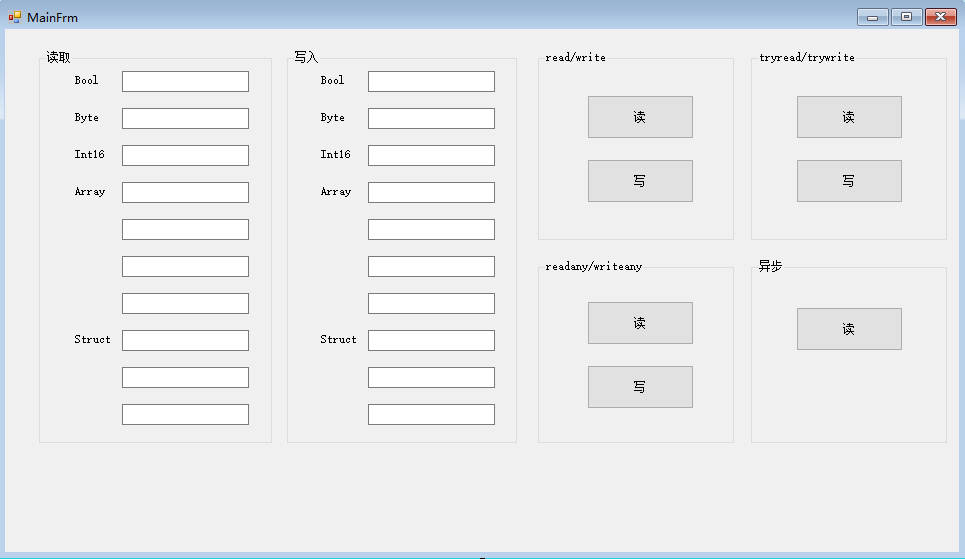
using System;
using System.Collections.Generic;
using System.ComponentModel;
using System.Data;
using System.Diagnostics;
using System.Drawing;
using System.Linq;
using System.Reflection;
using System.Runtime.InteropServices;
using System.Text;
using System.Threading.Tasks;
using System.Windows.Forms;
using TwinCAT.Ads;
namespace AdsProject
{
public partial class Main : Form
{
public TcAdsClient _client = null;
//创建句柄
public int _handleBool = 0;
public int _handleByte = 0;
public int _handleInt = 0;
public int _handleArray= 0;//int
public int _handleStruct = 0;//int16 byte real(2+1+4=7) (plc中的Int对应的C#中的int16,Dint对应int,real对应float,lreal对应double,Dword对应uint32)
public int _handleStruct2 = 0;//高级结构体句柄 public int _notificationHandleInt = 0;
public int _notificationHandleStruct = 0;
public int _notificationHandleStruct2 = 0; [StructLayout(LayoutKind.Sequential, Pack = 8)]
struct TestStruct
{
[MarshalAs(UnmanagedType.I2)]
public Int16 nData;
[MarshalAs(UnmanagedType.I1)]
public byte byVal;
[MarshalAs(UnmanagedType.R4)]
public float fVal;
} public Main()
{
InitializeComponent();
}
private void Main_Load(object sender, EventArgs e)
{
try
{
if (_client == null)
{
_client = new TcAdsClient();
} //Occurs when the ADS device sends a ADS Notification(通知) to the client.
//当PLC发送数据给客户端的时候触发回调函数
//回调方式1
_client.AdsNotification += new AdsNotificationEventHandler(AdsNotificationEventOnChange);
//回调方式2
_client.AdsNotificationEx += new AdsNotificationExEventHandler(AdsNotificationEventOnChangeEx);
_client.Connect(851);
_handleBool = _client.CreateVariableHandle("MAIN.Data_Bool");
_handleByte = _client.CreateVariableHandle("MAIN.Data_Byte");
_handleInt = _client.CreateVariableHandle("MAIN.Data_Int");
_handleArray = _client.CreateVariableHandle("MAIN.Data_Array");
_handleStruct = _client.CreateVariableHandle("MAIN.Data_Struct");
_handleStruct2 = _client.CreateVariableHandle("GVL.stAxis");
}
catch(Exception ex)
{
MessageBox.Show(ex.Message);
} } //回调函数2:当设备向客户端发送数据的时候触发
private void AdsNotificationEventOnChangeEx(object sender, AdsNotificationExEventArgs e)
{
if (e.NotificationHandle == _notificationHandleInt)
{
Debug.WriteLine(e.Value.ToString());
this.BeginInvoke(new Action(() =>
{
this.txtReadInt.Text = e.Value.ToString();
}));
}
else if (e.NotificationHandle == _notificationHandleStruct)
{
TestStruct testc = (TestStruct)e.Value;
Debug.WriteLine(testc.nData.ToString());
Debug.WriteLine(testc.byVal.ToString());
Debug.WriteLine(testc.fVal.ToString());
//因为是跨线程操作
this.BeginInvoke(new Action(() =>
{
this.txtReadStructInt16.Text = testc.nData.ToString();
this.txtReadStructByte.Text = testc.byVal.ToString();
this.txtReadStructFloat.Text = testc.fVal.ToString();
}));
}
//读取高级结构体
else if (e.NotificationHandle==_notificationHandleStruct2)
{
Plc_StAxisInfo plcStAxis = new Plc_StAxisInfo();
plcStAxis = (Plc_StAxisInfo)e.Value;
foreach (Plc_StAxis plc_StAxis in plcStAxis.Axis)
{
//获取结构体中的所有字段
FieldInfo[] fieldInfos = typeof(Plc_StAxis).GetFields();
int FieldCount = fieldInfos.Length;
for(int i=0;i< FieldCount;i++)
{
if (fieldInfos[i].FieldType.Name == "Byte[]")
{
byte[] b = (byte[])fieldInfos[i].GetValue(plc_StAxis);
foreach (var item in b)
{
Debug.WriteLine(item.ToString());
}
}
else if (fieldInfos[i].FieldType.Name == "Double[]")
{
double[] d = (double[])fieldInfos[i].GetValue(plc_StAxis);
foreach (var item in d)
{
Debug.WriteLine(item.ToString());
}
}
else
{
//获取字段值
Debug.WriteLine(fieldInfos[i].GetValue(plc_StAxis));
}
}
}
}
} //回调函数1:当设备向客户端发送数据的时候触发
private void AdsNotificationEventOnChange(object sender, AdsNotificationEventArgs e)
{
//AdsBinaryReader reader = new AdsBinaryReader(e.DataStream);
//if (e.NotificationHandle == _notificationHandleInt)
// Debug.WriteLine(reader.ReadInt16());
//else if (e.NotificationHandle == _notificationHandleStruct)
//{
// Debug.WriteLine(reader.ReadInt16());
// Debug.WriteLine(reader.ReadByte());
// reader.ReadByte();
// Debug.WriteLine(reader.ReadSingle());
//}
} //read
private void btnRead_Click(object sender, EventArgs e)
{
AdsStream stream = new AdsStream(100);
AdsBinaryReader reader = new AdsBinaryReader(stream);
_client.Read(_handleBool,stream);//读取设备中的数据并写入到文件流stream中
txtReadBool.Text = reader.ReadBoolean().ToString();//从当前文件流中读取Boolean值,并使当前流的位置提升1个字节 _client.Read(_handleByte, stream);
stream.Seek(0,System.IO.SeekOrigin.Begin);//设定流的位置为开头
txtReadByte.Text = reader.ReadByte().ToString();//从当前文件流中读取Boolean值,并使当前流的位置提升1个字节 _client.Read(_handleInt, stream);
stream.Seek(0, System.IO.SeekOrigin.Begin);//设定流的位置为开头
txtReadInt.Text = reader.ReadInt16().ToString();//从当前文件流中读取Boolean值,并使当前流的位置提升2个字节 _client.Read(_handleArray,stream);
stream.Seek(0, System.IO.SeekOrigin.Begin);//设定流的位置为开头
txtReadArrayInt1.Text = reader.ReadInt16().ToString();//从当前文件流中读取Boolean值,并使当前流的位置提升2个字节
txtReadArrayInt2.Text = reader.ReadInt16().ToString();
txtReadArrayInt3.Text = reader.ReadInt16().ToString();
txtReadArrayInt4.Text = reader.ReadInt16().ToString(); _client.Read(_handleStruct,stream);
stream.Seek(0,System.IO.SeekOrigin.Begin);
txtReadStructInt16.Text = reader.ReadInt16().ToString();
txtReadStructByte.Text = reader.ReadByte().ToString();
reader.ReadByte();//前面Int16是两个字节,byte是一个字节,一共三个字节,而float是占四个字节,要从第五个字节开始读,所以要再读第四个字节,然后跳到第五个字节
txtReadStructFloat.Text = reader.ReadSingle().ToString(); } //write
private void btnWrite_Click(object sender, EventArgs e)
{
try
{
AdsStream stream = new AdsStream(100);
AdsBinaryWriter writer = new AdsBinaryWriter(stream); writer.Write(Boolean.Parse(txtWriteBool.Text));
_client.Write(_handleBool, stream, 0, 1); stream.Seek(0, System.IO.SeekOrigin.Begin);//设定流的位置为开头
writer.Write(Byte.Parse(txtWriteByte.Text));
_client.Write(_handleByte, stream, 0, 1); stream.Seek(0, System.IO.SeekOrigin.Begin);//设定流的位置为开头
writer.Write(Int16.Parse(txtWriteInt.Text));
_client.Write(_handleInt, stream, 0, 2); stream.Seek(0, System.IO.SeekOrigin.Begin);//设定流的位置为开头
writer.Write(Int16.Parse(txtWriteArrayInt1.Text));
writer.Write(Int16.Parse(txtWriteArrayInt2.Text));
writer.Write(Int16.Parse(txtWriteArrayInt3.Text));
writer.Write(Int16.Parse(txtWriteArrayInt4.Text));
_client.Write(_handleArray, stream, 0, 8); stream.Seek(0, System.IO.SeekOrigin.Begin);
writer.Write(Int16.Parse(txtWriteStructInt16.Text));
writer.Write(Byte.Parse(txtWriteStructByte.Text));
writer.Write((Byte)0);//写入第四个字节
writer.Write(float.Parse(txtWriteStructFloat.Text));
_client.Write(_handleStruct, stream, 0, 8); }
catch (Exception ex)
{
MessageBox.Show(ex.Message);
}
} //readany
private void btnReadAny_Click(object sender, EventArgs e)
{
try
{
txtReadBool.Text = _client.ReadAny(_handleBool, typeof(Boolean)).ToString();
txtReadByte.Text = _client.ReadAny(_handleByte, typeof(Byte)).ToString();
txtReadInt.Text = _client.ReadAny(_handleInt, typeof(Int16)).ToString();
//从设备中读取short[]
short[] testint = (short[])_client.ReadAny(_handleArray, typeof(short[]),new int[] { 4});
txtReadArrayInt1.Text = testint[0].ToString();
txtReadArrayInt2.Text = testint[1].ToString();
txtReadArrayInt3.Text = testint[2].ToString();
txtReadArrayInt4.Text = testint[3].ToString();
// //从设备中读取TestStruct
TestStruct tstruct = (TestStruct)_client.ReadAny(_handleStruct, typeof(TestStruct));
txtReadStructInt16.Text = tstruct.nData.ToString();
txtReadStructByte.Text = tstruct.byVal.ToString();
txtReadStructFloat.Text = tstruct.fVal.ToString();
}
catch (Exception ex) {
MessageBox.Show(ex.Message);
}
} //writeany
private void btnWriteAny_Click(object sender, EventArgs e)
{
short[] arraytest = new short[4]
{
short.Parse(txtWriteArrayInt1.Text),
short.Parse(txtWriteArrayInt2.Text),
short.Parse(txtWriteArrayInt3.Text),
short.Parse(txtWriteArrayInt4.Text)
};
TestStruct tstruct = new TestStruct();
tstruct.nData = Int16.Parse(txtWriteStructInt16.Text);
tstruct.byVal = Byte.Parse(txtWriteStructByte.Text);
tstruct.fVal = float.Parse(txtWriteStructFloat.Text); _client.WriteAny(_handleBool, Boolean.Parse(txtWriteBool.Text));//写入值到设备中
_client.WriteAny(_handleByte, Byte.Parse(txtWriteByte.Text));//写入值到设备中
_client.WriteAny(_handleInt, Int16.Parse(txtWriteInt.Text));//写入值到设备中
_client.WriteAny(_handleArray, arraytest);//写入值到设备中
_client.WriteAny(_handleStruct, tstruct);//写入值到设备中
}
//tryread
private void btnTryRead_Click(object sender, EventArgs e)
{
int readBytes = 0;
AdsStream stream = new AdsStream(100);
AdsBinaryReader reader = new AdsBinaryReader(stream);
//tryread函数如果读不出来将会返回errorcode,而不是抛出异常
AdsErrorCode code = _client.TryRead((uint)AdsReservedIndexGroups.SymbolValueByHandle, (uint)_handleBool, stream, out readBytes);
txtReadBool.Text = reader.ReadBoolean().ToString(); stream.Seek(0, System.IO.SeekOrigin.Begin);
_client.TryRead((uint)AdsReservedIndexGroups.SymbolValueByHandle, (uint)_handleInt, stream, out readBytes);
txtReadInt.Text = reader.ReadInt16().ToString(); stream.Seek(0, System.IO.SeekOrigin.Begin);
_client.TryRead((uint)AdsReservedIndexGroups.SymbolValueByHandle, (uint)_handleByte, stream, out readBytes);
txtReadByte.Text = reader.ReadByte().ToString(); stream.Seek(0, System.IO.SeekOrigin.Begin);
_client.TryRead((uint)AdsReservedIndexGroups.SymbolValueByHandle, (uint)_handleStruct, stream, out readBytes);
txtReadStructInt16.Text = reader.ReadInt16().ToString();
txtReadStructByte.Text = reader.ReadByte().ToString();
reader.ReadByte();
txtReadStructFloat.Text = reader.ReadSingle().ToString(); _client.TryRead((uint)AdsReservedIndexGroups.SymbolValueByHandle, (uint)_handleArray, stream, out readBytes);
stream.Seek(0, System.IO.SeekOrigin.Begin);
txtReadArrayInt1.Text = reader.ReadInt16().ToString();
txtReadArrayInt2.Text = reader.ReadInt16().ToString();
txtReadArrayInt3.Text = reader.ReadInt16().ToString();
txtReadArrayInt4.Text = reader.ReadInt16().ToString();
}
//trywrite
private void btnTryWrite_Click(object sender, EventArgs e)
{
AdsStream stream = new AdsStream(100);
AdsBinaryWriter writer = new AdsBinaryWriter(stream);
//trywrite函数如果读不出来将会返回errorcode,而不是抛出异常
writer.Write(Boolean.Parse(txtWriteBool.Text));
AdsErrorCode code1 = _client.TryWrite((uint)AdsReservedIndexGroups.SymbolValueByHandle, (uint)_handleBool, stream,0,1); stream.Seek(0, System.IO.SeekOrigin.Begin);
writer.Write(Byte.Parse(txtWriteByte.Text));
AdsErrorCode code2 = _client.TryWrite((uint)AdsReservedIndexGroups.SymbolValueByHandle, (uint)_handleByte, stream, 0, 1); stream.Seek(0, System.IO.SeekOrigin.Begin);
writer.Write(Int16.Parse(txtWriteInt.Text));
AdsErrorCode code3 = _client.TryWrite((uint)AdsReservedIndexGroups.SymbolValueByHandle, (uint)_handleInt, stream, 0, 2); stream.Seek(0, System.IO.SeekOrigin.Begin);
writer.Write(Int16.Parse(txtWriteArrayInt1.Text));
writer.Write(Int16.Parse(txtWriteArrayInt2.Text));
writer.Write(Int16.Parse(txtWriteArrayInt3.Text));
writer.Write(Int16.Parse(txtWriteArrayInt4.Text));
AdsErrorCode code4 = _client.TryWrite((uint)AdsReservedIndexGroups.SymbolValueByHandle, (uint)_handleArray, stream, 0, 8); stream.Seek(0, System.IO.SeekOrigin.Begin);
writer.Write(Int16.Parse(txtWriteStructInt16.Text));
writer.Write(Byte.Parse(txtWriteStructByte.Text));
writer.Write((Byte)0);//写入第四个字节
writer.Write(float.Parse(txtWriteStructFloat.Text));
AdsErrorCode code5 = _client.TryWrite((uint)AdsReservedIndexGroups.SymbolValueByHandle, (uint)_handleStruct, stream, 0, 8);
} private void btnAsyncRead_Click(object sender, EventArgs e)
{
//启动回调
_notificationHandleInt = _client.AddDeviceNotificationEx("MAIN.Data_Int", AdsTransMode.OnChange, 1, 0, this, typeof(short));
_notificationHandleStruct = _client.AddDeviceNotificationEx("MAIN.Data_Struct", AdsTransMode.OnChange, 1, 0, this, typeof(TestStruct)); } private void Main_FormClosed(object sender, FormClosedEventArgs e)
{
if (_client != null)
{
_client.Disconnect();
}
_client.Dispose();
} //利用回调的方式读取高级结构体数据
private void btn_ReadStruct_Click_1(object sender, EventArgs e)
{
_notificationHandleStruct2 = _client.AddDeviceNotificationEx("GVL.stAxis", AdsTransMode.OnChange, 1, 0, this, typeof(Plc_StAxisInfo)); } //写高级结构体
private void btn_WriteStruct_Click(object sender, EventArgs e)
{
Plc_StAxisInfo plcStAxis = new Plc_StAxisInfo();
plcStAxis.Axis = new Plc_StAxis[10];
plcStAxis.Axis[0].ToDriverIO = 26;
plcStAxis.Axis[1].ToDriverIO = 36;
plcStAxis.Axis[2].ToDriverIO = 46;
plcStAxis.Axis[3].ToDriverIO = 56;
plcStAxis.Axis[4].ToDriverIO = 66;
plcStAxis.Axis[5].ToDriverIO = 76;
plcStAxis.Axis[6].ToDriverIO = 86;
plcStAxis.Axis[7].ToDriverIO = 96;
plcStAxis.Axis[8].ToDriverIO = 106;
_client.WriteAny(_handleStruct2, plcStAxis);//写入值到设备中
} //readonly方式
private void btnReadAnyStruct_Click(object sender, EventArgs e)
{
Plc_StAxisInfo plcStAxis = (Plc_StAxisInfo)_client.ReadAny(_handleStruct2, typeof(Plc_StAxisInfo));
foreach (Plc_StAxis plc_StAxis in plcStAxis.Axis)
{
//获取结构体中的所有字段
FieldInfo[] fieldInfos = typeof(Plc_StAxis).GetFields();
int FieldCount = fieldInfos.Length;
for (int i = 0; i < FieldCount; i++)
{
if (fieldInfos[i].FieldType.Name == "Byte[]")
{
byte[] b = (byte[])fieldInfos[i].GetValue(plc_StAxis);
foreach (var item in b)
{
Debug.WriteLine(item.ToString());
}
}
else if (fieldInfos[i].FieldType.Name == "Double[]")
{
double[] d = (double[])fieldInfos[i].GetValue(plc_StAxis);
foreach (var item in d)
{
Debug.WriteLine(item.ToString());
}
}
else
{
//获取字段值
Debug.WriteLine(fieldInfos[i].GetValue(plc_StAxis));
}
}
}
}
}
}
using System;

using System.Collections.Generic;

using System.Linq;

using System.Runtime.InteropServices;

using System.Text;

using System.Threading.Tasks;

namespace AdsProject

{

    //对于一些超复杂的结构体,使用普通DataStream是很难读取的,比较方便的方式是申请一个同等大小的结构体,然后用readany读取

    //PLC-->c#:BOOL--->bool, UINT--->Uint16, DWORD--->int32,LREAL-->Double,UDINT--->Uint32,ARRAY--->数组

    [StructLayout(LayoutKind.Sequential, Pack = 8)]

    public struct Plc_StAxis

    {

        //UINT

        [MarshalAs(UnmanagedType.U2)]

        public UInt16 DriverIO;

        [MarshalAs(UnmanagedType.U2)]

        public UInt16 DriverErrorID;

        //BOOL

        [MarshalAs(UnmanagedType.I1)]

        public bool Q_Brake;

        [MarshalAs(UnmanagedType.I1)]

        public bool AxisCamDog1;

        [MarshalAs(UnmanagedType.I1)]

        public bool AxisCamDog2;

        [MarshalAs(UnmanagedType.I1)]

        public bool LimitP;

        [MarshalAs(UnmanagedType.I1)]

        public bool LimitN;

        [MarshalAs(UnmanagedType.I1)]

        public bool HOME;

        [MarshalAs(UnmanagedType.I1)]

        public bool HomingDirection;

        [MarshalAs(UnmanagedType.I1)]

        public bool EXT1;

        //DWORD

        [MarshalAs(UnmanagedType.U4)]

        public UInt32 ToDriverIO;

        //BOOL

        [MarshalAs(UnmanagedType.I1)]

        public bool ServoOn_HMI;

        [MarshalAs(UnmanagedType.I1)]

        public bool ServoOnInt;

        [MarshalAs(UnmanagedType.I1)]

        public bool Homing_HMI;

        [MarshalAs(UnmanagedType.I1)]

        public bool HomingInt;

        [MarshalAs(UnmanagedType.I1)]

        public bool BrakeBtn_HMI;

        [MarshalAs(UnmanagedType.I1)]

        public bool Inch_HMI;

        [MarshalAs(UnmanagedType.I1)]

        public bool JogF_HMI;

        [MarshalAs(UnmanagedType.I1)]

        public bool JogB_HMI;

        [MarshalAs(UnmanagedType.I1)]

        public bool StationIni;

        [MarshalAs(UnmanagedType.I1)]

        public bool AutoPStart_HMI;

        [MarshalAs(UnmanagedType.I1)]

        public bool StopCond;

        [MarshalAs(UnmanagedType.I1)]

        public bool ServoOn_L;

        [MarshalAs(UnmanagedType.I1)]

        public bool OriginOk_L;

        [MarshalAs(UnmanagedType.I1)]

        public bool SingleCycle;

        [MarshalAs(UnmanagedType.I1)]

        public bool Busy;

        //LREAL

        [MarshalAs(UnmanagedType.R8)]

        public double ActPos;

        [MarshalAs(UnmanagedType.R8)]

        public double AutoPosition;

        //DWORD

        [MarshalAs(UnmanagedType.U4)]

        public UInt32 Alarm1;

        //DINT

        [MarshalAs(UnmanagedType.U4)]

        public UInt32 ErrorID;

        //BOOL

        [MarshalAs(UnmanagedType.I1)]

        public bool ActionEnable;   //轴可动作

        [MarshalAs(UnmanagedType.I1)]

        public bool ActionM;   //轴手动基本条件

        [MarshalAs(UnmanagedType.I1)]

        public bool PosEnable;

        [MarshalAs(UnmanagedType.I1)]

        public bool PosEnableM;

        [MarshalAs(UnmanagedType.I1)]

        public bool BackAutoPosEN;

        [MarshalAs(UnmanagedType.I1)]

        public bool Homing;   //轴回原点

        [MarshalAs(UnmanagedType.I1)]

        public bool MotionMethod;   //轴初始化回原点

        [MarshalAs(UnmanagedType.I1)]

        public bool ServoOn_M;   //伺服ON

        [MarshalAs(UnmanagedType.I1)]

        public bool Inch_M;   //寸动

        [MarshalAs(UnmanagedType.I1)]

        public bool JogF_M;   //正向微动

        [MarshalAs(UnmanagedType.I1)]

        public bool JogB_M;   //反向微动

        [MarshalAs(UnmanagedType.I1)]

        public bool AutoPStart_M;   //轴自动停位启动

        [MarshalAs(UnmanagedType.I1)]

        public bool BrakeBtn_M;   //刹车

        [MarshalAs(UnmanagedType.I1)]

        public bool GrabSafetyPos;

        [MarshalAs(UnmanagedType.I1)]

        public bool PlacedSafetyPos;

        // //ARRAY[1..10] OF BYTE

        [MarshalAs(UnmanagedType.ByValArray, SizeConst = 10)]

        public byte[] PosHandStart;   //轴手动启动

        [MarshalAs(UnmanagedType.ByValArray, SizeConst = 10)]

        public byte[] PosHandStartM;   //轴手动启动

        [MarshalAs(UnmanagedType.ByValArray, SizeConst = 10)]

        public byte[] PosAutoStart;   //轴自动启动

        [MarshalAs(UnmanagedType.ByValArray, SizeConst = 10)]

        public byte[] PosStart_M;   //轴启动

        [MarshalAs(UnmanagedType.ByValArray, SizeConst = 10)]

        public byte[] Position_L;   //轴位指示

        [MarshalAs(UnmanagedType.ByValArray, SizeConst = 10)]

        public byte[] PosHandEnable;   //轴手动条件

        //LREAL

        [MarshalAs(UnmanagedType.R8)]

        public double VelocityTotal;  //速度汇总

        [MarshalAs(UnmanagedType.R8)]

        public double OriginCompensation;  //原点补偿

        [MarshalAs(UnmanagedType.R8)]

        public double InchingLength;  //寸动长度

        [MarshalAs(UnmanagedType.R8)]

        public double Override;  //速度倍率

        [MarshalAs(UnmanagedType.R8)]

        public double JogVelocity;  //微动速度

        [MarshalAs(UnmanagedType.R8)]

        public double VelocityManual;  //轴手动速度

        [MarshalAs(UnmanagedType.R8)]

        public double VelocityAuto;  //轴自动速度

        [MarshalAs(UnmanagedType.R8)]

        public double VelocityAutoM;  //轴自动速度M

        [MarshalAs(UnmanagedType.R8)]

        public double VelocityDebug;  //调试速度

        [MarshalAs(UnmanagedType.R8)]

        public double HomingVelocity;  //原点补偿与寸动速度

        [MarshalAs(UnmanagedType.R8)]

        public double ErrorRangeSet;  //轴误差范围设定

        [MarshalAs(UnmanagedType.I4)]

        public Int32 AlarmCount;   //报警计数

        //ARRAY[1..10] OF LREAL

        [MarshalAs(UnmanagedType.ByValArray, SizeConst = 10)]

        public double[] PositionSet;

        //LREAL

        [MarshalAs(UnmanagedType.R8)]

        public double DTerminalVelocity;  //对端子速度

        [MarshalAs(UnmanagedType.R8)]

        public double TerminalvelocityManual;  //对端子手动速度

        [MarshalAs(UnmanagedType.R8)]

        public double TerminalvelocityAuto;    //对端子自动速度

    }

    //GVL中的stAxis数组

    [StructLayout(LayoutKind.Sequential, Pack = 8)]

    public struct Plc_StAxisInfo

    {

        [MarshalAs(UnmanagedType.ByValArray, SizeConst = 10)]

        public Plc_StAxis[] Axis;

    }

}
倍福plc端
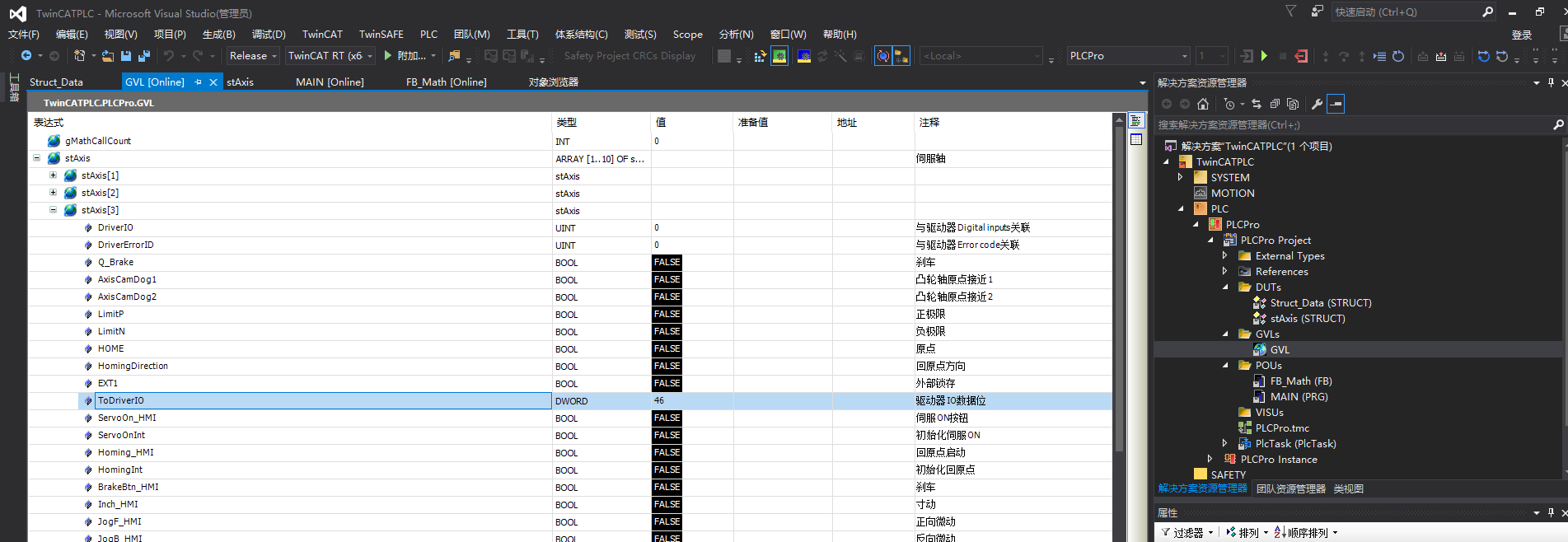
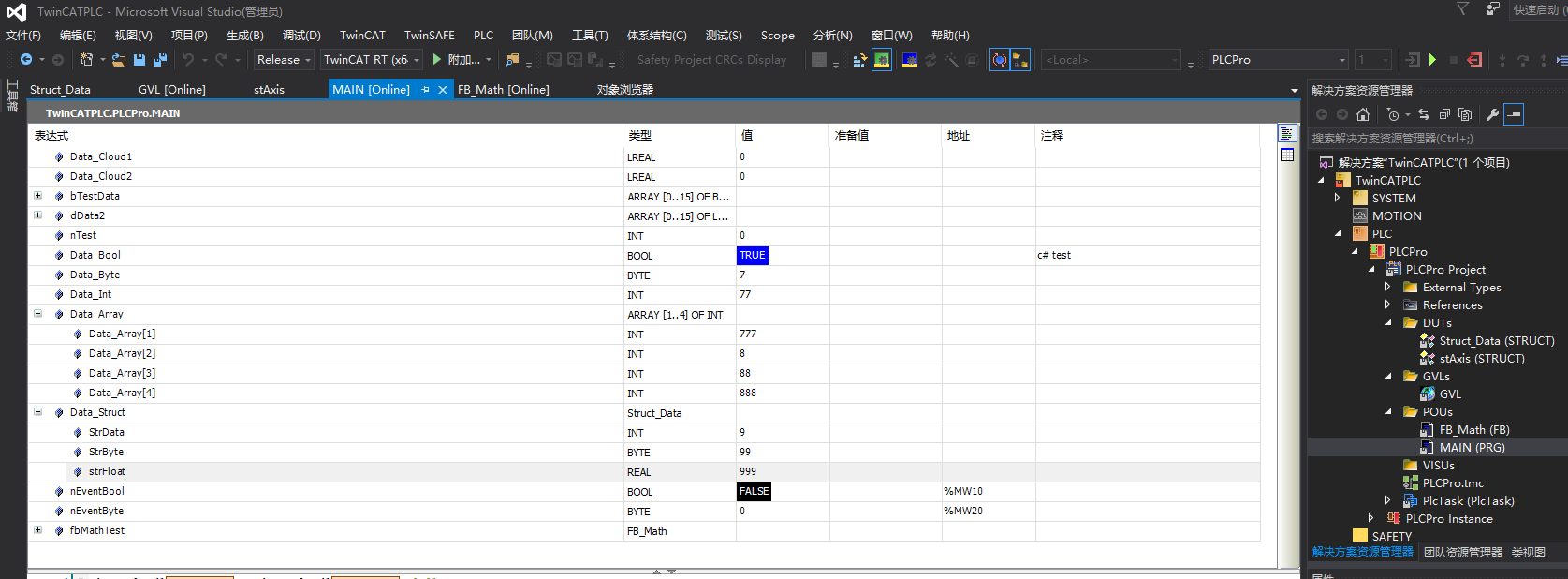
StAixis代码:
(********************************************************************)

  //结构体数据说明:

  //备注:

(********************************************************************)

TYPE stAxis :

STRUCT

    DriverIO                     AT%I*:UINT; //与驱动器Digital inputs关联

    DriverErrorID                AT%I*:UINT; //与驱动器Error code关联

//    ModelOperation               AT%Q*:SINT; //操作模式与驱动器Model of operation关联

    Q_Brake                      AT%Q*:BOOL; //刹车

    AxisCamDog1                  AT%Q*:BOOL; //凸轮轴原点接近1

    AxisCamDog2                  AT%Q*:BOOL; //凸轮轴原点接近2

    LimitP                            :BOOL; //正极限

    LimitN                            :BOOL; //负极限

    HOME                              :BOOL; //原点

    HomingDirection                   :BOOL; //回原点方向

    EXT1                              :BOOL; //外部锁存

    ToDriverIO                        :DWORD;//驱动器IO数据位

    ServoOn_HMI                       :BOOL; //伺服ON按钮

    ServoOnInt                        :BOOL; //初始化伺服ON

    Homing_HMI                        :BOOL; //回原点启动

    HomingInt                         :BOOL; //初始化回原点

    BrakeBtn_HMI                      :BOOL; //刹车

    Inch_HMI                          :BOOL; //寸动

    JogF_HMI                          :BOOL; //正向微动

    JogB_HMI                          :BOOL; //反向微动

    StationIni                        :BOOL; //轴所在工位初始化中

    AutoPStart_HMI                    :BOOL; //轴自动停位启动

    StopCond                          :BOOL; //轴停止条件

    ServoOn_L                         :BOOL; //伺服ON_L

    OriginOk_L                        :BOOL; //原点OK标志

    SingleCycle                       :BOOL; //轴所在工位单循环

    Busy                              :BOOL; //轴忙

    ActPos                            :LREAL;//轴当前实际位置

    AutoPosition                      :LREAL;//轴自动停位

    Alarm                             :DWORD;  //报警:00伺服报警 01负极限异常 02正极限异常 03原点接近异常 04轴未找到原点 05轴不在自停位 06伺服驱动器异常 08轴未伺服On

    ErrorID                           :UDINT;

    ActionEnable                      :BOOL; //轴可动作

    ActionEnableM                     :BOOL; //轴可动作M

    PosEnable                         :BOOL; //轴手动基本条件

    PosEnableM                        :BOOL; //轴手动基本条件M

    BackAutoPosEN                     :BOOL; //轴可自动回自停位

    Homing                            :BOOL; //轴回原点

    MotionMethod                      :BOOL; //运动方式 0相对1绝对

    ServoOn_M                         :BOOL; //伺服ON

    Inch_M                            :BOOL; //寸动

    JogF_M                            :BOOL; //正向微动

    JogB_M                            :BOOL; //反向微动

    AutoPStart_M                      :BOOL; //轴自动停位启动

    BrakeBtn_M                        :BOOL; //刹车

    GrabSafetyPos                     :BOOL;  //抓取安全位

    PlacedSafetyPos                   :BOOL;  //放料安全位

    PosHandStart                      :ARRAY[1..10] OF BOOL; //轴手动启动

    PosHandStartM                     :ARRAY[1..10] OF BOOL; //轴手动启动

    PosAutoStart                      :ARRAY[1..10] OF BOOL; //轴自动启动

    PosStart_M                        :ARRAY[1..10] OF BOOL; //轴启动

    Position_L                        :ARRAY[1..10] OF BOOL; //轴位指示

    PositionDone                      :BOOL; //轴动作完成

    PosHandEnable                     :ARRAY[1..10] OF BOOL; //轴手动条件

    VelocityTotal                     :LREAL;//速度汇总

//

    originCompensation                :LREAL;//原点补偿

    InchLength                         :LREAL;//寸动长度

    Override                           :LREAL;//速度倍率

    JogVelocity                        :LREAL;//微动速度

    VelocityManual                     :LREAL;//轴手动速度

    VelocityAuto                       :LREAL;//轴自动速度

    VelocityAutoM                      :LREAL;//轴自动速度M

    VelocityDebug                      :LREAL;//调试速度

    HomeVelocity                       :LREAL;//原点补偿与寸动速度

    ErrorRangeSet                      :LREAL;//轴误差范围设定

    AlarmCount                         :DINT; //报警计数

    PositionSet                        :ARRAY[1..10] OF LREAL;//轴位置设置

    DTerminalVelocity                  :LREAL;//对端子速度

    TerminalvelocityManual             :LREAL;//对端子手动速度

    TerminalvelocityAuto               :LREAL;//对端子自动速度

END_STRUCT

END_TYPE
Struct_Data结构体代码
TYPE Struct_Data :

STRUCT

    StrData:INT:=45;

    StrByte:BYTE:=45;

    strFloat:REAL:=45.0;

END_STRUCT

END_TYPE
MAIN(PRO)代码:
PROGRAM MAIN

VAR

    Data_Cloud1: LREAL := 0;

    Data_Cloud2: LREAL := 0;

    bTestData:ARRAY[0..15] OF BOOL;

    dData2:ARRAY[0..15] OF LREAL;

    nTest:INT:=0;

    //c# test

    Data_Bool  : BOOL:=TRUE;

    Data_Byte  : BYTE:=120;

    Data_Int  : INT:=45;

    Data_Array  : ARRAY [1..4] OF INT:=[256,128,456,789];

    Data_Struct  : Struct_Data;

    nEventBool AT %MW10: BOOL;

    nEventByte AT %MW20: BYTE;

    fbMathTest:FB_Math;

END_VAR
AdsStream的使用的更多相关文章
- 倍福TwinCAT3上位机与PLC通信测试(ADS通信) 包含C#和C++代码
倍福TwinCAT3上位机与PLC通信测试(ADS通信) 包含C#和C++代码 本次测试需要环境: VS2013,TwinCAT3(本人版本TC31-Full-Setup.3.1.4018.16) 代 ...
- 倍福Ads协议通信测试
测试环境:vs2015 + TC31-Full-Setup.3.1.4022.30.exe 首先需要安装TC31-Full-Setup.3.1.4022.30.exe 本例子是用本机作测试,如果使用远 ...
随机推荐
- SETTLE约束算法中的坐标变换问题
技术背景 在之前的两篇文章中,我们分别讲解了SETTLE算法的原理和基本实现和SETTLE约束算法的批量化处理.SETTLE约束算法在水分子体系中经常被用到,该约束算法具有速度快.可并行.精度高的优点 ...
- OpenJudge1.5.17 菲波那契数列
17:菲波那契数列 总时间限制: 1000ms 内存限制: 65536kB 描述 菲波那契数列是指这样的数列: 数列的第一个和第二个数都为1,接下来每个数都等于前面2个数之和. 给出一个正整数k,要求 ...
- 10_Linux基础-SHELL入门1
@ 目录 10_Linux基础-SHELL入门1 一. 输入输出重定向 二. 2个特殊文件 三. here document 四. tee命令 五. 清空文件内容 六. SHELL入门 SHELL的变 ...
- HTTP2指纹识别(一种相对不为人知的网络指纹识别方法)
这是关于网络指纹识别的两部分系列的第二部分 上一部分我介绍了有关TLS 指纹识别方法(以及在不同客户端的指纹有何区别): https://mp.weixin.qq.com/s/BvotXrFXwYvG ...
- KingbaseES R6 集群修改物理IP和VIP案例
在用户的实际环境里,可能有时需要修改主机的IP,这就涉及到集群的配置修改.以下以例子的方式,介绍下KingbaseES R6集群如何修改IP. 一.案例测试环境 操作系统: [KINGBASE@nod ...
- 回溯剪枝,dfs,bfs
dfs: 给定一个整数n,将数字1~n排成一排,将会有很多种排列方法. 现在,请你按照字典序将所有的排列方法输出. 输入格式 共一行,包含一个整数n. 输出格式 按字典序输出所有排列方案,每个方案占一 ...
- 华南理工大学 Python第7章课后小测-2
1.(单选)以下选项中使Python脚本程序转变为可执行程序的第三方库的是(本题分数:3)A) NetworkxB) pyinstallC) RequestsD) PyPDF2您的答案:B 正确率: ...
- 从Spring中学到的【1】--读懂继承链
最近看了一些 Spring 源码,发现源码分析的文章很多,而底层思想分析的文章比较少,这个系列文章准备总结一下Spring中给我的启示,包括设计模式思想.SOLID设计原则等,涉及一些编程的基本原则, ...
- Elasticsearch6.2服务器升配后的bug
.suofang img { max-width: 100% !important; height: auto !important } 本篇文章记录最近一次生产服务器硬件升级之后引起集群不稳定的现象 ...
- Elasticsearch:Cluster备份 Snapshot及Restore API
Elasticsearch提供了replica解决方案,它可以帮我们解决了如果有一个或多个node失败了,那么我们的数据还是可以保证完整的情况,并且搜索还可以继续进行.但是,有一种情况是我们的所有的n ...