
代码and截图
1.babassl
ZUC算法代码:
#include <stdio.h>

#include <string.h>

#include <openssl/crypto.h>

#include <openssl/evp.h>

int main(int argc, char *argv[])

{

    EVP_MD_CTX *mctx = NULL;

    EVP_PKEY_CTX *pctx = NULL;

    EVP_PKEY *pkey = NULL;

    unsigned char *got = NULL;

    size_t got_len;

    char *mac;

    int rv;

    const char key[] = {

        0xc9, 0xe6, 0xce, 0xc4, 0x60, 0x7c, 0x72, 0xdb,

        0x00, 0x0a, 0xef, 0xa8, 0x83, 0x85, 0xab, 0x0a

        };

    /*

	 * EIA3 的 iv 只有5个字节(只用到38bit),不是随机构造,构造方法如下:

	 * |----------32bit----------|-----5bit-----|---1bit---|

	 * |          count          |    bearer    | direction|

 	 */

    const char *iv = "a94059da54";

    const char msg[] = {

        0x98, 0x3b, 0x41, 0xd4, 0x7d, 0x78, 0x0c, 0x9e,

        0x1a, 0xd1, 0x1d, 0x7e, 0xb7, 0x03, 0x91, 0xb1,

        0xde, 0x0b, 0x35, 0xda, 0x2d, 0xc6, 0x2f, 0x83,

        0xe7, 0xb7, 0x8d, 0x63, 0x06, 0xca, 0x0e, 0xa0,

        0x7e, 0x94, 0x1b, 0x7b, 0xe9, 0x13, 0x48, 0xf9,

        0xfc, 0xb1, 0x70, 0xe2, 0x21, 0x7f, 0xec, 0xd9,

        0x7f, 0x9f, 0x68, 0xad, 0xb1, 0x6e, 0x5d, 0x7d,

        0x21, 0xe5, 0x69, 0xd2, 0x80, 0xed, 0x77, 0x5c,

        0xeb, 0xde, 0x3f, 0x40, 0x93, 0xc5, 0x38, 0x81,

        0x00

        };

    size_t msg_len = 73;

    /*

	 * 将 EIA3 的 key 转换成 EVP_PKEY

	 */

    pkey = EVP_PKEY_new_raw_private_key(EVP_PKEY_EIA3, NULL, key, 16);

    if (pkey == NULL)

        goto end;

    mctx = EVP_MD_CTX_new();

    if (mctx == NULL)

        goto end;

    if (!EVP_DigestSignInit(mctx, &pctx, NULL, NULL, pkey))

        goto end;

    /*

	 * 设置 EIA3 的 iv,其中 iv 是十六进制的字符串形式

	 * 也可以设置 hexkey 来修改 key,同样是十六进制的字符吕形式

	 */

    rv = EVP_PKEY_CTX_ctrl_str(pctx, "iv", iv);

    if (rv <= 0)

        goto end;

    if (!EVP_DigestSignUpdate(mctx, msg, msg_len))

        goto end;

    if (!EVP_DigestSignFinal(mctx, NULL, &got_len))

        goto end;

    got = OPENSSL_malloc(got_len);

    if (got == NULL)

        goto end;

    if (!EVP_DigestSignFinal(mctx, got, &got_len))

        goto end;

    /*

	 * EIA3 的 mac 值为4个字节,这里打印出来

	 */

    mac = OPENSSL_buf2hexstr(got, got_len);

    printf("MAC=%s\n", mac);

    OPENSSL_free(mac);

    end:

    EVP_MD_CTX_free(mctx);

    OPENSSL_free(got);

    EVP_PKEY_free(pkey);

    return 0;

}
ZUC测试截图

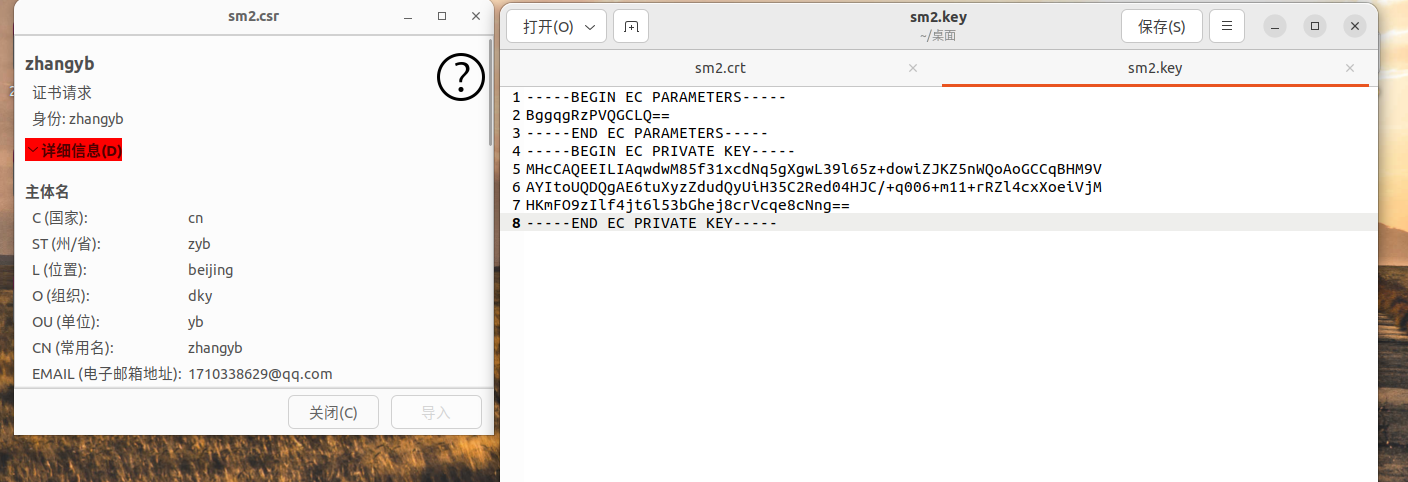
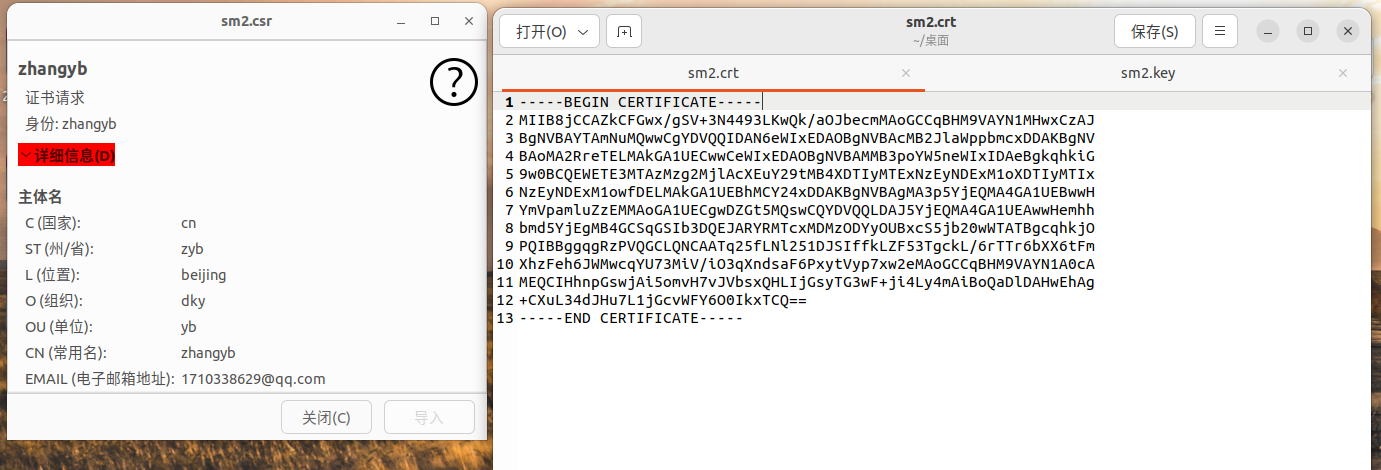
SM2代码:
//生成SM2私钥

openssl ecparam -genkey -name SM2 -out sm2.key

//生成证书签名请求 csr

openssl req -new -key sm2.key -out sm2.csr -sm3 -sigopt "sm2_id:1234567812345678"

//自签名测试证书

openssl x509 -req -in sm2.csr -signkey sm2.key -out sm2.crt -sm3 -sm2-id 1234567812345678 -sigopt "sm2_id:1234567812345678"
SM2测试截图

2.gmlib
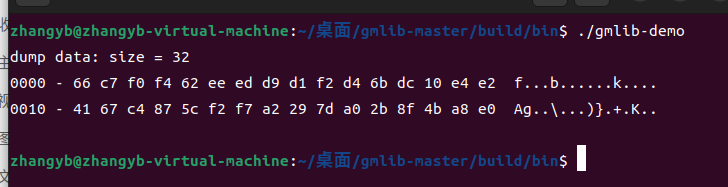
SM3测试代码:
#include<gmlib/utils.h>

#include<gmlib/hash/sm3.h>

int main() {

    SM3_CTX sm3_ctx;

    uint8_t msg[] = {'a', 'b', 'c'};  // 原始消息

    uint8_t digest[SM3_DIGEST_SIZE];  // 消息摘要

    // 初始化 SM3

    sm3_init(&sm3_ctx);

    // 输入消息

    sm3_update(msg, sizeof(msg), &sm3_ctx);

    // 结束 SM3 并输出摘要 digest

    sm3_final(digest, &sm3_ctx);

    dump_data(digest, sizeof(digest));

    /*  SM3 摘要结果

        66 c7 f0 f4 62 ee ed d9 d1 f2 d4 6b dc 10 e4 e2

        41 67 c4 87 5c f2 f7 a2 29 7d a0 2b 8f 4b a8 e0

    */

    return 0;

}
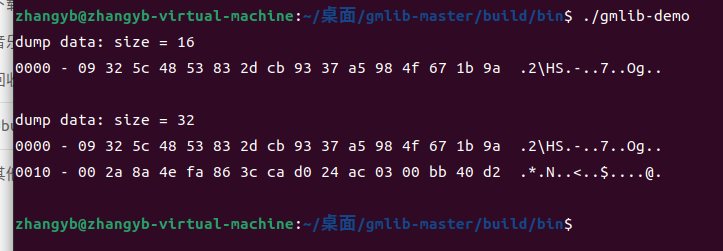
SM4测试代码:
#include <gmlib/cipher/mode.h>

#include <gmlib/cipher/sm4.h>

#include <gmlib/err.h>

#include <gmlib/utils.h>

static uint8_t sm4_key[SM4_KEYLEN] = {

    0x01, 0x23, 0x45, 0x67, 0x89, 0xab, 0xcd, 0xef,

    0xfe, 0xdc, 0xba, 0x98, 0x76, 0x54, 0x32, 0x10,

};

static uint8_t sm4_pt[SM4_BLOCK_SIZE] = {

    0x00, 0x11, 0x22, 0x33, 0x44, 0x55, 0x66, 0x77,

    0x88, 0x99, 0xaa, 0xbb, 0xcc, 0xdd, 0xee, 0xff,

};

static uint8_t out[SM4_BLOCK_SIZE * 2];

int main() {

    SM4_CTX sm4key;

    sm4_init(sm4_key, &sm4key);

    sm4_encrypt(out, sm4_pt, &sm4key);

    // 09 32 5c 48 53 83 2d cb 93 37 a5 98 4f 67 1b 9a

    dump_data(out, SM4_BLOCK_SIZE);

    ECB_CTX ctx;

    uint8_t* outptr = out;

    int outl;

    ecb_init(sm4_key, &SM4Info, &sm4key, &ctx);

    ecb_encrypt_update(outptr, &outl, sm4_pt, sizeof(sm4_pt), &ctx);

    outptr += outl;

    ecb_encrypt_final(outptr, &outl, &ctx);

    outptr += outl;

    // 09 32 5c 48 53 83 2d cb 93 37 a5 98 4f 67 1b 9a

    // 00 2a 8a 4e fa 86 3c ca d0 24 ac 03 00 bb 40 d2

    dump_data(out, (int)(outptr - out));

    return 0;

}
tjfoc-gm
代码:
package main

import (

	"bytes"

	"crypto/cipher"

	"crypto/rand"

	"fmt"

	"log"

	"github.com/Hyperledger-TWGC/tjfoc-gm/sm2"

	"github.com/Hyperledger-TWGC/tjfoc-gm/sm3"

	"github.com/Hyperledger-TWGC/tjfoc-gm/sm4"

)

func main() {

	SM2()

	SM3()

	SM4()

}

func SM2() {

	priv, err := sm2.GenerateKey(rand.Reader) // 生成密钥对

	if err != nil {

		log.Fatal(err)

	}

	msg := []byte("Tongji Fintech Research Institute")

	pub := &priv.PublicKey

	ciphertxt, err := sm2.Encrypt(pub, msg, rand.Reader)

	if err != nil {

		log.Fatal(err)

	}

	fmt.Println("SM2加密密文是:", string(msg))

	fmt.Printf("SM2加密结果是:%x\n", ciphertxt)

	plaintxt, err := priv.Decrypt(nil, ciphertxt, nil)

	if err != nil {

		log.Fatal(err)

	}

	if !bytes.Equal(msg, plaintxt) {

		log.Fatal("原文不匹配")

	}

	sign, err := priv.Sign(rand.Reader, msg, nil)

	if err != nil {

		log.Fatal(err)

	}

	isok := priv.PublicKey.Verify(msg, sign)

	fmt.Printf("SM2 Verified: %v\n", isok)

}

func SM3() {

	data := "test"

	h := sm3.New()

	h.Write([]byte(data))

	sum := h.Sum(nil)

	fmt.Printf("SM3 digest value is: %x\n", sum)

}

func SM4() {

	// 128比特密钥

	key := []byte("1234567890abcdef")

	// 128比特iv

	iv := make([]byte, sm4.BlockSize)

	data := []byte("Tongji Fintech Research Institute")

	fmt.Println("SM4加密密文是:", string(data))

	ciphertxt, err := sm4Encrypt(key, iv, data)

	if err != nil {

		log.Fatal(err)

	}

	fmt.Printf("SM4加密结果: %x\n", ciphertxt)

	res, err := sm4Decrypt(key, iv, ciphertxt)

	if err != nil {

		log.Fatal(err)

	}

	fmt.Printf("SM4解密结果: %x\n", res)

	fmt.Println("SM4解密密文是:", string(res))

}

func sm4Encrypt(key, iv, plainText []byte) ([]byte, error) {

	block, err := sm4.NewCipher(key)

	if err != nil {

		return nil, err

	}

	blockSize := block.BlockSize()

	origData := pkcs5Padding(plainText, blockSize)

	blockMode := cipher.NewCBCEncrypter(block, iv)

	cryted := make([]byte, len(origData))

	blockMode.CryptBlocks(cryted, origData)

	return cryted, nil

}

func sm4Decrypt(key, iv, cipherText []byte) ([]byte, error) {

	block, err := sm4.NewCipher(key)

	if err != nil {

		return nil, err

	}

	blockMode := cipher.NewCBCDecrypter(block, iv)

	origData := make([]byte, len(cipherText))

	blockMode.CryptBlocks(origData, cipherText)

	origData = pkcs5UnPadding(origData)

	return origData, nil

}

// pkcs5填充

func pkcs5Padding(src []byte, blockSize int) []byte {

	padding := blockSize - len(src)%blockSize

	padtext := bytes.Repeat([]byte{byte(padding)}, padding)

	return append(src, padtext...)

}

func pkcs5UnPadding(src []byte) []byte {

	length := len(src)

	if length == 0 {

		return nil

	}

	unpadding := int(src[length-1])

	return src[:(length - unpadding)]

}
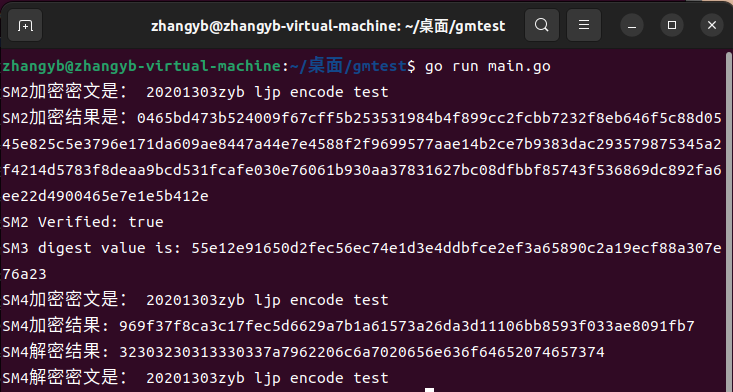
crypto++
代码:
#include "pch.h"

#include <string>

#include <cstring>

#include <vector>

#include <iostream>

#include <fstream>

#include <iomanip>

#include <algorithm>

#include "cryptopp/aes.h"

#include "cryptopp/filters.h"

#include "cryptopp/modes.h"

using namespace std;

using namespace CryptoPP;

byte key[CryptoPP::AES::DEFAULT_KEYLENGTH], iv[CryptoPP::AES::BLOCKSIZE];

void initKV() {

	memset(key, 0x00, CryptoPP::AES::DEFAULT_KEYLENGTH);

	memset(iv, 0x00, CryptoPP::AES::BLOCKSIZE);

}

string encrypt(string plainText) {

	string cipherText;

	CryptoPP::AES::Encryption aesEncryption(key, CryptoPP::AES::DEFAULT_KEYLENGTH);

	CryptoPP::CBC_Mode_ExternalCipher::Encryption cbcEncryption(aesEncryption, iv);

	CryptoPP::StreamTransformationFilter stfEncryptor(cbcEncryption, new CryptoPP::StringSink(cipherText));

	stfEncryptor.Put(reinterpret_cast<const unsigned char*>(plainText.c_str()), plainText.length() + 1);

	stfEncryptor.MessageEnd();

	string cipherTextHex;

	for (int i = 0; i < cipherText.size(); i++)

	{

		char ch[3] = { 0 };

		sprintf_s(ch, "%02x", static_cast<byte>(cipherText[i]));

		cipherTextHex += ch;

	}

	return cipherTextHex;

}

int main() {

	string text = "20201303zyb";

	cout << "text : " << text << endl;

	initKV();

	string cipherHex = encrypt(text);

	cout << "cipher : " << cipherHex << endl;

}

Miracl
代码:
#include <stdio.h>

#include <string.h>

#include <time.h>

#include "sm9/sm9_algorithm.h"

#include "sm9/print_out.h"

#define TEST 100

int main(int argc, char **argv)

{

    printf("20201303begin test \n");

//===========签名用到的参数==========

    unsigned char cks[32] = "\x86\xDC\xD6\x4F\xEB\x81\xA7\x19\x63\x59\x59\xF1\xA5\xC2\xF9\x88\xBD\x39\x43\x1B\x08\xA8\x63\xF0\x42\x8D\x21\xDF\xFA\xF2\xBF\x89";

    unsigned char id[5] = {"\x41\x6C\x69\x63\x65"};

    unsigned char rand[32] = {"\x1A\x23\x29\x77\xBA\x9F\xA2\xD1\xC5\x58\xF2\xD4\x67\xFE\x7B\xE7\x04\x05\x41\x26\x73\xF8\xBE\x64\x9B\xBD\xD4\xA0\x95\xBE\x1B\x4B"};

    unsigned char msg[20] = {"\x43\x68\x69\x6E\x65\x73\x65\x20\x49\x42\x53\x20\x73\x74\x61\x6E\x64\x61\x72\x64"};

//========加密用到的参数===================

    unsigned char cmsg[20] = {"\x43\x68\x69\x6E\x65\x73\x65\x20\x49\x42\x45\x20\x73\x74\x61\x6E\x64\x61\x72\x64"};

    unsigned char eks[32] = {"\x00\x01\xED\xEE\x37\x78\xF4\x41\xF8\xDE\xA3\xD9\xFA\x0A\xCC\x4E\x07\xEE\x36\xC9\x3F\x9A\x08\x61\x8A\xF4\xAD\x85\xCE\xDE\x1C\x22"};

    unsigned char eid[3] = {"\x42\x6F\x62"};

    unsigned char er[32] = {"\x00\x00\xAA\xC0\x54\x17\x79\xC8\xFC\x45\xE3\xE2\xCB\x25\xC1\x2B\x5D\x25\x76\xB2\x12\x9A\xE8\xBB\x5E\xE2\xCB\xE5\xEC\x9E\x78\x5C"};

    unsigned char plain[32];

    unsigned int plainlen;

//==============密钥交换用到的参数================

    unsigned char kks[32] = {"\x00\x02\xE6\x5B\x07\x62\xD0\x42\xF5\x1F\x0D\x23\x54\x2B\x13\xED\x8C\xFA\x2E\x9A\x0E\x72\x06\x36\x1E\x01\x3A\x28\x39\x05\xE3\x1F"};

    unsigned char alice[5] = {"\x41\x6C\x69\x63\x65"};

    unsigned char bob[3] = {"\x42\x6F\x62"};

    unsigned char ra[32] = {"\x00\x00\x58\x79\xDD\x1D\x51\xE1\x75\x94\x6F\x23\xB1\xB4\x1E\x93\xBA\x31\xC5\x84\xAE\x59\xA4\x26\xEC\x10\x46\xA4\xD0\x3B\x06\xC8"};

    unsigned char rb[32] = {"\x00\x01\x8B\x98\xC4\x4B\xEF\x9F\x85\x37\xFB\x7D\x07\x1B\x2C\x92\x8B\x3B\xC6\x5B\xD3\xD6\x9E\x1E\xEE\x21\x35\x64\x90\x56\x34\xFE"};

    time_t start,end;

    int res;

    unsigned char *gg;

    unsigned char AS1[32];

    unsigned char AS2[32];

    unsigned char ASK[16];

    unsigned char BS1[32];

    unsigned char BS2[32];

    unsigned char BSK[16];

//============独立验证时用到的参数==========

    unsigned char x1[32] = {"\x0f\xbd\x02\x40\x35\xb4\xca\x2f\x94\x14\x4f\xdf\x33\x3b\xf8\xe1\x81\x74\x7c\x8d\xd8\x5d\xe4\x12\xad\xc7\x18\x18\x98\x72\x43\x27"};

    unsigned char x2[32] = {"\x13\x2d\x39\x44\x38\x7b\x63\x1e\xe4\xb0\x55\x89\x9f\x6c\xfe\x42\x8f\xb9\xfc\x9f\xa2\x75\x68\x9f\xeb\x36\xbe\x2b\x60\x21\xea\xbe"};

    unsigned char y1[32] = {"\x07\x81\x20\x17\xdb\x06\x91\xd3\x43\x11\x36\x83\x21\x19\xe0\xe1\x94\x4e\x85\x5a\xed\xfc\xa7\x10\xed\xd1\x46\x6e\x69\x01\x8e\xa1"};

    unsigned char y2[32] = {"\x89\xf9\xf0\x0f\x5e\x05\x10\x6c\xb3\x4f\x60\x0f\xd9\x48\x92\x4b\x87\x24\x7b\xde\x11\xdf\x34\x01\x3d\xb6\xb9\x54\xbb\xf1\x9a\x55"};

    unsigned char h[32] = {"\xa1\xc3\xa6\xce\x30\x90\xea\x0d\xbd\x07\xe2\x1b\xcb\xdb\x43\x40\x4b\x80\x98\xf1\x90\x4d\xd6\xe7\x28\x3c\x7d\xfc\xdb\x23\x65\x91"};

    unsigned char xs[32] = {"\x2f\x5f\xe6\x33\xb6\x04\x16\x76\xfe\x77\x0d\x3f\xd3\x09\x6e\x0b\x64\xb0\x01\x0e\x1d\xa5\x50\x96\x5c\xd1\x94\xad\x53\x51\xa4\x98"};

    unsigned char ys[32] = {"\x51\x2b\x48\xf2\xae\xde\x4b\x10\xef\x25\xca\x58\x46\x49\x93\x8b\xfc\xd6\x3e\xe8\xb4\x8f\xbb\x86\xeb\x82\xa8\x22\x42\x97\x63\x14"};

    //如下可以使用SM9 第五部分 指定的曲线类型和主密钥初始化系统

    //也可以使用自定义曲线

    //

    SM9_Init(0,0,32,NULL,NULL, NULL, NULL, NULL, NULL, NULL, NULL, NULL, NULL, NULL );

// ========================================================

    SM9_MSK msk = SM9_MSK_New(32, cks);  // 申明一个签名主密钥

    SM9_MSPK mspk = SM9_MSPK_New(32);   //申明一个主签名公钥

    SM9_GenMSignPubKey(&msk, &mspk);  // 生成签名主公钥

    gg = SM9_Set_Sign(mspk.x1, mspk.x2, mspk.y1, mspk.y2, NULL); // 启动签名lib

    if (gg == NULL){

        printf("init sign lib error\n");

        return 1;

    }

    SM9_PK pk = SM9_PK_New(5, id);       // 申明一个签名公钥

    SM9_SSK sk = SM9_SSK_New(32);            // 申明一个签名私钥

    SM9_GenSignSecKey(&sk, &pk, &msk); // 由公钥(id)生成签名私钥

    SM9_Sign sign = SM9_Sign_New(32);   // 申明一个签名体

//===============signature test===============

      //使用私钥sk和随机数ran,对消息mes签名

    time(&start);

    for(int i=0;i<TEST;i++){

        SM9_Signature(msg, 20, rand, &sk, &sign);

    }

    time(&end);

    printf("sign %d time is %ld sec\n",TEST, end-start);

    time(&start);

    for(int i=0;i<TEST;i++){// 验证函数

        res = SM9_Verify(msg, 20, &sign, &pk, NULL);

        if (res) printf("verify error at %d = %d\n", i,res);

    }

    time(&end);

    printf("verify %d time is %ld sec\n",TEST, end-start);

//===============independent verify test===============

    SM9_Free();  //注销SM9

    //重新启动SM9

    SM9_Init(0,0,32,NULL,NULL, NULL, NULL, NULL, NULL, NULL, NULL, NULL, NULL, NULL );

    SM9_MSPK inmspk = SM9_MSPK_New(32);

    SM9_Sign insign = SM9_Sign_New(32);

    SM9_PK inpk = SM9_PK_New(5, id);

    inmspk.secLevel =32;

    inmspk.x1 = x1;

    inmspk.x2 = x2;

    inmspk.y1 = y1;

    inmspk.y2 = y2;

    gg = SM9_Set_Sign(inmspk.x1, inmspk.x2, inmspk.y1, inmspk.y2, NULL); // 启动签名lib

    if (gg == NULL){

        printf("init sign lib error\n");

        return 1;

    }

    insign.h = h;

    insign.xs = xs;

    insign.ys = ys;

    int inres;

    inres = SM9_Verify(msg, 20, &insign, &inpk, NULL);

    if (inres) {

        printf("independent verify error = %d\n",inres);

    }else{

        printf("independent verify success! \n");

    }

//===============encryption test===============

    SM9_MSK esk = SM9_MSK_New(32, eks);  // 申明一个加密主密钥

    SM9_MCPK mcpk = SM9_MCPK_New(32);   //申明一个主加密公钥

    SM9_GenMEncryptPubKey(&esk, &mcpk); // 生成加密主公钥

    gg = SM9_Set_Encrypt(mcpk.x, mcpk.y,NULL);  // 启动加密lib

    if (gg == NULL){

        printf("init encryption lib error\n");

        return 1;

    }

    SM9_PK epk = SM9_PK_New(3, eid);   //申明一个加密公钥

    SM9_CSK csk = SM9_CSK_New(32);   //申明一个加密私钥

    SM9_GenEncryptSecKey(&csk, &epk, &esk);  // 由公钥(id)生成加密私钥

    SM9_Cipher cipher = SM9_Cipher_New(32);

    time(&start);

    for(int i=0;i<TEST;i++){

        SM9_Encrypt(cmsg, 20, KDF_SM4, er, &epk, &cipher);

    }

    time(&end);

    printf("Encrypt %d time is %ld sec\n",TEST, end-start);

    time(&start);

    for(int i=0;i<TEST;i++){

        res = SM9_Decrypt(&epk, KDF_SM4, &csk, &cipher, plain, &plainlen);

        if (res) printf("decrypt error code is %d \n", res);

    }

    time(&end);

    printf("Decrypt %d time is %ld sec\n",TEST, end-start);

//===============keyexchange test===============

    SM9_MSK ksk = SM9_MSK_New(32, kks);

    SM9_MKPK mkpk = SM9_MKPK_New(32);   //申明一个主协商公钥

    SM9_GenMKeyExchangePubKey(&ksk, &mkpk); // 生成协商主公钥

    gg = SM9_Set_KeyExchange(mkpk.x, mkpk.y,NULL);  // 启动协商lib

    if (gg == NULL){

        printf("init keyexchange lib error\n");

        return 1;

    }

    SM9_PK  apk = SM9_PK_New(5, alice);

    SM9_KSK ask = SM9_KSK_New(32);

    SM9_GenKeyExchangeSecKey(&ask, &apk, &ksk);

    SM9_PK  bpk = SM9_PK_New(3, bob);

    SM9_KSK bsk = SM9_KSK_New(32);

    SM9_GenKeyExchangeSecKey(&bsk, &bpk, &ksk);

    SM9_Send ase = SM9_Send_New(32);

    SM9_Send bse = SM9_Send_New(32);

    SM9_SendStep(ra, &bpk, &ase);

    SM9_SendStep(rb, &apk, &bse);

    time(&start);

    for(int i=0;i<TEST;i++){

        SM9_ReceiveStep(ra, &ase, &bse, &apk, &bpk, &ask, 16, AS1, AS2, ASK, AKE_SENDER);

        SM9_ReceiveStep(rb, &bse, &ase, &bpk, &apk, &bsk, 16, BS1, BS2, BSK, AKE_RECEIVER);

        if(SM9_CheckStep(AS1, BS2)) printf("error at step 1\n");

        if(SM9_CheckStep(AS2, BS1)) printf("error at step 2\n");

    }

    time(&end);

    printf("key exchange %d time is %ld sec\n", TEST*2,end-start);

    printf("end test \n ================== \n");

    return 0;

}
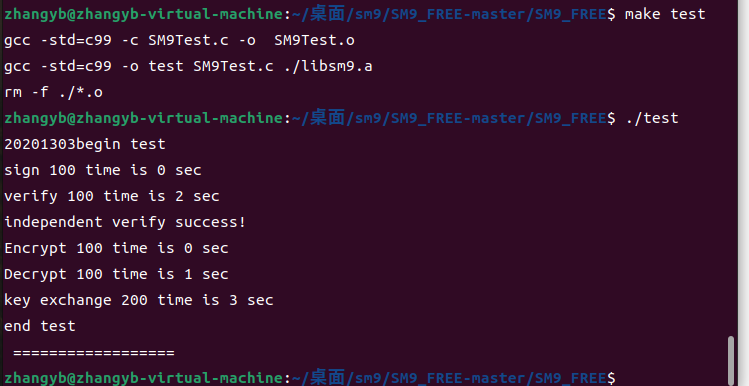
GMSSL
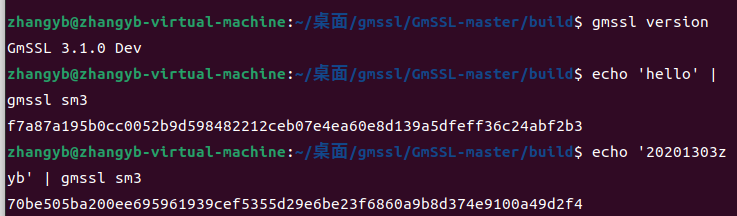
sm3命令行:
echo '20201303zyb' | gmssl sm3
OPENSSL
SM4代码
#include <stddef.h>

#include <stdio.h>

#include <stdlib.h>

#include <string.h>

#include "openssl/err.h"

#include "openssl/evp.h"

/* Before OpenSSL 1.1.1-pre1, we did not have EVP_sm4_ecb() */

#if defined(OPENSSL_VERSION_NUMBER) \

    && OPENSSL_VERSION_NUMBER < 0x10101001L

static const EVP_CIPHER *(*EVP_sm4_ecb)()=EVP_aes_128_ecb;

#endif

typedef struct {

    const unsigned char *in_data;

    size_t in_data_len;

    int in_data_is_already_padded;

    const unsigned char *in_ivec;

    const unsigned char *in_key;

    size_t in_key_len;

} test_case_t;

void test_encrypt_with_cipher(const test_case_t *in, const EVP_CIPHER *cipher)

{

    unsigned char *out_buf = NULL;

    int out_len;

    int out_padding_len;

    EVP_CIPHER_CTX *ctx;

    ctx = EVP_CIPHER_CTX_new();

    EVP_EncryptInit_ex(ctx, cipher, NULL, in->in_key, in->in_ivec);

    if (in->in_data_is_already_padded)

    {

        /* Check whether the input data is already padded.

        And its length must be an integral multiple of the cipher's block size. */

        const size_t bs = EVP_CIPHER_block_size(cipher);

        if (in->in_data_len % bs != 0)

        {

            printf("ERROR-1: data length=%d which is not added yet; block size=%d\n", (int) in->in_data_len, (int) bs);

            /* Warning: Remember to do some clean-ups */

            EVP_CIPHER_CTX_free(ctx);

            return;

        }

        /* Disable the implicit PKCS#7 padding defined in EVP_CIPHER */

        EVP_CIPHER_CTX_set_padding(ctx, 0);

    }

    out_buf = (unsigned char *) malloc(((in->in_data_len>>4)+1) << 4);

    out_len = 0;

    EVP_EncryptUpdate(ctx, out_buf, &out_len, in->in_data, in->in_data_len);

    if (1)

    {

        printf("Debug: out_len=%d\n", out_len);

    }

    out_padding_len = 0;

    EVP_EncryptFinal_ex(ctx, out_buf+out_len, &out_padding_len);

    if (1)

    {

        printf("Debug: out_padding_len=%d\n", out_padding_len);

    }

    EVP_CIPHER_CTX_free(ctx);

    if (1)

    {

        int i;

        int len;

        len = out_len + out_padding_len;

        for (i=0; i<len; i++)

        {

            printf("%02x ", out_buf[i]);

        }

        printf("\n");

    }

    if (out_buf)

    {

        free(out_buf);

        out_buf = NULL;

    }

}

void main()

{

    int have_sm4 = (OPENSSL_VERSION_NUMBER >= 0x10101001L);

    int have_aes = 1;

    const unsigned char data[]=

    {

        0x01, 0x23, 0x45, 0x67, 0x89, 0xab, 0xcd, 0xef,

        0xfe, 0xdc, 0xba, 0x98, 0x76, 0x54, 0x32, 0x10,

    };

    unsigned char ivec[EVP_MAX_IV_LENGTH]; ///< IV 向量

    const unsigned char key1[16] = ///< key_data, 密钥内容, 至少16字节

    {

        0x01, 0x23, 0x45, 0x67, 0x89, 0xab, 0xcd, 0xef,

        0xfe, 0xdc, 0xba, 0x98, 0x76, 0x54, 0x32, 0x10,

    };

    test_case_t tc;

    tc.in_data = data;

    tc.in_data_len = sizeof(data);

    tc.in_data_is_already_padded = (tc.in_data_len % 16)==0; // Hard coded 16 as the cipher's block size

    tc.in_key = key1;

    tc.in_key_len = sizeof(key1);

    memset(ivec, 0x00, EVP_MAX_IV_LENGTH);

    tc.in_ivec = ivec;

#if defined(OPENSSL_NO_SM4)

    have_sm4 = 0;

#endif

    if (have_sm4)

    {

        printf("[1]\n");

        printf("Debug: EVP_sm4_ecb() test\n");

        test_encrypt_with_cipher(&tc, EVP_sm4_ecb());

    }

#if defined(OPENSSL_NO_AES)

    have_aes = 0;

#endif

    if (have_aes)

    {

        printf("[2]\n");

        printf("Debug: EVP_aes_128_ecb() test\n");

        test_encrypt_with_cipher(&tc, EVP_aes_128_ecb());

    }

}

SM3代码
#include <stdio.h>

#include <string.h>

#include <openssl/evp.h>

#include <openssl/err.h>

void tDigest(){

	unsigned char md_value[EVP_MAX_MD_SIZE];

	unsigned int md_len;

	EVP_MD_CTX *mdctx;

	mdctx = EVP_MD_CTX_new();

	char msg1[] = "20201303";

	char msg2[] = "ZHANGyibo";

	EVP_MD_CTX_init(mdctx);

	EVP_DigestInit_ex(mdctx, EVP_sm3(), NULL);

	EVP_DigestUpdate(mdctx, msg1, strlen(msg1));

	EVP_DigestUpdate(mdctx, msg2, strlen(msg2));

	EVP_DigestFinal_ex(mdctx, md_value, &md_len);

	EVP_MD_CTX_destroy(mdctx);

	printf("Debug:Message1%s and Message2%s digest to:\n",msg1, msg2);

	for(int i = 0; i<md_len; i++){

		printf("0x%02x ", md_value[i]);

	}

	printf("\n");

}

int main(){

	OpenSSL_add_all_algorithms();

	tDigest();

	return 0;

}

代码and截图的更多相关文章
- python代码实现截图识字
有次网上down了个截图实识的软件,发现一天只能用10次要钱才能解锁免费,很气,作为一个菜鸡怎么能忍受 于是自己用python写了个简单的小工具,分享给大家 代码如下: 先安装库 from PIL i ...
- Python3行代码之——截图工具
最近工作需要个定时截图的小工具,用Python实现比较急直接上代码 from PIL import ImageGrab im = ImageGrab.grab() im.save(addr,'jpeg ...
- android逆向代码分析截图
- selenium web driver 实现截图功能
在验证某些关键步骤时,需要截个图来记录一下当时的情况 Webdriver截图时,需要引入 import java.io.File; import java.io.IOException; import ...
- Quartz2D复习(一)--- 基础知识 / 绘制线段圆弧 / 图片水印 / 截图
1.Quartz 2D是一个二维绘图引擎,同时支持ios和Mac系统: Quart2D的API是纯C语言的,API来自于Core Graphics框架: 2.Quartz 2D可以绘制图形(线段/三 ...
- [深入浅出WP8.1(Runtime)]应用实例——移动截图
10.2应用实例——移动截图 移动截图例子是实现一个把一张图片的某个部分截取出来的功能,并且用户可以选定截取的图片区间.那个该例子会使用ManipulationDelta事件来实现对截取区间的选择.然 ...
- jquery截图插件的使用
首先感谢http://www.htmleaf.com/Demo/201504211717.html这款插件. 使用之初,对于插件的结构很是糊涂,首先文件的核心是cropper.js,其次才是mian. ...
- SharePoint 使用代码为页面添加WebPart
传统的SharePoint实施中,我们通常会创建SharePoint页面,然后添加webpartzone,而后在上面添加webpart:但是有些情况下,也要求我们使用代码,将webpart添加到相应w ...
- 从linux内核代码分析操作系统启动过程
朱宇轲 + 原创作品转载请注明出处 + <Linux内核分析>MOOC课程http://mooc.study.163.com/course/USTC-1000029000 在本次的实验中, ...
- 编写高质量代码改善程序的157个建议:第87个建议之区分WPF和WinForm的线程模型
今天有时间了,继续<编写高质量代码改善程序的157个建议>的阅读,当我阅读到建议87的时候,里面的一些代码示例和文中所说的不一致了,是不是我现在用的是NetFramework 4.0的缘故 ...
随机推荐
- 代码随想录训练营day 5|24.两两交换链表中的节点 19.删除链表的倒数第N个节点 面试题02.07.链表相交 142.环形链表Ⅱ
24. 两两交换链表中的节点 题目链接:24. 两两交换链表中的节点 题目描述:给你一个链表,两两交换其中相邻的节点,并返回交换后链表的头节点.你必须在不修改节点内部的值的情况下完成本题(即,只能进行 ...
- 肖sir_多线程Thread(threading)__知识点
多线程Thread(threading) 一.理论知识 二.实战
- etcdctl 安装与使用
介绍 etcdctl是一个提供简洁命令的etcd客户端,使用etcdctl可以直接和etcd服务打交道,对etcd中的键值对进行增删改查. 安装etcdctl 下载etcdctl工具 下载地址:etc ...
- Appium-TouchAction类与MultiAction类(控件元素的滑动、拖动,九宫格解锁,手势操作等)
文章转自:https://www.cnblogs.com/lfr0123/p/13679568.html swipe一般用于对页面进行上下左右滑动操作,但自动化过程中还会遇到其他情况,如对控件元素进行 ...
- java 枚举使用
/** * 埋点模块枚举 * @author huang */ public enum ModelEnum { PROCESS_CONTROL("流程管控", 10), TASK_ ...
- nestjs mongoose关联查询
nestjs,mongoose关联查询网上搜不到了,查看了nest/mongoose.d.ts文件,分享一波 user.model.ts import { Prop, Schema, SchemaFa ...
- Windows流媒体怎么关闭。
点击白色框,搜索服务. 步骤阅读 步骤阅读 2 选本地服务旁打开,然后下拉服务. 步骤阅读 步骤阅读 3 选择media,然后右键它属性. 步骤阅读 步骤阅读 4 然后点击停止,点击手动. 步骤阅读 ...
- GIT Authentication failed for错误问题处理
1. Settings ==> Developer settings ==> Personal access tokens ==> Generate new token 生成新的 ...
- COMMON_FUNC_SPLIT_STRING
void SplitString(const std::string& s, std::vector<std::string>& v, const std::string& ...
- 并发多线程学习(三)Java多线程入门类和接口
1 Thread类和Runnable接口 上一章我们了解了操作系统中多线程的基本概念.那么在Java中,我们是如何使用多线程的呢? 首先,我们需要有一个"线程"类.JDK提供了Th ...