
day09-功能实现08
家居网购项目实现08
以下皆为部分代码,详见 https://github.com/liyuelian/furniture_mall.git
19.功能18-添加家居到购物车
19.1需求分析/图解
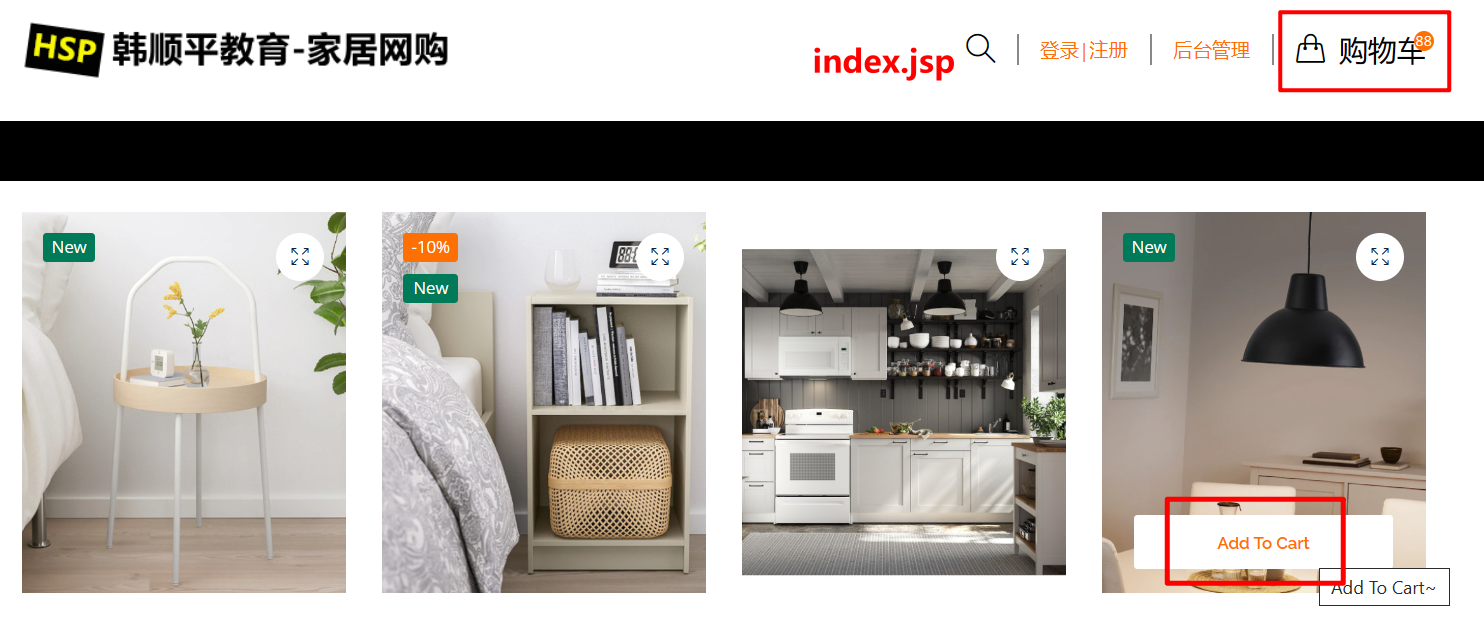
- 会员登录后,可以添加家居到购物车
- 完成购物车的设计和实现
- 每添加一个家居,购物车的数量+1并显示
19.2思路分析
说明:这里实现的购物车是session版的,不是数据库版的。也就是说,用户购物车的数据在退出登录或者退出浏览器后将会清空。
如果希望将购物车放到mysql中,将Cart数据模型改成一张表即可,即Entity和表的一种映射概念,你可以使用Entity-DAO-Service。大概做法就是购物车表和CartItem实体映射,表的一行记录就是一个cartItem类。通过记录用户id和用户联系起来。
.png)
JavaEE+mvc模式:
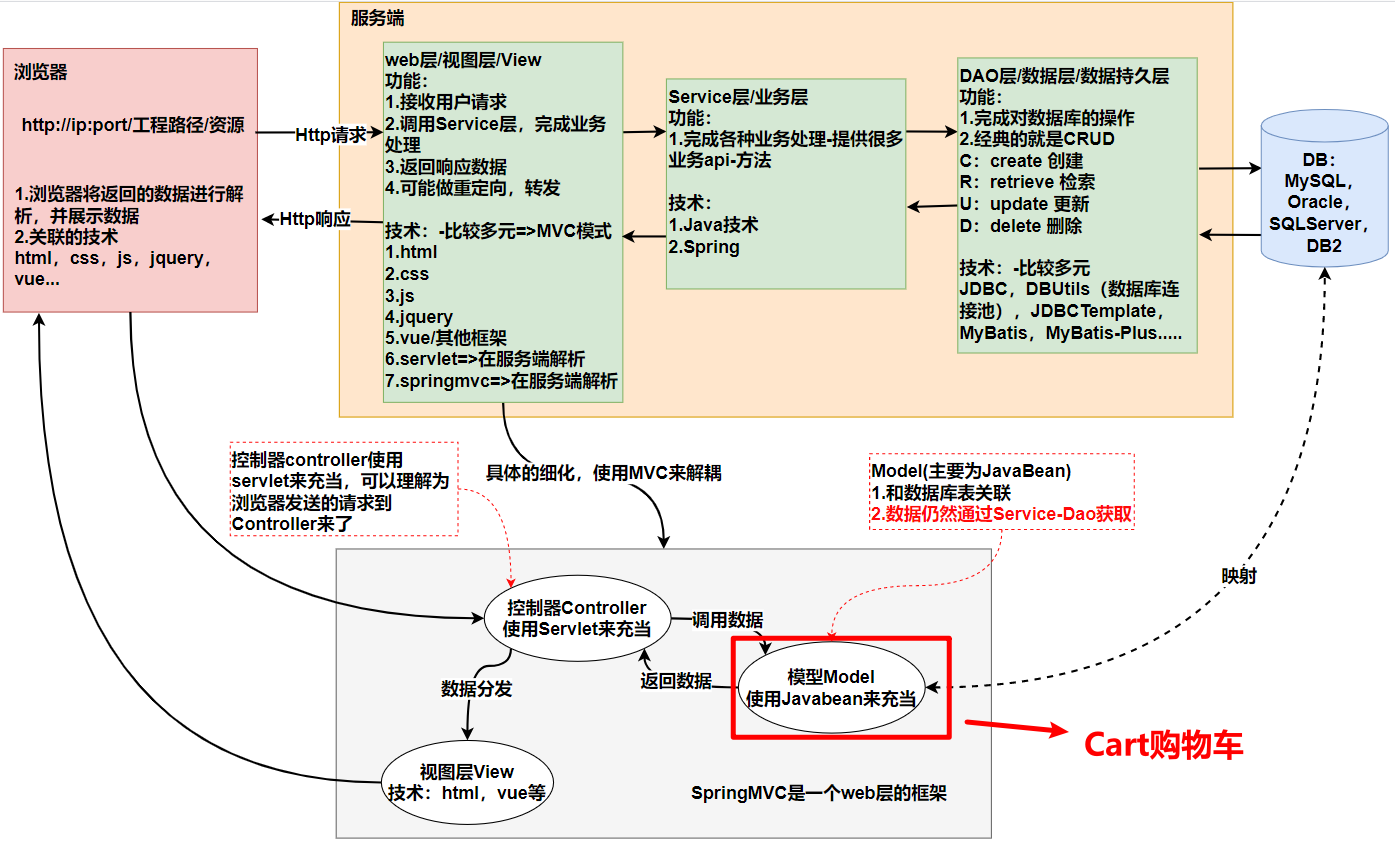
19.3代码实现
19.3.1entity层
CartItem.java
package com.li.furns.entity;

import java.math.BigDecimal;

/**

 * CartItem 表示购物车的一项,就是某个家居数据

 *

 * @author 李

 * @version 1.0

 */

public class CartItem {

    //定义属性->根据需求

    private Integer id; //家居id

    private String name; //家居名

    private BigDecimal price; //家居单价

    private Integer count; //家居数量

    private BigDecimal totalPrice; //总价格

    public CartItem() {

    }

    public CartItem(Integer id, String name, BigDecimal price, Integer count, BigDecimal totalPrice) {

        this.id = id;

        this.name = name;

        this.price = price;

        this.count = count;

        this.totalPrice = totalPrice;

    }

    public Integer getId() {

        return id;

    }

    public void setId(Integer id) {

        this.id = id;

    }

    public String getName() {

        return name;

    }

    public void setName(String name) {

        this.name = name;

    }

    public BigDecimal getPrice() {

        return price;

    }

    public void setPrice(BigDecimal price) {

        this.price = price;

    }

    public Integer getCount() {

        return count;

    }

    public void setCount(Integer count) {

        this.count = count;

    }

    public BigDecimal getTotalPrice() {

        return totalPrice;

    }

    public void setTotalPrice(BigDecimal totalPrice) {

        this.totalPrice = totalPrice;

    }

    @Override

    public String toString() {

        return "CartItem{" +

                "id=" + id +

                ", name='" + name + '\'' +

                ", price=" + price +

                ", count=" + count +

                ", totalPrice=" + totalPrice +

                '}';

    }

}
Cart.java
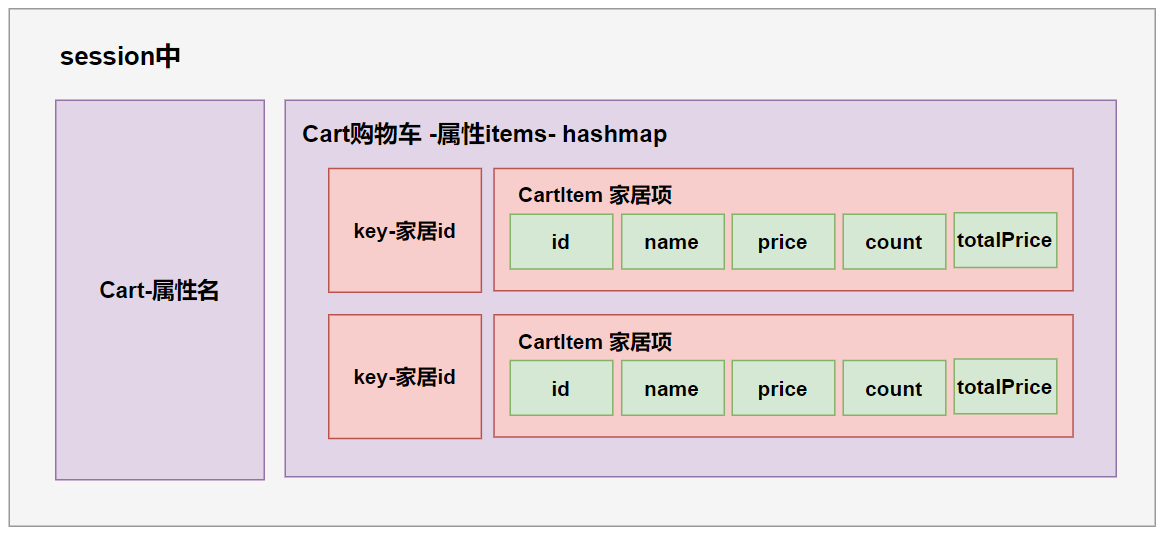
package com.li.furns.entity;

import java.math.BigDecimal;

import java.util.HashMap;

import java.util.Set;

/**

 * Cart就是一个购物车,包含很多CartItem对象

 *

 * @author 李

 * @version 1.0

 */

public class Cart {

    //定义属性

    //包含多个CartItem对象,使用HashMap来保存

    private HashMap<Integer, CartItem> items = new HashMap<>();

    //添加家居CartItem到Cart

    public void addItem(CartItem cartItem) {

        //添加cartItem到Cart前要先判断-该item是第一次添加还是二次以后添加

        //使用家居id在items中找有没有对应家居

        CartItem item = items.get(cartItem.getId());

        if (null == item) {//说明当前购物车还没有这个cartItem

            //添加该cartItem到购物车Cart中去

            items.put(cartItem.getId(), cartItem);

        } else {//当前购物车已经有这个cartItem

            //数量增加1

            item.setCount(item.getCount() + 1);

            //修改总价

            //item.setTotalPrice(item.getPrice().multiply(new BigDecimal(item.getCount())));

            item.setTotalPrice(item.getTotalPrice().add(item.getPrice()));

        }

    }

    @Override

    public String toString() {

        return "Cart{" +

                "items=" + items +

                '}';

    }

}
19.3.2test
CartTest.java
package com.li.furns.test;

import com.li.furns.entity.Cart;

import com.li.furns.entity.CartItem;

import org.junit.jupiter.api.Test;

import java.math.BigDecimal;

/**

 * @author 李

 * @version 1.0

 */

public class CartTest {

    private Cart cart = new Cart();

    @Test

    public void addItem() {

        cart.addItem(new CartItem(1, "沙发", new BigDecimal(10), 2, new BigDecimal(20)));

        cart.addItem(new CartItem(2, "小椅子", new BigDecimal(20), 2, new BigDecimal(40)));

        System.out.println("cart=>" + cart);

    }

}
19.3.3web层
配置CartServlet
<servlet>

    <servlet-name>CartServlet</servlet-name>

    <servlet-class>com.li.furns.web.CartServlet</servlet-class>

</servlet>

<servlet-mapping>

    <servlet-name>CartServlet</servlet-name>

    <url-pattern>/cartServlet</url-pattern>

</servlet-mapping>
CartServlet.java
package com.li.furns.web;

import com.li.furns.entity.Cart;

import com.li.furns.entity.CartItem;

import com.li.furns.entity.Furn;

import com.li.furns.service.FurnService;

import com.li.furns.service.impl.FurnServiceImpl;

import com.li.furns.utils.DataUtils;

import javax.servlet.ServletException;

import javax.servlet.http.HttpServletRequest;

import javax.servlet.http.HttpServletResponse;

import java.io.IOException;

/**

 * @author 李

 * @version 1.0

 */

public class CartServlet extends BasicServlet {

    //增加一个属性

    private FurnService furnService = new FurnServiceImpl();

    /**

     * 添加家居数据到购物车

     *

     * @param req

     * @param resp

     * @throws ServletException

     * @throws IOException

     */

    protected void addItem(HttpServletRequest req, HttpServletResponse resp) throws ServletException, IOException {

        //得到添加的家居ID

        int id = DataUtils.parseInt(req.getParameter("id"), 0);

        //获取到id对应的Furn对象

        Furn furn = furnService.queryFurnById(id);

        if (furn == null) {//说明没有查到对应的家居信息

            return;

            //todo

        }

        //根据furn构建CartItem

        CartItem item =

                new CartItem(furn.getId(), furn.getName(), furn.getPrice(), 1, furn.getPrice());

        //从session获取cart对象

        Cart cart = (Cart) req.getSession().getAttribute("cart");

        if (null == cart) {//说明当前的session没有cart对象

            //创建一个cart对象

            cart = new Cart();

            //将其放入到session中

            req.getSession().setAttribute("cart", cart);

        }

        //将cartItem加入到cart对象

        cart.addItem(item);

        //添加完毕后需要返回到添加家居的页面

        String referer = req.getHeader("Referer");

        resp.sendRedirect(referer);

    }

}
19.3.4修改前端接口
views/cutomer/index.jsp
点击add to cart按钮,添加家居信息到购物车中
<script type="text/javascript">

    $(function () {

        //给add to cart绑定事件

        $("button.add-to-cart").click(function () {

            //获取到点击的furn-id

            var furnId = $(this).attr("furnId");

            //发出一个请求-添加家居=>后面改成ajax

            location.href = "cartServlet?action=addItem&id=" + furnId;

        })

    })

</script>
显示购物车信息

19.4完成测试
未添加家居前购物车显示

点击add to cart,添加家居到购物车
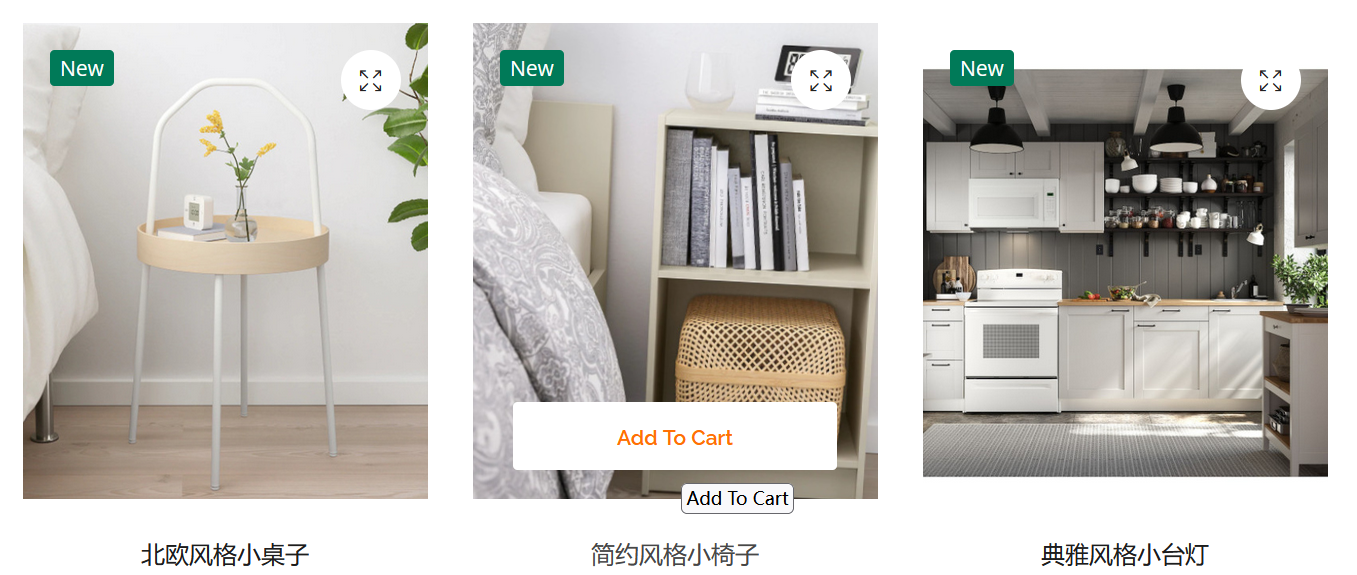

添加多个家居信息
20.功能19-显示购物车
20.1需求分析/图解
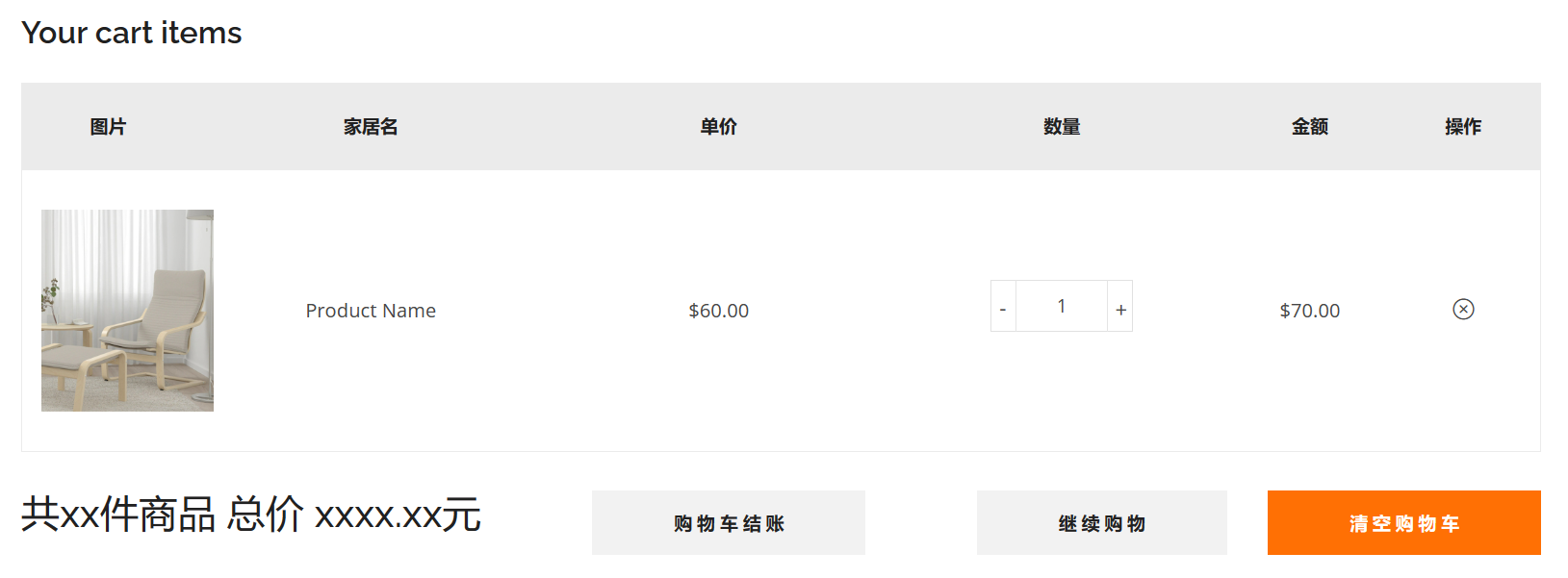
- 查看购物车,可以显示如上信息
- 选中了哪些家居,名称,数量,金额
- 统计购物车共多少商品,总价多少
20.2思路分析
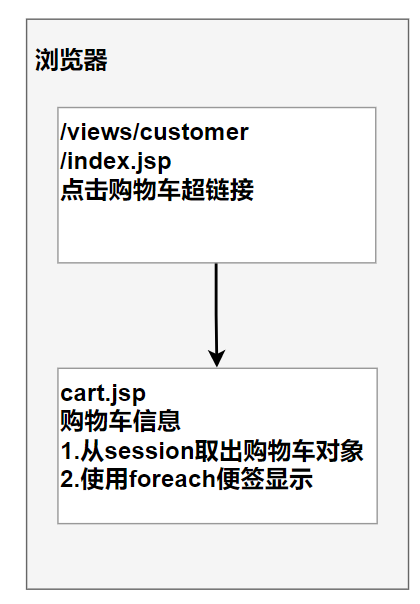
20.3代码实现
Cart.java
为了配合前端接口,增加一些方法
public HashMap<Integer, CartItem> getItems() {

    return items;

}

public BigDecimal getCartTotalPrice() {

    BigDecimal cartTotalPrice = new BigDecimal(0);

    //遍历购物车,返回整个购物车的商品总价格

    Set<Integer> keys = items.keySet();

    for (Integer id : keys) {

        CartItem item = items.get(id);

        //一定要把add后的值重新赋给cartTotalPrice

        cartTotalPrice = cartTotalPrice.add(item.getTotalPrice());

    }

    return cartTotalPrice;

}

public int getTotalCount() {

    //因为前端每点击一次添加商品,购物车显示就会调用getTotalCount方法,

    //如果不置0,数量相当是重复添加

    int totalCount = 0;

    //遍历购物车,返回商品总数量

    Set<Integer> keys = items.keySet();

    for (Integer id : keys) {

        totalCount += ((CartItem) items.get(id)).getCount();

    }

    return totalCount;

}
用foreach在cart.jsp循环显示购物车信息
<!-- Cart Area Start -->

<div class="cart-main-area pt-100px pb-100px">

<div class="container">

<h3 class="cart-page-title">Your cart items</h3>

<div class="row">

<div class="col-lg-12 col-md-12 col-sm-12 col-12">

<form action="#">

<div class="table-content table-responsive cart-table-content">

<table>

<thead>

<tr>

<th>图片</th>

<th>家居名</th>

<th>单价</th>

<th>数量</th>

<th>金额</th>

<th>操作</th>

</tr>

</thead>

<tbody>

<%--找到显示的购物车项,进行循环显示--%>

<c:if test="${not empty sessionScope.cart.items}">

<%--

1.items实际上是HashMap<Integer, CartItem>

2.所以通过foreach标签取出的每一个对象entry 是 HashMap<Integer, CartItem> 的k-v

3.因此var其实就是entry

4.所以要取出cartItem是通过entry.value

--%>

<c:forEach items="${sessionScope.cart.items}" var="entry">

    <tr>

        <td class="product-thumbnail">

            <a href="#"><img class="img-responsive ml-3"

                             src="assets/images/product-image/1.jpg"

                             alt=""/></a>

        </td>

        <td class="product-name"><a href="#">${entry.value.name}</a></td>

        <td class="product-price-cart"><span class="amount">${entry.value.price}</span></td>

        <td class="product-quantity">

            <div class="cart-plus-minus">

                <input class="cart-plus-minus-box" type="text" name="qtybutton"

                       value="${entry.value.count}"/>

            </div>

        </td>

        <td class="product-subtotal">${entry.value.totalPrice}</td>

        <td class="product-remove">

            <a href="#"><i class="icon-close"></i></a>

        </td>

    </tr>

</c:forEach>

</c:if>

</tbody>

</table>

</div>

<div class="row">

<div class="col-lg-12">

<div class="cart-shiping-update-wrapper">

<h4>共${sessionScope.cart.totalCount}件商品 总价 ${sessionScope.cart.cartTotalPrice}元</h4>

<div class="cart-shiping-update">

    <a href="#">购 物 车 结 账</a>

</div>

<div class="cart-clear">

    <button>继 续 购 物</button>

    <a href="#">清 空 购 物 车</a>

</div>

</div>

</div>

</div>

</form>

</div>

</div>

</div>

</div>

<!-- Cart Area End -->
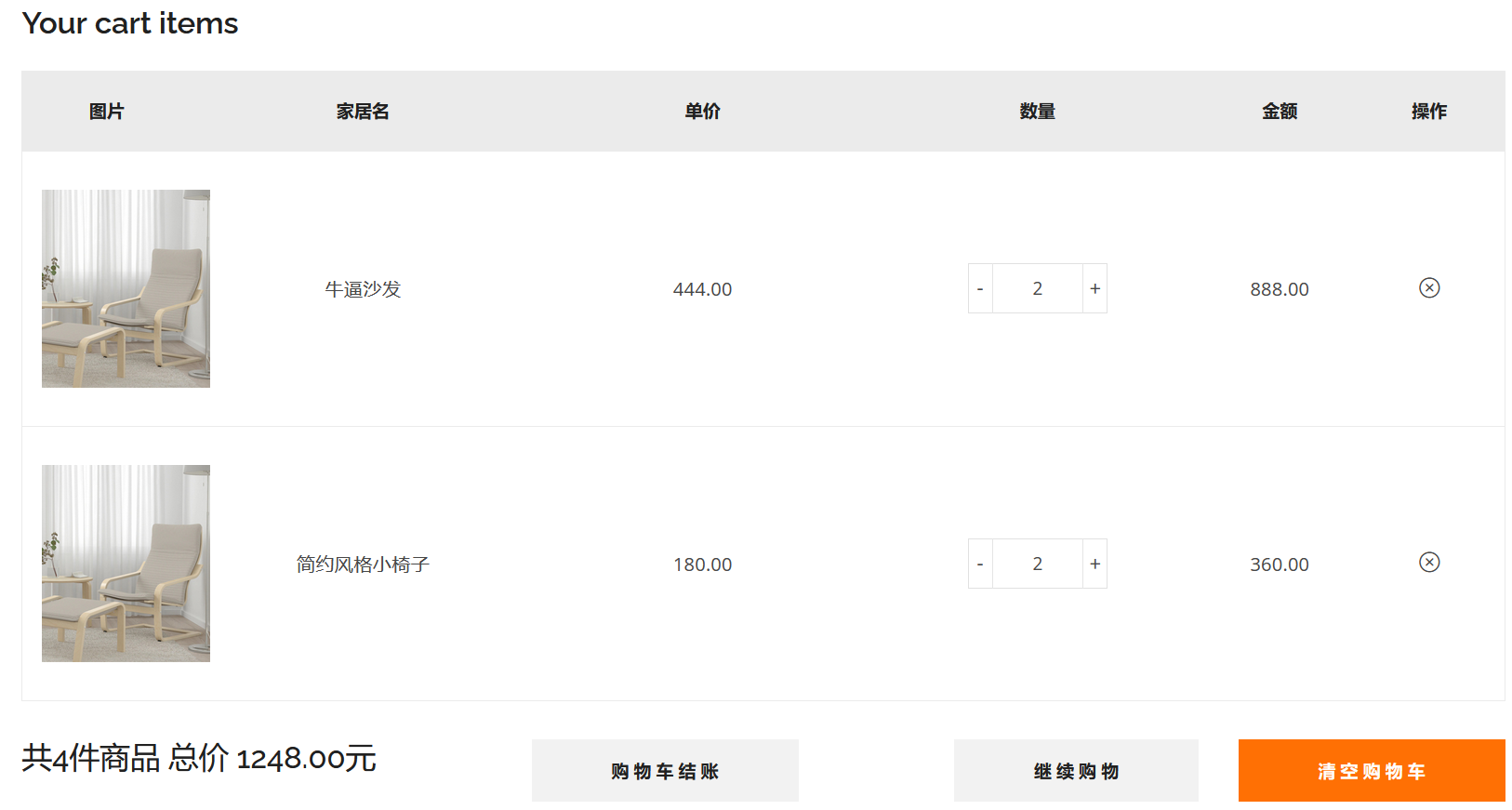
20.4完成测试
21.功能20-修改购物车
21.1需求分析/图解
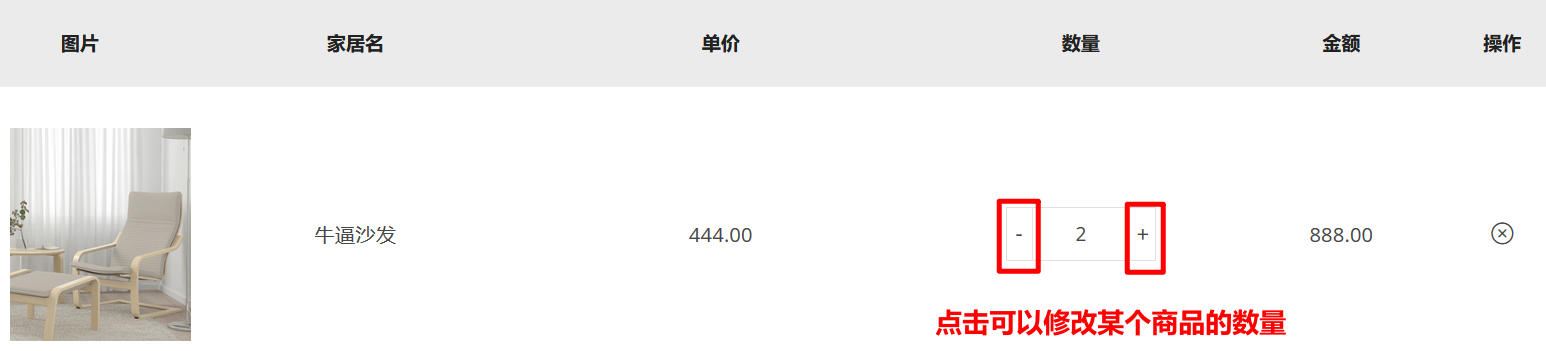
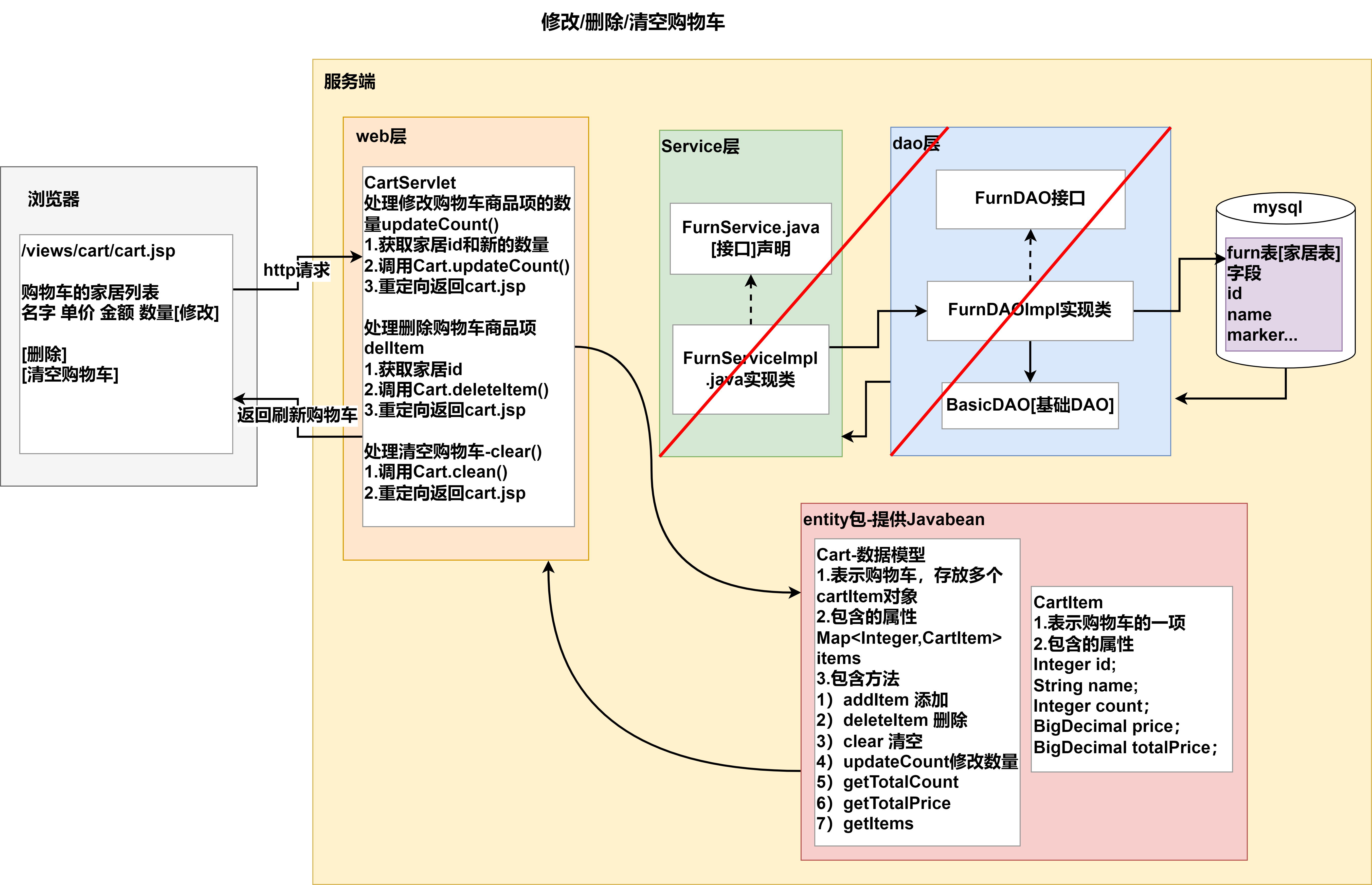
- 进入购物车页面,可以修改购买数量
- 更新该商品的金额
- 更新购物车商品数量和总金额
21.2思路分析
day09-功能实现08的更多相关文章
- Hotelling T2检验和多元方差分析
1.1 Hotelling T2检验 Hotelling T2检验是一种常用多变量检验方法,是单变量检验的自然推广,常用于两组均向量的比较. 设两个含量分析为n,m的样本来自具有公共协方差阵的q维正态 ...
- [Code::Blocks] Install wxWidgets & openCV
The open source, cross platform, free C++ IDE. Code::Blocks is a free C++ IDE built to meet the most ...
- JavaSE_ API常用对象 总目录(11~14)
JavaSE学习总结第11天_开发工具 & API常用对象111.01 常见开发工具介绍11.02 Eclipse和MyEclipse的概述11.03 Eclipse的下载安装及卸载11.04 ...
- Visual Studio 使用调试技巧
Visual Studio 使用调试技巧 这篇文章来源于http://damieng.com/blog/2014/02/05/8-visual-studio-debugging-tips-debug- ...
- C语言所有作业练习题
2015.08.11 1.计算十进制 42 转换为二进制.八进制.十六进制分别对应的值 2.计算二进制 11010110 对应的十进制值 3.计算八进制 075 对应的十进制值 4.计算十六进制 0x ...
- 本人SW知识体系导航 - Programming menu
将感悟心得记于此,重启程序员模式. js, py, c++, java, php 融汇之全栈系列 [Full-stack] 快速上手开发 - React [Full-stack] 状态管理技巧 - R ...
- 软工作业No.5 甜美女孩第三周yep
需求&原型改进: 1. 针对课堂讨论环节老师和其他组的问题及建议,对修改选题及需求进行修改 (5分) 没有问题及建议 2. 修改完善上周提交的需求规格说明书(10分) 上周的<需求规格说 ...
- linux下 GUI 数码相册项目 持续更新中
GITHUB: https://github.com/nejidev/digital_photo_album 本项目,是部分参考别人的项目,是全新从0编写的.算法实现和别人肯定是不同的,github ...
- 【转】virtualbox 4.08安装虚机Ubuntu11.04增强功能失败解决方法
原文网址:http://fuliang.iteye.com/blog/1102998 在笔记本安装Ubuntu11.04增强功能失败 引用 fuliang@fuliang-VirtualBox:~$ ...
- 时光如梭,MES生产制造执行系统上线2周年--->2016.08,发个博客展示一下系统的主要功能!
以下程序是系统当中的主要功能信息,一些相对简单功能就不在此处展示了. 1.模具基础资料Excel导入与模具资料手动更新功能.友情提示:为了避免不必要的麻烦已经将部分信息打码.! 2.配方资料Excel ...
随机推荐
- 微信小程序分享好友,朋友圈
<template> <view> <button open-type="share">发送给好友</button> </vi ...
- 仿B站小火箭发射上升
效果图: CSS代码块: <style type="text/css"> .goTop { background-image: url(img/rocket_top ...
- 洛谷P2367 语文成绩(差分)
标准的差分应用题,不要想的太复杂,写成了线段树. 1 #include<bits/stdc++.h> 2 using namespace std; 3 const int N=5e6+10 ...
- Ventoy制作PE启动盘
前言 不怎么回事,只要是学计算机的都被非计算机专业的认为是会修电脑.常常抛来一个请求:咦,你不是学计算机的吗,帮我重装系统. 在日常生活中准备个有PE系统的U盘,以备不时之需. 常见的PE启动盘的制作 ...
- CVPR2022 Oral OGM-GE阅读笔记
标题:Balanced Multimodal Learning via On-the-fly Gradient Modulation(CVPR 2022 Oral) 论文:https://arxiv. ...
- 记录一次使用git工具拉取coding上代码密码账号错误的经历
1.忘记密码 1.另外的一个位置
- python字典推导&&列表推导&&输出随机数
字典推导: x = ['A', 'B', 'C', 'D'] y = ['Alice', 'Bob', 'Cecil', 'David'] print({i:j for i,j in zip(x,y) ...
- 上传数据、下载模板文件解决方案(前端:antd;后端:.Net Core WebAPI)
一.Excel 模板下载 通过静态文件下载. 将模板文件放在根目录的 public 文件夹下备用. 下载事件方法如下:(通过临时生成一个 a 标签,触发后再移除) downLoadExcelModel ...
- Windows7下驱动开发与调试体系构建——1.驱动开发的环境准备
目录/参考资料:https://www.cnblogs.com/railgunRG/p/14412321.html 系统基础环境 开发环境 win7下开发驱动需要安装vs,这里使用2017. 安装vs ...
- Win环境安装Protobuf 2.0 版本
转载请注明出处: 安装步骤 下载 protobuf-2.5.0.zip 与 protoc-2.5.0-win32.zip 下载链接 : https://github.com/protocolbuffe ...