
分布式日志:Exceptionless的安装与部署
安装步骤
首先exceptionless依赖elasticsearch,而elasticsearch需要java环境,所以先安装jdk
下载exceptionless:
下载完成之后解压进入目录中:
右击已管理员身份运行:Start.bat。如果报错,则用powershell进入到该目录,然后运行。他会帮我们下载elasticsearch和kabana。
进入到wwwroot文件夹中修改web.config文件:
<?xml version="1.0" encoding="utf-8"?>

<configuration>

  <connectionStrings>

      <!--exceptionless默认用户名和密码是存在内存中,这里设置存放在redis中-->

    <add name="RedisConnectionString" connectionString="" />

    <!--elasticSearch的地址-->

    <add name="ElasticSearchConnectionString" connectionString="http://localhost:9200" />

    <add name="LdapConnectionString" connectionString="" />

  </connectionStrings>

  <appSettings>

    <!-- Base url for the ui used to build links in emails and other places. -->

    <!--exceptionless的地址,注意后面一定要加个!号,不然激活邮箱的地址会失效-->

    <add key="BaseURL" value="http://localhost:50000/#!" />

    <!-- Controls whether SSL is required. Only enable this if you have SSL configured. -->

    <add key="EnableSSL" value="false" />

    <!--

    Dev: Use this mode when debugging. (Outbound emails will not be sent)

    QA: Use this mode when deployed to staging. (Outbound emails restricted)

    Production: Use this mode when deployed to production.

    -->

    <add key="WebsiteMode" value="Production" />

    <!-- Controls whether users can signup. -->

    <add key="EnableAccountCreation" value="true" />

    <!-- Controls whether daily summary emails are sent -->

    <add key="EnableDailySummary" value="true" />

    <!--

      Email Client Settings (Uncomment the section below to change the default email settings)

      There are three valid SmtpEncryption settings: None, SSL and StartTLS

    -->

    <add key="SmtpHost" value="smtp.qq.com" />

    <add key="SmtpPort" value="465" />

    <add key="SmtpEncryption" value="SSL" />

    <add key="SmtpFrom" value="1983702356@qq.com" />

    <add key="SmtpUser" value="1983702356@qq.com" />

    <add key="SmtpPassword" value="jhmvvgpwfbaoeagi" />

    <!-- Folder used to store event post data -->

    <add key="StorageFolder" value="|DataDirectory|\storage" />

    <!-- Runs the jobs in the current website process -->

    <add key="RunJobsInProcess" value="true" />

    <add key="aspnet:UseTaskFriendlySynchronizationContext" value="true" />

  </appSettings>

  <system.net>

    <defaultProxy enabled="true" />

  </system.net>

  <system.web>

    <authentication mode="None" />

    <compilation targetFramework="4.6" debug="false" />

    <httpRuntime targetFramework="4.6" maxRequestLength="10000" maxUrlLength="1024" />

    <customErrors mode="RemoteOnly" defaultRedirect="~/error.html" />

  </system.web>

  <system.webServer>

    <modules runAllManagedModulesForAllRequests="true">

      <remove name="FormsAuthentication" />

      <remove name="RewriteModule" />

      <remove name="RoleManager" />

      <remove name="WebDAVModule" />

    </modules>

    <urlCompression doStaticCompression="true" />

    <httpCompression directory="%SystemDrive%\websites\_compressed" minFileSizeForComp="1024">

      <scheme name="gzip" dll="%Windir%\system32\inetsrv\gzip.dll" />

      <staticTypes>

        <add mimeType="text/*" enabled="true" />

        <add mimeType="message/*" enabled="true" />

        <add mimeType="application/javascript" enabled="true" />

        <add mimeType="application/json" enabled="true" />

        <add mimeType="*/*" enabled="false" />

      </staticTypes>

    </httpCompression>

    <httpProtocol>

      <customHeaders>

        <remove name="Server" />

        <remove name="X-Powered-By" />

        <remove name="X-AspNet-Version" />

      </customHeaders>

    </httpProtocol>

    <handlers>

      <remove name="OPTIONS" />

      <remove name="OPTIONSVerbHandler" />

      <remove name="TRACE" />

      <remove name="TRACEVerbHandler" />

      <remove name="WebDAV" />

      <remove name="ExtensionlessUrlHandler-Integrated-4.0" />

      <add name="ExtensionlessUrlHandler-Integrated-4.0" path="*." verb="*" type="System.Web.Handlers.TransferRequestHandler" preCondition="integratedMode,runtimeVersionv4.0" />

    </handlers>

    <security>

      <requestFiltering allowDoubleEscaping="true">

        <requestLimits maxAllowedContentLength="10000000" />

      </requestFiltering>

    </security>

    <!--<rewrite><rules><clear /><rule name="Redirect HTTP to HTTPS"><match url="^(.*)$" /><conditions><add input="{HTTPS}" pattern="^OFF$" /><add input="{HTTP_HOST}" matchType="Pattern" pattern="\:9001$" negate="true" /><add input="{HTTP_HOST}" matchType="Pattern" pattern="^local-app.exceptionless.io$" negate="true" /></conditions><action type="Redirect" url="https://{HTTP_HOST}/{R:1}" redirectType="SeeOther" /></rule><rule name="Redirect HTTPS to HTTP"><match url="^(.*)$" /><conditions><add input="{HTTPS}" pattern="^ON$" /><add input="{HTTP_HOST}" matchType="Pattern" pattern="^local-app.exceptionless.io$" /></conditions><action type="Redirect" url="http://{HTTP_HOST}/{R:1}" redirectType="SeeOther" /></rule><rule name="Redirect exceptionless.io to be.exceptionless.io"><match url="^(.*)$" /><conditions><add input="{HTTP_HOST}" matchType="Pattern" pattern="^exceptionless.io$" /></conditions><action type="Redirect" url="https://be.{HTTP_HOST}/{R:1}" redirectType="SeeOther" /></rule><rule name="PushState" stopProcessing="true"><match url=".*" /><conditions logicalGrouping="MatchAll"><add input="{REQUEST_FILENAME}" matchType="IsFile" negate="true" /><add input="{REQUEST_FILENAME}" matchType="IsDirectory" negate="true" /><add input="{REQUEST_FILENAME}" pattern=".*[^.]*\.[\d\w]+$" negate="true" /><add input="{REQUEST_URI}" matchType="Pattern" pattern="api/(.*)" negate="true" /></conditions><action type="Rewrite" url="/" /></rule></rules></rewrite>-->

  </system.webServer>

  <location path="error.html">

    <system.web>

      <httpModules>

        <clear />

      </httpModules>

    </system.web>

    <system.webServer>

      <modules>

        <clear />

      </modules>

    </system.webServer>

  </location>

  <location path="exceptionless.png">

    <system.web>

      <httpModules>

        <clear />

      </httpModules>

    </system.web>

    <system.webServer>

      <modules>

        <clear />

      </modules>

    </system.webServer>

  </location>

  <location path="favicon.ico">

    <system.web>

      <httpModules>

        <clear />

      </httpModules>

    </system.web>

    <system.webServer>

      <modules>

        <clear />

      </modules>

    </system.webServer>

  </location>

  <location path="index.html">

    <system.web>

      <httpModules>

        <clear />

      </httpModules>

    </system.web>

    <system.webServer>

      <modules>

        <clear />

      </modules>

    </system.webServer>

  </location>

  <runtime>

    <assemblyBinding xmlns="urn:schemas-microsoft-com:asm.v1">

      <dependentAssembly>

        <assemblyIdentity name="System.Web.Http" publicKeyToken="31bf3856ad364e35" culture="neutral" />

        <bindingRedirect oldVersion="0.0.0.0-5.2.3.0" newVersion="5.2.3.0" />

      </dependentAssembly>

      <dependentAssembly>

        <assemblyIdentity name="Newtonsoft.Json" publicKeyToken="30ad4fe6b2a6aeed" culture="neutral" />

        <bindingRedirect oldVersion="0.0.0.0-10.0.0.0" newVersion="10.0.0.0" />

      </dependentAssembly>

      <dependentAssembly>

        <assemblyIdentity name="Microsoft.Owin" publicKeyToken="31bf3856ad364e35" culture="neutral" />

        <bindingRedirect oldVersion="0.0.0.0-3.1.0.0" newVersion="3.1.0.0" />

      </dependentAssembly>

      <dependentAssembly>

        <assemblyIdentity name="System.Net.Http.Formatting" publicKeyToken="31bf3856ad364e35" culture="neutral" />

        <bindingRedirect oldVersion="0.0.0.0-5.2.3.0" newVersion="5.2.3.0" />

      </dependentAssembly>

      <dependentAssembly>

        <assemblyIdentity name="Microsoft.Owin.Security" publicKeyToken="31bf3856ad364e35" culture="neutral" />

        <bindingRedirect oldVersion="0.0.0.0-3.1.0.0" newVersion="3.1.0.0" />

      </dependentAssembly>

      <dependentAssembly>

        <assemblyIdentity name="System.Web.Cors" publicKeyToken="31bf3856ad364e35" culture="neutral" />

        <bindingRedirect oldVersion="0.0.0.0-5.2.3.0" newVersion="5.2.3.0" />

      </dependentAssembly>

      <dependentAssembly>

        <assemblyIdentity name="Microsoft.AspNet.SignalR.Core" publicKeyToken="31bf3856ad364e35" culture="neutral" />

        <bindingRedirect oldVersion="0.0.0.0-2.2.0.0" newVersion="2.2.0.0" />

      </dependentAssembly>

      <dependentAssembly>

        <assemblyIdentity name="NLog" publicKeyToken="5120e14c03d0593c" culture="neutral" />

        <bindingRedirect oldVersion="0.0.0.0-4.0.0.0" newVersion="4.0.0.0" />

      </dependentAssembly>

      <dependentAssembly>

        <assemblyIdentity name="SimpleInjector" publicKeyToken="984cb50dea722e99" culture="neutral" />

        <bindingRedirect oldVersion="0.0.0.0-3.1.1.0" newVersion="3.1.1.0" />

      </dependentAssembly>

      <dependentAssembly>

        <assemblyIdentity name="Microsoft.Owin.FileSystems" publicKeyToken="31bf3856ad364e35" culture="neutral" />

        <bindingRedirect oldVersion="0.0.0.0-3.0.1.0" newVersion="3.0.1.0" />

      </dependentAssembly>

      <dependentAssembly>

        <assemblyIdentity name="Microsoft.Data.Edm" publicKeyToken="31bf3856ad364e35" culture="neutral" />

        <bindingRedirect oldVersion="0.0.0.0-5.6.4.0" newVersion="5.6.4.0" />

      </dependentAssembly>

      <dependentAssembly>

        <assemblyIdentity name="Microsoft.Data.Services.Client" publicKeyToken="31bf3856ad364e35" culture="neutral" />

        <bindingRedirect oldVersion="0.0.0.0-5.6.4.0" newVersion="5.6.4.0" />

      </dependentAssembly>

      <dependentAssembly>

        <assemblyIdentity name="Microsoft.Data.OData" publicKeyToken="31bf3856ad364e35" culture="neutral" />

        <bindingRedirect oldVersion="0.0.0.0-5.6.4.0" newVersion="5.6.4.0" />

      </dependentAssembly>

      <dependentAssembly>

        <assemblyIdentity name="SimpleInjector.Extensions.ExecutionContextScoping" publicKeyToken="984cb50dea722e99" culture="neutral" />

        <bindingRedirect oldVersion="0.0.0.0-3.1.1.0" newVersion="3.1.1.0" />

      </dependentAssembly>

      <dependentAssembly>

        <assemblyIdentity name="System.Collections.Immutable" publicKeyToken="b03f5f7f11d50a3a" culture="neutral" />

        <bindingRedirect oldVersion="0.0.0.0-1.2.1.0" newVersion="1.2.1.0" />

      </dependentAssembly>

    </assemblyBinding>

  </runtime>

  <location path="index.html">

    <system.webServer>

      <staticContent>

        <clientCache cacheControlMode="DisableCache" />

      </staticContent>

    </system.webServer>

  </location>

</configuration>
如果你修改了Exceptionless的默认路由,记得改下app.config.77fc9ddd679d37dc.js文件中的地址。
- 然后启动elasticsearch、redis。再将exceptionless部署到iis即可。
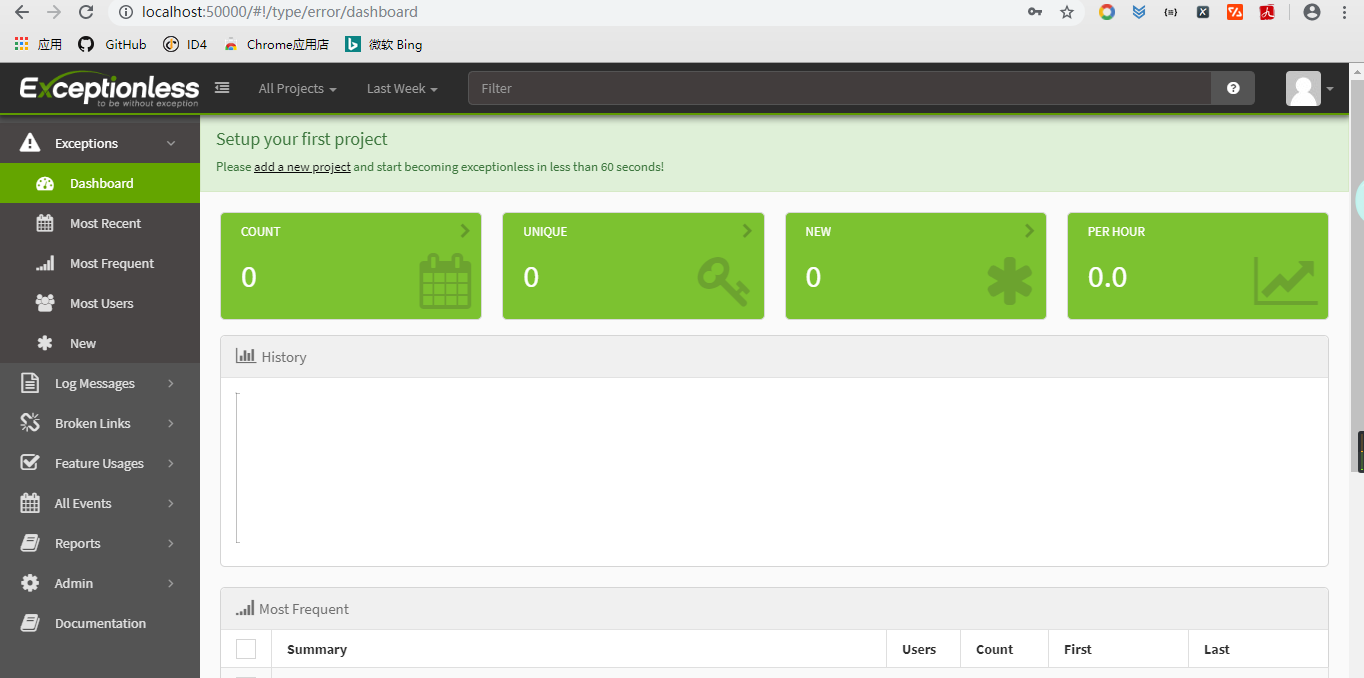
- 打开http://localhost:50000,注册一个账号,然后登入:
分布式日志:Exceptionless的安装与部署的更多相关文章
- .NetCore 分布式日志收集Exceptionless 在Windows下本地安装部署及应用实例
自己安装时候遇到很多问题,接下来把这些问题写出来希望对大家有所帮助 搭建环境: 1.下载安装 java 8 SDK (不要安装最新的10.0) 并配置好环境变量(环境变量的配置就不做介绍了) 2.下载 ...
- 分布式日志框架Exceptionless之生产环境部署步骤
Exceptionless 是一个开源的实时的日志收集框架,它将日志收集变得简单易用并且不需要了解太多的相关技术细节及配置.本篇基于我的上一篇<基于Exceptionless实现分布式日志> ...
- .Net Core 集成ExceptionLess分布式日志框架之本地化部署
前言 公司目前使用的项目中关于日志记录这块,之前一直都是使用的Log4net 存放于后台文件中的,对于异常错误啊,或者需要查看一些详情错误的时候感觉很不方便,要到服务器上去打开日志文件检索错误,降低了 ...
- 容器化分布式日志组件ExceptionLess的Angular前端UI
写在前面 随着微服务架构的流行,日志也需要由专门的分布式日志组件来完成这个工作,我们项目使用的是 ExceptionLess 这个组件,它是前后端分离的:这篇文章我们就来实践容器化 Exception ...
- .NET Core微服务之基于Exceptionless实现分布式日志记录
Tip: 此篇已加入.NET Core微服务基础系列文章索引 一.Exceptionless极简介绍 Exceptionless 是一个开源的实时的日志收集框架,它可以应用在基于 ASP.NET,AS ...
- Net Core集成Exceptionless分布式日志功能以及全局异常过滤
Net Core集成Exceptionless分布式日志功能以及全局异常过滤 相信很多朋友都看过我的上篇关于Exceptionless的简单入门教程[asp.Net Core免费开源分布式异常日志收集 ...
- .NET开源分布式日志框架ExceptionLess实战演练(公开版)
一.课程介绍 在以前,我们做日志收集大多使用 Log4net,Nlog 等框架,在应用程序变得复杂并且集群的时候,可能传统的方式已经不是很好的适用了,因为收集各个日志并且分析他们将变得麻烦而且浪费时间 ...
- Ambari安装之部署3个节点的HA分布式集群
前期博客 Ambari安装之部署单节点集群 其实,按照这个步骤是一样的.只是按照好3个节点后,再做下HA即可. 部署3个节点的HA分布式集群 (1)添加机器 和添加服务的操作类似,如下图 之后的添加a ...
- 如何扩展分布式日志组件(Exceptionless)的Webhook事件通知类型?
写在前面 从上一篇博客高并发.低延迟之C#玩转CPU高速缓存(附示例)到现在又有几个月没写博客了,啥也不说,变得越来越懒了,懒惰产生了拖延后遗症. 最近一周升级了微服务项目使用的分布式日志组件Exce ...
- Flume1.9.0的安装、部署、简单应用(含分布式、与Hadoop3.1.2、Hbase1.4.9的案例)
目录 目录 前言 什么是Flume? Flume的特点 Flume的可靠性 Flume的可恢复性 Flume的一些核心概念 Flume的官方网站在哪里? Flume在哪里下载以及如何安装? 设置环境变 ...
随机推荐
- .Net 7内容汇总(3)--反射优化
反射这玩意,一直以来都是慢的代名词.一说XXX系统大量的反射,好多人第一印象就是会慢. 但是呢,我们又不得不使用反射来做一些事情,毕竟这玩意可以说啥都能干了对吧. It's immensely pow ...
- echarts BAR堆叠图显示百分比
在使用echarts的堆叠图时,我们鼠标悬停的浮窗里的信息可能并不是我们想要的信息,这个时候需要我们配置一下,因为堆叠图的trigger的类型是坐标轴触发的,数据是多组数据,所以我们需要遍历一下数据, ...
- 如何0到1构建DevOps?
从0到1构建DevOps,首先得弄清楚这个DevOps的受众群体,它的用途到底是什么,解决什么问题,比如Android Studio是为了解决Android应用的开发,3UCS xPlus是为了解决应 ...
- Docker | redis集群部署实战
前面已经简单熟悉过redis的下载安装使用,今天接着部署redis集群(cluster),简单体会一下redis集群的高可用特性. 环境准备 Redis是C语言开发,安装Redis需要先将Redis的 ...
- 插入排序算法(Java代码实现)
其它经典排序算法:https://blog.csdn.net/weixin_43304253/article/details/121209905 插入排序算法: 思路:将数据分为已经排序好的数据和未排 ...
- NLP之基于TextCNN的文本情感分类
TextCNN @ 目录 TextCNN 1.理论 1.1 基础概念 最大汇聚(池化)层: 1.2 textCNN模型结构 2.实验 2.1 实验步骤 2.2 算法模型 1.理论 1.1 基础概念 在 ...
- DQL语句排序与分组
DQL语句排序与分组 一.DQL-排序 排序是计算机内经常进行的一种操作,其目的是将一组"无序"的记录序列调整为"有序"的记录序列.分内部排序和外部排序,若整个 ...
- 云原生之旅 - 9)云原生时代网关的后起之秀Envoy Proxy 和基于Envoy 的 Emissary Ingress
前言 前一篇文章讲述了基于Nginx代理的Kuberenetes Ingress Nginx[云原生时代的网关 Ingress Nginx]这次给大家介绍下基于Envoy的 Emissary Ingr ...
- CH58X/CH57X/V208 Observer(观察者)例程讨论讲解
使用的是沁恒的CH582M的Observer例程与官方的demo板. 本例程的功能是主机扫描到从机的MAC地址并打印出来. 先对宏定义进行理解讨论. 最大响应扫描数为8,在串口调试助手那里可以看到打印 ...
- SpringBoot 03: 常用web组件 - - - 拦截器 + Servlet + 过滤器
常用web组件 拦截器 Servlet 过滤器 使用思想 创建自定义类 实现或者继承框架里的接口或类 将自定义类注册到框架中 使用自定义类 拦截器 说明 拦截器是SpringMVC中的一种对象,能拦截 ...