
分布式日志:Exceptionless的安装与部署
安装步骤
首先exceptionless依赖elasticsearch,而elasticsearch需要java环境,所以先安装jdk
下载exceptionless:
下载完成之后解压进入目录中:
右击已管理员身份运行:Start.bat。如果报错,则用powershell进入到该目录,然后运行。他会帮我们下载elasticsearch和kabana。
进入到wwwroot文件夹中修改web.config文件:
<?xml version="1.0" encoding="utf-8"?>

<configuration>

  <connectionStrings>

      <!--exceptionless默认用户名和密码是存在内存中,这里设置存放在redis中-->

    <add name="RedisConnectionString" connectionString="" />

    <!--elasticSearch的地址-->

    <add name="ElasticSearchConnectionString" connectionString="http://localhost:9200" />

    <add name="LdapConnectionString" connectionString="" />

  </connectionStrings>

  <appSettings>

    <!-- Base url for the ui used to build links in emails and other places. -->

    <!--exceptionless的地址,注意后面一定要加个!号,不然激活邮箱的地址会失效-->

    <add key="BaseURL" value="http://localhost:50000/#!" />

    <!-- Controls whether SSL is required. Only enable this if you have SSL configured. -->

    <add key="EnableSSL" value="false" />

    <!--

    Dev: Use this mode when debugging. (Outbound emails will not be sent)

    QA: Use this mode when deployed to staging. (Outbound emails restricted)

    Production: Use this mode when deployed to production.

    -->

    <add key="WebsiteMode" value="Production" />

    <!-- Controls whether users can signup. -->

    <add key="EnableAccountCreation" value="true" />

    <!-- Controls whether daily summary emails are sent -->

    <add key="EnableDailySummary" value="true" />

    <!--

      Email Client Settings (Uncomment the section below to change the default email settings)

      There are three valid SmtpEncryption settings: None, SSL and StartTLS

    -->

    <add key="SmtpHost" value="smtp.qq.com" />

    <add key="SmtpPort" value="465" />

    <add key="SmtpEncryption" value="SSL" />

    <add key="SmtpFrom" value="1983702356@qq.com" />

    <add key="SmtpUser" value="1983702356@qq.com" />

    <add key="SmtpPassword" value="jhmvvgpwfbaoeagi" />

    <!-- Folder used to store event post data -->

    <add key="StorageFolder" value="|DataDirectory|\storage" />

    <!-- Runs the jobs in the current website process -->

    <add key="RunJobsInProcess" value="true" />

    <add key="aspnet:UseTaskFriendlySynchronizationContext" value="true" />

  </appSettings>

  <system.net>

    <defaultProxy enabled="true" />

  </system.net>

  <system.web>

    <authentication mode="None" />

    <compilation targetFramework="4.6" debug="false" />

    <httpRuntime targetFramework="4.6" maxRequestLength="10000" maxUrlLength="1024" />

    <customErrors mode="RemoteOnly" defaultRedirect="~/error.html" />

  </system.web>

  <system.webServer>

    <modules runAllManagedModulesForAllRequests="true">

      <remove name="FormsAuthentication" />

      <remove name="RewriteModule" />

      <remove name="RoleManager" />

      <remove name="WebDAVModule" />

    </modules>

    <urlCompression doStaticCompression="true" />

    <httpCompression directory="%SystemDrive%\websites\_compressed" minFileSizeForComp="1024">

      <scheme name="gzip" dll="%Windir%\system32\inetsrv\gzip.dll" />

      <staticTypes>

        <add mimeType="text/*" enabled="true" />

        <add mimeType="message/*" enabled="true" />

        <add mimeType="application/javascript" enabled="true" />

        <add mimeType="application/json" enabled="true" />

        <add mimeType="*/*" enabled="false" />

      </staticTypes>

    </httpCompression>

    <httpProtocol>

      <customHeaders>

        <remove name="Server" />

        <remove name="X-Powered-By" />

        <remove name="X-AspNet-Version" />

      </customHeaders>

    </httpProtocol>

    <handlers>

      <remove name="OPTIONS" />

      <remove name="OPTIONSVerbHandler" />

      <remove name="TRACE" />

      <remove name="TRACEVerbHandler" />

      <remove name="WebDAV" />

      <remove name="ExtensionlessUrlHandler-Integrated-4.0" />

      <add name="ExtensionlessUrlHandler-Integrated-4.0" path="*." verb="*" type="System.Web.Handlers.TransferRequestHandler" preCondition="integratedMode,runtimeVersionv4.0" />

    </handlers>

    <security>

      <requestFiltering allowDoubleEscaping="true">

        <requestLimits maxAllowedContentLength="10000000" />

      </requestFiltering>

    </security>

    <!--<rewrite><rules><clear /><rule name="Redirect HTTP to HTTPS"><match url="^(.*)$" /><conditions><add input="{HTTPS}" pattern="^OFF$" /><add input="{HTTP_HOST}" matchType="Pattern" pattern="\:9001$" negate="true" /><add input="{HTTP_HOST}" matchType="Pattern" pattern="^local-app.exceptionless.io$" negate="true" /></conditions><action type="Redirect" url="https://{HTTP_HOST}/{R:1}" redirectType="SeeOther" /></rule><rule name="Redirect HTTPS to HTTP"><match url="^(.*)$" /><conditions><add input="{HTTPS}" pattern="^ON$" /><add input="{HTTP_HOST}" matchType="Pattern" pattern="^local-app.exceptionless.io$" /></conditions><action type="Redirect" url="http://{HTTP_HOST}/{R:1}" redirectType="SeeOther" /></rule><rule name="Redirect exceptionless.io to be.exceptionless.io"><match url="^(.*)$" /><conditions><add input="{HTTP_HOST}" matchType="Pattern" pattern="^exceptionless.io$" /></conditions><action type="Redirect" url="https://be.{HTTP_HOST}/{R:1}" redirectType="SeeOther" /></rule><rule name="PushState" stopProcessing="true"><match url=".*" /><conditions logicalGrouping="MatchAll"><add input="{REQUEST_FILENAME}" matchType="IsFile" negate="true" /><add input="{REQUEST_FILENAME}" matchType="IsDirectory" negate="true" /><add input="{REQUEST_FILENAME}" pattern=".*[^.]*\.[\d\w]+$" negate="true" /><add input="{REQUEST_URI}" matchType="Pattern" pattern="api/(.*)" negate="true" /></conditions><action type="Rewrite" url="/" /></rule></rules></rewrite>-->

  </system.webServer>

  <location path="error.html">

    <system.web>

      <httpModules>

        <clear />

      </httpModules>

    </system.web>

    <system.webServer>

      <modules>

        <clear />

      </modules>

    </system.webServer>

  </location>

  <location path="exceptionless.png">

    <system.web>

      <httpModules>

        <clear />

      </httpModules>

    </system.web>

    <system.webServer>

      <modules>

        <clear />

      </modules>

    </system.webServer>

  </location>

  <location path="favicon.ico">

    <system.web>

      <httpModules>

        <clear />

      </httpModules>

    </system.web>

    <system.webServer>

      <modules>

        <clear />

      </modules>

    </system.webServer>

  </location>

  <location path="index.html">

    <system.web>

      <httpModules>

        <clear />

      </httpModules>

    </system.web>

    <system.webServer>

      <modules>

        <clear />

      </modules>

    </system.webServer>

  </location>

  <runtime>

    <assemblyBinding xmlns="urn:schemas-microsoft-com:asm.v1">

      <dependentAssembly>

        <assemblyIdentity name="System.Web.Http" publicKeyToken="31bf3856ad364e35" culture="neutral" />

        <bindingRedirect oldVersion="0.0.0.0-5.2.3.0" newVersion="5.2.3.0" />

      </dependentAssembly>

      <dependentAssembly>

        <assemblyIdentity name="Newtonsoft.Json" publicKeyToken="30ad4fe6b2a6aeed" culture="neutral" />

        <bindingRedirect oldVersion="0.0.0.0-10.0.0.0" newVersion="10.0.0.0" />

      </dependentAssembly>

      <dependentAssembly>

        <assemblyIdentity name="Microsoft.Owin" publicKeyToken="31bf3856ad364e35" culture="neutral" />

        <bindingRedirect oldVersion="0.0.0.0-3.1.0.0" newVersion="3.1.0.0" />

      </dependentAssembly>

      <dependentAssembly>

        <assemblyIdentity name="System.Net.Http.Formatting" publicKeyToken="31bf3856ad364e35" culture="neutral" />

        <bindingRedirect oldVersion="0.0.0.0-5.2.3.0" newVersion="5.2.3.0" />

      </dependentAssembly>

      <dependentAssembly>

        <assemblyIdentity name="Microsoft.Owin.Security" publicKeyToken="31bf3856ad364e35" culture="neutral" />

        <bindingRedirect oldVersion="0.0.0.0-3.1.0.0" newVersion="3.1.0.0" />

      </dependentAssembly>

      <dependentAssembly>

        <assemblyIdentity name="System.Web.Cors" publicKeyToken="31bf3856ad364e35" culture="neutral" />

        <bindingRedirect oldVersion="0.0.0.0-5.2.3.0" newVersion="5.2.3.0" />

      </dependentAssembly>

      <dependentAssembly>

        <assemblyIdentity name="Microsoft.AspNet.SignalR.Core" publicKeyToken="31bf3856ad364e35" culture="neutral" />

        <bindingRedirect oldVersion="0.0.0.0-2.2.0.0" newVersion="2.2.0.0" />

      </dependentAssembly>

      <dependentAssembly>

        <assemblyIdentity name="NLog" publicKeyToken="5120e14c03d0593c" culture="neutral" />

        <bindingRedirect oldVersion="0.0.0.0-4.0.0.0" newVersion="4.0.0.0" />

      </dependentAssembly>

      <dependentAssembly>

        <assemblyIdentity name="SimpleInjector" publicKeyToken="984cb50dea722e99" culture="neutral" />

        <bindingRedirect oldVersion="0.0.0.0-3.1.1.0" newVersion="3.1.1.0" />

      </dependentAssembly>

      <dependentAssembly>

        <assemblyIdentity name="Microsoft.Owin.FileSystems" publicKeyToken="31bf3856ad364e35" culture="neutral" />

        <bindingRedirect oldVersion="0.0.0.0-3.0.1.0" newVersion="3.0.1.0" />

      </dependentAssembly>

      <dependentAssembly>

        <assemblyIdentity name="Microsoft.Data.Edm" publicKeyToken="31bf3856ad364e35" culture="neutral" />

        <bindingRedirect oldVersion="0.0.0.0-5.6.4.0" newVersion="5.6.4.0" />

      </dependentAssembly>

      <dependentAssembly>

        <assemblyIdentity name="Microsoft.Data.Services.Client" publicKeyToken="31bf3856ad364e35" culture="neutral" />

        <bindingRedirect oldVersion="0.0.0.0-5.6.4.0" newVersion="5.6.4.0" />

      </dependentAssembly>

      <dependentAssembly>

        <assemblyIdentity name="Microsoft.Data.OData" publicKeyToken="31bf3856ad364e35" culture="neutral" />

        <bindingRedirect oldVersion="0.0.0.0-5.6.4.0" newVersion="5.6.4.0" />

      </dependentAssembly>

      <dependentAssembly>

        <assemblyIdentity name="SimpleInjector.Extensions.ExecutionContextScoping" publicKeyToken="984cb50dea722e99" culture="neutral" />

        <bindingRedirect oldVersion="0.0.0.0-3.1.1.0" newVersion="3.1.1.0" />

      </dependentAssembly>

      <dependentAssembly>

        <assemblyIdentity name="System.Collections.Immutable" publicKeyToken="b03f5f7f11d50a3a" culture="neutral" />

        <bindingRedirect oldVersion="0.0.0.0-1.2.1.0" newVersion="1.2.1.0" />

      </dependentAssembly>

    </assemblyBinding>

  </runtime>

  <location path="index.html">

    <system.webServer>

      <staticContent>

        <clientCache cacheControlMode="DisableCache" />

      </staticContent>

    </system.webServer>

  </location>

</configuration>
如果你修改了Exceptionless的默认路由,记得改下app.config.77fc9ddd679d37dc.js文件中的地址。
- 然后启动elasticsearch、redis。再将exceptionless部署到iis即可。
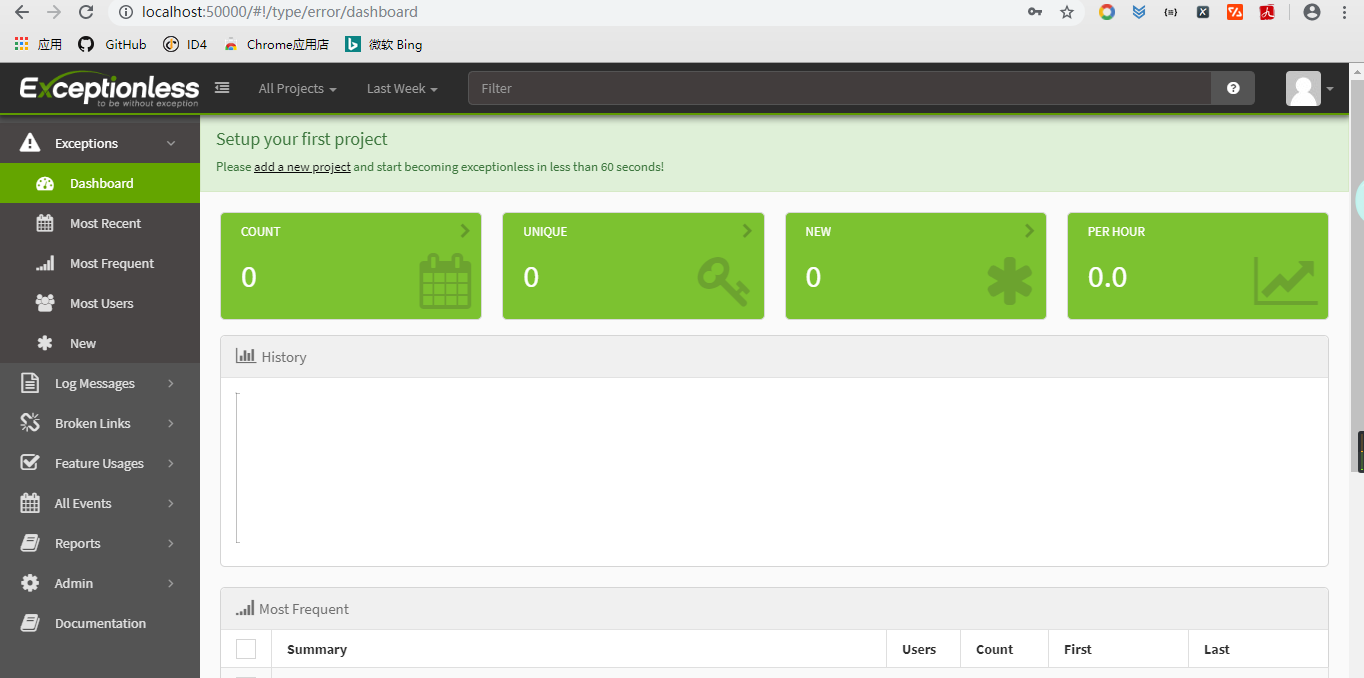
- 打开http://localhost:50000,注册一个账号,然后登入:
分布式日志:Exceptionless的安装与部署的更多相关文章
- .NetCore 分布式日志收集Exceptionless 在Windows下本地安装部署及应用实例
自己安装时候遇到很多问题,接下来把这些问题写出来希望对大家有所帮助 搭建环境: 1.下载安装 java 8 SDK (不要安装最新的10.0) 并配置好环境变量(环境变量的配置就不做介绍了) 2.下载 ...
- 分布式日志框架Exceptionless之生产环境部署步骤
Exceptionless 是一个开源的实时的日志收集框架,它将日志收集变得简单易用并且不需要了解太多的相关技术细节及配置.本篇基于我的上一篇<基于Exceptionless实现分布式日志> ...
- .Net Core 集成ExceptionLess分布式日志框架之本地化部署
前言 公司目前使用的项目中关于日志记录这块,之前一直都是使用的Log4net 存放于后台文件中的,对于异常错误啊,或者需要查看一些详情错误的时候感觉很不方便,要到服务器上去打开日志文件检索错误,降低了 ...
- 容器化分布式日志组件ExceptionLess的Angular前端UI
写在前面 随着微服务架构的流行,日志也需要由专门的分布式日志组件来完成这个工作,我们项目使用的是 ExceptionLess 这个组件,它是前后端分离的:这篇文章我们就来实践容器化 Exception ...
- .NET Core微服务之基于Exceptionless实现分布式日志记录
Tip: 此篇已加入.NET Core微服务基础系列文章索引 一.Exceptionless极简介绍 Exceptionless 是一个开源的实时的日志收集框架,它可以应用在基于 ASP.NET,AS ...
- Net Core集成Exceptionless分布式日志功能以及全局异常过滤
Net Core集成Exceptionless分布式日志功能以及全局异常过滤 相信很多朋友都看过我的上篇关于Exceptionless的简单入门教程[asp.Net Core免费开源分布式异常日志收集 ...
- .NET开源分布式日志框架ExceptionLess实战演练(公开版)
一.课程介绍 在以前,我们做日志收集大多使用 Log4net,Nlog 等框架,在应用程序变得复杂并且集群的时候,可能传统的方式已经不是很好的适用了,因为收集各个日志并且分析他们将变得麻烦而且浪费时间 ...
- Ambari安装之部署3个节点的HA分布式集群
前期博客 Ambari安装之部署单节点集群 其实,按照这个步骤是一样的.只是按照好3个节点后,再做下HA即可. 部署3个节点的HA分布式集群 (1)添加机器 和添加服务的操作类似,如下图 之后的添加a ...
- 如何扩展分布式日志组件(Exceptionless)的Webhook事件通知类型?
写在前面 从上一篇博客高并发.低延迟之C#玩转CPU高速缓存(附示例)到现在又有几个月没写博客了,啥也不说,变得越来越懒了,懒惰产生了拖延后遗症. 最近一周升级了微服务项目使用的分布式日志组件Exce ...
- Flume1.9.0的安装、部署、简单应用(含分布式、与Hadoop3.1.2、Hbase1.4.9的案例)
目录 目录 前言 什么是Flume? Flume的特点 Flume的可靠性 Flume的可恢复性 Flume的一些核心概念 Flume的官方网站在哪里? Flume在哪里下载以及如何安装? 设置环境变 ...
随机推荐
- k8s控制器理解
DaemonSet 一个DaemonSet对象能确保其创建的Pod在集群中的每一台(或指定)Node上都运行一个副本.如果集群中动态加入了新的Node,DaemonSet中的Pod也会被添加在新加入N ...
- git-flow模型
git-flow 是在 git branch 和 git tag 基础上封装出来的代码分支管理模型,把实际开发模拟称 master develop feature release hotfix sup ...
- 制造企业有可能自行开发ERP系统吗?
当然可以啊! 生产企业对于ERP的需求是一直存在的,但市场上多为标准化的产品,与企业的个性化需求矛盾着. 有很多制造企业自行开发ERP系统啊!只是各个企业成效不同而已,毕竟不同企业的IT开发能力不同而 ...
- C#-8 数组
一 关于数组 数组是由一个变量名称表示的一组同类型的数据元素.数组中的元素通过变量名和方括号索引来访问. int[] intArray = new int[] { 1, 2, 3 }; //声明了一个 ...
- 分布式存储系统之Ceph集群MDS扩展
前文我们了解了cephfs使用相关话题,回顾请参考https://www.cnblogs.com/qiuhom-1874/p/16758866.html:今天我们来聊一聊MDS组件扩展相关话题: 我们 ...
- 1.RabbitMQ系列之服务启动
1. docker方式启动MQ # latest RabbitMQ 3.10 docker run -it --rm --name rabbitmq -p 5672:5672 -p 15672:156 ...
- 20220729 - DP训练 #2
20220729 - DP训练 #2 时间记录 \(8:00-8:10\) 浏览题面 \(8:10-8:50\) T1 看题想到了建树,从每一个点遍历,若能遍历每一个点,则可以获胜 快速写完之后,发现 ...
- python 矩阵切片
假设n是一个numpy或者torch.tensor张量,那么 n[a:b,c:d]则代表从a到b行(不含b行),c到d列(不含d列)的切片 当然,ab.cd中的数是可以省略掉,只要abcd中有一个数即 ...
- F118校准(二)-- 操作步骤(使用PX01 PG点屏,并使用PX01 PG校准F118)
1. 准备工作 硬件连接: CA310通过USB线材连接PC PX01通过USB线材连接PC F118通过灰排线连接PX01左上角的GPIO扩展口(如下图所示) LCM连接PX01 启动LcdTool ...
- Java多线程-线程关键字(二)
Java中和线程相关的关键字就两:volatile和synchronized. volatile以前用得较少,以后会用得更少(后面解释).它是一种非常轻量级的同步机制,它的三大特性是: 1.保证可见性 ...