
Demo of canvas, canvas optimization and svg
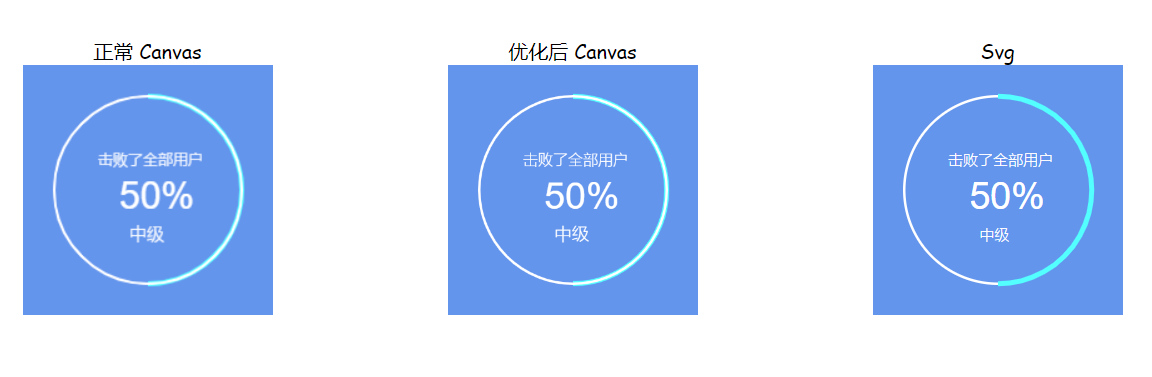
It used the canvas to draw the curves in the old project, and the client felt that it was vague, so I tried to make a demo about canvas, canvas optimization and svg comparison.
The effect is as follows:


<!DOCTYPE html>

<html>

<head>

    <style>

        html,

        body {

            width: 100%;

            height: 100%;

            overflow: hidden;

        }

    </style>

</head>

<body style="display: flex;

    align-items: center;

    justify-content: space-around;">

    <div>

        <div style="    text-align: center;

    font-family: cursive;">正常 Canvas</div>

        <div style="background-color:cornflowerblue;width:200px;height:200px;">

            <canvas id="normalCanvas" width="200" height="200" />

        </div>

    </div>

    <div>

        <div style="    text-align: center;

    font-family: cursive;">优化后 Canvas</div>

        <div style="background-color:cornflowerblue;width:200px;height:200px;">

            <canvas id="optimizedCanvas" style="width:200px;height:200px" width="400" height="400" />

        </div>

    </div>

    <div>

        <div style="    text-align: center;

    font-family: cursive;">Svg</div>

        <div id="svgDiv" style="background-color:cornflowerblue;width:200px;height:200px;">

            <svg style="width:100%;height:100%;">

                <circle cx="30" cy="50" r="25" />

            </svg>

        </div>

    </div>

</body>

<script>

    drawNormalCanvas();

    drawOptimizedCanvas();

    drawSvg();

    function drawNormalCanvas() {

        let canvas = document.getElementById("normalCanvas");

        let context = canvas.getContext('2d');

        let centerX = canvas.width / 2;

        let centerY = canvas.height / 2;

        let rad = Math.PI * 2 / 100;

        let endNum = 0.5 * 100;

        let scale = 1;

        context.imageSmoothingEnabled = true;

        context.clearRect(0, 0, canvas.width, canvas.height);

        context.save();

        context.strokeStyle = "#53FFFF"; //设置描边样式

        context.lineWidth = 4 * scale; //设置线宽

        context.beginPath(); //路径开始

        context.arc(centerX, centerY, 75 * scale, -Math.PI / 2, -Math.PI / 2 + endNum * rad, false); //用于绘制圆弧context.arc(x坐标,y坐标,半径,起始角度,终止角度,顺时针/逆时针)

        context.stroke(); //绘制

        context.closePath(); //路径结束

        context.restore();

        context.save();

        context.beginPath();

        context.strokeStyle = "white";

        context.lineWidth = 2 * scale;

        context.arc(centerX, centerY, 75 * scale, 0, Math.PI * 2, false);

        context.stroke();

        context.closePath();

        context.restore();

        context.save(); //save和restore可以保证样式属性只运用于该段canvas元素

        context.strokeStyle = "#fff"; //设置描边样式

        //绘制字体,并且指定位置

        context.fillStyle = "#fff";

        context.font = "normal normal lighter 12px Microsoft YaHei"; //设置字体大小和字体

        context.fillText("击败了全部用户", centerX - 40 * scale, centerY - 20 * scale);

        context.font = "normal normal normal 30px arial";

        context.fillText(endNum.toFixed(0) + "%", centerX - 23 * scale, centerY + 15 * scale);

        context.font = "normal normal lighter 14px Microsoft YaHei"; //设置字体大小和字体

        context.fillText('中级' + '', centerX - 15 * scale, centerY + 40 * scale);

        context.stroke(); //执行绘制

        context.restore();

    }

    function drawOptimizedCanvas() {

        let canvas = document.getElementById("optimizedCanvas");

        let context = canvas.getContext('2d');

        let centerX = canvas.width / 2;

        let centerY = canvas.height / 2;

        let rad = Math.PI * 2 / 100;

        let endNum = 0.5 * 100;

        let scale = 2;

        context.imageSmoothingEnabled = true;

        context.clearRect(0, 0, canvas.width, canvas.height);

        context.save();

        context.strokeStyle = "#53FFFF"; //设置描边样式

        context.lineWidth = 4 * scale; //设置线宽

        context.beginPath(); //路径开始

        context.arc(centerX, centerY, 75 * scale, -Math.PI / 2, -Math.PI / 2 + endNum * rad, false); //用于绘制圆弧context.arc(x坐标,y坐标,半径,起始角度,终止角度,顺时针/逆时针)

        context.stroke(); //绘制

        context.closePath(); //路径结束

        context.restore();

        context.save();

        context.beginPath();

        context.strokeStyle = "white";

        context.lineWidth = 2 * scale;

        context.arc(centerX, centerY, 75 * scale, 0, Math.PI * 2, false);

        context.stroke();

        context.closePath();

        context.restore();

        context.save(); //save和restore可以保证样式属性只运用于该段canvas元素

        context.strokeStyle = "#fff"; //设置描边样式

        //绘制字体,并且指定位置

        context.fillStyle = "#fff";

        context.font = "normal normal lighter 24px Microsoft YaHei"; //设置字体大小和字体

        context.fillText("击败了全部用户", centerX - 40 * scale, centerY - 20 * scale);

        context.font = "normal normal normal 60px arial";

        context.fillText(endNum.toFixed(0) + "%", centerX - 23 * scale, centerY + 15 * scale);

        context.font = "normal normal lighter 28px Microsoft YaHei"; //设置字体大小和字体

        context.fillText('中级' + '', centerX - 15 * scale, centerY + 40 * scale);

        context.stroke(); //执行绘制

        context.restore();

    }

    function drawSvg() {

        let svgDiv = document.getElementById("svgDiv");

        let centerX = svgDiv.offsetWidth / 2;

        let centerY = svgDiv.offsetHeight / 2;

        let newHtml = `<svg style="width:100%;height:100%;">

<circle cx="${centerX}"  cy="${centerY}" r="75" style="fill:none;stroke:white;stroke-width: 2px" />

<path d="M 100 25 A 75 75 0 1 1 100 175" stroke="#53FFFF" stroke-width="4px" fill="none" />

<text x="${centerX - 40}" y="${centerY - 20}" style="fill: #fff;font:normal normal lighter 12px Microsoft YaHei;">击败了全部用户</text>

<text x="${centerX - 23}" y="${centerY + 15}" style="fill: #fff;font:normal normal normal 30px arial;">50%</text>

<text x="${centerX - 15}" y="${centerY + 40}" style="fill: #fff;font:normal normal lighter 12px Microsoft YaHei;">中级</text>

</svg>

    `;

        svgDiv.innerHTML = newHtml;

    }

</script>

</html>
references:
https://echarts.apache.org/handbook/zh/best-practices/canvas-vs-svg/#
https://www.cnblogs.com/fireyjy/p/5789376.html
https://www.cnblogs.com/heibaiqi/p/16547624.html
Demo of canvas, canvas optimization and svg的更多相关文章
- HTML5 Canvas、内联 SVG、Canvas vs. SVG
canvas 元素用于在网页上绘制图形. 什么是 Canvas? HTML5 的 canvas 元素使用 JavaScript 在网页上绘制图像. 画布是一个矩形区域,您可以控制其每一像素. canv ...
- FireFox下Canvas使用图像合成绘制SVG的Bug
本文适合适合对canvas绘制.图形学.前端可视化感兴趣的读者阅读. 楔子 所有的事情都会有一个起因.最近产品上需要做一个这样的功能:给一些图形进行染色处理.想想这还不是顺手拈来的事情,早就研究过图形 ...
- 做出一个SwitchButton的效果,并详细学习一下onDraw(Canvas canvas)方法的使用
代码的灵感和原理主要来自于android自定义开关控件-SlideSwitch http://blog.csdn.net/singwhatiwanna/article/details/9254309这 ...
- Html5新增元素中Canvas 与内联SVG的比较!
SVG与Canvas的区别与比较如下: svg:使用xml描述2D图形,canvas使用javascript描述2D图形. Canvas 是逐像素进行渲染的,在 canvas 中,一旦图形被绘制完成, ...
- 把一个base64编码的图片绘制到canvas (canvas的图片在转成dataurl)
把一个base64编码的图片绘制到canvas 需要引入jquery. <canvas id="myCanvas" width="800" height= ...
- HTML5 学习总结(四)——canvas绘图、WebGL、SVG
一.Canvas canvas是HTML5中新增一个HTML5标签与操作canvas的javascript API,它可以实现在网页中完成动态的2D与3D图像技术.<canvas> 标记和 ...
- HTML5新特性——HTML 5 Canvas vs. SVG
Canvas 和 SVG 都允许您在浏览器中创建图形,但是它们在根本上是不同的. SVG SVG 是一种使用 XML 描述 2D 图形的语言. SVG 基于 XML,这意味着 SVG DOM 中的每个 ...
- canvas绘图、WebGL、SVG
目录 一.Canvas 1.1.创建canvas元素 1.2.画线 1.3.绘制矩形 1.4.绘制圆弧 1.5.绘制图像 1.6.绘制文字 1.7.随机颜色与简单动画 二.WebGL 2.1.HTML ...
- HTML5 学习笔记(四)——canvas绘图、WebGL、SVG
一.Canvas canvas是HTML5中新增一个HTML5标签与操作canvas的javascript API,它可以实现在网页中完成动态的2D与3D图像技术.<canvas> 标记和 ...
- svg转化成canvas以便生成base64位的图片
很久前写了关于把html转成图片的一个例子,最近有出了新的问题.利用html2canvas.js文件把html转成base64位的图片是没什么问题的,但也不是绝对的,比如这时候不能碰见svg这个鬼,h ...
随机推荐
- input标签file文件上传图片本地预览(转载)
<input type="file" name="img-up" id="img-up" value="" /&g ...
- 完全机器模拟浏览器操作自动刷网课!不怕被封!!-----python基于selenium实现超星学习通刷视频网课
(使用过程中有小伙伴反映如果课程的第一章是空白的页面会报错,我当时做的时候是根据我自己的课程,没有第一节是空页面的现象,这个以后有时间我再改一下吧,或者小伙伴自己修改一下也可) 原谅我这个标题党,对叭 ...
- SVN的安装和使用手册2
转载:http://www.cnblogs.com/armyfai/p/3985660.html SVN简介: 为什么要使用SVN? 程序员在编写程序的过程中,每个程序员都会生成很多不同的版本,这就需 ...
- flask相关
app使用flask_session pip install flask_session from flask_session import Session app = Flask(__name__) ...
- error Unnecessary return statement no-useless-return
语法错误 原本是 addUser() { this.$refs.addFormRef.validate((valid) => { if (!valid) return ...
- H5移动端跳转唤起QQ在线客服与跳转支付宝
以下两段代码都是找了很久的,在某个删库跑路的支付商那里找到的! H5移动端跳转QQ 实现在线客服 <a href="mqqwpa://im/chat?chat_type=wpa& ...
- C语言中局部变量和全局变量关于释放
1.全局都属于静态,局部区分静态非静态,局部静态和全局的区别在于可见范围,局部能使用外部看不见的意思,本质相同的. 2.如果是全局变量或局部静态变量,编译器会为其分配一个位于静态存储区的地址.这个地址 ...
- 关于XAF中ListView慢的总结与改善
关于XAF中ListView慢的总结与改善: 一.数据访问模式改善:ListView中DataAccessMode中的改变:默认模式是Client,这在大多数情况下,适当的使用Server,Serve ...
- ts get和set
class User { // get.set方法的成员变量命名时建议在前面加 _ private _fullName: string; //get 的用法 get fullName(): strin ...
- SDN之Openflow+OpenDayLight课程开课通知
内容简介: 该课程为期2天,在这两天里 我们将会深入体会SDN的特点与传统网络的区别 ,掌握SDN架构里各层的协议用途,Openflow作为sdn里的一款开源的南向协议,最大的意义体现在它实现了网络设 ...