
ssm 框架实现增删改查CRUD操作(Spring + SpringMVC + Mybatis 实现增删改查)
ssm 框架实现增删改查
SpringBoot 项目整合
一、项目准备
1.1 ssm 框架环境搭建
博客地址:ssm项目框架搭建
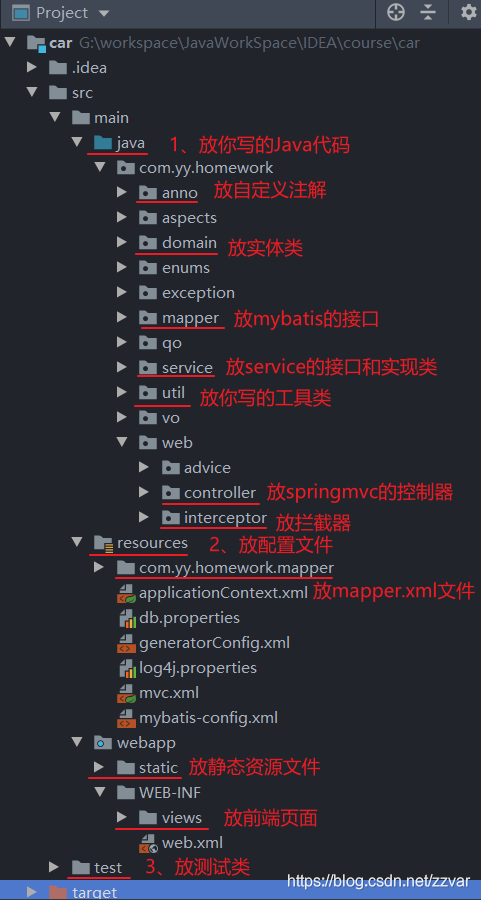
1.2 项目结构图如下
1.3 数据表结构图如下
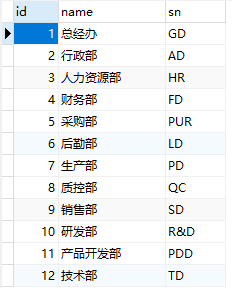
CREATE TABLE `department` (

  `id` bigint(20) NOT NULL AUTO_INCREMENT,

  `name` varchar(255) DEFAULT NULL,

  `sn` varchar(255) DEFAULT NULL,

  PRIMARY KEY (`id`) USING BTREE

) ENGINE=InnoDB AUTO_INCREMENT=13 DEFAULT CHARSET=utf8 ROW_FORMAT=DYNAMIC;
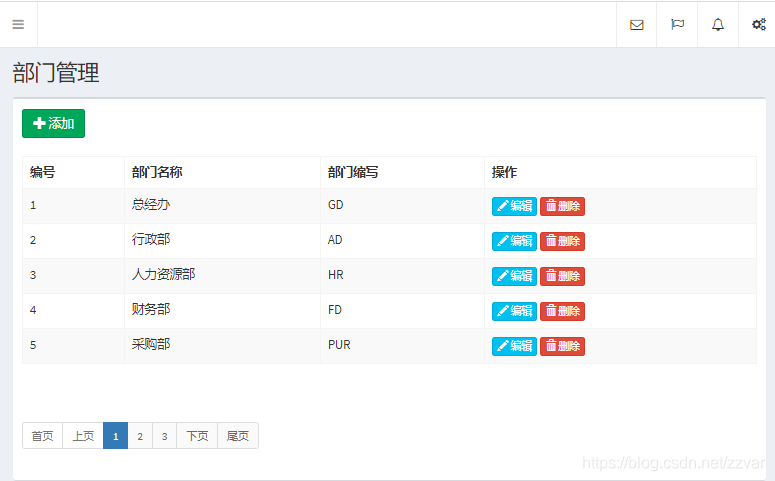
1.4 运行结果
二、项目实现
1. EmployeeController 控制器
package com.yy.homework.web.controller;

import com.github.pagehelper.PageInfo;

import com.yy.homework.anno.RequiredPermission;

import com.yy.homework.domain.Department;

import com.yy.homework.qo.DepartmentPageObject;

import com.yy.homework.service.IDepartmentService;

import com.yy.homework.service.IDepartmentService;

import org.springframework.beans.factory.annotation.Autowired;

import org.springframework.stereotype.Controller;

import org.springframework.ui.Model;

import org.springframework.web.bind.annotation.ModelAttribute;

import org.springframework.web.bind.annotation.RequestMapping;

@Controller

@RequestMapping("/department")

public class DepartmentController {

    @Autowired

    private IDepartmentService departmentService;

    @RequestMapping("/list")

    @RequiredPermission(name = "部门查询", expression = "department:list")

    public String selectAll(Model model, @ModelAttribute("qo")DepartmentPageObject qo) {

    	// Mybatis分页插件 PageHelper

    	//qo:页面模糊查询传入的值和分页查询传入的当前页和每页条数分装成 DepartmentPageObject 对象

        PageInfo<Department> pageInfo = departmentService.selectForList(qo);

        model.addAttribute("pageInfo", pageInfo);

        return "department/list";

    }

    @RequestMapping("/input")

    @RequiredPermission(name = "部门新增或修改", expression = "department:saveOrUpdate")

    public String input(Department department, Model model) {

        if (department.getId() != null) {

            Department e = departmentService.selectById(department.getId());

            model.addAttribute("department", e);

        }

        return "department/input";

    }

    @RequestMapping("/saveOrUpdate")

    @RequiredPermission(name = "部门新增或修改", expression = "department:saveOrUpdate")

    public String saveOrUpdate(Department department) {

        if (department.getId() != null) {

            departmentService.update(department);

        } else {

            departmentService.insert(department);

        }

        return "redirect:/department/list";

    }

    @RequestMapping("/delete")

    @RequiredPermission(name = "部门删除", expression = "department:delete")

    public String delete(Long id) {

        departmentService.delete(id);

        return "redirect:/department/list";

    }

}
2. IDepartmentService 接口
package com.yy.homework.service;

import com.github.pagehelper.PageInfo;

import com.yy.homework.domain.Department;

import com.yy.homework.domain.Department;

import com.yy.homework.qo.DepartmentPageObject;

import java.util.List;

public interface IDepartmentService {

    void insert(Department department);

    void delete(Long id);

    void update(Department department);

    Department selectById(Long id);

    PageInfo<Department> selectForList(DepartmentPageObject qo);

    List<Department> selectAll();

}
3. DepartmentServiceImpl 接口实现类
package com.yy.homework.service.impl;

import com.github.pagehelper.PageHelper;

import com.github.pagehelper.PageInfo;

import com.yy.homework.domain.Department;

import com.yy.homework.domain.Department;

import com.yy.homework.mapper.DepartmentMapper;

import com.yy.homework.qo.DepartmentPageObject;

import com.yy.homework.service.IDepartmentService;

import org.springframework.beans.factory.annotation.Autowired;

import org.springframework.stereotype.Service;

import java.util.List;

@Service

public class DepartmentServiceImpl implements IDepartmentService {

    @Autowired

    private DepartmentMapper departmentMapper;

    @Override

    public void insert(Department department) {

        departmentMapper.insert(department);

    }

    @Override

    public void delete(Long id) {

        departmentMapper.deleteByPrimaryKey(id);

    }

    @Override

    public void update(Department department) {

        departmentMapper.updateByPrimaryKey(department);

    }

    @Override

    public Department selectById(Long id) {

        return departmentMapper.selectByPrimaryKey(id);

    }

    @Override

    public PageInfo<Department> selectForList(DepartmentPageObject qo) {

        // 使用分页插件,传入当前页,每页显示数量

        PageHelper.startPage(qo.getCurrentPage(), qo.getPageSize());

        List<Department> department = departmentMapper.selectForList(qo);

        return new PageInfo<>(department);

    }

    @Override

    public List<Department> selectAll() {

        return departmentMapper.selectAll();

    }

}
4. DepartmentMapper 接口
package com.yy.homework.mapper;

import com.yy.homework.domain.Department;

import com.yy.homework.qo.DepartmentPageObject;

import java.util.List;

public interface DepartmentMapper {

    int deleteByPrimaryKey(Long id);

    int insert(Department record);

    Department selectByPrimaryKey(Long id);

    List<Department> selectForList(DepartmentPageObject qo);

    int updateByPrimaryKey(Department record);

    List<Department> selectAll();

}
5. DepartmentMapper.xml
<?xml version="1.0" encoding="UTF-8" ?>

<!DOCTYPE mapper PUBLIC "-//mybatis.org//DTD Mapper 3.0//EN" "http://mybatis.org/dtd/mybatis-3-mapper.dtd" >

<mapper namespace="com.yy.homework.mapper.DepartmentMapper" >

  <resultMap id="BaseResultMap" type="com.yy.homework.domain.Department" >

    <id column="id" property="id" />

    <result column="name" property="name" />

    <result column="sn" property="sn" />

  </resultMap>

  <delete id="deleteByPrimaryKey" >

    delete from department

    where id = #{id}

  </delete>

  <insert id="insert" useGeneratedKeys="true" keyProperty="id" >

    insert into department (name, sn)

    values (#{name}, #{sn})

  </insert>

  <update id="updateByPrimaryKey" >

    update department

    set name = #{name},

      sn = #{sn}

    where id = #{id}

  </update>

  <select id="selectByPrimaryKey" resultMap="BaseResultMap" >

    select id, name, sn

    from department

    where id = #{id}

  </select>

  <select id="selectForList" resultMap="BaseResultMap" >

    select id, name, sn

    from department

  </select>

    <select id="selectAll" resultMap="BaseResultMap">

      select id, name, sn

      from department

    </select>

</mapper>
6. list.ftl 页面(可以不使用 FreeMarker 模板,自己定义)
<!DOCTYPE html>
<html>
<head>
<meta charset="utf-8">
<meta http-equiv="X-UA-Compatible" content="IE=edge">
<title>部门管理</title>
<!-- 使用相对当前模板文件的路径 再去找另一个模板文件 -->
<#include "/common/link.ftl">
<script>
$(function () {
/* 添加 */
$('.btn-input').click(function () {
let tr = this.parentNode.parentNode;
console.log(tr);
if (tr.childNodes[1].innerText) {
$('input[name=id]').val(tr.childNodes[1].innerText);
$('input[name=name]').val(tr.childNodes[5].innerText);
// console.log($('#exampleInputEmail1').val());
$('input[name=sn]').val(tr.childNodes[7].innerText);
}
$('.modal').modal('show'); //官方文档中表示通过该方法即可弹出模态框
});
/*$('.btn-input').click(function () {
$('.modal').modal('show'); //官方文档中表示通过该方法即可弹出模态框
});*/
});
</script>
</head>
<body class="hold-transition skin-black sidebar-mini">
<div class="wrapper">
<#include "/common/navbar.ftl">
<!--定义一个变量 用于菜单回显-->
<#assign currentMenu="department"/>
<#include "/common/menu.ftl">
<div class="content-wrapper">
<section class="content-header">
<h1>部门管理</h1>
</section>
<section class="content">
<div class="box">
<!--高级查询--->
<form class="form-inline" id="searchForm" action="/department/list" method="post">
<input type="hidden" name="currentPage" id="currentPage" value="1">
<a href="#" class="btn btn-success btn-input" style="margin: 10px">
<span class="glyphicon glyphicon-plus"></span> 添加
</a>
</form>
<!--编写内容-->
<div class="box-body table-responsive ">
<table class="table table-hover table-bordered table-striped">
<thead>
<tr>
<th>编号</th>
<th>部门名称</th>
<th>部门缩写</th>
<th>操作</th>
</tr>
</thead>
<tbody>
<#list pageInfo.list as department>
<tr>
<td style="display: none">${department.id}</td>
<td>${department_index + pageInfo.startRow}</td>
<td>${department.name}</td>
<td>${department.sn}</td>
<td>
<a href="#" class="btn btn-info btn-xs btn-input">
<span class="glyphicon glyphicon-pencil"></span> 编辑
</a>
<a class="btn btn-danger btn-xs btn-delete" data-url="/department/delete?id=${department.id}">
<span class="glyphicon glyphicon-trash"></span> 删除
</a>
</td>
</tr>
</#list>
</tbody>
</table>
<!--分页-->
<#include "/common/page.ftl" >
</div>
</div>
</section>
</div>
<#include "/common/footer.ftl" >
<div class="modal fade" tabindex="-1" role="dialog">
<div class="modal-dialog" role="document">
<div class="modal-content">
<div class="modal-header">
<button type="button" class="close" data-dismiss="modal" aria-label="Close"><span
aria-hidden="true">×</span>
</button>
<h4 class="modal-title">添加/修改部门</h4>
</div>
<form action="/department/saveOrUpdate" method="post">
<input type="hidden" name="id">
<div class="modal-body">
<div class="form-group">
<label for="exampleInputEmail1">部门名称</label>
<input type="text" name="name" class="form-control" id="exampleInputEmail1"
placeholder="部门名称">
</div>
<div class="form-group">
<label for="exampleInputPassword1">部门缩写</label>
<input type="text" name="sn" class="form-control" id="exampleInputPassword1"
placeholder="部门编号">
</div>
</div>
<div class="modal-footer">
<button type="submit" class="btn btn-primary">保存</button>
<button type="button" class="btn btn-default" data-dismiss="modal">关闭</button>
</div>
</form>
</div><!-- /.modal-content -->
</div><!-- /.modal-dialog -->
</div><!-- /.modal -->
</div>
</body>
</html>
总结
以上就是 ssm 框架实现增删改查的操作了,代码仅供参考,欢迎讨论交流。
SpringBoot 项目搭建详细介绍请看我下一篇博客
博客地址:SpringBoot 项目整合源码
ssm 框架实现增删改查CRUD操作(Spring + SpringMVC + Mybatis 实现增删改查)的更多相关文章
- SSM 框架-06-详细整合教程(IDEA版)(Spring+SpringMVC+MyBatis)
SSM 框架-06-详细整合教程(IDEA版)(Spring+SpringMVC+MyBatis) SSM(Spring.Spring MVC和Mybatis)如果你使用的是 Eclipse,请查看: ...
- SSM 框架-05-详细整合教程(Eclipse版)(Spring+SpringMVC+MyBatis)
SSM 框架-05-详细整合教程(Eclipse版)(Spring+SpringMVC+MyBatis) 如果你使用的是 Intellij IDEA,请查看: SSM的配置流程详细的写了出来,方便很少 ...
- SSM框架搭建web服务器实现登录功能(Spring+SpringMVC+Mybatis)
初学java EE,虽然知道使用框架会使开发更加便捷高效,但是对于初学者来说,感到使用框架比较迷惑,尤其是各种jar包的引用.各种框架的配置.注解的使用等等. 最好的学习方法就是实践,于是下载了一个现 ...
- 记录-项目java项目框架搭建的一些问题(maven+spring+springmvc+mybatis)
伴随着项目框架的落成后,本以为启动就能成功的,but.... 项目启动开始报错误1:java.lang.ClassNotFoundException: org.springframework.web. ...
- Spring+SpringMVC+Mybatis(SSM)框架集成搭建
Spring+SpringMVC+Mybatis框架集成搭建教程 一.背景 最近有很多同学由于没有过SSM(Spring+SpringMvc+Mybatis , 以下简称SSM)框架的搭建的经历,所以 ...
- Spring+SpringMvc+Mybatis框架集成搭建教程
一.背景 最近有很多同学由于没有过SSM(Spring+SpringMvc+Mybatis , 以下简称SSM)框架的搭建的经历,所以在自己搭建SSM框架集成的时候,出现了这样或者那样的问题,很是苦恼 ...
- 第三百零七节,Django框架,models.py模块,数据库操作——表类容的增删改查
Django框架,models.py模块,数据库操作——表类容的增删改查 增加数据 create()方法,增加数据 save()方法,写入数据 第一种方式 表类名称(字段=值) 需要save()方法, ...
- 五 Django框架,models.py模块,数据库操作——表类容的增删改查
Django框架,models.py模块,数据库操作——表类容的增删改查 增加数据 create()方法,增加数据 save()方法,写入数据 第一种方式 表类名称(字段=值) 需要save()方法, ...
- 10天学会phpWeChat——第九天:数据库增、删、改、查(CRUD)操作
数据库的操作(CRUD)是一个现代化计算机软件的核心,尤其针对web应用软件.虽然在前面的几讲里,我们针对数据库操作大致有了一些了解,但今天我们需要再次强化下. 除了新瓶装老酒,我们今天还引入一个新的 ...
随机推荐
- linux基本篇--入门成神之路
一.linux基础操作 1.初识bash shell概念 shell是系统的用户界面,提供了用户与内核进行交互操作的一种接口,他接受用户输入的命令并把它送入内核去执行,实际上shell是一个命令解释 ...
- CSS样式下划线
样式之文字下划线 第一 text-decoration: underline; 缺点是不好修改颜色 不要修改下划线的位置,优点就是一行代码解决 可以使用line-height: 20px; 也能调整位 ...
- Swagger 接口文档
目录 Swagger 介绍 Swagger 依赖 SpringBoot 集成 Swagger 配置类 常用注解 效果示例 Swagger 介绍 Swagger UI 允许任何人(无论是开发团队还是最终 ...
- 07 Java的方法 何谓方法
Java的方法 1.何谓方法 System.out.println(); 那么它是什么呢? System是系统的类,out是System下的一个输出对象,println()就是一个方法 类.对象.方法 ...
- 当前分支拉取master的操作 git rebase master
使用场景 理解rebase 操作步骤 1 git切换至当前开发版本 2 查找需要变基到的branch,不一定是master 3 执行rebase变基 没有冲突的情况 存在冲突的情况 解决冲突 标记冲突 ...
- Arcgis Server发布的带有透明度的地图服务,调用时不显示透明度问题
问题: 在发布道路地图时候设置地图透明度为50% 使用arcgis API for js 中 ArcGISDynamicMapServiceLayer 调用该地图时,发现透明效果不实现 如下图: 解决 ...
- 如何在 Java 中实现二叉搜索树
二叉搜索树 二叉搜索树结合了无序链表插入便捷和有序数组二分查找快速的特点,较为高效地实现了有序符号表.下图显示了二叉搜索树的结构特点(图片来自<算法第四版>): 可以看到每个父节点下都可以 ...
- ioctl以及read阻塞型引发的思考
1. 尝试strace 或 jstack 去追踪程序,发现某一个进程作为socket连接server出现如下的log(strace追踪): 1. ioctl(45,[0],0) = 0 2. .... ...
- java并发lock锁详解和使用
一.synchronized的缺陷 synchronized是java中的一个关键字,也就是说是Java语言内置的特性.那么为什么会出现Lock呢? 在上面一篇文章中,我们了解到如果一个代码块被syn ...
- python 模块和包的基础知识
1.常见的场景:一个模块就是一个包含了python定义和声明的文件,文件名就是模块名字加上.py的后缀 2.为了方便管理,我们通常将程序分成一个个的文件,这样做程序的结构更清晰,方便管理.这时我们不仅 ...